In short
The best VoIP modem router in Australia is the one that matches the premises’ NBN access type and gives voice traffic predictable priority. For most businesses, look for configurable QoS, adjustable SIP ALG, VLANs, dual-WAN failover, reliable wired Ethernet, monitoring and bridge mode. An FXS phone port is optional, not essential.
Key takeaways
- FTTN and FTTB services need a VDSL2 modem that meets nbn’s UNI-DSL requirements; FTTP, HFC, FTTC and Fixed Wireless normally use an nbn connection box plus a router. (nbnco.com.au)
- QoS should control the congested WAN queue and prioritise voice traffic; a menu labelled QoS is not enough if it cannot shape the internet upload. (rfc-editor.org)
- SIP ALG should be configurable because the appropriate behaviour depends on the VoIP service, NAT design and firmware. (ietf.org)
- Plan power and WAN failover together because a backup mobile connection cannot help if the router, nbn box, switch or phones have lost power. (acma.gov.au)
- ITU-T G.114 treats one-way delay up to 150 milliseconds as acceptable for most applications and identifies 400 milliseconds as a general network-planning limit. (itu.int)
On this page
- Do you need a modem router or only a router on the NBN?
- Which router features actually improve VoIP reliability?
- How much latency is acceptable for a VoIP call?
- Which network layout suits your business?
- How should you test a router before rolling it out?
- What causes bad VoIP calls even with a good router?
- What else do businesses ask about VoIP routers?
- What should you do before buying?
As of November 2026, the useful answer to the best VoIP modem router Australia question is not a single model. Stock, firmware and provider settings change, while the underlying requirements remain consistent. The same checklist applies when comparing the best FTTP router in Australia or the best VDSL2 modem router in Australia, but the required modem function is different.
Do you need a modem router or only a router on the NBN?
Start by identifying the NBN access technology at the premises. FTTN and FTTB normally require customer or provider equipment with a compatible VDSL2 modem, while several other NBN technologies already have an nbn-supplied device that connects to the router by Ethernet.
What equipment does each NBN type need?
| NBN access type | Access equipment at the premises | What to look for |
|---|---|---|
| FTTP | nbn fibre connection box | A router with an Ethernet WAN port; no VDSL modem is required. |
| HFC | nbn HFC connection box | A router with an Ethernet WAN port that supports the internet plan’s speed. |
| FTTC | nbn FTTC connection device | A router or gateway with an Ethernet WAN port. |
| FTTN or FTTB | Copper wall socket connected to customer or provider equipment | A compliant VDSL2 modem router, or a VDSL2 modem in bridge mode feeding a separate router. |
| Fixed Wireless | nbn connection box | An Ethernet WAN router configured as directed by the internet provider. |
| Sky Muster satellite | nbn satellite connection equipment | A compatible Ethernet router configured for the provider’s service. |
The current nbn equipment guidance distinguishes the nbn-supplied equipment used by FTTP, HFC, FTTC, Fixed Wireless and satellite services from the modem used for FTTN and FTTB. (nbnco.com.au)
For FTTN or FTTB, check nbn’s UNI-DSL requirements before buying. nbn warns that a non-compliant modem may run below full speed, drop out or be blocked if it interferes with other services. (nbnco.com.au)
Retail and provider language can be confusing because a router may still be marketed as a modem even when its NBN connection uses an Ethernet WAN port. Check the physical WAN interface and supported operating modes rather than relying on the product category alone.
Match the NBN access type first, because the wrong modem role cannot be fixed with better QoS.

Performance you can feel, backed by clients who depend on it. Read how our support and uptime create long‑term customer success.Power Your Business with Better Hosting
Which router features actually improve VoIP reliability?
Peak Wi-Fi speed is not the main buying criterion for business calls. The router must keep small, delay-sensitive voice packets moving when uploads, cloud backups, video meetings and guest traffic compete for the same connection.
What should be on the buying checklist?
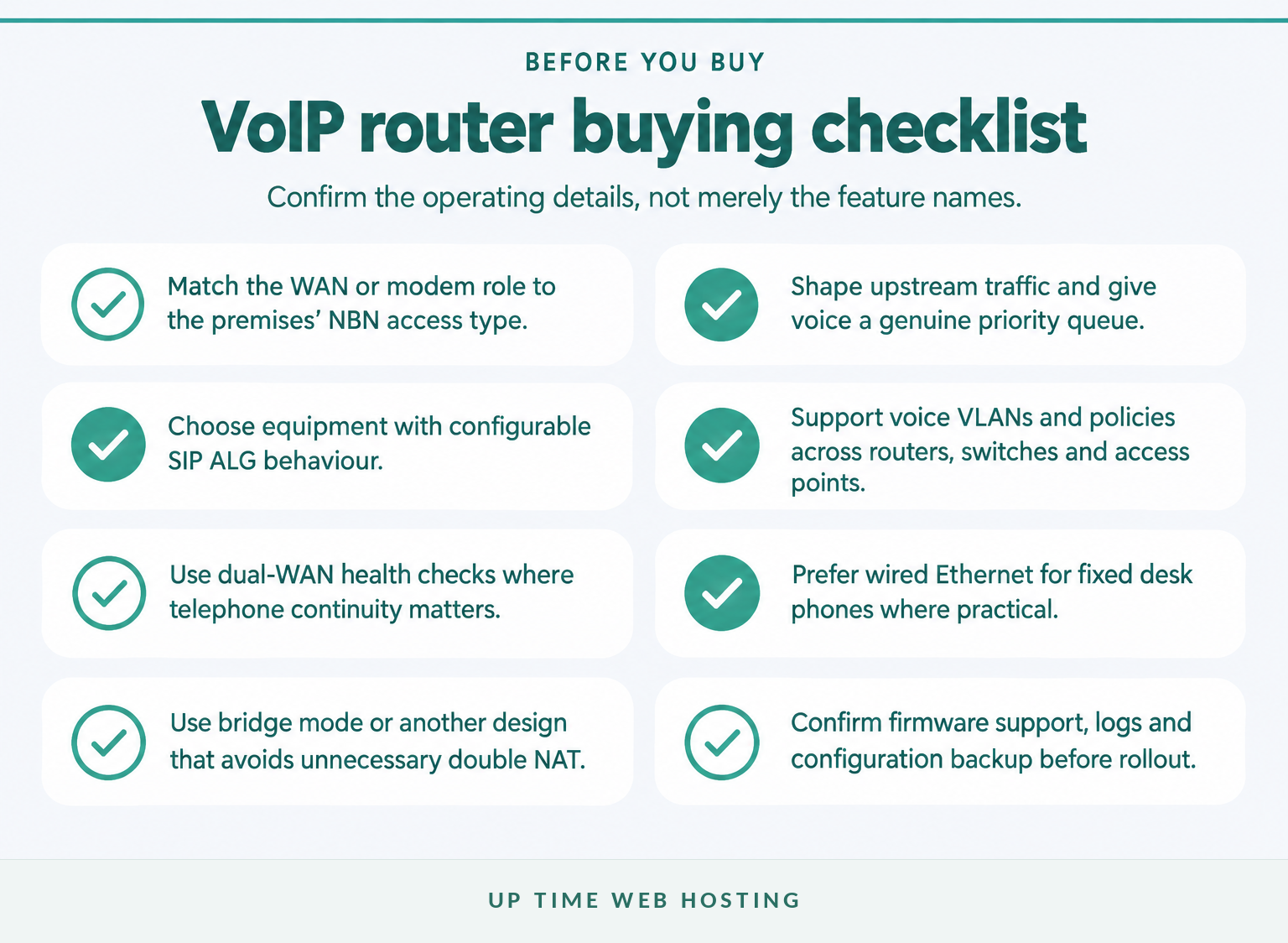
Treat every checklist item as a configuration requirement, not merely a word printed on a retail box. Ask for screenshots, documentation or a demonstration if the specification does not explain how the feature works.
Does QoS control the actual WAN queue?
Look for adjustable upstream bandwidth, priority queues, per-device or per-VLAN policies and support for DSCP markings. The IETF’s RFC 4594 recommends Expedited Forwarding for VoIP bearer traffic and a priority-queuing system that forwards those packets quickly. (rfc-editor.org)
A practical setup enters a shaping rate slightly below the connection’s sustained upload capacity so the router, rather than an uncontrolled upstream queue, decides which packets leave first. Test this setting under load. Do not assume that enabling an automatic QoS switch has completed the job.
Can SIP ALG be changed?
SIP ALG is neither a universal requirement nor something that should always be disabled. The IETF’s RFC 3027 explains that SIP can carry IP addresses and port information inside signalling messages, which is why NAT devices may translate that information. (ietf.org)
Modern VoIP services may handle NAT traversal in other ways, and unwanted ALG rewriting can contribute to failed registration or one-way audio. Choose equipment that lets an administrator enable, disable or bypass SIP ALG, then follow the VoIP provider’s tested configuration.
Can voice be separated from other devices?
VLAN support lets a business place phones on a separate logical network, apply voice-specific QoS and keep guest or unmanaged devices away from the phone segment. The switches and wireless access points must also understand the design. A VLAN creates segmentation, but firewall rules are still required where traffic must be restricted.
What happens if the NBN or power fails?
A business router should support dual-WAN failover where telephone availability matters. Check whether it can monitor the real internet path rather than only detecting that an Ethernet cable is connected, and confirm that phones re-register after the backup service becomes active.
Power protection is a separate requirement. ACMA’s emergency-call guidance says most services connected to the NBN will not work during a power outage, while nbn’s power-outage guidance says each powered device needs its own backup power. Protect the router, nbn device, switch, ATA, access points and phones that must remain operational. Keep a charged mobile available for emergency calls. (acma.gov.au)
Are desk phones wired where practical?
A fixed IP desk phone normally has a more predictable connection over Ethernet than over a busy or weak Wi-Fi link. If phones must use Wi-Fi, check voice-priority support, access-point capacity, coverage and roaming behaviour. A newer Wi-Fi generation does not compensate for poor access-point placement or congested radio channels.
For a larger building, use multiple appropriately placed access points with wired backhaul where practical. Do not expect one high-powered modem router to provide reliable voice coverage through every wall and floor.
Do you need an FXS phone port or an ATA?
An Ethernet IP phone does not need an analogue phone port on the router. An FXS port matters only when an analogue handset, fax device or other compatible analogue equipment must connect to the VoIP service.
A separate adapter can be easier to replace or reposition than an all-in-one modem router. The guide to VoIP ATA adapters in Australia explains the analogue connection path and the questions to ask the provider before reusing an existing handset.
Can support staff inspect and restore the configuration?
Business equipment should provide useful event logs, DHCP reservations, configuration export and restore, firmware updates and controlled administrator access. Bridge mode is valuable when a separate router must sit behind a VDSL2 modem or provider gateway. Without it, two routing devices may create double NAT and make VoIP troubleshooting harder.
The best VoIP router is configurable, observable and able to keep voice ahead of bulk traffic.
How much latency is acceptable for a VoIP call?
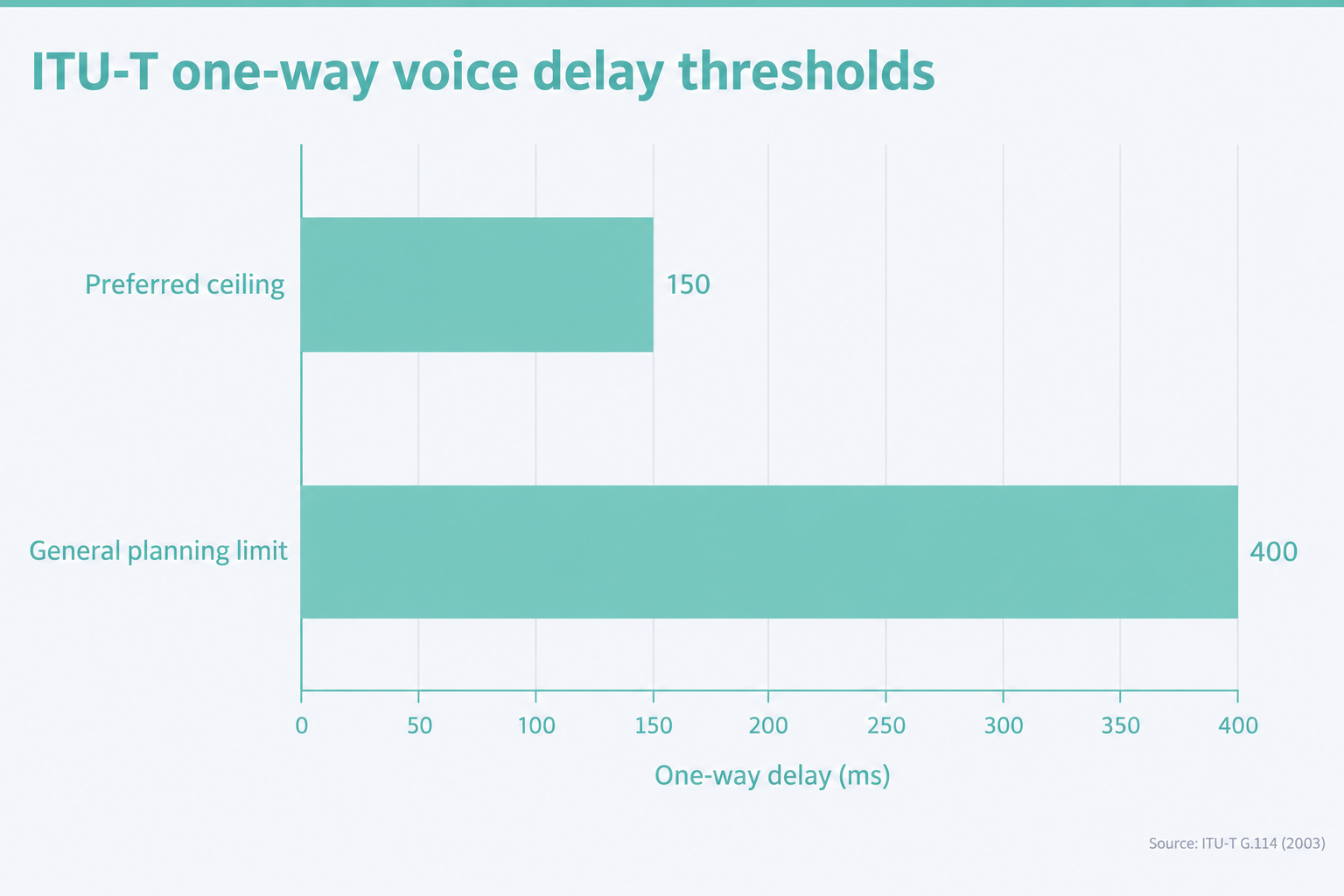
The preferred target is less than 150 milliseconds of one-way delay across the full call path. ITU-T G.114 says 150 to 400 milliseconds may remain usable with an understood quality impact, while delays above 400 milliseconds are generally unsuitable for network-planning purposes. (itu.int)
What do the ITU-T delay thresholds look like?
Latency is only one call-quality signal. Packet delay variation, commonly called jitter, and packet loss can make speech break up even when the average latency looks acceptable. Test during the business’s busiest period, not only early in the morning when the link is idle.
QoS can reduce congestion created inside the premises, but a router cannot repair an unstable NBN line, a poor provider route or congestion beyond the network it controls. Record call quality and network measurements together so support staff can see where the problem begins.
Treat 150 ms one-way delay as the preferred ceiling, then investigate jitter and loss as well as latency.
Host your website with our 5-star rated, cPanel website hosting plans.
Super fast servers, with security included and hosted in your choice of Australian Data Center.
View cPanel Plans
Which network layout suits your business?
The best layout depends on the NBN access type, phone type, site size and consequences of an outage. Choose the architecture first, then select equipment that performs the required role.
- FTTP, HFC or FTTC with IP phones: Connect the nbn device to a business router, then use a managed switch for wired phones and correctly placed access points for wireless devices. A PoE switch can power compatible phones without requiring a separate power pack at each desk.
- FTTN or FTTB with a separate business router: Use a compliant VDSL2 modem in bridge mode where supported, then let the business router handle NAT, firewalling, VLANs, QoS and failover. Confirm any provider-managed voice-port requirements before bridging or replacing the supplied gateway.
- An existing analogue handset: Use a compatible ATA or a provider-supported FXS port. Do not buy an all-in-one modem router merely for a phone socket without confirming that the port can be configured for the intended VoIP service.
- A multi-site or outage-sensitive business: Use a monitored router or firewall, managed switching, properly designed access points, a backup WAN service and UPS coverage for every required device. Test recovery instead of assuming that a mobile failover label guarantees telephone continuity.
If the phone-system decision is still open, the guide to cloud PBX and VoIP explains how the hosted service relates to handsets and the business network. The router remains important, but it is only one part of the complete call path.
Choose the network layout before the router, especially when analogue phones, FTTN or business continuity are involved.
How should you test a router before rolling it out?
Test the router with the intended VoIP service, phones and internet connection before every employee depends on it. A clean speed test is not enough because common problems appear only during congestion, Wi-Fi movement, WAN failover or a reboot.
What test order catches the common failures?
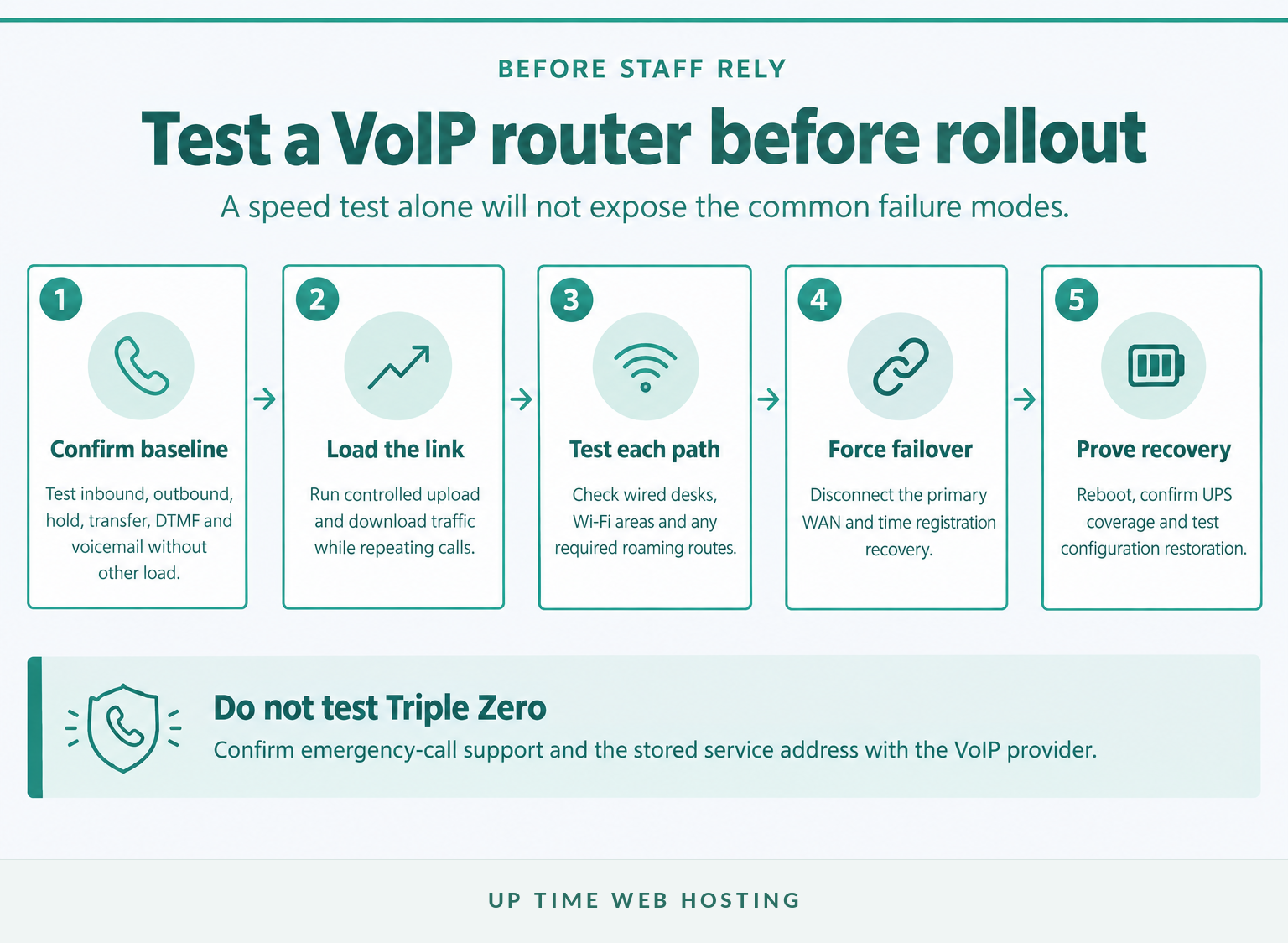
- Confirm the idle baseline. Make inbound and outbound calls, then test hold, transfer, voicemail and keypad tones without other network load.
- Load the connection. Run controlled upload and download traffic while repeating calls. Listen for clipping, delay, failed transfers and one-way audio.
- Test each phone path. Check wired desks, meeting rooms and every Wi-Fi area that will carry calls. Move between access points if roaming is expected.
- Force WAN failover. Disconnect the primary service in a controlled maintenance window. Record whether the active call survives, how long registration recovery takes and when inbound calls return.
- Prove recovery. Reboot the router and supporting equipment, confirm UPS coverage and restore a saved configuration to replacement or test hardware where possible.
Do not place a trial call to Triple Zero. Confirm emergency-calling support, the stored service address and outage procedures with the VoIP provider. ACMA advises that a VoIP caller may need to state the town and state because the caller may not be at the billing address. (acma.gov.au)
A traceroute on Windows can help identify where a route changes or stops responding, but it is a diagnostic clue rather than proof of voice quality. Combine it with call timestamps, router logs and measurements taken while the fault is occurring.
A controlled load and failover test reveals more than a clean speed test.
What causes bad VoIP calls even with a good router?
A suitable router cannot compensate for every fault in the call path. Troubleshoot from the local power and cabling outward so configuration changes are based on evidence rather than guesswork.
- Check power and physical links. Confirm that the nbn equipment, router, switches, access points, ATA and phones are powered and that link lights and cables are normal.
- Check the NBN service. Look for connection-box alarms, VDSL dropouts or a wider provider outage before changing voice settings.
- Check local congestion and Wi-Fi. Compare calls on wired Ethernet and Wi-Fi, then repeat while uploads and backups are paused.
- Check NAT, SIP ALG and firewall state. Match the settings to the VoIP provider’s documented configuration and look for failed registration or one-way audio.
- Check the external service path. Give the provider exact call times, affected numbers, direction of the call and any available packet-loss, jitter or latency records.
Do not treat every internet symptom as a modem-router problem. For example, an HTTP 429 too many requests response is an application or server rate-limit response, not evidence that the VoIP router has failed.
Troubleshoot from power and cabling outward, and do not assume every internet symptom is a router fault.
Register your new domain name at competitive market prices including free domain add-ons like privacy, DNS Hosting, Custom Nameservers and Forwarding.
Always the best price and no nasty renewal price hikes.
Register A Domain Name
What else do businesses ask about VoIP routers?
The short answers below address common buying questions associated with modem routers and VoIP. Each answer still depends on the premises’ access type and the provider’s supported configuration.
What's the difference between a router and a modem?
A modem terminates the access technology, while a router moves traffic between the internet and the local network, applies firewall rules and usually provides Wi-Fi. On FTTN or FTTB, the modem must support compliant VDSL2. On FTTP, HFC, FTTC and Fixed Wireless, nbn equipment normally handles the access link.
Can I just plug a VoIP phone into my router?
Usually, yes, if the VoIP phone has an Ethernet port and the router gives it internet access to the configured service. The phone does not need an analogue FXS port. An existing analogue handset needs either an FXS port supplied for that service or a separate ATA configured by the provider.
What is the average lifespan of a router?
There is no reliable universal average for a router. Replacement timing depends on firmware support, heat, power quality, connection speed, device count and business risk. Review the router when security updates end, when the WAN speed exceeds its real throughput, when Wi-Fi coverage changes or when unexplained faults become frequent.
What is the best router for a large house?
For a large house or spread-out office, the best result usually comes from a capable router plus multiple properly placed access points, preferably with wired Ethernet backhaul. One high-powered modem router cannot overcome every wall or floor. Keep fixed VoIP desk phones wired where practical, and design Wi-Fi coverage separately from the internet gateway.
The right answer depends on access type, phone type, update support and building coverage, not one universal model.
What should you do before buying?
Write the network requirements before creating a product shortlist. Record the NBN access type, internet plan, site layout, handset count, peak simultaneous calls, analogue-device needs, Wi-Fi coverage, backup connection and required UPS runtime.
The router checklist in this guide is equipment compatibility advice. It does not represent a router hardware range sold by Up Time Web Hosting; the relevant business offer is VoIP Telephony and associated planning and support.
Before ordering hardware, send Up Time Web Hosting’s VoIP team the connection and call requirements so the VoIP service, NBN link and network design can be checked together.
Choose the network design first, then buy the router that fits it.