In short
An HTTP 304 Not Modified response usually means caching is working, not that the website failed. A browser or intermediary asked whether a stored resource had changed; the server confirmed it had not, so the cached copy can be reused. Fix it only when users receive stale content or cache rules behave unexpectedly.
Key takeaways
- HTTP 304 is a normal response when a conditional request confirms that a cached representation is still valid.
- A 304 response does not contain the requested content body; the client reuses content it already holds.
- A changed resource normally returns 200 OK with the current content instead of 304 Not Modified.
- Clearing a browser cache is a useful diagnostic test, but it does not prove that an application, proxy or server cache is correct.
- Disabling all caching can hide a configuration fault while making repeat visits slower.
Table of contents
- What is a 304 code?
- Why does the browser return 304 instead of 200?
- When is a 304 response actually a problem?
- How do I fix error code 304?
- How can I tell which cache layer is stale?
- What else do people ask about HTTP 304?
- What should I do after finding the stale layer?
If a developer tool shows status code 304 while the current page, image, script or stylesheet appears correctly, there may be nothing to repair. The useful question is not, “How can every 304 be stopped?” It is, “Does the stored representation match what the user should receive?”
What is a 304 code?
HTTP 304 Not Modified is a response to a conditional GET or HEAD request. It tells the client that its stored representation is still valid and that the server does not need to transfer the content again.
RFC 9110, published in June 2022, defines 304 as the result that would have been 200 OK if the request condition had not evaluated to false. A 304 response ends after its header section and cannot contain content or trailers. (rfc-editor.org)
Although 304 belongs to the 3xx class, it is different from the redirects most website owners recognise. A 301 or 302 generally points the client towards another URI. A 304 tells the client to use the representation it already stored for the requested URI.
A valid 304 response can still contain metadata that helps update the stored response, including Date, ETag, Vary, Cache-Control, Expires and, in some cases, Last-Modified. The absence of a content body is therefore expected, not evidence of an empty or broken page.
A 304 means the client already has a valid representation, so the server does not send the content again.

Performance you can feel, backed by clients who depend on it. Read how our support and uptime create long‑term customer success.Power Your Business with Better Hosting
Why does the browser return 304 instead of 200?
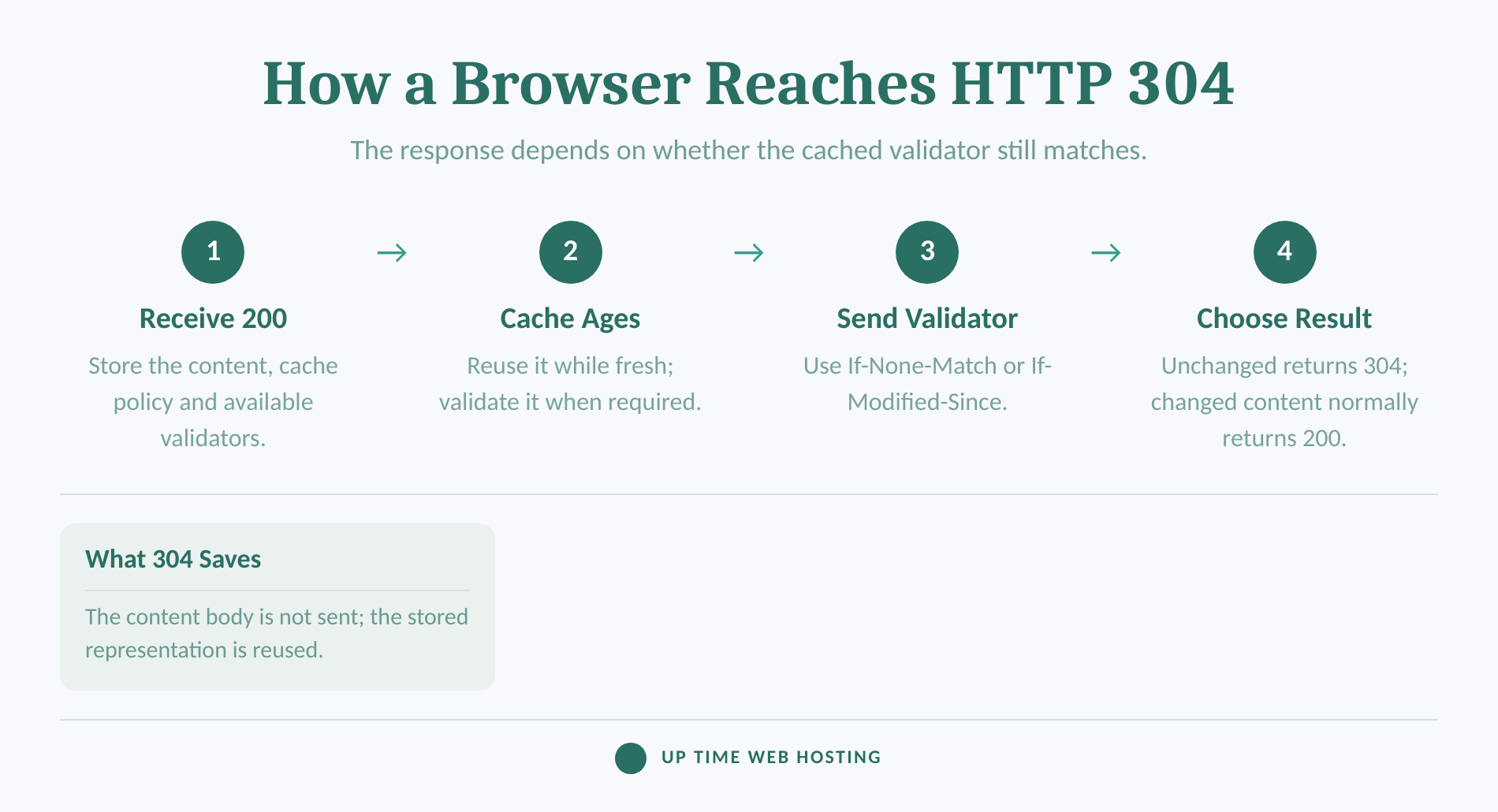
The browser returns to its cached representation when a validator confirms that the resource has not changed. If the validator no longer matches, the server normally returns 200 OK with the current representation and a content body.
A simplified cache-validation sequence works like this:
- The client receives a resource. The first usable response is commonly 200 OK with the content. The response may also contain an
ETag, aLast-Modifieddate and cache-lifetime instructions. - The client stores the response. While that stored response remains fresh, the client may reuse it without contacting the server.
- The client validates the stored copy. Once validation is required, the client sends a conditional request containing
If-None-Match,If-Modified-Sinceor both. - The server compares the validator. A match produces 304 Not Modified. A meaningful change produces a full response, commonly 200 OK, with the current content.
RFC 9111's cache-validation rules describe ETag as a validator used with If-None-Match, while Last-Modified supplies the date used with If-Modified-Since. If both conditional headers are present, If-None-Match takes precedence. (rfc-editor.org)
A request using an ETag may look like this:
“http GET /assets/site.css HTTP/1.1 Host: example.com If-None-Match: "<ETag from the cached response>" “
If the selected representation still matches, the response can be:
“http HTTP/1.1 304 Not Modified ETag: "<current ETag>" Cache-Control: <current cache policy> “
No CSS body follows the headers. The browser applies the stored CSS instead.
A 304 is the unchanged branch of a conditional request; a changed resource returns 200 with the current content.
When is a 304 response actually a problem?
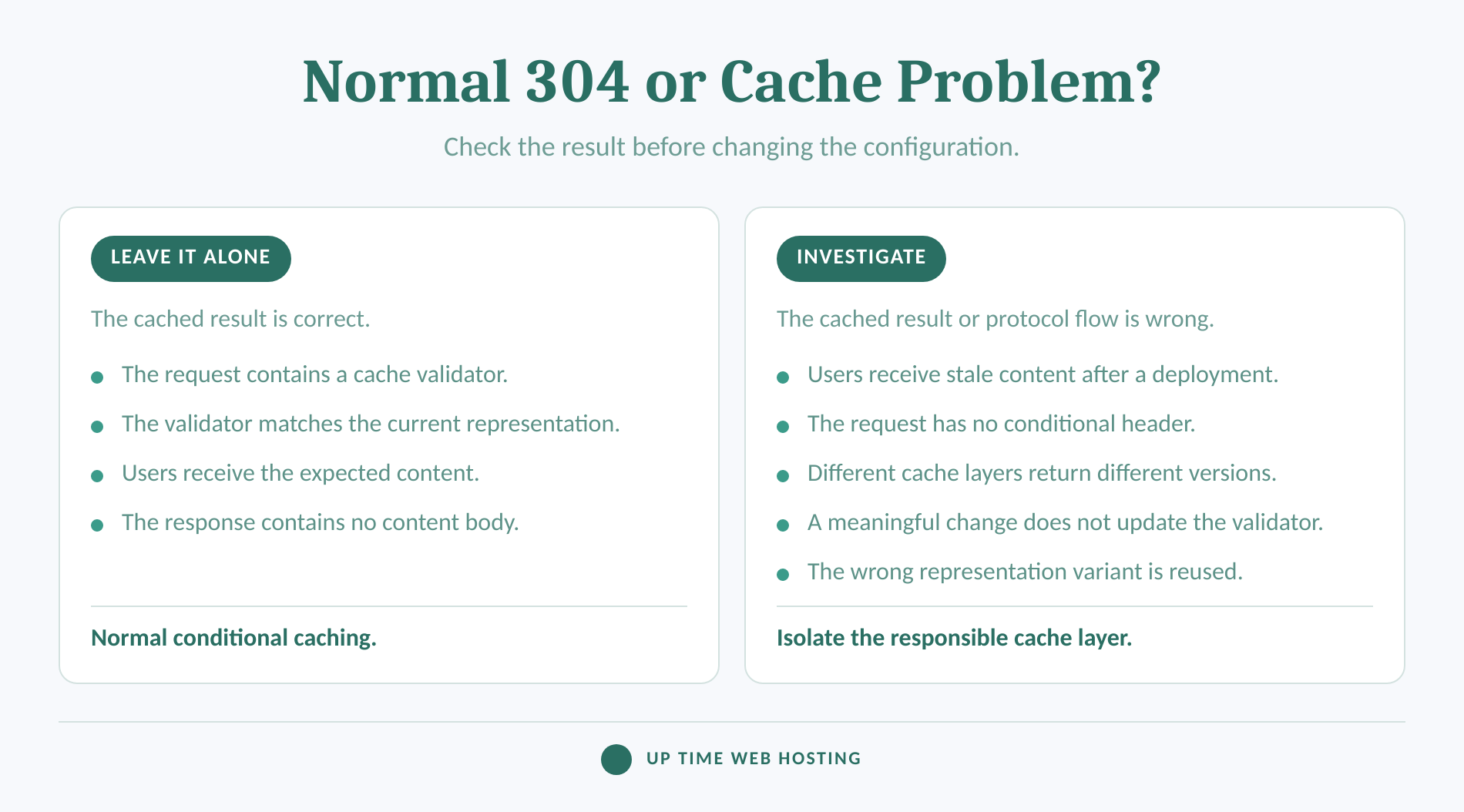
A 304 becomes a troubleshooting signal when the client reuses content that should no longer be current. It also deserves investigation if a server sends 304 even though the request was not a conditional GET or HEAD.
A normal 304 often appears after reloading a page that uses unchanged scripts, stylesheets, fonts or images. The request contains a validator, the validator matches, and the browser displays the correct cached resource. Repeated 304 entries are not proof of a website outage or hosting fault.
Investigate when one or more of these conditions apply:
- A page, script, stylesheet or image remains old after a confirmed deployment.
- One browser shows new content while another browser or network keeps receiving an old version.
- The request headers contain neither
If-None-MatchnorIf-Modified-Since, but the response is still 304. - A meaningful representation change does not produce a changed validator.
- The browser, application cache, intermediary cache and origin server disagree about the current version.
- Users receive the wrong language, encoding or personalised variant from a shared cache.
The last case can involve the Vary response header. Under RFC 9111's cache-key rules, a cache must consider the request headers named by Vary before reusing a stored response. A missing or incorrect Vary value can therefore allow the wrong representation to be selected. (rfc-editor.org)
A correct 304 still requires a validation exchange when the client contacts the server. It saves the content transfer, but it does not remove network latency or server processing from that exchange.
Investigate a 304 only when the cached result is wrong or the request was not genuinely conditional.
Host your website with our 5-star rated, cPanel website hosting plans.
Super fast servers, with security included and hosted in your choice of Australian Data Center.
View cPanel Plans
How do I fix error code 304?
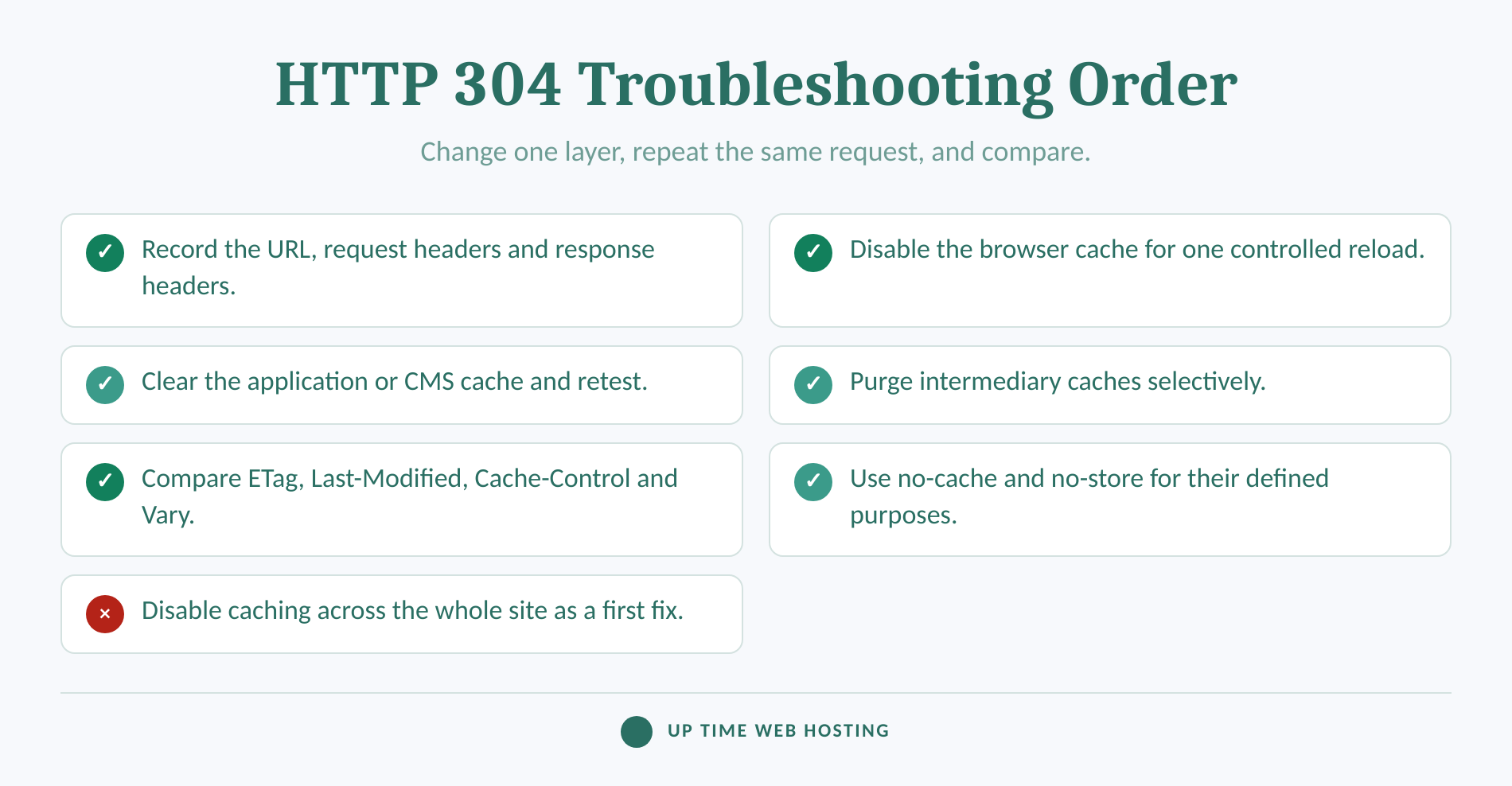
Do not try to eliminate every 304 response. Reproduce the stale-content problem, identify the cache layer serving the old representation, and change only the rule or validator responsible for that result.
1. Record the evidence before clearing anything
Copy the exact resource URL, including its query string. Record the request method, status, request validators, response validators and cache-control headers. Also note which browser, device, network and user account showed the stale result.
Clearing every cache first may make the symptom disappear, but it also removes the evidence needed to find the faulty layer.
2. Disable the browser cache for one controlled test
Open the browser's Network panel, enable its cache-disabling option and reload the page. Google's Chrome DevTools network documentation states that Disable cache emulates a first-time visit while DevTools is open; Chrome also provides an Empty Cache and Hard Reload action. (developer.chrome.com)
If the new resource appears only with the browser cache disabled, inspect the response lifetime and validators. Do not treat a hard reload as the permanent repair.
3. Clear the application or CMS cache
A content-management system, plugin, theme or page builder may store generated HTML and assets separately from the browser. On WordPress, follow a controlled process for clearing website caches and retest the same URL before changing another layer.
If a generated page remains old at the origin, purging only the browser or intermediary cache will allow that old page to be stored again.
4. Purge intermediary caches selectively
Clear the affected URL from any reverse proxy, edge cache or content-delivery layer. Purge one layer, repeat the same request and compare the headers. A selective purge preserves useful cached content elsewhere and makes the test easier to interpret.
Provider-specific headers may indicate a hit, miss, bypass or cache age, but their names and values differ. Check the documentation for the actual service in use rather than assuming that one provider's header names apply everywhere.
5. Inspect validators at the origin
Request the resource directly from the origin or ask the hosting provider to capture the origin response. Confirm that a meaningful representation change updates the ETag, the Last-Modified value or both.
Also inspect Cache-Control, Expires and Vary. If the origin says that an old representation is current, every correctly operating downstream cache may keep validating the wrong result.
6. Use no-cache and no-store for their defined purposes
Cache-Control: no-cache does not mean “never store this response.” RFC 9111 says an unqualified no-cache response can be stored but must be successfully validated before it is reused.
Cache-Control: no-store has a stronger purpose. The no-store rule in RFC 9111 instructs caches not to store the request or response for later use. (rfc-editor.org)
Do not apply no-store across an entire public website merely to stop 304 entries. Correct caching reduces repeated transfers and can support better website speed. Choose a policy according to how often the resource changes, who may store it and how harmful stale reuse would be.
Fix stale content by isolating one cache layer at a time, not by disabling caching everywhere.
How can I tell which cache layer is stale?
Compare the same resource with normal browser caching, browser caching disabled and each intermediary layer selectively bypassed or purged. The first test that changes the returned representation identifies the layer that should be examined next.
In the Network panel, select the affected resource and check:
- Request URL: Confirm that the browser requested the deployed filename and query string.
- Request method: A standard cache-validation case uses GET or HEAD.
- Request headers: Look for
If-None-MatchandIf-Modified-Since. - Response status: Confirm whether the response is 304, 200 or another status.
- Response headers: Compare
ETag,Last-Modified,Cache-Control,Expires,Vary,DateandAgewhere present. - Transferred content: A valid 304 has no content body.
Command-line testing can remove some browser variables. The official curl manual documents --dump-header, --output and --header, which can be combined to inspect an ordinary response and then send a specific validator. (curl.se)
First, capture the current headers:
“bash curl --dump-header - --output /dev/null https://example.com/assets/site.css “
Then copy the returned ETag into a conditional request:
“bash curl --dump-header - --output /dev/null --header 'If-None-Match: "<etag-value>"' https://example.com/assets/site.css “
A matching current ETag should produce 304. If the selected representation changed, the request should receive the current representation instead, commonly with status 200.
Repeat the test after bypassing or purging one cache layer. Do not change the browser cache, application cache, intermediary cache and origin configuration in the same test, because the result will not identify which change mattered.
If the representation is correct but validation is consistently slow, investigate server response time rather than treating 304 itself as the fault. Add a header check to a recurring website health review so cache behaviour is checked after deployments and configuration changes.
The first layer whose bypass changes the result is the layer to inspect before changing policy.
What else do people ask about HTTP 304?
HTTP 304 questions usually concern the response's purpose, its lack of a content body and its relationship to other 3xx or 2xx responses. The key distinctions are what triggered the response, whether content is transferred and whether the client is sent to another URL.
What is the difference between HTTP status codes 302 and 304?
HTTP 302 Found tells the client that the target resource is temporarily available at another URI, normally supplied in a Location header. HTTP 304 Not Modified does not send the client to another URL. It answers a conditional GET or HEAD by telling the client to reuse its stored representation.
What is a 304 code?
An HTTP 304 code means the requested resource has not changed relative to the validator sent by the client. The server therefore returns headers rather than the resource body, and the browser or cache reuses its stored copy. This is normal when conditional caching is configured correctly.
How do I fix error code 304?
Do not fix every 304 response. If content is stale, disable the browser cache for one test, verify the exact resource URL, clear the application cache, purge any intermediary cache, then inspect ETag, Last-Modified, Cache-Control and Vary at the origin. Change one layer at a time and retest.
What does the error code 304 denote in HTTP?
In HTTP, 304 denotes Not Modified. It means a conditional GET or HEAD would otherwise have returned 200 OK, but the client's validator still matches the current representation. The server sends no content body, and the client uses the cached representation while updating relevant response metadata.
HTTP 304 questions become simpler once response purpose, body transfer and destination URL are kept separate.
Register your new domain name at competitive market prices including free domain add-ons like privacy, DNS Hosting, Custom Nameservers and Forwarding.
Always the best price and no nasty renewal price hikes.
Register A Domain Name
What should I do after finding the stale layer?
Leave a correct 304 response in place. If the cached content is wrong, save the request and response headers, correct the responsible validator or cache policy, purge that layer, and repeat the same test before making another change.
If the fault reaches origin headers, server caching or account configuration and there is no clear technical owner, review Up Time Web Hosting's cPanel website hosting plans. The plans include cPanel, LiteSpeed and Australian support for hosting-side configuration. (uptimewebhosting.com.au)
Change cache policy only after the stale layer and incorrect header can be named.