In short
To speed up WordPress with Cloudflare, proxy the site through Cloudflare, confirm static files are caching, enable HTTP/3 and compression, then add APO if you want HTML pages served from the edge. Keep WordPress admin, logged-in sessions and checkout paths uncached, and test server-side caching separately so the two cache layers do not serve stale content.
Key takeaways
- Cloudflare's standard cache primarily accelerates static files, while APO adds WordPress-aware HTML edge caching.
- Cloudflare's current WordPress defaults use Standard caching, a four-hour browser cache TTL and Rocket Loader switched off.
- APO bypasses common logged-in, session and ecommerce cookies instead of sharing personalised HTML with other visitors.
- A manual Cache Everything rule is unsafe unless private paths, dynamic cookies and unknown query strings are excluded.
- Origin page caching remains useful for cache misses and deliberately uncached requests, but both cache layers must be tested and purged deliberately.
Table of contents
- What should you check before changing Cloudflare settings?
- Which Cloudflare settings should you turn on for WordPress?
- Should you enable APO for WordPress?
- What should Cloudflare never cache on WordPress?
- How should Cloudflare work with a WordPress cache plugin?
- How do you verify Cloudflare is actually speeding up WordPress?
- Why is Cloudflare slowing down my website?
- What else do WordPress owners ask about Cloudflare?
- What should you do next?
Cloudflare cannot repair slow PHP processing, database queries or oversized pages. Cloudflare improves delivery when traffic is proxied correctly and the requested content is eligible for caching.
What should you check before changing Cloudflare settings?

Start by measuring the site before enabling more Cloudflare features. Test the same representative pages, device profile, connection and Australian test location after each change so a temporary cache hit is not mistaken for a lasting improvement.
Record at least the homepage, a normal page or article, and a transactional or personalised page if the site has one. Save the Time to First Byte, Largest Contentful Paint, page weight, request count and response headers rather than relying on one performance score.
Next, confirm traffic actually passes through Cloudflare. Cloudflare's June 2026 slow-site troubleshooting guide recommends checking for the cf-ray response header. If that header is absent, the DNS record may not be proxied and Cloudflare's performance settings are not handling the request.
Test while logged out or in a private browser window. WordPress administrators and logged-in customers should often bypass full-page caching, so an administrator session does not show what an anonymous visitor receives.
Request the same static image or stylesheet twice and inspect CF-Cache-Status. A first MISS followed by a HIT shows that the asset was admitted to the edge cache. Repeated DYNAMIC or BYPASS responses need investigation before more settings are added.
If the first uncached response remains slow, work through a broader WordPress performance optimisation process as well. Cloudflare can reduce repeated origin trips, but it cannot make an overloaded database or inefficient theme execute faster.
A Cloudflare setup can only be judged against a repeatable baseline that separates edge-cache gains from origin-server delay.

Performance you can feel, backed by clients who depend on it. Read how our support and uptime create long‑term customer success.Power Your Business with Better Hosting
Which Cloudflare settings should you turn on for WordPress?
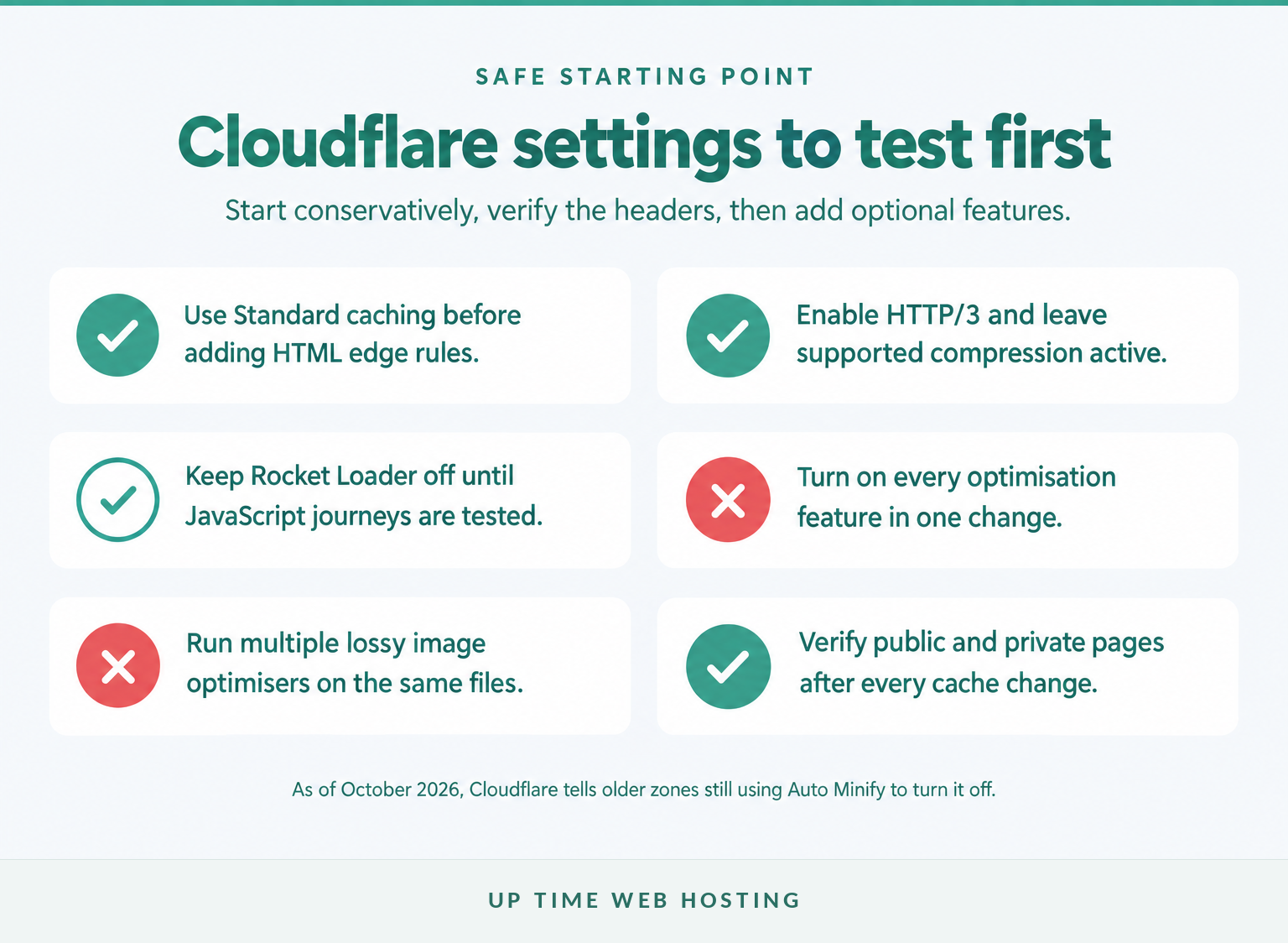
Start with Cloudflare's WordPress defaults, then enable protocol and compression settings that carry relatively little compatibility risk. Leave script rewriting and duplicate image optimisation off until a measured test shows that they improve the site without breaking forms, menus or checkout behaviour.
A practical setup order is:
- Add the domain to Cloudflare, update the authoritative nameservers and proxy the website hostname.
- Install the official Cloudflare WordPress plugin if APO or automatic WordPress-aware purging will be used.
- Connect the plugin with a scoped API token created from Cloudflare's WordPress token template.
- Apply the recommended WordPress settings, purge existing caches and test the site.
- Add APO or other optional features one at a time.
As of October 2026, Cloudflare's WordPress one-click configuration applies Standard caching, a four-hour browser cache TTL and keeps Rocket Loader off.
| Setting | Safe starting position | What to check |
|---|---|---|
| Caching level | Standard | Static assets should move from MISS to HIT on repeated requests. |
| Browser cache TTL | Four-hour plugin default | Extend it only when versioned filenames or reliable cache busting are in place. |
| HTTP/2 | Leave enabled | Cloudflare enables it by default on all plans. |
| HTTP/3 | On | Cloudflare's HTTP/3 documentation says it is available on all plans and can help on lossy connections. |
| Compression | Default Brotli and Gzip | Cloudflare's compression settings also offer optional Zstandard support with fallbacks. |
| Rocket Loader | Off initially | Enable it only after testing every JavaScript-dependent journey. |
| Auto Minify | Off | Cloudflare's April 2026 guidance tells zones still using it to turn off Auto Minify. |
| Speed Brain | Test on cacheable sites | It targets subsequent navigation, not the visitor's first page load. |
| Image optimisation | Choose one main system | Avoid applying multiple lossy compression systems to the same images. |
For images, Cloudflare's Polish activation guide says not to run Polish and Cloudflare image transformations together. Cloudflare also warns against applying repeated lossy optimisation because the extra quality loss can outweigh the file-size saving.
Cloudflare's August 2026 Speed Brain documentation says prefetched pages must already be cache eligible and that prefetch requests never continue to the origin. Keep it enabled only if navigation tests show a benefit and the site does not depend on unusual GET requests with side effects.
Cloudflare is one part of the performance stack. The site's theme, plugins, database and media still need attention, as covered in these wider ways to speed up WordPress.
Use Cloudflare's safe defaults first, then add optional features one at a time and keep only the settings that improve measured performance.
Should you enable APO for WordPress?
Enable Automatic Platform Optimization when public WordPress HTML is a major part of the workload and visitors are spread across different locations. APO is less useful when most responses are personalised, uncached or already delivered quickly to a nearby audience from a fast origin.
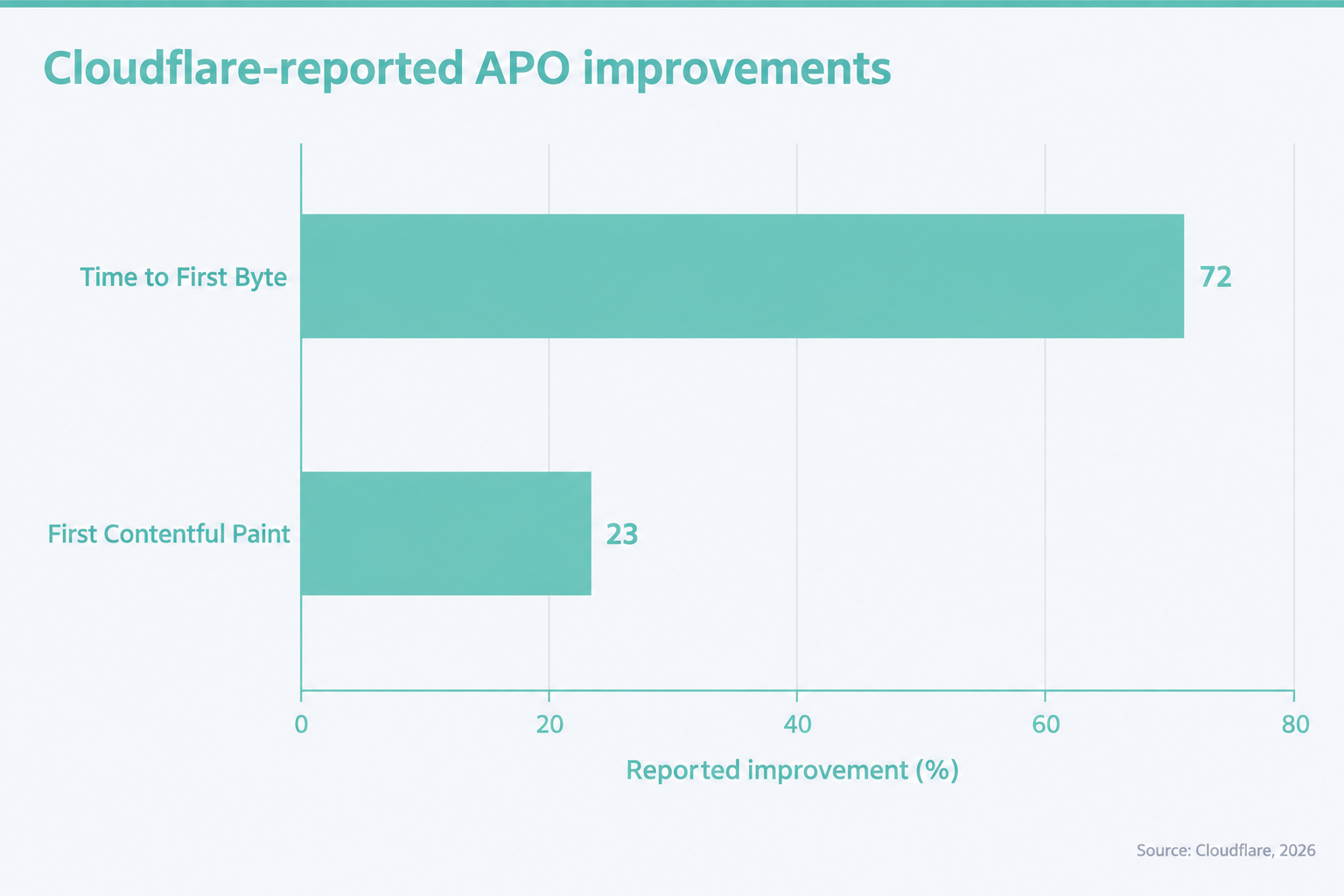
Cloudflare's 2026 APO product page reports a 72 per cent improvement in Time to First Byte and a 23 per cent improvement in First Contentful Paint in its own tests. These are vendor-reported results, not a forecast for every WordPress site.
Cloudflare's September 2026 APO documentation explains that normal Cloudflare caching focuses on static content, while APO can also cache eligible HTML. The WordPress plugin adds the cf-edge-cache instruction and purges changed content.
To enable APO:
- Follow Cloudflare's APO activation guide to install the official plugin.
- Create the API token with the WordPress template rather than sharing a global key.
- Apply the recommended WordPress settings.
- Switch APO on in the plugin or Cloudflare dashboard.
- Purge Cloudflare and the existing server cache, then verify the response headers.
Cloudflare recommends switching off other full-page cache plugins during the initial APO setup. Confirm that APO works first, then re-enable the server cache and test for stale pages or unexpected behaviour.
The September 2026 APO FAQ states that the plugin normally caches eligible content for 30 days and invalidates changed content within 30 seconds. Publishing, editing and deleting content should still be tested on the actual site.
APO is most useful when public HTML is cacheable and the WordPress plugin can purge changed pages reliably.
Host your website with our 5-star rated, cPanel website hosting plans.
Super fast servers, with security included and hosted in your choice of Australian Data Center.
View cPanel Plans
What should Cloudflare never cache on WordPress?
Cloudflare should not cache admin pages, logged-in sessions, previews, personalised account areas, carts or checkout pages. APO handles common WordPress and ecommerce exclusions automatically, but a manual Cache Everything rule must reproduce those safeguards.
| Request or content | Normal cache action | Reason |
|---|---|---|
| Images, CSS, JavaScript and fonts | Cache | These files are normally shared between visitors. |
| Public pages and articles | Cache with APO after testing | Anonymous visitors usually receive the same HTML. |
/wp-admin/ and /wp-login.php | Bypass | These routes are private and session-dependent. |
| Logged-in and session cookies | Bypass | The response may contain user-specific controls or content. |
| Cart, checkout and account pages | Bypass | Prices, cart contents and customer details can vary by session. |
| Preview, feed and cron routes | Bypass | These requests are not ordinary public page views. |
| Unknown query strings | Bypass by default | Parameters can alter the response or trigger application logic. |
Cloudflare's query-parameter rules list cookie prefixes that always bypass APO, including wp-, wordpress, comment_ and woocommerce_. Common marketing parameters are allowlisted, while other query strings normally go to the origin.
Do not copy a broad caching rule from an old tutorial without checking the current site. Cloudflare's own Cache Everything warning says the setting can cache dynamic HTML and expose information not intended for another visitor unless cookies and paths are excluded.
Custom membership, booking, currency, language and personalisation plugins may add their own cookies or routes. Inspect the browser cookies and application documentation, add precise bypass conditions, and test as an anonymous visitor and as every important user type.
Cache public content, but bypass every request that can reveal a login state, cart, account, preview or personalised response.
How should Cloudflare work with a WordPress cache plugin?
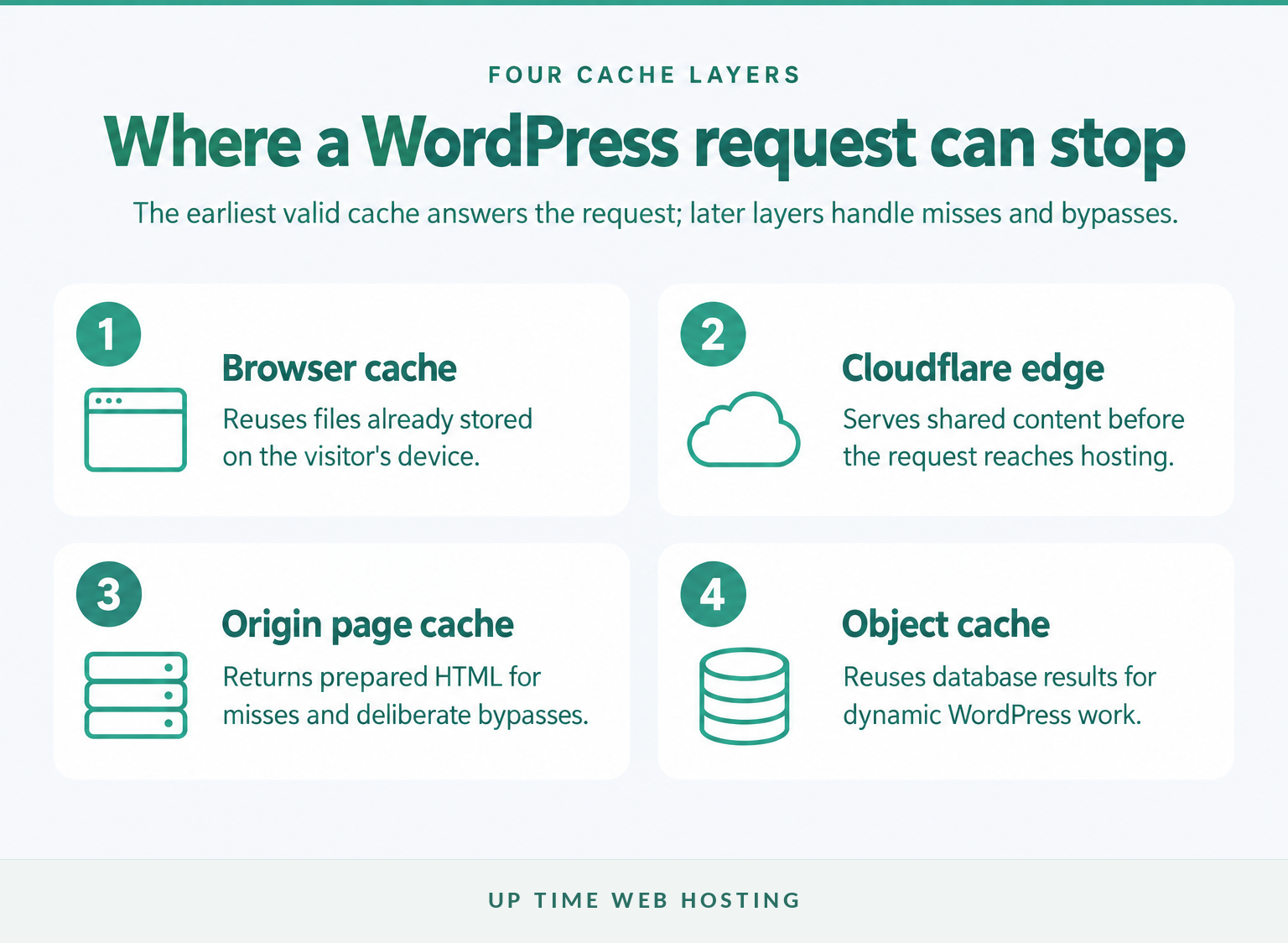
Cloudflare edge caching and a server-side WordPress cache can work together because they answer requests at different points. Configure and verify one layer at a time so stale content can be traced to a specific cache rather than cleared blindly from every system.
The main layers are:
- Browser cache: Reuses static files already stored on the visitor's device.
- Cloudflare edge cache: Serves shared content before the request reaches the hosting server.
- Origin page cache: Serves prepared HTML when Cloudflare misses or deliberately bypasses the request.
- Object cache: Reuses database query results for dynamic WordPress work that still reaches the application.
Cloudflare's October 2026 APO compatibility list includes several page and object caching systems, but Cloudflare cannot test every WordPress plugin combination. Compatibility does not remove the need to test publishing, forms, search, login, account and checkout journeys.
A sensible rollout is to disable the existing full-page cache, activate and verify APO, then restore the origin page cache and test again. Object caching can remain valuable for uncached and administrative requests because it addresses database work rather than public edge delivery.
For sites on LiteSpeed, LiteSpeed's Cloudflare integration guide explains how its WordPress plugin can manage Cloudflare purges. It also notes that standard CDN URL mapping is unnecessary when Cloudflare is operating as a reverse proxy.
Assign one system to each overlapping task. Avoid running two JavaScript-delay features, two HTML minifiers or two lossy image compressors unless a controlled test proves that the combination is safe and useful.
A detailed WordPress caching guide can help with the origin layer. If misses remain slow, review how hosting affects website speed rather than adding another edge rule.
Cloudflare and server-side caching can work together when each layer has a distinct job and both are purged deliberately.
How do you verify Cloudflare is actually speeding up WordPress?
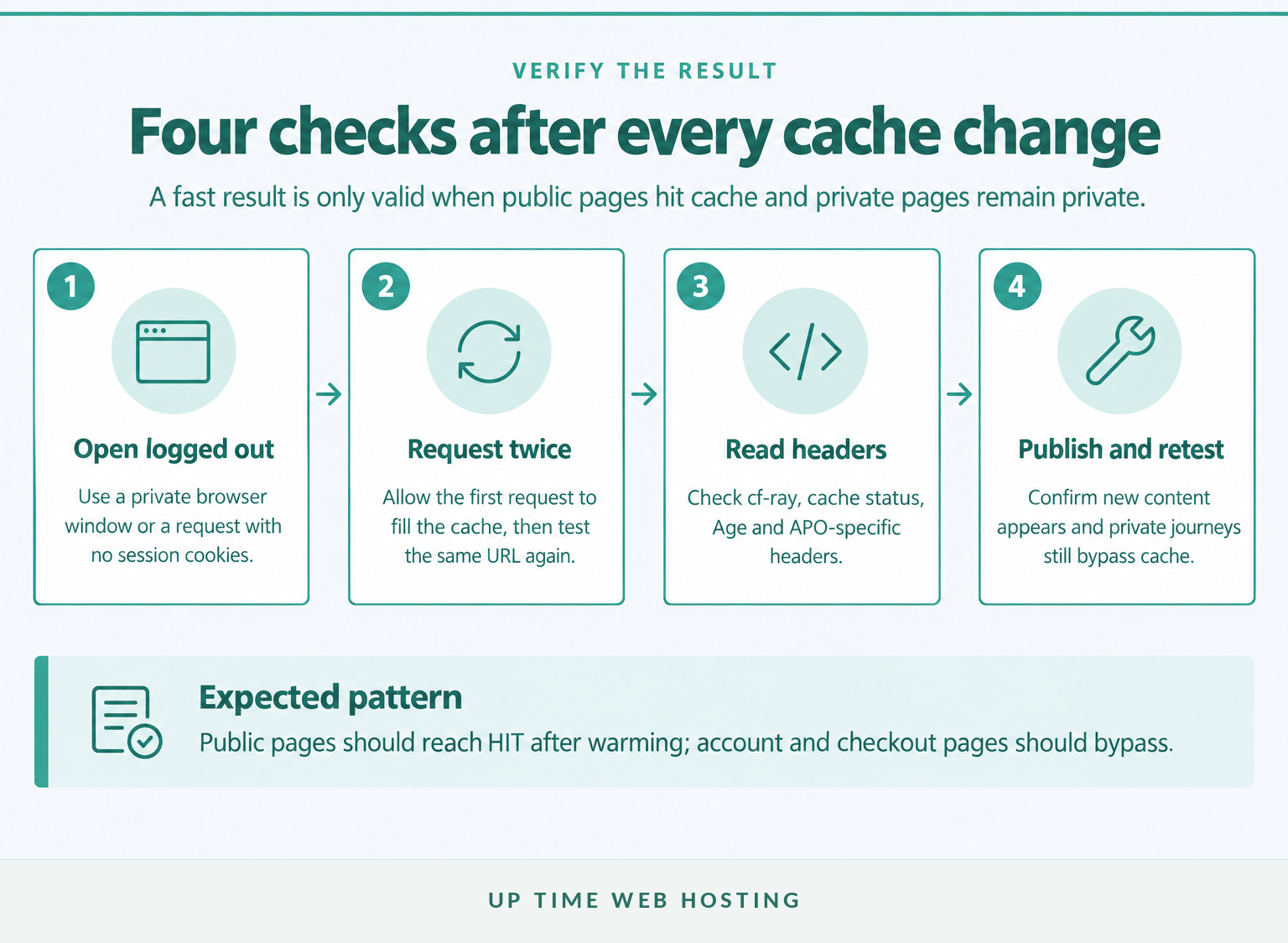
Verify Cloudflare with response headers, repeated requests and a real content update rather than trusting a dashboard toggle. Public pages should produce cache hits after warming, while private and transactional pages should continue to bypass shared HTML caching.
Cloudflare's APO verification guide provides this browser-like command pattern:
“bash curl -svo /dev/null -A 'CF' 'https://example.com/' -H 'accept: text/html' 2>&1 | grep -E 'cf-cache-status|cf-edge|cf-apo-via' “
Replace example.com with the page being tested. Request the same URL at least twice because the first request may fill the local cache.
| Header or status | What it normally means |
|---|---|
cf-ray | The response passed through Cloudflare. |
CF-Cache-Status: MISS | The response was cache eligible but was not stored at that location yet. |
CF-Cache-Status: HIT | Cloudflare served the response from cache. |
CF-Cache-Status: DYNAMIC | Cloudflare decided the request was not cache eligible. |
CF-Cache-Status: BYPASS | The request was eligible, but a rule, cookie or origin response prevented caching. |
Age | The number of seconds the stored response has been in Cloudflare's cache. |
cf-edge-cache | The WordPress plugin supplied an APO cache instruction. |
cf-apo-via | APO handled or assessed the HTML request. |
Cloudflare's September 2026 cache response reference distinguishes MISS, DYNAMIC and BYPASS. This distinction matters because each status has a different fix.
After header testing, publish a harmless text change. Confirm that a logged-out visitor sees it after the purge window, then check that login, account, cart and checkout pages remain personalised and uncached.
Run the same test on more than the homepage. Include an article, a normal page, an image and every commercially important dynamic journey.
A successful setup shows cache hits on public pages, deliberate bypasses on private pages and fresh content after publishing.
Register your new domain name at competitive market prices including free domain add-ons like privacy, DNS Hosting, Custom Nameservers and Forwarding.
Always the best price and no nasty renewal price hikes.
Register A Domain Name
Why is Cloudflare slowing down my website?
Cloudflare can appear to slow a site when requests are not cache eligible, the origin remains slow, an optional optimisation breaks page behaviour or a recent purge causes repeated misses. Check the headers and disable one optional feature at a time instead of changing several cache rules together.
Use this order:
- Confirm Cloudflare is handling the request. Look for
cf-ray; otherwise check the DNS proxy status. - Request the same URL twice. A first
MISScan be normal, while repeatedDYNAMICorBYPASSneeds investigation. - Check Development Mode. Development Mode suspends caching temporarily and can make every request reach the origin.
- Close or reconfigure browser developer tools. Chrome can send
Cache-Control: no-cachewhile its Disable cache option is selected, which changes APO test results. - Switch off optional script processing. Cloudflare's Rocket Loader documentation recommends disabling it if JavaScript or jQuery problems appear.
- Purge both cache layers once. Repeatedly purging during a test prevents the cache from warming and makes every run look like a cold visit.
- Inspect the origin. If uncached HTML is slow, improve PHP, database work, plugins, page weight or hosting resources rather than expecting Cloudflare to hide every request.
Also check for origin responses containing private, no-store, Set-Cookie or unusual Vary headers. These can prevent caching even when a Cache Rule initially marks the request as eligible.
When Cloudflare appears slow, the response headers usually reveal whether the problem is routing, cache eligibility, an origin directive or an optional feature.
What else do WordPress owners ask about Cloudflare?
These short answers cover the broader questions associated with Cloudflare and WordPress performance. They assume a standard single-site WordPress installation rather than an unusual application or multi-zone architecture.
How to boost WordPress website speed?
Boost WordPress speed by measuring representative pages, improving the origin server, enabling one reliable page-cache layer, compressing and sizing images correctly, reducing unnecessary JavaScript, and using Cloudflare for cached delivery. Change one layer at a time, test logged-out and logged-in journeys, and keep the fastest configuration that preserves site behaviour.
Can I use Cloudflare with WordPress?
Yes. Cloudflare can proxy a WordPress site, cache static assets, compress responses and provide HTTP/2 and HTTP/3 without the WordPress plugin. The official plugin becomes important for APO because it adds WordPress-aware cache instructions and automatic purging. The APO plugin does not support WordPress multisite as of October 2026.
Is there a replacement for Cloudflare that is compatible with WordPress?
Yes. A WordPress site can use another CDN or edge-caching service, or run without one when its audience is close to a fast origin. Compare HTML caching, automatic purging, dynamic-page exclusions, image handling, Australian performance and support. Avoid placing two reverse-proxy CDNs before the same hostname without a deliberate architecture.
Cloudflare is compatible with WordPress, but the right setup depends on which pages are public, personalised or transactional.
Experience Microsoft 365 Business Standard for free for 30 days.
Up to 25 users with full access to email, OneDrive and Teams. Includes full versions of desktop apps of Outlook, Word, Excel, PowerPoint and more.
Try Microsoft 365
What should you do next?
Start by recording the headers and timings for one public page, one article and one private or transactional page, then change only one cache layer. If the site is business-critical and routine testing, updates and cache purges need an owner, review managed WordPress maintenance before experimenting on the live site.
The safest fast WordPress site is one whose cache behaviour is tested, documented and owned.