Your website loads. The checkout spins. Staff can see product pages, but orders aren't saving, customer logins fail, and nobody's sure whether last night's backup really restored. That's the moment many Australian businesses discover they bought web hosting without thinking hard about database hosting. The pages are online. The system underneath them isn't working. This guide treats that underneath layer as an operational decision, not a server-location checkbox.
Table of Contents
- Why Database Hosting Decisions Matter
- Understanding Database Hosting Models
- Managed Versus Self-Hosted Databases
- Choosing SQL and NoSQL Databases
- Technical Criteria for Database Hosts
- Configuration Examples for Common Workloads
- Choose an Australian Database Host Confidently

Performance you can feel, backed by clients who depend on it. Read how our support and uptime create long‑term customer success.Power Your Business with Better Hosting
Why Database Hosting Decisions Matter
Take a Brisbane retailer running a small online store. The homepage is fast, images are cached, and the site looks healthy. Then a customer updates an address, the store queries the database, and the request times out. No order confirmation arrives. Support checks the hosting dashboard and sees the website is up, which is true and also beside the point.
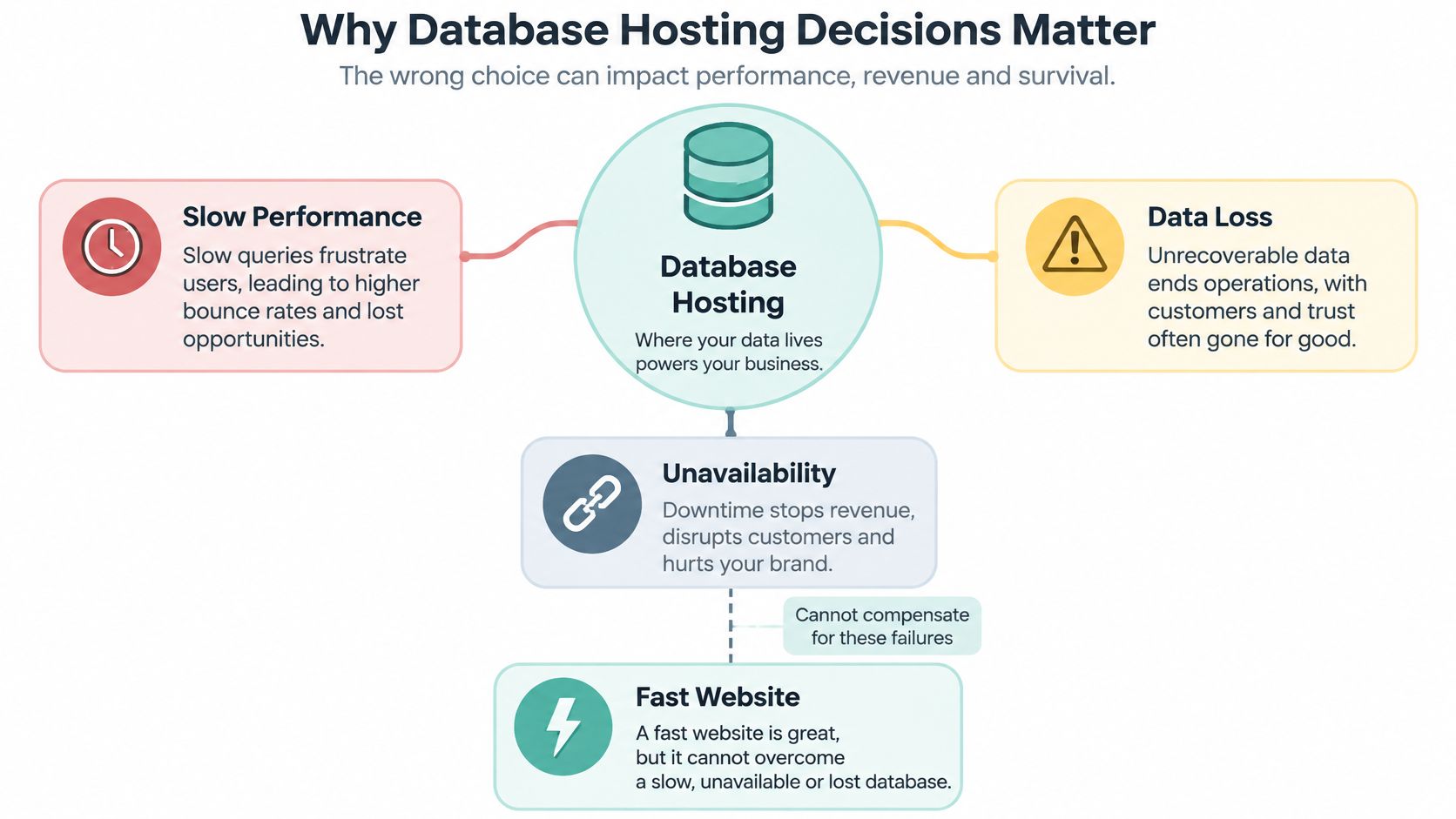
A database stores the records your site or application depends on. That includes customer accounts, orders, product details, page content, form submissions and operational history. If it's slow, every search, login and checkout feels slow. If it's unavailable, dynamic pages can't do their job. If it can't be recovered, you're not fixing a technical fault, you're reconstructing business records.
Availability Is Not Reliability
Website availability only tells you a server responded. Database reliability asks harder questions. Can the application read and write records correctly under load? Are backups complete? Has anyone tested a restore into a clean environment? Who notices failed jobs at night, and who has permission to fix them?
Those questions matter beyond large enterprises. The ABS recorded that 55.4% of Australian businesses used paid cloud-computing services in 2019-20, and 30.2% of those businesses used cloud services for hosting databases, according to ABS business use of information technology data. Hosted databases are now ordinary small-business infrastructure, not specialist equipment.
A fast front end can't compensate for a database that's slow to answer, hard to restore or controlled by shared credentials nobody remembers creating.
You'll need to decide five things clearly. First, which hosting model fits your team. Second, which database technology matches your data. Third, which technical controls you'll verify rather than assume. Fourth, what support covers when something fails outside business hours. Fifth, who owns recovery, because a backup file nobody has restored is a hope, not a plan.
For Australian businesses, those decisions also touch privacy, data location, latency for local customers and GST-inclusive pricing. Start with the operational risk, then choose the product. Buying storage first and working out responsibilities later is how gaps form.
Understanding Database Hosting Models
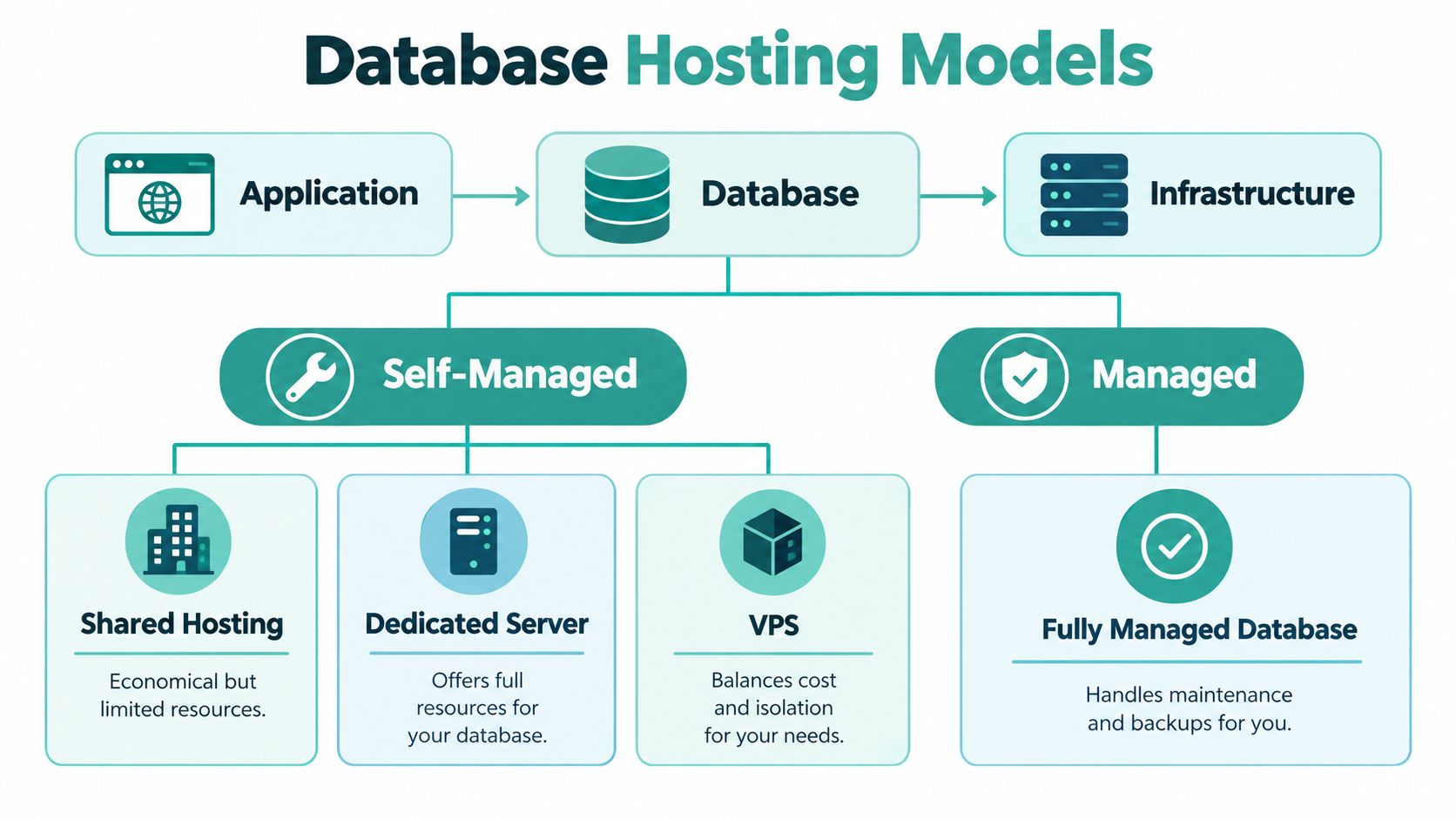
Think of a shop. The storefront is your application, the pages and buttons people use. The stockroom ledger is the database, where orders, customers and inventory records live. The building, power and security are the infrastructure. Database hosting is the arrangement that keeps that ledger available, connected to the storefront and protected when hardware or software fails.
Your application sends queries to the database and receives records back. A product search reads data. A checkout writes data. A password reset does both. If the connection, credentials or database service breaks, the application may still display a cached page while core functions fail.
The Common Models
- Shared database hosting: Your database sits on infrastructure shared with other customers. It's economical and simple, but resource limits and configuration options are narrower.
- VPS hosting: You get a partitioned virtual server with more isolation and control. You may still manage the operating system, database software and backups yourself.
- Dedicated hosting: One server is allocated to you. That gives clearer resource ownership, but it doesn't automatically provide database administration.
- Managed database hosting: The provider takes defined responsibility for maintenance tasks such as patching, monitoring and backups, within the limits of the service agreement.
Labels don't prove architecture. Two services called managed can assign very different duties. Ask who patches the database engine, who tunes slow queries, who rotates credentials, who tests restores and who investigates a failed backup. Write the answers down. Vague phrases like fully managed aren't an operating model.
This distinction became relevant as smaller firms moved online. Australian business adoption of paid cloud-computing services rose from 19.4% in 2013-14 to 42.4% in 2017-18, while adoption among businesses with 5-19 employees increased from 23.6% to 50.1%, according to ABS characteristics of Australian business data. Many of those businesses don't employ a database administrator.
Connection method is part of the model too. Some teams need remote administration for development tools, while production access should stay tightly restricted. If you're configuring external access, follow the steps for a remote MySQL connection in cPanel and limit access to known addresses where possible.
Start by listing what your team already does well. If nobody wants patching, monitoring and restore testing, don't buy a model that leaves those jobs with you. If your developers need direct control over versions and settings, don't choose a managed service that locks away the controls they rely on daily.
Host your website with our 5-star rated, cPanel website hosting plans.
Super fast servers, with security included and hosted in your choice of Australian Data Center.
View cPanel Plans
Managed Versus Self-Hosted Databases
The useful comparison isn't which model sounds modern. It's who does the work when the database needs attention. Who applies updates? Who sees the alert? Who can restore the complete service, including application files, configuration and database records in the right order? Who pays, in staff time or contractor fees, for an incident on a public holiday?
A managed database trades some direct control for operational simplicity. Provisioning is usually faster, routine maintenance is handled for you, and support has a clearer role during failures. The trade-off is that you work within the provider's supported versions, settings and change windows. You also need to check whether managed means the provider monitors only server health or also database-specific problems such as failed backups and replication lag.
A self-hosted database gives you configuration freedom. Your team chooses the engine version, tuning parameters, extensions and access patterns. That freedom comes with direct responsibility for patching, hardening, monitoring, capacity, backups and recovery drills. It's a sensible choice when you have capable staff and a genuine need for control. It's a poor bargain when the plan depends on one developer remembering everything.
Managed and Self-Hosted Database Responsibilities
| Decision area | Managed database | Self-hosted database | Question to ask |
|---|---|---|---|
| Maintenance | Provider handles defined patching and updates | Your team schedules and applies changes | Which updates are excluded? |
| Control | Settings limited to supported options | Broad control over versions and tuning | Which settings do we truly need? |
| Recovery | Provider supplies backup and restore process | Your team designs and tests recovery | Has a full restore been demonstrated? |
| Monitoring | Provider alerts on covered failures | Your team builds alerts and response rosters | Who acts after hours? |
| Staffing | Less routine administration in-house | Requires database and systems skills | Who covers leave and turnover? |
| Cost exposure | More predictable service fees, possible add-ons | Infrastructure plus labour and incident costs | What does one bad night cost us? |
Cost comparisons often miss the expensive part. Self-hosting can look cheaper because the invoice is smaller, while staff time disappears into salaries. Managed hosting can look expensive until you price emergency help, delayed recovery or a botched update. Compare total operating cost, not just monthly hosting fees.
Practical rule: Choose managed hosting when your main risk is neglected maintenance. Choose self-hosting when your main requirement is specific control and you can staff that control properly.
Don't let ideology decide. A small agency maintaining client WordPress sites usually needs repeatable, managed routines more than exotic tuning. A product team with platform engineers may need the opposite. Capability and risk should drive the purchase.
Choosing SQL and NoSQL Databases
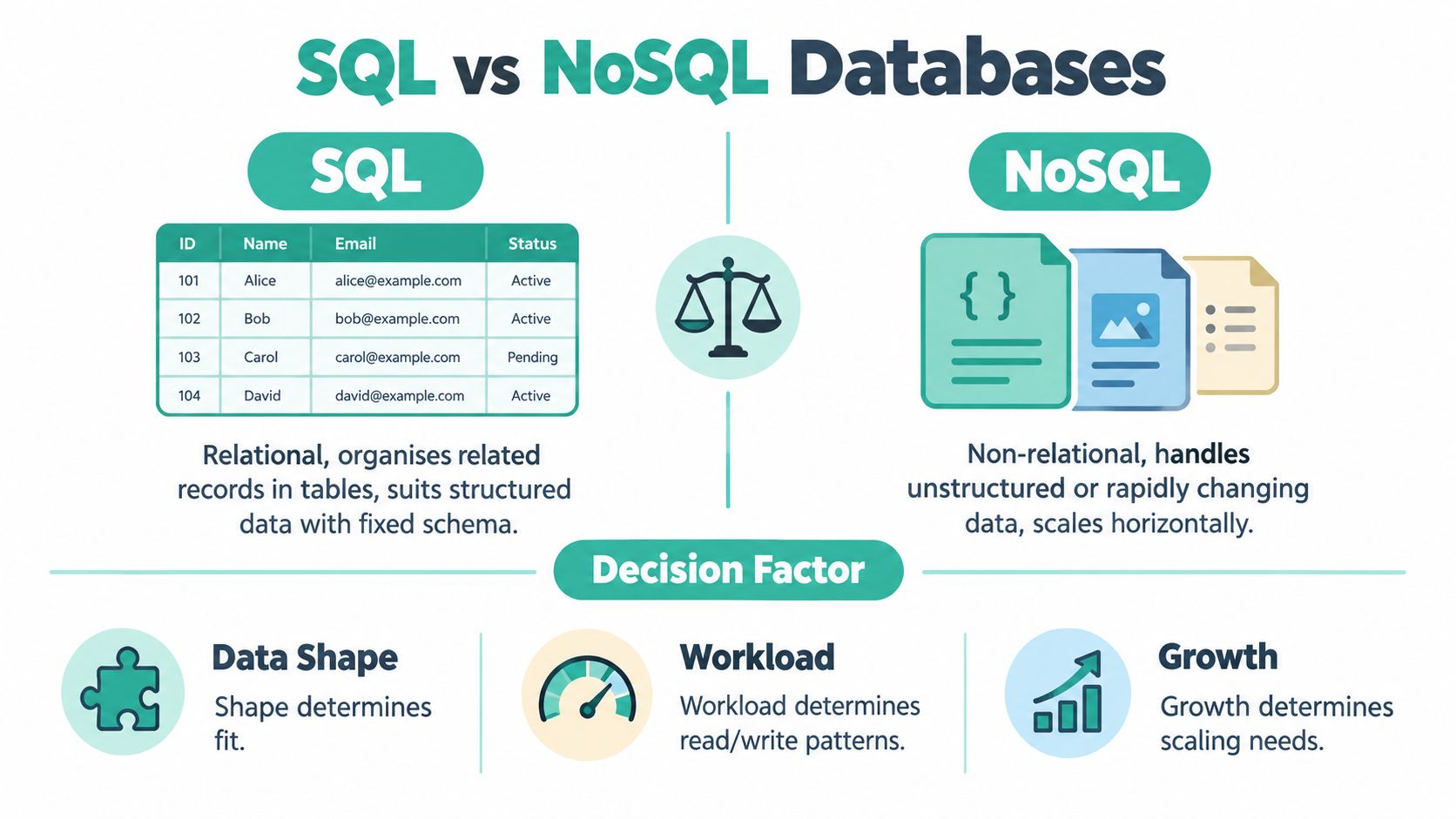
Start with the shape of your data, not the popularity of the technology. If your records naturally relate to each other, customers to orders, orders to line items, students to enrolments, a relational design usually fits. If records vary widely in structure and don't need frequent joins across collections, a non-relational design may be simpler.
SQL databases organise related records in tables with defined columns and relationships. That structure suits WordPress, Joomla, Drupal, most eCommerce platforms and ASP.NET applications using MSSQL. A fixed schema sounds restrictive, but it's often protective. It can prevent an order existing without a customer, or a payment being recorded against the wrong account. Joins let you ask combined questions, such as which customers in Victoria bought a product and later requested a refund.
Where NoSQL Fits
NoSQL databases include document, key-value and other non-tabular models. A document store can hold a product record where one item has sizes, another has expiry dates and another has downloadable files, without forcing every item into identical columns. A key-value store can suit caching or session data, where the application mainly retrieves one value quickly by a known key.
Flexible schemas help when data changes shape. They hurt when teams use flexibility to avoid design decisions, then discover reporting is painful because the same concept was stored five different ways. Consistency matters too. Financial and booking systems usually need strong guarantees that related updates succeed or fail together. Activity feeds or cached recommendations may tolerate looser timing.
Ask three questions before choosing.
- Relationships: Do queries regularly combine records from several entities?
- Access patterns: Does the application mostly fetch one complete record, or filter and aggregate across many?
- Change: Is the structure stable, evolving in planned releases, or genuinely variable by record?
Your platform may already answer the question. WordPress expects a relational database, so reviewing WordPress hosting requirements is more useful than debating NoSQL in the abstract. An ASP.NET application built for MSSQL shouldn't be moved casually because migration affects queries, tooling and support skills.
Mixed architectures are normal. A store might keep orders in SQL, cache sessions separately and send reporting data to an analytics store. That's reasonable when each system has a clear job. It becomes messy when teams duplicate the same customer record everywhere without deciding which copy is authoritative. Choose the primary database for correctness first, then add specialised stores only for proven needs.
Technical Criteria for Database Hosts
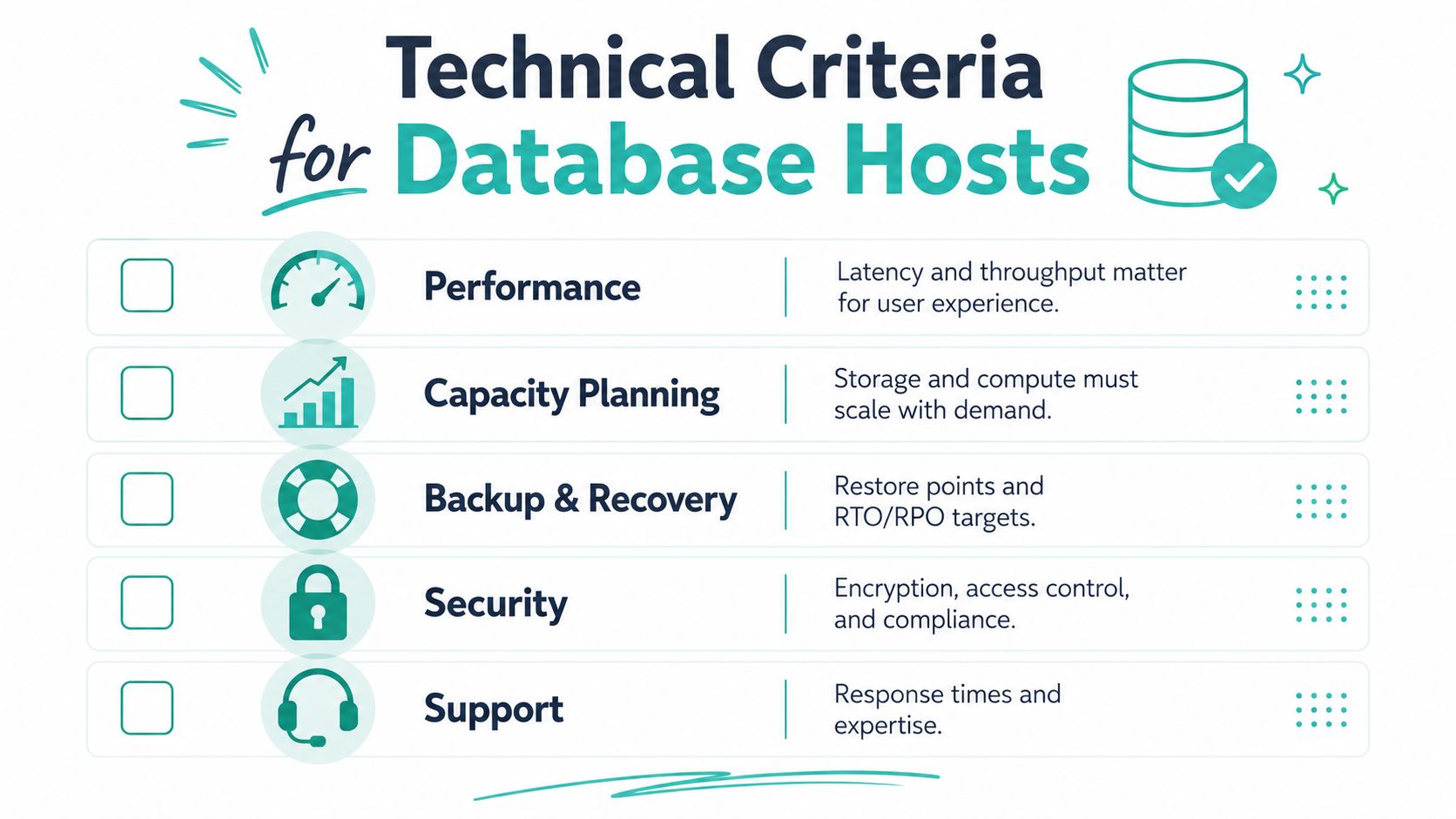
Judge a host by evidence you can request before signing up. Brochures talk about speed and security. Your job is to turn those words into settings, logs, restore tests and named responsibilities. The checklist below works whether you're buying shared hosting for a brochure site or a managed environment for a booking system.
Performance, Latency and Capacity
Performance isn't one number. A database can have fast storage and still respond poorly because queries lack indexes, memory is undersized or the application opens too many connections. Ask what CPU, memory and storage are allocated, how limits are enforced, and what happens when you exceed them. For Australian audiences, keep the application and database close together. Distance between them adds delay to every query, and pages often make many queries.
Capacity planning should cover growth in records, uploads, logs and backup retention. Ask how scaling works, whether it needs downtime, and which metrics trigger a recommendation to upgrade. If you're tuning an existing Linux environment, the guidance on MySQL tuning on Linux hosts helps separate configuration problems from genuine resource shortages.
Backups, Replication and Monitoring
Separate three ideas that sales pages often blur. Backups are copies you restore from. Replication copies changes to another database for availability or read capacity, but it can also replicate an accidental deletion. Disaster recovery is the tested process for rebuilding service after a serious failure. You may need all three, but one doesn't replace the others.
Ask how often backups run, how long they're kept, where they're stored, whether they're encrypted and when a restore was last tested. Monitoring should produce useful alerts, not just a graph nobody watches. Useful signals include failed backups, storage pressure, connection saturation, replication lag and repeated slow queries. Ask who receives each alert and what they're authorised to do.
Security and Human Error
Perimeter security matters, but everyday mistakes cause real damage. The OAIC recorded 532 notifiable data breaches in Australia during January to June 2025, and human error accounted for 193 cases, or 37% of all notifications, in its latest notifiable data breach statistics. Design for that reality.
- Least-privilege accounts: Give each application only the permissions it needs, and don't let a website user drop tables unless there's a specific reason.
- Separate credentials: Use different production and staging users so a test script can't write to live customer records.
- Audit logging: Record administrative access, exports and permission changes so you can investigate mistakes quickly.
- Controlled temporary access: Give developers time-limited accounts, then remove them when the job ends.
- Safer restore testing: Test restores in an isolated environment, with sensitive records protected or de-identified where appropriate.
Encryption should cover connections and stored data where supported, with keys and access managed carefully. The ACSC small business guidance on protecting business customer data supports encrypting servers that store or access personal information and restricting access to centralised data.
Privacy checks are technical checks too. Confirm where production data, replicas, backups and support access are located. APP 8 and section 16C apply when an entity discloses personal information to an overseas recipient; APP 8.1 generally requires reasonable steps to ensure the recipient does not breach the Australian Privacy Principles, subject to exceptions, as explained in OAIC guidance on data analytics and the Australian Privacy Principles. Record the provider's answers for your privacy documentation rather than relying on a sales call memory.
Register your new domain name at competitive market prices including free domain add-ons like privacy, DNS Hosting, Custom Nameservers and Forwarding.
Always the best price and no nasty renewal price hikes.
Register A Domain Name
Configuration Examples for Common Workloads
Examples make trade-offs visible. The patterns below aren't universal requirements. They're starting points for provider conversations, shaped by what usually goes wrong in each workload.

WordPress Publication
A Sydney publisher running WordPress needs a relational MySQL or MariaDB database, sensible caching and enough memory for editorial peaks when a story is shared widely. The common failure isn't exotic scale. It's plugin changes made directly in production, shared admin credentials and backups that include files but not a usable database copy. Use staging with separate credentials, test updates there, and confirm the restore process covers both files and database.
When moving or rebuilding the site, large imports need care so timeouts don't leave partial data. The procedure for importing a large MySQL database is relevant here, especially when a migration window is short.
Australian eCommerce Store
A Melbourne retailer selling nationally needs strong consistency for orders, stock and payments. SQL is the natural primary store. Performance work should start with indexing product searches and order lookups, then consider read replicas only if reporting or browsing traffic competes with checkout writes. The responsibility that causes trouble is access control. Marketing exports, developer troubleshooting and fulfilment integrations shouldn't all share one powerful database user. Separate accounts make errors traceable and limit damage.
ASP.NET Application Using MSSQL
An Adelaide professional services firm with an internal ASP.NET application will usually keep MSSQL because the application, reporting tools and developer skills already align. The hosting questions are version support, scheduled jobs, backup access and whether test and production databases are isolated. UpTime Web Hosting offers Windows and ASP.NET hosting with Microsoft SQL Server options, including additional databases where plans allow. Whichever provider you assess, confirm how database jobs are monitored. A silent failed job can mean invoices, reminders or integrations stop while the application appears online.
Development and Test Environment
A temporary environment should be cheap to create, easy to refresh and impossible to confuse with production. Use separate hostnames, credentials and access rules. Copy structure freely, but be careful with customer records. De-identified or reduced test data is safer for most development work, and it prevents a test email or export reaching real customers. The recurring failure is convenience, someone copies production credentials into a test config file and forgets.
Analytics Workload
A Perth business analysing sales trends shouldn't run heavy reporting queries against the live checkout database during trading hours if those queries slow customers down. A read replica or separate analytics store may be appropriate, refreshed on a schedule that matches reporting needs. Define which system is authoritative. Analysts can tolerate slightly delayed data if they know the refresh time. They can't work confidently if totals change unexplained between meetings.
Across all five examples, the pattern is consistent. Pick the database for the workload, separate environments, restrict users, schedule backups and name the person who tests recovery. Configuration templates help, but ownership prevents most avoidable incidents.
Choose an Australian Database Host Confidently
Use a staged process and make the provider demonstrate answers. Don't begin with price. Begin with location, recovery and accountability, then check whether the plan fits your workload and budget.
- Confirm locations: Ask where production databases, replicas, backups and support access are located, then compare the answer with your privacy obligations. Guidance on Australian data sovereignty hosting can help frame those questions.
- Test the latency story: If your customers and staff are mainly in Australia, ask where the application and database sit relative to each other and to your audience. Local infrastructure only helps if the whole request path makes sense.
- Request recovery evidence: Ask for backup frequency, retention, encryption, separation and the most recent restore test method. The ACSC recommends a 3-2-1 backup approach, three copies of data, two different types of media and one copy kept off-site, with backups encrypted, protected from alteration or deletion and tested for restoration, in its ransomware guidance.
- Inspect controls: Check account permissions, audit logging, monitoring alerts, patching duties and how temporary developer access is removed.
- Review documentation: Update your privacy policy and internal register with storage, backup and overseas access arrangements. The OAIC APP 1 guidance explains that a privacy policy should describe the usual approach to holding personal information, including storage and security, without exposing sensitive control details.
Then read the commercial terms with the same care. Favour transparent GST-inclusive pricing, clear database limits, understandable local support hours and plain explanations of add-ons. Ask what happens when you outgrow the plan, need an extra database or require help restoring at night. If answers stay vague before purchase, they won't become clearer during an incident.
Your final checklist is short. Right model for your team's capability. Right database for your data shape. Verified backups. Restricted access. Known data locations. Monitored failures. Documented recovery owner. Reliability comes from those operating practices working together, not from the hosting label alone.
If you're comparing Australian database hosting for WordPress, a custom application or an ASP.NET site using MSSQL, UpTime Web Hosting offers local hosting options with MySQL, MariaDB and Microsoft SQL Server support alongside Australian-based service information. Visit the site to review the hosting plans, database features and support channels against the checklist above before you migrate or launch.