
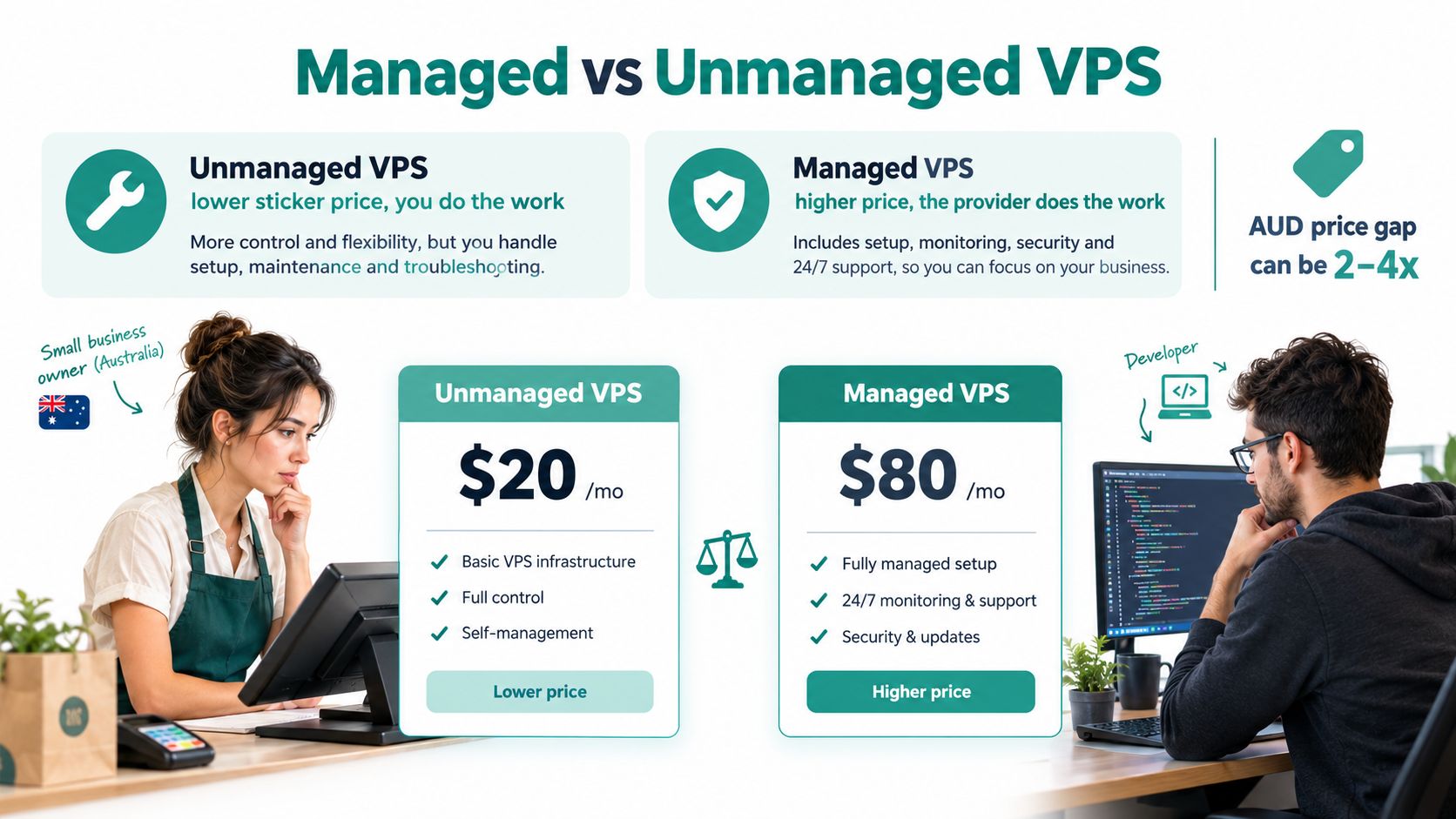
You're standing at an Australian hosting checkout page. An unmanaged VPS looks attractively cheap, while the managed plan costs noticeably more. The specifications appear similar, and the checkout page doesn't show what happens at 2am when a security update breaks the site, disk space fills up or the server stops responding.
That decision is rarely about CPU, memory or storage alone. It's about who installs updates, checks backups, responds to alerts and investigates a compromised website. For a developer with Linux experience, unmanaged hosting can provide useful freedom. For an SME without in-house systems expertise, the same plan can turn the business owner, agency lead or overworked developer into the person responsible for server operations.
The Australian VPS market is already mainstream. It was estimated at AUD 1.2 billion to AUD 1.6 billion in 2026, up from about AUD 700 million in 2020, with managed VPS accounting for an estimated 55% to 60% of revenue in 2026 according to Australian VPS market analysis. This isn't a niche choice reserved for infrastructure specialists. It's a regular purchasing decision for retailers, agencies, professional services firms and developers.
By the end of this guide, you'll know what each model includes, how to calculate the true cost beyond the monthly invoice, and which option fits your workload. You'll also have a practical way to assess Australian data handling, local support and operational resilience before you commit.
Table of Contents
- Introduction
- What Managed and Unmanaged VPS Actually Mean
- Responsibilities, Security and Support Compared Area by Area
- True Cost Difference in Australia
- When Each Option Makes Sense for Australian Users
- How to Decide With Confidence
- Getting Started and Next Steps

Performance you can feel, backed by clients who depend on it. Read how our support and uptime create long‑term customer success.Power Your Business with Better Hosting
Introduction
A Brisbane retailer can save on the monthly invoice with an unmanaged VPS, then lose that saving during one late-night outage. The owner expects a developer to “keep an eye on it”, but that developer is already managing campaigns, product updates and client work. Patching slips, monitoring stays basic and backups may run without anyone testing a restore. After months of quiet operation, a faulty update or configuration change takes the shop offline.
For an Australian SME without in-house Linux skills, that is the central comparison. Managed VPS vs unmanaged VPS is a decision about staff time, downtime risk and security exposure before it is a decision about server performance. The cheaper plan is only cheaper if someone can reliably handle maintenance, alerts, access controls, backups and recovery.
An unmanaged VPS can suit a Sydney agency with staff who already manage Linux systems, deployment pipelines, containerised applications and staging environments. Root access gives that team control over its build tools and configuration. Paying for administration it can perform internally may add cost without reducing risk.
A small business should not receive the same recommendation as that agency.
The practical question: Who responds when the server needs attention, and can that person act quickly enough?
Australian pricing makes the trade-off visible. Entry-level unmanaged VPS plans have appeared around AUD 10 to AUD 30 per month, while mid-range plans have run from AUD 40 to AUD 120 per month. Managed plans have commonly carried a 40% to 80% premium over equivalent unmanaged infrastructure because the fee covers administration, support and operational services, as shown in Internet hosting services market coverage.
That price gap should be compared with employee or contractor hours, the cost of an interrupted shop or client project, and the exposure created by delayed security work. It should also be checked against practical Australian requirements. Confirm where data is stored, which support team handles incidents, what hours support operates, and whether escalation is available locally or only through an overseas queue.
Choose unmanaged hosting when a named technical owner has time, Linux capability and a tested recovery process. Choose managed hosting when those responsibilities would fall to an overstretched owner, developer or agency lead. For a plain explanation of virtual servers, read this guide to what VPS web hosting means, then judge the plan by the operational work it removes, not only by its storage and processor specifications.
What Managed and Unmanaged VPS Actually Mean
The simplest distinction is responsibility.
With an unmanaged VPS, you receive a virtual server with root access and control over the software environment. You typically choose the operating system, configure the web server, install applications, apply security patches, harden access, configure monitoring and arrange backups. The provider generally remains responsible for the underlying infrastructure and network, but the server administration is yours.
With a managed VPS, the provider takes on defined administration tasks. Australian managed plans commonly include operating-system and control-panel updates, proactive monitoring, daily backups and support escalation. Some packages also include initial setup, cPanel or WHM administration, DDoS protection and network monitoring. The exact scope still matters, so read the service description rather than assuming that every product labelled managed covers the same work.
The root-access distinction can be misleading. Managed doesn't necessarily mean you lose all control. It means the provider has a role in maintaining the server, while you remain responsible for your website, application code and business decisions. Unmanaged means you have more direct autonomy, but you also own the consequences of each configuration choice.
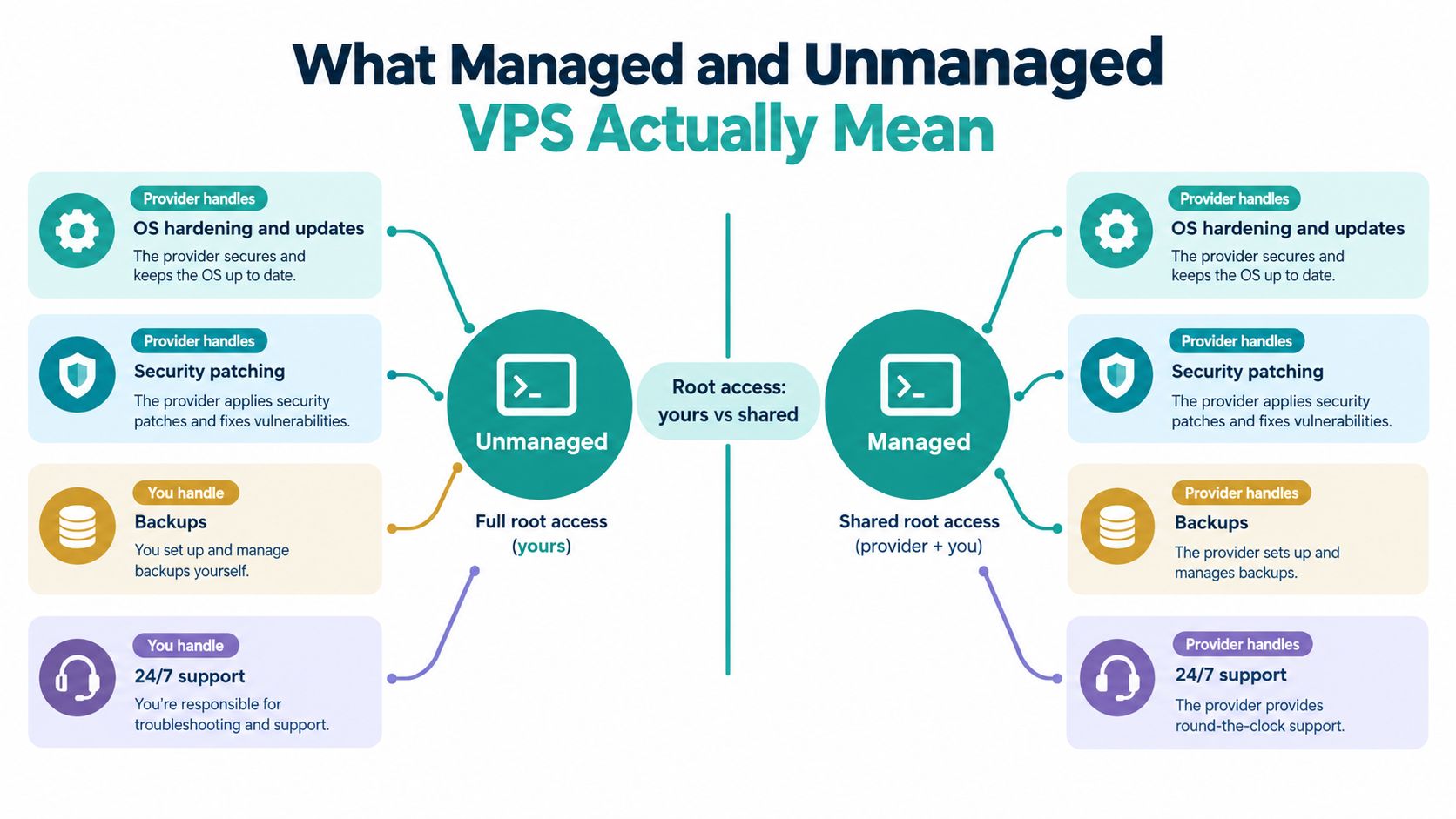
Unmanaged means you own the operational layer
A developer choosing an unmanaged VPS might install a custom stack, tune a database and create their own deployment process. That control is useful when the team understands the environment and wants changes to happen on its schedule.
The same freedom creates exposure for a small business. If the owner doesn't know whether the operating system is patched, whether the firewall is configured correctly or whether backups are restorable, the server is not self-managing. It is unattended.
Managed means the service includes people and processes
A managed plan should make server administration visible. The provider should explain how it handles updates, monitoring, backups, recovery and escalation. Australian hosting guidance describes managed VPS as covering operating-system patching and updates, monitoring and backup management, while unmanaged plans leave those tasks with the customer. The managed VPS explanation for Australian businesses provides useful context for that division.
The single difference that matters most is who answers when something breaks.
You still need to check the boundaries. A provider may manage the operating system but exclude application debugging. It may provide backups but not guarantee that every restore is immediate. It may offer support tickets without promising a particular response path. Management is valuable only when the included responsibilities match your actual risks.
Host your website with our 5-star rated, cPanel website hosting plans.
Super fast servers, with security included and hosted in your choice of Australian Data Center.
View cPanel Plans
Responsibilities, Security and Support Compared Area by Area
The distinction becomes clearer when each operational task is examined separately. A managed service doesn't magically fix poorly written application code, but it can reduce the number of server-level jobs your team must remember and perform.
| Task | Managed VPS | Unmanaged VPS |
|---|---|---|
| Operating-system updates | Provider applies and manages updates | You schedule, test and apply them |
| Control-panel maintenance | Provider handles supported panel updates | You manage the panel and related issues |
| Security hardening | Provider-side controls may include firewalls, scanning and hardening | You configure and review the security layer |
| Backups | Provider commonly supplies automated daily backups | You select, configure and verify the backup system |
| Monitoring | Provider monitors agreed server and network conditions | You install tools and respond to alerts |
| Performance tuning | Provider can assist with server-level tuning | You diagnose resource and configuration issues |
| Incident escalation | Provider support handles covered server events | You investigate or source specialist help |
| Application code | Your team remains responsible | Your team remains responsible |
Updates and patching
On an unmanaged plan, an update isn't finished when it installs. You need to consider compatibility, service restarts, failed deployments and the possibility that a vulnerable package remains untouched. The work may be straightforward for an experienced Linux administrator, but it still needs ownership.
Consider a practical scenario. An agency developer delays a security patch because a client launch is taking priority. A week later, the client's content management system shows suspicious redirects. The unmanaged provider can usually confirm that the virtual server is running, but the agency must investigate the patch status, access logs and compromised files.
Under a managed arrangement, the provider may apply the relevant operating-system or control-panel update as part of its administration process. That doesn't remove application responsibility, but it can close one common gap.
Security, backups and monitoring
Security isn't a single product checkbox. It involves hardening, patching, access controls, monitoring and a recovery plan. Managed plans may bundle DDoS-protected firewalls, malware scanning and provider-side security administration. Unmanaged customers need to assemble and maintain those controls themselves.
Backups deserve particular scrutiny. A backup that has never been tested is an assumption, not a recovery plan. Ask where backups are stored, how often they run, how long they are retained and who performs a restore when the site is unavailable.
Monitoring changes the response window. A business owner who checks the website after receiving a customer complaint has an entirely different operating model from a provider monitoring server health continuously and escalating a covered incident.
Security rule: If nobody on your team can explain the patching, monitoring and restore process, you don't have an operational plan. You have hope.
Support and performance
Unmanaged support usually focuses on the infrastructure the provider controls. It may not cover a broken web-server configuration, a database problem or a compromised application. You can still get help, but you may need to diagnose the issue first and pay separately for specialist assistance.
Managed services vary, but Australian packages can include software updates, patching, cPanel or WHM support, reboot and recovery assistance and resource-usage insights. Some providers also offer local phone support, tickets and call-backs. Read the support scope before ordering, because “24/7 support” doesn't automatically mean application engineering.
Use this website security checklist for Australian hosting to identify the work your team would need to own on an unmanaged server. If the list already feels larger than your available time, the price difference is probably buying capacity your business needs.
True Cost Difference in Australia
An unmanaged VPS can look like the obvious bargain on an Australian hosting invoice. For an SME without Linux or DevOps staff, that invoice is only the starting point. The final cost also includes staff time, outage exposure, security work, specialist assistance and the business impact of choosing infrastructure that may not meet local data-residency or support requirements.
Australian entry-level unmanaged plans have commonly been priced around AUD 10 to AUD 30 per month, with mid-range plans around AUD 40 to AUD 120 per month. Managed plans typically add a premium for support, automated backups and control-panel administration. Local pricing comparisons for small businesses put some managed layers around AUD 10 to AUD 15 per month above a basic service, with fully managed comparable plans around AUD 17 to AUD 22 per month. These figures vary by provider and scope, as outlined in this Australian VPS cost analysis for small businesses.

What the unmanaged invoice leaves out
A business without Linux or DevOps capability still owns the administration. Someone must review alerts, apply patches, check storage, investigate failed services, maintain backups and respond when an incident occurs. That person may be the owner, a developer, an agency contractor or an employee pulled away from their primary work.
The labour cost does not need an invented hourly rate to matter. A developer spending a weekend recovering a server loses time that could have gone to billable work or product development. A retailer dealing with failed orders also absorbs customer frustration and lost trading time while the fault is investigated.
Separate monitoring, backup and security tools may add to the bill. The larger risk is operational: a poor configuration can remain unnoticed until an outage or compromise demands urgent specialist help. Australian SMEs should also confirm where data is stored and whether support operates in a compatible local time zone, rather than assuming an overseas service meets those needs.
When the premium is the cheaper choice
An agency with an in-house systems engineer may rationally choose unmanaged hosting because the required skills and processes already exist. An accounting firm with no technical staff may reach the opposite conclusion, even if its unmanaged invoice is lower. The premium can cost less than one after-hours incident, especially when downtime affects sales or client commitments.
Review the wider budget with this Australian guide to annual web hosting costs, then add the human work your current plan requires.
The key question is not which plan is cheaper. It is how much downtime, security risk and staff time unmanaged hosting consumes.
If one operational incident would erase the saving, managed hosting is the value option. Choose unmanaged only when your team can consistently provide the administration, monitoring and response it requires.
When Each Option Makes Sense for Australian Users
The right plan depends on who operates the server and what the server does. A developer's staging environment and a retailer's checkout system should not be assessed with the same tolerance for interruption.
Developers who need control
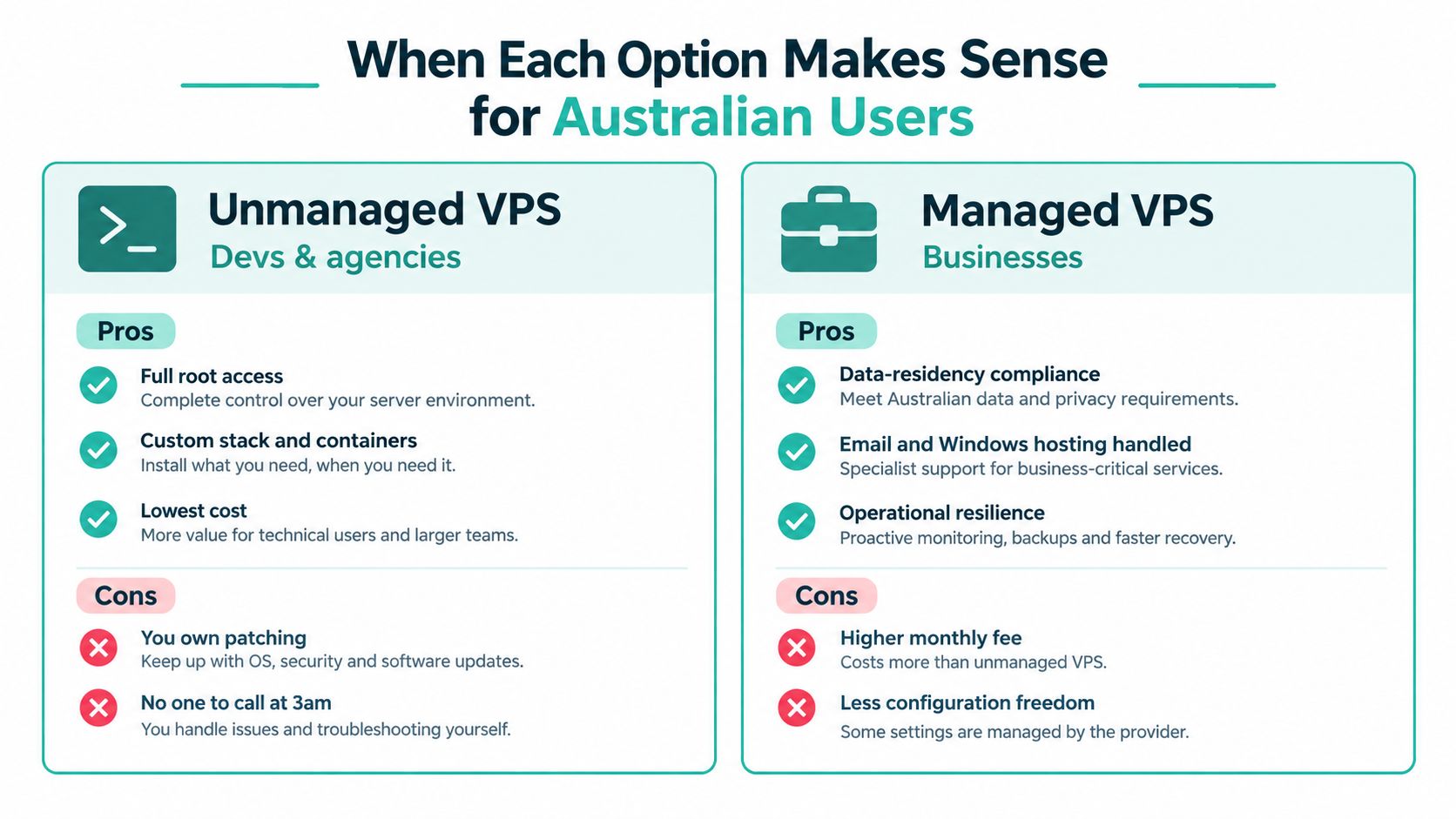
An experienced developer or DevOps team may prefer unmanaged VPS hosting for custom software stacks, build pipelines, containers and benchmarking. Full root access lets the team choose its own tools and change configurations without waiting for provider-side approval.
For example, an Australian agency might deploy a minimal static page to the smallest instance in the nearest Australian region while comparing raw server and network behaviour. A local VPS benchmarking methodology measures Time to First Byte from Australian locations using median and p95 results across multiple runs, and deliberately tests a minimal static page on the smallest instance in the nearest AU region to isolate server and network performance. The approach is described in this Australian VPS benchmarking methodology.
That scenario suits unmanaged hosting when the agency owns monitoring, backups and incident response. The saving comes from using existing skills, not from pretending administration has no cost.
Agencies hosting client environments
An agency may choose unmanaged hosting for development or staging, where a short outage doesn't affect customers. Production client sites are different. If the agency has promised availability but has no person responsible for overnight incidents, managed hosting protects the agency's reputation as well as the client's site.
The choice can also differ between clients. A technically proficient client may want control over its stack. A local professional services business may value predictable support more than custom server access.
SMEs running WordPress, Joomla or Drupal
A small business running WordPress, Joomla or Drupal usually cares about publishing, leads, bookings and sales, not operating-system maintenance. Managed VPS hosting removes server administration from the owner's weekly workload while leaving the business responsible for content, plugins and application decisions.
A practical example is a retailer whose sales depend on the site remaining available while staff are offline. Daily off-site backups and continuous monitoring don't eliminate every failure, but they create a defined operational response instead of leaving the owner to discover a problem through a customer message.
Windows and ASP.NET workloads
Windows and ASP.NET applications add another reason to examine the support boundary carefully. Businesses running email, Windows applications or Microsoft database workloads may need a provider that understands the operating environment and can support the relevant server layer.
Unmanaged hosting can still work when the business has Windows administration skills. Without that capability, managed support is the more sensible default, particularly where customer information or business-critical email is involved.
Register your new domain name at competitive market prices including free domain add-ons like privacy, DNS Hosting, Custom Nameservers and Forwarding.
Always the best price and no nasty renewal price hikes.
Register A Domain Name
How to Decide With Confidence
An Australian SME can save on the monthly VPS bill and still pay more overall. Staff hours spent patching Linux, investigating alerts, rebuilding a compromised server or restoring a failed site quickly outweigh a modest hosting price difference. Decide who carries that work before comparing CPU, RAM and storage.
Start with the risk profile. Ask where customer information, backups and logs are stored, who can access them, and whether the provider can respond during your operating hours. Local infrastructure may support data-residency requirements and reduce support friction, but Australian hosting alone does not make a business compliant. Confirm the backup location, monitoring coverage, incident process and escalation path.
Use this checklist:
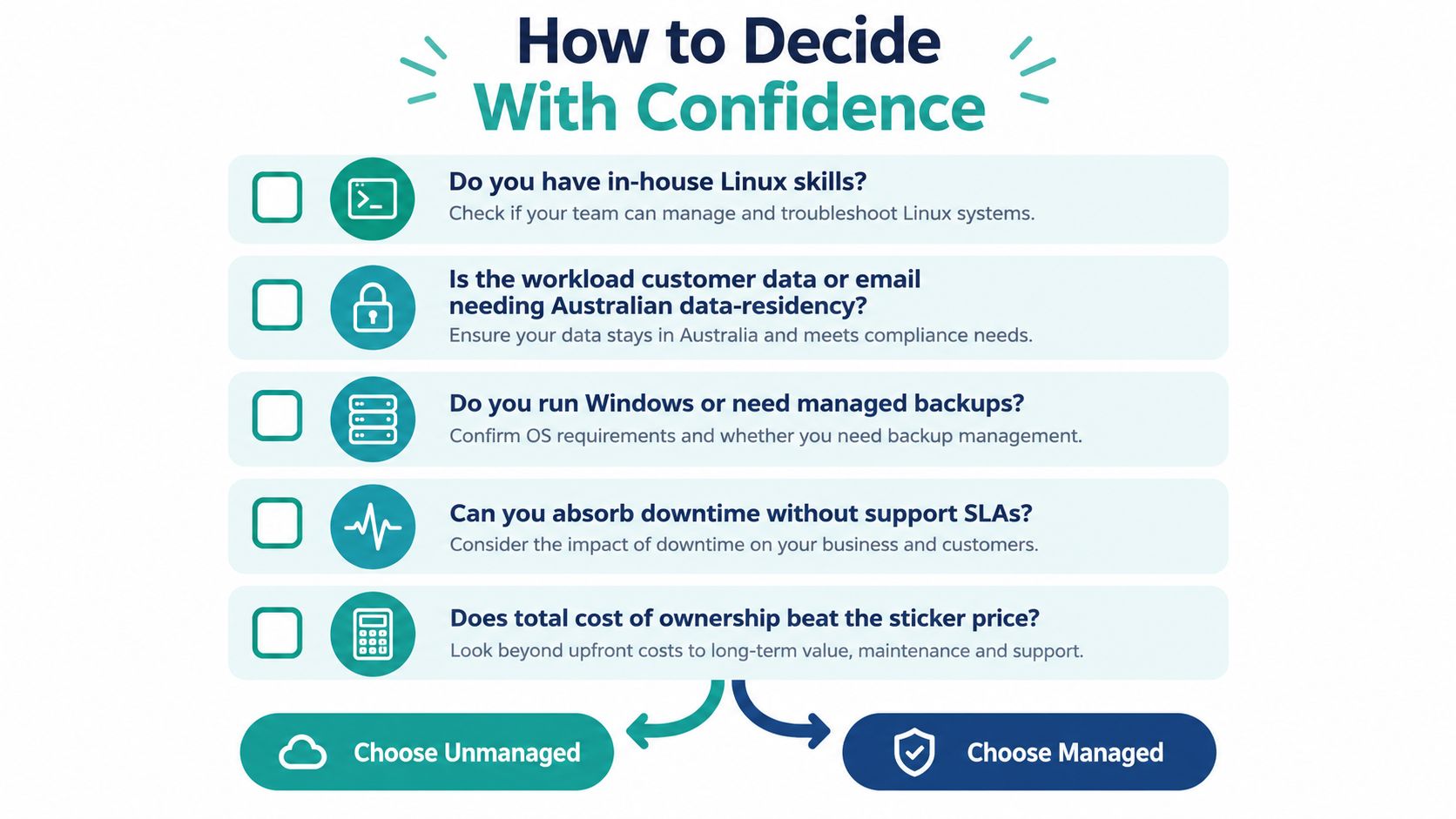
- Do you have in-house Linux skills? Unmanaged VPS hosting suits a team that can patch, harden, monitor and recover the server as part of its normal work. If administration falls to a developer who helps only between projects, select managed hosting.
- Does the workload contain customer data or business email? Security exposure matters more when a breach affects customers, staff or revenue. Ask how backups are protected, where operational access occurs and what happens after a suspected compromise.
- Do you run Windows or need managed backups? Confirm exactly which server tasks the provider handles. If your team cannot administer the operating environment confidently, outsource that responsibility rather than buying a cheaper plan and carrying the risk internally.
- Can you absorb downtime without a support path? A personal project can tolerate disruption. A booking system, online shop or client portal cannot. Match support coverage and response expectations to the cost of an outage.
- Does total cost of ownership beat the sticker price? Add staff time, backup software, monitoring, security work, emergency assistance and the opportunity cost of taking technical employees away from client or revenue work.
Managed hosting is the firm recommendation for non-technical Australian businesses, revenue-producing websites and sensitive workloads. Unmanaged hosting makes sense for a capable technical team that wants full control, can meet its own security obligations and has a tested recovery process.
If you cannot name the person responsible for the next patch and the next restore, choose managed VPS.
Confirm the decision in writing: monthly price, GST treatment, contract terms, support hours, data location and the tasks included in management. That comparison exposes the cost instead of rewarding the lowest sticker price.
Getting Started and Next Steps
If you're starting fresh, begin by writing down the workload and its support requirements. List the applications, operating system, control panel, backup expectations and people who need access. Don't choose a management level until you know whether you need help with setup, patching, monitoring, recovery and control-panel administration.
For a managed migration, the provider can provision the server, configure cPanel or WHM where applicable, transfer the sites and test the new environment before the final changeover. Schedule the final switch during a quiet period, reduce avoidable changes during migration and keep the existing service available until the new server has been checked.
If you're consolidating several unmanaged servers, migrate one low-risk site first. Confirm application behaviour, email delivery, backups and restore procedures before moving a revenue-producing workload. Keep a written rollback plan, and make sure someone is available to approve the final change and respond if the application behaves differently in the new environment.
A suitable Australian managed package may include server setup, cPanel, encrypted off-site nightly backups, 24×7 monitoring, DDoS-protected firewalls, local support through 1300 phone assistance, tickets and call-backs, and infrastructure in Sydney, Melbourne, Brisbane and Perth. Check whether pricing includes GST, whether contracts apply and exactly what the support team will handle. The Australian VPS hosting service guide is a useful starting point for comparing those service details.
My recommendation is firm. Developers and agencies with genuine Linux skills, reliable monitoring and time to maintain production systems can choose unmanaged VPS. Almost every other Australian business is better served by managed VPS, because the extra fee buys back attention, reduces avoidable exposure and gives the organisation a clearer response when the server misbehaves.
UpTime Web Hosting provides managed VPS hosting with server setup, maintenance, monitoring, backups and Australian support across infrastructure in Sydney, Melbourne, Brisbane and Perth. Visit UpTime Web Hosting to review the managed option against your current server workload and request a plan that matches your support and data-handling needs.