In short
A sudden flood of subscription emails is often a subscription bomb: someone has entered the address into many legitimate signup forms. Do not mass-delete the messages. First search for hidden purchase, password-reset and account-change alerts, check financial accounts directly, secure the mailbox, then quarantine likely signup mail with recoverable server-side rules.
Key takeaways
- Treat a sudden mail flood as a security incident until hidden fraud or account changes have been ruled out.
- A 2026 peer-reviewed study of 24 real campaigns analysed 46,970 unwanted emails, many sent by legitimate third-party services.
- Check banking, payment, shopping, cloud and administrator accounts through their official apps or websites, not through links in the flood.
- Quarantine or tag suspected signup mail rather than deleting it, because broad rules can hide genuine security alerts.
- For Australian reporting, use ReportCyber for suspected cybercrime and ACMA for unsolicited commercial email complaints.
In this guide
- Why is my email being signed up for spam?
- What should I do in the first 30 minutes?
- How do I secure the mailbox without hiding legitimate mail?
- How can I filter a subscription bomb safely?
- Can I find out who signed me up for spam email?
- Is signing someone up for spam emails illegal?
- When should the business escalate the incident?
- What else do Australian businesses ask about subscription bombs?
- What should you do now?
If hundreds of confirmations arrive within minutes, ordinary unsubscribe advice is not enough. The urgent task is to protect the signal inside the noise: evidence of a purchase, password change, new login, forwarding rule or compromised account.
Why is my email being signed up for spam?
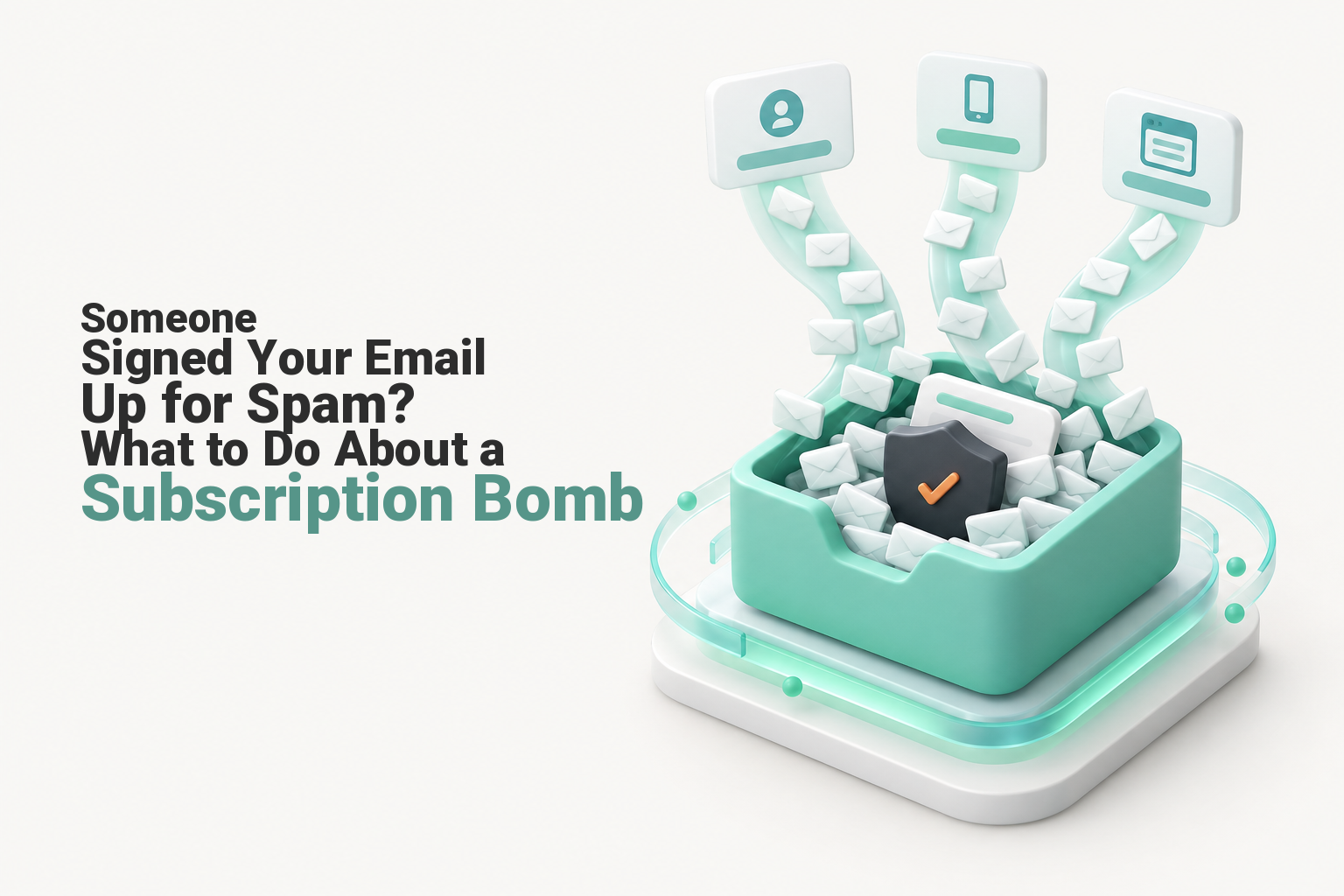
The address may be caught in a subscription bomb, also called list bombing or subscription flooding. An attacker does not need to sign in to the mailbox, because automated tools can submit the address to large numbers of genuine signup, registration and password-reset forms.
What does a subscription bomb look like?
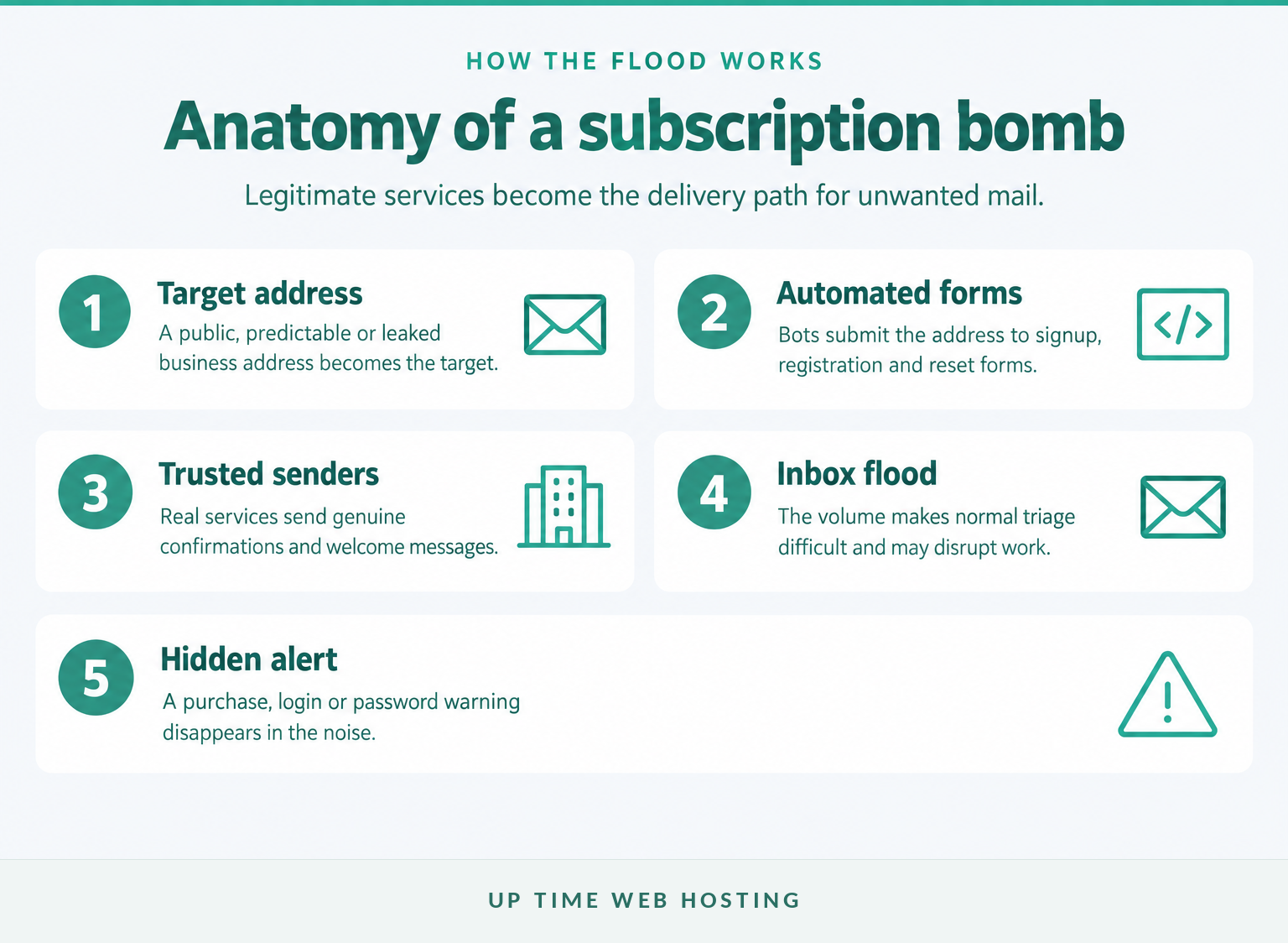
The 2026 study cited above analysed 24 campaigns containing 46,970 unwanted emails. The messages often came from real services with legitimate sending infrastructure, which helps explain why ordinary spam filters and sender-authentication checks may allow them through.
Possible motives include harassment, disruption, distraction from another attack and preparation for a fake support approach. The flood itself does not prove that the email account was accessed, but it creates enough risk to justify immediate checks.
A subscription bomb does not prove the mailbox was hacked, but it is serious enough to check for a hidden account or payment incident.

Performance you can feel, backed by clients who depend on it. Read how our support and uptime create long‑term customer success.Power Your Business with Better Hosting
What should I do in the first 30 minutes?
Stop cleaning the inbox and work in a fixed order: preserve, search, verify, secure and filter. The first 30 minutes should focus on finding the one message the flood may be trying to bury.
What order should the response follow?
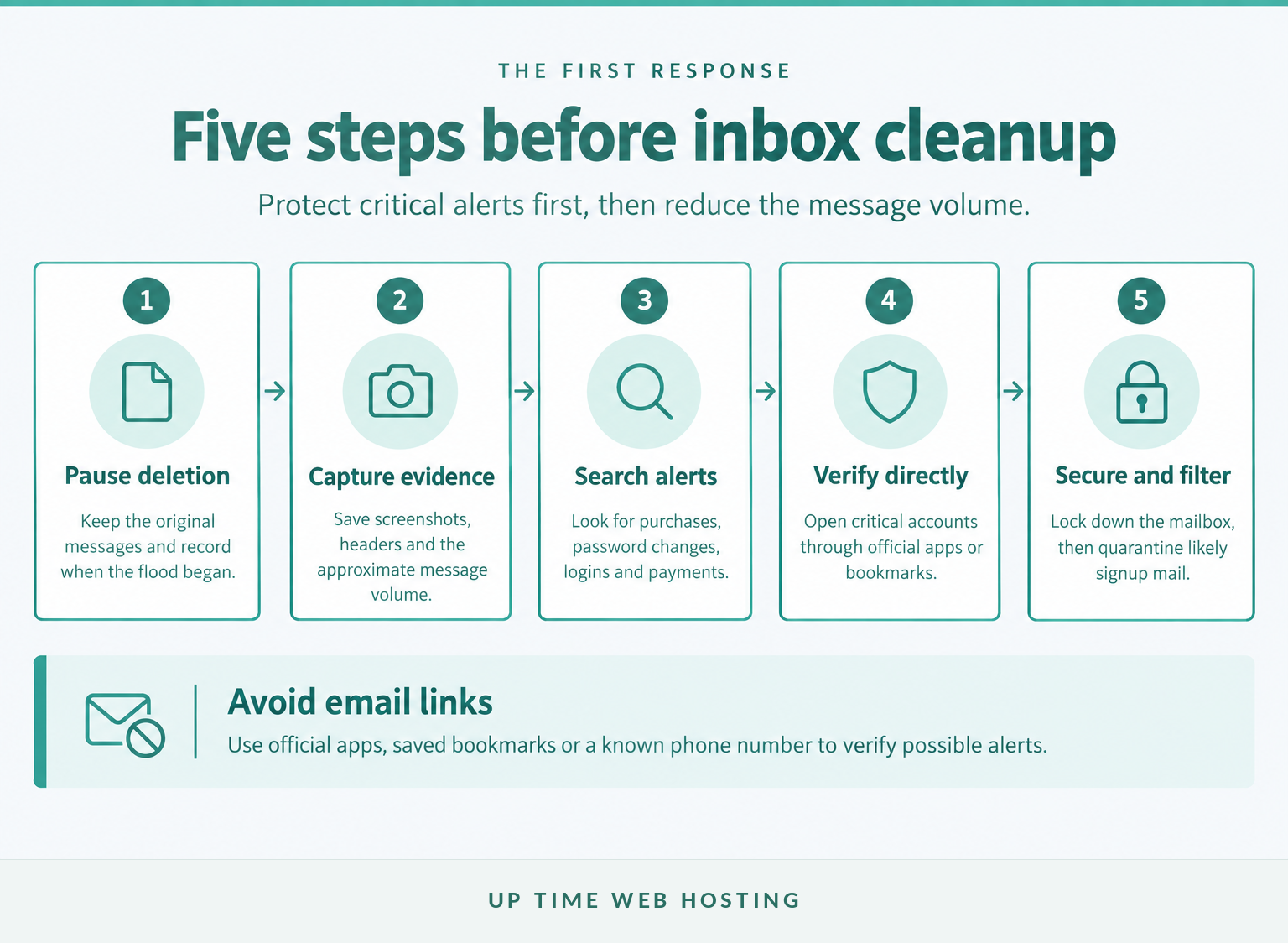
- Preserve the messages. Do not empty the inbox, junk folder or deleted items. Record when the flood began, take screenshots and note the approximate number of messages received.
- Notify the right people. Tell the mailbox administrator, finance contact and incident lead. Ask staff not to click links, approve login prompts or accept unsolicited support calls about the flood.
- Search for critical alerts. Search every folder for terms such as
order,receipt,purchase,payment,transfer,password,reset,login,security,verification,MFA,cardandaccount changed. If staff need help recognising dangerous lookalikes, review these common spam email examples. - Verify accounts directly. Open banking, payment, shopping, domain, hosting, cloud and administrator accounts through an official app, saved bookmark or manually entered address. Do not use a link from a message in the flooded inbox.
- Act on anything unauthorised. Contact the institution through a known number, ask it to secure or freeze affected services, save transaction details and start an incident record.
The first response should find critical alerts before anyone tries to make the inbox tidy.
How do I secure the mailbox without hiding legitimate mail?
Review the mailbox's security even if fraud is not immediately visible, because the flood may overlap with an account takeover. Use the provider's official app or administration portal rather than links contained in email messages.
The Australian Cyber Security Centre's 2023 recovery guidance recommends checking the following controls when compromise is suspected:
- Change the password if there is an unknown login, unexpected reset, reused password or another sign of compromise.
- Enable multi-factor authentication or a passkey and remove authentication methods that are not recognised.
- Check recovery email addresses, phone numbers and other recovery methods.
- Review active devices and sessions, then sign out unfamiliar devices.
- Inspect forwarding rules, inbox rules, automatic replies, delegates and app passwords.
- Check sent, deleted and archived folders for activity the user did not perform.
- Review administrator logs across other mailboxes if the affected address belongs to a business domain.
- Scan the device for malware if anyone opened an attachment, followed a link or installed software.
These checks should become part of the organisation's wider email security best practices, rather than a one-off response to this incident.
Mailbox security checks matter because an attacker may have changed access, forwarding or recovery settings while the inbox was noisy.
Host your website with our 5-star rated, cPanel website hosting plans.
Super fast servers, with security included and hosted in your choice of Australian Data Center.
View cPanel Plans
How can I filter a subscription bomb safely?
Use a temporary holding rule that keeps messages searchable and recoverable. Do not begin with a broad delete rule, because legitimate purchase or security notifications may contain the same words as unwanted signup mail.
Which filtering choices are safer?
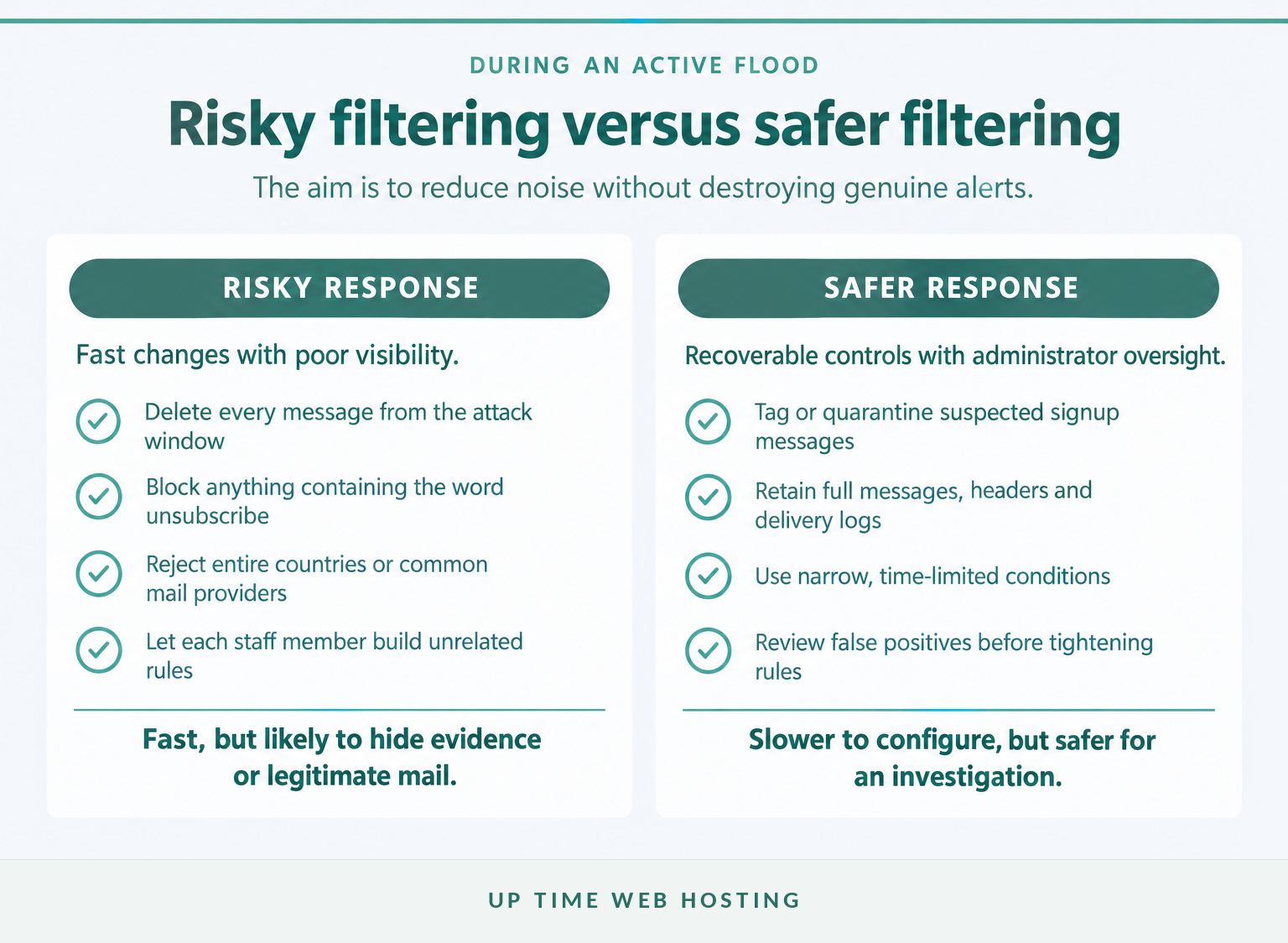
cPanel's May 2026 support guidance suggests placing messages containing terms such as unsubscribe in a separate folder. The 2026 subscription-bombing study warns that keyword-only cleanup is difficult because wanted messages can use the same language.
For a business mailbox, use the folder or quarantine approach without automatic deletion, then add tighter conditions with the mail administrator. Depending on the mail platform, the administrator can:
- Tag or quarantine high-volume mail from previously unseen senders during the attack window.
- Group likely signup, confirmation and newsletter messages for later review.
- Preserve full messages, headers, delivery logs and quarantine records.
- Avoid blocking entire countries, top-level domains or common mail providers.
- Create time-limited rules and review false positives before tightening them.
- Keep known business workflows under observation rather than assuming every familiar sender is safe.
Layered email spam protection can reduce the manual work, but it does not replace checks of financial and connected accounts. Once the immediate incident is contained, use ordinary methods for stopping unwanted emails and unsubscribe only through verified senders or their official websites.
Safe filtering reduces volume without destroying the evidence or alerts needed to investigate the incident.
Can I find out who signed me up for spam email?
Usually, not from the incoming messages alone. The messages identify the services that sent them, but they rarely reveal the person or automated system that submitted the address to each form.
Preserve evidence instead of making accusations. Useful records include:
- Original message files and full headers.
- The first and last known arrival times.
- Screenshots showing the message rate and subject patterns.
- Every affected address, alias or shared mailbox.
- Unknown logins, password resets, orders and transaction identifiers.
- Unsolicited calls or messages claiming to offer technical support.
Ask the mail provider to retain relevant logs if the incident appears targeted. A recipient usually cannot obtain another service's form-submission logs without that service's cooperation or a lawful investigation.
Under ACMA's 2025 spam guidance, suspected commercial spam can be forwarded without editing the message or subject line to report@submit.spam.acma.gov.au. ACMA can use reports for compliance work, but it cannot block the messages or provide an outcome for every individual report.
If fraud, threats or unauthorised account access are involved, submit a ReportCyber report and preserve the incident reference.
Attribution is often difficult, so preserve evidence and focus first on stopping harm.
Is signing someone up for spam emails illegal?
Potentially, but there is no automatic answer simply because an address was entered into forms. Australian liability depends on who sent or caused the messages, whether they were commercial, whether consent existed and whether the campaign impaired communications or supported another offence.
The Spam Act 2003 restricts unsolicited commercial electronic messages with an Australian link and includes provisions concerning people who cause messages to be sent or knowingly assist a breach. That does not mean every confirmation in a subscription bomb is automatically unlawful under the Act, because some services may have been deceived and may send only a factual registration message.
Section 477.3 of the Criminal Code Act 1995 addresses knowingly causing unauthorised impairment of electronic communication to or from a computer. Whether a particular campaign meets that definition is a matter for investigators and legal advisers.
This is general information, not legal advice for a specific incident.
Australian law may apply, but the facts and the attacker's role determine which rules or offences are relevant.
Register your new domain name at competitive market prices including free domain add-ons like privacy, DNS Hosting, Custom Nameservers and Forwarding.
Always the best price and no nasty renewal price hikes.
Register A Domain Name
When should the business escalate the incident?
Escalate immediately when there is evidence of money loss, an unknown login, changed recovery details, hidden forwarding rules, missing mail or impact across multiple users. A repeat wave or a flood followed by an unsolicited IT support call should also be treated as suspicious.
Which signs require escalation?
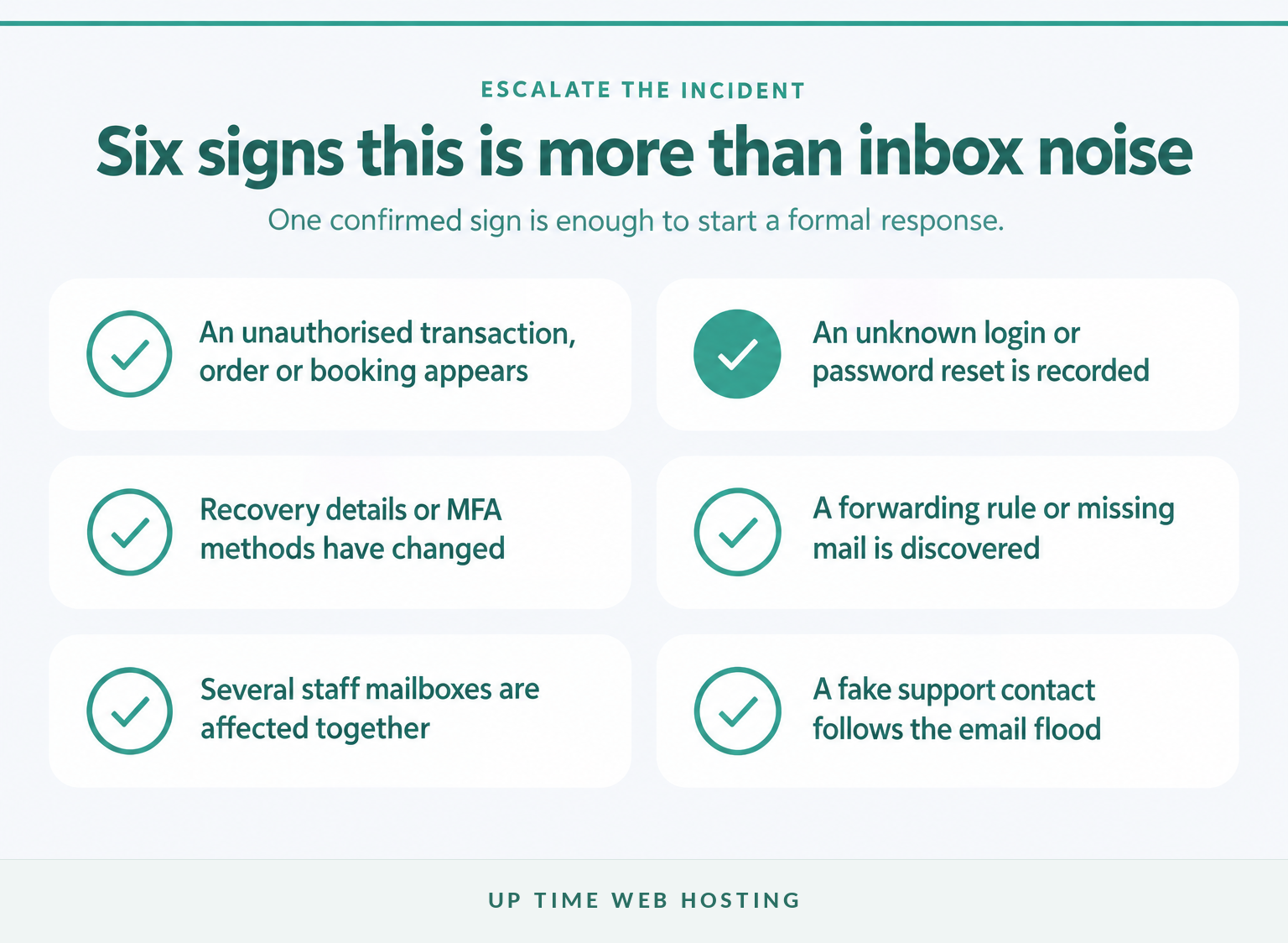
Contact the mail provider, bank, affected service and incident lead when any of these signs appear:
- An unauthorised purchase, payment, transfer or booking.
- A password, recovery address or multi-factor authentication method changed without approval.
- A login from an unfamiliar device, time or location.
- New forwarding rules, delegates, automatic replies or deleted messages.
- Several staff mailboxes receiving coordinated floods.
- Someone contacting the user through phone, messaging or collaboration software and offering to fix the email problem.
The Australian Cyber Security Hotline is available on 1300 CYBER1 (1300 292 371), 24 hours a day, seven days a week. Call 000 if there is an immediate threat to life or safety.
A targeted flood can also feel intrusive and exhausting. If distress continues after the immediate technical risk is contained, this general explanation of when talking to a mental health professional may be appropriate may help with the decision to seek support; it is not cyber-incident or crisis support.
Escalate when the flood coincides with compromise, fraud, repeated targeting or material business disruption.
What else do Australian businesses ask about subscription bombs?
These questions cover the points most likely to cause confusion during an active incident. Each answer assumes the business will preserve evidence and verify accounts outside the flooded inbox.
Is signing someone up for spam emails illegal?
Potentially, but the legal answer depends on the conduct. Australia's Spam Act 2003 restricts unsolicited commercial electronic messages and people who cause them to be sent. A deliberate campaign that impairs electronic communications may also raise Criminal Code issues. Preserve evidence and use ReportCyber; obtain legal advice for a specific dispute.
Why is my email being signed up for spam?
An address can be entered into hundreds of newsletter, registration and password-reset forms by an automated tool. The goal may be harassment, disruption or distraction from a fraudulent purchase or account change. The flood does not prove the mailbox itself was accessed, but it should trigger immediate account and transaction checks.
Can I find out who signed me up for spam email?
Usually not from the emails alone. The messages normally come from legitimate services and show their senders, not the person who submitted the form. Preserve full headers, timestamps and related account alerts, then ask the mail provider or police through ReportCyber about evidence if fraud, threats or repeated targeting are involved.
What should I do if someone is signing up for things using my email address?
Do not begin by deleting everything or clicking every unsubscribe link. Search for purchase, payment, password, login and account-change notices, verify important accounts through official apps or websites, secure the email account, preserve evidence and use a recoverable quarantine or holding folder for likely subscription messages.
Experience Microsoft 365 Business Standard for free for 30 days.
Up to 25 users with full access to email, OneDrive and Teams. Includes full versions of desktop apps of Outlook, Word, Excel, PowerPoint and more.
Try Microsoft 365
What should you do now?
Start with a focused search for financial and account alerts, then secure the mailbox before changing its filters. If the affected domain uses compatible cPanel hosting and needs domain-wide quarantine, log search and digest controls, review Up Time Web Hosting's Premium Email Spam Protection.
The safest order is simple: find the hidden alert, secure the account, preserve the evidence, then reduce the noise.