
You've got a business name, a few good reviews, and customers finding you through word of mouth and social media. Then someone asks for your website, and you send a Facebook page or say it's coming soon. That gap costs you enquiries, because a person checking you on their phone tonight wants prices, opening hours, proof you do the work, and a fast way to contact you.
A useful website for a small business isn't a brochure you launch and forget. It's a lead capture tool you plan around one action, maintain every month, and judge by calls, forms, bookings and repeat customers.
Table of Contents
- Plan Your Pages and Goals Before You Buy Anything
- How to Set Up Your Domain, Hosting and Email
- Choose a Builder, WordPress or Custom Build
- Write Pages and Legal Basics Visitors Expect
- Launch With Speed and Search Checks
- Secure, Back Up and Maintain Your Site
- Run the Go-Live Gate and Track Enquiries

Performance you can feel, backed by clients who depend on it. Read how our support and uptime create long‑term customer success.Power Your Business with Better Hosting
Plan Your Pages and Goals Before You Buy Anything
Most owners buy a domain first, then wonder what to put on the site. Do it backwards. Decide what the site must produce, then buy the technology to support it.
Start with one primary action. A plumber wants a quote request or phone call. A cafe wants a table booking. An accountant wants a discovery call. Every page should make that action obvious and easy, especially on mobile.
Starter Page Plan by Business Type
| Business type | Core pages | Main goal | Success measure |
|---|---|---|---|
| Local trade (plumber, electrician) | Home, services, service areas, quote form, contact | Quote requests and phone calls | Enquiries per month from form and calls |
| Cafe or restaurant | Home, menu, opening hours, booking page, location map | Table bookings and visits | Booking form completions per week |
| Accountant or consultant | Home, services, team, case examples, enquiry form, privacy policy | Discovery calls | Consultations booked per month |
| Photographer or creative | Portfolio gallery, packages, about, booking enquiry form | Shoot bookings | Enquiries that turn into booked sessions |
| Online retailer | Home, category pages, product pages, cart, delivery and returns | Online orders | Conversion rate and average order value |
Don't copy a competitor's page list. List only pages that help a visitor decide and act. A long blog, a gallery of stock photos and five vague service pages won't rescue a site with no clear quote form.
Three Questions Before You Write Anything
- Who's the customer on their phone at 7pm? Name the suburb, urgency and problem, such as a homeowner with a burst pipe or a parent booking dinner.
- What must they see before trusting you? Licence details, real photos, service areas, timeframes, reviews you can verify and a price guide where possible.
- What would make them leave? No phone number, a menu buried in a PDF, no opening hours, or a form asking for ten fields before a simple quote.
Trades face the same scoping problem online and on site. If you don't define the job, you'll get vague quotes that can't be compared, much like the thinking behind pricing and scoping small repair jobs.
Finish with a one-page brief. Include the page list, primary action, enquiry channel, who writes the copy and who answers submissions. Keep it to one page so you can hand it to any builder and compare quotes against the same scope.
If a quote doesn't match your one-page brief line by line, you're not comparing quotes. You're comparing sales pitches.
How to Set Up Your Domain, Hosting and Email
Set up ownership in the right order and you'll avoid most lock-in problems. Domain first, then hosting, then business email, then the website itself.
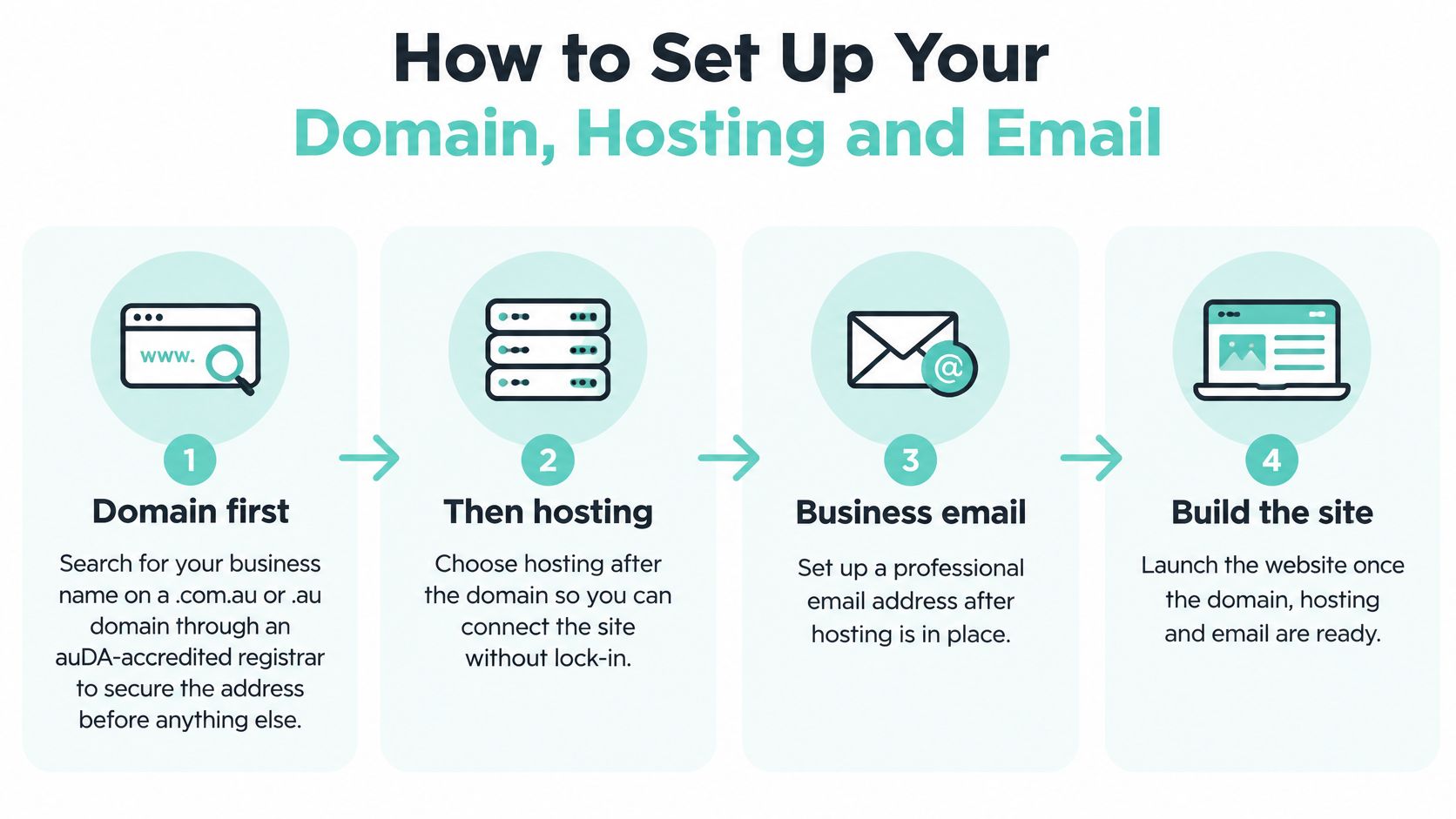
The Setup Sequence
- Search for a .com.au or .au domain through an auDA-accredited registrar. Check eligibility first, because .com.au requires an Australian presence.
- Register it in the legal name of the business using a role-based email you control. Don't let it sit in a developer's personal account.
- Store logins in a shared password manager with at least two owners. Registrar, hosting and email access shouldn't disappear when one person leaves.
- Choose hosting with Australian data centres so visitors in Sydney, Melbourne, Brisbane or Perth load pages from nearby servers. Match the plan to the job. Our Small WordPress Sites plan is designed for low-volume sites such as niche blogs, small businesses, community sites, online portfolios and information sites, and is not recommended for ecommerce sites.
- Turn on HTTPS through your host's certificate before you publish forms or take payments. Browsers warn visitors away from insecure pages, and enquiry forms shouldn't send details unencrypted.
- Create business email on your own domain and publish SPF, DKIM and DMARC records. These help legitimate mail reach inboxes and make spoofing your name harder. Our guide to business email, domain and hosting setup walks through how the pieces connect.
- Turn on auto-renewal and set a reminder 60 days before expiry. An expired domain takes your site and email offline together.
Buying domain and hosting together speeds up setup, and you can separate them later. Convenience is fine. Loss of control isn't.
The Registrant Problem to Fix Before Launch
If a developer registered your domain under their company, ask for the registrant to be changed before launch. Check the registrant name, ABN details and contact email yourself, and confirm you can log in without asking anyone for a code.
You don't own your website in any practical sense if you can't log in to the registrar, renew the domain and move the hosting without permission.
I would treat that check as essential. It's a ten-minute job before launch and a painful dispute after relationships cool.
Host your website with our 5-star rated, cPanel website hosting plans.
Super fast servers, with security included and hosted in your choice of Australian Data Center.
View cPanel Plans
Choose a Builder, WordPress or Custom Build
You've got three realistic options. Drag-and-drop builders suit simple sites with templates and no coding. Hosted WordPress with a page builder suits service businesses that need a blog, lead forms and control over search settings. A custom build suits booking systems, member portals or workflows that don't fit standard tools.

Builder, WordPress or Custom Build Compared
| Option | Best for | Main trade-off | Choose when |
|---|---|---|---|
| Drag-and-drop builder | Brochure sites with templates and no coding | Limited plugins and harder exports | Content changes weekly with no custom logic |
| Hosted WordPress with page builder | Growing service businesses wanting a blog, forms and search control | Needs regular updates and tested backups | Blog, lead forms and SEO control are required |
| Custom build | Booking systems, member portals, unusual workflows | Highest cost and dependence on one developer | Custom logic beyond forms is required |
Use one decision rule. If you'll edit content often and need no custom logic, choose a builder or WordPress. If the site must calculate, integrate, restrict access or manage members in a specific way, budget for a developer and ongoing support.
Match the Tool to the Business
Say a bakery sells twelve products and posts weekly specials. A builder with an ecommerce tier is enough, provided checkout is simple and stock is easy to update. If you're weighing that route, our explainer on what a website builder does separates the useful features from the sales claims.
A physiotherapist publishing articles, collecting enquiry forms and targeting suburb searches is usually better on WordPress. She gets control, but she also accepts updates, backups and plugin discipline. A bookkeeper who wants clients to log in, upload documents and see private records needs custom logic, not a prettier template.
For ecommerce, don't judge by product count alone. Payment options, shipping rules, stock, discounts and accounting connections create the actual workload. A small catalogue can run on a builder store or WooCommerce, while a larger store needs more resources and a proper payments setup.
Before you choose, answer three questions carefully. How often will content change? Do you need logic beyond forms? Who will maintain the site in two years when the original helper has moved on?
Write Pages and Legal Basics Visitors Expect
Apply the five-second test to every page. A visitor should know what you do, where you do it and what to do next without scrolling and guessing. If they can't, the design isn't the first problem. The copy is.

Write a home page headline that names the service and location. A plumber should write Blocked drains cleared across Western Sydney, usually the same day, not "Quality plumbing solutions for every home". The first version tells the right customer to stay.
What Each Core Page Must Say
- Service pages: State what's included, what's excluded, a typical timeframe and a price or range where you can offer one.
- About page: Use a real photo, names, qualifications and licences where relevant. Stock smiles don't build local trust.
- Contact page: Show the address, phone number and business name exactly as customers and directories should reproduce them.
- Booking or quote page: Ask only for details you need to respond well. Tell people when you'll reply and what happens next.
Privacy and Consumer Claims
If your site collects personal information through forms, email or analytics, publish a current privacy policy. The OAIC APP 1 guidance on open and transparent management of personal information says covered organisations should identify the organisation and contact details, the types of information collected and stored, collection methods and storage location, purposes, use and disclosure practices, access and correction rights, complaint procedures and likely overseas disclosures where practical.
That guidance also notes the Privacy Act generally covers organisations with annual turnover above $3 million, along with some other organisations. Check whether it covers you rather than assuming a small business is exempt. Say an accountant adds an enquiry form. Her policy should explain what contact details she collects, why she needs them, where submissions are stored, who receives them and how a customer can request access or correction.
Consumer law applies to your wording too. Claims such as Australian made, in stock or next-day delivery must be accurate when they appear. Reviews must reflect real feedback, and you should remove any testimonial you can't verify. Our guide to Australian website legal requirements helps you check the basics before publishing.
Finish with a copy checklist. Every claim needs evidence you could show a customer who asked.
Launch With Speed and Search Checks
Test mobile first with Lighthouse or PageSpeed Insights, then compare the result with field data where it exists. A strong desktop score can hide a slow experience for a customer on a phone outside your shop.
Record the home page and your two or three highest-value landing pages before you change anything. Note Largest Contentful Paint, Interaction to Next Paint and Cumulative Layout Shift, then retest after each fix so you know what helped.
Core Web Vitals Targets and First Fixes
| Metric | Good at or below | First fix to try |
|---|---|---|
| Largest Contentful Paint (loading) | 2.5 seconds | Faster server response, caching, compressed hero image |
| Interaction to Next Paint (responsiveness) | 200 milliseconds | Defer heavy JavaScript, remove unused plugins |
| Cumulative Layout Shift (stability) | 0.1 | Set image and video dimensions, avoid late-loading banners |
Fix in this order: server response and caching, image size, scripts that block rendering, then unused plugins and heavy third-party tags. Don't preload everything or install three optimisation plugins at once. You'll create conflicts and learn nothing.
The lab and field gap is real. An Australian analysis of 12,621 small-business websites found only 11.7% met a 2.5-second LCP threshold in laboratory testing, while 59.9% of sites with available real Chrome user data met the 2.5-second LCP bar. Lab-only checks can produce false confidence, so compare both.
Say a regional electrician opens his home page with a heavy hero video. I would replace it with a compressed still image, put a short clip lower on the page, and retest on a mobile connection. Our guide on how to test website performance gives you a repeatable way to run that check.
Search Basics That Matter at Launch
- Unique titles and descriptions: Give each page one clear page title, a useful meta description and one main heading.
- Image alt text: Describe the image for people who can't see it, using location or service words only where they're truthful.
- Sitemap submission: Add a sitemap and submit it through Google Search Console.
- Local consistency: Complete your Google Business Profile with the same name, address and phone number used on your site.
If you'll manage search yourself, compare tools against your actual tasks, such as keyword checks and technical audits, using SEO tool recommendations for solopreneurs as a starting shortlist. Don't buy a suite to fix a title tag.
Register your new domain name at competitive market prices including free domain add-ons like privacy, DNS Hosting, Custom Nameservers and Forwarding.
Always the best price and no nasty renewal price hikes.
Register A Domain Name
Secure, Back Up and Maintain Your Site
Start with accounts, because stolen credentials undo good design quickly. Turn on multi-factor authentication for hosting, your content management system, domain registrar and email. Use strong, unique passwords or passkeys everywhere else.
Give each person the lowest role they need. A developer may change configuration, while marketing staff only publish pages. A trades business on WordPress can require MFA for administrators, give the office manager publishing access and remove a contractor's account the day the job ends.
Updates, Backups and Email Risk
- Apply security updates promptly: Update the CMS and plugins within seven days of release, after testing on a copy of the site where possible.
- Back up automatically: Include site files, the database, configuration and form submissions, not just the visible pages.
- Test a restore: Restore to a separate environment monthly or quarterly. A backup you've never restored is only a guess.
- Protect email as part of the site: Review inboxes, forwarding rules and account access, because a compromised mailbox can reset website passwords.
Victorian Government guidance reported in Business Victoria's Cyber Month 2025 article that 47% of small-business data breaches resulted from compromised email systems and 74% of small businesses contacting IDCARE had no data-breach response plan. You don't need a large policy document. You do need named actions and phone numbers.
If the site is compromised, isolate it, reset passwords and keys, restore a clean backup and check email for attacker-created forwarding rules. Then tell affected customers, record what happened and review which control failed. Our web maintenance and support services are relevant when you need help, and developer support can help with a customer's website when their web developer is not available.
Monthly Website Maintenance Schedule
| Task | How often | Who | Done when |
|---|---|---|---|
| Apply CMS and plugin security updates | Within 7 days of release | Owner or developer | Update logged and test form still works |
| Review admin and staff accounts | Monthly, and on any staff exit | Owner | Unused accounts removed and MFA confirmed |
| Test a backup restore | Monthly or quarterly | Developer or technical contact | Clean copy restored to a separate environment |
| Send a test enquiry through every form | Monthly | Owner | Email arrives in the right inbox and spam folder |
| Check domain and SSL renewal | Every quarter | Owner | Auto-renewal confirmed and expiry dates recorded |
| Compare speed and search results to baseline | Quarterly | Owner or consultant | Core Web Vitals within target and no lost rankings |
Monthly rule: Update, test the forms, prove a backup restores, and remove access nobody needs. Skip decorative changes until those four jobs are done.
Run the Go-Live Gate and Track Enquiries
Don't point the domain at the new site because the home page looks finished. Run a short gate first and book the launch date only when every item passes.
- Confirm business details match: Check the privacy policy, ABN details and business name against the contact page.
- Track actions separately: Record calls, form submissions and bookings as separate analytics events, not just visits.
- Prove recovery works: Confirm one test restore has succeeded and automatic backups are running.
- Test every form: Send an enquiry, open the receiving inbox, reply to it and check the spam folder.
Then review enquiries monthly against the measure in your page plan. A plumber counts quote requests and calls. A cafe counts booking completions each week. Add repeat customers so you judge value, not traffic.
That matters because the CPA Australia small business survey market summary found only 44% of Australian small businesses reported generating more than 10% of revenue through online channels in 2025. A service website can still pay its way by creating phone enquiries and credibility before an offline purchase.
When you connect booking, customer or email tools, map what data moves and who owns each account. This overview of third-party integrations for business growth is useful for spotting useful connections without adding tools you won't maintain. Keep the same tracking running for the first 90 days so you can compare like with like.
Ready to put your plan on fast, Australian hosting with local support, business email and tools you can manage without coding? Visit UpTime Web Hosting to choose hosting for your small business website and launch with ownership, security and enquiry tracking sorted from day one.