You're probably dealing with the same pattern most agencies hit once they move past a handful of client sites. One plugin update needs checking on three stores. A contact form fails on a lead-gen site. A client wants a report by this afternoon. Someone forgot which sites still need backups verified. By the time you've logged in everywhere, half the day is gone.
That's the main problem with managing multiple WordPress sites. It isn't just technical overhead. It's context switching, risk, and the constant sense that one missed update could turn into an outage, a malware clean-up, or an awkward client call.
The good news is that chaos usually comes from a weak operating model, not from WordPress itself. Once you choose the right site structure, centralise management, automate the repetitive work, and keep Australian hosting realities in view, the workload becomes much more predictable. That matters even more for local agencies juggling mixed hosting environments, compliance expectations, and client sites spread across Sydney, Melbourne, Brisbane, Perth, and offshore providers.
Table of Contents
- From WordPress Chaos to Centralised Control
- The Foundational Choice Multisite vs Independent Sites
- Choosing Your Central Management Dashboard
- Automating Core Maintenance for Peak Efficiency
- Proactive Security and Performance at Scale
- Essential Workflows for Australian Web Agencies
- Conclusion Your Scalable WordPress Management System

Performance you can feel, backed by clients who depend on it. Read how our support and uptime create long‑term customer success.Power Your Business with Better Hosting
From WordPress Chaos to Centralised Control
The struggle doesn't come from a scarcity of tools. Instead, the issue arises because every site is managed as a one-off. Different plugin stacks, varying update habits, inconsistent backup rules, and diverse client reporting methods all introduce friction.
Once that happens, small jobs start taking too long. A routine plugin update turns into manual checking across multiple dashboards. Security review becomes reactive instead of scheduled. Client reporting gets built from screenshots and notes instead of system data.
Practical rule: if your team needs to remember what to do for each site, your process is too loose.
A better setup starts with central control. That doesn't mean every site needs to live on one server or one WordPress install. It means your team should manage updates, backups, uptime checks, scans, access, and reporting from one repeatable operating model.
The agencies that do this well usually share a few habits:
- One source of truth: They use a central dashboard for site status, updates, backup state, and alerts.
- A fixed maintenance cadence: They don't update randomly. They use windows for checks, backups, and deployment.
- Safe change management: They test risky changes before pushing them live.
- Clear client boundaries: Each client site stays isolated enough to avoid shared-risk messes.
- Local thinking: They account for Australian hosting latency and data handling, not just generic global advice.
That's the difference between firefighting and running a proper maintenance system. If you're trying to work out how to manage multiple WordPress sites without burning hours every week, centralisation is the shift that makes everything else possible.
The Foundational Choice Multisite vs Independent Sites
The first big decision is structural. Do you run sites under WordPress Multisite, or do you keep them as independent WordPress installs and manage them through a central dashboard?
For agencies with unrelated client sites, that choice usually decides whether management gets simpler or more fragile.
Why Multisite looks simpler than it is
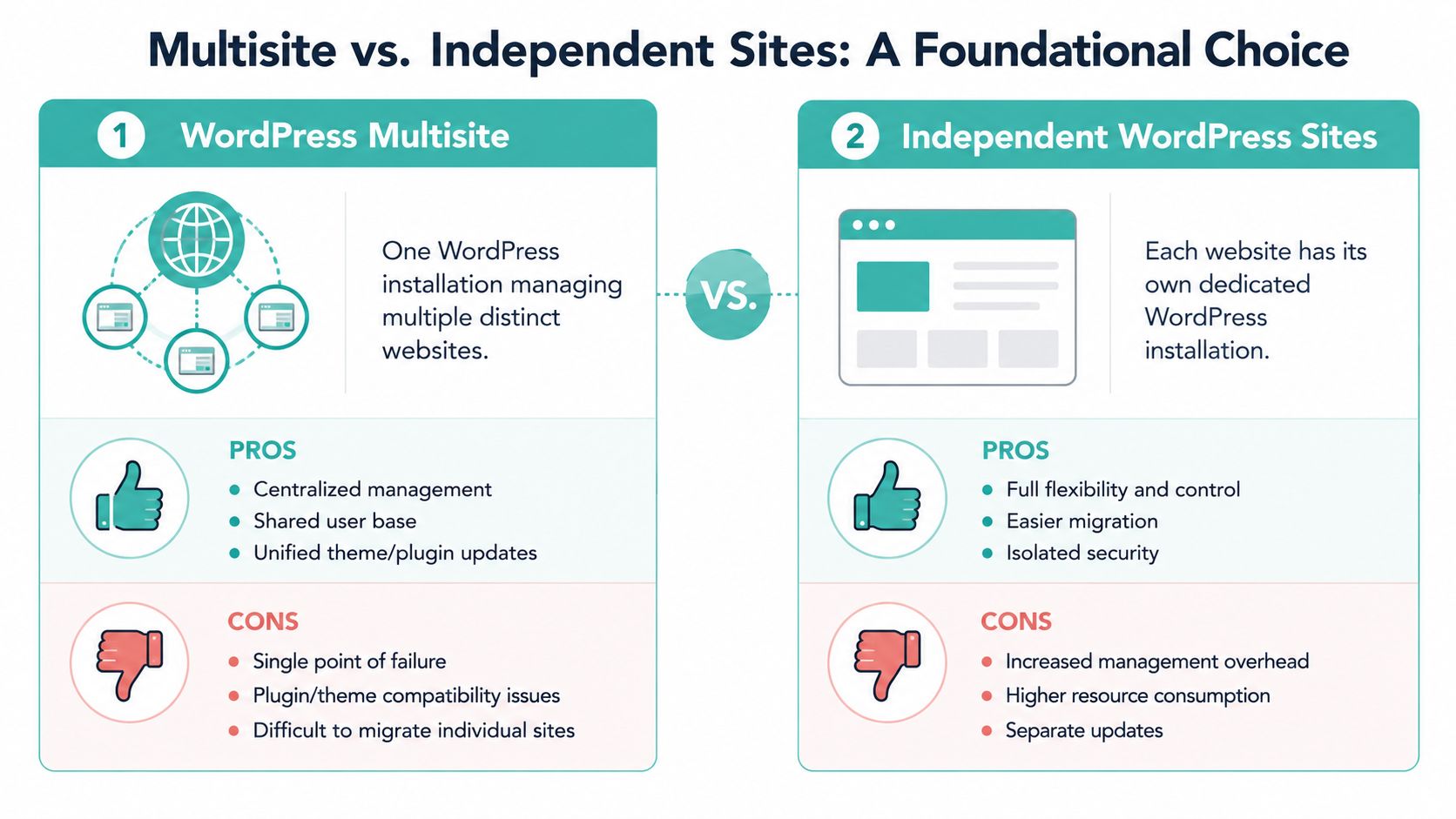
Multisite sounds attractive because it puts multiple sites inside one WordPress network. You get one core install, a shared user framework, and central plugin or theme control. For connected projects, such as a franchise group or internal business network, that can make sense.
For agency portfolios, it usually doesn't.
When clients sit across different hosting providers, distinct billing setups, separate compliance needs, and custom plugin stacks, Multisite creates coupling where you don't want it. A plugin conflict, database issue, or bad deployment can affect the wider network. Migrating one client away can also become more awkward than it should be.
There's also an Australian compliance angle that too many generic guides skip. The local concern isn't only technical convenience. It's whether client data should sit in a shared application and database model at all. If you're reviewing options, it's worth understanding the trade-offs in WordPress Multisite hosting and setup before you treat it as a default answer.
Why independent sites fit agency work better
Independent installs are less elegant on paper and far better in practice for most agencies. Each site can have its own hosting, plugin stack, access controls, backup logic, and migration path. If one site breaks, the rest don't inherit the problem.
That matters when clients aren't related to each other and don't share risk tolerance. A WooCommerce site, a brochure site, and a membership site shouldn't be forced into one technical container just because they all use WordPress.
A central management tool solves the overhead that independent installs would otherwise create. The model becomes powerful through its ability to keep isolation at site level while still allowing maintenance from one place. For agencies managing client sites across different hosting providers, WordPress Multisite isn't viable. A management tool for independent sites delivers a 94% success rate in bulk update stability when updates are first tested on staging environments according to Pantheon's guide to managing multiple WordPress sites.
Independent installs give you cleaner failure boundaries. That's one of the few decisions that improves both technical resilience and client management.
If you're serious about how to manage multiple WordPress sites in an agency setting, this is the foundation I'd choose almost every time. Multisite works for tightly related properties. Independent sites work for real-world client portfolios.
Host your website with our 5-star rated, cPanel website hosting plans.
Super fast servers, with security included and hosted in your choice of Australian Data Center.
View cPanel Plans
Choosing Your Central Management Dashboard
Once you've committed to independent installs, the next question is where your team works each day. You need one dashboard that gives you update visibility, backups, uptime checks, access shortcuts, reporting, and enough control to avoid doing everything site by site.
That's the point where agencies usually compare self-hosted management against SaaS management.
Self-hosted versus SaaS
A SaaS dashboard is easier to start with. You sign up, connect sites, and get going quickly. That convenience is real, especially for small teams that want a lighter setup.
The trade-off is cost creep and less control. Per-site pricing sounds manageable until you add the extras clients come to expect, such as white-label reports, uptime monitoring, or deeper maintenance visibility. For an Australian agency managing 50 WordPress sites, a self-hosted tool like MainWP costs about $220 per year, while SaaS alternatives can cost $1,200–$1,800 annually because of per-site fees, based on Ben Ryan's comparison of WordPress management dashboards.
That difference matters because maintenance margins disappear fast when tooling costs rise with every site you add.
A self-hosted dashboard also gives you more control over where your management layer lives. For Australian agencies, that can matter for data handling, speed, and operational independence. If your business already prefers infrastructure you control rather than another external dashboard dependency, the self-hosted model fits better.
What I'd choose for a mixed agency portfolio
For a portfolio spread across different hosts and different client types, MainWP is the practical choice I'd lean toward. Not because it's trendy, but because the pricing structure is easier to live with and the operating model suits agency work. You're not paying a growing tax every time you onboard another client site.
The economics become even clearer when clients want routine reports, security checks, and more than bare-minimum update management. A flat annual tool cost is easier to budget than a stack of add-ons.
A few selection criteria matter more than feature lists:
| Decision factor | What to prefer |
|---|---|
| Pricing model | Predictable annual cost rather than expanding per-site extras |
| Control | Self-hosted if your agency wants tighter operational ownership |
| Client mix | Tools that handle unrelated sites cleanly |
| Reporting | White-label or client-ready summaries without manual assembly |
| Scalability | A dashboard that still feels efficient when the site count grows |
If you're comparing management environments alongside deployment tooling, it also helps to understand the difference between WordPress Toolkit and Softaculous workflows, because installation and maintenance convenience aren't always the same thing.
The wrong dashboard makes every recurring task slightly slower. The right one becomes the control plane your team hardly thinks about because it operates smoothly.
Automating Core Maintenance for Peak Efficiency
Most agencies don't need more effort. They need fewer manual decisions. That's what automation fixes.
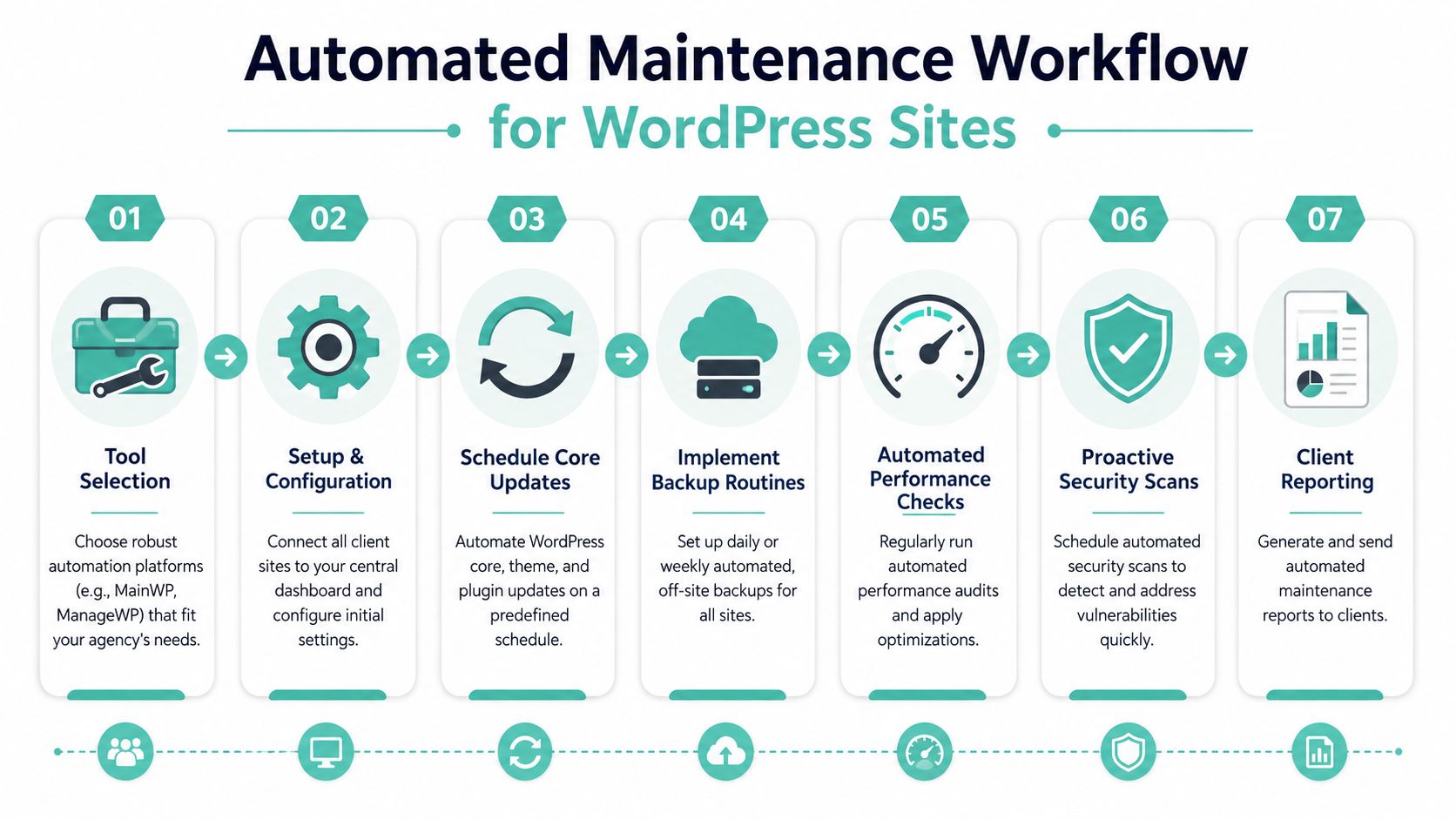
The strongest maintenance setups use a standard cycle instead of ad hoc updates. Teams know what runs daily, what runs weekly, what gets audited monthly, and what always happens before a change goes live. That removes the habit of “we'll get to it when we can”.
The maintenance rhythm that actually works
The pattern I've seen work best is simple. Daily monitoring, weekly update windows, and monthly full audits. That gives enough frequency to catch problems early without forcing your team into constant interruption.
Australian agencies that implement standardised maintenance cycles like daily monitoring, weekly updates, and monthly audits see an 89% operational efficiency gain, 67% less human error, and a 52% cut in incident response time, according to Raidboxes' guide for agencies managing multiple websites.
Those gains make sense because standardisation removes improvisation. You're not asking a technician to remember the next step for every site. The system already defines it.
A practical weekly flow usually looks like this:
Daily checks
Review uptime alerts, malware notifications, and any obvious anomalies. Most days, this should only require exception handling.Weekly maintenance window
Run backups first, then apply bulk plugin and theme updates in batches. Check critical site functions after deployment.Monthly review
Audit performance, security posture, unused plugins, and client-facing issues that need escalation or recommendation.
Operations note: Automating alerts is only useful if someone owns the response path. A silent alert queue is just delayed risk.
A practical automation checklist
The best systems combine a management dashboard with hosting-level safety nets. Dashboard automation handles update orchestration, visibility, scans, and reporting. Hosting-level backups and restore options give you a fallback when a deployment goes wrong.
Use this checklist as a baseline:
- Automate uptime watching: Set alerting rules so the team only gets pulled in when a site needs attention.
- Back up before change: Never run bulk updates without an automated backup step attached to the job.
- Batch by risk: Update low-risk brochure sites together. Handle WooCommerce, memberships, and custom integrations in smaller groups.
- Trim plugin sprawl: Keep each site to essential plugins only. Bloated stacks are harder to secure and harder to update safely.
- Report from the system: Generate maintenance summaries from the dashboard instead of building them manually.
For agencies wanting a cleaner process around routine support work, a structured WordPress maintenance service model helps turn technical tasks into a repeatable service instead of a pile of one-off jobs.
If you're working out how to manage multiple WordPress sites without losing your week to repetitive admin, this is the section to take seriously. Automation doesn't replace judgment. It removes avoidable labour so your judgment can be used where it matters.
Proactive Security and Performance at Scale
A stable maintenance routine keeps sites current. It doesn't automatically make them secure or fast. That takes another layer of discipline.
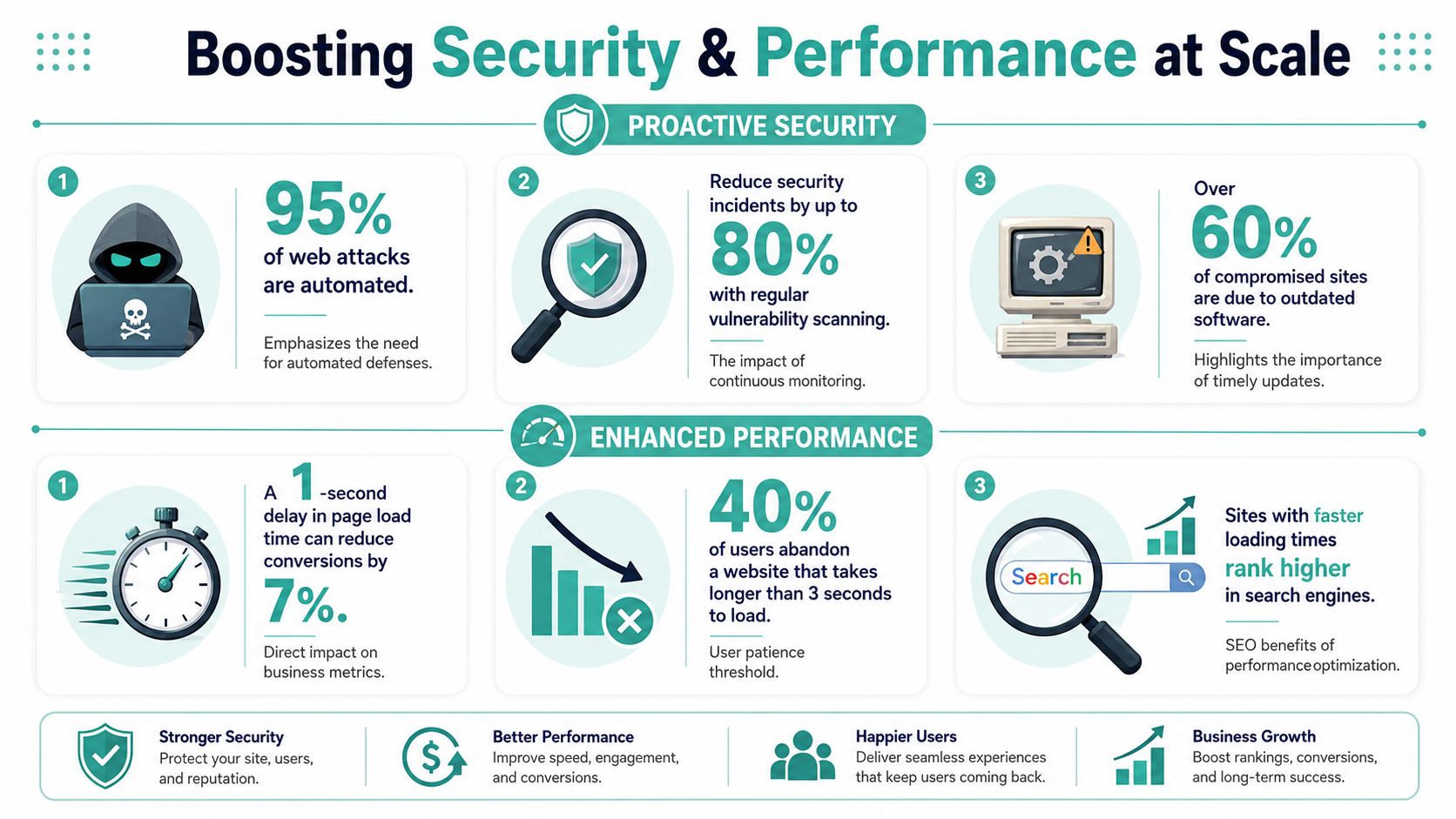
At portfolio scale, security and performance can't depend on someone remembering to log into each site and inspect it manually. You need a central process that finds weak points early, applies the same standards everywhere, and flags exceptions before clients notice anything is wrong.
How to run security across a portfolio
The first rule is straightforward. Don't treat security as a plugin install and forget about it. Treat it as an ongoing review loop.
That means regular scans across all connected sites, controlled update approval for sensitive plugins, and clear permissions for who can change what. In larger teams, role-based access stops well-meaning people from pushing risky plugin or payment gateway changes without review.
For broader reading on handling application risk and protecting user data, that resource is useful because it frames security as process and governance, not just tooling.
A practical agency security stack usually includes:
- Scheduled malware scans: Run them centrally so you can spot patterns across sites.
- Role-based access: Limit who can install, update, or deactivate critical components.
- Plugin restraint: Don't let every site accumulate unnecessary extensions.
- Update triage: Not every plugin should auto-update without context.
Regular security scanning with a tool like MainWP can reduce malware incidents by 74% on Australian-hosted sites. That gives agencies a strong reason to make scanning routine rather than occasional in Australian environments.
How to improve performance without manual babysitting
Performance work gets easier when you standardise the stack. If your sites use wildly different caching methods, image handling habits, and hosting locations, every optimisation becomes bespoke.
For Australian audiences, local performance depends heavily on where the site and its supporting systems live. In Australian benchmarks, using a CDN with WP Rocket caching improved local load times by 40%, moving from 3.2s to 2.0s. That's a meaningful improvement for agency portfolios serving local visitors.
A central dashboard helps again by enabling you to spot lagging sites, identify the worst-performing installations, and push a consistent performance baseline across the portfolio instead of fixing one complaint at a time.
A useful performance standard might include:
| Area | Baseline agency rule |
|---|---|
| Caching | Use one approved caching method across most sites |
| CDN | Enable it where local delivery benefits matter |
| Audits | Review performance monthly, not only after complaints |
| Plugin load | Remove duplicate or non-essential functionality |
| Hosting location | Prefer Australian infrastructure for Australian traffic |
Faster sites usually come from fewer moving parts, better caching, and infrastructure that matches the audience location.
If security is part of your managed service offer, a dedicated WordPress security approach for hosted sites also makes it easier to keep the baseline consistent across clients.
Register your new domain name at competitive market prices including free domain add-ons like privacy, DNS Hosting, Custom Nameservers and Forwarding.
Always the best price and no nasty renewal price hikes.
Register A Domain Name
Essential Workflows for Australian Web Agencies
The best agency systems aren't just technical. They're operational. Good teams know how a change moves from review to testing to production, who signs off, what gets documented, and what the client sees afterwards.
That's where many WordPress portfolios either become profitable to manage or gradually turn into a support burden.

A realistic agency workflow
A clean weekly workflow often looks like this in practice. The team reviews pending updates, pushes risky items to staging first, tests checkout or form flows, then schedules production deployment in a maintenance window. Once complete, the dashboard generates a client-ready report.
That process sounds ordinary. It's supposed to. Reliable agencies win by making ordinary work repeatable.
The staging step matters more than is often admitted. If a plugin update breaks a live site, the issue usually isn't WordPress. It's the absence of a release process. The earlier section covered the value of testing before production. In day-to-day agency work, this is what stops a maintenance round from turning into emergency support.
A few habits separate organised teams from overloaded ones:
- Use staging for anything non-trivial: Especially stores, bookings, memberships, and custom-coded sites.
- Restrict access sensibly: Clients shouldn't have the same permissions as the people maintaining the stack.
- Send reports automatically: Clients stay calmer when they can see what was done.
- Keep ownership clear: Each site or batch needs an accountable person.
Where local infrastructure changes the day-to-day
Australian agencies run into a problem global guides rarely address. Management itself becomes slower when the dashboard or client sites are hosted offshore. Bulk updates drag, scans take longer, and the admin workflow feels heavier than it should.
A key overlooked issue for Australian agencies is offshore management latency. 68% report slowdowns in bulk updates and scans due to latency, and the issue is mitigated by using local Australian hosting clusters for both the management dashboard and client sites, as noted by Temerity Digital's article on managing multiple WordPress sites.
That lines up with what many local teams already feel. Australian hosting decisions affect agency operations, not just front-end visitor speed. If your staff are waiting on dashboards, backups, and scans all day, that friction compounds into real labour cost.
For businesses packaging this into a support offer, a structured web maintenance and support workflow helps align the technical process with client communication and recurring service delivery.
Conclusion Your Scalable WordPress Management System
Managing a large WordPress portfolio doesn't need to feel messy. The shift comes from a handful of sound decisions made early and applied consistently.
Keep unrelated client sites independent. Use one dashboard as your operating layer. Automate maintenance on a fixed rhythm. Treat security and performance as portfolio-wide disciplines, not occasional clean-up tasks. For Australian agencies, factor in local hosting latency and data handling from the start instead of relying on generic overseas advice.
That combination changes the job. You stop logging into endless dashboards to chase individual tasks. You start running a system that surfaces exceptions, protects client sites, and gives your team room to focus on higher-value work.
If you've been trying to work out how to manage multiple WordPress sites efficiently, this is the model worth building. It scales better, it's easier to support, and it creates a more professional service for clients.
If you want the hosting layer beneath that system to be local, fast, and predictable, UpTime Web Hosting is worth a close look. Their Australian infrastructure, security features, backup protections, and transparent pricing fit the way agencies and growing businesses manage WordPress portfolios.