You've done the hard part. The products are loaded, the photos look sharp, the checkout works in testing, and the store is finally ready to take orders. Then launch week arrives and the site slows down the moment traffic picks up. Cart pages hang. Admin feels sluggish. A customer in Perth says the site feels clunky on mobile, while someone in Sydney gets a timeout during payment.
That usually isn't a design problem. It's a hosting problem.
For Australian businesses, that choice matters more than many owners realise. Australia's online retail spend reached about A$69 billion in 2024, and 9.6 million people made online purchases in the 12 months to June 2024, according to the Australia Post and ABS figures referenced here. If you're building on WordPress and WooCommerce, you're serving a local market that already expects fast pages, responsive carts, and checkout reliability.
If you're still sorting out the business side as well as the website, this practical guide for Australian business owners is worth bookmarking. It covers setup basics that often get overlooked when owners rush straight to branding and web design.
The other part to get right early is how online selling works locally. This overview of online selling in Australia is useful because it frames hosting as one piece of a bigger operational setup, not a standalone tech decision.
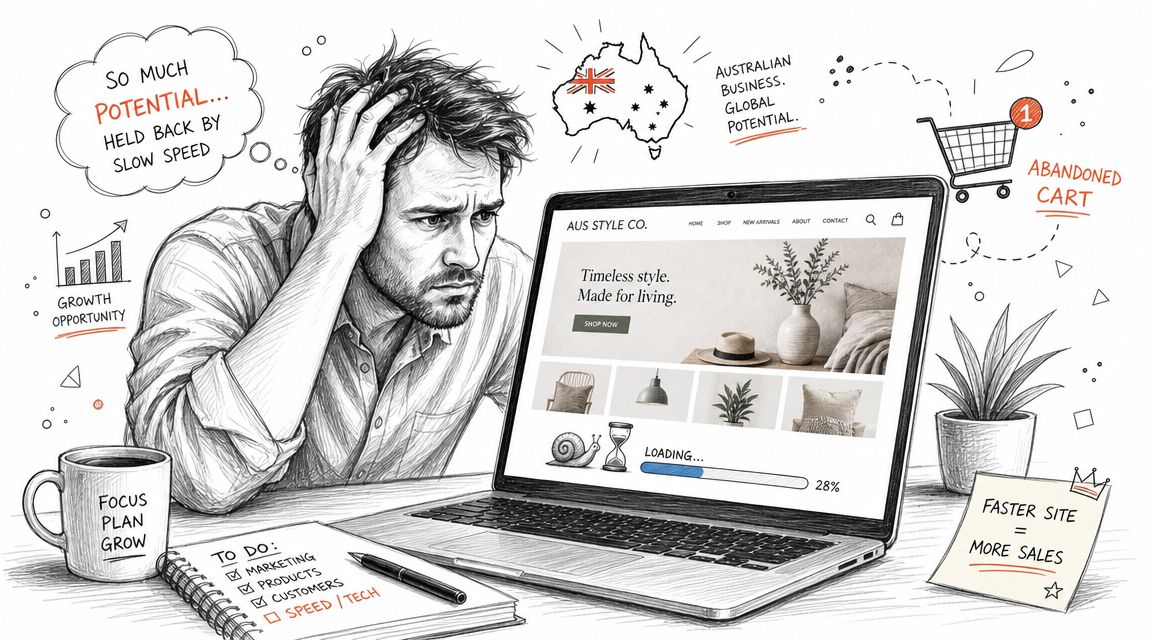
Table of Contents
- Setting Up Your Australian Online Store for Success
- Why WordPress and WooCommerce Remain the Top Choice
- Core Technical Pillars of Ecommerce Hosting
- Decoding Hosting Plans for Your Business Size
- Beyond the Price Tag Analysing True Hosting Costs
- Your Ecommerce Launch and Optimisation Checklist
- Frequently Asked Questions about Ecommerce Hosting

Performance you can feel, backed by clients who depend on it. Read how our support and uptime create long‑term customer success.Power Your Business with Better Hosting
Setting Up Your Australian Online Store for Success
A lot of small business owners start with the wrong priority order. They spend weeks on branding, product copy, shipping settings, and category structure, then treat hosting like a cheap utility at the end. That usually works right up until the first sale campaign.
A typical example is a boutique retailer running a weekend promotion after building a visually polished WooCommerce store. The homepage loads well enough in the office. But under real customer traffic, product filters become sticky, the cart takes too long to refresh, and checkout stops feeling trustworthy. Customers don't file technical reports. They leave.
Practical rule: If the cart, checkout, and wp-admin feel slow before a campaign, they won't improve when traffic arrives.
For an Australian store, local conditions matter. You're often serving customers across Sydney, Melbourne, Brisbane and Perth, with a large share of visits coming from mobile devices on mixed network quality. Hosting that looks acceptable in a generic demo can struggle once product images, payment plugins, shipping rules, and email notifications all fire together.
Three things usually separate a stable store from a frustrating one:
- Local responsiveness: The site has to feel fast for Australian customers, not just in overseas test locations.
- Operational reliability: Updates, backups, restores, and security checks need to work without drama.
- Room to grow: Campaign bursts, seasonal peaks, and catalogue expansion shouldn't force an emergency rebuild.
That's why the best WordPress hosting for ecommerce isn't the cheapest plan with one-click install. It's the setup that keeps the store usable when customers are buying.
Why WordPress and WooCommerce Remain the Top Choice
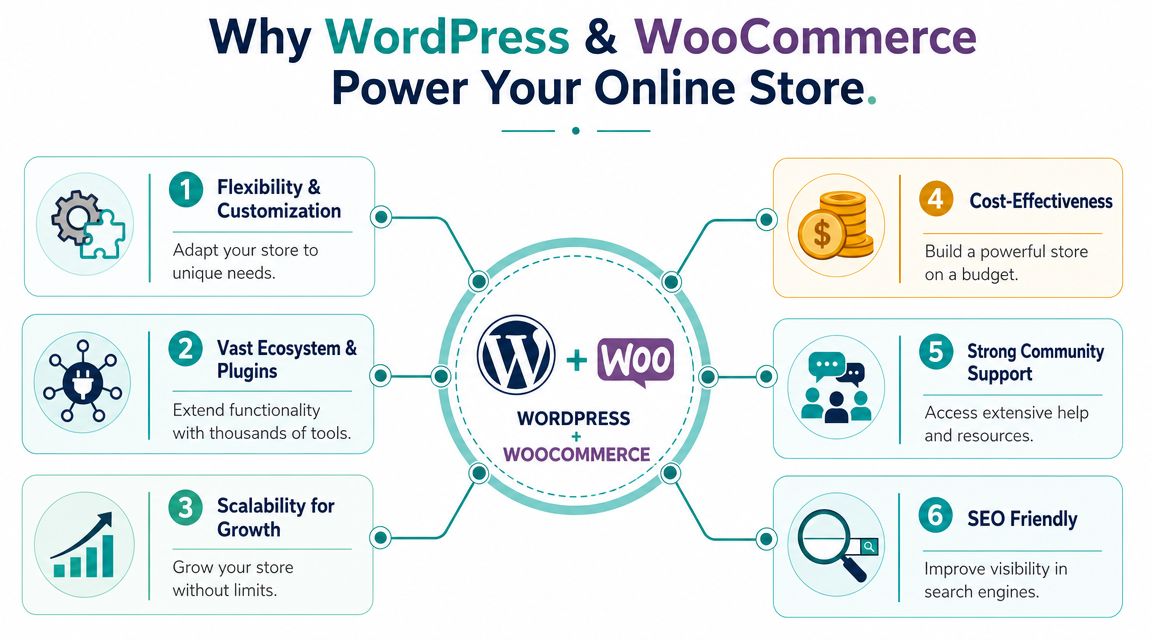
WordPress and WooCommerce still make the most sense for many Australian businesses because they give owners control without locking the store into a rigid commercial platform. You can shape the store around the business, not the other way around.
That matters when you need Australian shipping logic, local payment methods, custom checkout fields, wholesale pricing, booking add-ons, or content-heavy category pages that support SEO and sales at the same time.
Why merchants keep coming back to WordPress
WordPress has scale and maturity on its side. W3Techs has repeatedly reported that WordPress powers more than 40% of all websites globally, as summarised in this WordPress hosting and ecommerce market overview. For ecommerce operators, that long history matters because it's shaped the standard feature set people now expect from decent WordPress hosting, including staging, automatic updates, backup and restore workflows, and stronger security controls.
A mature ecosystem solves practical problems faster. If you need product bundles, local pickup, abandoned cart recovery, invoice generation, or granular role management, there's usually already a stable plugin path. If you need a custom build, most Australian developers already know the stack.
The same applies to design. You can start with a clean theme, keep the catalogue simple, and only add complexity when the business needs it. That's far easier than trying to force a rigid hosted platform into serving wholesale buyers, retail customers, and content marketing from one storefront.
For a broader business case, this explanation of why WordPress is the best platform for your business website is a useful companion read.
What works better than locked-down platforms
The main advantage isn't just flexibility. It's ownership.
With WordPress and WooCommerce, you control the content structure, plugin stack, checkout flow, and migration path. That gives you options when the business changes. A florist adding local delivery rules has different needs from a trade supplier introducing account pricing. On WordPress, both can adapt without rebuilding from zero.
A good WooCommerce setup feels boring in the best possible way. Products publish cleanly, orders flow through, plugin changes are tested safely, and no one is fighting the platform.
That said, WordPress only performs well when the hosting is built for it. A bloated plugin stack on weak shared hosting creates the exact problems owners blame on WooCommerce itself. In practice, most stores that run smoothly use hosting with server-level caching, safer update workflows, and stronger security defaults rather than bare-bones commodity plans.
Host your website with our 5-star rated, cPanel website hosting plans.
Super fast servers, with security included and hosted in your choice of Australian Data Center.
View cPanel Plans
Core Technical Pillars of Ecommerce Hosting
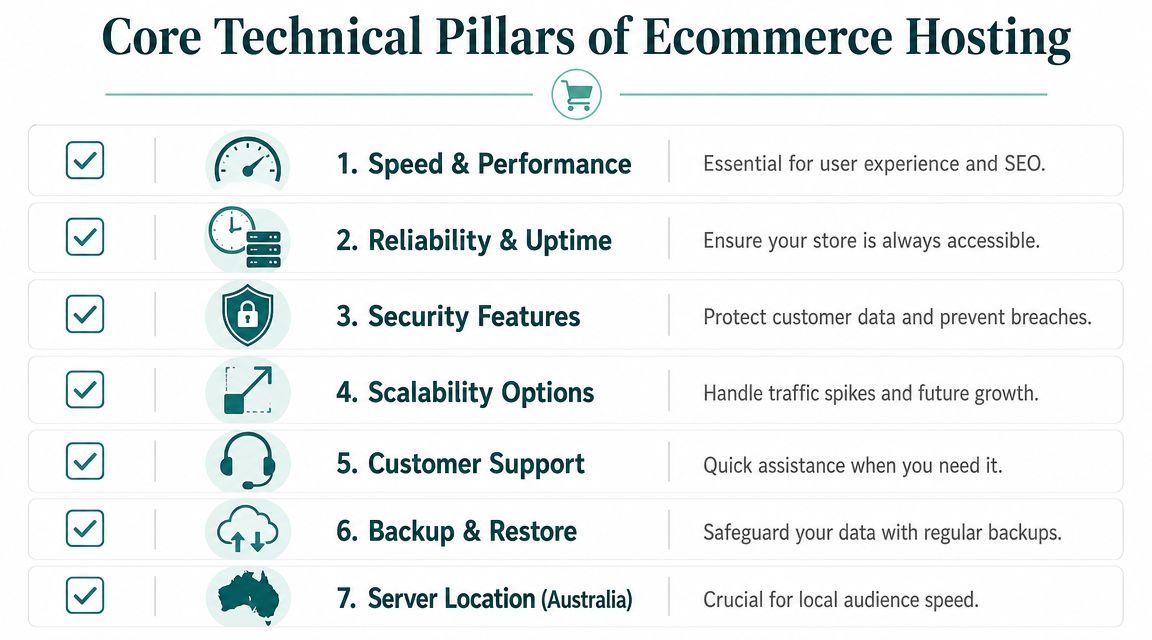
“Best” is too vague to be useful. For ecommerce, hosting needs to be judged against a small group of essential operational requirements. If any one of them is weak, the store becomes harder to manage and riskier to grow.
Here's a practical early comparison.
Quick comparison table
| Pillar | What to look for | What usually fails on weak hosting | Why it matters for Australian stores |
|---|---|---|---|
| Performance | Local server presence, LiteSpeed or equivalent, caching, CDN support, SSD storage | Slow cart refresh, delayed category pages, sluggish wp-admin | Customers expect responsive browsing across metro and regional locations |
| Security | Malware scanning, firewall protection, SSL, hardened WordPress environment | Infections, spam abuse, compromised plugins, checkout distrust | Stores handle customer data, logins, and payment integrations |
| Backups | Encrypted off-site backups, simple restore process, routine scheduling | Backups that exist but are hard to restore quickly | Recovery speed matters when orders are in flight |
| Scalability | Resource headroom, flexible plan upgrades, traffic handling | Site instability during promos or catalogue growth | Retail traffic is uneven and campaign driven |
| Support | Local support, WordPress familiarity, ticket and phone access | Long delays and generic scripts | Ecommerce issues usually need action, not copy-paste replies |
| Monitoring | Proactive checks and service visibility | Downtime noticed by customers first | Prevention is cheaper than recovery |
This is also where managed and semi-managed WordPress hosting usually beats low-cost shared plans. As noted in this comparative WordPress hosting review, expert shortlists for WooCommerce repeatedly favour managed platforms with staging, server-level caching, and managed security hardening. The same review says HostingStep reported WordPress.com as the top performer among 34 hosts in comparative 2026 testing, with other recommended names also concentrated in managed or semi-managed options rather than basic shared hosting.
Performance starts with local delivery
For a WooCommerce store, performance is not just a homepage score. It's how quickly category filters respond, whether the cart updates cleanly, and how long customers wait between pressing “Place order” and seeing confirmation.
Australian stores should prioritise infrastructure that keeps delivery local where possible, supports caching properly, and avoids overloaded shared environments. LiteSpeed-based stacks generally help here because they reduce processing overhead and play well with WordPress caching workflows. SSD storage also matters because ecommerce sites read and write constantly through orders, sessions, search, and plugin operations.
A server built for WordPress makes a practical difference in three areas:
- Catalogue browsing: Product archives, filters, and search don't feel sticky.
- Checkout flow: Session handling stays responsive when users change shipping or coupon details.
- Admin speed: Staff can process orders, edit products, and manage content without waiting on every click.
If you want a reference point for the kind of environment WordPress stores benefit from, this overview of a WordPress server setup shows the sort of stack features worth checking before you choose any host.
Security has to protect the checkout, not just the homepage
Many owners hear “secure hosting” and think that means an SSL certificate alone. That's only the visible part.
A real ecommerce security setup includes malware scanning, DDoS-aware firewalling, isolated account controls, hardened WordPress settings, and update discipline. The weak point often isn't the server itself. It's an outdated plugin, a poorly maintained theme, or a login exposed for too long without proper safeguards.
What works in practice is a layered approach:
- Server-side filtering: Stops a lot of bad traffic before WordPress has to process it.
- Routine scanning: Catches compromised files or suspicious changes early.
- Safe update workflows: Lets you test plugin or theme changes before pushing them live.
- Least-complex stack: Fewer plugins, fewer surprise interactions, fewer attack paths.
If a host advertises security but leaves cleanup and recovery entirely to the customer, that “cheap” plan can become expensive very quickly.
For WooCommerce specifically, protect the paths that generate revenue. Login pages, account areas, carts, checkouts, contact forms, and transactional email flows deserve attention first. A polished homepage won't save a store if order notifications fail or the checkout starts throwing errors after an untested plugin update.
Backups need to be usable, not just advertised
A backup only counts if it can be restored cleanly under pressure.
Many hosting plans disappoint in this regard. They mention backups in the headline features, but restores are slow, manual, limited, or charged separately. For ecommerce, you need off-site backups, sensible frequency, and a restore process that won't turn a trading outage into a full-day problem.
A practical backup standard for a small or mid-sized store looks like this:
| Backup question | Good answer |
|---|---|
| Where are backups stored | Off-site and encrypted |
| How often do they run | Nightly as a baseline |
| Can you restore quickly | Yes, without a drawn-out support process |
| Can you recover after a bad plugin update | Yes, with minimal store downtime |
| Are backups part of the plan or an add-on | Included is usually better for TCO |
Backups also need context. If your store changes constantly, database integrity matters just as much as file recovery. Product edits, order records, customer accounts, and shipping updates all sit in the database. That's why a backup system has to capture the whole application, not just the theme files.
Scalability is about surviving busy days calmly
Most small businesses don't need enterprise infrastructure. They do need a hosting setup that won't buckle when an EDM lands, a social post performs unexpectedly well, or a seasonal promotion drives a burst of concurrent users.
Scalability is often misunderstood as a future issue. It isn't. A modest store can still trigger spikes that expose weak resource limits, especially when WooCommerce, search, image-heavy layouts, and third-party scripts all run together.
Signs a plan won't scale well include:
- Tight hidden limits: CPU, memory, or process caps that aren't obvious at signup.
- No staging path: Changes have to be tested live.
- No upgrade breathing room: Every growth step forces a migration.
- Poor peak handling: The site becomes unstable during promotions.
The best WordPress hosting for ecommerce gives you headroom before you desperately need it. That doesn't mean overpaying for a huge plan. It means choosing a stack that's designed to cope with real store behaviour rather than brochure-level traffic.
Decoding Hosting Plans for Your Business Size
Store owners often buy the wrong plan for one of two reasons. They either underbuy because the cheapest option looks safe enough, or they overbuy because they assume ecommerce must mean premium everything from day one.
The right plan depends less on how ambitious the business feels and more on how the store operates. Product count, image weight, plugin load, admin activity, campaign schedule, and checkout volume all matter.
A managed option built for Australian stores is usually the easiest starting point. This page on managed WordPress hosting in Australia gives a good benchmark for the kind of features owners should expect when they want less server babysitting and more business focus.
UpTime Hosting Tiers for Australian Ecommerce Businesses
| Feature | Startup Store (WordPress Basic) | Growing Business (WordPress Business) | Established Store (WordPress Premium) |
|---|---|---|---|
| Best fit | New store with lean catalogue and light plugin stack | Active SME store with regular campaigns and broader catalogue | Busy WooCommerce store with heavier traffic and operational complexity |
| Typical use | Launching, validating products, building search presence | Scaling orders, adding marketing tools, more admin users | Running promotions, advanced plugins, larger catalogue and team workflows |
| Resource expectations | Keep the build simple and efficient | More headroom for plugins, media and admin activity | Higher tolerance for busy periods and demanding WooCommerce tasks |
| Recommended approach | Prioritise clean theme, image compression, minimal plugins | Add staging discipline and stronger monitoring habits | Build around performance hygiene, tested updates, and operational resilience |
| Main risk if undersized | Sluggish admin and cart as features grow | Campaigns expose plan limits | Peak periods create instability and support pressure |
Startup store
A startup store doesn't need the biggest plan. It needs the cleanest one.
If you're launching with a focused product range, a lightweight theme, and a modest plugin set, a basic WordPress ecommerce plan is usually enough. This is common for service businesses adding online payments, niche retail launches, or local brands testing demand before expanding inventory.
What works best at this stage:
- Keep the stack lean: Use only core plugins you understand and need.
- Optimise media early: Resize and compress product images before upload.
- Avoid theme bloat: Fancy homepage effects often hurt more than they help.
What usually goes wrong is trying to simulate a large retailer too early. Owners install page builders, animation add-ons, wishlist tools, abandoned cart systems, multiple analytics plugins, and complex shipping logic before the store has proven its offer.
Growing business
A growing SME store needs more than extra storage. It needs operational breathing room.
This is the stage where a business starts running regular email campaigns, adding more products, relying on search traffic, and involving multiple staff members in order processing or content updates. WooCommerce itself is still fine here, but the hosting environment must cope with more background activity and more frequent changes.
Good signs you've moved into this tier:
- The wp-admin slows down during trading hours.
- Plugin updates now feel risky.
- Product imports, backups, and campaign periods affect site responsiveness.
- You need a safer process for testing changes before they hit live checkout.
The moment you say “let's just make the change on the live site after hours” is usually the moment you've outgrown an entry-level setup.
A business-tier plan suits stores that are no longer experimenting. They're trading, iterating, and depending on the site every week.
Established store
An established store needs hosting that supports the business as an operating system, not just a website.
At this level, the cost of instability rises. Staff lose time, orders stall, support queues grow, and every failed checkout creates frustration you may never hear about directly. Stores with larger catalogues, more plugin integrations, and regular marketing bursts need premium-level resources and stricter process around updates, backups, and change management.
This type of plan usually makes sense when the store has:
- Broader operational load: More products, categories, users, and integration points.
- Revenue-critical uptime needs: The business depends on uninterrupted trading.
- Regular change cycles: New campaigns, landing pages, plugin adjustments, and content releases.
For these stores, the plan should support staging, reliable backups, stronger security controls, and enough headroom that a good sales day doesn't become a hosting incident.
Beyond the Price Tag Analysing True Hosting Costs
Cheap hosting looks attractive because the cost is visible and immediate. The expensive part is everything that appears later.
For Australian ecommerce, total cost of ownership matters more than promo pricing. This AU-focused analysis of WordPress hosting for ecommerce makes that point clearly. It highlights operational costs owners need to think about, including GST-inclusive pricing, paid add-ons, resource limits, backup restores, email deliverability, and whether the host can absorb peak-load events without cart slowdowns.
What cheap hosting leaves out
A low monthly figure often excludes the pieces that make a store usable day to day.
Common omissions include:
- Backups as a paid extra: Fine until you need a restore quickly.
- Malware cleanup outside the plan: You discover this after the infection.
- Business email limitations: Deliverability and account quality may be weaker than expected.
- Resource constraints: The plan is “unlimited” until WooCommerce starts doing real work.
- Poor local consistency: Generic uptime claims don't tell you how the site feels across Australian cities.
Many owners frequently get caught. They compare sticker price instead of comparing trading conditions.
A useful reality check is this breakdown of the hidden costs of budget web hosts. It's a reminder that a hosting plan should be evaluated like any other business service. Not on the first invoice alone, but on how much friction it creates or removes over time.
What to compare before you commit
When you're reviewing hosting for WooCommerce, use a practical shortlist instead of headline pricing:
| Cost question | Why it matters |
|---|---|
| Is GST included in the advertised price | It affects real budgeting for Australian businesses |
| Are backups included and easy to restore | Recovery should not become an extra project |
| Is malware scanning built in | Security add-ons can shift the true monthly cost |
| Are business email accounts usable | Some cheap plans treat email as an afterthought |
| Are resource limits clear | Hidden caps create surprise slowdowns |
| Is the environment designed for WordPress | WooCommerce needs more than generic web space |
The cheapest host can still be the most expensive choice if it causes admin delays, campaign failures, update stress, and checkout instability. For a trading store, reliability is not a luxury line item. It's part of cost control.
Register your new domain name at competitive market prices including free domain add-ons like privacy, DNS Hosting, Custom Nameservers and Forwarding.
Always the best price and no nasty renewal price hikes.
Register A Domain Name
Your Ecommerce Launch and Optimisation Checklist
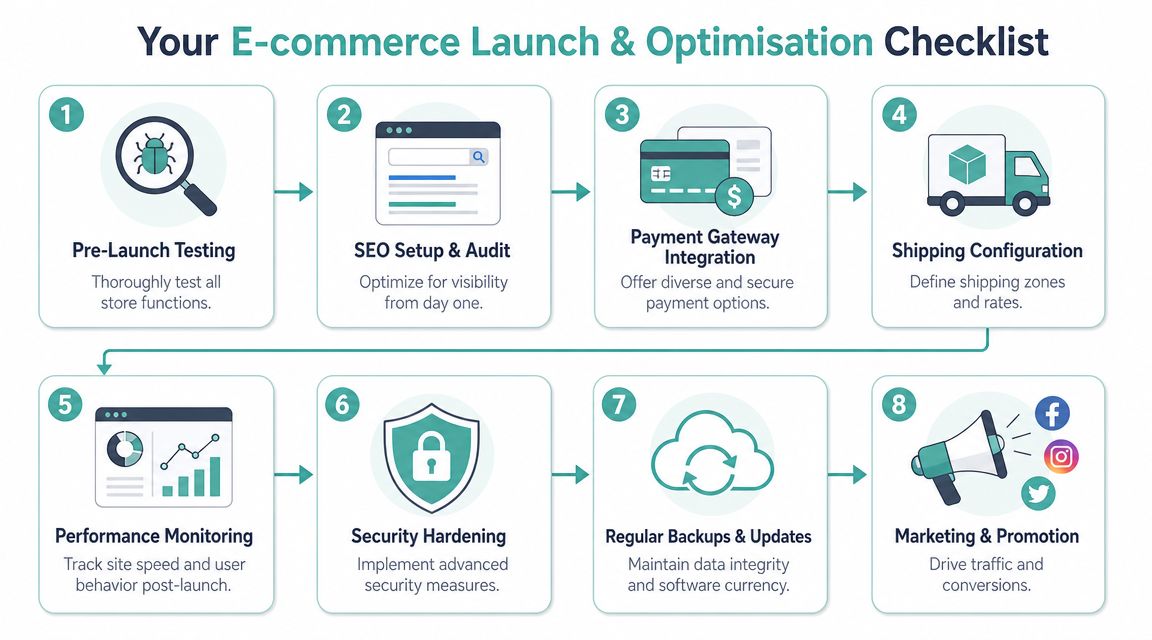
Launching a WooCommerce store is rarely one clean switch-on moment. It's a sequence of checks that determines whether the site starts strong or begins life with hidden problems.
The list below is the one I'd use for a small Australian business that wants fewer surprises after launch.
If you're migrating an existing WooCommerce store
Migration problems usually come from rushing the sequence, not from the move itself.
- Audit the current plugin stack. Remove anything redundant before migration. A move is the best time to clean up overlapping SEO plugins, duplicate security tools, and abandoned add-ons.
- Record the critical store functions. Test product pages, cart logic, shipping rules, coupon behaviour, account login, and transactional emails.
- Lower complexity before the move. Disable unnecessary background jobs and tidy old media where practical.
- Stage the migration first. Never move a trading WooCommerce site blind.
- Test order flow end to end. Use a full checkout test, including confirmation emails and order status updates.
- Check redirects and SEO essentials. Confirm permalink structure, metadata plugin behaviour, XML sitemaps, and canonical settings.
- Verify caching behaviour. Ecommerce pages need selective caching. Cart, checkout, and account pages should behave correctly.
- Schedule the final cutover at a calm trading time. Don't migrate during a sale or active campaign.
A clean migration starts with deleting what the store no longer needs. Carrying old plugin clutter into a new environment just recreates old problems on a faster server.
If you're launching a new store from scratch
A new store gives you an advantage. You can build performance in from the start.
Use this order:
- Choose a lightweight theme: Pick one that handles WooCommerce well without excessive bundled features.
- Set permalink and product structure early: Changing structure later adds avoidable cleanup work.
- Install only essential plugins: Payments, SEO, image optimisation, security, backups, and shipping. Add marketing tools later if needed.
- Prepare product images properly: Compress before upload and keep formatting consistent.
- Write transactional pages carefully: Shipping, returns, privacy, terms, and contact pages should be complete before launch.
- Test on mobile first: Most owners build on desktop and miss friction in the mobile cart.
- Review emails: Order confirmations, password resets, contact notifications, and admin alerts must all arrive reliably.
For local businesses, don't forget operational basics like shipping zones, GST display, pickup settings, and support contact details. Those settings often matter more to customer confidence than homepage polish.
Ongoing optimisation jobs that keep the store healthy
A WooCommerce site is not finished when it launches. It needs routine maintenance to stay quick and stable.
A practical maintenance rhythm looks like this:
| Task | What to do |
|---|---|
| Plugin updates | Test updates in staging before applying them live |
| Theme review | Remove unused theme assets and avoid bloated feature packs |
| Image housekeeping | Compress new product images and replace oversized legacy files |
| Cache tuning | Use the host's performance tooling, such as LiteSpeed-friendly caching or AccelerateWP where available |
| Security review | Scan routinely, prune old admin users, and remove obsolete plugins |
| Backup checks | Confirm backups are running and that restore paths are clear |
| Form and checkout tests | Run periodic live-path tests so silent failures don't linger |
| Admin cleanup | Clear drafts, spam, trashed products, and expired plugin baggage |
If your host provides a knowledge base, use it. Good help articles save real time during setup and troubleshooting. Look for documentation on staging, SSL, caching, email delivery, malware scanning, and backups before problems arise, not after.
Frequently Asked Questions about Ecommerce Hosting
Do I need PCI compliance from my host
It depends on how payments are handled.
If your store sends customers to a hosted gateway or uses embedded payment fields from a reputable processor, your PCI exposure is generally lower than if you directly store or process card data on the site. Even so, the host still matters because server security, SSL, malware control, and update hygiene all affect the trustworthiness of the environment around checkout.
Should I host business email on the same plan as the store
For many small businesses, hosting email with the same provider is practical and easier to manage. It keeps billing and support simpler.
The trade-off is that email has its own deliverability and administration needs. If the store is mission-critical and your team relies heavily on email automation, quote replies, or support inboxes, it's worth checking how the host handles spam filtering, mailbox limits, and business email reliability before bundling everything together.
What's the practical difference between shared hosting and VPS for WooCommerce
Shared hosting places multiple accounts on the same underlying environment, with resources allocated across users. A VPS gives you a more isolated slice of server resources and usually more control.
For WooCommerce, the practical difference shows up when the site becomes busy or plugin-heavy. A simple store can run well on strong WordPress hosting built on quality shared infrastructure. But if the store has demanding integrations, custom workflows, or high operational load, a VPS can provide more consistency and room to tune the environment.
Why does Australian server location matter so much
Because customer experience is local.
An Australian store doesn't just need “good uptime”. It needs responsive delivery for buyers across Australian cities and devices. Local hosting can reduce latency, improve admin responsiveness for your team, and make checkout interactions feel more immediate, especially when the store is doing dynamic WooCommerce work rather than serving static brochure pages.
Do I need managed WordPress hosting or can I do it myself
You can do it yourself if you're comfortable handling updates, backups, security, caching, troubleshooting, and restore planning. Many business owners start there.
Most eventually decide their time is better spent on products, marketing, customer service, and fulfilment. Managed WordPress hosting becomes worthwhile when the cost of your attention exceeds the cost of the service. For a trading WooCommerce store, that point arrives sooner than many expect.
If you want a local platform that's built around Australian performance, security, and transparent pricing, UpTime Web Hosting is worth a look. It offers Australian-based hosting with local support, WordPress-ready infrastructure, security features, backups, and straightforward plan options that suit small businesses launching or growing an online store.