A lot of Australian business owners are in the same spot right now. They do solid work, answer the phone, look after customers, and still feel invisible online. A plumber in Perth, a florist in Adelaide, a café in Brisbane, or a bookkeeper in regional NSW can all run into the same problem. People nearby are searching, but the business doesn't appear clearly enough, soon enough, or convincingly enough.
That's where Google matters. For most local businesses, customers don't start with your website. They start with a search, a map, a review, or a quick check of your trading hours. Google has become a core local-discovery channel in Australia because it holds about 95%+ of search traffic share, and Google Business Profile gives businesses tools to track impressions, clicks, calls, and direction requests across Search and Maps, as outlined in Google Business Profile performance reporting.
If you're still working out what kind of business you want to build, it helps to start with ideas that suit the Australian market. This roundup of EndureGo Tax business ideas is useful because it frames opportunities through a local business lens, not just a generic startup one.
Google for local business isn't just about claiming a listing and hoping for the best. It's about building a clear, trustworthy presence that connects your Google profile, your website, your reviews, and your contact details. If you also use social media as part of that presence, a simple setup guide for a business Facebook page can help keep your channels aligned.
Table of Contents
- Introduction Why Your Local Business Needs Google
- The Google Ecosystem for Local Business Explained
- Your First Step Claiming and Building Your Google Business Profile
- Optimising Your Profile for Maximum Local Visibility
- Advanced Local SEO Tactics to Dominate Your Area
- The Technical Foundation Your Local SEO Needs
- Measuring Success and Learning from Local Campaign Examples
- Frequently Asked Questions About Google for Local Business

Performance you can feel, backed by clients who depend on it. Read how our support and uptime create long‑term customer success.Power Your Business with Better Hosting
Introduction Why Your Local Business Needs Google
A good local business can disappear online for silly reasons. The phone number is old on one page. The opening hours are wrong. The business name is written three different ways. The listing exists, but no one has verified it. To the owner, it feels unfair. To Google, it looks uncertain.
That's why Google has become the first practical step for local visibility. It's not just a search engine. For many businesses, it acts like the main street sign, directory board, word-of-mouth noticeboard, and street map all at once.
For Australian businesses, the opportunity is hard to ignore. Roughly 46% of all Google searches have local intent, and 76% of people who search for something nearby visit a business within 24 hours, according to this local search statistics roundup. That means local search isn't some side task for later. It's often where buying intent starts.
Why owners get stuck
Many small business owners think they need to “do SEO” before they've sorted the basics of being findable. They worry about keywords, backlinks, or blog posts when the more immediate problem is simpler. Google needs to know who you are, where you are, what you do, and whether your information can be trusted.
A local electrician in Newcastle gives Google one set of details on the website, another in a directory, and a third on social media. A hair salon in Geelong forgets to update holiday hours. A mobile dog groomer sets up a profile but doesn't understand service area settings. These aren't rare edge cases. They're everyday reasons a business gets missed.
Practical rule: If a customer can't confirm your service, area, hours, and contact details in under a minute, your Google presence is doing less work than it should.
What Google does for local business
Google for local business works best when you think of it as a connected system. Your Google Business Profile handles core public details. Google Maps helps people find you. Google Search surfaces your business for relevant intent. Your website backs up the facts and gives Google another place to verify them.
That's the part many guides skip. They focus on the profile and leave out the technical base underneath it. But if your website is slow, thin, inconsistent, or hard to use on a phone, your Google visibility has weaker support.
The businesses that stand out usually aren't doing fancy tricks. They've made it easy for Google to trust them and easy for customers to act.
The Google Ecosystem for Local Business Explained
A lot of local owners open Google and see a jumble of listings, maps, reviews, ads, and website reports. The easier way to understand it is to see how each part helps answer one customer question. Can I find this business, trust it, and contact it without hassle?
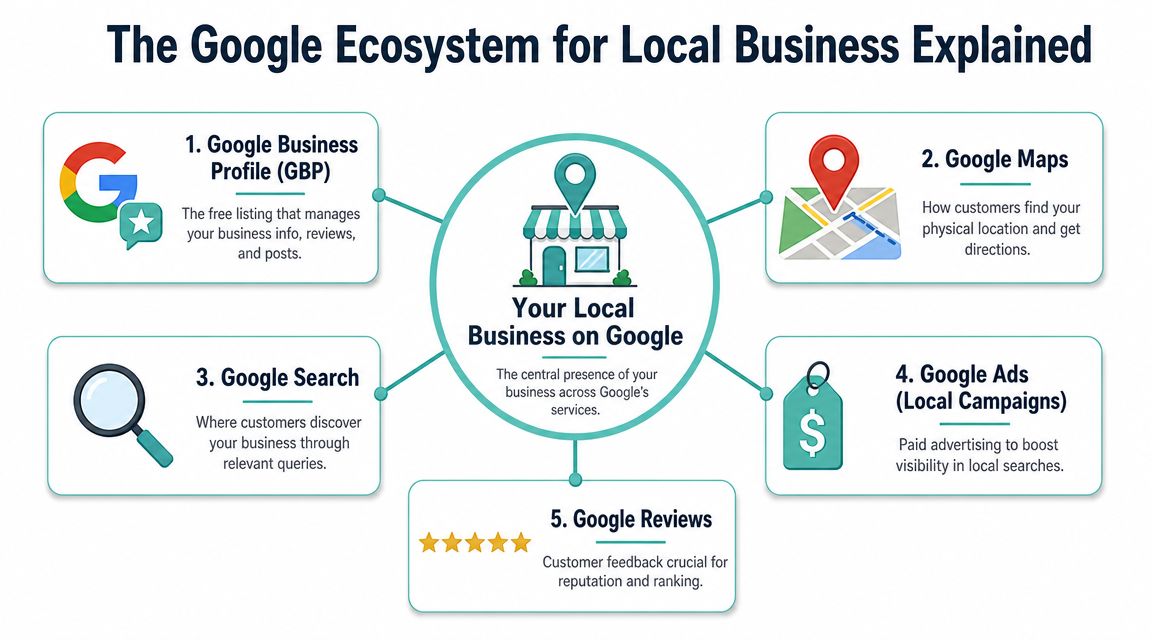
A customer does not care which Google product they are using. They care whether the right details show up at the right moment. Google pieces those moments together from your profile, your website, your reviews, and the technical health of your site. That last part gets overlooked in many local guides, especially for Australian businesses using cheap or poorly configured hosting.
The main parts of Google's local system
Your Google Business Profile is the business record Google refers to again and again. It carries your name, category, hours, phone number, photos, service area, and reviews. If that record is incomplete or inconsistent, the rest of your visibility is harder to support.
Google Maps helps people act on local intent. It shows where you are, how close you are, whether you are open, and how to get in touch while someone is already on the move.
Google Search decides which businesses appear for phrases like “plumber in Ballarat” or “Thai restaurant near me”. It draws from your profile, your website, and other trust signals across the web.
The Local Pack is the map-based group of business results that often appears near the top of local searches. You do not switch it on manually. Google chooses those listings based on how well your business matches the search, how close you are, and how trustworthy your details appear.
Your website does a different job. It confirms the facts, explains your services, and gives Google more context than a profile alone can provide. If the site is slow on mobile, hard to use, or hosted poorly for Australian visitors, that weakens the whole system. For a broader look at how search engines rank your site, this guide to how search engines rank websites is a helpful companion.
How these pieces connect in real life
Here is a common path.
Someone in Parramatta searches for “laptop repair near me” on their phone. They spot a business in Maps or the Local Pack, scan the reviews, check whether it is open, then tap through to the website. On the site, they look for repair types, pricing, turnaround time, and a booking option. If the site loads slowly or feels clunky on mobile, the customer may go straight back to Google and choose another listing.
That is why your Google presence works more like a chain than a set of separate tools. If one link is weak, the customer journey gets interrupted.
| Google Product | Primary Role |
|---|---|
| Google Business Profile | Manages public business details, reviews, updates, and customer actions |
| Google Maps | Helps customers discover locations and request directions |
| Google Search | Surfaces local businesses for relevant searches |
| Google Reviews | Builds trust and influences customer decisions |
| Google Ads | Adds paid local visibility when you want extra reach |
| Search Console | Shows how your website appears in Google search results |
| Google Analytics | Helps you understand website behaviour after people click through |
A simple way to remember it is this. Your profile starts the conversation. Reviews reduce hesitation. Your website answers the practical questions that help someone book, call, or visit.
For Australian businesses, the website foundation matters more than many owners realise. A tradie in Brisbane, a clinic in Adelaide, and a cafe in Wollongong all depend on quick mobile access, accurate local details, and hosting that serves nearby visitors reliably. Google's tools can bring people to your door, but your site still needs to open that door quickly.
Host your website with our 5-star rated, cPanel website hosting plans.
Super fast servers, with security included and hosted in your choice of Australian Data Center.
View cPanel Plans
Your First Step Claiming and Building Your Google Business Profile
If your business isn't properly claimed, everything else gets harder. You can't confidently manage your public details, you can't control updates properly, and you can't get the same visibility benefits as a verified profile.
Start with the core business details
Begin by searching your business name on Google and in Google Maps. If a listing already exists, claim it. If it doesn't, create one. Keep the setup plain and factual.
Use your real trading name. Add your real phone number. Add the correct business address if customers visit you, or set the business up properly as a service-area operation if you travel to customers.
Your details need to match how the business appears elsewhere. Don't use one phone number on the profile and another on the site unless there's a very clear operational reason. Don't shorten the business name in one place and expand it in another.
A clean setup usually includes:
- Business name that matches your actual public trading identity
- Phone number that customers can use during business hours
- Address or service area set according to how you operate
- Website link pointing to the correct page, not a placeholder
- Hours including special trading hours when needed
Get the category right early
Category choice has more impact than many owners realise. Google requires you to choose one primary category that best describes the business, and then you can add only a few secondary categories where they appropriately fit, as explained in Google's business category guidance.
That means a suburban IT provider shouldn't try to stuff every service into categories. If the main commercial activity is web hosting, that should guide the primary choice more than side offerings. If you're a dentist, choose the closest real dental category rather than something broad and vague.
Overly broad categorisation can dilute relevance. A narrower, more accurate setup usually gives Google a cleaner signal.
For a practical setup walkthrough, this article on adding a Google local business listing can help if you're doing this for the first time.
Verification is not a minor admin task
A lot of guides treat verification like a quick final click. In reality, it's a control point. Google wants to confirm that the business is real, eligible, and represented by the right person.
That's why you should prepare before starting:
- Check signage and branding: Make sure the business identity is consistent with what customers would recognise.
- Review your address format: Use the same written version across your website and public assets.
- Use a business-controlled account: Don't build the whole listing under a staff member's personal login if you can avoid it.
- Keep supporting details handy: If Google asks for further confirmation, you'll want your public business information organised.
Verification isn't red tape for its own sake. It's part of how Google filters out unclear or ineligible listings.
Once you've claimed and verified the profile, you've built the base layer. The next job is making that profile look active, complete, and useful.
Optimising Your Profile for Maximum Local Visibility
A Google Business Profile isn't a brochure you write once and forget. It's closer to a shop window. If it looks current, complete, and active, customers feel more comfortable. Google also gets stronger signals that the business is operating properly.
Treat the profile like a living shop window
Start with your visuals. Upload real photos of your premises, team, products, vehicles, menu items, or completed work. Skip generic stock imagery if you can. A mechanic in Ballarat should show the workshop and service bays. A café in Fremantle should show the seating, coffee, and front entrance. Real-world images reduce doubt.
Then fill in the practical details many businesses leave half-finished. Add applicable attributes. If you offer pickup, accessibility features, appointment options, or specific amenities, include them accurately. Customers often use these details as decision shortcuts.
The written parts matter too. Your business description should explain what you do in normal language. Not keyword soup. Not slogans. Just a clear summary a local customer would understand.
A simple maintenance rhythm
Busy owners need a repeatable rhythm more than a perfect system. This one works well:
- Weekly check: Review hours, answer new questions, and respond to reviews.
- Fortnightly refresh: Add a new photo or update a recent project image.
- Monthly update: Publish a Google Post for a seasonal offer, event, service reminder, or local update.
Google Posts can help keep the profile current. A landscaping business might post about autumn garden clean-ups. A tax agent might post about key dates. A physiotherapy clinic could post about new appointment availability.
The Q&A area is easy to overlook. Don't wait for random users to fill it with incomplete answers. Add sensible common questions yourself and answer them clearly. For example, “Do you offer same-day callouts?” or “Is parking available nearby?”
If your website also needs attention, this guide on improving your website ranking on Google fits neatly with profile optimisation.
A complete profile reduces friction. A current profile reduces hesitation.
The businesses that often look strongest in local search aren't necessarily the oldest. They're the ones that feel maintained.
Advanced Local SEO Tactics to Dominate Your Area
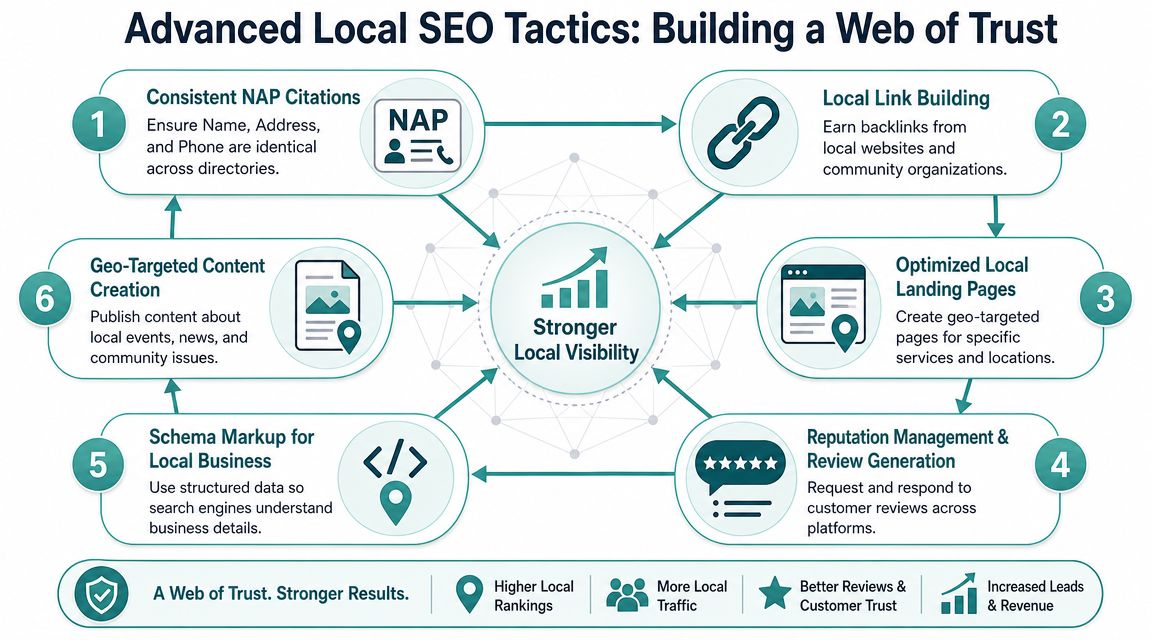
Once your profile is claimed and active, the next layer is trust. Google compares your business details across different places online. If the information lines up, your identity looks stronger. If it conflicts, visibility can get messy.
Why consistency matters more than clever wording
For Australian local businesses, local visibility is largely a data-consistency problem. Google recommends adding LocalBusiness structured data to your website, validating it, and keeping your NAP details identical across your profile and site markup so Google can better trust and reuse the business identity, according to Google's LocalBusiness structured data documentation.
NAP means Name, Address, Phone number. It sounds basic because it is basic. But it's one of the first places businesses drift.
A simple example:
- Your profile says “Harbour View Dental”
- Your website says “Harbourview Dental Clinic”
- A directory says “Harbour View Dentist”
- Your old Facebook page has a previous phone number
To a person, that might still look close enough. To Google, it introduces uncertainty.
Reviews citations and schema working together
Think of local SEO as building a web of confirmation around your business. A customer finds your profile, clicks your site, sees matching details, then sees similar information in reputable directories. Each match makes the business look more believable.
Three practical areas deserve regular attention:
Citations in Australian directories
List your business in credible places where local customers look. Keep the wording aligned. Don't create variations for the sake of it.
Review management
Ask happy customers for reviews in a natural way after the job or purchase is complete. Respond to reviews politely and specifically. Reviews help future customers understand what it's like to deal with you.
Schema markup on your website
Schema is structured code that helps Google interpret your business details more clearly. You don't need to write it by hand if your web platform or developer can implement it properly, but you do need to ensure it matches your public business information.
A local business that serves several suburbs can also create sensible landing pages for real service areas, as long as each page is useful and not just a copy with the suburb name swapped out.
The goal isn't to scatter your business details everywhere. The goal is to make the same business identity visible in the right places.
That's how local SEO moves beyond the profile itself.
Register your new domain name at competitive market prices including free domain add-ons like privacy, DNS Hosting, Custom Nameservers and Forwarding.
Always the best price and no nasty renewal price hikes.
Register A Domain Name
The Technical Foundation Your Local SEO Needs
Google can send the right people to your business, but your website still has to close the loop. A local customer might tap your site while waiting at the lights, sitting in a ute between jobs, or comparing two nearby businesses on their phone. If the page is slow, awkward on mobile, or hard to trust, that visit can end before it turns into a call.

A slow website drains local demand
Local SEO often brings people with a very practical goal. They want to know whether you serve their area, whether you look legitimate, and how to contact you without hunting around. Your website works like the front counter of the business. If the counter is messy or the staff member disappears out the back, people leave.
That is why the top of each key page should answer the basics quickly. State what you do, where you work, how to call or book, and why someone should trust you. Put those details where a tired customer can spot them in seconds on a phone screen.
Speed matters here, but so does stability. A page that jumps about while loading, covers the screen with pop-ups, or hides the phone number behind menus creates friction. Google visibility gets the visit. Site usability helps you get the enquiry.
Small technical settings also play a part. A file such as robots.txt guidance for search engines helps control which areas of your site are crawled, which can prevent search engines from wasting attention on the wrong pages.
Hosting shapes the experience more than many owners expect
Hosting sounds like back-room plumbing, but it affects what customers see and feel. If the server is sluggish, the whole site can feel heavier. If the security setup is poor, browsers may show warnings that make a legitimate local business look neglected.
For Australian businesses, location matters too. If your customers are in Brisbane, Perth, Melbourne, or regional towns across Australia, local infrastructure can help pages load more responsively for those visitors. It also makes support easier when you need help in your own time zone.
A solid setup usually includes:
- Fast mobile delivery: Pages load cleanly on phones, where many local searches happen
- SSL security: Visitors see a secure connection instead of a browser warning
- Reliable uptime: Your site stays available when customers are ready to call
- Australian-based performance: Local visitors often get a better experience from hosting built for Australian traffic
UpTime Web Hosting is one example of a provider in this space, with Australian-based hosting, free SSL, LiteSpeed, AccelerateWP, domains, email, and local support. That kind of setup suits small businesses that want their Google presence backed by a website that loads properly, stays online, and feels current.
Your Google profile gets you into the shortlist. Your website and hosting help you stay there.
Measuring Success and Learning from Local Campaign Examples
A lot of local business owners do the hard work of fixing their profile, updating their website, and improving their visibility, then get stuck on one simple question. Is any of this working?
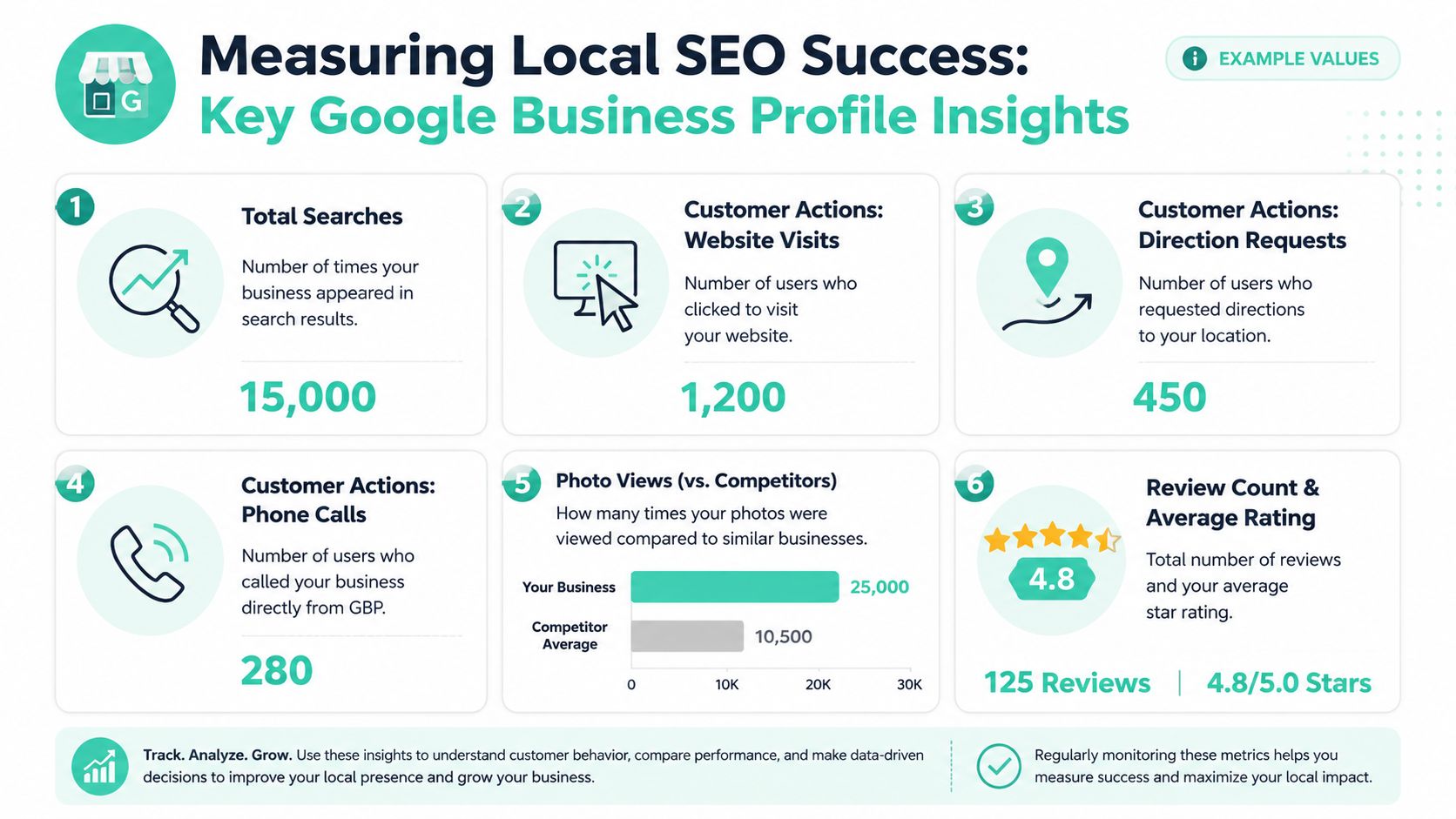
The easiest way to answer that is to watch what real customers do. Your Google Business Profile reporting shows whether people are finding you and whether they take useful actions like calling, clicking through to your website, or asking for directions. The reporting link was covered earlier, so there is no need to repeat it here.
What to watch inside your profile
Start with the basics. You are not trying to become a data analyst. You are checking whether your Google presence and your website are working together like a shopfront and a front door.
Look for patterns such as:
- Discovery trend: Are more local people finding the business over time?
- Customer actions: Are calls, website visits, and direction requests increasing?
- Content response: Do fresh photos, updated services, or posts lead to more activity?
- Location accuracy: If you have multiple branches, are customers interacting with the correct listing?
One good month on its own does not prove much. A steady lift after you improve your profile and fix weak pages on your website is far more useful.
That website connection matters more than many guides admit. If your profile earns the click but your site is slow, confusing, or hard to use on a phone, Google has done its job and the website has dropped the handover. For Australian businesses, that often comes back to practical setup choices such as mobile performance, local support, and hosting that serves local visitors well.
Three simple Australian examples
A Perth plumber updates service descriptions, adds recent job photos, and cleans up the contact page so people can call quickly from mobile. The result is not just more profile activity. The business also gets better-quality calls because customers can see the service area, hours, and job type before picking up the phone.
A Brisbane bakery posts current product photos, fixes public holiday hours, and replies to reviews every week. People start mentioning that they found the bakery on Google and decided to visit after seeing what was available that day. That is a useful sign because the profile is influencing an in-person visit, not just collecting views.
A Canberra bookkeeping service aligns its business details across Google and the website, then rewrites service pages so they are clearer for local searchers. Website visits become more valuable because visitors land on pages that explain the service properly and make it easy to enquire. In that case, the profile gets attention, but the website does the convincing.
Measure actions that lead to business. Calls, clicks, bookings, and direction requests matter more than a vague sense of being “more visible”.
When results stall or visibility drops
Sometimes the issue is not your marketing. It is access, verification, or profile status.
A listing that is under review, partially suspended, or set up with inconsistent business details can lose visibility fast. That can feel confusing because owners often keep improving photos and descriptions while the underlying issue sits in the background. This analysis of local business visibility challenges explains why eligibility and verification problems can block progress before ranking improvements even come into play.
If performance drops suddenly, check the fundamentals first:
- Business details: Make sure your name, address, phone number, and hours still reflect the current business
- Access and ownership: Confirm the right people still control the profile
- Recent changes: Review edits to categories, address, service areas, or linked website pages
- Website reliability: Test the linked pages on mobile and check that they load properly
Treat it like troubleshooting a ute that suddenly will not start. You do not begin by polishing the paint. You check fuel, battery, and connections first. Local SEO works the same way.
Experience Microsoft 365 Business Standard for free for 30 days.
Up to 25 users with full access to email, OneDrive and Teams. Includes full versions of desktop apps of Outlook, Word, Excel, PowerPoint and more.
Try Microsoft 365
Frequently Asked Questions About Google for Local Business
How should I respond to a negative review
Stay calm and keep it professional. Thank the reviewer for the feedback, address the issue briefly, and invite them to continue the conversation privately if appropriate. Don't argue in public and don't paste in a legal-sounding reply unless the situation demands it.
A strong response does three things well:
- Acknowledges the experience: “Sorry to hear your visit didn't go smoothly.”
- Clarifies where needed: “We'd like to review what happened.”
- Offers a next step: “Please contact our team so we can look into it.”
Future customers read your response as much as the original review. They're judging how you handle pressure.
What if I have more than one location
Give each real location its own profile if the setup meets Google's eligibility rules. Don't merge multiple branches into one listing just because it feels simpler. Customers in different suburbs need accurate local information, and each branch may have different hours, staff, photos, or service nuances.
On the website, create a proper page for each location. Include the location's contact details, opening hours if relevant, and useful local information. Avoid cloning the same page repeatedly with only the suburb name changed.
If some services are shared across locations, that's fine. The location pages should still help a real customer choose the right branch.
Can I use Google if I work from home or travel to customers
Yes, but you need to set the business up correctly. Many service-area businesses often get confused on this point. If customers don't visit your premises, you generally shouldn't present the listing like a standard storefront.
Examples include:
- Mobile mechanics
- Cleaners
- Pest control services
- On-site IT support
- Home-visit beauty services
Use service areas carefully and keep the business description honest about how you operate. Your website should also reflect that model. If you travel to customers across several suburbs, say so clearly and match that setup across your public details.
Do I need a website if I already have a Google Business Profile
A profile can help customers find you, but a website gives you a stronger first-party presence. It's where you explain services properly, build trust, and control the customer journey. It also gives Google another place to confirm your business details.
This matters even more for businesses that currently rely on directories, Maps, and phone calls. A profile can make you visible. A good website helps you look established.
What's the biggest mistake local businesses make
They treat Google like a one-off task. They claim a listing, fill in half the fields, then leave it untouched while their website, hours, reviews, and contact details drift out of sync.
The businesses that usually do better keep the basics clean:
- Accurate profile details
- Correct category choices
- Regular updates and review responses
- Matching website information
- A fast, secure, mobile-friendly site
That combination is more dependable than chasing shortcuts.
If your local business is getting found on Google but your website still feels slow, hard to manage, or disconnected from your profile, UpTime Web Hosting is one Australian option for bringing the technical side into line. It offers local hosting, domains, email, SSL, and website tools that support a cleaner foundation for local search visibility.