You've probably been here already. You paid for a website, picked the colours, wrote the copy, maybe even added a few nice photos of your team or your products. It looks solid. Then you wait for enquiries.
And not much happens.
That's the frustrating bit about websites. A site can be well designed and still stay invisible. For many Australian small businesses, the primary problem isn't the website itself. It's that Google doesn't yet see it as the best answer for the searches your customers are making.
That's where search engine optimization comes in. Done properly, it helps your business show up when people are actively looking for what you sell, where you sell it, and whether you serve their suburb, city, or region. It also turns a lot of technical decisions, like hosting location, site speed, and security, into business decisions that affect enquiries, bookings, and sales.
If you're weighing up the basics first, this guide on why local Australian hosting matters is a useful starting point before you dive deeper into the SEO side.
Table of Contents
- What Is Search Engine Optimisation And Why It Matters in Australia
- The Four Pillars of SEO for Australian Businesses
- Technical SEO Your Website's Foundation
- On-Page SEO Crafting Content for Customers and Google
- Off-Page and Local SEO Building Your Digital Reputation in Australia
- Choosing the Right Tools and Measuring SEO Success
- Your SEO Starter Checklist for Australian Businesses

Performance you can feel, backed by clients who depend on it. Read how our support and uptime create long‑term customer success.Power Your Business with Better Hosting
What Is Search Engine Optimisation And Why It Matters in Australia
Search engine optimization is the work of helping your website appear in search results when someone types in a relevant question, product, service, or location. In plain English, it's how your site stops being a brochure sitting in a drawer and starts becoming a shopfront on a busy street.
Think about a local electrician in Brisbane. If someone searches “switchboard upgrade Brisbane” and your site appears clearly, fast, and relevant, you're in the running. If your site is buried or missing, that search goes to someone else.
For Australian businesses, this matters because organic search accounts for approximately 53.3% of all website traffic, and Google holds over 90% of the search market, according to SEO statistics compiled by SeoProfy. That tells you something simple but important. Google search isn't one marketing channel among many. For most businesses, it's the front door.
What SEO actually does
SEO helps Google answer three questions about your site:
- What is this business about so it can match your pages to the right searches
- Can people use this site easily on mobile and desktop
- Can this business be trusted enough to appear ahead of others
When people hear “SEO”, they often imagine tricks, loopholes, or mysterious jargon. Good SEO is much less dramatic than that. It's mostly about clarity.
If your website confuses Google, it usually confuses customers too.
What this means for you
If you run a trade business, clinic, café, online shop, consultancy, or local service, SEO is about showing up at the moment of intent. Someone is already looking. You don't need to interrupt them. You need to be findable.
That's why search engine optimization is so valuable for Australian SMBs. It meets customers when they're asking, comparing, and deciding.
The Four Pillars of SEO for Australian Businesses
SEO feels messy when it's treated like a random to-do list. It gets much easier when you think of it as four connected pillars. If one pillar is weak, the whole thing wobbles.
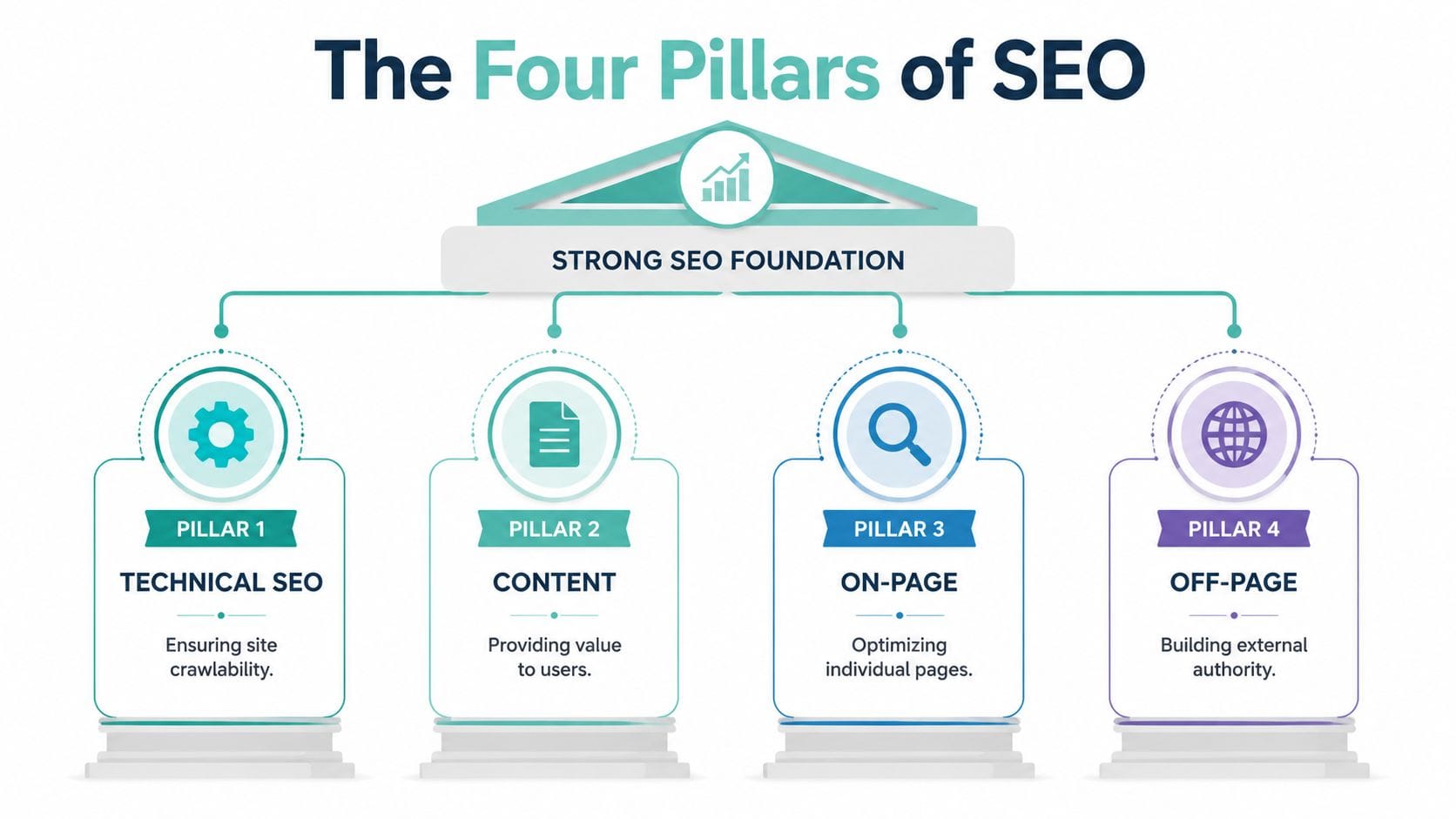
Technical SEO
This is the foundation under the building. It covers speed, mobile usability, security, crawlability, and how easily search engines can access your pages.
A technically weak site is like a shop with a jammed front door. Even good content struggles if the basics aren't working.
On-page SEO
This is what people see and read on each page. Your titles, headings, copy, product descriptions, service pages, images, and internal links all sit here.
On-page work tells Google, and your visitor, exactly what the page is about. If you run a removals business in Melbourne, your page shouldn't read like a vague national homepage. It should clearly talk about the service, the area, and the problem you solve.
Off-page SEO
This is your reputation around the web. The biggest signal here is backlinks, which are links from other websites to yours.
A backlink is a bit like a recommendation. If a local business association, supplier, community organisation, or respected publication links to your website, Google sees that as a stronger trust signal than if nobody mentions you at all.
Local SEO
Local SEO helps you appear for suburb, city, and “near me” searches. It includes your Google Business Profile, reviews, location pages, and consistent business details across the web.
For many Australian businesses, this is the pillar that directly leads to phone calls and map visibility.
How the pillars work together
Here's the simplest way to picture it:
| Pillar | Simple analogy | Business effect |
|---|---|---|
| Technical SEO | Strong slab and wiring | Your site works properly |
| On-page SEO | Clear signage inside the shop | People understand your offer |
| Off-page SEO | Your reputation in town | Others validate your business |
| Local SEO | Correct address on the map | Nearby customers can find you |
Practical rule: Don't chase backlinks or blog content before your technical basics and service pages make sense. Otherwise you're sending visitors to a site that still isn't ready to convert.
A lot of SEO confusion comes from mixing these jobs together. Once you can separate the pillars, decisions become easier. You know whether a problem is about site speed, weak page copy, missing trust signals, or poor local visibility.
Host your website with our 5-star rated, cPanel website hosting plans.
Super fast servers, with security included and hosted in your choice of Australian Data Center.
View cPanel Plans
Technical SEO Your Website's Foundation
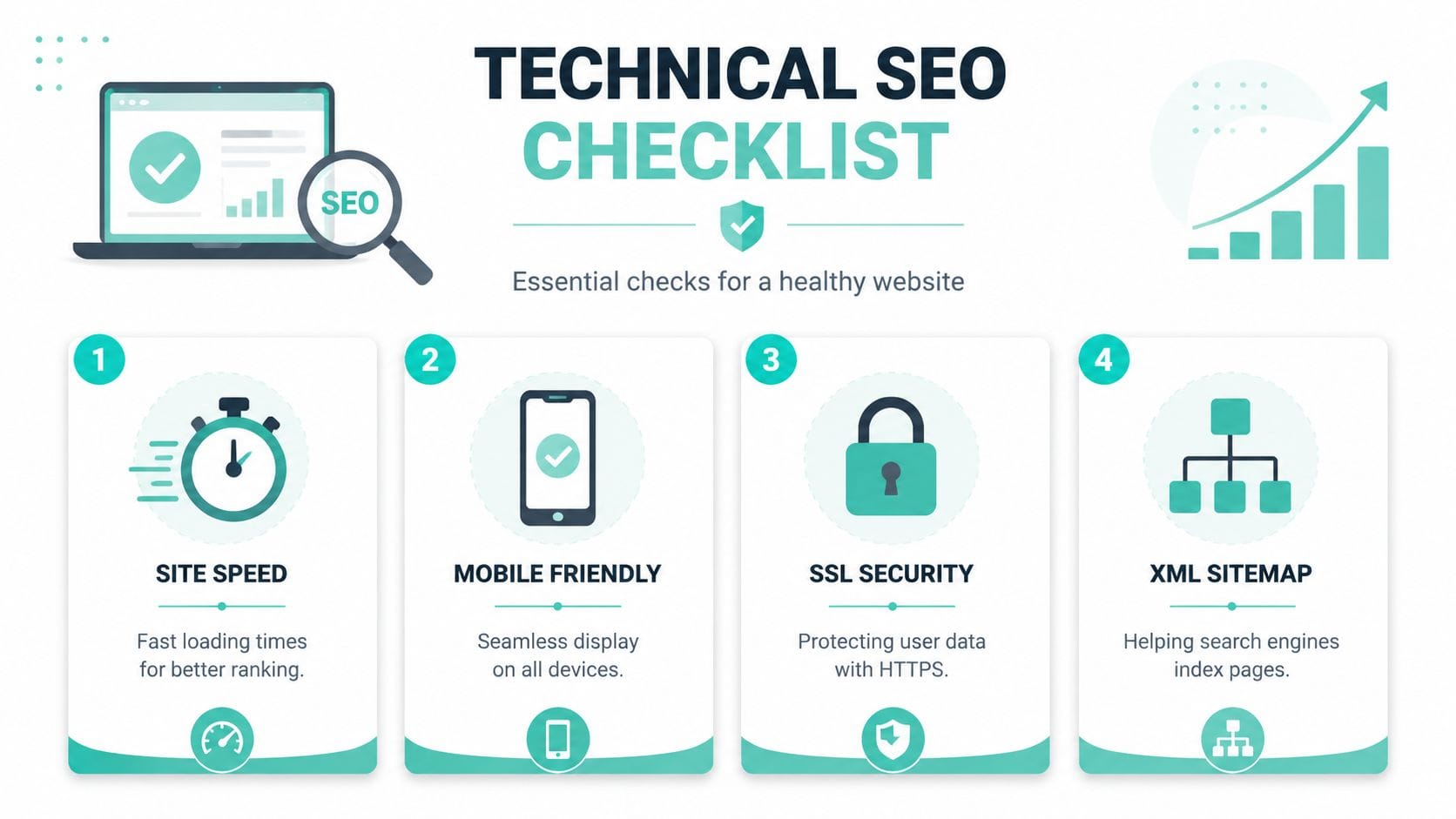
Technical SEO doesn't usually get the glory. No customer says, “I chose you because your crawl path was elegant.” But technical SEO is what makes every other SEO effort count.
If your site is slow, insecure, or hard for Google to process, even strong content can underperform. For Australian businesses, hosting choices are a big part of that.
Why hosting location matters in Australia
An Australian customer searching from Sydney, Melbourne, Brisbane, or Perth shouldn't have to wait for your site to travel halfway around the world and back. That delay affects user experience, and it can affect how search engines view your site's performance.
According to research on overlooked SEO opportunities for local hosting, optimising for local SEO using Australian hosting servers is critical, and local servers can deliver up to 40% faster indexing and ranking lifts for WordPress and eCommerce sites compared to overseas hosts.
That doesn't mean server location is a magic wand. It means local infrastructure gives you a practical edge. Less latency. Faster page delivery for local visitors. Better conditions for strong Core Web Vitals.
If you want a plain-English overview of the performance side, this guide to website speed optimisation for Australian users explains the mechanics well.
Speed is not a vanity metric
A fast site feels more trustworthy. People stay longer, browse more comfortably, and are less likely to abandon the page before it finishes loading.
For SEO, speed also helps in quieter ways:
- Crawling becomes easier because search engines can move through more pages efficiently
- Mobile users get a smoother experience which matters for local businesses and online stores
- Conversion friction drops because forms, carts, and product pages respond quickly
A slow site creates a double penalty. People leave, and Google gets a weaker quality signal.
The technical basics every small business site needs
You don't need to be a developer to understand the essentials. You just need to know what to ask for and what to check.
Start with these non-negotiables
- HTTPS and SSL enabled so the site is secure and visitors don't see browser warnings
- Mobile-friendly layouts because many local searches happen on phones
- A clean sitemap so search engines can find key pages
- No broken internal links that send users and crawlers into dead ends
- Fast server response times especially for Australian visitors
- Reliable uptime and monitoring so your site stays available when Google revisits it
Performance tools that make a difference
Some hosting features directly support technical SEO outcomes:
| Feature | What it helps with |
|---|---|
| LiteSpeed | Faster page delivery |
| AccelerateWP | Better WordPress performance workflow |
| CloudLinux | Resource stability when sites share a server |
| Malware scanning | Reduces security risk and trust issues |
| DDoS protection | Helps keep the site online during attacks |
| Nightly backups | Supports recovery if something breaks |
These aren't “nice to have” extras for an Australian business site. They support availability, speed, and trust.
A secure, fast website gives your content a fair chance to rank. A fragile website makes every SEO activity harder.
Where business owners usually get stuck
The common misunderstanding is thinking technical SEO only matters for large sites or developers. It matters just as much for a local accountant, an online boutique, or a trades business with twenty service pages.
Here's what often happens. A business invests in blog content, tweaks keywords, and maybe even runs ads, but the site still feels sluggish and inconsistent. That's like printing better brochures for a shop with flickering lights and a sticky front door.
Quick self-check questions
Ask yourself:
- Is my site noticeably quick on mobile in Australia
- Does it load securely with HTTPS on every page
- Can Google reach all my main service, category, and location pages
- Do plugins, themes, or scripts slow things down
- Is my hosting helping local visitors or adding delay
If you can't answer those confidently, technical SEO deserves attention before you spend more on content promotion.
On-Page SEO Crafting Content for Customers and Google
On-page SEO is where a lot of small business owners either overdo it or avoid it completely. They either cram the same phrase into every sentence, or they write nice-sounding copy that never clearly says what the page is about.
The goal is simpler than it may seem. Write pages that help real people and make the topic unmistakable to Google.
Start with the search a customer would actually type
A plumber in Parramatta shouldn't optimise a page only for “plumber”. That's too broad and not very helpful. A better approach is to match the wording to the service and the place.
Compare these two ideas:
- Too broad: “We offer quality plumbing services”
- Much clearer: “Emergency plumber in Parramatta for blocked drains and hot water issues”
That second version gives search engines more context and gives the customer more confidence they're in the right place.
The core page elements that matter
Each important page on your site should have a job. A homepage introduces the business. A service page explains one service well. A location page connects that service to a specific area. A product page helps someone decide whether to buy.
Focus on these page elements
- Page title because it strongly influences how your page appears in Google
- Meta description because it helps persuade the searcher to click
- Main heading so the page topic is obvious straight away
- Opening paragraph that confirms the service, product, or problem solved
- Subheadings that break the topic into logical sections
- Internal links that guide visitors to related pages
According to SEO ranking data referenced here, the #1 organic result on Google captures 27.6% of all clicks, and climbing one position can boost click-through rate by an average of 2.8%. That's why on-page optimisation matters so much. Small improvements in clarity can lead to better rankings, and better rankings can lead to more clicks.
A simple example
Let's say you run a dog grooming business in Adelaide.
Weak title:
“Home | Paws and Shine”
Better title:
“Dog Grooming in Adelaide | Wash, Clipping and Nail Care”
Weak heading:
“Welcome to our website”
Better heading:
“Dog grooming for Adelaide pets that need regular care”
The better version doesn't sound robotic. It just says clearly what the page offers.
Write the page so a busy customer can tell, within seconds, that you do the exact job they need in the exact place they need it.
How to avoid sounding like a keyword machine
A lot of people still think search engine optimization means repetition. It doesn't. Google is much better at understanding natural language than it used to be.
Instead of repeating one phrase over and over, use plain variations that fit the topic. If you're a family lawyer in Newcastle, your page might naturally mention separation, parenting matters, mediation, and property settlements.
Good on-page writing habits
- Answer the obvious first so visitors know they're in the right place
- Use natural wording instead of awkward keyword stuffing
- Keep paragraphs short because walls of text lose readers
- Add local detail where it's relevant, such as suburbs served or delivery areas
- Include trust signals like FAQs, process explanations, and clear contact paths
If you want inspiration for content formats that read naturally, these blog post examples are handy for shaping service articles, guides, and helpful posts.
A page structure that works for most businesses
| Page section | What it should do |
|---|---|
| Title and heading | Say exactly what the page is about |
| Intro | Confirm the service or product quickly |
| Main body | Explain features, process, or benefits |
| Local relevance | Mention service area where appropriate |
| FAQs | Remove hesitation and answer common questions |
| Call to action | Make the next step obvious |
On-page SEO is not about writing for a machine. It's about removing ambiguity. The easier your page is to understand, the easier it is to rank and convert.
Off-Page and Local SEO Building Your Digital Reputation in Australia
You can say your business is trustworthy all day long on your own website. Off-page and local SEO are where the wider web backs you up.
That support usually comes in two forms. First, other websites mention or link to you. Second, your local business details are consistent and visible where customers expect to find them.

What backlinks really are
A backlink is another website linking to yours. In SEO terms, it acts like a vote of confidence. But not all votes carry the same weight.
For an Australian business, a link from a local chamber of commerce, supplier, industry body, event site, or regional publication is often more meaningful than a random blog from overseas that has nothing to do with your market.
Practical ways to earn links without being spammy
You don't need gimmicks. You need reasons for other sites to mention you.
Good link opportunities for SMBs
- Local partnerships with nearby businesses, venues, or service partners
- Community involvement such as sponsoring a school, club, or event
- Industry memberships where member listings include a website link
- Useful resources like local guides, calculators, or checklists worth referencing
- Media contributions when you comment on topics in your field
A builder in Geelong might earn a link from a local supplier page. A physiotherapy clinic in Hobart might be listed by a sporting club or health directory. A regional online store might get coverage from a local news site for a seasonal campaign.
Why local SEO often drives the quickest wins
Local SEO is what helps your business appear in map results, branded searches, and nearby service searches. If you serve a physical area, this is rarely optional.
The centrepiece is your Google Business Profile. That profile should be claimed, completed, and kept accurate. Your business name, address, phone number, categories, hours, and photos all matter.
Your local SEO essentials
- Claim your Google Business Profile
- Use the exact same business details everywhere
- Choose the right primary and secondary categories
- Upload real photos of your business, team, or work
- Collect genuine customer reviews
- Respond to reviews professionally
- Build location-specific pages on your website where relevant
A local profile works best when it matches your website, your contact page, and your listings elsewhere online. Consistency builds trust.
Reviews are not just social proof
Reviews help customers decide whether to contact you, but they also reinforce local relevance. A steady pattern of genuine reviews tells Google that your business is active, real, and serving actual people in a location.
That's why a Melbourne dentist should ask patients for reviews mentioning the service naturally. A Perth pest control company should make it easy for customers to leave feedback after a completed job. A Gold Coast retailer should keep opening hours and photos current.
Off-page and local SEO work best together
This is the part many guides miss. A strong local presence and a strong backlink profile aren't separate projects. They support each other.
Consider this perspective:
| Activity | Primary outcome |
|---|---|
| Google Business Profile | Local visibility |
| Reviews | Trust and click confidence |
| Local directory consistency | Business validation |
| Links from relevant AU sites | Authority and relevance |
| Location pages | Better suburb and city matching |
If you sell online as well as locally, your website still needs to support that broader search presence. This guide to online selling in Australia is useful if you're balancing local visibility with eCommerce growth.
Register your new domain name at competitive market prices including free domain add-ons like privacy, DNS Hosting, Custom Nameservers and Forwarding.
Always the best price and no nasty renewal price hikes.
Register A Domain Name
Choosing the Right Tools and Measuring SEO Success
SEO gets expensive when you guess. It gets manageable when you measure the right things.
Most small businesses don't need a giant reporting stack. They need a clear view of how people find the site, what they search for, and whether those visits turn into useful actions.

The two core tools to start with
Google Search Console shows how your site appears in search. It helps you see which queries bring impressions and clicks, which pages are being indexed, and whether technical issues are getting in the way.
Google Analytics 4 shows what visitors do after they arrive. You can look at organic traffic, key landing pages, engagement, and conversions such as form submissions, calls, or purchases.
Used together, they answer two different questions:
- Search Console tells you how visible you are
- Analytics tells you whether that visibility is producing business results
What to check each month
A simple review beats a complicated dashboard nobody opens.
In Search Console
- Search queries so you can see the phrases people use before clicking
- Top pages to identify which service or blog pages attract attention
- Indexing status so important pages aren't being missed
- Mobile usability and page issues that may need fixing
In Analytics
- Organic traffic trend to see whether search visibility is growing or shrinking
- Landing pages from organic search to see what content pulls people in
- Enquiry or purchase actions so you can connect traffic to outcomes
- Location patterns if your business targets certain Australian regions
What good measurement looks like for different businesses
A local service business might care most about calls, contact form submissions, and visits to the contact page from organic traffic.
An eCommerce store might watch category pages, product page entrances, and completed checkouts from organic search.
A publisher or blogger might focus on which informational pages attract search traffic and whether readers move deeper into the site.
Don't measure SEO by traffic alone. Measure whether the right people arrive and take the next step.
Useful audit help when you want a second opinion
If you want a practical external checklist, especially for trade businesses, this resource on how to improve your trade site visibility can help you review site health and spot obvious issues before they become ranking problems.
For WordPress site owners, your hosting environment also affects what you see in these tools. Slow responses, plugin conflicts, and server-level bottlenecks can muddy the picture. If you're comparing performance-focused setups, this guide to the best Australian WordPress hosting gives useful context.
A simple reporting table you can keep
| Metric | Why it matters | What to ask |
|---|---|---|
| Organic sessions | Shows search traffic trend | Are more relevant visitors arriving? |
| Top search queries | Reveals customer language | Are we matching intent well? |
| Landing pages | Shows entry points | Are core services visible? |
| Enquiries or sales | Connects SEO to business value | Are visits turning into leads or orders? |
Measurement doesn't need to be fancy. It just needs to be regular and tied to decisions.
Your SEO Starter Checklist for Australian Businesses
A good SEO plan doesn't start with “do everything”. It starts with the next sensible action.
The checklist below is built for three common groups. WordPress site owners and bloggers. eCommerce stores. Developers and agencies managing client sites. Pick the one closest to your setup and work through it steadily.

For WordPress and bloggers
If you run a brochure site, blog, or service business website on WordPress, your first win is usually clarity plus clean technical basics.
Your first tasks
- Check your site loads securely on every page with HTTPS
- Review your page titles and headings so each page has one clear topic
- Create one strong page per service instead of squeezing every service into one vague page
- Write for Australian searches using suburb, city, and service language naturally
- Install an SEO plugin if you need help editing titles, descriptions, and sitemaps
- Link related pages together so users and Google can move through the site logically
Your content priorities
- Answer real customer questions in blog posts or FAQs
- Update thin pages that don't say enough to earn trust
- Add internal links from blog posts to service pages where relevant
- Use descriptive image alt text that explains the image clearly
- Keep contact details obvious in the header, footer, and contact page
A blogger in Australia might publish articles on seasonal topics, local issues, or buyer questions. A migration agent might write about visa pathways. A garden designer might publish guidance on backyard drainage or turf choices. The point isn't volume. The point is relevance.
For eCommerce stores
Online shops have extra SEO layers because category pages, product pages, filters, and collection pages all affect visibility.
Store essentials
- Write unique product descriptions instead of relying only on supplier copy
- Optimise category pages because they often rank better than individual products
- Keep product titles clear and easy to scan in search results
- Use logical site navigation so shoppers can move from broad categories to specific items
- Add helpful FAQs on product or shipping pages to reduce hesitation
- Check mobile usability carefully because many buyers browse on phones
Local eCommerce considerations
Even online-only stores can benefit from local relevance when they serve Australian customers. Clear shipping, returns, support, and trust information matters. So does site speed for local users.
A Sydney gift store, for example, shouldn't rely only on product listings. It may need category pages for occasions, recipient types, and seasonal ranges, plus informative content that supports those categories.
For developers and agencies
If you manage multiple sites, SEO often succeeds or fails in the build choices people barely notice.
Build and maintenance checklist
- Set clean page structures with one clear H1 per page
- Make sure important pages are indexable
- Generate and submit XML sitemaps
- Reduce plugin bloat where possible
- Test templates on mobile devices
- Review redirects and broken links after migrations or rebuilds
- Check image handling so assets are compressed and sensibly sized
- Protect site stability with solid backup and security practices
Hosting-related checks
- Confirm the server location suits the audience
- Verify SSL is active and renewing properly
- Use performance caching and optimisation features where appropriate
- Monitor uptime and investigate repeated slowdowns
- Keep CMS, themes, and plugins updated safely
For agencies, one of the biggest missed opportunities is handover. A site gets launched with good bones, then the client starts adding giant images, duplicate pages, and unclear headings. A short training document can prevent months of SEO drift.
A simple order of operations
If you're overwhelmed, follow this order:
- Fix technical basics so the site is secure, mobile-friendly, and reasonably fast
- Clarify your core pages so each service, category, or location has a clear purpose
- Set up measurement with Search Console and Analytics
- Strengthen local presence through Google Business Profile and review collection
- Publish useful supporting content that answers customer questions
- Build reputation signals through local links, mentions, and partnerships
Common mistakes to avoid
- Chasing broad keywords too early when local or service-specific phrases are more realistic
- Writing one page for everything instead of separate focused pages
- Ignoring mobile experience even though customers often search on their phones
- Treating SEO like a one-off setup instead of ongoing maintenance
- Overwriting pages for keywords until they sound unnatural
- Forgetting that hosting affects performance and performance affects user experience
The takeaway
Search engine optimization works best when you stop treating it like a trick. It's a system.
Your website needs to load well for Australian users. Your pages need to explain exactly what you do. Your business needs signals of trust beyond your own site. And your reporting needs to tell you whether that effort is producing leads, calls, and sales.
Do those consistently and SEO becomes a practical business asset, not a vague marketing buzzword.
If you want fast, secure, Australian-based hosting that supports the technical side of search engine optimization, UpTime Web Hosting is worth a look. Its local infrastructure, WordPress and Windows hosting options, free SSL, performance features, backups, and security tooling give Australian businesses a stronger base to build on.