A customer is standing a few streets away, phone in hand, searching for exactly what you sell. Maybe it's a café in Fitzroy, a plumber in Parramatta, or a bookkeeper in Hobart. If your business doesn't appear on Google Search or Maps, that customer usually won't dig any deeper. They'll tap the next result and move on.
That's why so many owners end up searching for Google local business add in the first place. They know they should be visible, but they're not sure whether to create a new listing, claim an old one, hide their address, or wait for verification before doing anything else. For Australian small businesses, those details matter. A rushed setup can create duplicate listings, trigger delays, or leave your profile half-finished right when someone is deciding whether to call.
Google has turned local presence into a structured workflow. Its business profile setup is built around 3 steps, Create, Personalize, and Grow, and the profile now sits across Search and Maps rather than acting like a loose directory entry (Google Business Profile). That's a good thing for local operators, because it gives you a clear path from invisible to discoverable.
Table of Contents
- Why Your Aussie Business Needs to Be on Google Maps
- Getting Started The Right Way
- Adding Your Business to Google Step by Step
- The Verification Hurdle and How to Clear It
- Beyond the Basics Optimising Your Profile for More Customers
- Troubleshooting Common Google Business Profile Issues
- Conclusion Your Digital Front Door Is Now Open

Performance you can feel, backed by clients who depend on it. Read how our support and uptime create long‑term customer success.Power Your Business with Better Hosting
Why Your Aussie Business Needs to Be on Google Maps
If you run a local business, showing up on Google isn't optional anymore. It's where buyers check hours, compare providers, scan reviews, and decide whether your business feels legitimate enough to contact.

The behaviour behind that is already well established. 72% of consumers use Google to search for local business information, and customers are 2.7 times more likely to trust a business when they see a complete business profile on Search and Google Maps, according to BrightLocal's local SEO statistics. That trust gap matters when someone is comparing two similar businesses on the same screen.
Local intent is different from general browsing
A person searching for “Thai restaurant Carlton”, “electrician near me”, or “managed IT support Adelaide” usually isn't doing broad research. They want a nearby answer. Google's own business listing page also stresses discovery by customers “near you”, which tells you the product is built around local intent rather than broad brand awareness.
For Aussie operators, that changes the job of your profile. It isn't just a citation. It's a decision page.
A complete profile helps answer the questions buyers ask fast:
- Are you open right now
- Do you service my area
- Can I trust this business
- Should I call, visit, or click through
If those answers are missing, you lose momentum. Customers won't go hunting through social media or a contact page to fill in the blanks.
Google Maps often becomes your first impression
Think about a café in Fitzroy. A new customer may never see its Instagram first. They'll see the map pin, photos, opening hours, reviews, and whether the listing looks active.
The same goes for a mobile service business. A plumber in Parramatta doesn't need foot traffic, but they do need a clean profile that proves they work in the area and respond like a real business.
Practical rule: your Google Business Profile is often the first trust check, not the last one.
That's also why local SEO and website SEO work best together. Your profile brings in nearby intent, and your website closes the loop when people want more detail. If you want to improve both sides of that journey, this guide on search engine optimisation for Australian businesses is a useful next read.
Getting Started The Right Way
Most Google local business add problems start before the profile is even created. Owners rush in, type what seems right, and discover later that Google already had a listing, the phone number was inconsistent, or the service area was set too broadly.
A bit of prep avoids that mess.
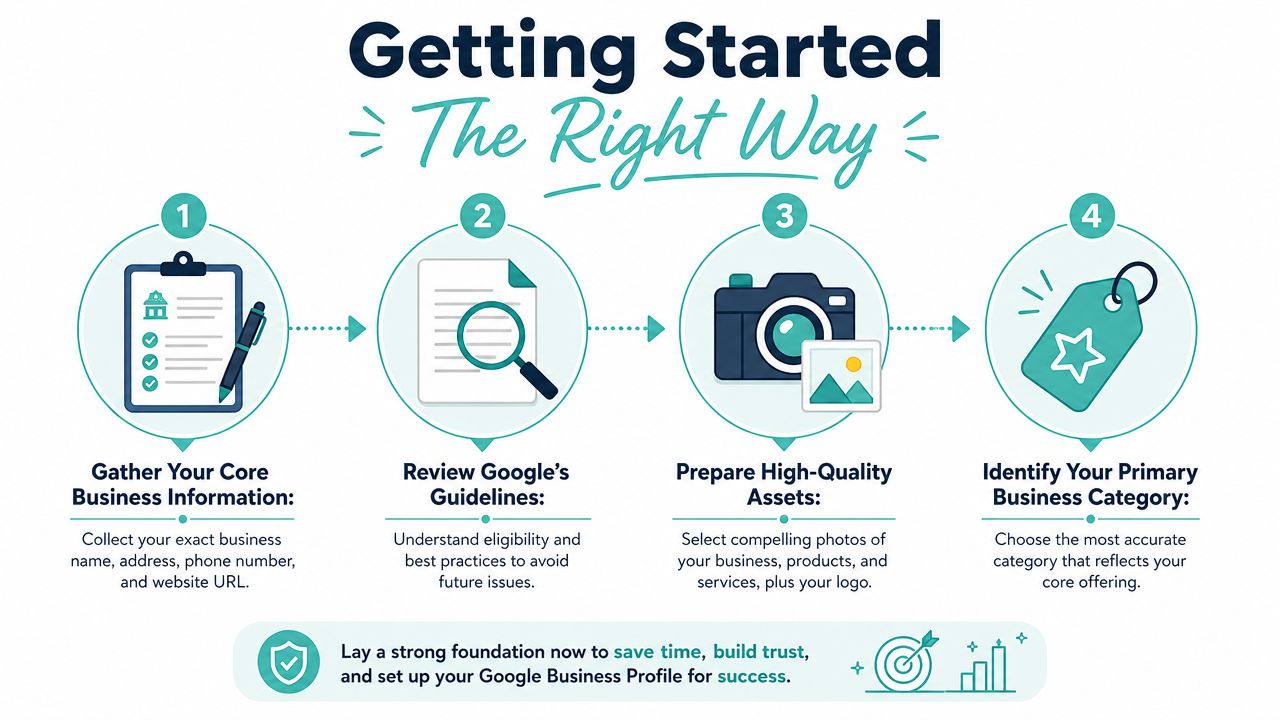
The best setup workflow is to check for an existing listing first, then complete the key fields in a consistent order. Accurate Name, Address, and Phone data matters for discovery and for verification checks, as outlined in this Google Business Profile setup workflow guide.
Check whether Google already created your listing
Search your business name in Google and Google Maps before you create anything. Try a few versions, including your suburb and phone number.
If you find a listing that matches your business, claim it. Don't create a second one just because the old listing looks incomplete. Duplicate profiles create confusion for customers and can complicate verification.
A common real-world example is a long-running local business that changed websites or ownership details over time. Google may still show an older profile with the right trading name but outdated hours. That listing is usually worth claiming and fixing, not replacing.
Gather the business details you'll need
Before you start, have your core information in one place. This saves time and reduces the chance you'll enter one version in Google and another version on your website or invoices.
A practical checklist:
- Business name. Use the trading name customers know you by.
- Address or service area. Decide whether customers visit you, or whether you travel to them.
- Phone number. Use a direct number customers can reach.
- Website URL. Link to the correct homepage or location page.
- Hours. Include standard trading hours from the start.
- Category. Pick the main activity you want to be known for.
- Photos. Prepare a logo, storefront shots, team photos, or service photos.
If you're still sorting out your business web address, it helps to lock that down before you build the profile. Choosing the right domain early avoids future edits to branding, email, and links. This guide to registering a domain name in Australia covers the basics clearly.
Match what customers will actually see
Many profiles encounter difficulties. The name on Google should match the name on your website and customer-facing material. Your phone number should be the number you want calls on. Your suburb, city, or service region should reflect where you operate.
If your profile says one thing and your website says another, customers notice before Google does.
A café with dine-in service should use its actual street location and public hours. A mobile dog groomer serving the Gold Coast should set up as a service-area business, not as a fake storefront with a residential address shown publicly.
That distinction affects both trust and eligibility. It's worth getting right before you click submit.
Host your website with our 5-star rated, cPanel website hosting plans.
Super fast servers, with security included and hosted in your choice of Australian Data Center.
View cPanel Plans
Adding Your Business to Google Step by Step
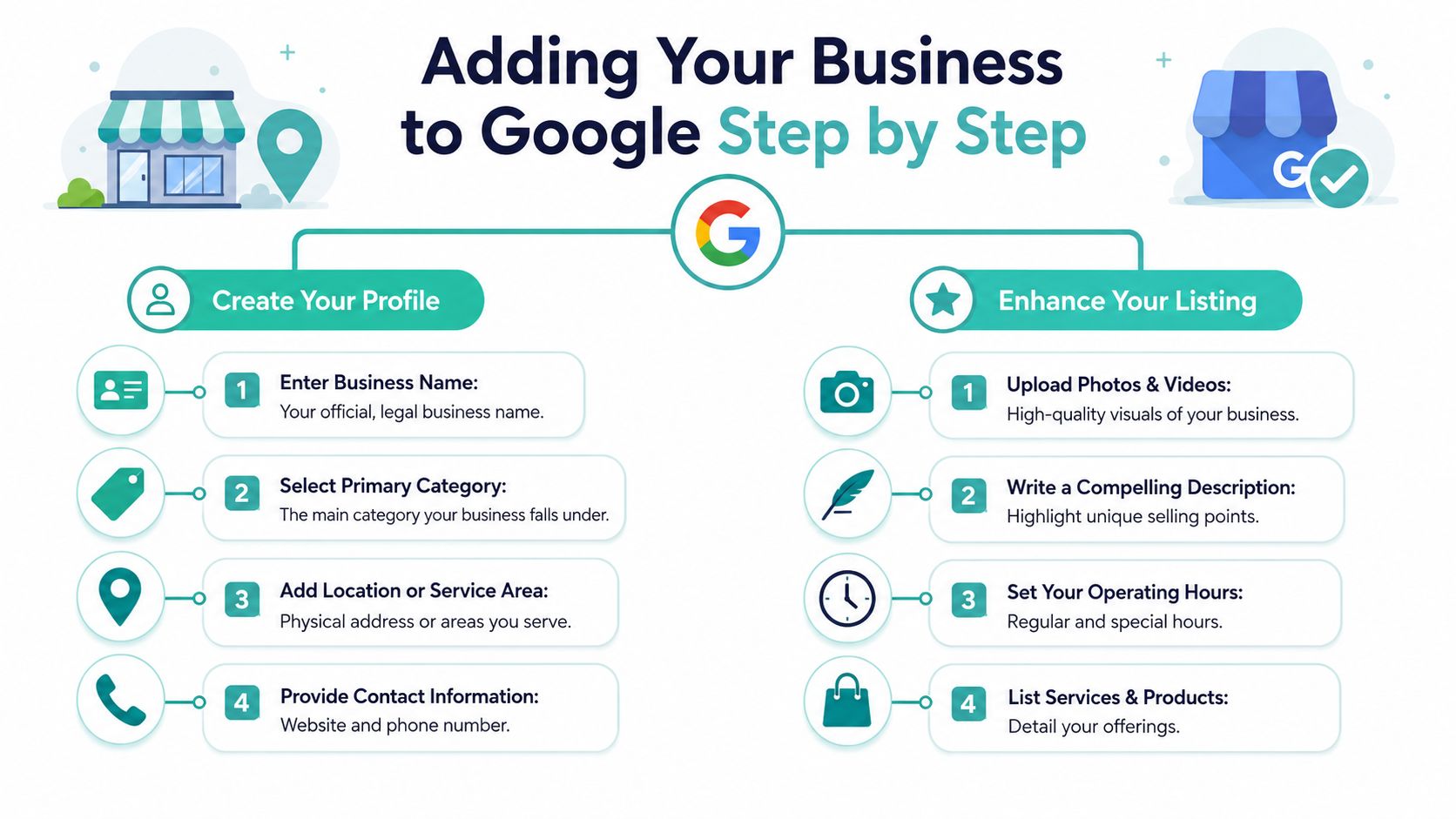
This is the part most owners mean when they search for Google local business add. The trick is to treat setup like a business record, not a marketing brainstorm. Clear beats clever every time.
Claim first if Google already knows you exist
If Google Maps already shows your business, start with the claim process. That's common for established operators, especially hospitality venues, trades, clinics, and professional services.
Claiming an existing profile is usually the cleaner option because the entity may already be indexed in Google's systems. You're taking control of what's there instead of creating a parallel version.
That matters for businesses with history. A restaurant in South Yarra may already have user photos, suggested hours, or reviews attached to a listing. A duplicate would split that attention and create mixed signals for customers.
Choose the right business type
This is one of the biggest forks in the road.
If customers come to your premises, you're generally dealing with a storefront style setup. Think café, barber, physio clinic, bottle shop, florist, or retail showroom.
If you travel to customers and don't want your street address shown publicly, you should configure the profile as a service-area business. Google's guidance allows service-area businesses to define where they operate by suburb, city, or postal code, which is especially useful for mobile businesses and tradies (Google Ads support on service-area business setup).
Examples make this easier:
| Business type | Best setup |
|---|---|
| Café in Fitzroy | Storefront with public address |
| Electrician in Newcastle | Service-area business |
| Wedding photographer with studio visits by appointment | Depends on whether clients genuinely visit the location |
| Mobile mechanic on Sydney's Northern Beaches | Service-area business |
Don't try to game this. A home-based service business that doesn't receive walk-in customers shouldn't present itself like a shopfront.
Enter your core details carefully
Google's creation flow expects the basics first. Fill out the business name, business category, location or service area, phone number, website, and hours with care.
A few practical notes:
- Business name. Use your actual trading name, not a string of service keywords.
- Primary category. Pick the closest fit to your main service. If you're a plumber, choose plumber, not a broader category that feels adjacent.
- Phone and website. Use live, customer-facing contact details.
- Hours. Add regular hours straight away so people know when to call or visit.
For service-area businesses, define your area accurately. Keep it tied to your real footprint. If you serve Melbourne's western suburbs, don't blanket all of Victoria. Broad, unrealistic coverage doesn't help the customer and often makes the listing less convincing.
Build out the parts customers actually use
Once the skeleton is in place, complete the details that turn a bare profile into a useful one. Add services, business description, photos, and any helpful updates to hours or operating arrangements.
A good profile answers basic pre-sale questions without making the customer leave Google:
- What do you do
- Where do you operate
- How do I contact you
- What will I see if I visit
- Does this look active and legitimate
For restaurants and hospitality venues, photos and menu-related details are often make-or-break. If you run a venue, TopFoodApp's Google Business Profile guide for restaurants is a handy companion because it focuses on the listing details diners notice most.
The best listings don't try to sound impressive. They remove doubt.
Add photos that reflect the real business
Skip stock-style imagery if you can. Use clear photos of the storefront, interior, staff, vehicles, completed work, or product shelves. A Brisbane café should show the space, coffee, seating, and frontage. A Sunshine Coast garden professional should show actual jobs, equipment, and team presence.
For local businesses, these photos do two jobs at once. They reassure the customer and support the completeness of the profile.
Include your website properly
Your website link shouldn't be an afterthought. It's where higher-intent visitors go once they've checked your location, reviews, and opening details.
Make sure the site loads, the page title reflects the business name, and the contact details match what's on the profile. If Google asks you to prove ownership or complete connected verification tasks later, having your domain sorted helps. If you need to add a verification-related DNS record during connected services setup, this knowledge base article on adding a verification record to DNS for Google or Microsoft 365 gives a straightforward walkthrough.
Don't overcomplicate the first version
A lot of owners delay going live because they think every photo, service line, and description has to be perfect. It doesn't. Accurate and complete is more important than polished and delayed.
A solid first version usually includes:
- Correct business name
- Right business type
- Accurate location or service area
- Working phone number
- Website link
- Trading hours
- A sensible category
- Real photos
That gets you moving. You can refine wording and expand service details once the profile is live.
The Verification Hurdle and How to Clear It
Verification is where many Australian businesses lose patience. The setup seems done, then Google asks for proof and the process stalls.
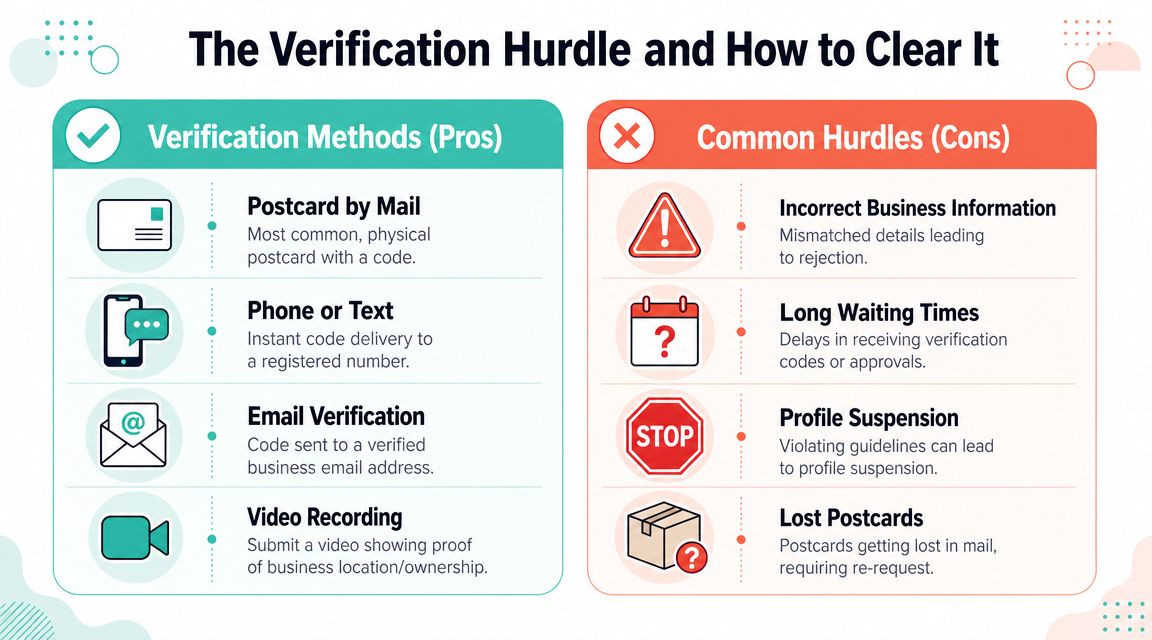
The biggest issue is usually simple. Missing or incomplete contact information can limit your options and push you toward postcard verification, which can take up to 14 days according to this practical guide on Google Business Profile verification delays.
Why verification gets stuck
Google wants to confirm that the business is real, reachable, and represented by someone authorised to manage it. Profiles often hit friction when the business details are inconsistent, the address doesn't fit the business model, or the contact information was skimmed over during setup.
Common examples in Australia include:
- A tradie using a public address when they should be set up as service-area only
- A business with one phone number on the website and another on the profile
- A newly created listing when an older one already exists
- A profile missing enough detail that Google falls back to slower review paths
Clean details reduce verification friction. Messy details usually create it.
What to expect from each verification path
Google may offer one or more methods depending on the business.
| Method | What it usually means in practice |
|---|---|
| Postcard by mail | A code arrives at the business location. Slow, but still common |
| Phone or text | A code is sent to a registered number |
| A code goes to an eligible business email | |
| Video verification | You show evidence of the business, location, tools, signage, or access |
For a physical shop, postcard or phone may be straightforward. For a service-area business, video can be more likely because Google may want clearer proof that the operation is genuine.
If you're asked for video, keep it practical. Show branded materials if you have them, your work vehicle if that's central to the business, tools of trade, access to the premises, or other evidence that connects the listing to a real business operation.
A practical checklist before you submit
Don't treat verification as a gamble. Prep for it.
- Check the NAP details. Your name, address, and phone should match across the profile and website.
- Use the correct business model. Storefront and service-area setups aren't interchangeable.
- Make the website support the profile. Your business identity should be obvious when someone lands on the site.
- Keep documents and brand assets handy. These can help if Google requests more evidence.
- Watch for duplicate listings. They often create extra confusion.
If your website or Google workspace setup needs a domain ownership confirmation step, this guide to confirming domain ownership for Google can save time.
If the postcard never turns up, review the address details before requesting another one. Repeating the same mistake usually leads to the same delay.
Beyond the Basics Optimising Your Profile for More Customers
A claimed profile gets you on the map. A well-run profile gets the enquiry.
For an Australian small business, that gap matters more than people expect. A cafe in Fitzroy can have great coffee and still lose the lunchtime search if the photos are old, the hours are wrong, and the menu details are thin. A plumber in Parramatta can miss urgent callouts if the listing says too little about service areas, emergency work, or what jobs are covered.
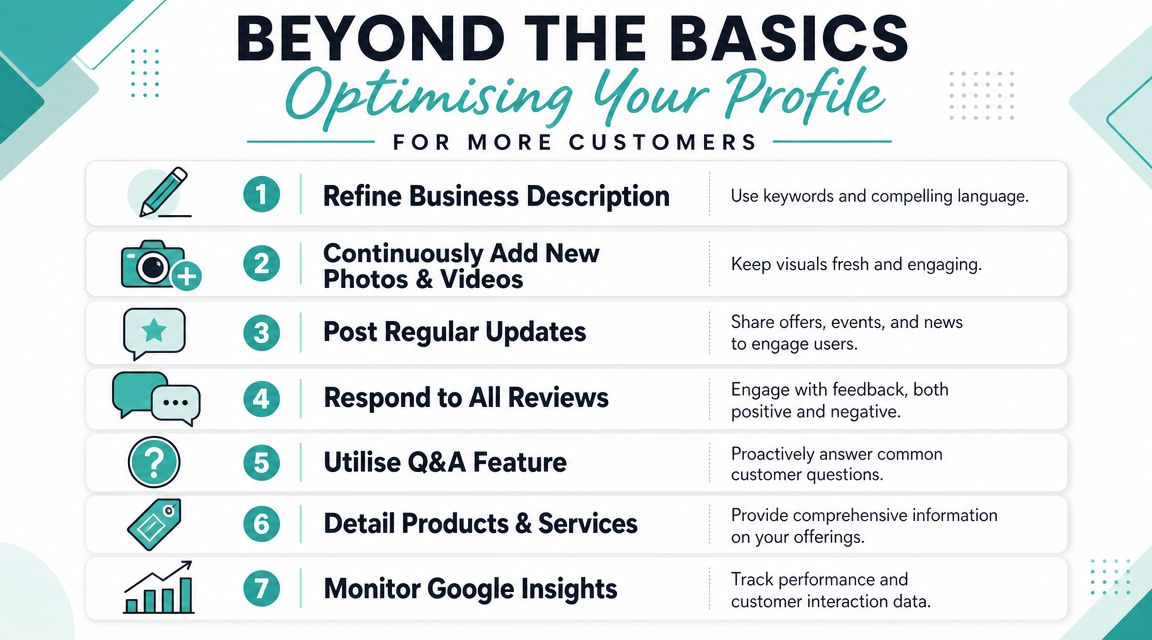
What a basic profile looks like
A basic profile is live, but it is not helping much.
It usually has one logo, a short description, patchy service details, and no recent activity. The business may be legitimate and good at what it does, but the listing gives a potential customer very little confidence.
Take a suburban accountant in Melbourne. If the profile only says "tax services" and shows an old office photo, people still do not know whether the firm helps sole traders, family trusts, SMSFs, or growing small companies. They keep searching until another listing answers those questions faster.
What a stronger profile does differently
A stronger profile removes doubt.
An Adelaide restaurant with fresh venue photos, current trading hours, review replies, and posts about seasonal specials feels open, active, and ready for bookings. A Brisbane consultant who lists clear services, answers common questions, and explains response times gives people enough confidence to make contact before they even visit the website.
That is the primary job of optimisation. Help the right customer decide sooner.
The updates that make the biggest difference
You do not need to babysit the profile every day. You do need a simple maintenance rhythm that keeps it accurate and useful.
Focus on these:
- Add current photos. Show your shopfront, team, finished work, products, or workspace as it looks now. If you are a service business, local job photos often do more work than a polished stock image.
- Keep hours tight. Public holidays, school holiday shifts, and seasonal changes catch out plenty of Australian businesses.
- List specific services. A generic category is only the start. Spell out what you do, whether that is blocked drain repairs, BAS lodgements, Shopify builds, or split-system installations.
- Reply to reviews. Short, calm, human responses show the business is active and paying attention.
- Use posts for timely updates. New offers, booking availability, events, and temporary changes are all worth publishing.
Here is what that looks like in practice:
| Before | After |
|---|---|
| “Electrician” with no detail | Services listed for switchboards, fault finding, smoke alarms, and emergency callouts |
| One old van photo | Fresh job photos, team photo, branded vehicle |
| No review replies | Short, polite responses that show the business is active |
| Generic description | Clear service summary written for local customers |
One more practical point. Your profile sets the expectation, but your website has to back it up. If your listing is strong and your site is confusing, slow, or thin on service details, people drop off after the click. This guide on improving your website ranking on Google is a useful next step if you want the profile and the site working together.
Small improvements stack up. Clearer services, better photos, accurate hours, and active review management can turn a profile from a placeholder into a steady source of local enquiries.
Register your new domain name at competitive market prices including free domain add-ons like privacy, DNS Hosting, Custom Nameservers and Forwarding.
Always the best price and no nasty renewal price hikes.
Register A Domain Name
Troubleshooting Common Google Business Profile Issues
Most profile issues feel bigger than they are. The fastest way to deal with them is to diagnose the symptom, identify the likely cause, and fix the underlying mismatch rather than making random edits.
Symptom your profile was suspended
A suspension often follows edits that changed the business identity too sharply, a setup that doesn't match its actual business model, or information that Google can't confidently verify.
If you're a service-area business, check whether you accidentally presented yourself like a public storefront. If you changed the business name, category, address, and phone at once, that can also create friction.
Start by reviewing whether every public detail reflects the actual business as customers experience it. Then gather supporting evidence before appealing.
Symptom someone else owns the profile
This is common after a staff change, agency handover, or purchase of an existing business. The listing may be legitimate, but the current owner can't access it.
The likely cause is simple. Someone else created or claimed the profile first.
Your best move is to request access rather than creating a new listing. Duplicate creation usually makes the situation worse. Keep records that show your connection to the business, such as website control, business documents, and contact details that match the listing.
Symptom reviews or edits don't appear
If a review is missing or a profile edit hasn't gone live, the issue is often moderation or processing rather than a permanent error.
Use this quick guide:
- If a review is missing, wait before making more changes. Reviews can be filtered or delayed.
- If an address or hours edit isn't accepted, compare the change against your website and other public references.
- If photos won't display, check quality and relevance. Low-value or unclear uploads often struggle.
- If duplicate listings appear, identify the main claimed profile first, then work from there.
When something goes wrong, don't create a second profile in frustration. That usually adds a new problem instead of solving the first one.
For Australian businesses, patience matters, but so does accuracy. Most issues trace back to mismatched business details, ownership confusion, or an incorrect setup type.
Conclusion Your Digital Front Door Is Now Open
A Google Business Profile gives your business a proper local presence where customers are already searching. Done well, it turns “we should probably sort that out” into a working digital front door.
The important shift is this. Creating the profile isn't the finish line. It's the start of managing how your business appears in Search and Maps, how trust is built before the first call, and how local visibility connects to the rest of your online presence.
For an Aussie café, that might mean more bookings and walk-ins. For a tradie, it might mean more calls from the right suburbs. For a service business, it often means fewer dead-end enquiries because the profile answers key questions before the customer reaches out.
Once your listing is live, the next step is making sure the click leads somewhere solid. Your website, email, and hosting still shape the customer experience after Google has done its job.
If you're ready to back up your new visibility with fast local hosting, reliable email, and Australian support, UpTime Web Hosting is a strong fit for small businesses that want everything working together. From domains and business email to WordPress, cPanel, Windows hosting, and local support, they make it easier to turn search visibility into a dependable online presence.