Your website doesn't usually fail at a convenient time. It drops out on a sale day, during payroll, or when customers are trying to log in and place orders. To the business owner, it looks like “the site is down”. To a network engineer, one possible cause is simpler and uglier: your server or upstream link is being overwhelmed by junk traffic.
That's why DDoS protected web hosting matters. Not as a buzzword, and not as a premium extra for giant enterprises, but as a practical control for Australian businesses that rely on websites, email, portals, booking systems, and ecommerce.
A lot of hosting pages say “DDoS protection” and leave it there. That's not enough. You need to know what protection means, where it sits in the network, what it can absorb, and what happens to real users in Australia when an attack is underway.
Table of Contents
- Why DDoS Protection Is a Must for Australian Websites
- How DDoS Attacks Work and How Protection Stops Them
- Key Features to Look for in a Protected Hosting Plan
- Balancing Protection Performance and Cost
- A Practical Checklist for Choosing an Australian Provider
- The Action Plan for Migrating to a Protected Host
- DDoS Protected Hosting FAQs
- Is DDoS protection always active?
- Will I be told if my site is under attack?
- Is included hosting protection the same as a third-party cloud service?
- Does DDoS protection stop hacking and malware too?
- Will protection affect my customers during an attack?
- How do I know whether my current host's protection is enough?

Performance you can feel, backed by clients who depend on it. Read how our support and uptime create long‑term customer success.Power Your Business with Better Hosting
Why DDoS Protection Is a Must for Australian Websites
A small Australian retailer launches a promotion on Thursday morning. Ads are live. Email goes out. Traffic starts building. Then the site slows, the cart won't load, and support gets messages saying the login page is broken. Customers don't care whether the cause is hosting, networking, or security. They just leave.
That scenario isn't niche. Australia's cyber-threat environment is busy enough that resilience has to be built into hosting decisions. The Australian Signals Directorate recorded 94,000 cybercrime reports in 2022–23, averaging one report every 6 minutes, and the broader cyber strategy aims to make Australia a world-leading cyber-secure nation by 2030, as noted in SentinelOne's summary of the threat landscape.
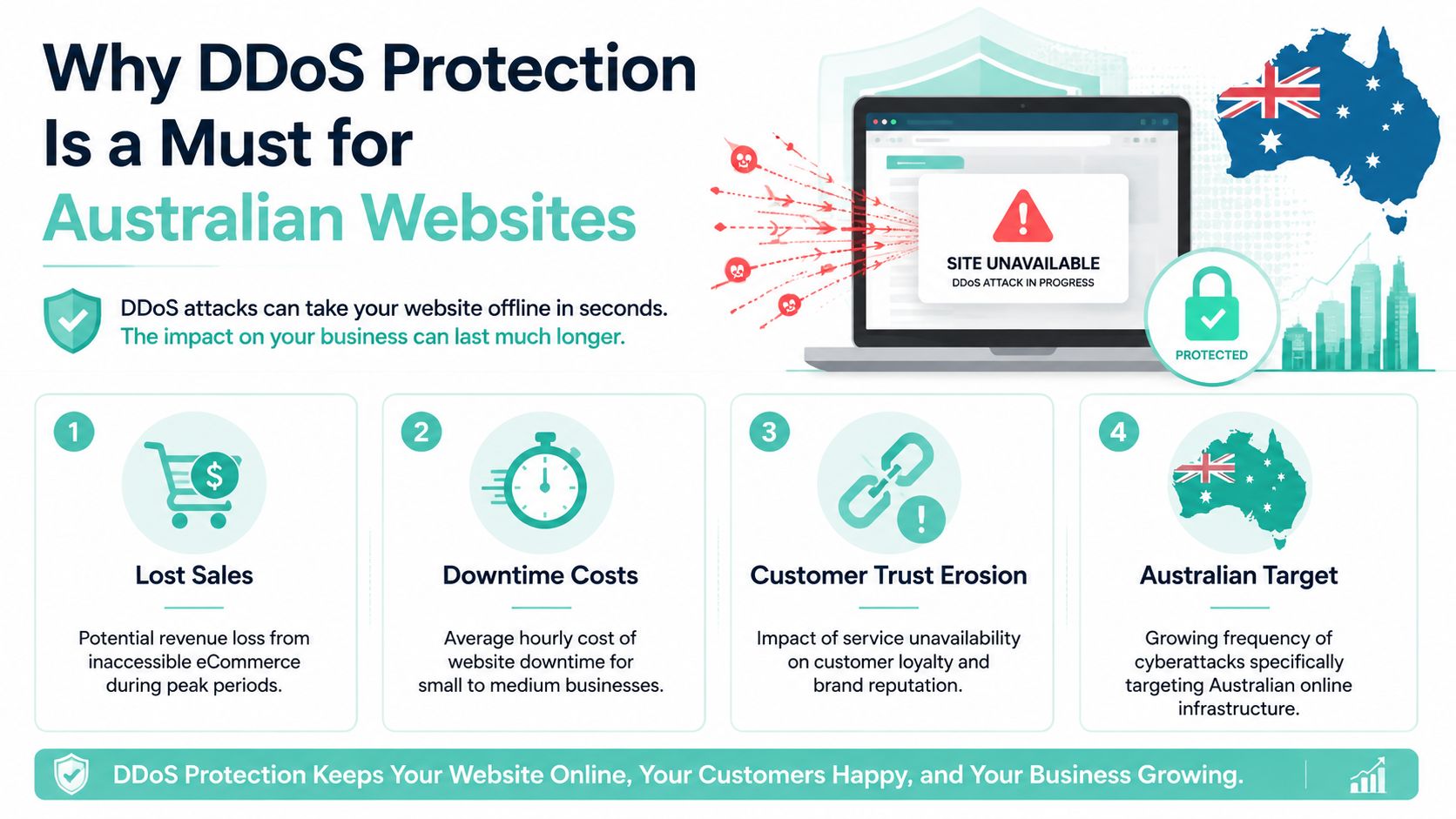
A Distributed Denial-of-Service attack, or DDoS attack, is an attempt to overload your online service with traffic or requests so real visitors can't get through. Sometimes the target is the website itself. Sometimes it's the network link in front of it. Either way, the business impact lands first.
What downtime looks like in a small business
For an SME, even a short interruption can hit several systems at once:
- Online sales stop. Shoppers can't browse, check out, or complete payment.
- Customer service takes the hit. Contact forms, order lookups, and client portals become unreliable.
- Email-linked workflows break. Password resets, confirmations, and support notifications may fail or arrive late.
- Staff lose confidence fast. Internal teams often don't know whether they're dealing with a hosting fault, a coding issue, or an attack.
Practical rule: If your website helps customers buy, book, log in, or request support, DDoS protection isn't optional plumbing. It's part of business continuity.
If you're reviewing hosting through a risk lens rather than a price-only lens, it helps to treat website resilience the same way you'd treat backups or outage planning. This broader view is covered well in business continuity planning for hosting-dependent businesses.
The confusion most owners run into
Many owners assume security means “stopping hackers from logging in”. That's only one part of the picture. DDoS protection is about keeping the service reachable while hostile traffic is hitting it.
That distinction matters because a perfectly patched website can still go offline if the traffic flood reaches it unfiltered. Good hosting isn't just about server speed. It's about staying available when conditions turn ugly.
How DDoS Attacks Work and How Protection Stops Them
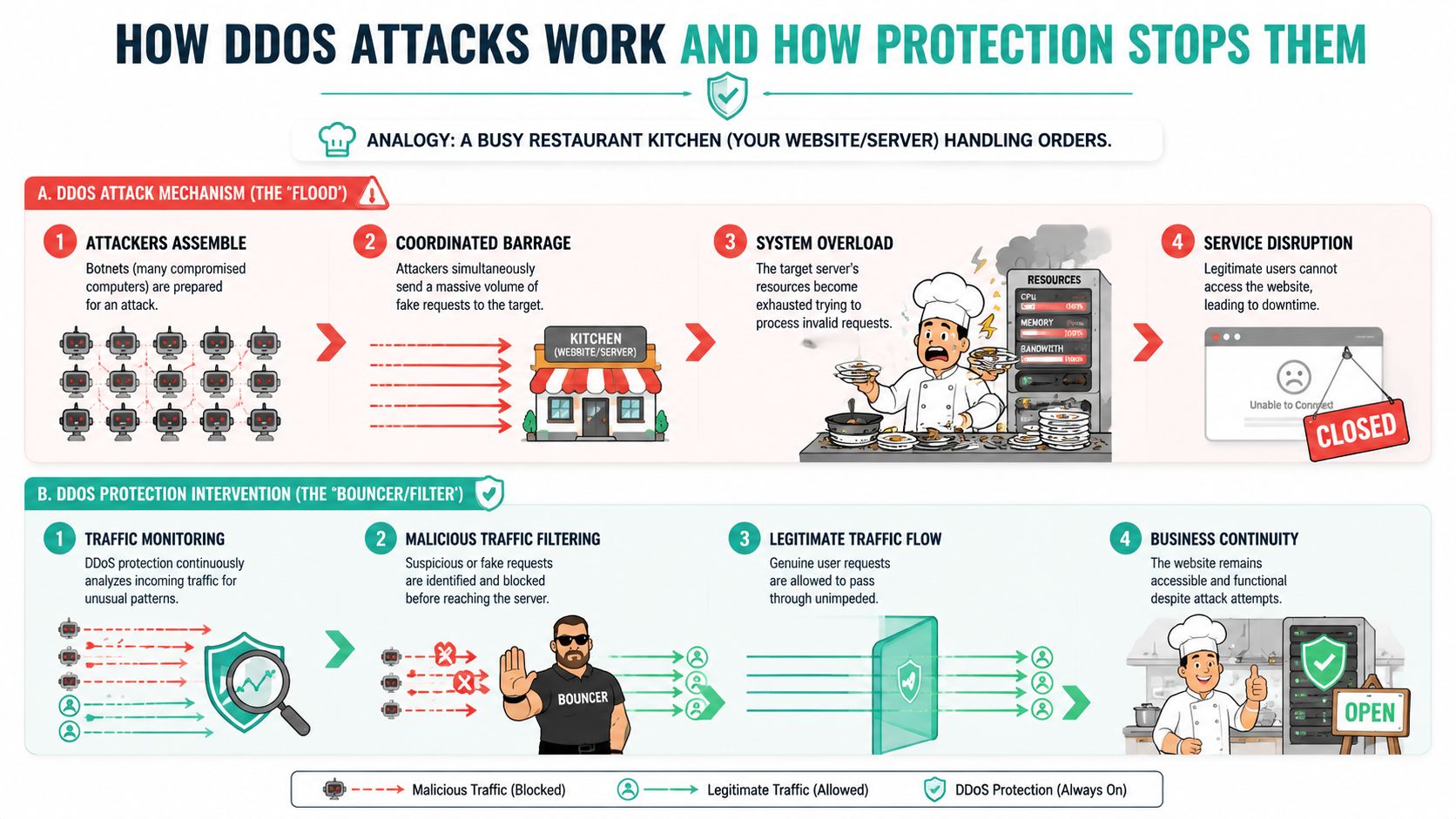
Think of your website like a restaurant kitchen. Real customers place normal orders, the staff process them, and service runs smoothly. A DDoS attack is the digital equivalent of thousands of fake orders arriving at once. The kitchen doesn't fail because the meals are complex. It fails because the input stream becomes unmanageable.
That overload can happen in different ways. Some attacks aim to swamp raw network capacity. Others try to exhaust server resources by sending large volumes of application requests. For the business owner, the symptom is the same. The site becomes slow, unstable, or unreachable.
The basic mechanics
A DDoS attack usually uses many systems at once to send traffic at the same target. That distribution makes the traffic harder to block with simple rules because it doesn't all come from one obvious source.
What matters in hosting terms is where the failure happens first:
- At the upstream link if the incoming flood fills available bandwidth before your server can respond
- At the server if the machine runs out of CPU, memory, worker processes, or connection capacity
- At the application layer if fake page requests, search requests, or login attempts consume web stack resources
What real protection looks like
Protection works best as layers, not as a single feature tick-box.
AWS explains that effective mitigation depends on both bandwidth/transit capacity and server capacity, and recommends placing applications behind CDNs or load balancers while restricting direct internet access to sensitive services. That's the best-practice model described in AWS Shield guidance on DDoS attack protection.
In plain language, that means the dangerous traffic should be filtered before it reaches the origin server.
Here's what those layers usually do:
- Traffic scrubbing filters bad traffic patterns at the edge before they can clog the path to your server.
- Rate limiting slows or blocks request floods from clients behaving like bots rather than people.
- Web Application Firewall rules inspect HTTP and HTTPS requests and stop abusive Layer 7 behaviour.
- CDN or edge distribution absorbs and spreads incoming load so the origin isn't exposed directly.
- Restricted origin access makes it harder for attackers to bypass the protective layer and hit the server itself.
A host can have a strong server and still fail during a DDoS event if the internet-facing path in front of it is too thin.
For SME owners, that's the key point. A bigger hosting plan alone doesn't solve this problem. More CPU helps with normal load. It doesn't fix an upstream saturation issue.
Where people often get this wrong
A common assumption is that the web server itself will “handle” the attack if it's powerful enough. It won't, not if the line feeding it is already overwhelmed. That's why network architecture matters as much as server specifications.
If you want a plain-English primer on the wider security side around small business infrastructure, this guide to small business network security for Australian SMEs is a useful companion read.
Host your website with our 5-star rated, cPanel website hosting plans.
Super fast servers, with security included and hosted in your choice of Australian Data Center.
View cPanel Plans
Key Features to Look for in a Protected Hosting Plan
Marketing fluff often starts with vague claims. A provider says “DDoS protected firewall”, “enterprise security”, or “always-on mitigation”, but gives you no detail about what's included. If you can't tell whether the protection sits at the edge, at the rack, or only on the local firewall, you're not comparing plans properly.
The biggest distinction to understand is the gap between basic provider-level mitigation and purpose-built cloud-scale protection. Many standard hosting plans offer unquantified Layer 3 and Layer 4 protection that can fail against modern attacks exceeding 10 Gbps, while dedicated cloud-based services can handle 100 Gbps+. That gap is rarely explained in local hosting FAQs.
The checklist that actually matters
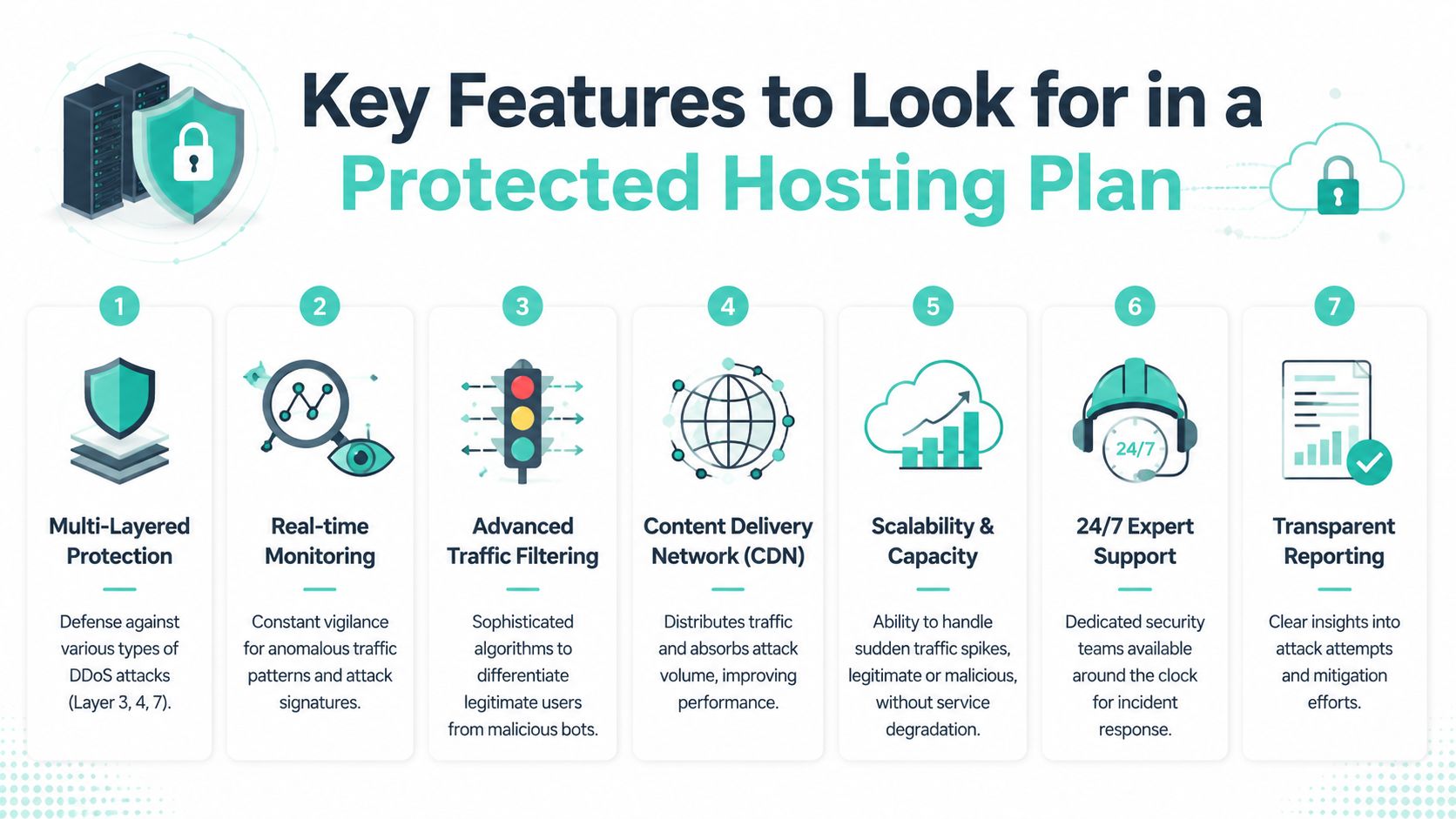
When you're reviewing DDoS protected web hosting, look for these signs of genuine protection:
- Edge-based filtering. The host should protect traffic before it reaches the origin, not just rely on server-local filtering.
- Layer 7 awareness. Network filtering alone won't stop every HTTP or HTTPS abuse pattern.
- CDN or scrubbing integration. A protected path in front of the server is stronger than an exposed origin.
- Transparent scope. You should know whether protection covers only infrastructure attacks or also web application abuse.
- Operational visibility. The provider should be able to explain what happens during an event, not just sell the idea of protection.
- Support that understands incidents. You want technicians who can distinguish a traffic spike, a code bottleneck, and an attack.
Questions that expose weak protection quickly
If a host can't answer these cleanly, treat that as a warning sign.
| Feature area | Weak answer | Stronger answer |
|---|---|---|
| Mitigation location | “We have DDoS protection on all plans” | Clear explanation of where filtering happens before traffic reaches the server |
| Protection scope | “Firewall included” | Distinction between network-layer and application-layer controls |
| Capacity discussion | No quantified benchmark or only vague claims | Honest discussion of basic included mitigation versus cloud-scale options |
| Origin exposure | Server directly reachable from the internet | Origin placed behind a CDN, load balancer, or protected edge |
| Incident handling | Generic support reply | Defined process for attack review, filtering, and escalation |
Don't confuse firewall language with full mitigation
A local firewall can be useful. It can also be overwhelmed, bypassed, or placed too late in the traffic path to help during a large volumetric event.
That's why “DDoS protected” needs context:
- Basic protection may be enough for lower-volume nuisance traffic.
- Scalable cloud protection is usually the better fit when uptime is critical or when the site is exposed to larger attack bursts.
- Hybrid approaches often make sense for Australian businesses that want local hosting but need stronger edge absorption.
If a provider won't explain the difference between included mitigation and a higher-tier cloud defence model, you're probably looking at marketing, not engineering.
Businesses comparing managed environments often run into these differences because “managed” doesn't automatically mean “well-protected”. This is worth keeping in mind when assessing managed web hosting options in Australia.
Balancing Protection Performance and Cost
One of the most common objections is simple. “Won't extra protection slow my site down?” Sometimes, under attack conditions, there is a trade-off. The useful question isn't whether filtering adds any overhead at all. The useful question is whether the overhead is acceptable compared with the alternative, which is outage.

For Australian businesses, geography matters. Without globally distributed scrubbing centres, some local filtering can introduce a 15 to 20% latency increase for legitimate Australian users during an attack. That matters most for performance-sensitive sites such as ecommerce.
What that means in practice
Under normal conditions, a well-designed protective layer should be unobtrusive. During an attack, though, the system may inspect more traffic, challenge suspicious requests, or reroute flows through mitigation systems. That can create a noticeable delay for real users.
You may also see temporary friction such as:
- False positives where a legitimate request gets challenged or blocked
- Session interruptions if a user's path changes during active mitigation
- Short-lived slowdowns while filtering rules adapt to the traffic pattern
That sounds negative, but compare it with the no-protection outcome. Without a proper edge layer, the whole site may become unreachable.
Cost decisions usually go wrong in one place
Owners often compare line-item hosting prices and miss the operational risk. The cheap plan looks fine until the first serious incident. Then the hidden cost arrives as lost enquiries, abandoned carts, support overhead, and emergency migration pressure.
A useful way to think about spend is this:
| Choice | What you save upfront | What you risk later |
|---|---|---|
| Bare-bones hosting | Lower monthly cost | Higher exposure to outage and reactive fixes |
| Basic included mitigation | Some baseline protection | Unclear limits during larger or more complex events |
| Stronger protected setup | Higher monthly spend | Better continuity when traffic turns hostile |
Good protection is designed to preserve service for legitimate users, not simply block traffic aggressively and hope for the best.
If you've ever moved to a cheap host and then discovered the “extras” later, you'll recognise the pattern. This broader budgeting problem is similar to the hidden costs of budget web hosts.
A Practical Checklist for Choosing an Australian Provider
By this point, the job isn't to become a network engineer. It's to ask better questions than “Do you offer DDoS protection?” That question is too broad and too easy for a sales page to answer with a yes.
Use the checklist below when you speak with an Australian provider. If the answers are vague, you've learnt something useful.
DDoS Protection Provider Checklist
| Feature/Question | Why It Matters | Ideal Answer |
|---|---|---|
| Where is the website hosted? | Local hosting affects support, latency expectations, and operational handling | Clear Australian hosting location and service scope |
| Where does DDoS filtering happen? | Protection is stronger when bad traffic is filtered before the origin is hit | Filtering occurs upstream or at the edge, not only on the server |
| Is the origin exposed directly? | A directly reachable origin is easier to target | Origin sits behind a CDN, load balancer, or protected front end |
| What's included by default? | “Included security” can mean many different things | The provider explains what baseline protection covers and what it doesn't |
| Do you protect Layer 7 traffic? | Web requests can be abused even when network floods are filtered | WAF or equivalent application-layer controls are available |
| What happens during an active event? | You need to know the response path before an incident happens | Clear process for monitoring, filtering, and support escalation |
| Is support available locally? | Fast, plain-English communication matters during an outage | Australian support channels with timely response |
| Are costs transparent? | Incident costs and add-ons can become nasty surprises | Straightforward pricing and clear inclusions |
| Can you help with migration? | A safer move reduces operational risk | Managed or guided migration process available |
How to use the checklist well
Take notes during the call. Ask follow-up questions in plain language. If the provider retreats into jargon, ask them to explain where the traffic is stopped and how your server is shielded from direct impact.
It also helps to compare your shortlist against broader expert tips for web hosting choices, especially around support quality, pricing clarity, and operational fit. Those factors matter just as much as technical labels.
Red flags worth taking seriously
- No detail on architecture. The provider repeats “protected” but won't explain the path.
- No distinction between firewall and DDoS mitigation. That usually means the service scope is thin.
- No discussion of local support or escalation. During an incident, you don't want a ticket queue with vague ownership.
- No migration help. If the move is left entirely to you, the risk shifts onto your team.
Register your new domain name at competitive market prices including free domain add-ons like privacy, DNS Hosting, Custom Nameservers and Forwarding.
Always the best price and no nasty renewal price hikes.
Register A Domain Name
The Action Plan for Migrating to a Protected Host
Migration sounds risky to many business owners because they picture a messy cutover and hours of downtime. In reality, a well-run move is mostly about preparation, verification, and timing. The protection piece matters, but so does the process around it.
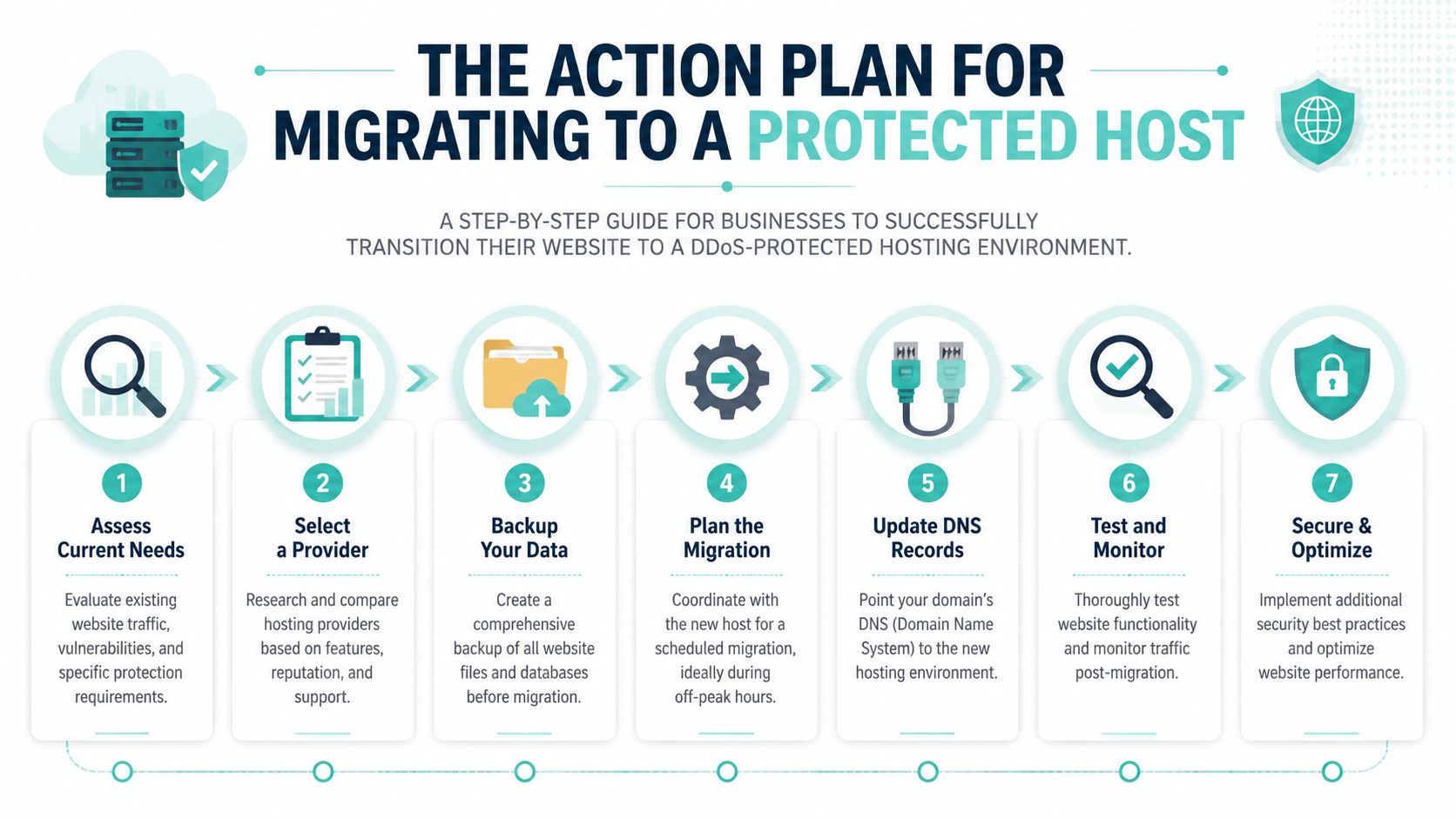
A sensible migration sequence
Review what you run
List the website, databases, forms, email dependencies, plugins, and any third-party integrations. You can't protect or migrate what you haven't identified.Take a full backup first
Keep a current copy of site files and databases before anyone changes hosting. That gives you a clean rollback point if something unexpected happens.Open the migration request with the new host
Give them the basics early. Site type, approximate size, application stack, and any business-critical windows to avoid.Share access securely
Provide only the credentials needed for the move, and use the provider's approved secure method rather than sending sensitive details casually.
Before you go live
A migration isn't finished when the files are copied.
You should also:
- Check the temporary or preview version to confirm pages, forms, carts, and logins work properly
- Review security settings so the protective layer, SSL, and application rules are active
- Confirm backups and monitoring are operating in the new environment
- Schedule the cutover sensibly so key staff are available if a post-move issue appears
The safest migrations are boring. Good hosts make them boring by planning the work, checking the result, and avoiding rushed cutovers.
The final switch
Once the migrated site has been reviewed, the final step is updating the live traffic path so users start reaching the new environment. After that, watch the site closely. Check forms, transactions, portal access, and performance from an Australian user perspective.
If you want a clearer view of what a managed move usually involves, this walkthrough on how to migrate a website to a new host covers the process in practical terms.
DDoS Protected Hosting FAQs
Is DDoS protection always active?
That depends on the provider's design. Some protection is always on in the background, while some higher-level controls become more relevant once suspicious traffic patterns appear. The important point is to ask whether the protective layer sits in front of your origin continuously or only as an optional add-on.
Will I be told if my site is under attack?
Better providers usually have a process for alerting customers when there's a meaningful service event or mitigation action. Ask what notification methods they use and whether support will explain what happened in plain English.
Is included hosting protection the same as a third-party cloud service?
Not always. Included protection may cover baseline network-layer events, while a specialised cloud service can offer broader capacity and more flexible mitigation. The right choice depends on how exposed your site is, how critical uptime is, and whether your provider's included controls are clearly defined.
Does DDoS protection stop hacking and malware too?
No. It helps keep services available during traffic floods or abusive request patterns. It doesn't replace patching, malware scanning, access control, secure plugins, or backups. Availability protection and compromise prevention are related, but they're not the same thing.
Will protection affect my customers during an attack?
It can. Some filtering systems may challenge suspicious visitors, slow some requests, or briefly increase latency while mitigation is active. Good systems are tuned to keep genuine users moving while cutting off abusive traffic.
How do I know whether my current host's protection is enough?
Ask direct questions. Where is traffic filtered? Is the origin exposed? Is Layer 7 abuse covered? What happens if attack volume exceeds the included baseline? If the answers are vague, you probably don't have enough clarity to trust the setup.
If you want local help choosing secure, Australian-hosted infrastructure without the jargon, UpTime Web Hosting offers Australian-based hosting, support, and migration assistance for businesses that need their sites to stay fast, reachable, and properly protected.