You're probably here because backup has gone from a boring checkbox to a real worry. Maybe your website matters more than it did a year ago. Maybe orders come through WooCommerce, enquiries land by email, bookings sit inside WordPress, and your staff assume it's all “just on the hosting”. Then one morning the site won't load, the login fails, or someone tells you the server copy is gone too.
That's the moment small businesses start asking a better question than “do I have a backup?” The better question is where is that backup, what does it include, and can I restore it fast enough to keep trading? That's what off-site backup is really about in an Australian hosting context. Not theory. Survival.
Table of Contents
- Your Website Vanished Overnight Now What?
- Why Off-Site Backup Is Your Business Lifeline
- On-Site vs Off-Site Backups A Critical Comparison
- How Off-Site Backups Work in Practice
- Choosing an Off-Site Backup Provider in Australia
- Your Next Step Towards Digital Resilience

Performance you can feel, backed by clients who depend on it. Read how our support and uptime create long‑term customer success.Power Your Business with Better Hosting
Your Website Vanished Overnight Now What?
You open your laptop at 7:15 am. Your website shows a 404 error. The contact forms aren't working. A customer has already emailed from a Gmail address because your normal business email looks broken too. If you run bookings, online orders, or lead generation through your site, the day starts with stress instead of sales.

This isn't always a dramatic Hollywood-style cyberattack. Sometimes a plugin update goes wrong. Sometimes a file gets deleted. Sometimes malware damages the site and the local backup stored on the same server isn't safe either. If the production copy and the backup copy live too close together, one incident can hit both.
That's why off-site backup matters. It functions as insurance for your data. You don't keep your only spare shop key inside the locked shop. In the same way, you don't want your only backup sitting in the same environment as the website you're trying to protect.
When “we have backups” still isn't enough
A lot of business owners hear “nightly backups included” and assume the job's done. But that phrase can hide important gaps:
- Same-server risk means the backup may be stored on the same platform as the live website.
- Partial backup scope can mean files are captured, but databases or email aren't.
- Support-only restores can slow everything down when you need one file back quickly.
- Short retention may leave you without a clean restore point if a problem sat unnoticed.
A backup only helps if it's separate, current, and restorable.
For website owners using cPanel, WordPress, or Windows hosting, the practical question is simple. If your site disappeared today, could you restore the right version without rebuilding from scratch?
If you're not sure, check whether your host provides a clear restore path such as this account backup restore guide. Even if you never touch it, the existence of a proper restore process tells you a lot about how serious the provider is about recovery.
Why Off-Site Backup Is Your Business Lifeline
An off-site backup is a copy of data stored in a separate, usually remote, physical location from the primary production environment, designed to protect against local disasters such as fires, floods, or cyberattacks that could render on-premises backups unusable. In Australia, regulatory and insurer expectations increasingly treat off-site backups as a baseline for business continuity planning. Studies of Australian SMBs indicate that only about 30 to 40% of smaller organisations consistently maintain fully separate, off-site backup copies for their core business systems, which leaves many exposed to real risk, as outlined in this guide to why storing backup data off-site matters.
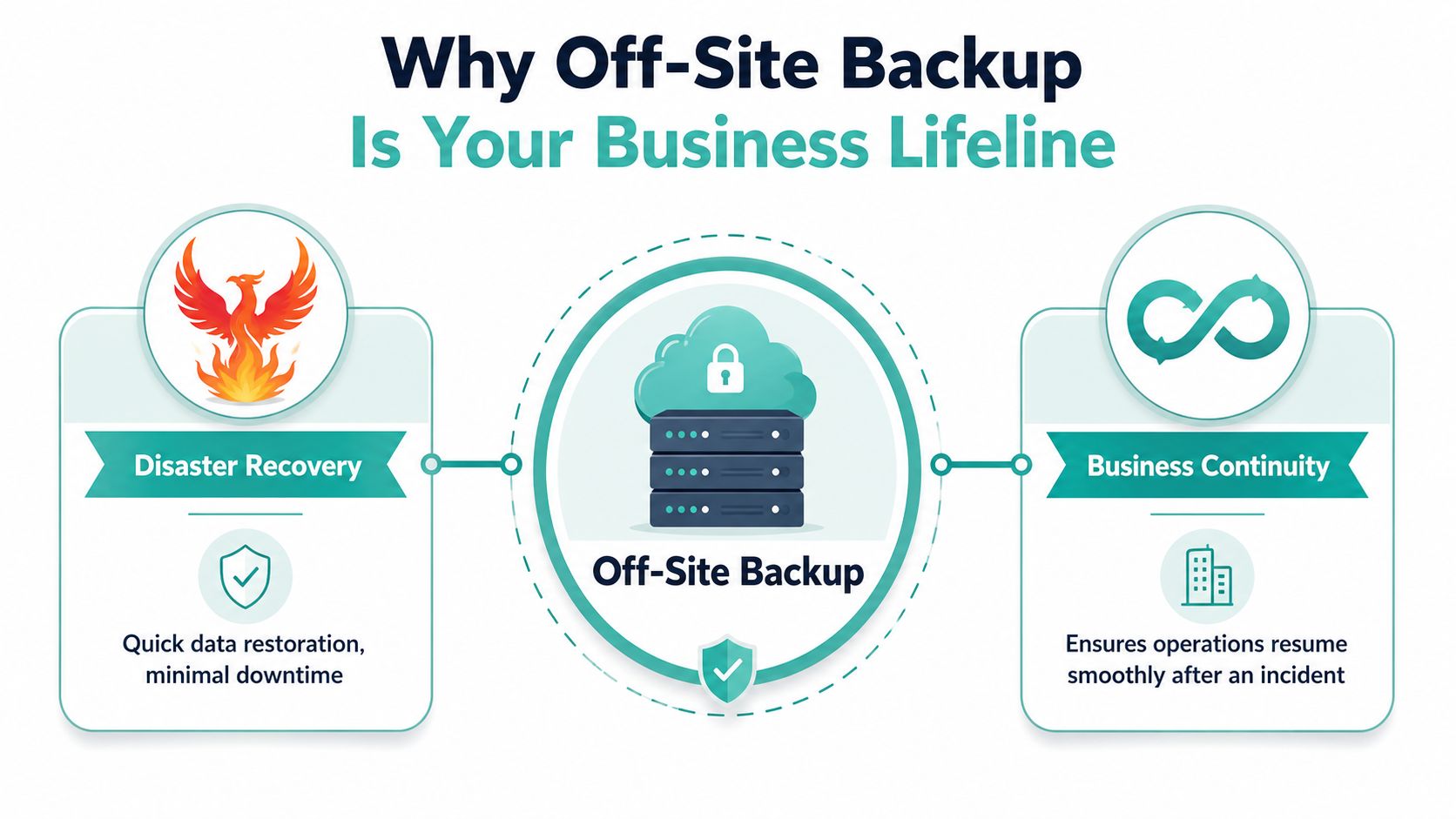
For a small business owner, that definition matters because downtime isn't just technical trouble. It means missed leads, disrupted service, awkward customer calls, and extra labour while someone tries to patch things together. A proper off-site copy gives you a second recovery path that isn't caught in the same mess as the first one.
Two business terms worth knowing
You don't need to speak fluent IT, but two ideas help.
RTO is your recovery time objective. In plain English, it's how quickly you need to reopen after a disruption. If your website is your storefront, RTO is the time between the “closed” sign going up and you trading again.
RPO is your recovery point objective. That's how much recent data you can afford to lose. Using the same shop analogy, it's the number of sales receipts lost in the fire. If your last good backup is too old, you may restore the site but still lose orders, enquiries, or content changes.
Why insurers and regulators care
Australian businesses face a practical reality. When a local incident affects your premises, your hardware, or your hosting environment, a nearby backup may fail at the same time. That's why off-site backup sits inside broader business continuity planning rather than being treated as an optional extra.
Practical rule: If the live system and the backup can be taken out by the same event, you don't yet have a resilient backup strategy.
For web hosting customers, backup moves past being an abstract IT term and becomes a business control. If you want an example of what managed protection can look like in a business setting, review a dedicated business backup service for Australian organisations. You're looking for separation, routine automation, and a clear path back to service.
A useful way to think about it is this. Security tries to stop bad things happening. Backup accepts that some bad things will still happen, and prepares your business to recover anyway.
Host your website with our 5-star rated, cPanel website hosting plans.
Super fast servers, with security included and hosted in your choice of Australian Data Center.
View cPanel Plans
On-Site vs Off-Site Backups A Critical Comparison
A lot of confusion starts because on-site backup sounds responsible. And it can be. If you keep a copy on a local office server, a NAS, or an external drive, you may be able to restore a deleted file quickly. For small mishaps, on-site backup is handy.
Its weakness is location. If the same local event hits both the live data and the backup, the speed advantage doesn't matter much.
What on-site backup does well
On-site backups are useful for everyday recovery. Someone deletes a folder. A developer breaks a theme file. A staff member needs yesterday's version of a spreadsheet. Local copies can be fast to access and easy to keep under your own control.
They also suit businesses that want a layered approach. There's nothing wrong with keeping a nearby copy for convenience. The problem is treating it as the only line of defence.
Where off-site backup changes the game
Off-site backup exists to solve the exact weakness of on-site storage. It puts a copy in another physical location, separate from the event affecting the primary environment. That's the heart of what is off-site backup in practical terms. It's backup with distance and separation built in.
The side-by-side difference is easier to see in a simple table.
| Feature | On-Site Backup (e.g., USB drive, office server) | Off-Site Backup (e.g., remote data centre) |
|---|---|---|
| Disaster protection | Limited if the same event affects the office or host | Stronger because the copy is stored elsewhere |
| Restoration speed | Often quick for small local restores | May be slower than a nearby copy, depending on setup |
| Cost profile | Can be simpler upfront | Usually part of a broader managed recovery approach |
| Best use case | Fast recovery from accidental deletion or small errors | Recovery after server failure, cyberattack, or site-wide outage |
A strong strategy uses both. The common shorthand is the 3-2-1 backup rule. Keep three copies of data, on two media types, with one copy off-site. That model is referenced in the Australian off-site backup guidance cited earlier, and it remains an easy way for non-technical owners to sense-check whether they're relying on a single point of failure.
If your only backup sits in the same office, the same rack, or the same hosting environment, it's a convenience copy, not a full resilience plan.
This same location-versus-separation idea turns up in other parts of IT operations too. For example, this look at ITAD pros and cons in Georgia is about asset disposal rather than backup, but it's a helpful reminder that on-site and off-site services solve different problems because physical context matters.
If you're reviewing hosting options, a dedicated cloud backup service for business websites can show you the sort of separation and recovery features worth asking about.
How Off-Site Backups Work in Practice
When business owners ask what is off-site backup, they usually don't want a textbook definition. They want to know what happens to the website at night, where the data goes, and how they'd get it back after a bad day.
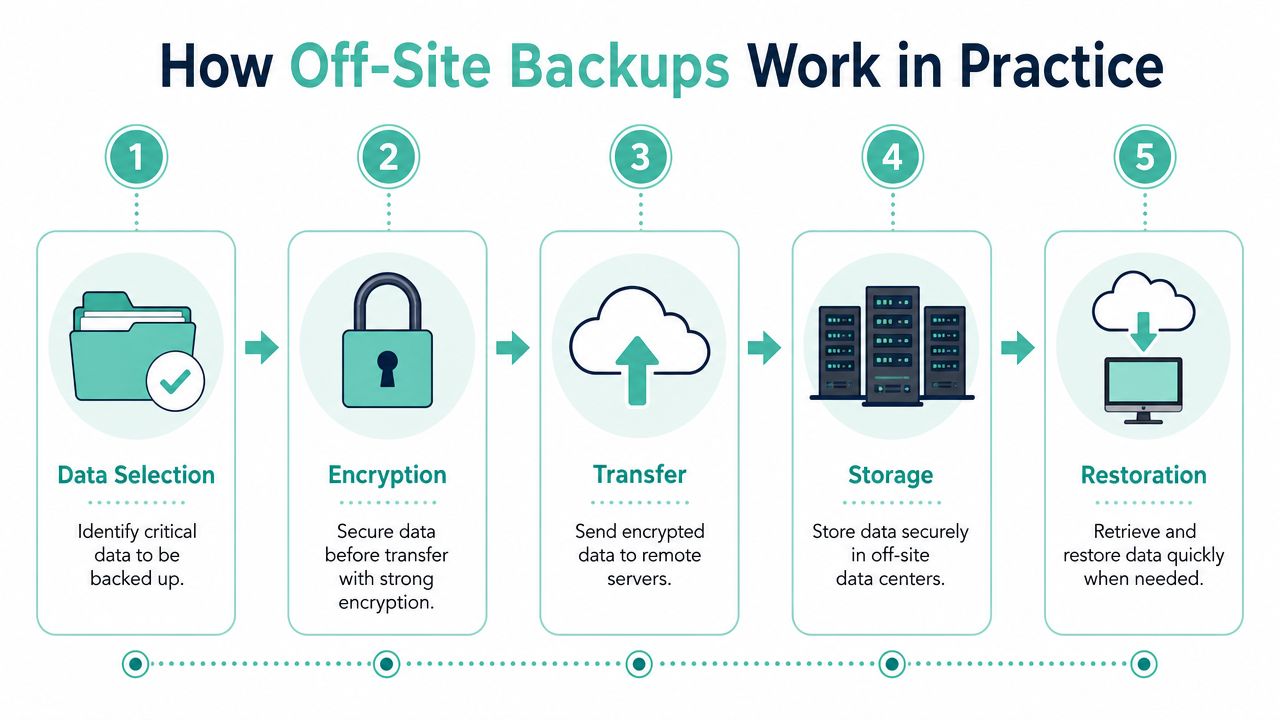
In a hosting environment, the process is usually automated. The provider identifies the data to be protected, creates a backup job, encrypts the transfer, sends it to a remote location, stores it under a retention policy, and makes it available for restoration when needed. You don't log in each night to do this by hand. The value is in the system running reliably without depending on memory.
What usually happens behind the scenes
Best practice treats the off-site copy as a distinct recovery plane. For example, data stored in Sydney-hosted production environments is commonly replicated to a secondary data centre in Melbourne or Brisbane. Measured Australian case studies show that maintaining at least 250 to 300 km geographic separation between primary and off-site copies reduces the probability of simultaneous infrastructure failure during regional disasters by over 70%, and regulated Australian hosting providers commonly use AES-256 encryption at rest and TLS 1.3-secured transfers, as described in this overview of off-site data protection.
That sounds technical, but the idea is simple. Your live site and your recovery copy shouldn't depend on the same storage stack, the same network path, or the same local event staying small.
A useful analogy is a secure, time-locked safe. The backup is sealed before it travels, stored in a different building, and kept in versions so you can choose the right restore point rather than being stuck with only the latest copy.
What this looks like in cPanel and WordPress hosting
Many owners get caught out. They assume “website backup” means everything.
In practice, different hosting setups may involve different pieces:
- Website files such as themes, uploads, images, and application files
- Databases that power WordPress content, settings, orders, and user accounts
- Email data if your mailboxes live with the hosting account
- Account settings tied to the control panel environment
For WordPress in particular, the database is often the part people forget. A site can look fine at file level and still lose recent posts, product changes, or form entries if the database wasn't part of the backup plan. If you want to compare that against your own setup, this WordPress backup guide for Australian website owners is a practical starting point.
Why testing matters as much as storage
A backup strategy isn't finished when the copy is created. It's finished when a restore works.
Ask these questions:
- Can you restore a single file or full account?
- Can you choose from multiple dates?
- Is the restore self-service, provider-assisted, or both?
- Does the provider test the process regularly?
Backups fail quietly. Restores reveal the truth.
Snapshots also deserve a quick mention. They can be excellent for fast rollback, but they aren't always the same as a true off-site backup. A snapshot may live close to production and protect against one type of mistake while doing less for a broader location-based incident. That's why “we have snapshots” isn't automatically the same answer as “we have off-site backup”.
Choosing an Off-Site Backup Provider in Australia
Most providers say they do backups. The better question is whether they do the right kind of backup for your business, your website stack, and your recovery needs.
Existing content rarely explains how off-site backup works for web hosting specifically in Australia, such as how nightly backups are encrypted, stored, and restored in cPanel or WordPress environments. Australian SMBs often assume their hosting backup captures everything including databases and email, yet many standard plans do not. Poor understanding of backup scope and recovery procedures undermines resilience for small businesses, as noted in this off-site backup definition and hosting context overview.
The questions to ask before you trust any backup promise
Take these into your next support chat or sales call.
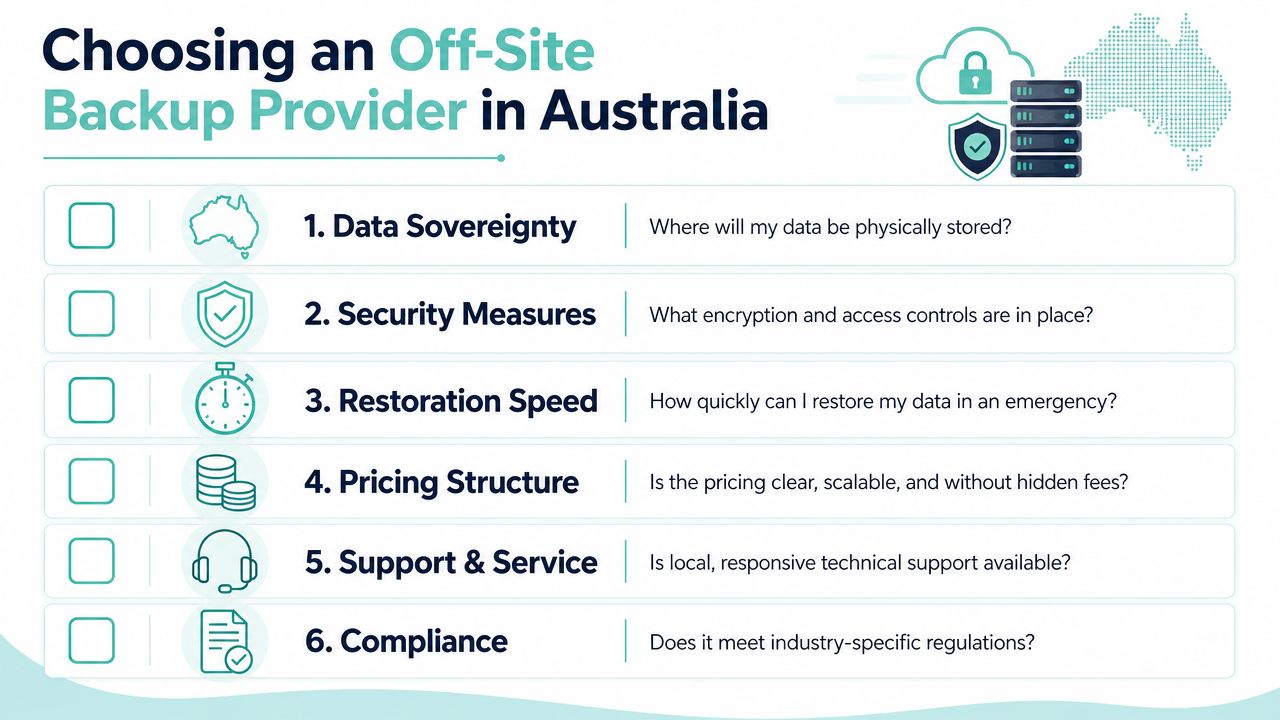
- Where is my data physically stored? You're not looking for marketing language. You want a clear location answer relevant to Australia and a clear explanation of whether there's geographic separation.
- What exactly is included? Ask whether backups cover files, databases, email, and account settings. “Website backup” can mean different things to different hosts.
- How are backups encrypted? You want the provider to explain encryption in storage and during transfer in plain language.
- How do restores work? Can you restore one file, one mailbox, one database, or the full account? Do you need to lodge a ticket every time?
- How many restore points are kept? Retention matters when a problem started days ago and wasn't noticed immediately.
- What happens after ransomware or accidental deletion? A useful answer should describe isolation, restore options, and support steps without sounding vague.
What a clear answer sounds like
A trustworthy provider usually answers directly. You shouldn't need to decode jargon or sit through a generic “enterprise-grade solution” speech.
Good answers often include points like these:
- Clear scope rather than broad promises. They should say what is and isn't included.
- Defined restore process so you know whether self-service, cPanel tools, or support assistance are available.
- Australian relevance including local support and realistic recovery expectations for websites hosted here.
- Disaster recovery context showing how the backup fits into a larger plan for service continuity.
If a provider can explain backup in one plain paragraph, they probably understand their own system. If they can't, keep asking.
For businesses that need a stronger continuity posture, it's worth reviewing what a dedicated disaster recovery hosting setup includes. Even if you stay with your current host, the feature list gives you a benchmark for the questions that matter.
One final note. Price matters, but backup quality usually reveals itself in the details no one checks until something breaks. Restore access. Retention. Scope. Location. Support. Those are the details that decide whether your backup is a reassurance or a false comfort.
Register your new domain name at competitive market prices including free domain add-ons like privacy, DNS Hosting, Custom Nameservers and Forwarding.
Always the best price and no nasty renewal price hikes.
Register A Domain Name
Your Next Step Towards Digital Resilience
By now, the main point should be clear. Backup is not just about making a copy. It's about making a copy that survives the same event that takes down the original.
That's why off-site backup matters so much for Australian small businesses using cPanel, WordPress, email hosting, or Windows hosting. If your site earns revenue, captures leads, runs bookings, or supports customers, the backup question is really a continuity question. Can you get back online with your data intact and your business reputation protected?
A practical next step is to open your current hosting plan and check four things today:
- Backup location so you know whether the copy is off-site
- Backup scope so you know if databases and email are included
- Restore method so you know whether you can recover quickly
- Retention history so you know how far back you can go
If any of those answers are fuzzy, don't ignore that feeling. That uncertainty is usually the first warning sign.
The strongest hosting arrangements make recovery part of normal operations rather than a mystery. They combine local relevance, clear support, security controls, and backup processes that make sense for real-world Australian businesses, not just enterprise checklists.
If you want a benchmark for what to look for, review UpTime Web Hosting. Its Australian hosting platform includes encrypted off-site nightly backups, local support, and services for cPanel, WordPress, ASP.NET, email, and business websites. You can also browse its knowledge base if you want practical restore guidance before making any hosting decision.