
You've bought the domain, picked a hosting plan, and you're ready to get your business online. Then the setup screen throws a question at you that most small business owners weren't expecting: cPanel or Plesk?
That choice looks technical, but it affects everyday jobs you'll do. Creating email addresses, installing WordPress, restoring a backup, checking why the site feels slow, or adding a second site for a new service line all happen inside the control panel. If you choose the wrong one for your stack, you'll feel it later.
For Australian businesses, the decision usually isn't about chasing a giant feature checklist. It's about matching the panel to the type of hosting you need, the applications you run, and how much complexity you want in daily admin.
Table of Contents
- Choosing Your Web Hosting Control Panel
- What Is a Hosting Control Panel Anyway
- Core Features and Interface Compared
- A Look at Security and Performance
- Managing Apps with Extensions and Toolkits
- Which Panel for Your Business Use Case
- The Verdict Answering the cPanel vs Plesk Question

Performance you can feel, backed by clients who depend on it. Read how our support and uptime create long‑term customer success.Power Your Business with Better Hosting
Choosing Your Web Hosting Control Panel
A common setup path looks like this. A local tradie, clinic, consultant, retailer, or agency registers a .au domain, orders hosting, and plans to launch a new site with business email. The website itself feels familiar. The control panel choice doesn't.
That's where people often assume both options do the same job in the same way. They don't. Both panels can manage files, email, databases, backups, and domains, but the experience is different, and the right choice depends heavily on the hosting environment behind it.
If you've just bought your domain and aren't sure what should happen next, this actionable plan for domain setup is a useful companion because it walks through the decisions that usually come before the panel starts to matter, such as email, DNS, website setup, and launch order.
Practical rule: Don't choose the panel by brand familiarity alone. Choose it by the type of applications you need to host and how you want your daily admin to feel.
For a straightforward Linux website, many businesses prefer the familiarity and broad ecosystem around cPanel. If the project includes Windows hosting requirements, that answer changes fast. If you're managing multiple client sites, the way each panel organises domains, users, and recovery tasks also becomes more important than the logo on the login page.
The panel is the dashboard you'll return to after launch. That's why this decision deserves a practical look instead of a marketing one.
What Is a Hosting Control Panel Anyway
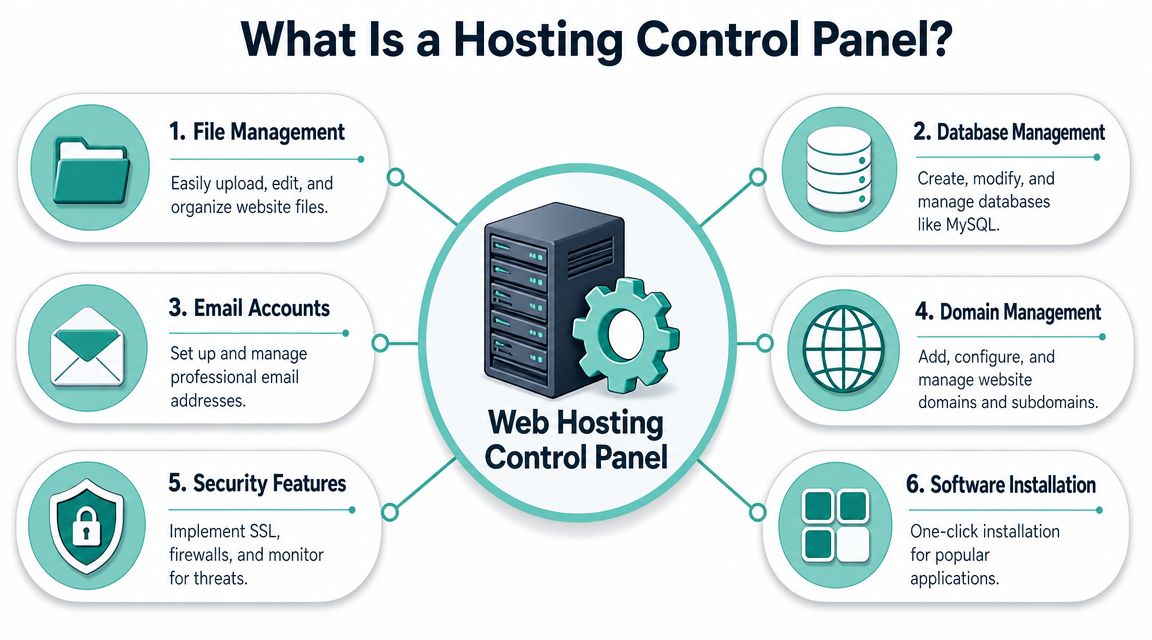
A hosting control panel is the web-based admin area for your hosting account. It gives you buttons, menus, and dashboards so you can manage the backend of your site without working directly at command line level.
What the panel actually controls
Most small businesses use the control panel for a short list of recurring jobs:
- Website files: Upload site files, edit config files, manage folders, and unzip archives.
- Databases: Create databases and users for WordPress or other applications.
- Email accounts: Set up addresses like sales@yourbusiness.com.au and manage forwards or autoresponders.
- Domains and subdomains: Connect your domain, add subdomains, and point extra sites to the same account where allowed.
- Security basics: Install SSL certificates, review protections, and manage access settings.
- Apps and CMS tools: Install WordPress and related software with far less friction than manual setup.
If DNS still feels fuzzy, this plain-English guide to DNS Explained helps because your panel and your domain settings constantly interact, especially when you're connecting web, email, and SSL services.
Why cPanel and Plesk matter
The broad difference is simple. cPanel debuted in 1996, while Plesk was designed later as a cross-platform panel. That still matters in Australia because Plesk supports both Linux and Windows, whereas cPanel is Linux-only, as noted in this cPanel and Plesk historical comparison.
That operating system difference is the first filter I'd use. If the hosting environment is Linux and the business is running a standard website stack, cPanel is a natural fit. If the business needs Windows hosting for ASP.NET or related workloads, Plesk becomes the practical option because the platform supports that environment.
For a hands-on look at how cPanel works in hosting, this guide on using cPanel gives a useful overview of the tools most site owners end up using first.
Host your website with our 5-star rated, cPanel website hosting plans.
Super fast servers, with security included and hosted in your choice of Australian Data Center.
View cPanel Plans
Core Features and Interface Compared
The quickest way to understand cPanel vs Plesk is to stop thinking in abstract features and look at how each panel feels when you're doing ordinary tasks on a Tuesday morning.
cPanel vs Plesk at a glance
| Feature | cPanel | Plesk |
|---|---|---|
| Primary hosting fit | Linux hosting | Linux and Windows hosting |
| Interface style | Traditional icon-based layout | More site-centric dashboard |
| Typical first impression | Familiar and direct | More modern and organised by subscription or site |
| File management | Straightforward for standard hosting tasks | Straightforward, with a cleaner grouped workflow for some users |
| Email and domains | Easy to find once you know the cPanel layout | Often feels more consolidated around each site |
| Database admin | Mature and familiar for Linux web hosting users | Clean workflow, especially when managing mixed hosting needs |
| Monitoring | Functional core server metrics | More granular built-in observability |
| Backups | Reliable, depends on host tooling and setup | Strong built-in scheduling and restore flexibility |
| Windows support | No | Yes |
How the interfaces feel in real use
cPanel is the panel many Linux hosting users recognise immediately. You log in and see a grid of tools. If you already know where Email Accounts, File Manager, Domains, and phpMyAdmin live, it's fast. For experienced users, that familiarity is a strength.
For beginners, though, cPanel can feel like a toolbox with every drawer open at once. It's capable, but the layout sometimes asks you to know what you're looking for before you click.
Plesk takes a more site-centred approach. Instead of feeling like one giant feature board, it tends to group work around the domain or subscription you're managing. If you run one business site and one staging site, or a mix of customer sites, that organisation can reduce the “where was that setting again?” problem.
A few practical examples make the difference clearer:
- Setting up email forwarding: In cPanel, the task is easy once you know the Email section. In Plesk, it often feels more connected to the domain you're already managing.
- Creating a subdomain: Both can do it quickly. cPanel feels more like choosing the exact tool from a menu. Plesk feels more like managing one property with several related settings.
- Checking account basics: cPanel usually favours speed for users who know the panel. Plesk usually favours guided navigation for users who want context.
If you run one Linux site and rarely touch advanced settings, cPanel's familiarity is often enough. If you manage several properties or mixed environments, Plesk's structure can reduce admin friction.
Monitoring and backup workflows
The strongest expert-level difference between the two panels sits in monitoring and recovery. Plesk offers a more granular built-in observability stack. Its Monitoring extension includes Grafana support, visual dashboards, and customisable alerts, and its backup tooling supports scheduled backups at the server, subscription, or file level with one-click restores, according to this Plesk versus cPanel monitoring comparison.
That matters when a business site slows down and someone needs to work out whether the issue is load, a runaway process, a plugin conflict, or something else. It also matters when you don't want to restore everything just to recover one damaged file set.
By contrast, cPanel's server-side view through WHM is usually more basic and easier to grasp. For many small businesses, that's perfectly fine. They don't need a deeper telemetry stack every day. They need clear hosting controls and a support team that can step in when required.
If licensing is part of your buying process, this cPanel licensing knowledge base article is useful because panel costs can affect plan structure even when the user only sees the front-end dashboard.
A Look at Security and Performance
Security and speed don't come from the control panel alone. They come from the panel plus the server stack, the host's defaults, backup policy, SSL setup, and how well routine admin tasks are handled.

Security in day-to-day hosting
For a small business owner, good security usually means a few practical outcomes. SSL is installed cleanly. Malware scanning is active. Backups exist and can be restored without drama. Firewalls and isolation happen in the background rather than becoming your weekend problem.
Both cPanel and Plesk can sit inside a secure hosting setup, but they surface security tools differently. In practice, what matters most is whether common tasks are easy to complete and easy to check later. A panel that hides SSL, backup, or account access settings behind a confusing flow creates unnecessary risk because people postpone maintenance.
The strongest operational point on the Plesk side is its more detailed built-in monitoring and recovery workflow, which was covered earlier. That helps when diagnosing issues before they become outages.
For businesses using Plesk-based hosting, this guide on installing free SSL on Plesk is the sort of article worth bookmarking because SSL setup is one of those tasks that should feel routine, not stressful.
A secure setup isn't just about having protection tools available. It's about making the safe path the easy path for the person managing the account.
Performance depends on the full stack
Many comparisons err by treating cPanel and Plesk as if the panel alone decides speed. It doesn't. The panel influences management workflow. The hosting stack does most of the performance heavy lifting.
For Linux hosting, cPanel is often paired with an environment built for common CMS workloads such as WordPress. That can include server-level caching, isolated resources, and performance-focused web server software. In practical terms, that combination matters more than whether the panel uses a grid layout or a left-hand navigation.
Plesk can also support strong performance, especially when the server is configured well and the workload suits the platform. Its advantage is less about raw magic and more about visibility. Better built-in observability can shorten troubleshooting time when performance drops.
Three practical performance questions matter more than brand debates:
- What application are you hosting? A brochure site, WooCommerce store, and custom app all place different demands on the stack.
- What operating system do you need? That can settle the panel decision immediately.
- How often will you manage the site yourself? A simpler workflow often prevents mistakes that hurt performance later.
Managing Apps with Extensions and Toolkits
Most businesses don't buy hosting because they love control panels. They buy hosting because they need WordPress, Joomla, a store, a booking system, or a client site online quickly and safely. That's where extensions and toolkits matter.
How app management differs
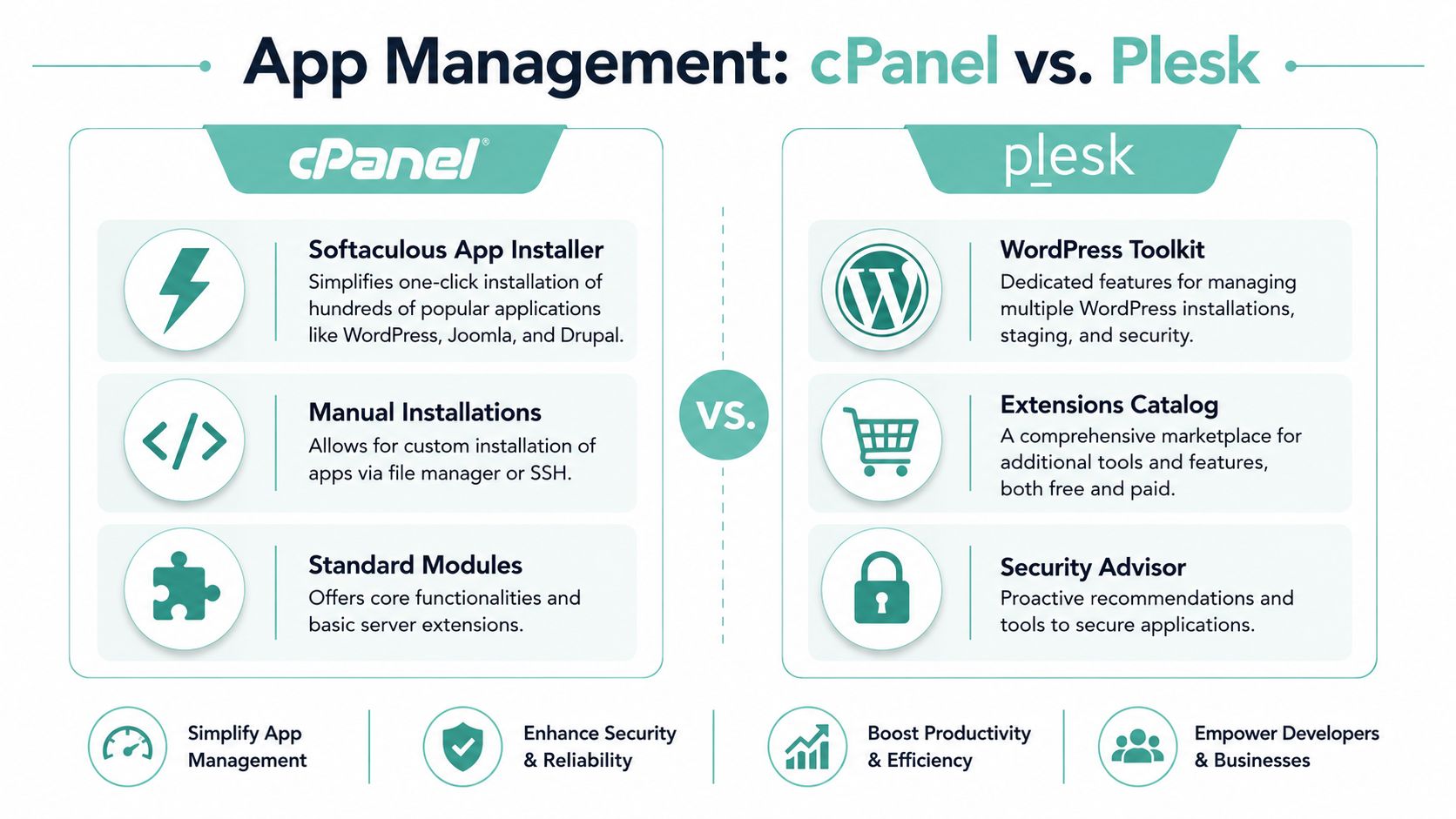
cPanel often relies on familiar app installers such as Softaculous for one-click deployment. That works well for standard website builds. You choose the app, fill in a few details, and let the installer handle the database and basic file placement.
Plesk tends to make extensions feel more native to the panel itself. The add-ons and app tools are more tightly woven into the interface, which some users prefer because there's less jumping between separate-looking modules.
The day-to-day difference usually comes down to workflow:
- For quick CMS installs: cPanel is familiar and efficient.
- For a more integrated extension experience: Plesk often feels tidier.
- For agencies managing many websites: the way each panel groups updates, clones, and security tasks matters more than the sheer number of apps listed.
WordPress workflow matters more than app count
If WordPress is your main platform, the conversation shifts from “which panel installs WordPress” to “which panel helps me manage WordPress with fewer mistakes”.
That's why the toolkit layer matters. Staging, cloning, plugin and theme management, update handling, and security checks save time because they reduce the amount of manual admin across multiple sites. For agencies and freelancers, that's often the point where a control panel stops being a background tool and becomes part of the delivery workflow.
This comparison of WordPress Toolkit vs Softaculous is useful if your shortlist is really about WordPress operations rather than the panel itself.
The better panel for apps isn't the one with the longest catalogue. It's the one that makes updates, cloning, and routine maintenance less error-prone for your setup.
Register your new domain name at competitive market prices including free domain add-ons like privacy, DNS Hosting, Custom Nameservers and Forwarding.
Always the best price and no nasty renewal price hikes.
Register A Domain Name
Which Panel for Your Business Use Case
The cleanest answer to cPanel vs Plesk comes from the application you need to host.
If you run a standard business website
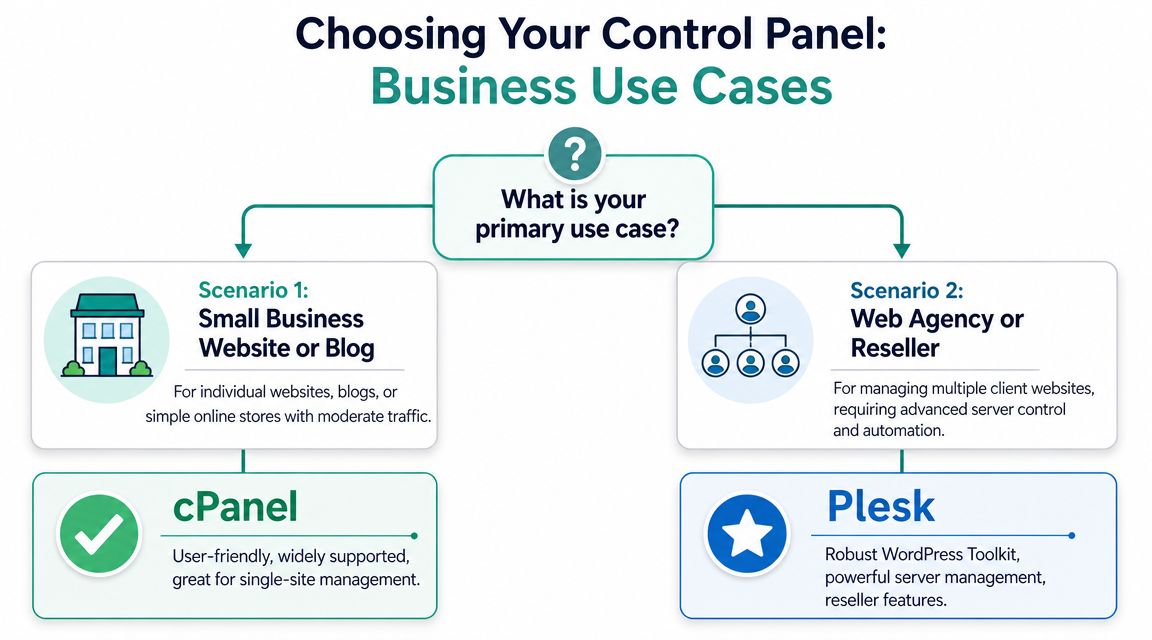
For a normal small business website on a Linux stack, cPanel is usually the straightforward choice. It suits WordPress sites, brochure websites, service businesses, blogs, and many small online stores where the job is to manage files, email, domains, databases, and routine admin without overcomplicating the experience.
That's also the use case where a cPanel-based hosting plan makes the most sense. If you're comparing Linux hosting options, web hosting services with cPanel gives you the general shape of what that environment looks like for day-to-day business use.
A few signs cPanel is probably the right fit:
- You're building on Linux: WordPress, Joomla, brochure sites, and many common CMS projects fit here.
- You want broad familiarity: Designers, freelancers, and support staff often already know the cPanel layout.
- You don't need Windows-specific tech: If there's no ASP.NET or MSSQL requirement, there's no reason to force a Windows path.
If you need Microsoft application support
The decision stops being subjective for Australian SMBs that need Windows/ASP.NET or mixed OS hosting. Plesk has a structural technical advantage because it supports both Linux and Windows Server, while cPanel is Linux-only. That makes Plesk the more practical panel for hosts that must support MSSQL, .NET, or Windows-based application stacks, as explained in this comparison of Plesk and cPanel for mixed operating system hosting.
If your business runs an ASP.NET site, a legacy Microsoft-based application, or an internal tool that relies on Windows hosting, cPanel isn't the right tool because the operating system requirement rules it out. In that situation, trying to “standardise” on cPanel only creates friction later.
This is also the one place where mentioning a specific provider setup is useful. UpTime Web Hosting separates these use cases clearly with Linux cPanel hosting for standard websites and Windows ASP.NET Plesk hosting for Microsoft-based workloads. That's a sensible split because it aligns the panel with the operating system and application stack rather than forcing one interface onto every scenario.
The Verdict Answering the cPanel vs Plesk Question
For most Australian small businesses, the answer is simpler than the comparison pages make it sound.
Choose cPanel if you're running a standard Linux website, especially a WordPress or CMS-based business site where familiarity, easy email management, and straightforward hosting admin matter most. It's the practical fit for the majority of everyday website projects.
Choose Plesk if your site or application needs Windows hosting, ASP.NET, .NET, MSSQL, or a mixed-environment workflow. That isn't a cosmetic preference. It's a platform requirement.
Cost also deserves a more practical lens than most comparisons give it. cPanel's pricing is account-based while Plesk's is domain-based, which can change the actual cost depending on how many client logins or add-on domains an agency manages. For Australian buyers, clear local billing matters because it reduces hidden costs and exchange-rate risk over renewals, as noted in this pricing model comparison for cPanel and Plesk.
The right panel is the one that matches your stack, your admin style, and your actual business workload.
If you're deciding between Linux cPanel hosting and Windows Plesk hosting, UpTime Web Hosting is worth a look because it offers both paths in an Australian context, including local billing, .au-friendly business hosting, and plans aligned to standard websites or ASP.NET workloads.