You're probably in one of two spots right now. Your business needs a proper website, but the quote from a traditional build feels too heavy, or you've opened an AI website builder and realised getting “a website” is easy while getting a site that feels like your business is harder.
That's the current conversation in Australia now. AI can save time and money, but it can also give you bland copy, broken layouts, and a site that looks finished until a customer tries to use it. If you want to build a website with AI in 2026, the smart approach isn't blind trust. It's using AI for speed, then applying human judgement where it matters.
For small business owners, that's good news. You don't need to be a developer to get a professional result. You do need a process.
Table of Contents
- Why Every Aussie Business Is Talking About AI Websites
- Choosing Your AI Website Building Path
- From Prompt to Polished Website
- Connecting Your Business to the Web
- The Pre-Launch Checks Most People Skip
- Your AI Website Questions Answered

Performance you can feel, backed by clients who depend on it. Read how our support and uptime create long‑term customer success.Power Your Business with Better Hosting
Why Every Aussie Business Is Talking About AI Websites
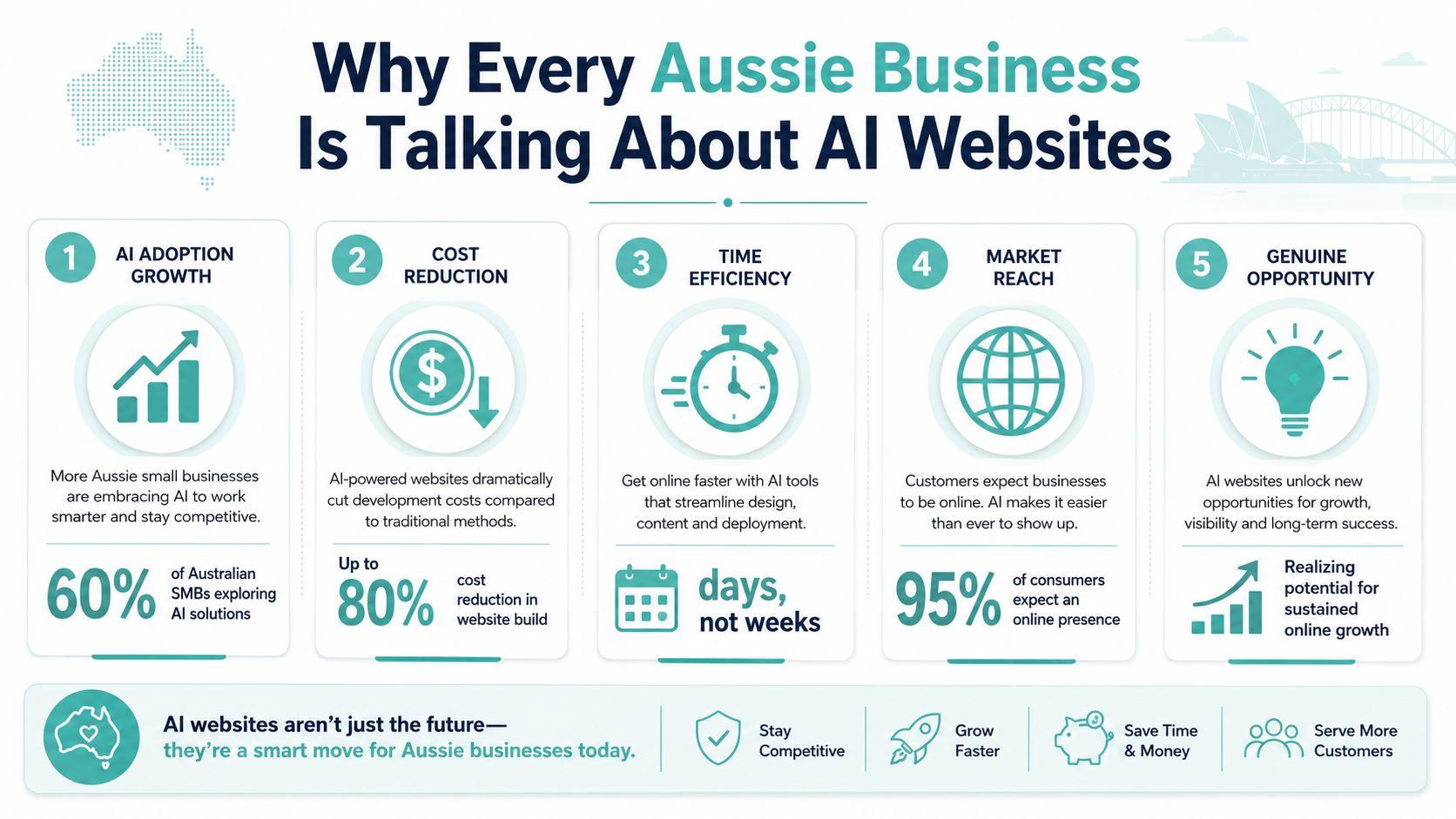
The speed of adoption tells the story. In Australia, over 58% of small businesses now use generative AI tools, up from 23% in 2023, and worldwide AI spending is projected to reach $2.52 trillion in 2026, which keeps pushing more AI features into everyday business tools, including website platforms (Hostinger AI website builder statistics).
Why this has moved beyond hype
A few years ago, “build website with AI” sounded experimental. Now it's normal enough that local businesses expect to at least try it before paying for a custom build. That doesn't mean AI replaces a good web professional in every case. It means the starting point has changed.
If you run a tradie business, clinic, café, consultancy, or online shop, AI can get the first version of your site together far faster than a blank page can. It can draft service pages, suggest layouts, generate FAQs, write calls to action, and help structure the homepage around what customers need to see first.
Practical rule: AI is excellent at producing a first draft. It's unreliable as a final reviewer.
That's the part many business owners miss. The opportunity isn't “push one button and forget it”. The opportunity is building faster without paying for every small setup task by hand.
What this means for a local business owner
For an Australian business, the most useful benefit is reduced friction. You can get online sooner, test offers sooner, and start collecting enquiries without waiting on a long development cycle. If local search matters to you, it also helps to think about hosting and visibility together rather than treating the website as a separate job. A useful starting point is this guide to local SEO for Australian businesses.
Here's where AI works well for small operators:
- Service businesses: Drafting pages for plumbing, electrical, legal, accounting, cleaning, and other common service categories.
- Startups: Getting a credible launch site live while budget is still tight.
- Side hustles and sole traders: Creating a homepage, contact page, pricing page, and booking flow without hiring a full agency.
- Content refreshes: Rewriting old pages so they're easier to read and more current.
What doesn't work is assuming every generated sentence is accurate, every section is on-brand, and every page will hold up once real visitors arrive. That's where the rest of the process matters.
Choosing Your AI Website Building Path
Not every AI website setup works the same way. Most Australian small businesses end up choosing between two practical paths. One is faster and simpler. The other gives you more control.
The economic pull is obvious. AI website builders are cutting costs for common website types by 50% to 90%, and the market was valued at $3.75 billion in 2025 with a projection of $25.0 billion by 2035 at a 20.9% CAGR (Rudys.ai AI website builder statistics). Cost matters, but fit matters more.
Path one with an all-in-one builder
An all-in-one AI builder gives you the quickest route from idea to live pages. You answer a few questions, the platform generates a layout, and you edit inside the same environment. This suits businesses that want less technical overhead.
One example in the Australian hosting space is Sitejet, which is available through hosting providers such as UpTime Web Hosting. In this model, design, content drafting, publishing, and site management happen in one place.
Good fit for:
- New businesses: You need something professional without wrestling with plugins or themes.
- Low-maintenance sites: Brochure sites, local service sites, landing pages, simple portfolios.
- Owners who want speed: You'd rather edit text and images than manage a stack of separate tools.
The trade-off is flexibility. If you later want unusual layouts, specialised integrations, or a highly customised content structure, you may hit the edges of what the builder does comfortably.
Path two with a flexible CMS and AI tools
The second path uses AI in a more modular way. You might run WordPress, then use AI tools to draft copy, brainstorm page structure, generate image ideas, and tighten metadata. This usually takes longer at the start, but it gives you more room to grow.
This suits businesses that already know they'll need deeper content, more plugins, or a site that evolves over time. If that's you, it's worth reviewing website builder options for startups before locking yourself into the fastest tool.
| Factor | All-in-One AI Builder (e.g., Sitejet) | AI-Assisted Workflow (e.g., WordPress + AI tools) |
|---|---|---|
| Setup speed | Faster for a first launch | Slower, more moving parts |
| Ease of use | Simpler for non-technical owners | Better if you're comfortable learning a bit |
| Customisation | Good for standard business sites | Better for tailored layouts and functionality |
| Ongoing edits | Easy inside one interface | Depends on theme, plugins, and editor setup |
| Scalability | Fine for many basic sites, but can feel boxed in | Usually better for long-term flexibility |
| Content workflow | Built-in AI drafting | Wider choice of AI writing and media tools |
If your business needs to launch quickly, an all-in-one path often makes sense. If your website is becoming a long-term business asset, flexibility usually wins.
For business owners comparing plan structures, feature bundles, and what “cheap” really includes, this breakdown of 2026 AI builder pricing explained is worth a look.
A simple rule helps here. Choose the tool that matches what your business needs in the next year, not just this week. A local electrician with five core service pages can keep things lean. A growing online store or content-heavy brand should think harder about future edits, search visibility, and scaling.
Host your website with our 5-star rated, cPanel website hosting plans.
Super fast servers, with security included and hosted in your choice of Australian Data Center.
View cPanel Plans
From Prompt to Polished Website
A lot of small business owners get stuck at this point. The AI builder gives them a full site in minutes, but the result feels like every other site in the market. The fix is rarely starting over. It is giving the tool better input, then doing a proper edit before anything goes live.
The first draft depends on the quality of the brief. Vague prompts produce bland pages. Clear business context gives you a draft you can work with.
Analysts at Wix point to a common problem in their guide to designing a website with AI. Business owners often publish AI copy with minimal editing, and that weakens brand voice and local relevance. That lines up with what I see in practice. AI is fast, but it still needs direction and a human pass to sound credible.
Start with the business facts AI needs
Before you generate pages, collect the details your site needs to reflect:
- What you sell: “Residential air conditioning installation in Brisbane” beats “cooling solutions”.
- Who you serve: Homeowners, clinics, builders, cafés, B2B clients, or regional customers.
- Why customers choose you: Fast turnaround, same-team support, local experience, clear pricing, after-hours help.
- Pages required: Home, About, Services, Pricing, FAQ, Contact, Booking, location pages, or product pages.
- Tone: Straightforward, warm, premium, plain-English, expert, family-run.
Then give the builder a proper prompt.
Build a clean Australian small business website for a mobile dog grooming service in Melbourne. Use a friendly, trustworthy tone. Include Home, Services, Pricing, FAQ, About, and Contact pages. Focus on convenience, pet safety, and local service areas. Keep headings short and practical.
That gives the AI enough structure to produce something useful instead of generic filler.
Edit the draft until it sounds like a real business
AI copy is often clean but forgettable. It repeats itself, overstates simple services, and smooths out the details that help customers decide.
A good review usually comes down to three jobs:
Replace generic claims
Swap vague lines like “we are committed to excellence” for concrete reasons to choose your business.Add local relevance
Mention suburbs, service areas, response times, or the kind of issues your Australian customers ask about.Shorten inflated headings
“Reliable air con repairs across Adelaide” is clearer than “Complete climate comfort solutions”.
If you are publishing on WordPress, the theme affects how polished the finished site feels. A sensible WordPress theme setup makes it much easier to clean up AI-generated layouts without rebuilding pages from scratch.
A simple example for an Aussie service business
Say you run a bookkeeping business in Perth. The AI might give you this:
“We provide professional bookkeeping solutions designed for your business requirements.”
It sounds tidy, but it could belong to anyone. A stronger version is more specific:
“We help Perth small businesses stay organised with clear monthly bookkeeping, payroll support, and practical reporting you can use.”
Same service. Better clarity. More trust.
This is also where the trade-off becomes obvious. AI saves time on first drafts, page structure, and basic content blocks. It does not know which phrases your customers respond to, which service details matter most, or whether the tone matches your business. That final polish is still your job.
Check the details AI often leaves rough:
- Image alt text
- Button wording
- Repeated service copy
- Contact form labels
- Meta titles and descriptions
For image accessibility and search basics, a tool like this free ai alt text generator can speed up the cleanup.
The quickest way to make an AI-built site feel professional is to rewrite the top half of the homepage, tighten the service page headings, and sharpen the main call to action. Customers do not need flashy copy. They need to know what you do, where you work, why they should trust you, and what to do next.
Connecting Your Business to the Web
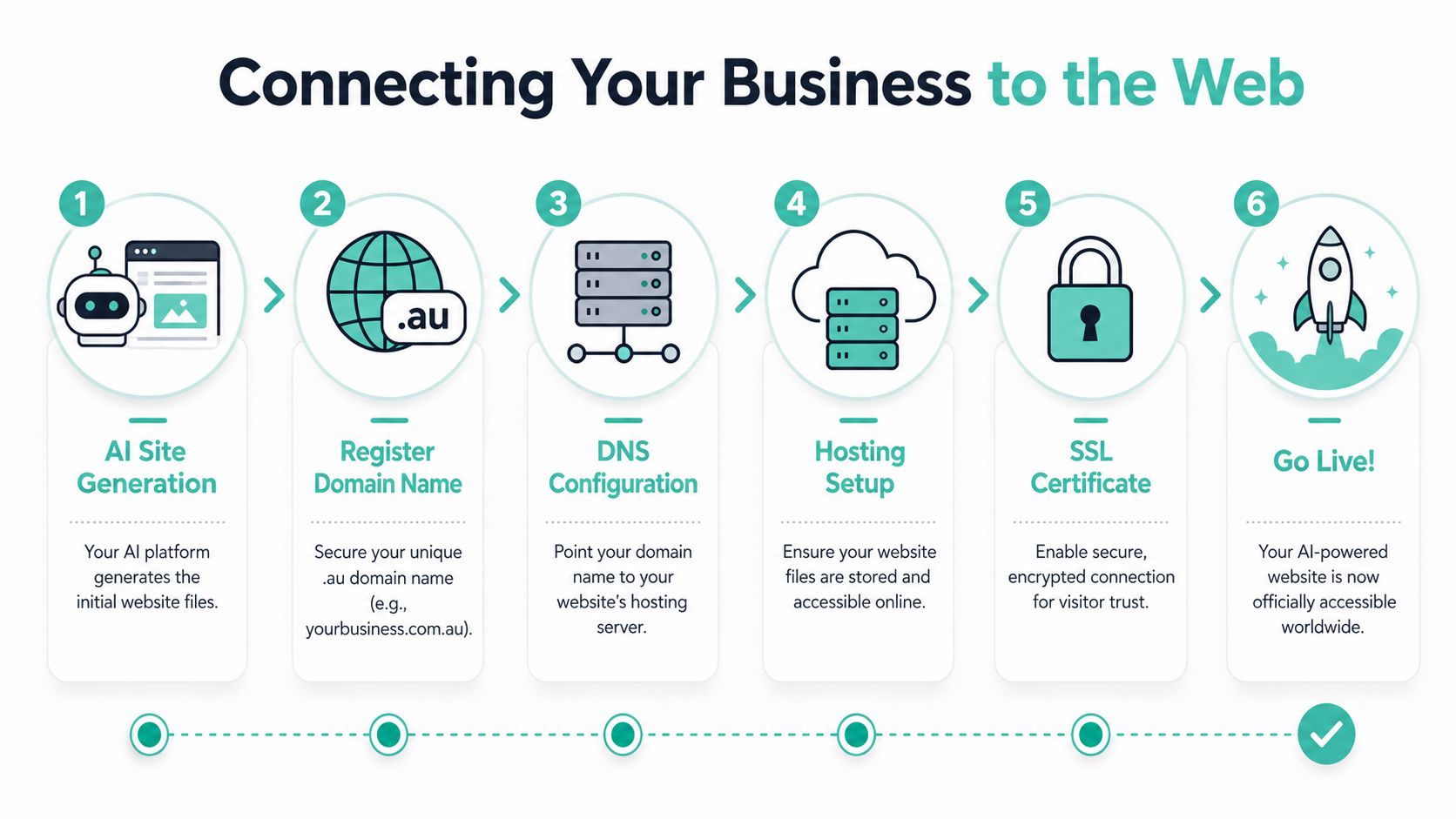
A generated website isn't the finished product. It becomes a real business asset when it's tied to your domain, your email, and hosting that matches how customers use it.
Your domain email and hosting matter more than people think
If your site still lives on a temporary builder address, it doesn't feel established. A proper .au domain tells customers you're operating locally, and a matching email address adds another layer of trust.
Before launch, make sure you've handled these basics:
- Domain ownership: Register the domain in the business owner's name or under the business entity, not under a third party you can't access later. This guide on domain name ownership in Australia is worth reading before you connect anything.
- Business email: Use addresses like hello@, sales@, or bookings@ on your own domain.
- SSL: Customers expect the secure padlock in the browser, especially if forms or payments are involved.
- Backups: If an edit goes wrong, you need a clean rollback point.
Hosting costs vary a lot in Australia. Shared hosting can sit under $50 per month, while more advanced setups can reach $1,000 AUD per month, and dedicated servers start at $400 AUD per month depending on the hosting type and resources involved (True Green guide to choosing web hosting in Australia). For many small businesses, the right answer is a solid entry or mid-tier plan, not the biggest package on day one.
Why local hosting is the practical choice
For Australian businesses targeting Australian customers, local hosting has straightforward benefits. Australian web hosting providers can deliver faster load speeds, stronger local SEO signals, and alignment with Australian data privacy expectations (DreamIT Host guide to Australian web hosting).
That matters even more when your AI site starts getting real traffic. Many simple AI builders are good at making a static site quickly, but they're less convincing when the business grows or traffic becomes less predictable. If you want to understand how AI-generated SEO content can plug into a wider publishing workflow, these BlazeHive AI SEO agent details offer a useful example of how businesses automate page creation while keeping CMS control.
Hosting also affects customer behaviour in more subtle ways. Slow pages, SSL problems, and patchy transaction handling create friction during checkout or enquiry submission. Reliable hosting, secure forms, and local support reduce that risk. That's particularly important for businesses taking bookings, processing payments, or chasing leads outside standard office hours.
The Pre-Launch Checks Most People Skip
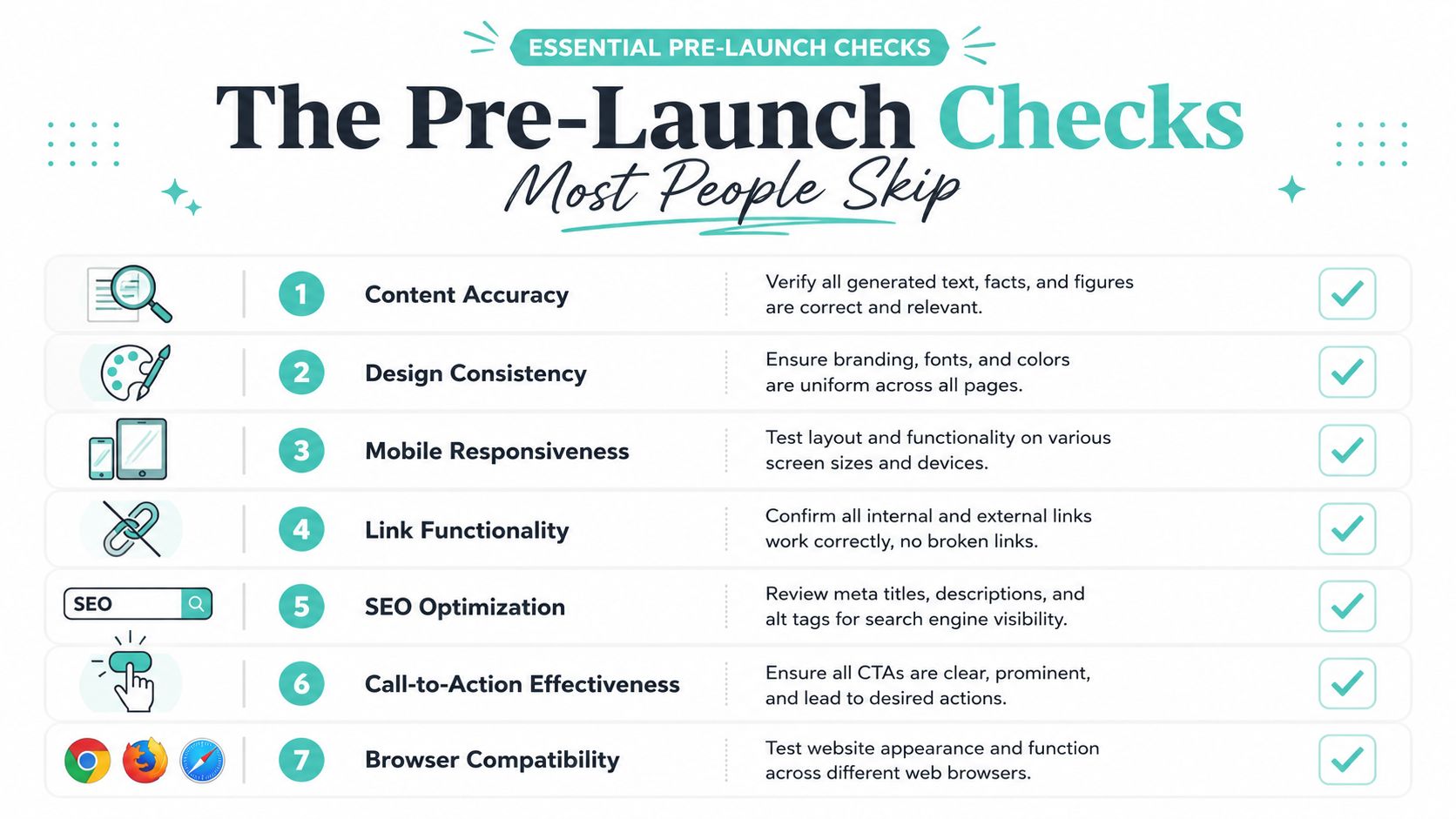
Many AI-built websites falter post-launch. Despite a decent homepage, tidy colors, and the owner clicking publish, issues arise: a customer hits a dead link, a mobile layout breaks, or a form sends nowhere.
That isn't a rare edge case. Forbes AU data cited in GoDaddy's Australian guide says 62% of AI-built sites need manual correction within 30 days because outputs weren't properly verified, and 79% of users skip necessary pre-launch checks. The same guide states plainly that AI still makes mistakes in code, text, and rendering (GoDaddy AU AI guide for web design).
What AI often gets wrong
AI doesn't fail in one dramatic way. It fails in small, annoying ways that make your business look less credible.
Typical examples include:
- Wrong internal links: Buttons point to placeholder pages or drafts.
- Awkward mobile spacing: Text overlaps, buttons stack badly, images crop strangely.
- Invented claims: The copy sounds confident but includes wording you can't support.
- Mixed branding: One page sounds formal, another sounds chatty, another reads like a software brochure.
- Thin contact flows: Forms submit, but confirmation messages are vague or missing.
Publish day should feel boring. If it feels risky, you haven't tested enough.
A launch checklist that catches the obvious and the sneaky stuff
Run through the site slowly, page by page. Don't just read it in the editor. Use it like a customer would.
- Check every link: Open menu items, footer links, buttons, policy pages, social icons, and contact links.
- Test forms properly: Send real test enquiries and confirm they arrive where they should.
- Read the copy out loud: You'll catch robotic phrasing, repetition, and weird AI wording faster.
- Review on mobile first: Most small business traffic now arrives on phones. Check tap targets, headings, form fields, and image crops.
- Scan visual consistency: Fonts, colours, spacing, and button styles should feel like one system.
- Confirm trust elements: Phone number, suburb coverage, ABN if relevant, business email, SSL, and clear contact details.
- Do a security pass: A practical website security checklist helps catch the non-design issues people often forget.
A useful habit is to ask someone outside the business to test the site. Not a designer. Not the person who built it. A normal person. If they can't work out what you do, where to click, or how to contact you, the site still needs work.
The best AI websites don't look “AI-made”. They look clear, trustworthy, and easy to use. That result comes from verification, not from the generator alone.
Register your new domain name at competitive market prices including free domain add-ons like privacy, DNS Hosting, Custom Nameservers and Forwarding.
Always the best price and no nasty renewal price hikes.
Register A Domain Name
Your AI Website Questions Answered
Is AI-generated website content okay for SEO
It can be, if the content is accurate, specific, and edited properly. Search visibility usually improves when pages clearly match real customer intent. Thin, repetitive, generic copy won't help much, whether a human or AI wrote it.
Can AI redesign an existing website
Yes. It's often a good use case. AI can help restructure headings, rewrite weak service pages, refresh outdated wording, and suggest a cleaner page layout. The catch is that you still need to review the final content against your current offers, branding, and customer journey.
Do I need local hosting if I use an AI builder
If your customers are in Australia, local hosting is still a sensible choice. It supports speed, business trust, and easier management of domains, email, and support in the same local context.
What should I maintain after launch
Keep the basics current. Review plugins or platform updates, test forms, refresh service pages, check contact details, and update photos or testimonials when your business changes. AI can help with drafts and rewrites, but ongoing maintenance is still a business task, not a one-time setup.
Is WordPress still worth using if AI builders are easier
For many businesses, yes. WordPress still makes sense when you want flexibility, broader plugin options, or more control over content structure. AI builders are faster for launch. WordPress is often stronger when the site becomes more complex over time.
What's the biggest mistake people make when they build a website with AI
They trust the first draft too much. The strongest results come from using AI to remove the heavy lifting, then applying clear editing, practical design choices, and proper pre-launch checks.
If you're ready to build a website with AI and want the domain, hosting, email, and website builder side handled in one Australian setup, UpTime Web Hosting offers local hosting, Sitejet website builder access, WordPress and Windows hosting, plus the core services needed to get a business site live and keep it maintained.