You've just pushed a Node.js API for an Australian client. The React frontend is ready, the database is holding real customer records, and launch traffic could arrive from Sydney, Melbourne, Brisbane or Perth. Your current cPanel server works, but scaling it means another manual migration, another maintenance window and another decision about who'll watch it overnight.
That's the practical starting point for cloud hosting for developers. It isn't a choice between a cheap server and an expensive hyperscaler. It's a decision about how much infrastructure you want to operate, how close your application should sit to Australian users, and which compliance requirements your provider can support.
Table of Contents
- Why Australian Developers Are Choosing Cloud Hosting in 2026
- What Cloud Hosting Actually Means for Developers
- IaaS, PaaS and FaaS Compared in Real Developer Terms
- A Practical Deployment Workflow with CI/CD and Containers
- Picking an Australian Region for Speed and Sovereignty
- Security and Performance Essentials Every Developer Should Lock Down
- Hyperscaler, Local Cloud, or Australian Managed Hosting?
- Practical Pricing Examples and a Migration Checklist

Performance you can feel, backed by clients who depend on it. Read how our support and uptime create long‑term customer success.Power Your Business with Better Hosting
Why Australian Developers Are Choosing Cloud Hosting in 2026
Mia leads a small development agency in Melbourne. One client portal is running on a single managed server, alongside a few smaller sites. The setup is familiar and inexpensive to operate, but Mia spends release days checking disk space, arranging backups and worrying about whether one noisy site could affect another.
Her alternative is a cloud deployment. The API could run on a virtual machine or managed application service, the frontend could use object storage and a content delivery network, and the database could move to a managed service. Mia wouldn't eliminate every operational task, but she could shift routine server work to platform tools and spend more time shipping features.
That shift reflects a broader Australian business pattern. The Australian Bureau of Statistics cloud computing analysis reports paid cloud service use rising from 19.4% of businesses in 2013–14, to 30.7% in 2015–16, 42.4% in 2017–18, and 55.4% in 2019–20. The ABS definition includes software, computing power and storage accessed over the internet, which maps directly to application runtimes, databases, file storage and CI/CD systems.
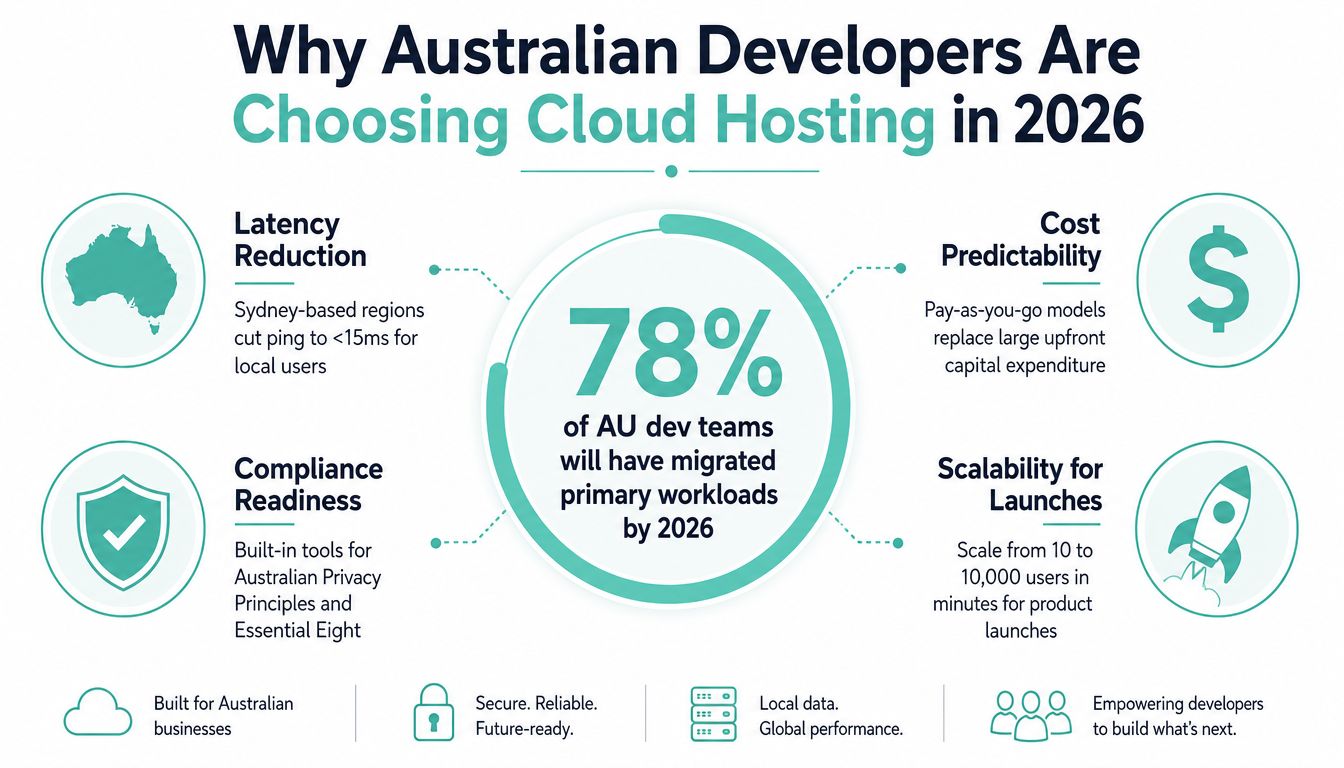
Larger firms have adopted paid cloud services particularly strongly. ABS data for 2017–18 shows use among businesses with 0–4 employees at 35.5%, compared with 50.1% for firms with 5–19 employees, 65.7% for firms with 20–199 employees, and 76.4% for firms with 200 or more employees, as reported in Characteristics of Australian Business.
For a developer, that adoption changes the default question. Instead of asking whether an application can run on one server, teams ask which layer reduces deployment effort, where state belongs, how the system recovers and how easily the architecture can grow. Mia can compare a managed local server with the wider benefits of cloud hosting without treating either option as automatically correct.
What Cloud Hosting Actually Means for Developers
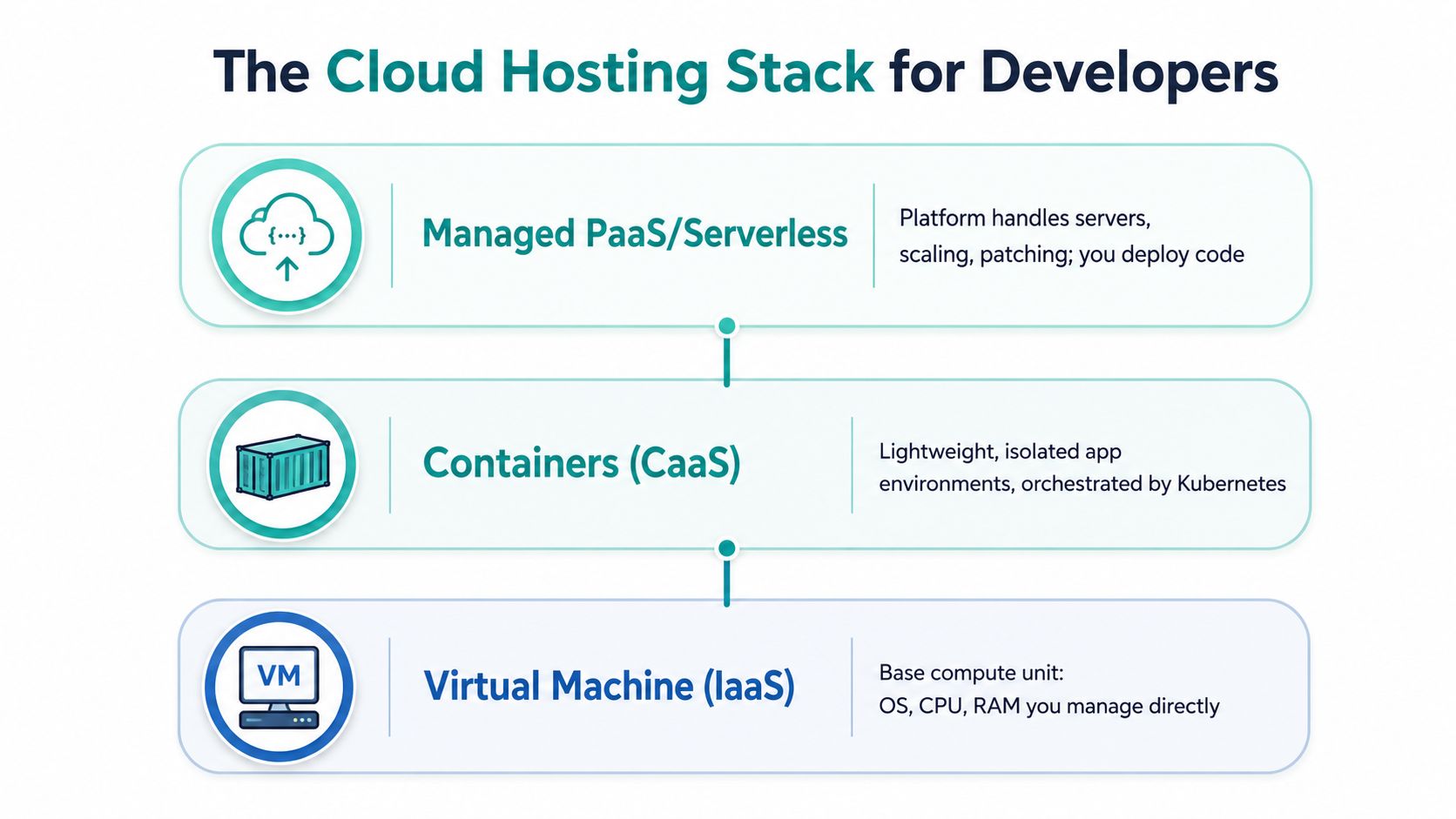
Cloud hosting becomes easier to understand when you treat it as a stack of responsibility. At the bottom, you control nearly everything. Higher layers remove operational work and give you a simpler deployment model, but they also reduce some of your control.
Start with a virtual machine, or IaaS. You receive virtual CPU, memory, storage and networking, then choose an operating system, install dependencies and configure the application. A Sydney-based VM might host a Node API, Nginx, PostgreSQL and a worker, but you're responsible for patching, access control, backups and capacity planning.
A container packages the application and its dependencies into a repeatable unit. The container doesn't replace the host operating system, but it gives your team a consistent runtime across a laptop, CI runner and production environment. Docker makes the package; a container service or Kubernetes manages where it runs.
The responsibility moves upward
A managed PaaS hides more of the server. You connect a repository or provide an image, define environment variables and select a runtime. The platform provisions capacity, handles parts of deployment and often supplies logs, health checks and scaling controls. You still own application behaviour, data design and release quality.
FaaS, or serverless functions, breaks work into short event-driven units. A function might resize an uploaded image, process a queue message or generate a report after a user action. You don't manage a persistent application server, but you must design around execution limits, event retries, cold starts and external state.
The cloud computing overview is useful when you need a plain-language distinction between these models. The important questions stay the same at every layer:
- Deployment: Are you copying files, building an image or publishing a function?
- State: Does data live in a managed database, attached disk, object store or external service?
- Patching: Does your team update the OS and base image, or does the provider manage it?
- Failure: What happens when a process, host, zone or dependency stops responding?
Practical rule: Choose the highest layer that supports your workload without forcing awkward workarounds. Drop lower only when you need the control.
Host your website with our 5-star rated, cPanel website hosting plans.
Super fast servers, with security included and hosted in your choice of Australian Data Center.
View cPanel Plans
IaaS, PaaS and FaaS Compared in Real Developer Terms
The best layer depends on the workload, not on the popularity of the technology. A legacy ASP.NET application may need a Windows environment and direct server configuration, while a small image-processing task may fit neatly into an event-driven function.
| Layer | Control | Billing Granularity | Best-Fit Workload |
|---|---|---|---|
| IaaS | High. You manage the operating system, runtime, network rules and deployment method. | Usually tied to allocated compute, storage and network resources. | Legacy applications, custom networking, persistent services and workloads needing specific OS control. |
| PaaS | Medium. You manage code, configuration and data while the platform manages much of the runtime. | Often based on application resources, runtime use or provisioned service capacity. | Standard APIs, web applications, managed workers and teams prioritising delivery speed. |
| FaaS | Focused. You manage function code, triggers, permissions and external state. | Typically tied to invocation and resource execution rather than an always-on server. | Queue consumers, scheduled jobs, webhooks and bursty background processing. |
The trade-offs that matter
Operational overhead is usually lowest with FaaS and highest with IaaS. That doesn't make functions free of operations. You'll still need observability, retry handling, permissions and data governance. PaaS removes more routine work while retaining a familiar application model.
Latency can favour a continuously running service when a request must respond immediately. Functions can also perform well, but cold-start behaviour and dependency loading need testing against your user journey.
Lock-in increases when you rely on provider-specific databases, event formats or deployment controls. Containers can improve portability, but portability isn't automatic if the surrounding architecture depends on proprietary services.
Regulated data needs more than a checkbox in a product comparison. Confirm the provider's ownership profile, facility location, certification status and contractual controls. For infrastructure with direct resource access, an Australian cloud server option can be evaluated alongside managed platform services according to the workload's obligations.
A containerised API on managed Kubernetes suits a team with multiple services, repeatable releases and a need for orchestration. A nightly image pipeline may be better as a function or scheduled container. A WordPress site with predictable requirements may not need either. The honest verdict is simple: IaaS buys control, PaaS buys focus and FaaS buys event-level elasticity.
A Practical Deployment Workflow with CI/CD and Containers
A reliable deployment starts before production. The pipeline should turn a Git change into a tested, traceable release, then provide a safe way back when the new version misbehaves.
Take a Node.js API with a static React frontend. Mia's team keeps both projects in Git, but deploys them differently. The API becomes a Docker image, while the compiled React files are published to static hosting or a web server behind a CDN.
From commit to running service
- Git push: A pull request merge triggers the pipeline. The commit identifier becomes part of the release record, so the team can identify exactly what's running.
- Build and test: The CI runner installs dependencies, runs unit tests and performs linting and security checks. A failed test stops the release before it reaches a registry.
- Build the image: The Dockerfile creates an immutable image containing the API and its runtime dependencies. The pipeline scans the image and rejects known issues according to the team's policy.
- Publish the image: The private registry stores the tagged image. A tag based on the commit is safer than relying only on a mutable label such as
latest. - Deploy: The managed container service or VPS cluster pulls the image, starts the new container and checks its health endpoint before routing traffic.
The React build follows a shorter path. CI runs the build, uploads the generated assets and invalidates the relevant cache. The API reads database credentials from a secret store, not from the image or repository.
Use Kubernetes only when the problem needs it
A single container on a managed VPS can be enough for a small API, especially when the team has one service, modest operational complexity and a clear backup plan. Kubernetes earns its place when you need service discovery, rolling deployments, workload scheduling, self-healing behaviour or several independently released services.
Blue-green deployment keeps the previous version available while the new version receives validation traffic. Feature flags separate code deployment from feature release, which lets the team disable a risky workflow without rebuilding the application. GitOps tools can make the desired environment declarative, but they also add process and should support a real operational need.
A container is a packaging decision. Kubernetes is an operations decision. Don't adopt the second merely because you chose the first.
Picking an Australian Region for Speed and Sovereignty
A Perth customer opening a real-time dashboard does not experience your architecture diagram. They experience the distance between their device and your compute. Region selection therefore affects response speed, data location and developer productivity, because a closer deployment can reduce the need to explain or work around latency in interactive features.
For a domestic application, Sydney may be a sensible starting point, but Australia is not one uniform latency zone. Indicative round-trip measurements to a Sydney AWS region are about 3–5 ms from Sydney, 13 ms from Melbourne, 16 ms from Brisbane and 20 ms from Adelaide. Perth sees roughly 50–52 ms to Sydney or Melbourne regions, based on observed Australian AWS region latency guidance. Test your own network path before treating these figures as a design limit.
Match placement to the interaction
A customer portal with ordinary page requests may work well from Sydney for users across the eastern states. A real-time collaboration service, WebSocket backend or session-sensitive workflow may need compute nearer its users, particularly when customers are concentrated in Perth. The right choice depends on the interaction, not only the provider's default region.
AWS describes Local Zones as locations that place compute, storage and database services near population centres to support single-digit millisecond latency, as explained on its Australian Local Zones page. Australian guidance reports Perth NBN connections averaging about 15 ms to the Perth Local Zone, compared with about 58 ms to the Sydney AWS Region. That gap can matter for interactive systems. Batch processing, reporting and a central database may still belong in a primary region.
Sovereignty applies a separate filter. The Australian Government's Hosting Certification Framework covers data centre providers and cloud service providers. Its certified list contains 22 providers and distinguishes certified strategic data centre providers from certified strategic cloud service providers, according to the framework material.
Deployment rule: Start with the closest suitable Australian region. Add another city when resilience, customer distribution or procurement requirements justify the operational cost.
For regulated workloads, request evidence instead of accepting a generic “Australian hosting” label. Use this Australian data sovereignty hosting guide alongside your assessment of certification, ownership, facilities, backups and support access. That checklist turns region choice into a documented engineering decision rather than a provider setting.
Register your new domain name at competitive market prices including free domain add-ons like privacy, DNS Hosting, Custom Nameservers and Forwarding.
Always the best price and no nasty renewal price hikes.
Register A Domain Name
Security and Performance Essentials Every Developer Should Lock Down
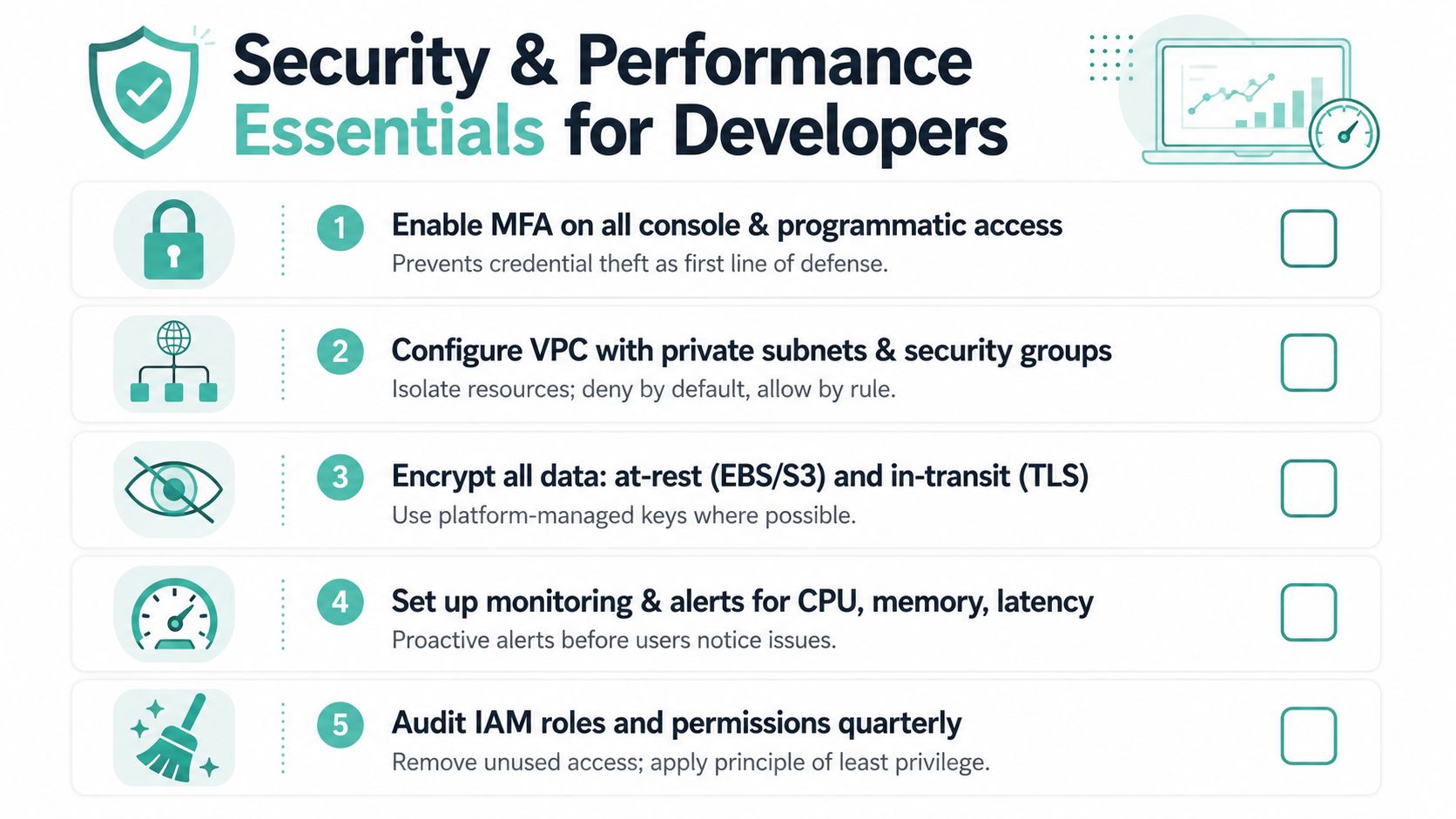
Cloud services provide powerful controls, but they won't secure an application that grants broad access, exposes secrets or lacks restore testing. Build the baseline into the deployment process so every new environment inherits sensible defaults.
Apply these controls before launch
- Protect identities: Enable MFA for console and programmatic access where supported. Give CI a narrowly scoped role instead of a personal administrator credential.
- Keep secrets out of Git: Store database passwords, API keys and signing material in a managed secrets vault. Rotate them without rebuilding application code.
- Encrypt every path: Use TLS for user traffic and service-to-service communication. Encrypt disks, object storage and backups with platform-managed keys where that meets your policy.
- Segment the network: Put databases in private subnets and expose only the components that need public access. Security groups should deny by default and allow specific traffic by rule.
- Watch the system: Collect structured logs, request latency, error rates, CPU and memory metrics. Alert on symptoms that affect users, not only on infrastructure thresholds.
- Recover deliberately: Encrypt backups, retain them according to business requirements and perform restore tests. A backup that has never been restored is an assumption, not a recovery plan.
Treat speed as a placement and caching problem
Choose storage suited to the access pattern. SSD-backed volumes help latency-sensitive databases and application files, while object storage suits uploads, media and generated artefacts. Cache static assets at the edge and configure compression so Australian users aren't repeatedly downloading unchanged files over consumer connections.
HTTP/3 can improve connection behaviour on networks where packet loss or changing paths affects performance, but test it with your actual clients and proxy chain. A cache won't fix slow database queries, so pair edge caching with query analysis, connection pooling and sensible indexes.
The Australian Government's hosting framework is relevant when security controls must align with a regulated procurement path, but certification doesn't replace application-level security. Your team still owns authorisation, validation, dependency updates and incident response.
Hyperscaler, Local Cloud, or Australian Managed Hosting?
A Sydney team running a serverless API, a Melbourne agency maintaining client WordPress sites and a Perth business hosting an internal application may need very different providers. Global hyperscalers offer Australian regions, broad managed services and flexible architectures, but developers must control infrastructure choices, service sprawl and usage-based billing. Certified local cloud and data-centre providers can suit sovereignty-led procurement, where facility location, ownership and certification shape the decision. Australian managed hosting gives up some low-level control in exchange for local support and a smaller platform surface.
The useful comparison is the work your team wants to own.
| Provider category | Strong fit | Main question |
|---|---|---|
| Hyperscaler with an Australian region | Custom architectures, advanced managed services and teams with infrastructure expertise. | Can the team control service sprawl, security and usage-based billing? |
| Certified local provider | Government, regulated or sovereignty-sensitive workloads. | Do the provider's certification and facility profile match the procurement requirement? |
| Australian managed host | Agencies, business websites, conventional applications and teams that want local support. | Which server, backup, monitoring and application tasks does the provider operate? |
A hyperscaler fits a platform that needs managed queues, analytics or serverless integration, provided the team can operate those services confidently. A certified local cloud suits buyers with a defined compliance posture or procurement requirement. A managed host can improve developer productivity for a conventional application because the provider handles agreed server operations, leaving the team to focus on releases and application code.
UpTime Web Hosting is one Australian managed option, with servers in Sydney, Melbourne, Brisbane and Perth, managed VPS services, cPanel and WordPress hosting, Windows and ASP.NET hosting, free SSL, malware scanning, DDoS-protected firewalls, encrypted off-site nightly backups and 24×7 monitoring. Its local support model can suit developers deploying client sites or Windows applications. A hyperscaler or certified provider may fit better when the workload needs a specialised architecture, stricter procurement alignment or deeper control over individual services.
Experience Microsoft 365 Business Standard for free for 30 days.
Up to 25 users with full access to email, OneDrive and Teams. Includes full versions of desktop apps of Outlook, Word, Excel, PowerPoint and more.
Try Microsoft 365
Practical Pricing Examples and a Migration Checklist
Pricing needs a workload definition. A small API, a static marketing site and a database-heavy application consume different resources, so a headline plan price rarely tells you the complete story. Before comparing offers, list compute, storage, backups, data transfer, managed services, support and any separate observability charges.
The required visual includes a useful illustrative figure, but treat it as an example rather than a universal quote. A t3.micro instance with 20 GB SSD is shown at approximately AU$12 per month in the supplied pricing visual. Confirm live rates, currency treatment, storage, transfer and backup charges with the provider before committing.
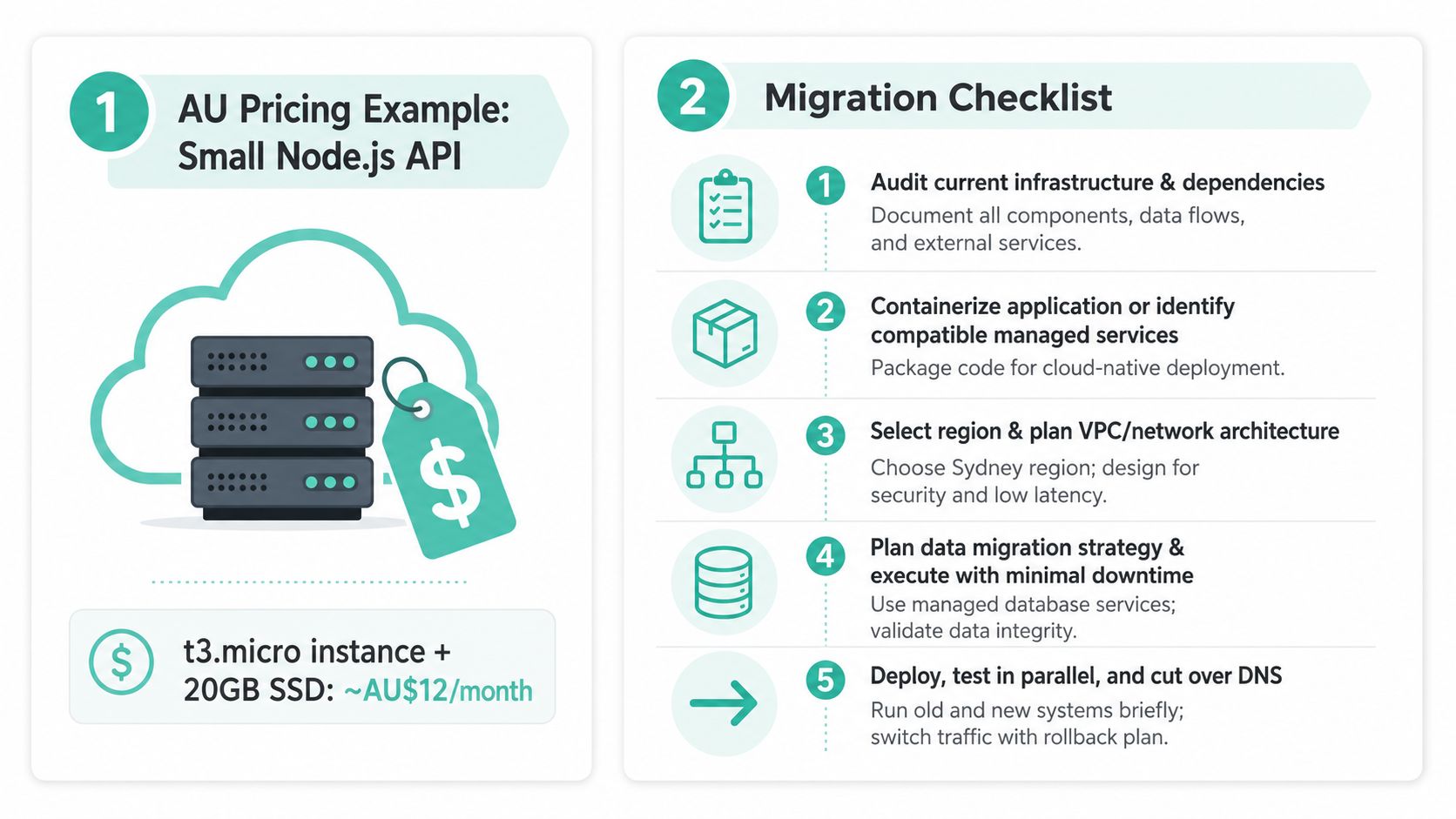
A migration sequence that reduces surprises
- Audit the current stack. Record the application runtime, scheduled jobs, databases, file uploads, email dependencies, third-party APIs, certificates, monitoring and backup locations.
- Select the target layer. Decide whether the application needs a VM, containers, PaaS or functions. Keep state outside replaceable application instances.
- Choose the Australian location. Use user geography, data handling obligations and recovery requirements. Don't choose a region solely because a tutorial uses it.
- Build the destination privately. Create access roles, network boundaries, secrets, logging, backups and health checks before moving production data.
- Test the release path. Deploy from CI, run functional tests, verify database compatibility and confirm that the application can start from a clean environment.
- Move data carefully. Choose replication, export and import, or a maintenance-window approach according to the database and downtime tolerance. Validate record counts and application reads.
- Cut over with a rollback plan. Run old and new environments in parallel where practical, lower operational risk through staged traffic, then update DNS and monitor the transition.
- Close the old environment deliberately. Keep evidence, backups and logs according to policy before removing unused resources and credentials.
The website migration checklist can help organise the cutover. Domain planning matters too. auDA says its current .au Domain Administration Rules apply to licences created, transferred or renewed after 10:00 AEST on 12 April 2021, while earlier registrations remained under the older eligibility policy until its 11 April 2026 expiry, as explained in the official .au rules and policies. The Australian Government identifies auDA as the independent body endorsed to administer Australia's .au country-code top-level domain and says registrants must meet eligibility requirements, according to its domain names guidance.
Direct .au domains became available on 24 March 2022, with matching existing .au registrations receiving a six-month priority hold until 20 September 2022, according to Business Victoria's direct .au guide. Check current eligibility before registering or renewing, particularly during a migration.
FAQ answers are straightforward:
- What causes cloud cost surprises? Untracked resources, data transfer, oversized databases, retained snapshots and verbose logs. Set budgets, alerts and ownership.
- When should you use multiple Australian cities? When resilience, customer proximity or compliance justifies operating more than one location. A second site adds testing and operational work.
- Does serverless suit a legacy application? Usually not as a direct rewrite. Start by isolating a small event-driven task, then measure whether the new boundary improves delivery or operations.
UpTime Web Hosting provides Australian hosting across Sydney, Melbourne, Brisbane and Perth, including managed VPS, cPanel, WordPress and Windows or ASP.NET options with local support, backups, monitoring and security services. Review your current workload against these deployment choices, then visit UpTime Web Hosting to discuss a hosting setup that matches your application, location and operational capacity.