An Australian business owner usually notices a hosting problem at the worst possible time. The site slows down during a campaign, a contact form stops sending enquiries, or a customer reports being redirected to an unfamiliar page after a plugin update. By the time the owner reaches support, local visitors have already moved on and the internal team is trying to determine whether the fault sits with WordPress, the theme, the plugin, or the server.
That experience explains the appeal of Australian managed WordPress hosting. The service isn't rented server space. It combines WordPress-focused maintenance, local infrastructure, security controls, backups, performance tuning, and support that understands the operating conditions of Australian businesses. The important question is not whether a host uses the word “managed”, but what it does when a site is slow, compromised, or damaged by an update.
Table of Contents
- Why Australian Businesses Are Rethinking WordPress Hosting
- What Managed WordPress Hosting Actually Includes
- The Australian Advantage in Performance and Security
- Choosing the Right Hosting Approach for Your Needs
- Migrating Your WordPress Site Without Downtime
- Answers to Common Hosting Questions
- Practical Recommendations and Next Steps

Performance you can feel, backed by clients who depend on it. Read how our support and uptime create long‑term customer success.Power Your Business with Better Hosting
Why Australian Businesses Are Rethinking WordPress Hosting
A local trades business can lose enquiries without ever seeing a formal outage. Its homepage loads slowly on mobile, the booking form takes too long to respond, or a malware redirect appears only for some visitors. The owner sees an apparently working website, while customers see uncertainty and leave.
I've seen this pattern repeatedly during migrations. The original hosting plan was cheap, but the business paid for it through staff time, developer invoices, missed leads, and long support queues. Offshore support can still be technically capable, but a response that arrives after the Australian trading day has finished doesn't help much when a checkout or enquiry workflow is already failing.

The pressure behind the move
Australia has a substantial local domain base. auDA recorded 4,400,684 .au names under management in July 2026, compared with 4,287,717 in July 2025, while .com.au reached 3,298,387 names, a 2.9% year-on-year rise in the country's largest commercial namespace (auDA registry statistics). Direct .au registrations also reached 814,423 by July 2026, after launching in March 2022, showing the continuing adoption of locally branded digital identities.
WordPress provides the installed base behind much of that demand. Australian web-technology tracking reported about 213,776 Australian companies using WordPress in 2026, while an Australia-focused market-share summary estimated that WordPress powered roughly 65% of Australian websites, representing around 3.2 million websites (Australian WordPress market-share data).
That combination creates a practical hosting issue. Businesses don't only need a website that exists. They need a platform that receives updates safely, delivers pages promptly to Australian visitors, stores recoverable backups, and gives someone responsibility for incident response.
Practical rule: If your website generates enquiries, bookings, sales, or client confidence, hosting should be treated as an operations decision rather than a minor design expense.
The shift to managed hosting usually follows a familiar pattern: repeated plugin conflicts, slow first-byte response, unclear backup arrangements, or a security incident that exposes how little the business can do after compromise. A useful starting point is this guide to why Australian businesses switch to local hosting, particularly when local response times and data handling matter.
What Managed WordPress Hosting Actually Includes
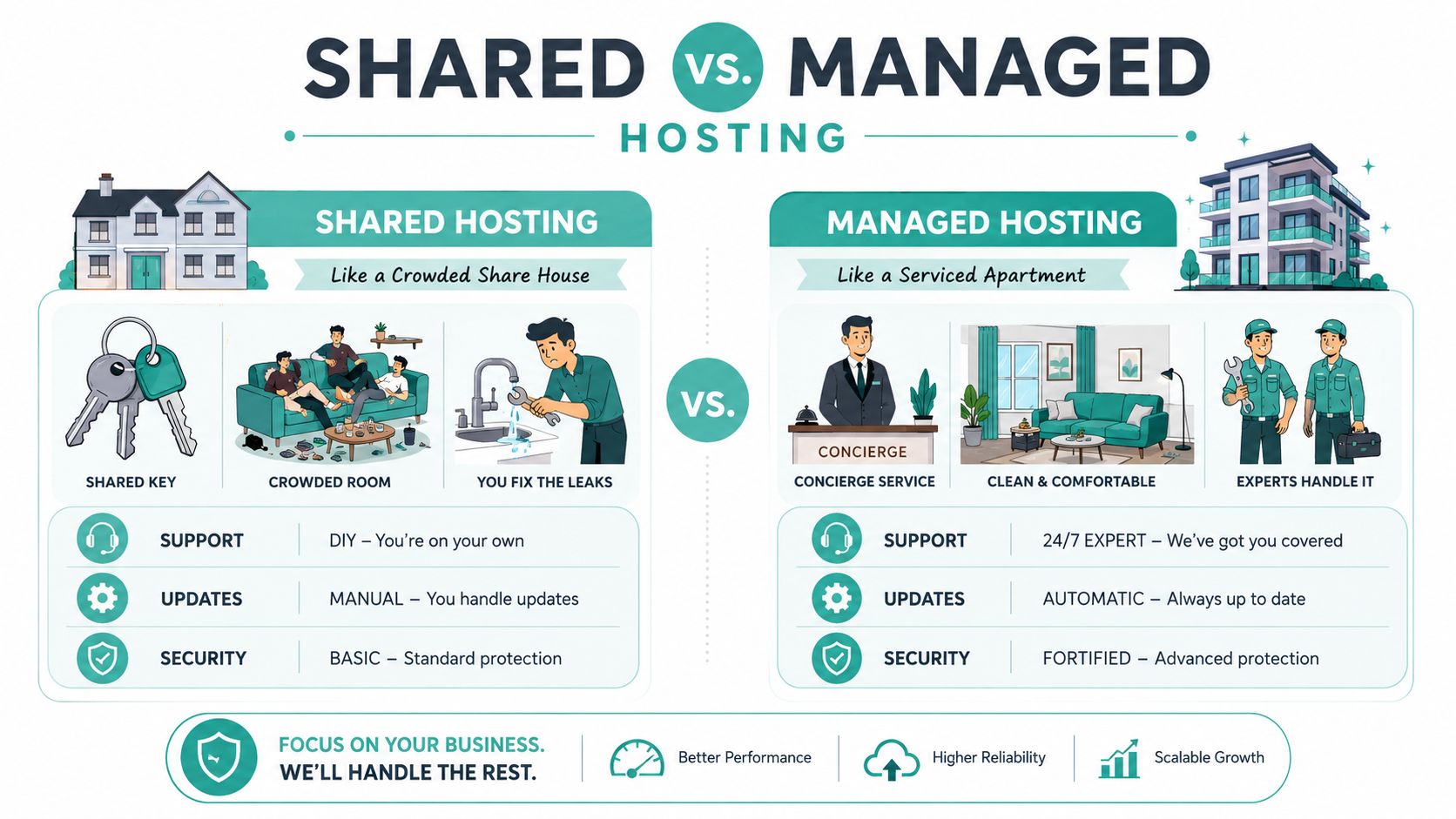
Shared hosting is like renting a room in a crowded share house. You receive a key, but you're responsible for most of the maintenance, and the behaviour of other occupants can affect the building. Managed WordPress hosting is closer to a serviced apartment, where a building manager maintains the environment, handles routine faults, and keeps the property ready for use.
The distinction matters because WordPress has several moving parts. Core files, themes, plugins, PHP, databases, caching, forms, and security controls all interact. A host that only provides storage and a control panel hasn't necessarily taken responsibility for the application.
What should be included
A credible managed plan should make the following operational tasks clear:
- Safe updates: WordPress core and plugin updates should be automated where appropriate, tested through staging where available, and reversible if a release causes a conflict.
- Recoverable backups: Daily off-site backups should be encrypted, retained according to a clear policy, and restorable without opening a prolonged investigation.
- Application caching: Server-level page and object caching reduces repeated work for the web server and database. It should be configured for WordPress rather than left as a generic switch.
- WordPress-aware protection: A Web Application Firewall should address common WordPress attack patterns, while malware scanning and removal should cover the files and behaviours that a basic firewall can miss.
- Runtime management: PHP versions, worker limits, database settings, and resource allocation should be managed with WordPress compatibility in mind.
- Specialist support: Support staff should understand plugin conflicts, failed updates, redirects, cron tasks, database errors, and restoration workflows.
The value sits in the expertise layered over the infrastructure. A fast server won't automatically resolve a compromised plugin or a broken checkout.
Where the boundary sits
Managed hosting doesn't usually include custom theme development, bespoke plugin programming, or debugging every line of a third-party application. The provider may identify that custom code is causing an error, but writing and maintaining that code remains a developer's responsibility.
Before signing up, ask who handles plugin conflicts, whether staging is included, how restoration works, and whether malware cleanup is part of the service or an extra charge. The WordPress hosting features guide is useful for turning those questions into a practical plan comparison.
Host your website with our 5-star rated, cPanel website hosting plans.
Super fast servers, with security included and hosted in your choice of Australian Data Center.
View cPanel Plans
The Australian Advantage in Performance and Security
Australian hosting has two separate advantages, and they shouldn't be collapsed into one marketing claim. The first is network proximity. The second is operational proximity, meaning the ability to receive assistance and make decisions during Australian business hours.
A Sydney-based test of WordPress hosting recorded median Time to First Byte results of 85 ms for Cloudways, 95 ms for SiteGround, 105 ms for VentraIP, and 148 ms for Hostinger AU (Sydney WordPress performance testing). The results show a roughly 40% to 70% difference between the faster and slower examples, and Sydney-origin TTFB varied by almost two times across the providers tested.
That variation matters because TTFB is only the first part of delivery. DNS resolution, TLS negotiation, server processing, page caching, asset delivery, and browser rendering all contribute to the visitor experience. A Sydney server can help an Australian audience, but it won't compensate for an overloaded database, uncached WooCommerce queries, or a poorly configured CDN.
Security is now an operational question
Australian-focused reporting citing Patchstack data recorded 11,334 new WordPress vulnerabilities in 2025, up from 7,966 in 2024, a 42% year-on-year increase. The same reporting said 43% were exploitable without authentication, with a median gap of about five hours between disclosure and active exploitation (Australian WordPress security reporting).
That window changes the meaning of “managed”. Automatic patching helps, but it isn't enough on its own. A provider also needs to detect suspicious files, identify webshell behaviour, isolate an affected account, preserve evidence where appropriate, and restore a clean version without reintroducing the same vulnerability.
The Australian Cyber Security Centre has warned that large-scale campaigns continue to exploit website CMS vulnerabilities. Its guidance recommends rapid patching, safe automatic updates, disabling vulnerable plugins, read-only web directories where possible, and asking managed-hosting providers how monitoring and compromise response work (ACSC CMS exploitation alert reporting).
For organisations assessing broader cloud and security architecture, Avada It Clouds1 security overview provides additional context for evaluating layered controls rather than relying on a single firewall feature.
| Metric | Australian managed host | Offshore shared host |
|---|---|---|
| First-byte response for Australian visitors | Usually easier to optimise through local origin or edge delivery | May involve longer network paths |
| WordPress caching | Configured around the application and database | Often generic or self-managed |
| Security response | Can align monitoring and support with Australian operations | Response process and time zone may be less suitable |
| Data handling | Location and backup residency can be specified | Physical storage and backup locations may be unclear |
| Recovery | Should include documented restoration and containment | May be limited to account-level support |
Australian domain eligibility and policy compliance also matter. auDA administers the .au country-code top-level domain as a not-for-profit body endorsed by the Australian Government, and .au names are allocated only to users who meet eligibility requirements (auDA rules and policies). Businesses considering direct .au should also understand that the shorter namespace launched on 24 March 2022, with eligibility tied to a current Australian presence (Victorian Government guidance on direct .au domains).
For privacy-sensitive businesses, ask where live data, backups, logs, and support access reside. Australian residency can simplify governance discussions, but it doesn't remove the need to understand the Privacy Act, the Notifiable Data Breaches scheme, access controls, retention, and the provider's incident process. A useful explanation of Australian data sovereignty hosting can help frame those questions before procurement.
Choosing the Right Hosting Approach for Your Needs
The right hosting tier depends less on the size of the business than on the consequences of failure. A small professional practice with sensitive forms may need stronger operational controls than a larger organisation with a simple brochure site. Conversely, a low-traffic information site can be over-provisioned if nobody checks what it uses.
A practical decision matrix
| Hosting type | Best for | Monthly traffic capacity | Security management | Typical monthly cost AUD | Technical skill required |
|---|---|---|---|---|---|
| Shared hosting | Simple brochure sites and early projects | Depends on provider limits and resource allocation | Mostly customer-managed | Varies by provider | Low, but troubleshooting is self-directed |
| Managed WordPress hosting | Business sites, agencies, stores, and lead-generation platforms | Scales within the plan and resource limits | Host-managed updates, scanning, backups, and controls | Varies by plan | Low to moderate |
| Managed or unmanaged VPS | Custom configurations and demanding WordPress installs | More predictable resources than shared hosting | Low overhead when managed, substantial when unmanaged | Varies by resources and support | Moderate to high |
| Dedicated hosting | Specialised workloads requiring isolated resources | High, subject to architecture and application design | Customer or managed operations team | Varies widely | High unless fully managed |
A shared plan becomes a liability when traffic grows beyond 50,000 monthly visits, or earlier if site speed directly affects conversions. That threshold isn't a universal law. A poorly optimised site can struggle before it, while a carefully cached site may remain stable longer. Use it as a trigger for testing, not as permission to wait for failure.
Match the platform to the work
An Australian payment-enabled store needs reliable checkout, safe plugin management, database performance, and a recovery plan. An agency needs staging, client separation, repeatable provisioning, and a support model that doesn't force developers to handle routine maintenance. A regulated organisation needs explicit answers about data location and access.
A VPS can make sense when custom server settings or application isolation are important, but an unmanaged VPS transfers patching, monitoring, firewall configuration, and recovery to the customer. Dedicated resources can solve a capacity problem, yet they may add administration that a business doesn't need.
Before choosing, ask:
- Business impact: What stops working if the site is unavailable?
- Technical ownership: Who handles updates, logs, security alerts, and recovery?
- Application complexity: Does the site run WooCommerce, memberships, bookings, or custom integrations?
- Growth pattern: Are traffic increases gradual, or do campaigns create sudden peaks?
- Data handling: Do live data and backups need Australian residency?
- Recovery expectation: Can the business tolerate a lengthy manual rebuild?
For businesses needing more isolation without taking on all server administration, managed VPS WordPress hosting is a sensible category to investigate. The key is confirming exactly which management tasks are included.
Migrating Your WordPress Site Without Downtime
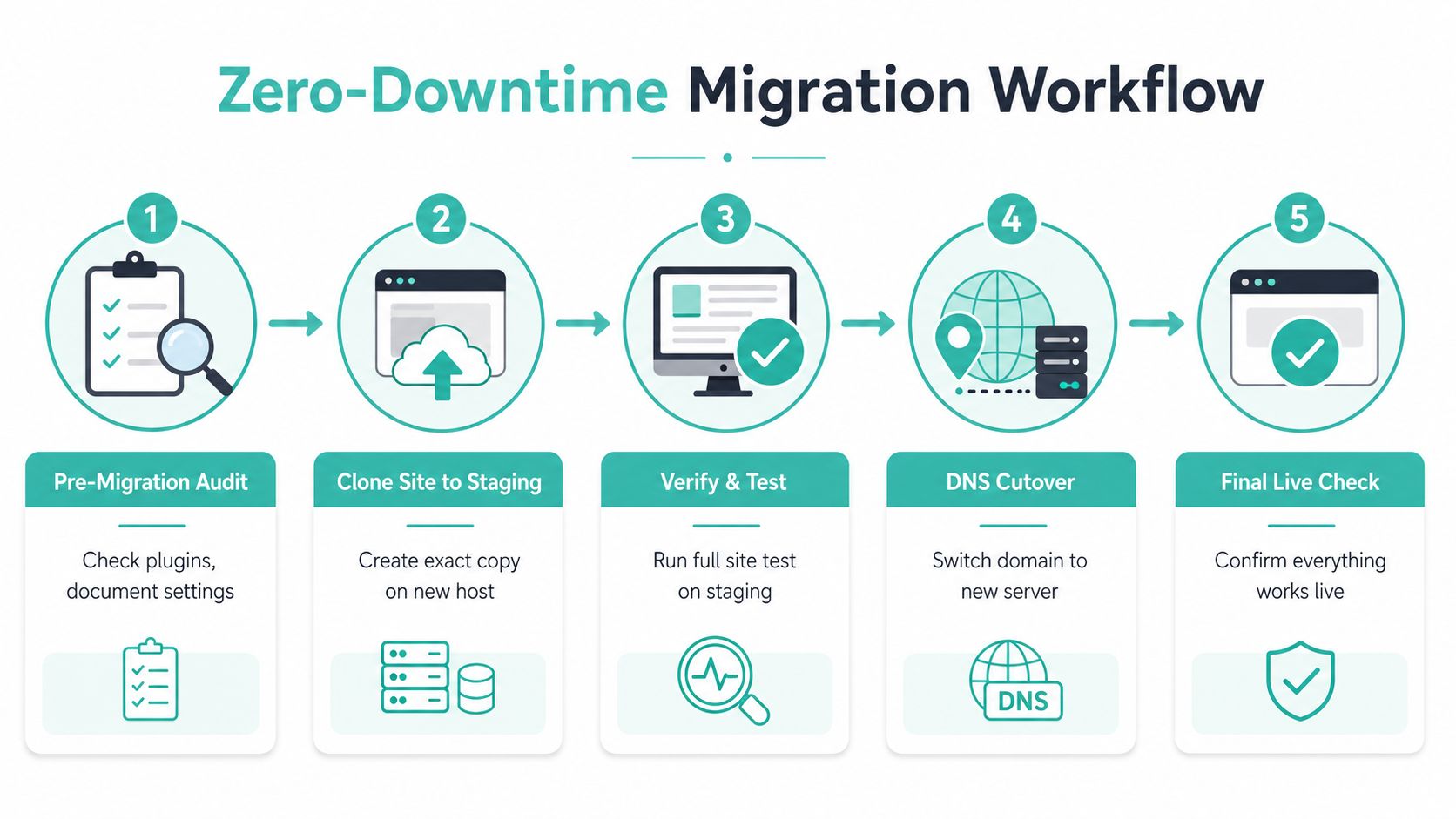
A good migration is controlled rather than dramatic. The new site should be built and tested while the existing site continues serving visitors, then the final change should move traffic with minimal disruption.
Prepare before copying anything
Start by inventorying the site. Record active plugins, theme customisations, forms, payment flows, scheduled tasks, analytics, redirects, media storage, and any external services. Capture the current backup arrangement and store a complete copy of files and the database off-server, not only inside the host you're leaving.
Audit plugins for compatibility and remove abandoned or unnecessary components before migration. Document custom configurations, because a setting that exists only in a control panel or a developer's notes can disappear during a move.
Build and test the new environment
Create a staging copy on the new host while the domain still points to the old service. Test the pages customers use, not only the homepage.
- Forms: Submit enquiries and confirm delivery.
- Payments: Run the approved test flow for the Australian gateway.
- Accounts: Check logins, password resets, memberships, and permissions.
- Media: Inspect images, downloads, and responsive layouts.
- Email: Confirm that notifications reach the intended inboxes.
- Caching: Purge and rebuild caches after changes.
- Security: Verify SSL, firewall behaviour, malware scanning, and administrative access.
Reduce DNS TTL 24 to 48 hours before the planned cutover, then schedule the final copy during a quieter trading period. Freeze content briefly if the site receives orders, bookings, or form submissions, so new data isn't written to the old database after the final transfer.
Validate after the switch
Keep the previous hosting active while monitoring the new site. Check SSL certificates, permalinks, scheduled tasks, backup schedules, error logs, forms, checkout, redirects, media, and administrator access during the first 72 hours.
Common failures have straightforward fixes. Broken permalinks usually require a rewrite-rule refresh and a review of the site's URL settings. Missing media often indicates an incomplete uploads directory or incorrect file permissions. Database charset mismatches need a controlled export and import using compatible settings, followed by checks for damaged special characters.
Managed hosts can usually copy the site, provision staging, install SSL, and assist with DNS timing. They can't know whether a specialist integration behaves correctly unless the business supplies test cases and completes functional verification. The WordPress migration service guide is useful when the site handles business-critical workflows.
Register your new domain name at competitive market prices including free domain add-ons like privacy, DNS Hosting, Custom Nameservers and Forwarding.
Always the best price and no nasty renewal price hikes.
Register A Domain Name
Answers to Common Hosting Questions
Does managed hosting justify the extra cost?
The answer depends on what the site is worth to the business. A low-risk brochure site may not need every managed feature, while an online store or lead-generation site can quickly spend more on breach remediation, performance work, emergency development, and staff troubleshooting than it would have spent on an appropriate hosting plan.
Compare the full operating cost, not just the invoice. Include backups, malware response, patching, recovery, support, and the time required to diagnose failures.
Will Australian hosting improve Google rankings?
A local data centre can improve delivery for Australian visitors, particularly when combined with page caching, an edge CDN, efficient PHP execution, and a responsive database. That can support better Core Web Vitals, but hosting location alone doesn't guarantee a ranking improvement. Content quality, technical accessibility, relevance, mobile usability, and user experience still matter.
Is a CDN enough?
No. A CDN can cache and deliver static assets from edge locations, but it doesn't automatically fix slow database queries, inefficient PHP, failed plugin updates, malware, or missing backups. The strongest setup uses the CDN alongside origin caching, WordPress maintenance, security monitoring, and recovery procedures.
Are plugin restrictions a problem?
Restrictions usually target plugins that duplicate server functions, consume excessive resources, create security exposure, or interfere with caching. A provider should explain the reason and suggest an alternative, rather than blocking the plugin without discussion. Ask for the restricted-plugin policy before migrating.
Will the host lock me in?
WordPress remains portable when you retain access to files, the database, media, domain, and backups. Ask whether you can export the full site and whether the host uses standard WordPress structures. A staging copy and documented migration process also reduce dependence on one provider.
Can managed hosting handle sudden demand?
It can help absorb spikes through caching, resource allocation, CDN delivery, monitoring, and planned scaling. It won't rescue an application with uncached database-heavy functions or poorly designed integrations. Before a campaign, ask the host how it detects load, what can scale automatically, and who responds if the site exceeds its plan.
Practical Recommendations and Next Steps
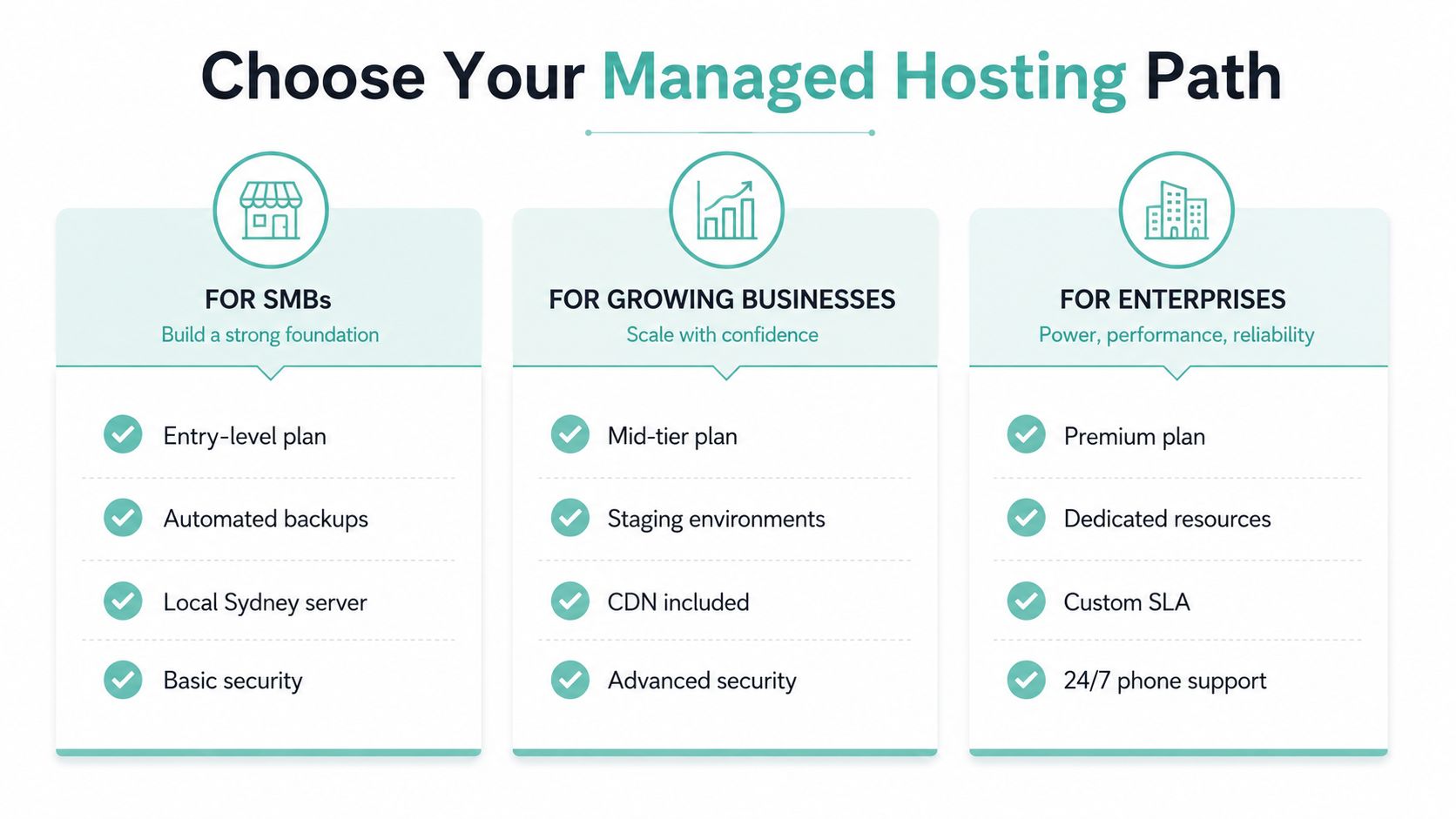
Small and medium businesses should prioritise automated backups, Australian infrastructure, WordPress-aware security, and responsive local support. Skip expensive dedicated resources unless the site needs them. Pay for a recovery process that staff can understand, test, and use during an active compromise.
Agencies need staging, multi-site management, client separation, white-label options, repeatable deployments, and pricing that remains workable as the portfolio grows. Support processes matter too. If developers must open separate tickets for routine actions, the provider reduces agency margin.
Developers should check SSH access, Git workflows, WP-CLI, API-driven provisioning, custom PHP settings, logging, and caching controls. For WooCommerce and membership sites, test database queries and checkout under realistic conditions, not only a homepage speed score. Ask how the host identifies an exploited plugin, isolates affected sites, restores clean files, and confirms the attack has stopped.
Use this three-step process:
- Audit current performance: Test from Australian locations with GTmetrix, then review TTFB, caching, page weight, and origin behaviour.
- Shortlist suitable providers: Compare containment, clean restoration, local support, and data residency, not just monthly cost.
- Request a migration quote: Require security hardening, staging, testing, backup verification, and post-migration monitoring in writing.
UpTime Web Hosting provides Australian hosting across Sydney, Melbourne, Brisbane, and Perth, plus WordPress services, managed VPS options, malware scanning, DDoS-protected firewalls, encrypted off-site nightly backups, and 24×7 monitoring. Review its hosting services against those operational questions. The cheapest plan rarely provides the recovery capacity an Australian business needs during an active CMS attack.
If the site is slow, difficult to restore, or supported only through a generic queue, review the setup before the next update or campaign exposes the weakness. Ask prospective hosts who contains an incident, who approves restoration, and how monitoring continues afterward.