In short
WordPress.com is the simpler all-in-one choice because hosting, core updates and platform security are managed for you. WordPress.org is free open-source software that you install with a host, giving your business more control over files, databases, plugins and server settings, but also more responsibility unless your host manages those tasks.
Key takeaways
- WordPress.com includes hosting, while WordPress.org provides software that must be installed with a separate host. (wordpress.com)
- As of August 2026, WordPress.com says every paid plan can install plugins, although a small number of incompatible plugins remain blocked. (wordpress.com)
- WordPress.org software is free under the GPL, but a functioning business site still needs hosting and usually a domain. (wordpress.org)
- WordPress.com provides customer-accessible automated backups and restores on Business and Commerce, while lower plans rely on content and media exports. (wordpress.com)
- Business email must be checked separately because WordPress.com's support page says email is not included, while its pricing page advertises a one-year mailbox inclusion on selected plans. (wordpress.com)
Table of contents
- What is the actual difference between WordPress.com and WordPress.org?
- How much control do you get over plugins, themes and code?
- What will WordPress.com and WordPress.org really cost?
- Who handles updates, security and backups?
- What happens to your domain and business email?
- Which option fits your business website?
- Can you move from WordPress.com to WordPress.org later?
- What else do businesses ask about WordPress.com vs WordPress.org?
- Which WordPress option should your business choose?
What is the actual difference between WordPress.com and WordPress.org?
WordPress.com is a commercial service that combines WordPress software with managed hosting. WordPress.org is the home of the open-source WordPress project, where the software is available for use with a hosting provider chosen by the website owner.
The official WordPress.com comparison, reviewed on August 11, 2026, confirms that both options use the same core software. The difference is who supplies and operates the hosting. WordPress.org's project overview also identifies WordPress as open-source software licensed under GPLv2 or later. (wordpress.com)
People often use “WordPress.org” as shorthand for self-hosted WordPress. A business does not normally run its website on WordPress.org itself. It downloads or installs the software through a separate host, then manages the website through that hosting account.
For a broader explanation of the hosting layer, this plain-English WordPress hosting guide separates the website software from the server that publishes it.
Quick comparison at a glance
| Question | WordPress.com | WordPress.org with separate hosting |
|---|---|---|
| Is hosting included? | Yes. | No. A hosting plan is required. |
| Is the software free? | A free service plan exists, with paid upgrades. | The WordPress software is free. |
| Who runs the server? | WordPress.com. | The chosen hosting provider. |
| Can plugins be installed? | Yes on paid plans, subject to an incompatible-plugin list. | Yes, subject to plugin compatibility and any host restrictions. |
| Can the server environment be changed? | Only within the tools and limits of the selected plan. | Often, but the available access depends on the host and plan. |
| Who handles core updates? | WordPress.com manages them. | The site owner, developer or managed host. |
| Is business email included? | Not generally; current promotional inclusions and renewals must be checked. | It depends on the hosting package. |
| Who is it best for? | Businesses prioritising low administration. | Businesses prioritising choice and operational control. |
The phrase “WordPress.org login” also causes confusion. A self-hosted site's administration area normally belongs to its own domain, commonly at /wp-admin; a WordPress.org community account is not the login for every self-hosted website. WordPress.org's administration guide documents the site-specific login path. (wordpress.org)
The choice is not between two editors; it is between two ways of hosting and operating the same core software.

Performance you can feel, backed by clients who depend on it. Read how our support and uptime create long‑term customer success.Power Your Business with Better Hosting
How much control do you get over plugins, themes and code?
WordPress.org with separate hosting normally provides more control over files, databases, plugins and the hosting environment. WordPress.com provides extensive website controls but keeps the site inside a managed platform with plan and infrastructure rules.
Where control changes in practice
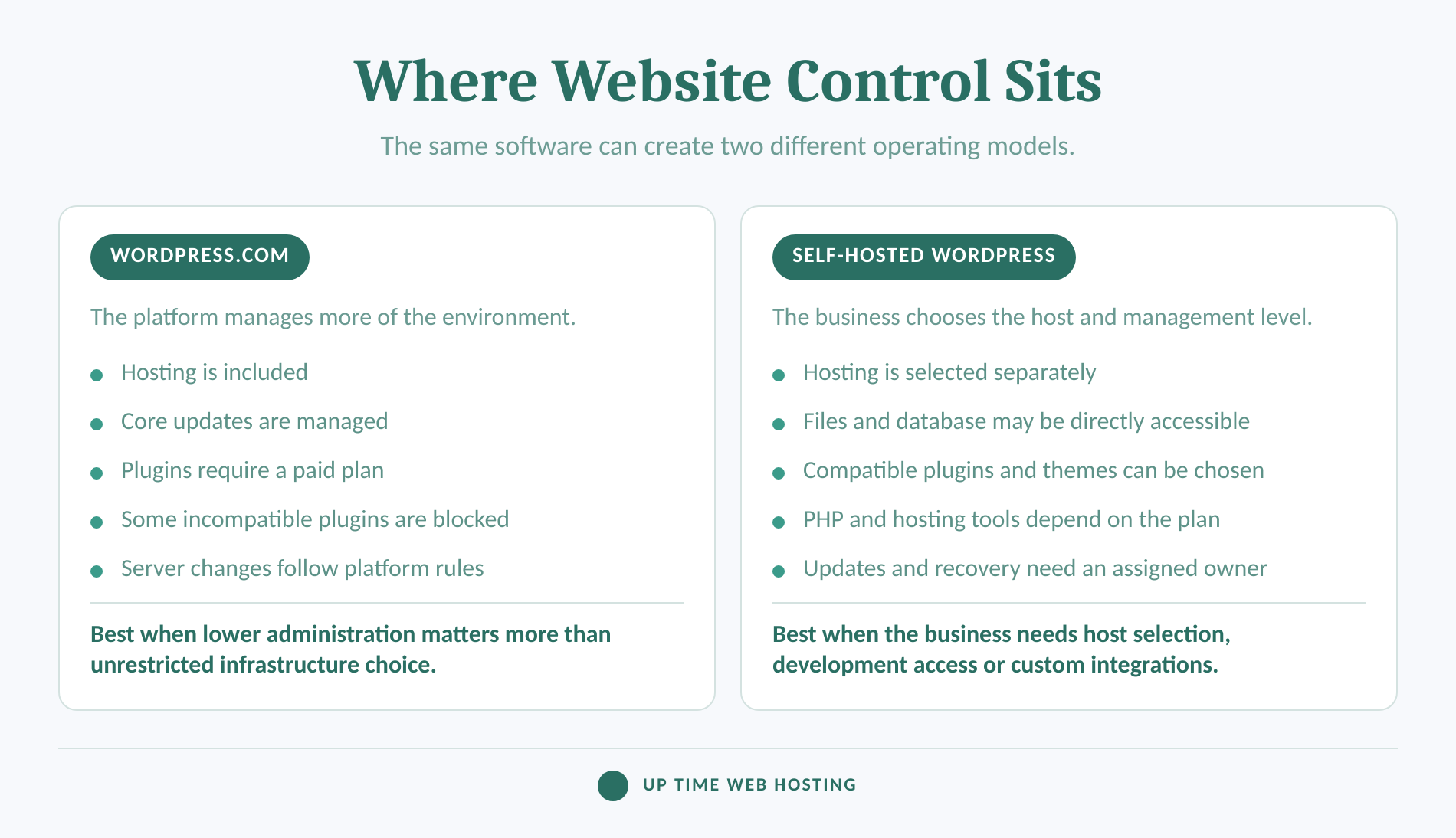
One major detail changed recently. Older guides often say WordPress.com requires its Business plan before plugins can be installed. The current WordPress.com plugin guide, reviewed in August 2026, says plugin installation is available on Personal, Premium, Business and Commerce plans. Free sites still need an upgrade. (wordpress.com)
That does not make the two options identical. WordPress.com maintains an incompatible-plugin list for plugins that interfere with its caching, security, backups or shared infrastructure. A plugin may install but remain disabled if the platform does not support it. (wordpress.com)
A self-hosted installation generally lets the business or developer:
- choose the hosting company and server location;
- install compatible themes and plugins from different sources;
- access site files and the database when the hosting plan permits it;
- choose caching, security, backup and deployment tools;
- change PHP and other hosting settings within the provider's limits; and
- move the site to another suitable host.
More control does not remove all restrictions. Shared hosting plans still have resource limits, disabled server functions and acceptable-use policies. Full server administration is also different from ordinary self-hosted WordPress, so access should be verified rather than assumed.
“Ownership” needs the same care. WordPress.com states that customers own their site content and can move it. The stronger self-hosted advantage is operational control: the business can usually access its hosting account, files and database directly instead of relying entirely on one platform's available tools. (wordpress.com)
For SEO, both options run the same underlying content management system. The practical difference is access. WordPress.com includes built-in tools and permits SEO plugins on paid plans, while self-hosted WordPress lets the business choose plugins and hosting-level performance settings.
Choose WordPress.com for managed limits or WordPress.org for host-level control, but do not confuse control with freedom from maintenance.
What will WordPress.com and WordPress.org really cost?
Neither option is always cheaper because the bundles are different. Compare the complete annual cost and the renewal cost, not a free software label or a discounted monthly equivalent.
WordPress.com combines hosting with a plan. Its current pricing page lists Free, Personal, Premium, Business and Commerce options, with features and effective monthly prices changing according to the billing term. Prices, promotions and local currency presentation can change, so the page should be checked when the purchase is made. (wordpress.com)
WordPress.org software costs nothing to download and use under its GPL licence. A live website still needs infrastructure and may require paid services around the software. (wordpress.org)
The full annual cost checklist
| Cost to check | WordPress.com | Self-hosted WordPress.org |
|---|---|---|
| Website hosting | Included in the selected plan. | Purchased from a hosting provider. |
| Domain name | May be included temporarily on an eligible term; check renewal. | Bought separately or bundled by the host. |
| Business email | Usually separate; verify any one-year inclusion and renewal. | May be included with hosting or sold separately. |
| Themes and plugins | Free and paid options; plan and compatibility rules apply. | Free and paid options; licence renewals may apply. |
| Backups and restores | Full backup access depends on the plan. | Depends on the host, plugin or maintenance service. |
| Maintenance | Core platform work is managed; content and installed extensions still need oversight. | Handled by the business, developer, host or care provider. |
| Migration | Tools vary by plan and migration type. | Host or developer charges may apply. |
| Staff or developer time | Usually lower for server administration. | Can be higher when the business manages more components. |
A useful budget formula is:
Annual website cost = plan or hosting + domain renewal + mailboxes + paid extensions + maintenance + expected technical labour.
The labour line is easy to miss. A lower hosting bill can become expensive when an employee spends hours diagnosing updates, restoring backups or chasing three different support providers. A more expensive plan can also be poor value if the business pays for tools it never uses.
The guide to what WordPress hosting means explains which services can sit between basic server space and fully managed site care. Use that distinction when comparing plans described with similar marketing labels.
The cheaper option is the one whose full annual cost includes the features and labour the business will actually use.
Host your website with our 5-star rated, cPanel website hosting plans.
Super fast servers, with security included and hosted in your choice of Australian Data Center.
View cPanel Plans
Who handles updates, security and backups?
WordPress.com manages the underlying hosting platform, core software updates and many security controls. With self-hosted WordPress, those jobs must be handled by the host, the business, a developer or a combination of all three.
WordPress.com's backup guide, reviewed on August 11, 2026, says customer-accessible automated backups are available on Business and Commerce. Eligible sites are backed up at least once every 24 hours, more frequently when changes occur, and can restore from backups retained for up to six months while the plan is active. (wordpress.com)
Free, Personal and Premium sites do not have the same automated backup interface. Those plans can export content and media, but an export is not the same as a one-click restoration point containing the complete site configuration.
Self-hosted WordPress includes update controls, including automatic plugin and theme updates. WordPress.org's update documentation still advises making a backup before an upgrade, and its backup lesson explains that a complete self-hosted backup needs both files and the database. (wordpress.org)
The important question is not simply “Are backups included?” Ask:
- How often are they created?
- Are they stored separately from the live site?
- How long are they retained?
- Can the business restore them without opening a support ticket?
- Does the backup include files, the database, email or only website content?
- Has anyone tested a restoration?
A managed host can reduce the difference between the two platforms. UpTime's current cPanel WordPress plans document WP Toolkit update controls, automatic and on-demand backups, LiteSpeed caching, malware protection, firewall controls and SSL. Businesses that also want routine site oversight handled can consider managed WordPress maintenance. (uptimewebhosting.com.au)
Managed hosting reduces routine work, but the business still needs a named owner for updates, recovery tests and renewals.
What happens to your domain and business email?
A domain name, website and mailbox are separate services even when one company places them on the same invoice. Check each service before choosing a platform because moving a website can affect DNS and mail without moving the domain registration itself.
WordPress.com's email information needs a careful reading. Its email support page, reviewed on September 3, 2026, says email is not included with the WordPress.com plan and should be purchased separately or connected through another provider. (wordpress.com)
The WordPress.com pricing page simultaneously advertises one free business email account for one year on its Business and Commerce plans. These statements can both be true if the mailbox is a temporary inclusion rather than an ongoing part of the hosting subscription. A business should confirm the number of included mailboxes, the provider and the renewal price before budgeting. (wordpress.com)
Self-hosted hosting packages vary just as widely. Some include website hosting only. Others include mailboxes, forwarding, webmail and filtering. UpTime's WordPress hosting page currently states that its cPanel plans include email accounts subject to the plan's storage limit, along with webmail and support for modern desktop and mobile mail applications. (uptimewebhosting.com.au)
Keep the domain registration under an account controlled by the business. Record the registrar, renewal date, registrant details, nameservers, DNS records and account recovery method. That information matters whichever WordPress option is selected.
Price the domain, website and mailboxes as separate services, even when one plan bundles them temporarily.
Which option fits your business website?
WordPress.com suits businesses that want the platform to handle most hosting administration. Self-hosted WordPress.org suits businesses that need broader technical choice, host selection or direct control over website infrastructure.
Four common business scenarios

Do you need a simple brochure site?
WordPress.com is a reasonable choice when the site needs standard pages, a blog, basic forms and little custom development. The managed platform reduces the number of separate services the owner must configure.
A managed self-hosted plan can also fit, especially when the business wants local support, bundled email or a specific server location. Compare the complete package rather than assuming self-hosted means the owner must administer a server.
Do you need business email and cPanel in one account?
Self-hosted WordPress is usually easier to compare when the requirement includes cPanel, mailboxes, DNS tools, file management and backups under one hosting account. Confirm what is included because “WordPress hosting” is not a standardised package.
The guide to the best Australian WordPress hosting sets out local factors to compare, including support, hosting location and WordPress-specific tools.
Will a developer need files, databases or server settings?
Self-hosted WordPress is generally the clearer fit when a developer needs predictable file access, database tools, staging workflows or control over PHP settings. The chosen host and plan must still provide the required access.
WordPress.com Business includes developer tools such as SFTP, SSH, WP-CLI and Git-based deployment, so WordPress.com should not automatically be dismissed. The decision depends on whether its managed environment supports the precise application and workflow. (wordpress.com)
Are you building an online store?
Both models can run an online store. Compare payment requirements, extensions, product volume, backups, staging, developer access and the support boundary before choosing.
A store with standard requirements may benefit from a managed platform. A store with unusual integrations, custom checkout logic or specialised hosting requirements may be better suited to self-hosted WordPress, provided someone is responsible for testing updates and protecting recovery points.
Before deciding, answer six questions:
- Is every required plugin or integration supported?
- Does a developer need direct file, database or server-setting access?
- Are the required mailboxes included, promotional or separate?
- Who will test updates and restore the site when something fails?
- Can the full site be moved without rebuilding important components?
- What is the total cost for the first year and the renewal year?
Choose the model that matches the business's required integrations and the person who will own the technical work.
Register your new domain name at competitive market prices including free domain add-ons like privacy, DNS Hosting, Custom Nameservers and Forwarding.
Always the best price and no nasty renewal price hikes.
Register A Domain Name
Can you move from WordPress.com to WordPress.org later?
Yes, a WordPress.com site can move to self-hosted WordPress. The effort depends on the plan, theme, plugins, media library, domain, email setup and whether a full-site migration method is available.
WordPress.com's export documentation, reviewed on August 11, 2026, says a standard XML export includes posts, pages, comments, categories, tags and links to media. It does not include the theme design, customisations or plugins. The media files themselves are also not stored inside that XML file. (wordpress.com)
A safer five-step move
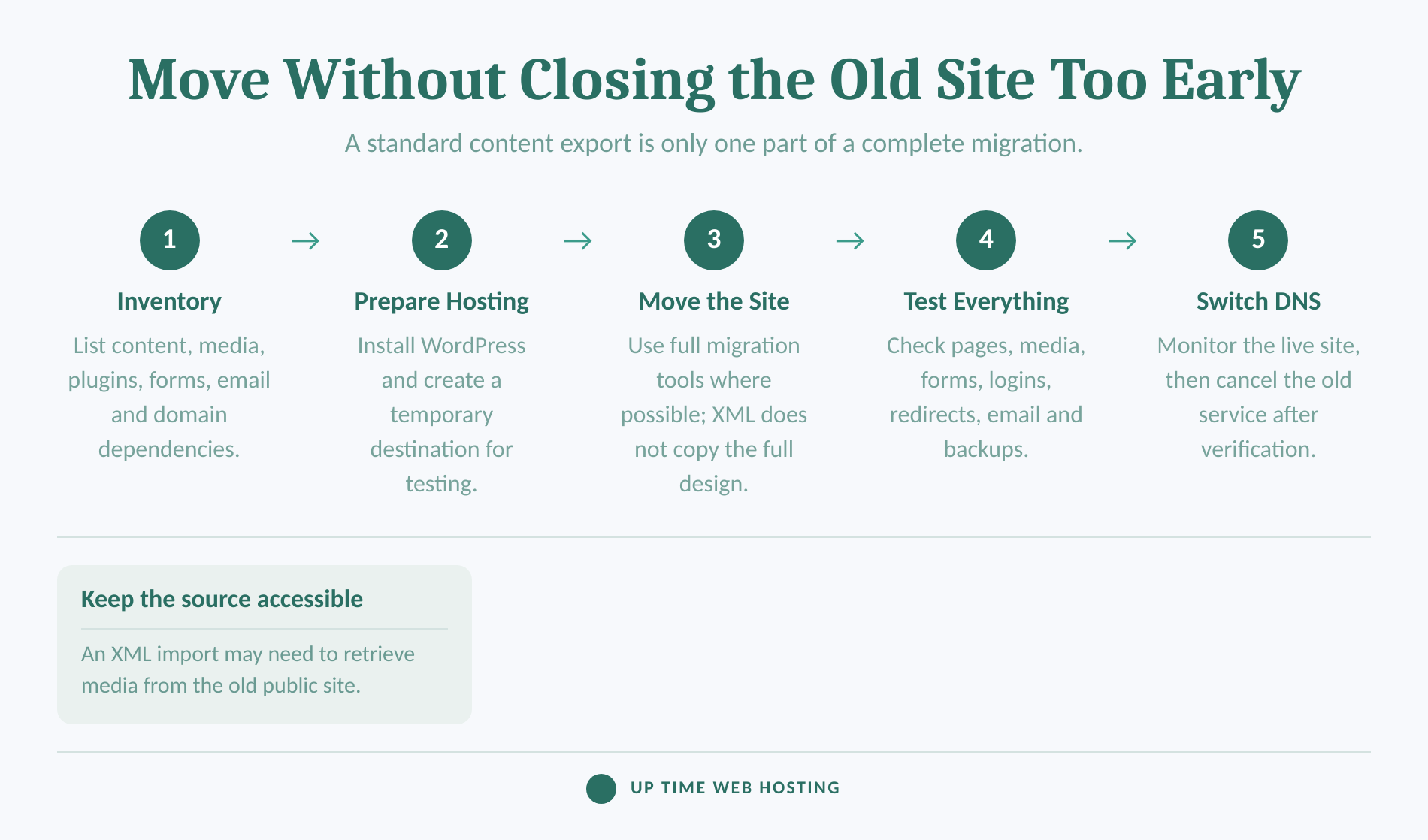
- Inventory the site. List pages, posts, media, plugins, forms, users, redirects, analytics, email and domain dependencies.
- Prepare the destination. Buy suitable hosting, install WordPress, enable SSL and create a temporary address or staging location.
- Choose the migration method. Use an eligible full-site migration or backup tool where possible. Use XML only when its content-only limits are acceptable.
- Test before changing DNS. Check media, forms, navigation, logins, ecommerce, redirects, email delivery, backups and mobile layouts.
- Switch and monitor. Change the necessary DNS records, watch the live site and retain the old service until the move has been verified.
WordPress.com advises keeping the old site public and accessible while an XML import copies media from the original URLs. Closing or making the old site private too early can leave images behind. (wordpress.com)
The domain does not always need to be transferred to the new host. It can remain with its current registrar while its DNS records point to the new website. Email records should be preserved or recreated deliberately so a website migration does not interrupt mail.
A move is practical, but a standard content export is not the same as a complete clone of the old site.
What else do businesses ask about WordPress.com vs WordPress.org?
The common follow-up questions concern company ownership, free software and migration. The answers become clearer once hosting, software and business services are treated as separate things.
Is WordPress.org and WordPress.com the same company?
No. WordPress.com is a commercial hosted service owned by Automattic. WordPress.org is the home of the open-source WordPress software project and does not sell hosting itself. The names are linked because both use the same core software, but they are not two plans from the same company. (wordpress.com)
Can I switch from WordPress.com to org?
Yes. WordPress.com lets you export content, and eligible plans can use full-site backup or migration methods. A standard XML export includes posts, pages, comments, categories and tags, but not the theme design, customisations or plugins. Keep the old site accessible until media has copied and test before changing DNS. (wordpress.com)
Is WordPress.org still free?
Yes. The WordPress software available through WordPress.org is free and licensed under GPLv2 or later. A working self-hosted website still needs hosting and usually a domain name. Business email, premium plugins, paid themes, maintenance and developer help may add further costs depending on the setup. (wordpress.org)
What does "WordPress.org" mean?
“WordPress.org” means the official home of the open-source WordPress project, including software downloads, documentation, themes, plugins and community resources. In everyday comparisons, people also use “WordPress.org” as shorthand for self-hosted WordPress, meaning the software is installed on hosting chosen by the website owner. (wordpress.org)
WordPress.org is free software, not free hosting, and moving from WordPress.com requires planning beyond exporting posts.
Experience Microsoft 365 Business Standard for free for 30 days.
Up to 25 users with full access to email, OneDrive and Teams. Includes full versions of desktop apps of Outlook, Word, Excel, PowerPoint and more.
Try Microsoft 365
Which WordPress option should your business choose?
Choose WordPress.com when the priority is reducing hosting administration and the required features fit its plans and platform rules. Choose self-hosted WordPress when the priority is selecting the host, controlling the operating environment or supporting custom development and integrations.
The deciding question is who will own the technical work. WordPress.com assigns more of that work to the platform. Self-hosted WordPress assigns it across the host, business, developer and any maintenance provider.
Do not choose self-hosted WordPress merely because it offers more control. Control only has value when the business has the skill, support arrangement or managed service needed to use it safely.
If self-hosted WordPress is the better match and Australian cPanel hosting is on the shortlist, compare the current Australian WordPress hosting plans. The plan page lists included email, backups, SSL, update tools and security controls, along with current and renewal pricing. (uptimewebhosting.com.au)
Choose the operating model your business can support, then verify current plan and renewal details before paying.