
You've launched a small Australian business site, chosen a design, organised the copy and approved the quote. Then the hosting provider asks one apparently simple question: Windows or Linux? The answer can affect your application compatibility, control panel, support process, monthly bill and migration risk, even though visitors won't see the operating system behind the site.
The practical choice isn't about whether your office computers run Windows. It's about what your website or application needs. Linux usually suits WordPress, PHP and open-source stacks. Windows earns its place when IIS, ASP.NET, MSSQL, COM objects or older .NET Framework dependencies are part of the workload. Local data-centre location and Australian support also matter, particularly for businesses serving customers in Australia.
Table of Contents
- Choosing Between Windows and Linux Hosting for Your Australian Business
- Understanding How Windows and Linux Hosting Stacks Differ
- Comparing Key Factors That Matter for Your Business
- Real-World Use Cases for Windows and Linux Hosting in Australia
- Making the Decision with a Practical Australian Business Checklist
- Next Steps and When to Seek Professional Guidance

Performance you can feel, backed by clients who depend on it. Read how our support and uptime create long‑term customer success.Power Your Business with Better Hosting
Choosing Between Windows and Linux Hosting for Your Australian Business
A Brisbane professional services firm can spend weeks approving a new site build, then lose time and money on a hosting decision made in five minutes. I see it often. The public site is standard WordPress, but an older client portal still runs on ASP.NET with SQL Server in the background. Put both on the wrong platform and the cheap plan stops being cheap very quickly.
That is the part many Windows versus Linux comparisons miss. The true cost is rarely the monthly hosting fee on its own. It is the rewrite work, the database conversion, the mailbox or DNS disruption during migration, and the support hours spent untangling an application that was never suited to the target server.

Start with the workload and the break-even point
Before comparing plans, list what the business runs and what a migration would force you to change.
- Core website stack: WordPress, WooCommerce, PHP CMS, Python app, Node app, or a custom build
- Microsoft dependencies: ASP.NET, older .NET Framework code, IIS settings, MSSQL, Access databases, COM objects, scheduled Windows tasks
- Database and integration links: MySQL or MariaDB, SQL Server, external CRM syncs, invoicing tools, API jobs
- Admin model: cPanel, Plesk, SSH access, RDP access, or fully managed support
- Business impact of downtime: lost leads, failed bookings, staff disruption, or broken quoting workflows
- Location requirements: whether an Australian data centre and local support matter for customer response times and staff access
If that list shows a plain WordPress or PHP stack, Linux is usually the lower-risk and lower-cost option. If it shows Microsoft-specific dependencies, the right question is not whether Windows hosting costs more each month. The right question is whether that extra monthly spend is still cheaper than rebuilding the application or fixing a failed migration later. Businesses comparing plans can use this Windows web hosting in Australia guide to confirm whether their application sits in that category.
In practice, the break-even point is simple. A standard marketing site, brochure site, or local e-commerce store usually gets better value on Linux because there is no licensing overhead to justify. A line-of-business app tied to IIS, MSSQL, or older .NET code often stays cheaper on Windows once you account for redevelopment time, testing, and user disruption.
Australian buyers also need to look past the sticker price. Some low-cost overseas plans look attractive until latency, ticket delays, backup restore fees, or after-hours support become a problem. For a suburban accountant, medical clinic, or trade business serving Australian customers, a slightly higher local plan can be the cheaper option over 12 months if it reduces outage time and support churn.
Practical rule: choose the platform that fits the application you already have, then price the migration work around it. Hosting is cheap. Rebuilds, failed cutovers, and emergency fixes are not.
Understanding How Windows and Linux Hosting Stacks Differ
The operating system determines the software layer underneath your website. It affects the web server, supported runtime, database options, control panel and the way administrators troubleshoot problems. It doesn't determine the visual appearance of the site, and a visitor won't know which platform serves a page unless the application exposes that information.
Linux hosting is the mainstream baseline for PHP and open-source websites. Providers commonly pair it with cPanel, LiteSpeed and CloudLinux. WordPress and other PHP content management systems generally fit this environment without special configuration.
Windows hosting is built around Microsoft technologies. IIS is the web server commonly associated with the platform, while ASP.NET and SQL Server are the important compatibility markers. Windows is also the practical choice for older .NET Framework applications and components that depend on Windows-specific services.
| Component | Windows Hosting | Linux Hosting |
|---|---|---|
| Web technologies | IIS, classic ASP, ASP.NET and .NET workloads | Apache or LiteSpeed, PHP and open-source frameworks |
| Application runtime | .NET Framework and Microsoft-native applications | PHP, Python, Ruby, Node.js and modern cross-platform runtimes |
| Common databases | Microsoft SQL Server, often called MSSQL | MySQL, MariaDB and PostgreSQL-style open-source stacks |
| Control panel | Plesk is the common choice | cPanel is widely used, with Plesk also available |
| Best-known business fit | Legacy Microsoft applications and SQL Server dependencies | WordPress, PHP sites and standard business websites |
| Main operating cost | Microsoft licensing and related management overhead | Lower platform overhead because Linux is open source |
Control panels change the daily experience
cPanel is Linux-only, which matters if your developer or office administrator already uses it for websites, email, backups and databases. Plesk supports both Linux and Windows, so it's often the more practical panel for a mixed environment or a Windows application.
A site owner who expects to create mailboxes, manage SSL certificates and restore files through a familiar dashboard should confirm the panel before ordering. The ASP.NET hosting explanation also helps clarify why an application built for Microsoft's web framework may need more than generic file hosting.
The same application label can hide different risks
Modern .NET applications can be portable, but portability isn't automatic. A newer .NET application may run on Linux if it avoids Windows-only paths, registry calls, IIS-specific configuration and other platform assumptions. An older .NET Framework application is a different proposition, particularly if it uses COM objects, Windows services or legacy libraries.
That's why a migration assessment must inspect the code and deployment process, not just the application name. A developer who says “it's .NET” hasn't yet answered whether Linux is safe.
Host your website with our 5-star rated, cPanel website hosting plans.
Super fast servers, with security included and hosted in your choice of Australian Data Center.
View cPanel Plans
Comparing Key Factors That Matter for Your Business
A Brisbane retailer moving a ten-year-old customer portal off an old Windows server usually asks about monthly hosting price first. The bigger cost often sits elsewhere. Database conversion work, after-hours cutovers, plugin or library conflicts, and the risk of breaking a form or payment flow can wipe out years of small savings from choosing the cheaper plan.
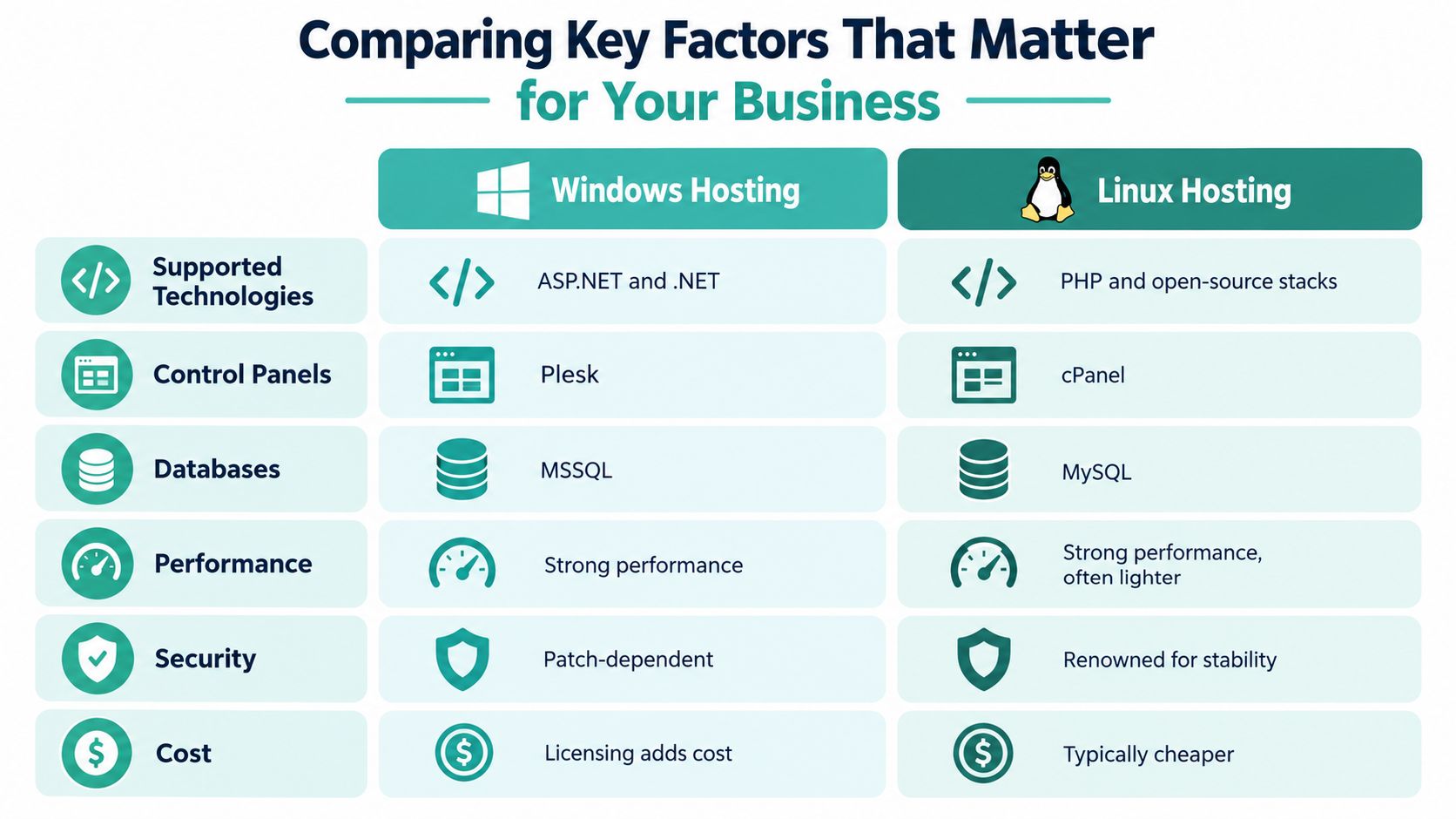
Supported technologies
Technology fit still decides the shortlist.
Linux suits the bulk of standard business websites in Australia. WordPress, WooCommerce, PHP frameworks and common open-source tools are usually easier to deploy, maintain and hand over on a Linux stack. That affects real operating cost. Developers are easier to find, documentation is clearer, and routine fixes tend to take less time.
Windows earns its place when the application depends on IIS behaviour, ASP.NET on the older .NET Framework, MSSQL-specific features, COM objects, or other Windows-only components. At that point, changing operating systems is tied to redevelopment risk. Businesses often underestimate that distinction and budget for a hosting move when they are in fact funding part of an application rewrite.
Control panels
Control panel choice affects daily admin work more than many providers admit. A small business with no in-house developer usually notices the panel before it notices the operating system.
cPanel remains the familiar option on Linux. Plesk is common where Windows hosting is involved and can also run on Linux, which helps if a business has mixed workloads. Before ordering, confirm who will handle mailbox changes, backups, SSL renewals, database access and staging restores. A cheap plan can become expensive fast if every small admin task turns into a support ticket. This web hosting checklist for comparing plans and support inclusions is a sensible way to check what is really included.
Databases
That is where hidden migration cost usually shows up first.
A standard WordPress or brochure site will usually be fine with MySQL or MariaDB on Linux. A line-of-business application built around SQL Server may stay cheaper on Windows, even if the monthly hosting fee is higher. The reason is simple. File migration is rarely the hard part. Stored procedures, user permissions, reporting connections, application queries, and third-party integrations are what consume billable hours.
For Australian businesses with older custom systems, I would price the break-even point this way. If Linux saves a modest amount each month but the move requires database remediation, developer testing and a supervised cutover, the payback period can stretch well beyond two or three years. For a low-margin site or an internal portal, that often makes no commercial sense.
Performance and location
Both platforms perform well if the stack is configured properly and the server is sized for the workload. Linux often runs leaner for PHP and CMS sites, but location usually matters more to Australian visitors than the operating system underneath.
A Sydney or Melbourne-hosted service will usually give local users a better experience than a cheaper offshore plan with higher latency. That matters for checkout flows, member logins and admin dashboards, not just homepage speed. An Australian review discussing local versus offshore hosting performance makes that point clearly in this Australian hosting comparison.
Security and maintenance
Neither platform fixes poor maintenance.
Linux benefits from a mature shared hosting ecosystem and straightforward permission controls. Windows can be perfectly stable as well, but it usually needs tighter patch discipline around Microsoft services and application dependencies. In practice, the bigger risk is often the forgotten layer above the server. An abandoned plugin, an old payment module, or a legacy .NET component can create more exposure than the OS choice itself.
Ask how patches are handled, what backups are retained, whether restores are self-service, and whether malware scanning or WAF rules are included. Those details affect downtime risk and recovery cost.
Cost
Linux usually starts lower on monthly price because there is no Microsoft licensing overhead. Windows plans often cost more, but the invoice total is only part of the decision.
For a simple marketing site, the break-even point is straightforward. Linux usually wins on setup cost, support flexibility and long-term value. For a business running an older ASP.NET or MSSQL application, Windows can be the cheaper option overall because it avoids redevelopment, retesting, and migration downtime. GST treatment, backup retention, control panel licensing, paid restore fees, and after-hours support charges should all be compared before calling one option cheaper.
That is the trade-off most feature tables miss. The right platform is the one with the lower three-year business cost and the lower migration risk for your specific application.
Real-World Use Cases for Windows and Linux Hosting in Australia
A local accountant with a WordPress website doesn't need Windows because its office uses Microsoft 365. The public site uses PHP and a MySQL-compatible database, so Linux is the natural fit. The team gets the wider WordPress ecosystem, familiar administration tools and lower platform overhead without sacrificing anything the site needs.
A manufacturing business with an older customer portal faces a different decision. The portal uses ASP.NET, connects to MSSQL and relies on IIS configuration. Moving it to Linux before testing the application would introduce unnecessary risk. Windows hosting keeps the deployment model aligned with the application while the business decides whether a later rewrite is worthwhile.
Where Windows earns its keep
Windows hosting is usually justified when the workload has a direct Microsoft dependency:
- Legacy ASP.NET applications: Older .NET Framework applications may depend on IIS, Windows paths, registry access, COM objects or other components that Linux won't provide.
- MSSQL-backed portals: If the application uses SQL Server features, keeping the web and database environment compatible can simplify support. Australian providers position Windows plans around ASP.NET and MS SQL workloads, as shown in this MSSQL database hosting service.
- Remote Desktop workloads: A business that needs a Windows server desktop for a specialist application has an infrastructure requirement beyond ordinary website hosting.
- Microsoft-native enterprise systems: Internal applications may integrate with Windows authentication, legacy reporting tools or other Microsoft services. Replacing those dependencies can cost more than the hosting premium.
The important question is not whether Windows is modern. It's whether removing it would create a larger project than the business wants to fund.
Where Linux is the sensible default
Linux is a strong fit for:
- WordPress and content sites: The platform matches the standard PHP hosting ecosystem.
- Small business websites: Brochure sites, service pages, blogs and many online shops rarely need IIS or MSSQL.
- Open-source applications: PHP, Python, Ruby and Node.js projects commonly have broad Linux support.
- Modern cross-platform .NET: A newer .NET application may run well on Linux when the development team has removed Windows-specific assumptions and tested deployment properly.
The migration risk for a modern .NET application is usually hidden in the details. File paths may be case-sensitive, IIS rules may need to move into the application or a reverse proxy, and environment configuration may change. Linux can be the right destination, but the team must prove portability before switching production traffic.
When a hybrid arrangement is cleaner
A retailer might keep its public WordPress site on Linux while retaining a Windows-hosted inventory application. A professional services firm might use Linux for its marketing site and Windows for a client portal that depends on MSSQL. Separating workloads reduces the temptation to force every application onto one platform.
Australian cloud hosting demand continues to expand. The local cloud hosting and data processing market is expected to reach A$4.1 billion in 2026 after 7.6% annualised growth through 2026-27, according to IBISWorld's Australian industry coverage. That growth makes mixed deployment options more accessible, but it doesn't remove the need to define clear application boundaries.
Making the Decision with a Practical Australian Business Checklist
A low monthly plan can become expensive after migration work, support calls, downtime or platform-specific fixes. Start with dependencies, then compare the full operating cost. Ask your developer or current provider for written answers, especially when the site contains custom code or a database no one currently maintains.
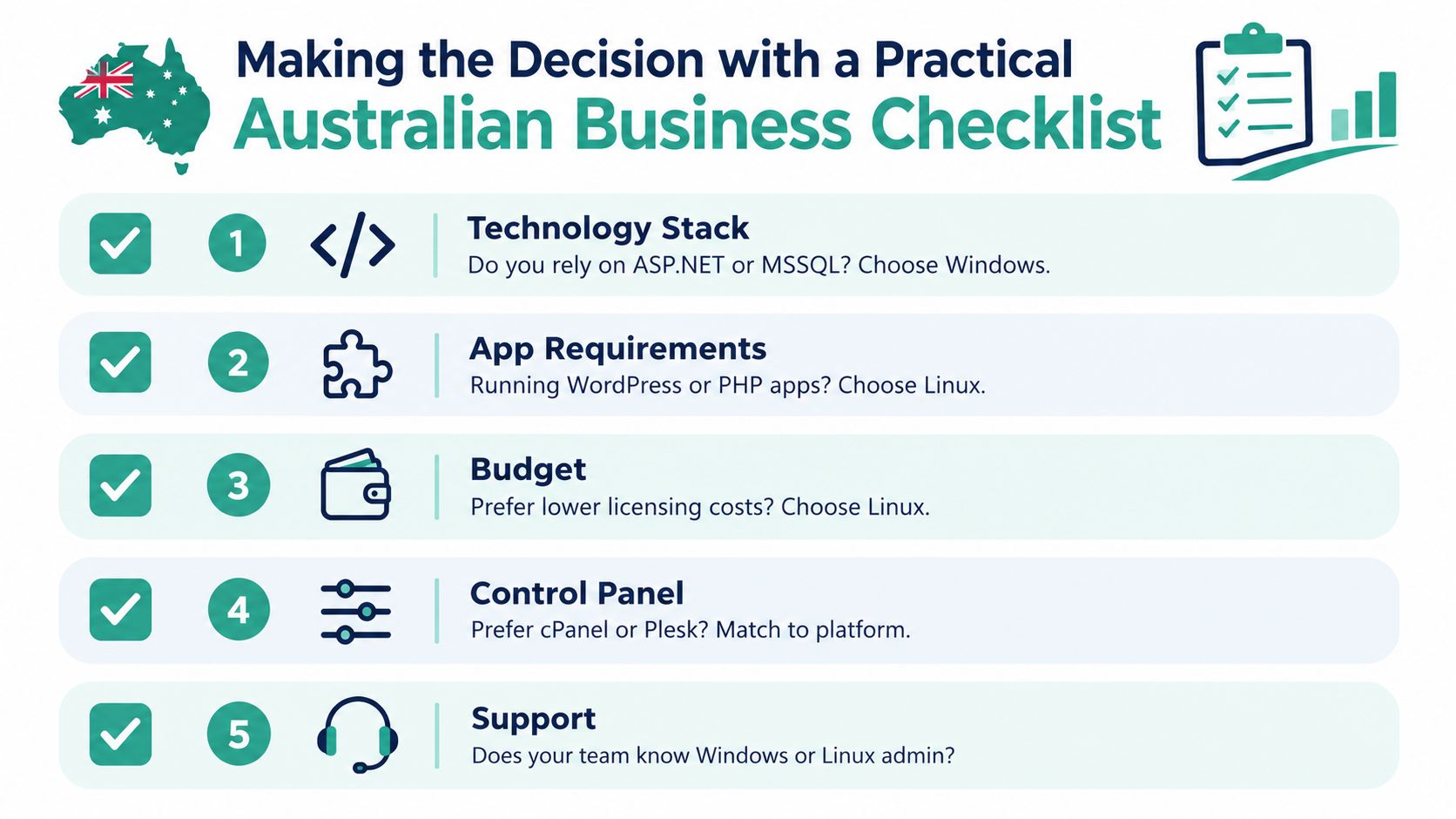
Five questions to answer
- Does the application require ASP.NET, IIS, MSSQL, COM objects or .NET Framework? If yes, begin with Windows. Price a migration to another stack separately rather than assuming compatibility.
- Does the site run WordPress, PHP or another open-source stack? Linux is usually the first platform to assess, provided its required modules and database tools are available.
- What does the team already know? A cheaper server can cost more in administration if nobody can manage it. Confirm staff or agency experience with cPanel, Plesk, SSH and the relevant database tools.
- What does the quote include? Check GST treatment, backup retention, migration assistance, monitoring, email, SSL certificates, storage, CPU and database limits. Confirm the final payable price in Australian dollars.
- Where are support and servers located? Check Australian data-centre options, support hours, escalation procedures and whether the provider can support the chosen platform after launch.
Use a simple scoring method
Give each platform one point for every requirement it meets without workarounds. Score application compatibility, database support, administration effort, local infrastructure, support fit and total operating cost. For a brochure site, a small price difference may outweigh migration work only if the stack is standard and easy to restore. For a revenue-generating application, one avoidable outage or failed deployment can erase that saving.
A tie means the decision needs evidence. Request a technical test, migration quote or both. A production readiness checklist for the migration can help verify the operational details before DNS changes.
Plan the migration as a controlled change
Keep the old service running after creating the new account. Take a verified backup, copy the site, test forms and payment flows, check scheduled tasks, review email behaviour and confirm database connections. For Windows to Linux, inspect hardcoded paths, case sensitivity, IIS rules, registry dependencies and Windows-specific time-zone assumptions.
For Linux to Windows, test PHP modules, rewrite rules, file permissions, scheduled tasks and database compatibility. Record the rollback plan in both directions. Keep the old environment available until the new site passes business-owner acceptance testing.
Migration advice: Choose the platform you can test before changing DNS, validate with real workflows and support after launch.
A hybrid setup may have the lowest risk when unrelated applications have different dependencies. Host each workload where it fits, then document the boundaries so a future rebuild does not combine them accidentally.
Register your new domain name at competitive market prices including free domain add-ons like privacy, DNS Hosting, Custom Nameservers and Forwarding.
Always the best price and no nasty renewal price hikes.
Register A Domain Name
Next Steps and When to Seek Professional Guidance
Choose Linux for a standard WordPress, PHP or open-source website that doesn't depend on Windows services. Choose Windows for an application that needs IIS, ASP.NET, MSSQL, COM objects or older .NET Framework compatibility. Choose a split environment when a business operates both types of workload and rewriting one application would create avoidable risk.
Self-service hosting is reasonable for a straightforward site with a clean backup, familiar control panel and no custom integrations. Professional help becomes worthwhile when the site handles bookings, payments, customer records, business-critical email or a database that the current team can't restore confidently. Migration support is also sensible when the destination platform changes the web server, runtime, database engine or deployment process.
Evaluate providers on more than the entry price. Ask about Australian infrastructure, support escalation, backups, monitoring, malware response, resource limits and the practical process for moving an application between Linux and Windows. A managed service such as managed web hosting in Australia can reduce the administration load when your team wants to focus on customers rather than server maintenance.
Make the next decision from an application inventory, not a sales slogan. List every runtime, database, integration and operational dependency, then request a migration plan that identifies testing, rollback and post-launch support.
UpTime Web Hosting provides Australian Linux hosting with cPanel and Windows hosting for ASP.NET and MSSQL workloads, supported by local infrastructure and managed services. Review the available options and discuss your application requirements with UpTime Web Hosting before committing to a platform change.