
You've chosen a domain name, approved a homepage design and perhaps even written the first service pages. Then someone asks, “Where will the website be hosted?” If that question produces more uncertainty than confidence, you're not alone. Many Australian business owners understand what a website looks like but haven't been shown what keeps it available online.
The web hosting definition is broader than “online storage”. Hosting is an ongoing service that provides the server, software environment, network connection and operational management needed to deliver your website to visitors. The right choice affects speed, security, support, compliance and how easily your site can grow.
Table of Contents
- Understanding the Web Hosting Definition
- How Web Hosting Works in Practice
- Common Types of Web Hosting Explained
- Why Location and Performance Matter
- Key Features to Look for in a Host
- Practical Tips for Choosing a Host
- Conclusion - Building Your Hosting Strategy

Performance you can feel, backed by clients who depend on it. Read how our support and uptime create long‑term customer success.Power Your Business with Better Hosting
Understanding the Web Hosting Definition
Suppose a Melbourne electrician has a new website built for local homeowners. The website consists of pages, images, forms, code and perhaps a database for its content management system. Those files need to reside on a connected computer that can respond whenever someone enters the business's web address.
That connected computer is a server, but renting server space alone doesn't fully explain hosting. A hosting provider supplies and manages the infrastructure that stores the files, processes requests and connects the website to the internet. The provider may also maintain the operating environment, security controls, backups, monitoring and support required to keep the site usable.
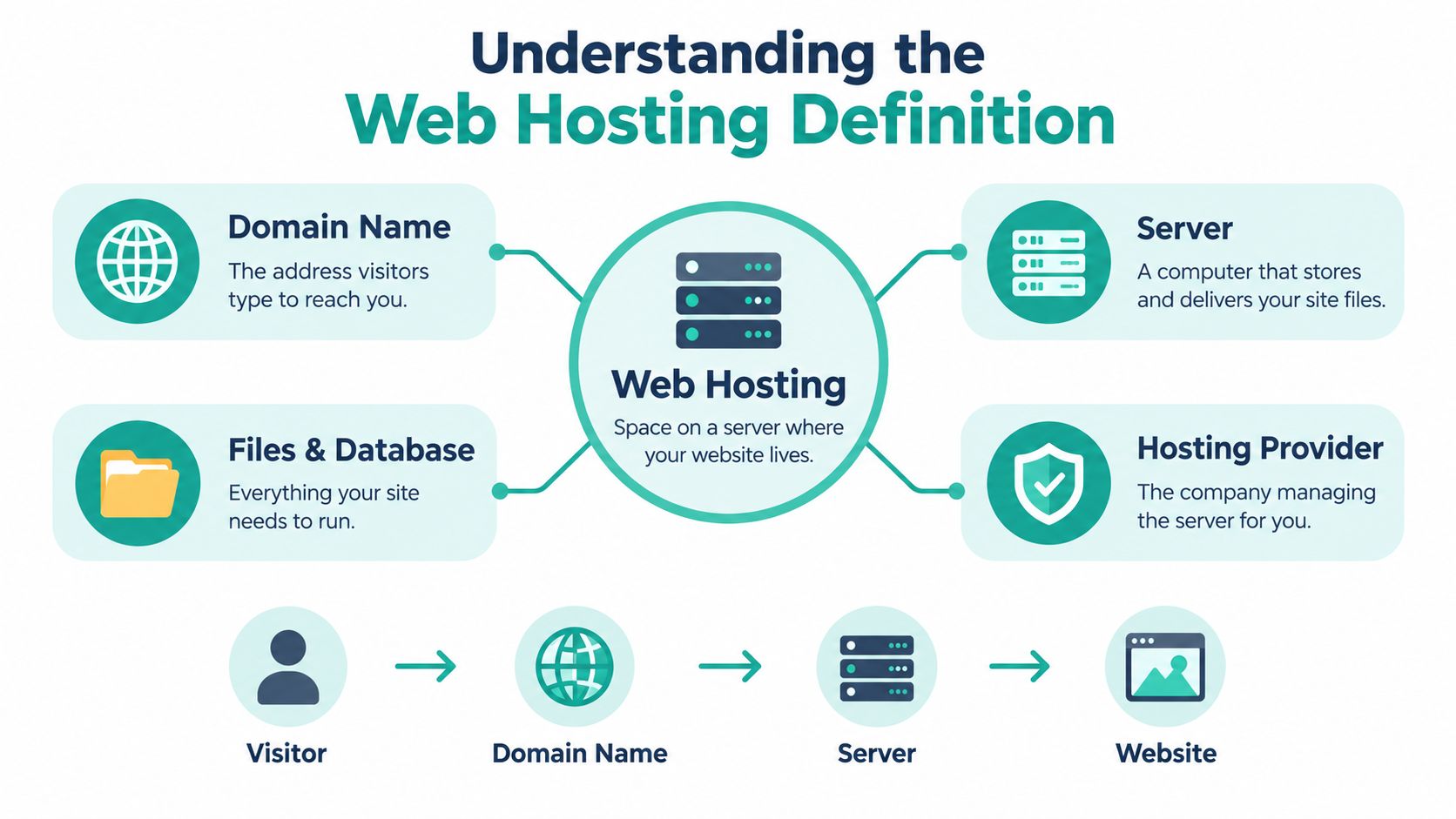
Hosting is a service, not a box
A domain name is the address people type into a browser. Hosting is the infrastructure that receives the request and delivers the website. They work together, but they aren't the same thing. The difference between domain names and web hosting becomes much easier to understand when you think of the domain as an address and hosting as the building, equipment and staff that make the destination function.
Australian businesses also need to think about the wider service attached to hosting. A plan might include website files, databases, email, SSL, backups, a control panel and technical assistance. Other items may be optional add-ons, so you should check the actual inclusions rather than assuming every advertised plan provides the same environment.
Why the Australian context matters
Commercial web hosting emerged in Australia in the late 1990s as businesses began outsourcing website management and infrastructure instead of purchasing and operating their own equipment. An Australian Financial Review report from 2002 described hosting as outsourcing both the website and the equipment that runs it. The report also recorded an IDC Australia forecast that local hosting revenue would rise from A$105.7 million in 2000 to A$694.7 million by the end of 2005, a projected increase of roughly 557%.
That history explains the central idea. You aren't buying a place to upload files. You're selecting an ongoing infrastructure partner that helps your website remain reachable, protected and capable of serving customers.
How Web Hosting Works in Practice
When a visitor enters your domain, the browser begins a short chain of requests. The domain points the request towards the hosting environment, the server identifies the correct website and the hosting system returns the files needed to build the page in the visitor's browser.
A useful analogy is a digital mailroom. The domain is the organisation's street address, the hosting server is the mailroom, and the website files are the parcels stored on its shelves. When a visitor sends a request, the server finds the right material, processes it and sends it back to the browser.
The delivery process
The visitor enters the domain. A customer types the business's web address into a browser or follows a search result.
The request reaches the hosting environment. Internet systems use the domain's routing information to locate the server responsible for the website.
The server finds the requested resources. It retrieves the relevant page files, images, stylesheets, scripts and database content. A static page may require a simple file response, while a CMS or online application may need the server to assemble content before sending it.
The server responds to the browser. The browser receives the data and renders the page. If the page requests additional resources, the server handles those requests as well.
The provider keeps the environment operating. Monitoring, security controls, backups, updates and support help the website continue responding when the owner isn't sitting at a computer.
Where file transfer fits
Business owners and developers may use FTP or related tools to move files between a local computer and a hosting account. That can be useful when publishing a custom website, transferring a backup or working with a development team. A plain-language explanation of FTP can help non-technical owners understand why a developer may mention it without needing to manage the process themselves.
The server's job isn't limited to delivering a homepage. It may also handle forms, email-related services, databases, application code and media. That's why server resources, software compatibility and support quality matter when you compare plans.
Host your website with our 5-star rated, cPanel website hosting plans.
Super fast servers, with security included and hosted in your choice of Australian Data Center.
View cPanel Plans
Common Types of Web Hosting Explained
Different hosting models allocate infrastructure in different ways. A small brochure website doesn't need the same arrangement as a busy application, and an agency managing client sites may value control and repeatable tools more than a single business owner does.
| Hosting Type | Best For | Key Benefit |
|---|---|---|
| Shared hosting | Small business websites, starter sites and low-complexity projects | A practical entry point where server resources are shared |
| VPS hosting | Growing businesses, developers and sites needing more control | Isolated virtual resources and greater configuration flexibility |
| Dedicated hosting | Resource-intensive websites and specialised business systems | An entire physical server allocated to one customer |
| Cloud hosting | Applications with changing demands or a need for distributed infrastructure | Flexible capacity across connected server resources |
Shared hosting
Shared hosting places multiple websites on the same physical server. The provider divides resources such as CPU, memory and storage between accounts, which keeps the arrangement straightforward and economical for many small Australian businesses.
It suits a local consultant, trades business or community organisation with a conventional website. The trade-off is that you have less control over the server environment, and activity on other accounts can affect available resources if the provider doesn't manage the platform carefully.
VPS hosting
A virtual private server, or VPS, creates a separate virtual environment within a larger physical server. You receive more control and a defined allocation of resources than with shared hosting, although you may also need more technical knowledge.
A growing retailer, developer or agency might choose VPS hosting when the website needs custom software, stronger isolation or more predictable capacity. This VPS hosting knowledge base article explains the model in practical terms. Managed VPS support can reduce the administration burden for teams that need the environment without wanting to maintain every server component themselves.
Dedicated and cloud hosting
Dedicated hosting assigns an entire physical server to one customer. It can make sense for demanding applications, specialised configurations or organisations that need extensive control, but it also places more responsibility on the customer or managed provider.
Cloud hosting uses connected infrastructure rather than relying on one isolated physical machine. That arrangement can suit a business application with variable demand or a team planning for changing workloads. Cloud doesn't automatically mean “faster” or “safer”. You still need to assess architecture, support, data handling, backups and the provider's ability to manage the environment.
WordPress hosting and Windows hosting are service environments rather than simple capacity labels. Managed WordPress plans can simplify updates and platform-specific maintenance, while Windows hosting may be necessary for ASP.NET applications or Microsoft database technologies. Choose the environment that matches the website's software, not the label that sounds most advanced.
Why Location and Performance Matter
For an Australian audience, geography is part of the web hosting definition. A server's physical and network distance from visitors affects how long requests take to travel and return, particularly when a page needs several server interactions before it can finish loading.
Australian latency comparisons show local hosting commonly delivering around 10 to 30 milliseconds for Australian users, while servers hosted in the United States can be around 180 to 250 milliseconds. A regional comparison records approximately 14 milliseconds between Sydney and Melbourne, compared with roughly 148 milliseconds to Los Angeles and 292 milliseconds to London. These figures are presented in Australian low-latency hosting guidance.
What latency changes
Every additional round trip adds time before the browser receives a response. The effect becomes more noticeable on dynamic websites, booking systems, online shops and CMS pages that make several requests to the server.
A business serving customers in Perth may prefer infrastructure that delivers consistently to Western Australian visitors. A national business may weigh local data-centre options against a distributed network or CDN. The decision depends on where customers are, how interactive the website is and whether the hosting platform can deliver stable performance across the regions that matter.
Performance is more than distance
Location helps, but it isn't the only factor. A nearby server with overloaded resources can perform poorly, while a well-managed platform can use caching, content delivery and efficient software to improve delivery. You should assess the server environment, network design, resource allocation, monitoring and support alongside data-centre location.
The local web hosting service information is relevant for businesses whose customers, staff and support needs are primarily in Australia. Local placement may also make conversations about data handling, operational access and service accountability more straightforward.
Australia's hosting ecosystem is now technically diverse. IBISWorld's Australian internet hosting services overview reported 1,825 businesses operating in the industry by 2026, with industry revenue growing at a 3.8% compound annual growth rate between 2021 and 2026. Its definition includes web hosting, email hosting and DNS hosting, which shows why the hosting decision often extends beyond a website's files.
Key Features to Look for in a Host
A hosting plan should be judged as an operating environment, not a storage allowance. Ask whether the service protects the site, delivers it efficiently, helps you recover from problems and explains its limits clearly.
Security should be built into the arrangement
An SSL certificate helps encrypt connections between visitors and the website. Firewalls, malware scanning, access controls, software updates and DDoS protection address different parts of the security picture. None of these removes the need for strong passwords, maintained applications and careful user permissions.
Backups need separate attention. A backup is useful only if it runs reliably, is stored away from the primary environment and can be restored when needed. Ask how often backups run, how long they are retained, whether restoration is included and whether the provider can assist during an incident.
For a practical overview of hosting protections, review this guide to secure web hosting. Look for clear explanations rather than a list of unexplained badges.
Performance tools need a purpose
Caching can reduce repeated processing for pages that don't change on every request. A CDN can serve suitable content from locations closer to visitors, while a suitable web server and properly allocated CPU and memory help the site handle ordinary requests.
These tools won't compensate for unsuitable software or an overloaded account. Ask what the plan includes, whether caching is configured for your CMS, how resources are monitored and what happens when the website approaches its limits.
Support and pricing reveal the service model
A reliable host should explain its support channels, response process and operating hours. Australian businesses may value support that overlaps with local working hours, particularly when a checkout, enquiry form or business email service fails during the day.
Read the pricing page carefully. Check renewal pricing, GST treatment, setup charges, migration assistance, backup restoration fees, email limits and whether security features are included or sold separately. An attractive introductory offer isn't enough if the ongoing arrangement is difficult to understand.
Australian government guidance also treats hosting as a platform for websites, CMS applications, systems and data, whether facilities operate on premises or through providers. The Australian Government ICT and digital services guidance links hosting decisions with certified services and infrastructure for security-classified information. A private SME may not face the same classification requirements, but the principle is valuable: hosting is part of your governance and risk environment.
Register your new domain name at competitive market prices including free domain add-ons like privacy, DNS Hosting, Custom Nameservers and Forwarding.
Always the best price and no nasty renewal price hikes.
Register A Domain Name
Practical Tips for Choosing a Host
Start with the website you have, then consider the next sensible stage of growth. You don't need to buy the most complex architecture if your business website consists of a few service pages, a contact form and a CMS.

Use these questions before committing:
- Ask about renewal terms: Confirm the ongoing price, contract length and cancellation process, not just the introductory price.
- Check local support: Find out whether support is available during Australian business hours and how urgent incidents are escalated.
- Review the knowledge base: Look for clear articles covering backups, email, domains, CMS maintenance and common troubleshooting tasks.
- Confirm ownership and access: Make sure your business retains control of its domain, website files, databases and account credentials.
- Match the software: Check whether the plan supports your CMS, programming framework, database and email requirements.
- Test the recovery promise: Ask who restores a compromised or deleted site and whether restoration carries a separate charge.
- Plan for change: Choose a provider with a sensible upgrade path, so a growing website doesn't require an avoidable migration.
Domain choice is part of the Australian setup. business.gov.au's domain registration guidance says most Australian businesses use .com.au domains and explains that registration requires a commercial entity with an ABN or ACN. The auDA .au direct rules also require an Australian Presence connection for .au direct registration, and a website doesn't have to be connected to the domain.
If a hosting failure involves lost files or damaged hardware, a specialist resource on professional data recovery can help you understand what recovery services involve. It shouldn't replace a tested hosting backup strategy, but it may be useful when important data exists outside a recoverable backup.
Conclusion - Building Your Hosting Strategy
Web hosting is the managed infrastructure that stores, runs and delivers your website, not just a folder on the internet. Your decision should reflect the website's software, customer location, performance needs, security obligations, support expectations and likely growth. Australian businesses should also check data handling, local infrastructure and domain requirements before signing up. Review the arrangement as the business changes, and choose a provider that can support the next stage without obscuring costs or responsibilities.
UpTime Web Hosting offers Australian-located website hosting, WordPress and Windows hosting, domains, email and managed VPS services, with features such as free SSL, malware scanning, firewalls, off-site backups and local support. Visit UpTime Web Hosting to compare a hosting environment with your website's performance, security and support requirements.