Your website still loads, orders still arrive, and nobody's complained. But the VPS behind it has an ageing control panel, a root password shared with a former developer, and a backup nobody's ever restored. That's a live website, not a managed server.
For an Australian small business, learning how to manage VPS server access, updates and recovery starts with ownership. Someone needs to know what's running, recognise trouble and take responsibility when the site stops behaving.
Table of Contents
- Why an Online VPS Still Needs a Manager
- Prepare Access Before You Change the Server
- Lock Down Accounts Ports and Patches
- Watch Packages Resources and Logs
- Prove Backups and Handle the First Hour
- Choose Australian Support and Start This Week

Performance you can feel, backed by clients who depend on it. Read how our support and uptime create long‑term customer success.Power Your Business with Better Hosting
Why an Online VPS Still Needs a Manager
Consider a suburban retailer whose WordPress shop looks perfectly healthy from a customer's phone. Behind the checkout, the owner assumes the developer handles security, the developer assumes the host handles updates, and the host has only been contracted to supply infrastructure.
Nobody has deliberately neglected the server. They've just left the work unassigned.
An ASP.NET application can end up in the same position. The developer deploys a client portal, confirms it works and moves on, while Windows updates, IIS configuration and MSSQL recovery remain somebody else's assumed responsibility.
Availability isn't evidence of good management
VPS management means maintaining a known, recoverable operating state. You should know who can log in, which services face the internet, when maintenance happens, how much storage remains and whether the business can recover its information.
On Linux, that usually means looking after SSH access, software packages, the web server and databases. On Windows, the working environment may involve RDP, IIS and MSSQL instead. The tools differ, but the ownership question doesn't.
A useful division of responsibility looks like this:
| Responsibility | What the business needs to know |
|---|---|
| Access | Who can administer the server and authorise changes |
| Maintenance | Who updates the operating system and application stack |
| Service health | Who notices failures and investigates them |
| Recovery | Who can restore the service and approve its return |
| Incident response | Who contacts support and assesses business consequences |
Don't accept “the hosting includes security” as a complete answer. Ask which tasks are included, which aren't, and who receives alerts outside business hours.
The Australian cost of leaving ownership unclear
In FY2024–25, the ACSC responded to 1,253 cyber-security incidents, an 11% increase, and received more than 84,700 cybercrime reports, approximately one every six minutes; the average self-reported business cost increased 50% to $80,850, with averages of $56,600 for small businesses, $97,200 for medium businesses and $202,700 for large businesses, according to the ACSC business threat factsheet.
Those figures describe reported cybercrime, not a prediction of what your VPS will cost you. They do make a strong case for treating administration as an operating expense rather than an optional clean-up.
A website loading successfully tells you that a request worked. It doesn't tell you that access, maintenance or recovery is under control.
Reserve a recurring management session and assign an owner. Keep a short record of checks, changes and unresolved risks so the next person doesn't have to reconstruct the server's history during an outage.
Prepare Access Before You Change the Server
Don't start by disabling accounts or changing firewall rules. First, establish a working login, a recovery route and a record of the current setup. Locking yourself out is a poor way to discover that nobody knows the provider-console credentials.
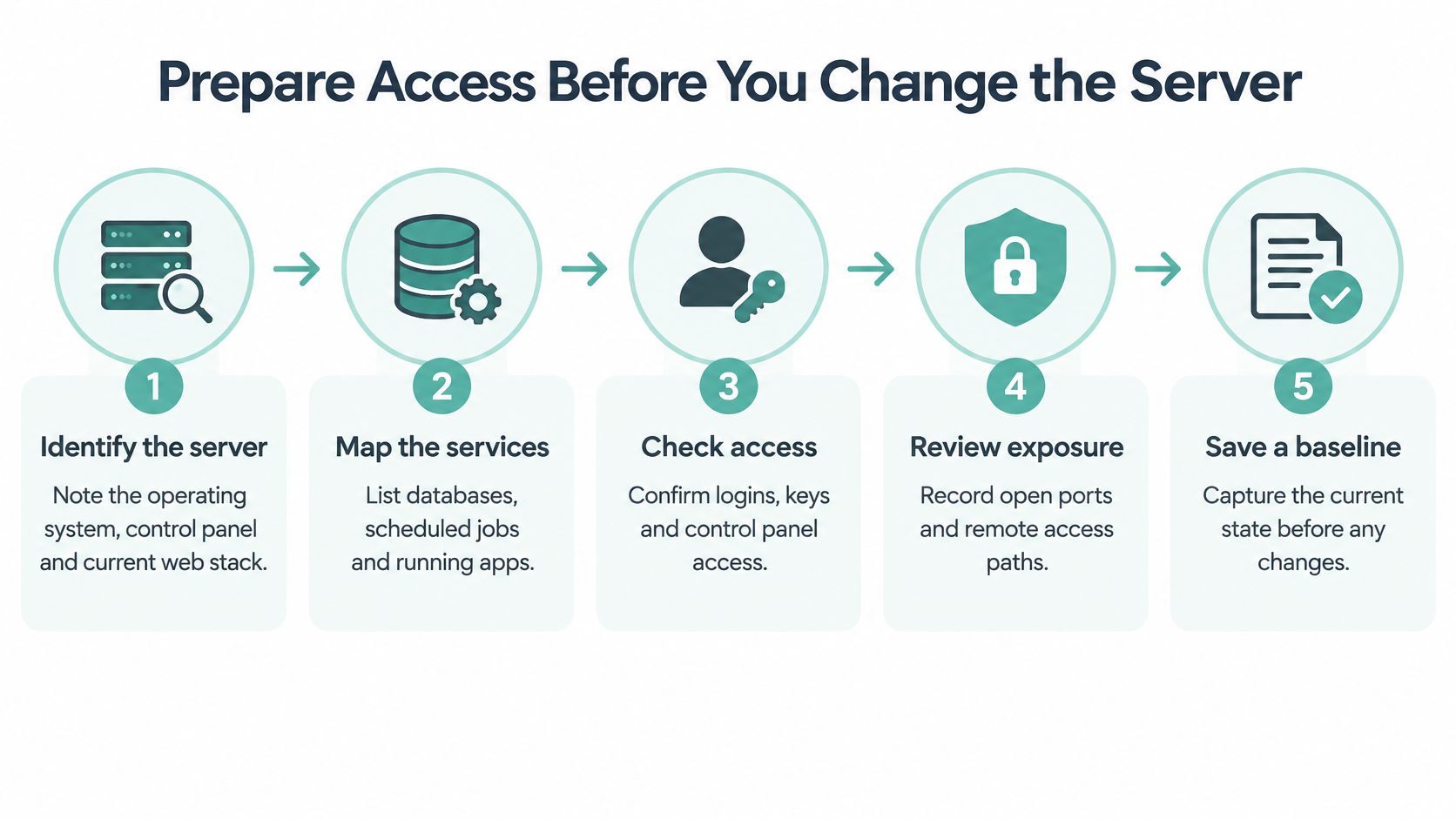
Use this preparation sequence before touching production settings.
Establish a safe working session
For a hypothetical Sydney retailer running Linux, I'd begin from a known, trusted device and confirm a key-based SSH session works. I'd then establish a named administrator account and test its permitted administrative actions before retiring any shared access.
If you're unfamiliar with selecting the login account, the host's SSH login command knowledge-base article is a useful starting point. Follow the host's own documentation for panel-specific screens rather than guessing menu names.
For a developer maintaining a client's ASP.NET application, begin with an authorised RDP session through the agreed restricted access path. Identify the Windows account being used, its privileges and the route back through the provider console if remote access fails.
Keep the provider-console login separate from the operating-system login in your records. Also note who controls recovery email addresses and authentication methods, so a departed contractor doesn't remain the only person able to regain access.
Record what the server actually supports
Build a compact server record that another authorised person could use:
- Server identity: Record the hostname, public IP, operating-system version and control-panel address in your private documentation.
- Application stack: List the web server, runtimes, databases, running applications and scheduled jobs.
- External dependencies: Note where DNS, SSL certificates and email are managed, including services outside the VPS.
- Access and exposure: Record administrator accounts, authentication methods, listening ports and remote-access paths.
- Recovery contacts: Identify the backup location, provider-console access and after-hours contact.
Don't paste passwords, private keys or recovery codes into an ordinary project document. Store secrets separately with controlled access, and record where authorised staff can retrieve them.
Use the ACSC's VPS-relevant access and application-hardening guidance alongside the provider's knowledge base when deciding how to restrict administration. The important result is a baseline you can compare against later, not a beautifully formatted inventory nobody maintains.
Before making changes, capture the current configuration and confirm the recovery route works. You should finish this session knowing what the server does, who can administer it and how you'll recover access if a change goes wrong.
Host your website with our 5-star rated, cPanel website hosting plans.
Super fast servers, with security included and hosted in your choice of Australian Data Center.
View cPanel Plans
Lock Down Accounts Ports and Patches
Reduce access deliberately, using the baseline you've just recorded. Don't apply a generic hardening script to a production VPS and hope the checkout, deployment process and scheduled jobs survive.
Start with named accounts and minimum necessary privileges. Developers shouldn't share root or Administrator credentials for routine work, and old contractors shouldn't retain access because nobody remembers what their account does.
Publish the website, not its administration
Use SSH keys rather than password-only Linux access. Enable MFA for the hosting control plane and any supported administrative application, then restrict administration through a VPN or allow-listed addresses.
Apply the same principle to Windows. Keep RDP behind a restricted access path, publish only the required IIS services and avoid exposing database administration to the public internet.
For the firewall, work from an explicit service list:
- Public website traffic: Allow HTTPS and any deliberately required supporting web traffic.
- Administrative traffic: Restrict it to approved access paths rather than leaving it generally reachable.
- Unused services: Disable them instead of merely forgetting about them.
- Database connections: Permit only the application and authorised management paths that need access.
Test the site's important transactions after each change. A homepage check won't tell you whether payment callbacks, uploads or background processing still work.
Set a patch clock you can enforce
The ACSC recommends patching, updating or applying vendor mitigations to internet-facing network devices within 48 hours for critical vulnerabilities or available exploits, and within two weeks for non-critical vulnerabilities without known exploits, in its network-defence mitigation guidance.
Use that urgency to shape your VPS policy, while checking the affected product's guidance. Don't misread a network-device recommendation as a universal product-specific deadline.
Australian VPS Patch Timing
| Situation | Example on a VPS | Target timing |
|---|---|---|
| Critical or actively exploited exposure | Vulnerable public SSH, web server or control panel | Emergency change, not the ordinary window |
| Non-critical issue without a known exploit | Routine security update for an exposed component | Scheduled window within the applicable security deadline |
| Compatibility risk | Runtime update affecting the application | Stage and test promptly, document any temporary mitigation |
| Failed installation | Package update fails or service won't restart | Investigate immediately rather than marking maintenance complete |
Choose a weekly maintenance window around your Australian trading hours. Test updates against a staging snapshot, retain a rollback route, then verify services, logs and a real application transaction.
Use vulnerability scanning to check the exposed stack, not just operating-system packages. WordPress plugins, PHP, Docker images and Windows components need explicit ownership too.
Exception rule: A patch you can't apply still needs an owner, a reason, a temporary safeguard and an expiry date.
Watch Packages Resources and Logs
A WordPress VPS can keep serving pages while its logs consume the remaining disk space. An IIS application can appear healthy between app-pool restarts while a developer overlooks a persistent memory problem. These are illustrative failure scenarios, not reasons to buy a larger server without investigating.
Watch changes in behaviour, not just current usage. A busy CPU during a known import is different from sustained activity on a quiet shop overnight.

Read signals in context
During the weekly review, check pending package and runtime updates, failed services, disk growth, CPU and memory use, certificate expiry and backup-job status. Compare the results with expected deployments, promotions and scheduled work.
For Linux, examine service status, authentication records and web-server logs. For Windows, review Windows Event Viewer, IIS logs and application-pool behaviour, then connect those observations to the application's own errors.
A practical Linux server monitoring knowledge-base guide can help organise the checks. The useful outcome is an explanation and an action, not another dashboard left open on a spare screen.
The OAIC's cloud-security guidance recommends MFA, IP restrictions, encryption, documented cloud-management responsibilities, configuration assessments and monitoring that includes cloud environments. Build configuration review into application and firewall changes rather than assuming launch-day settings remain appropriate.
Keep logs long enough to support your incident assessment, with access restricted and retention documented. Where practical, preserve important records outside the server so a local failure or attacker can't remove your only history.
Decide which alerts interrupt the day
Set thresholds around business impact and deviation from normal behaviour. There's no useful universal CPU percentage for every Australian shop, client portal and development application.
| Act the same day | Can wait for the weekly window if assessed as low risk |
|---|---|
| Successful administrator login you can't explain | Expected failed-login noise with no successful access |
| Failed backups or rapidly disappearing disk space | Stable storage growth with sufficient headroom |
| Unexpected process or unexplained outbound traffic | Brief resource spikes matching an authorised job |
Don't confuse infrastructure monitoring with application management. Ask the host whether its scope covers platform, network and power only, or also guest services and application checks.
Site code, CMS plugins, mailbox data and application accounts still need an assigned owner. Put that boundary in writing so an alert reaches someone who can fix the problem.
Prove Backups and Handle the First Hour
A successful backup job isn't proof of a clean recovery. You need to demonstrate that the saved data is complete, accessible and suitable for restoring service without reintroducing the compromise.
Australia recorded 532 notifiable data breaches in January–June 2025, with 59% caused by malicious or criminal attacks and 37% by human error, up from 29% in the preceding period, according to the OAIC's breach statistics. Recovery therefore needs both technical checks and control over who handles personal information.
Test the recovery, not just the copy
Back up web files, databases, configuration, encryption keys and relevant email data. Keep an encrypted copy separate from the VPS credentials, with isolated or offline retention where appropriate and a documented Australian storage-location decision.
Define the recovery point as how much recent work you can afford to lose. Define the recovery time as how long the business can operate without the service, then test whether your arrangements meet those limits.
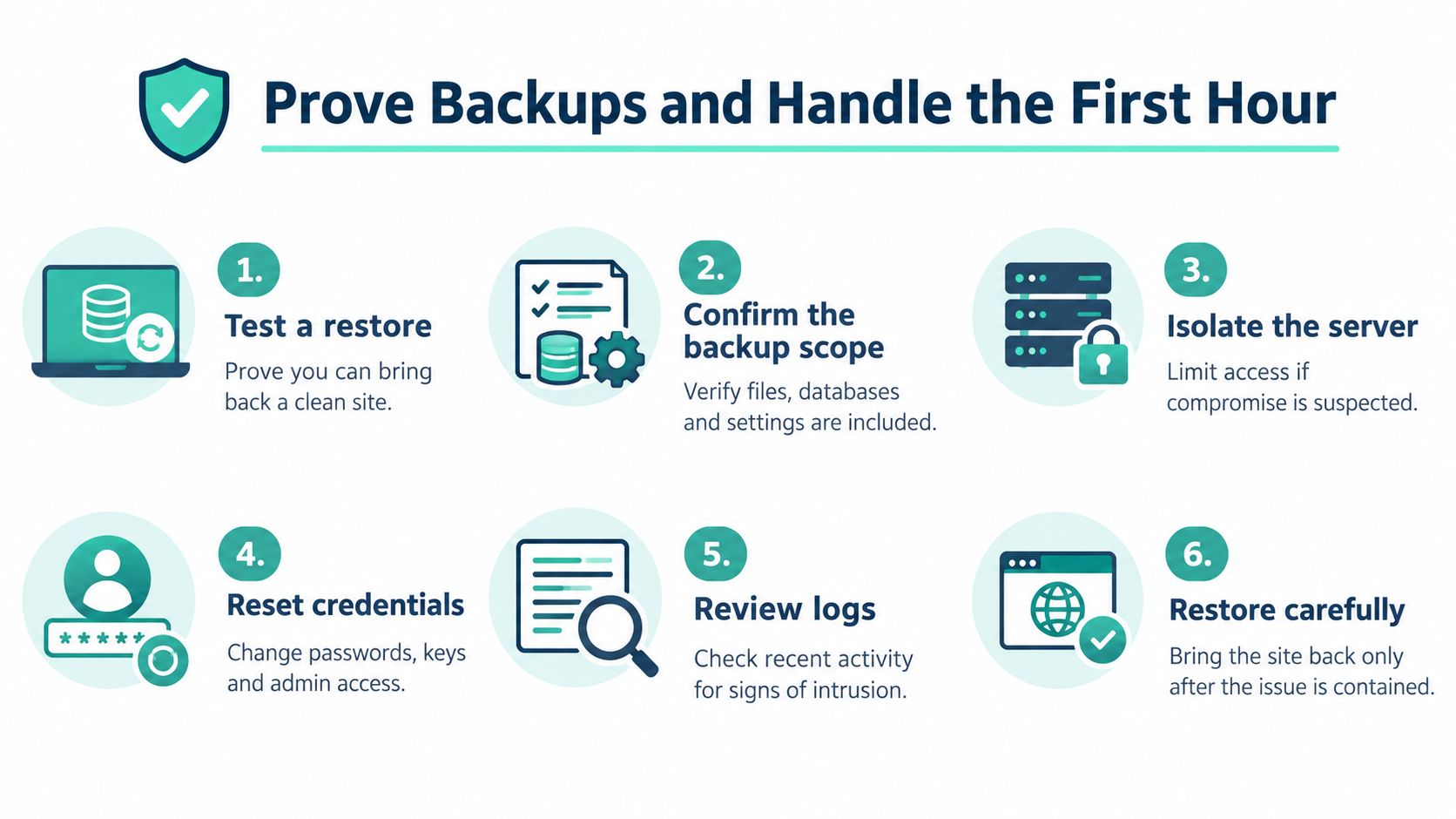
The OAIC's cyber-incident preparation guidance supports frequent, secure backups and checking that essential information is recoverable. Restore to a separate test location, verify database integrity and important transactions, inspect for suspicious accounts or files, and record the result.
For deciding what needs protection and how often, RDE Technologies' backup planning for small businesses provides a planning resource. Match that plan to off-site backup arrangements rather than leaving every copy within the same administrative reach.
Contain first, then decide what can return
If you find an unknown administrator, mining process or outbound spam, use this decision path:
- Suspected compromise: Isolate the VPS through provider controls without wiping logs. Preserve a snapshot and record observed activity.
- Exposed access: From a clean device, rotate affected credentials, keys and tokens after securing the access path.
- Uncertain recovery point: Keep production isolated while you identify a verified backup and close the original entry route.
- Customer information involved: Determine what was accessed, preserve evidence and assess likely serious harm separately from restoring availability.
Contact the host and the ACSC when compromise is suspected and help is needed with containment or reporting. Notify your cyber insurer promptly where applicable, and involve law enforcement where the circumstances warrant it.
From 30 May 2025, businesses with annual turnover of at least $3 million and critical-infrastructure entities became subject to mandatory ransomware reporting, as covered in the ACSC annual threat report; assess whether the reporting trigger applies rather than assuming every suspicious process requires that report.
Bringing the website back doesn't finish the incident. Assess personal-information exposure and whether notification under the Notifiable Data Breaches scheme is required.
Register your new domain name at competitive market prices including free domain add-ons like privacy, DNS Hosting, Custom Nameservers and Forwarding.
Always the best price and no nasty renewal price hikes.
Register A Domain Name
Choose Australian Support and Start This Week
Choose your management model around who can respond, not just who can provision a server. A self-managed VPS suits a team that can maintain the stack and own after-hours incidents. Managed hosting suits a business that needs agreed help with the platform work.
Among Australian businesses reporting internet-security incidents in 2017–18, 52% experienced service downtime, the most common consequence, according to the ABS business technology findings. That's historical evidence, but it frames a useful purchasing question: who will restore your service when trading is interrupted?
Buy a defined scope of responsibility
Compare the arrangements before choosing a plan:
| Self-managed VPS | Managed Australian VPS |
|---|---|
| Your team owns patching and configuration | The provider performs agreed maintenance |
| Your team investigates guest-system alerts | Escalation and monitoring depend on the service scope |
| Your team tests and performs restores | Recovery assistance must be confirmed |
| You arrange after-hours technical coverage | Local support provides an agreed escalation route |
Use the host's managed versus unmanaged VPS comparison to prepare questions about exclusions. “Managed” shouldn't be shorthand for an assumption that every plugin, custom application or privacy decision belongs to support.
The Australian provider shown below offers managed VPS alongside cPanel, WordPress and ASP.NET Windows hosting. Its published offering includes free SSL, malware scanning, DDoS-protected firewalls and encrypted off-site nightly backups with around-the-clock monitoring; confirm which features and responsibilities apply to your chosen VPS arrangement.

Make the handover practical
It's a wholly Australian provider with servers in Sydney, Melbourne, Brisbane and Perth. Local support is available through its national phone service, tickets and call-backs, with GST-inclusive pricing and no contracts.
Before committing, ask how support distinguishes a platform outage from broken application code. Confirm who authorises a restore, how incident updates arrive and what information support needs from your developer.
Start with these commitments:
- Keep administration private: Confirm your existing restricted access arrangement remains enforced.
- Test a restore this month: Use the recovery plan and record what worked or failed.
- Name the weekend contact: Write down who calls the host and who can approve changes.
Bring your Linux or Windows requirements, application dependencies and recovery expectations to the plan discussion. A useful hosting choice is one that leaves no ambiguity about who does the work.
UpTime Web Hosting offers managed VPS hosting with Australian support, server configuration and ongoing maintenance for teams that don't want to carry every administration task themselves. Visit UpTime Web Hosting to review local options, match your Linux or Windows workload to a plan, and confirm the patching, backup and incident-response responsibilities before you move.