In short
To block an IP address with .htaccess on Apache 2.4, place a <RequireAll> block in the affected site's document root, grant normal access with Require all granted, then add Require not ip ADDRESS. Back up the file first, use CIDR for ranges, and confirm Apache sees the visitor's real IP before relying on the rule.
Key takeaways
- Apache 2.4 uses
Requiredirectives instead of the legacyOrder,AllowandDenysyntax. - A negated
Require not iprule needs a positive condition such asRequire all grantedinside<RequireAll>. - Exact IPv4 addresses, IPv6 addresses and verified CIDR networks can be denied with the same basic structure.
- A safe change includes a downloaded backup, an unaffected administrator connection and a tested rollback path.
- Proxy servers, shared public addresses and dynamic allocation can make an IP block affect the wrong visitor.
Table of contents
- What should you do before editing .htaccess?
- What .htaccess rule blocks one IP address on Apache 2.4?
- How do you block multiple IP addresses, a range or IPv6?
- How do you test the block without locking yourself out?
- Why might the IP block fail or block the wrong visitor?
- When is .htaccess the wrong tool?
- What else do people ask about IP blocking?
- What should you do next?
What should you do before editing .htaccess?
Back up the existing file, confirm the site uses Apache 2.4-compatible access directives, and identify the correct document root. If .htaccess is ignored or Require is not permitted, the change must be made by the hosting provider or server administrator.
This tutorial targets Apache HTTP Server 2.4. If the hosting plan uses a different web server, confirm that server's authorization compatibility before applying Apache-specific syntax.
What is the safest edit sequence?
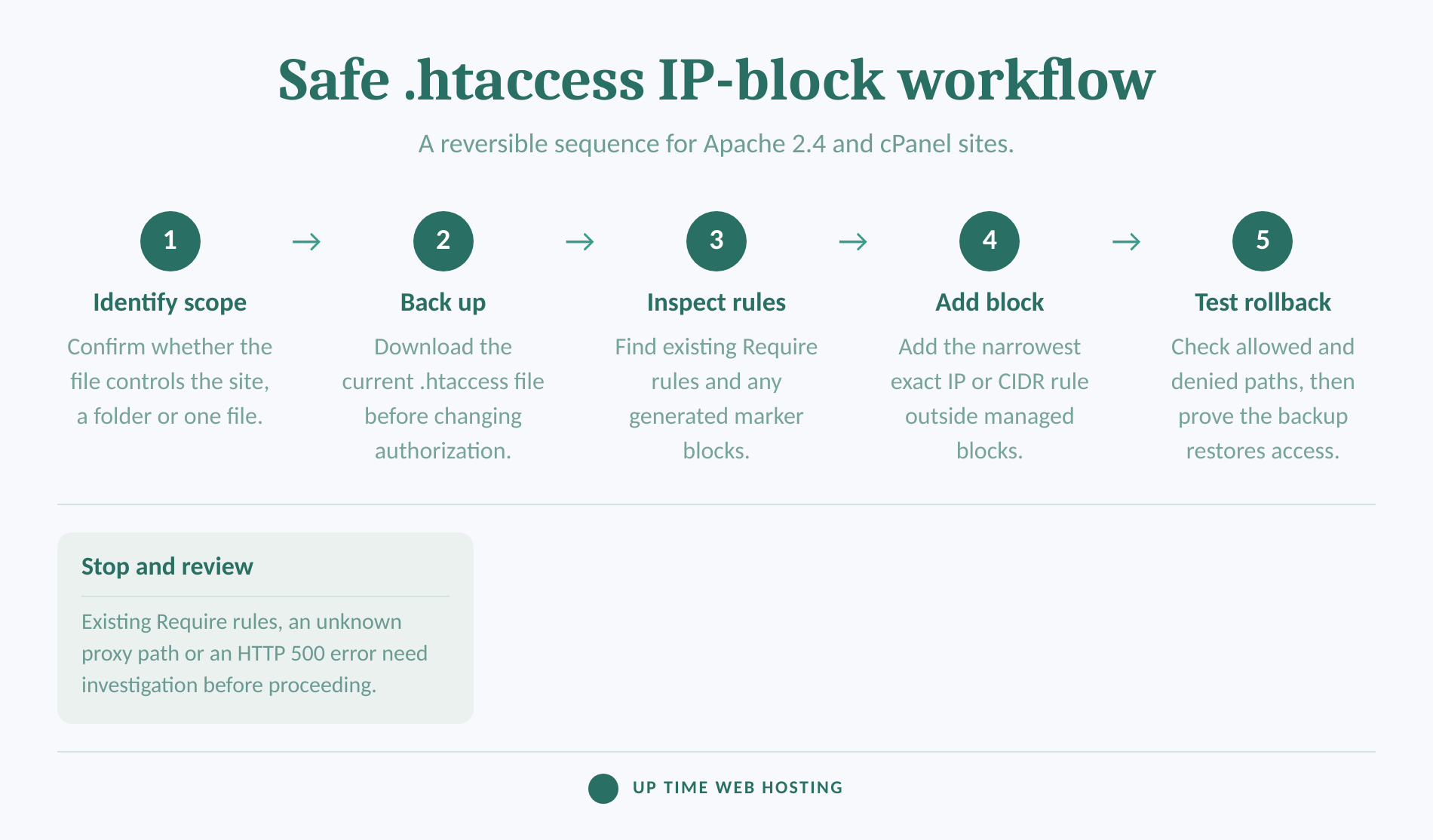
- Open the domain's document root through cPanel File Manager. For a primary domain, this is often
public_html, but addon domains can use a different folder. - Enable Show Hidden Files if
.htaccessis not visible. The period at the start makes it a hidden dotfile in many file managers. - Download the current file before editing. Give the copy a dated name that identifies it as the pre-change version.
- Search the existing file for
Require,Order,AllowandDeny. Treat existing authorization rules as one policy rather than pasting a second policy over them. - Write down the rollback action: restore the downloaded copy or remove only the new container.
The Apache .htaccess guide explains that Require needs the AuthConfig override class and that .htaccess is ignored when overrides are disabled. As of September 2026, the Apache 2.4 upgrade guide also discourages mixing the old and new authorization systems. (httpd.apache.org)
Place the manual rule outside any clearly marked auto-generated section. A control panel or application may replace content inside a block it manages.
Back up the file and understand the existing authorization rules before adding a deny rule.

Performance you can feel, backed by clients who depend on it. Read how our support and uptime create long‑term customer success.Power Your Business with Better Hosting
What .htaccess rule blocks one IP address on Apache 2.4?
Use <RequireAll> with Require all granted and a negated Require not ip line. Apache needs the positive requirement because a negated requirement cannot authorize a request by itself.
What is the exact Apache 2.4 rule?
“`apache
Apache 2.4: block one IPv4 address
Require all granted
Require not ip 203.0.113.42
“`
Replace 203.0.113.42 with the verified address to block. The address shown above is an example, not an address to add to a live deny list.
The Apache 2.4 access-control guide uses this <RequireAll> structure because Require not remains neutral when its condition does not match. The positive Require all granted line authorizes everyone who is not denied by the second line. (httpd.apache.org)
Put the rule in the document root .htaccess to cover the site and its subdirectories. A file in a lower folder affects that folder and its children instead.
If manual editing is unnecessary, the companion guide explains how to block an IP address in cPanel and remove the entry through the control panel. (uptimewebhosting.com.au)
Apache 2.4 IP denial needs both a normal grant and a specific negated address inside <RequireAll>.
Host your website with our 5-star rated, cPanel website hosting plans.
Super fast servers, with security included and hosted in your choice of Australian Data Center.
View cPanel Plans
How do you block multiple IP addresses, a range or IPv6?
Put several exact addresses on a Require not ip line, and express networks in CIDR notation. Apache 2.4 accepts full IPv4 addresses, IPv4 networks, full IPv6 addresses and IPv6 networks through the same IP authorization provider.
Which rule matches each type of address?
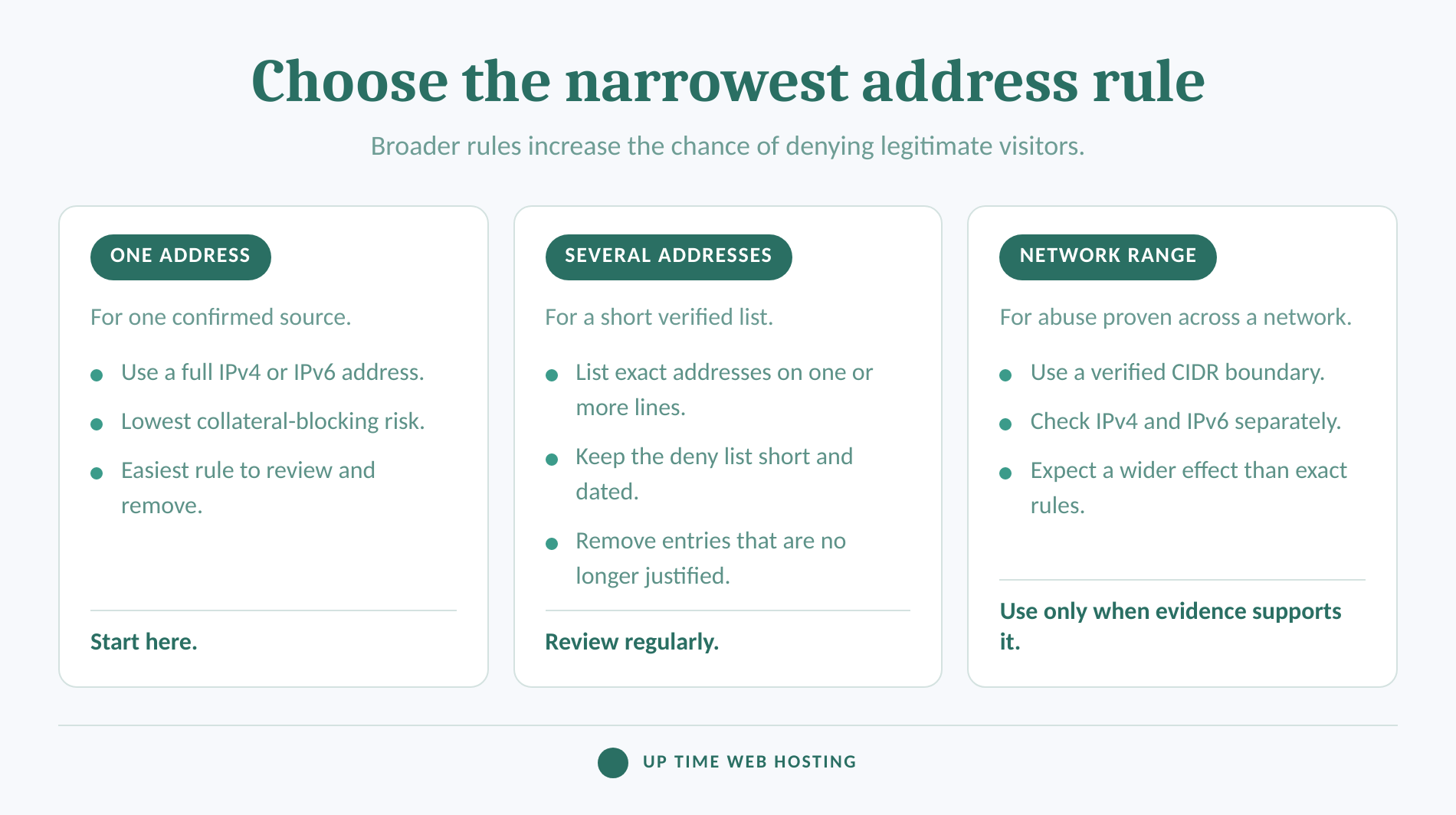
The following example blocks two individual IPv4 addresses, one IPv4 network and one IPv6 network:
“`apache
Require all granted
Require not ip 203.0.113.42 198.51.100.17
Require not ip 198.51.100.0/24
Require not ip 2001:db8:1234::/48
“`
The Apache mod_authz_host reference documents full addresses, network and netmask pairs, CIDR notation and IPv6. Verify the network boundary before using CIDR because every matching address is denied. (httpd.apache.org)
Do not paste a hyphenated start-to-end range into Require ip. cPanel's IP Blocker documentation, last modified July 8, 2026, accepts several range formats in its interface and converts them into CIDR-formatted subnets. (docs.cpanel.net)
To allow one trusted address and deny everyone else, use an allowlist instead of a negated deny rule:
“apache Require ip 203.0.113.42 “
Use an allowlist only where restricted access is intended. Putting that line in a public site's root would deny every visitor whose address does not match.
To deny access to a folder, place the rule in that folder's .htaccess. To limit the rule to one file, wrap the same <RequireAll> block in a file container:
“`apache
Require all granted
Require not ip 203.0.113.42
“`
Use exact addresses for isolated sources, verified CIDR for networks, and separate IPv6 rules when traffic arrives over IPv6.
How do you test the block without locking yourself out?
Test from one allowed connection and one connection that should be denied while retaining a known rollback path. Do not make the first test by blocking the only address from which the file can be edited or recovered.
- Keep the downloaded backup and the cPanel editor available.
- Save the rule, then load the homepage and an important form or login path from an unaffected connection.
- Test from a second public network whose address was intentionally added to the rule. A phone using mobile data with Wi-Fi switched off can provide a separate connection.
- Confirm that the denied request produces an HTTP 403 response or the site's configured access-denied page.
- Remove the temporary test rule or restore the backup, then confirm access returns.
A private or incognito browser window does not normally change the public source address, so it is not an independent network test. UpTime's August 2026 cPanel blocking guide also recommends keeping an unaffected administrator session open and checking both denied and legitimate access. (uptimewebhosting.com.au)
If every request starts returning HTTP 500, restore the backup immediately. A malformed directive or a directive forbidden by AllowOverride can cause an internal server error on Apache. (httpd.apache.org)
The OAIC's guidance on personal information, accessed in September 2026, says personal information may include IP addresses when a person is reasonably identifiable. Avoid publishing raw logs, and handle exported logs and block lists under the site's privacy and security procedures. (oaic.gov.au)
Record the reason, date, exact rule and removal process in the site's website security checklist.
A block is complete only after denied and legitimate access have both been tested and rollback has been proved.
Why might the IP block fail or block the wrong visitor?
Most failed blocks come from the wrong .htaccess location, disabled overrides, a proxy hiding the client address, or an IPv4 and IPv6 mismatch. A correct rule can still affect an innocent visitor later when addresses are shared or reassigned.
What should you check when the wrong IP is blocked?
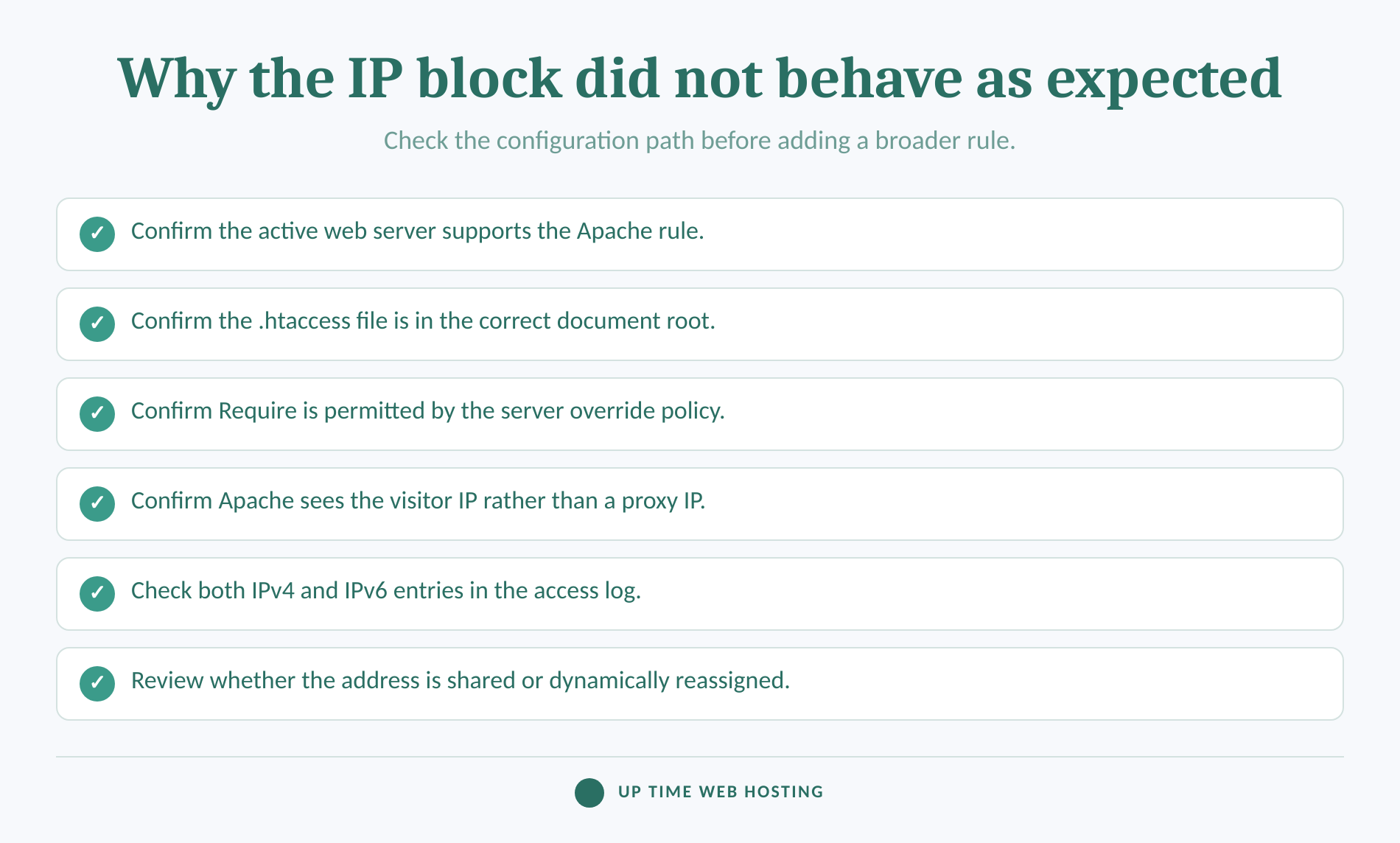
Apache's mod_remoteip documentation explains that a server behind a trusted proxy or load balancer may need server-level configuration to replace the proxy address with the original client address. Without that configuration, Require ip can evaluate the intermediary instead of the visitor. (httpd.apache.org)
Do not build an .htaccess rule that blindly trusts a visitor-supplied forwarding header. Apache warns that remote users can impersonate another address unless the intermediate systems presenting the header are explicitly trusted.
Check these failure points:
- Wrong file: Confirm the
.htaccessfile belongs to the domain or folder actually serving the request. - Ignored directive: Ask whether the server permits
RequirethroughAllowOverride AuthConfigor an equivalent allow-list. - Address-family mismatch: Review logs for both IPv4 and IPv6 forms instead of assuming one address covers both.
- Managed content: Confirm an application or control panel has not replaced the manual rule.
- Shared address: RFC 5684 explains that network address and port translation can let several private hosts share one public address simultaneously. (rfc-editor.org)
- Dynamic address: RFC 2131 describes dynamic allocation in which reusable addresses are leased for limited periods, so a later visitor may receive an address that was previously blocked. (rfc-editor.org)
Verify the address Apache is evaluating before widening a rule or assuming the syntax failed.
Register your new domain name at competitive market prices including free domain add-ons like privacy, DNS Hosting, Custom Nameservers and Forwarding.
Always the best price and no nasty renewal price hikes.
Register A Domain Name
When is .htaccess the wrong tool?
Use .htaccess for a small, site-specific deny list that must take effect without access to the main server configuration. Use a server firewall, rate limiting or a WAF for large rotating lists, country rules, distributed attacks or protection beyond the website.
An .htaccess rule controls requests handled in its web-directory scope. It does not automatically block access to email, cPanel, SSH or other services, and cPanel documents its own IP Blocker as a website-access control rather than a server-wide ban. (docs.cpanel.net)
A web application firewall is usually a better match when many addresses send the same malicious URL, payload or automated request pattern. Server or provider intervention is more appropriate when traffic volume threatens the connection or the server itself.
Use .htaccess for narrow website access decisions, not as a substitute for upstream filtering or application security.
What else do people ask about IP blocking?
These answers cover common questions about scope, syntax and legal risk. They assume the address has been verified in website logs before a rule is added.
Can I block a specific IP address?
Yes. On Apache 2.4, place the exact IPv4 or IPv6 address after Require not ip inside a <RequireAll> container that also contains Require all granted. Put the rule in the .htaccess file for the site or folder you want to protect, then test for an HTTP 403 response.
Is IP blocking illegal?
No single yes-or-no answer applies to IP blocking in Australia; the purpose and effect matter. The Racial Discrimination Act 1975 restricts refusing public goods or services on racial, colour, national or ethnic-origin grounds. Country-wide blocking or blocks affecting customers may need legal review. This is technical information, not legal advice. (legislation.gov.au)
Can you block an IP address from your website?
Yes. An .htaccess IP rule can deny access to a whole Apache-hosted site, a directory and its children, or a named file when wrapped in a <Files> section. The rule affects web requests handled in that scope; it does not automatically block email, cPanel, SSH or other server services.
How do I block someone's IP address?
First confirm the address in access logs, then back up .htaccess. Add the Apache 2.4 <RequireAll> rule, replace the example with the address, save, and test from a second network. If the site returns 500 or legitimate visitors are blocked, restore the backup and check the server's proxy and override settings.
IP blocking is a narrow access-control decision, not proof that the visitor, device or person behind an address has been identified.
Experience Microsoft 365 Business Standard for free for 30 days.
Up to 25 users with full access to email, OneDrive and Teams. Includes full versions of desktop apps of Outlook, Word, Excel, PowerPoint and more.
Try Microsoft 365
What should you do next?
Start with one exact address, not a broad range, and set a review date so temporary blocks do not become permanent clutter. For Australian cPanel hosting that lists custom IP blocking and local support, view cPanel Website Hosting. (uptimewebhosting.com.au)
The safest IP block is narrow, tested and easy to reverse.