In short
A ransomware recovery plan tells an Australian business how to contain an attack, protect evidence, notify the right people, rebuild clean systems and restore verified backups in business-priority order. The plan should be written before an incident, tested regularly and supported by offline or immutable backups that attackers cannot alter or delete.
Key takeaways
- A ransomware recovery plan must coordinate incident response, disaster recovery and business continuity without treating them as the same task.
- As of September 2026, ASD's Information Security Manual includes technically enforced backup immutability during retention as a specific control. (cyber.gov.au)
- Restoration should not begin until the organisation has contained the attack, protected clean backups and addressed the compromised access path.
- Since 30 May 2025, qualifying Australian businesses that make a ransomware or cyber extortion payment must report it within 72 hours. (homeaffairs.gov.au)
- Recovery objectives only become credible when a real system has been restored, validated and timed under controlled conditions.
Table of contents
- What should a ransomware recovery plan contain?
- What must be decided before an attack?
- How should backups be designed for ransomware recovery?
- What should happen in the first hour?
- How do you decide what to restore first?
- How do you restore without reinfecting systems?
- Which Australian reporting and notification rules apply?
- How should the plan be tested and maintained?
- What else do Australian businesses ask about ransomware recovery?
- What should you do next?
Ransomware recovery is not a normal server restore. Attackers may have copied information, stolen administrator credentials, changed backup settings or left another path into the network before encryption becomes visible, so a plan that only says restore from backup can return the business to the same compromise. (cyber.gov.au)
What should a ransomware recovery plan contain?
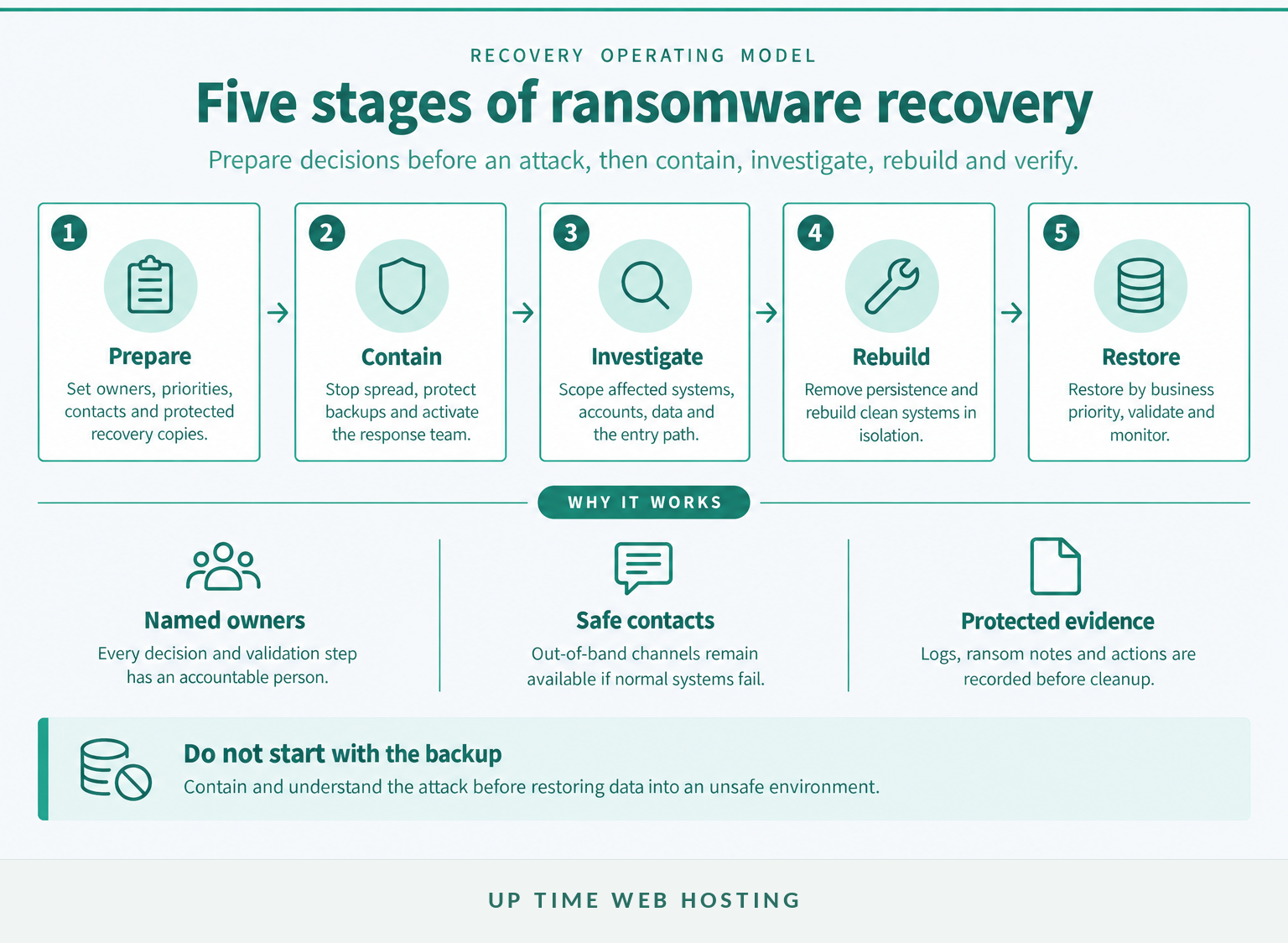
An effective plan contains the decisions, contacts and technical instructions needed to move from detection to safe operations. It joins incident response, disaster recovery and business continuity without treating them as the same job.
A normal disaster recovery plan explains how to recover systems after a failure. A ransomware plan adds hostile conditions: the attacker may still have access, backups may have been targeted and restored credentials may already be known to the attacker.
Incident response contains and investigates the attack. Disaster recovery rebuilds technology and restores data. Business continuity planning keeps essential work moving while technology remains unavailable, perhaps through manual processing, alternative communications or restricted services.
What belongs in the plan template?
The core document should be short enough to use during an incident. Detailed server procedures, contact lists and configuration records can sit in controlled appendices.
| Plan field | Decision to record |
|---|---|
| Activation trigger | Who can declare a ransomware incident and activate recovery |
| Incident authority | Who can isolate networks, disable accounts and stop services |
| Executive authority | Who approves spending, public statements and major operational decisions |
| Critical services | Which business processes must return first and what they depend on |
| Recovery objectives | The maximum acceptable outage and data loss for each service |
| Backup controls | Where clean copies are held and who can access, alter or delete them |
| Containment method | How devices, cloud services, remote access and connected parties are isolated |
| Reporting triggers | Which government, privacy, contractual, insurer and sector obligations may apply |
| Communications | Approved internal, customer, supplier and media channels |
| Recovery exit criteria | Who confirms systems are clean, accurate, monitored and ready for normal access |
The ransomware recovery process should also identify where the plan itself is stored. Keep an encrypted or printed copy outside the ordinary production network, along with out-of-band contact details and instructions for accessing recovery systems if normal identity services are unavailable.
Recovery software may help scan, rebuild, decrypt or restore particular assets, but software cannot decide which customer service returns first or whether a privacy notification is required. Tools support the plan. They are not the plan.
Practical rule: if the recovery plan cannot be opened after the normal network and identity system are disabled, the plan is stored in the wrong place.
A ransomware recovery plan works only when response, continuity and restoration decisions are written as one coordinated operating model.

Performance you can feel, backed by clients who depend on it. Read how our support and uptime create long‑term customer success.Power Your Business with Better Hosting
What must be decided before an attack?
Before an attack, decide who can shut systems down, who can approve restoration, who speaks externally and which services must return first. Those decisions are slow and political during a crisis, so they belong in the plan.
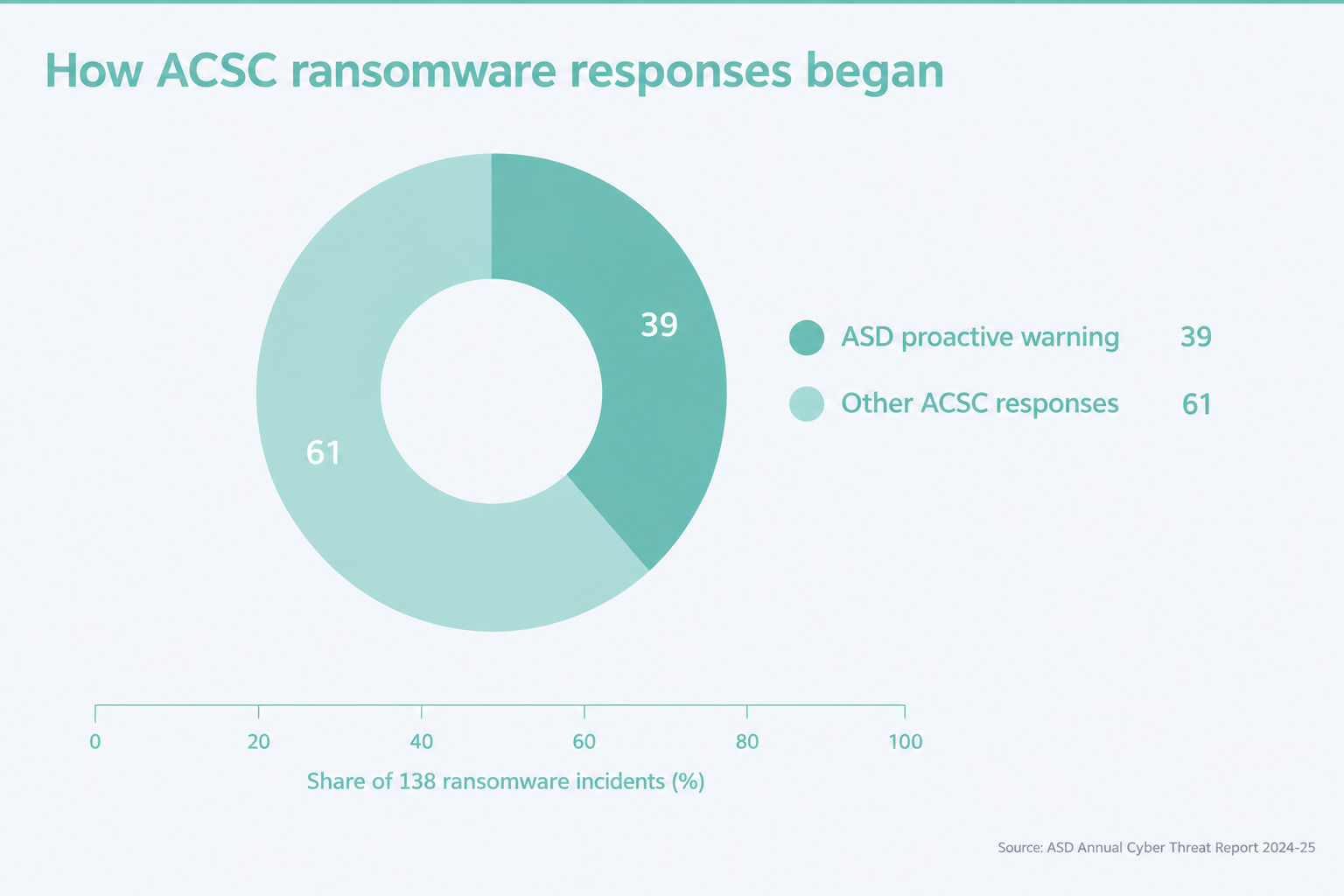
ASD's Annual Cyber Threat Report 2024-25 says the ACSC responded to 138 ransomware incidents during that financial year, and 39% resulted from ASD contacting the affected entity to warn of a possible incident. That finding shows why the plan needs clear monitoring ownership and an escalation path for an external warning, not only a response to an obvious ransom note. Read the ASD Annual Cyber Threat Report 2024-25. (cyber.gov.au)
Who has authority?
Name people and alternates for these functions:
- Incident lead: coordinates decisions, actions and status reporting.
- Technical containment lead: isolates systems, disables access and protects logs.
- Recovery lead: controls clean rebuilding, backup selection and restoration order.
- Executive decision-maker: approves business shutdowns, urgent spending and risk acceptance.
- Privacy or legal adviser: assesses personal information, contracts and reporting duties.
- Communications lead: prepares staff, customer, supplier and media messages.
- Finance and insurance contact: checks policy conditions, emergency purchasing and payment controls.
- System owners: validate restored applications and business data before release.
List mobile numbers and alternative email addresses that do not rely on the affected environment. Include service providers, insurers, key suppliers and connected organisations that may need to isolate their side of an integration.
Which recovery targets matter?
Set two targets for every critical service:
- Recovery time objective, or RTO: the longest acceptable period before the service returns.
- Recovery point objective, or RPO: the maximum acceptable amount of data loss, measured in time.
Do not set both targets at as soon as possible. A four-hour accounting RTO, for example, means little if the service depends on identity, network connectivity and a database that each have a two-day recovery path.
Build an asset and dependency register covering identity, network equipment, domain and DNS control, servers, cloud services, databases, email, telephony, websites, line-of-business applications, encryption keys, software licences and external integrations. The register should show the business owner, technical owner, data classification, RTO, RPO, workaround and validation method.
Practical rule: restore priorities should be approved by business leadership before an incident, because every department will consider its own system critical after an attack.
Pre-assigning authority and priorities removes the slowest decisions from the first hours of an attack.
How should backups be designed for ransomware recovery?
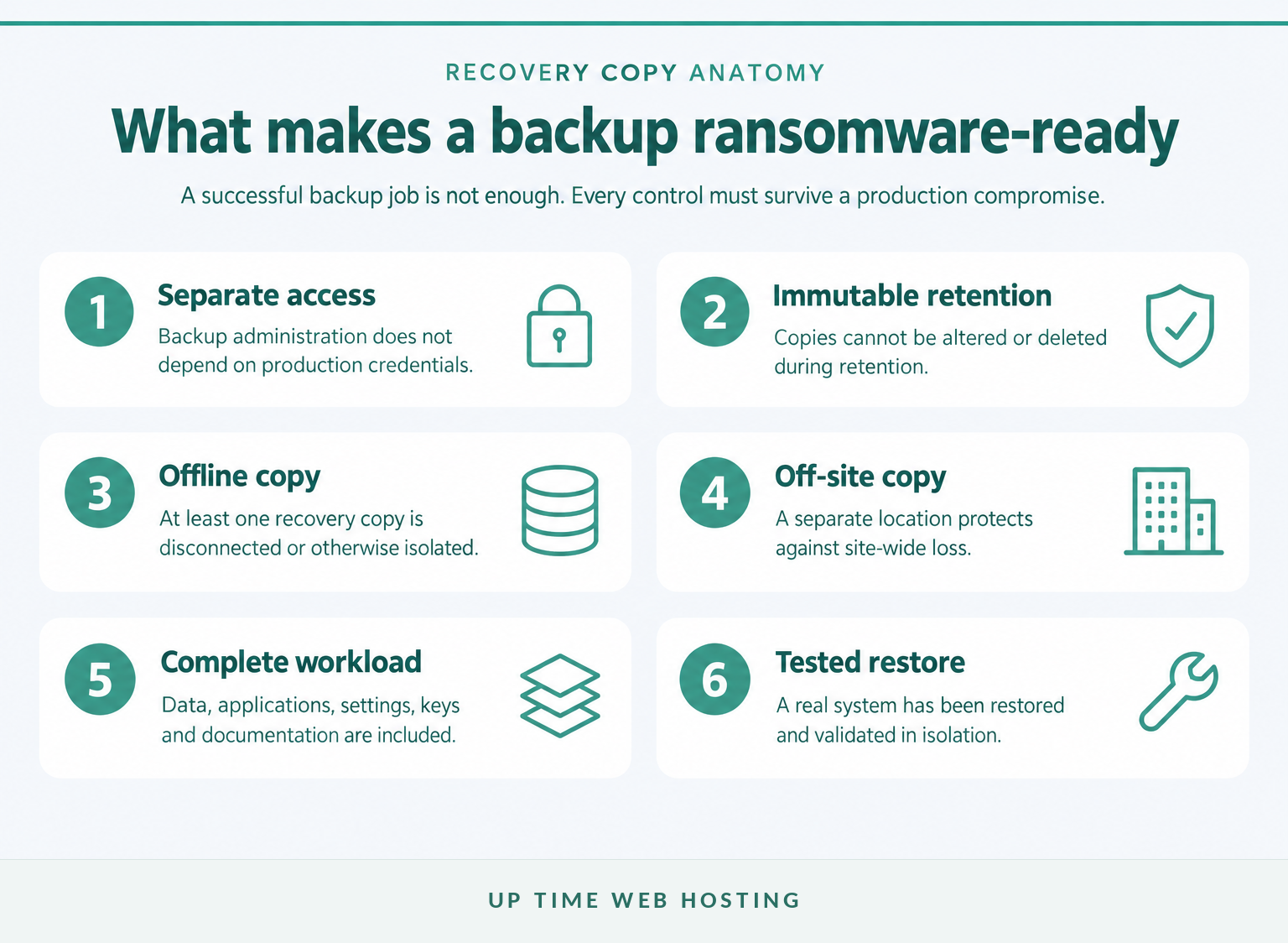
Ransomware-resistant backups must survive compromised production credentials and remain restorable after encryption or deletion begins. Keep recovery copies separate, control deletion, retain enough history and prove restoration works.
ASD's Information Security Manual says backups should cover data, applications and settings, be synchronised to a common recovery point and be retained in a secure and resilient manner. It also calls for separate authentication for backup infrastructure, restrictions on modification and deletion, coordinated restore testing and, in a control added in September 2026, technically enforced immutability for the retention period. Review the ASD Information Security Manual backup controls. (cyber.gov.au)
What do offline, off-site and immutable mean?
These controls solve different problems:
- Offline or disconnected: the copy is not reachable from production devices or the network when it is not being used.
- Off-site: the copy is stored at another physical or logical location, protecting it from a site-wide event.
- Immutable: the backup cannot be modified or deleted during its defined retention period, including by an administrator using ordinary credentials.
An off-site copy can still be vulnerable if it uses the same credentials and remains writable from production. An immutable copy can still be incomplete or too old. An offline copy can still fail if nobody tests the media.
Use an off-site backup strategy that combines separation with version history, access control and a documented restore method. For online backup systems, require separate administrative authentication and multi-factor approval for destructive changes.
What has to be backed up?
A file-only backup may not be enough to return a business system to operation. The recovery set may also need:
- operating system or machine images
- application installers and configuration files
- databases and transaction logs
- identity and access configuration
- network, firewall and DNS configuration
- encryption keys and certificates
- scripts, source code and infrastructure templates
- software licence information
- recovery documentation and current architecture diagrams.
Synchronise dependent components where consistency matters. Restoring an application server from Tuesday and its database from Thursday can create a technically successful restore that the application cannot use.
Retain enough history to move back before the first compromise, not only before the encryption event. Confirm that cloud synchronisation, snapshots and recycle bins provide the independent retention and deletion protection the recovery plan assumes.
How do you prove a backup works?
A successful backup job is evidence that data was written somewhere. It is not evidence that the business can recover.
Restore a representative system into an isolated environment and verify that:
- the backup catalogue can be accessed without production identity services;
- required files, databases, settings and keys are present;
- the restored service starts without unsafe connections to production;
- data reconciles with business records;
- the system owner can complete a real business task; and
- the measured restore time meets the approved RTO.
A backup is ransomware-ready only if attackers cannot alter it and the business has proved it can restore it.
Host your website with our 5-star rated, cPanel website hosting plans.
Super fast servers, with security included and hosted in your choice of Australian Data Center.
View cPanel Plans
What should happen in the first hour?
During the first hour, the priorities are to stop spread, preserve useful evidence, activate the response team and protect clean backups. Do not begin a broad restore while the attack path or affected scope is still unknown.
| Time | Action | Owner | Guardrail |
|---|---|---|---|
| First 10 minutes | Record the ransom note, detection time, affected users, devices and unusual file extensions | First responder | Use a known-good phone or camera if normal systems are untrusted |
| Next 10 minutes | Apply the pre-agreed isolation method to affected devices, networks, remote access and cloud sessions | Technical lead | Do not connect recovery media or clean administrator devices |
| Within 30 minutes | Activate the incident team and move communications to an out-of-band channel | Incident lead | Assume compromised email or chat may be monitored |
| Within 45 minutes | Protect backup repositories, pause unsafe replication and preserve logs | Recovery lead | Do not delete backup catalogues, logs or ransom artefacts |
| Within 60 minutes | Report the incident, contact advisers and start a documented impact assessment | Incident lead | Record every action, time, person and reason |
Should devices be isolated or powered down?
Official guidance differs because the right action depends on capability. The 2023 ACSC Ransomware Emergency Response Guide, written for individuals and smaller organisations, says to record important details and then turn off infected and connected devices to stop spread. (cyber.gov.au)
The CISA StopRansomware Guide advises organisations to isolate affected systems first and power them down only when network disconnection is not possible, because powering down can remove evidence stored in volatile memory. (cisa.gov)
Resolve that difference before an incident. A small business without forensic capability may follow the ACSC shutdown sequence, while an organisation with an incident-response team may isolate at the switch, preserve memory and follow specialist instructions.
What evidence should be protected?
Keep copies of:
- the ransom note, filenames and extensions
- the time and method of initial detection
- affected hostnames, accounts and network segments
- authentication, endpoint, firewall, email and cloud logs
- unusual administrator accounts or remote-access sessions
- recent patches, configuration changes and security alerts
- every containment and recovery action taken.
Do not investigate from a compromised administrator account. Use a known-clean device and record evidence in a location the attacker cannot reach.
Should the ransom be paid?
The Australian Government strongly discourages ransomware payments. ASD warns there is no guarantee that payment will restore access or prevent stolen information from being leaked, and paying may expose the victim to another attack. Read ASD's ransomware guidance. (cyber.gov.au)
Call the Australian Cyber Security Hotline on 1300 CYBER1 (1300 292 371) for assistance and submit the incident through ReportCyber as early as possible, even if the full scope is not known. (cyber.gov.au)
The first hour is for containment, evidence and coordination, not a rushed return to production.
How do you decide what to restore first?
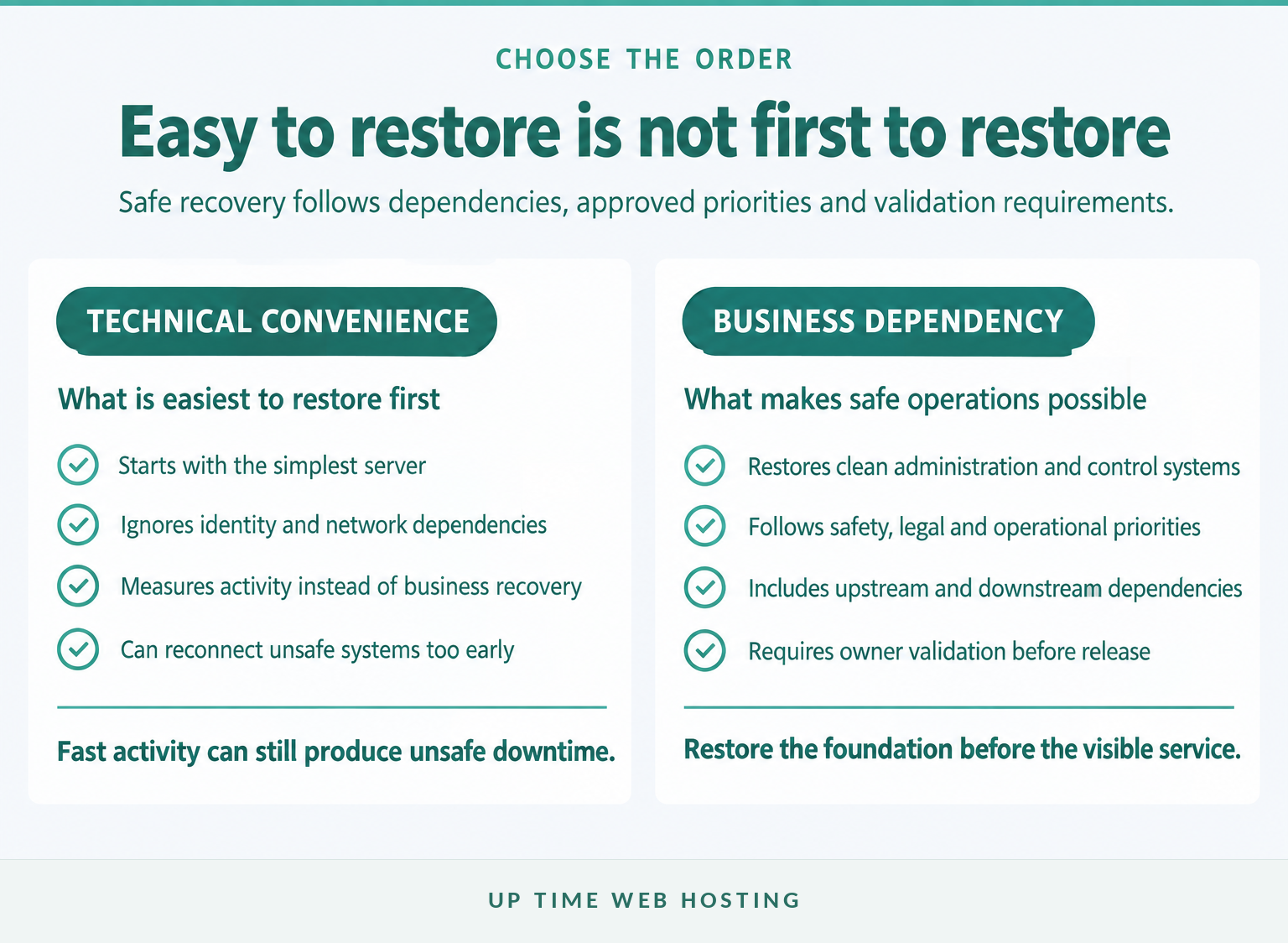
Restore services according to business impact and technical dependencies, not which server is easiest to recover. Identity, network control and security visibility often need attention before customer-facing applications can return safely.
A useful recovery order has four broad tiers.
Tier 0: recovery control systems
These are the systems needed to conduct a safe recovery:
- clean administrator devices
- secure communications
- identity and privileged-access controls
- network segmentation, firewalls and DNS
- backup management and recovery infrastructure
- central logging, endpoint monitoring and time synchronisation.
If the identity system is compromised, do not restore it blindly and use it to authorise everything else. Rebuild or recover it through the approved identity-compromise procedure, rotate privileged credentials and invalidate unsafe sessions.
Tier 1: essential operations
Restore services tied to safety, legal duties, urgent customer needs or immediate operational survival. The exact list will vary, but it may include core communications, essential databases, dispatch or booking functions, payment processing and systems required to meet regulated responsibilities.
Tier 2: revenue and customer service
Restore services that allow normal trading, customer support and supplier coordination. Some systems can operate in a restricted mode while deeper investigation continues.
For web workloads, a separate disaster recovery hosting environment may provide a controlled recovery path away from an affected production server. It still needs separate credentials, clean configuration and regular testing.
Tier 3: lower-impact services
Restore archives, internal convenience tools, historical reporting and non-essential development systems after the business-critical environment is stable.
For each service, record:
- maximum tolerable outage
- maximum tolerable data loss
- upstream and downstream dependencies
- minimum viable operating mode
- manual workaround
- clean restore source
- validation owner
- monitoring needed before release.
The order should remain adjustable. A payroll system may rise in priority before a pay run, while a customer-notification platform may become urgent if personal information has been exposed.
Restore the dependencies that make safe operations possible before restoring the services that are merely most visible.
How do you restore without reinfecting systems?
Recovery should happen in a clean environment after the entry point and persistence methods have been addressed. A backup can contain intact data and still restore an unsafe system if the chosen point or rebuild method is wrong.
What makes a restore point clean enough?
Choose a point before the earliest known malicious activity, not merely before files became encrypted. Ransomware deployment may be the final stage of a longer compromise involving stolen credentials, remote access, data theft and disabled security controls. (cisa.gov)
The recovery team should:
- establish known-clean administrator devices and communications;
- identify the likely entry point, affected accounts and persistence methods;
- close the exploited vulnerability or access path;
- rebuild affected operating systems from known-good images where practical;
- patch software and replace unsafe configurations;
- reset passwords, keys, tokens and multi-factor authentication registrations;
- scan and validate the selected backup in isolation; and
- restore services in controlled stages.
ASD's ransomware recovery guidance says infected drives and devices may need to be wiped and their operating systems reinstalled. It also says backups should only be restored when the organisation is confident they are free from ransomware. (cyber.gov.au)
How should restored systems be validated?
Use both technical and business checks:
- confirm security tools, logging and monitoring are active;
- check administrator, service and application accounts;
- verify patches and configuration baselines;
- scan restored data and systems for known indicators;
- reconcile databases, transactions and document counts;
- test integrations without opening unrestricted production access;
- have the system owner perform a real business process;
- monitor authentication, network and file activity for recurrence.
Reconnect one recovery segment at a time. A staged return limits the impact if a hidden dependency, unsafe account or malicious artefact appears.
Do not declare the incident over simply because the homepage loads or staff can open files. The exit criteria should require containment confirmation, business-owner validation, active monitoring and an agreed period without signs of continuing compromise.
Clean rebuilds and staged validation reduce the chance that recovery restores the attacker as well as the data.
Register your new domain name at competitive market prices including free domain add-ons like privacy, DNS Hosting, Custom Nameservers and Forwarding.
Always the best price and no nasty renewal price hikes.
Register A Domain Name
Which Australian reporting and notification rules apply?
Australian reporting depends on what happened, what information was affected, the business's regulatory status and whether a payment was made. The plan should list reporting triggers and advisers before an incident, because more than one notification path may apply.
As of October 2026, the main Commonwealth considerations include the following.
| Trigger | Required or recommended action | Timing |
|---|---|---|
| Ransomware or cyber security incident | Report through ReportCyber and seek ASD assistance | As early as possible |
| Ransomware or cyber extortion payment by a reporting entity | Submit the mandatory payment report | Within 72 hours of payment or awareness that payment was made |
| Suspected eligible data breach involving personal information | Conduct a reasonable and expeditious assessment | Take all reasonable steps to complete it within 30 calendar days |
| Eligible data breach likely to cause serious harm | Notify the OAIC and affected individuals | As soon as practicable after the assessment |
| Sector, contract, insurance or critical infrastructure trigger | Notify the relevant body under the applicable rule | According to the specific obligation |
When is a ransom payment report mandatory?
Mandatory payment reporting has applied since 30 May 2025. A business carrying on business in Australia with annual turnover in the previous financial year equal to or exceeding $3 million, and certain entities responsible for critical infrastructure assets, must report a ransomware or cyber extortion payment within 72 hours of making it or becoming aware that a payment was made on its behalf. Read the Home Affairs ransomware payment reporting factsheet. (cyber.gov.au)
The mandatory rule applies to payments, not every demand. A separate voluntary ReportCyber report should still be considered for the incident itself.
When does the Notifiable Data Breaches scheme apply?
An organisation covered by the Privacy Act 1988 must assess a suspected eligible data breach and notify the OAIC and affected individuals if the breach is likely to cause serious harm. The OAIC says organisations must take all reasonable steps to complete a suspected-breach assessment within 30 calendar days and should treat that period as a maximum rather than a target. Review the OAIC NDB scheme guidance. (oaic.gov.au)
Do not assume a business with turnover below $3 million has no privacy obligations. Some smaller organisations are covered because of their activities or the information they handle, including private health service providers and certain tax file number recipients. (oaic.gov.au)
Use the Australian Government's Single Reporting Portal to identify Commonwealth reporting paths that may apply, then obtain legal advice for the organisation's circumstances. This article provides general information, not legal advice. (cyber.gov.au)
Australian businesses should map every reporting trigger in advance because one ransomware event can create several separate obligations.
How should the plan be tested and maintained?
A ransomware recovery plan is only credible when the organisation has restored real systems under controlled conditions and measured the result. Testing should expose missing credentials, hidden dependencies, slow transfers and unclear authority before an attacker does.
ASD's December 2024 incident response planning guidance asks whether organisations have current, regularly tested incident response, business continuity and disaster recovery plans, and whether supplier agreements include cyber incident reporting and response activities. (cyber.gov.au)
What should a practical test schedule look like?
The following is a practical starting schedule, not a legal or ASD-mandated interval. Increase testing where systems change frequently or outages would create serious harm.
| Test | Starting frequency | What it proves |
|---|---|---|
| Automated backup-job and anomaly review | Each backup cycle | Jobs ran and unusual deletion or encryption patterns are noticed |
| Sample file or database restore | Monthly | A recent recovery copy is readable and usable |
| Contact and decision tabletop | Quarterly | Owners, alternates and escalation paths understand their roles |
| Critical application restore | At least annually | Dependencies, credentials, data and validation steps work together |
| Full recovery exercise | Based on business risk | Multiple services can return in approved priority order |
| Plan review | After exercises and material changes | Contacts, systems, suppliers and procedures remain current |
What should be measured?
Record more than pass or fail:
- actual recovery time against RTO
- actual data loss against RPO
- time taken to activate the team
- time taken to access protected backups
- transfer and rebuild bottlenecks
- missing passwords, keys, licences or documentation
- failed integrations and hidden dependencies
- time required for technical and business validation
- decisions that lacked a clear owner
- communications that could not be delivered through the planned channel.
Every failed step should produce an owner and due date. Update architecture diagrams, contact lists, backup scope, scripts and supplier responsibilities through normal change management rather than waiting for the next annual review.
A measured restore test is the evidence that turns recovery objectives into recovery capability.
Experience Microsoft 365 Business Standard for free for 30 days.
Up to 25 users with full access to email, OneDrive and Teams. Includes full versions of desktop apps of Outlook, Word, Excel, PowerPoint and more.
Try Microsoft 365
What else do Australian businesses ask about ransomware recovery?
These answers cover the questions most businesses ask when turning a general disaster recovery plan into a ransomware-specific one. The details still need to be matched to the organisation's systems, legal duties and tested recovery capability.
When would a DRP be activated?
A disaster recovery plan should be activated when an incident makes critical systems, applications or data unavailable, untrusted or unsafe to use, and normal incident handling cannot restore them within acceptable time. For ransomware, activation may begin during containment, before the full scope is known, so recovery resources can be prepared without reconnecting compromised systems.
What is the best method to recover from a ransomware attack?
The best method is to contain the attack, identify and close the entry point, rebuild affected systems in a clean environment, then restore verified data from an offline or immutable backup. Recovery should follow business priorities and include credential resets, security monitoring and validation by the system owner before normal access returns.
What is the average to make a full recovery from a ransomware attack?
There is no dependable universal average for full ransomware recovery. Time varies with network size, data volume, backup integrity, identity compromise, regulatory work and whether clean infrastructure is available. A business should rely on tested recovery time objectives and exercise results, not a generic industry figure that may not match its systems.
What are the 5 steps of disaster recovery planning?
Five practical disaster recovery planning steps are: identify critical services and dependencies; define recovery time and recovery point objectives; design protected backup and recovery methods; assign roles, contacts and decision authority; and test, measure and update the plan. Ransomware planning adds containment, forensic preservation and clean-rebuild requirements to those steps.
The useful answer to any recovery question is the one the organisation has documented and tested.
What should you do next?
The next action is to choose one critical service and run a timed restore into a clean environment. The result will show whether the recovery plan is operational or only documented.
If backup ownership, off-site copies or restore testing are unclear, review UpTime Networks Backup and Recovery for server, workstation, database and email backup options, then request a recovery-readiness discussion. (uptimewebhosting.com.au)
The next useful step is a timed restore test, not another untested policy document.