
A new Australian business can have a polished website ready to launch, yet visitors still see nothing when they enter the address. The domain has been registered, the pages have been designed, and the content is complete, but the site hasn't been given a reliable place to live online.
That place is web hosting. Understanding the web hosting meaning helps you separate the domain name people type, the server that stores your website, and the systems that connect the two. It also helps you choose infrastructure that suits Australian visitors, data requirements, email, security and future growth.
Table of Contents
- Understanding the Web Hosting Meaning
- How Servers Deliver Your Website to Visitors
- Comparing the Main Types of Web Hosting
- Essential Features Every Hosting Plan Needs
- The Case for Local Australian Infrastructure
- How to Choose the Right Hosting Provider
- Frequently Asked Questions About Web Hosting

Performance you can feel, backed by clients who depend on it. Read how our support and uptime create long‑term customer success.Power Your Business with Better Hosting
Understanding the Web Hosting Meaning
Suppose a Melbourne café registers yourcafe.com.au and pays a designer to build a website. The domain gives customers an address to remember, but it doesn't automatically provide the server space needed for the website's images, pages, code and database. The café still needs hosting so a visitor's browser can retrieve that content whenever someone visits.
A simple real estate analogy makes the distinction clearer:
- The domain name is the street address. It tells people where to find the business online.
- Web hosting is the land and building infrastructure. It provides the server where website files and databases are stored.
- The website is the house. It contains the rooms visitors explore, such as the home page, services, contact form and checkout.
- DNS is the signposting system. It directs the domain name towards the correct hosting service.
Buying a domain without hosting is like registering a street address without constructing a building there. Buying hosting without a domain is possible, but visitors would generally use a less memorable technical address instead of the business name.
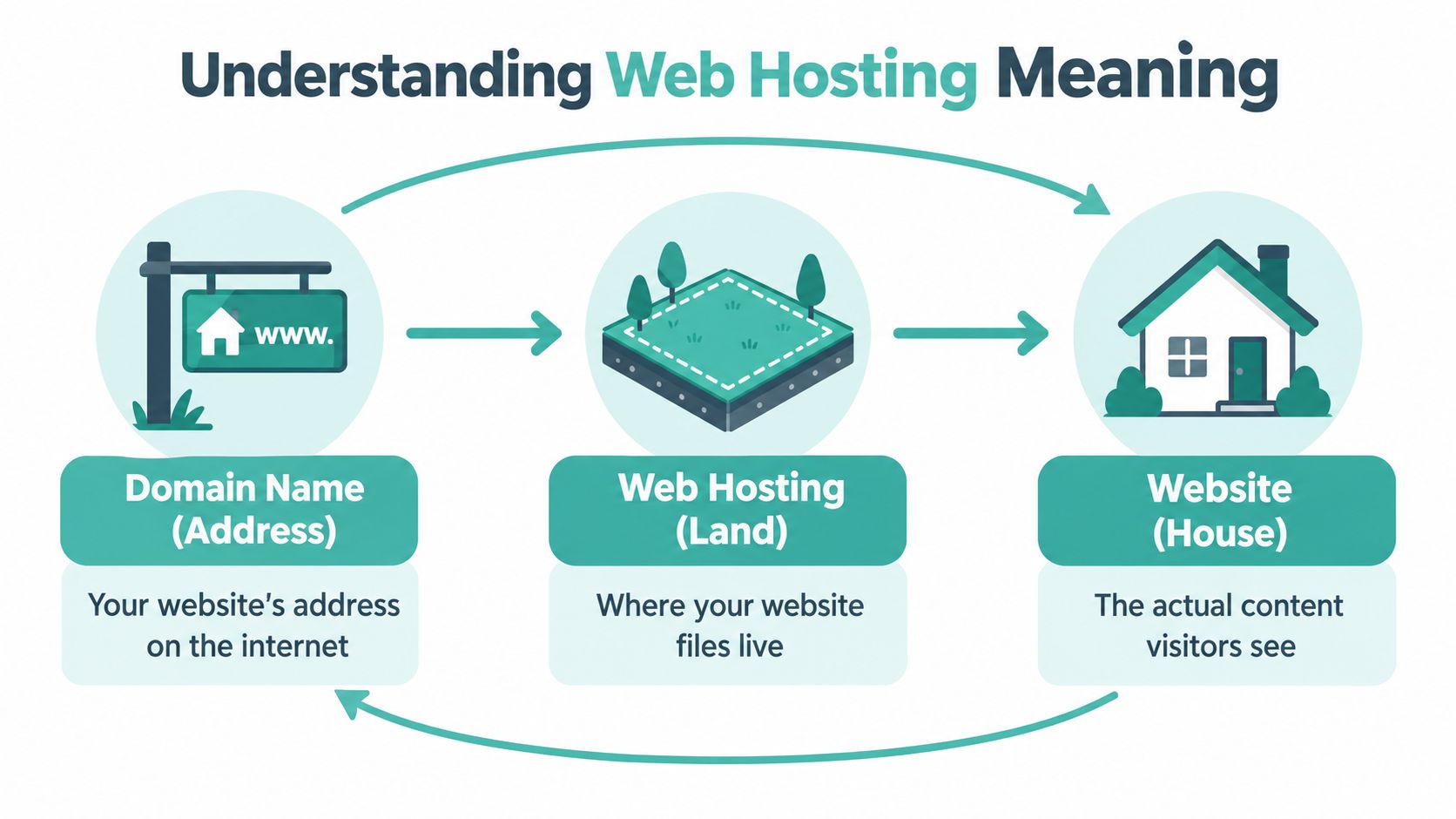
The three services work together
Domain registration reserves a name in the relevant domain namespace. For Australian organisations, that might be a .com.au, .edu.au, .gov.au or another .au domain. DNS hosting maintains the directions that help browsers find the services associated with that name. Web hosting supplies the server environment that stores and delivers the site.
The broader Australian hosting market can also include email hosting and DNS hosting, which is one reason basic explanations often blur separate services together. The industry is projected to reach about AUD 1.5 billion in 2026, with 1,825 providers, according to Australian internet hosting services market information. That crowded market makes precise definitions useful when comparing plans.
A practical explanation of the difference between domain names and web hosting can help if you're deciding whether you need one service or both. In most business launches, you need a domain, hosting and a way to connect them, even if a provider packages those services together.
Australia's hosting story began with academic infrastructure rather than a consumer marketplace. The first Australian web server was installed at the Australian National University in late 1992, AARNet had connected the Australian internet internationally in 1989, and by 1995 the internet had shifted towards private ownership as businesses and consumers moved online, as described in this history of the early Australian web. Hosting has since developed from a research utility into the foundation for Australian websites, email and online services.
How Servers Deliver Your Website to Visitors
Web hosting isn't passive storage. It is the delivery layer that receives requests, processes them and sends the required content back to a browser.
When a customer enters your domain, several actions happen in a short sequence:
- The browser identifies the domain the visitor requested.
- DNS helps the browser locate the server responsible for that website.
- The browser sends a request for a page, image, stylesheet or other resource.
- The server uses available CPU, memory, storage and software to find or generate the requested content.
- The server transfers the response through the internet.
- The browser assembles the response and displays the page.
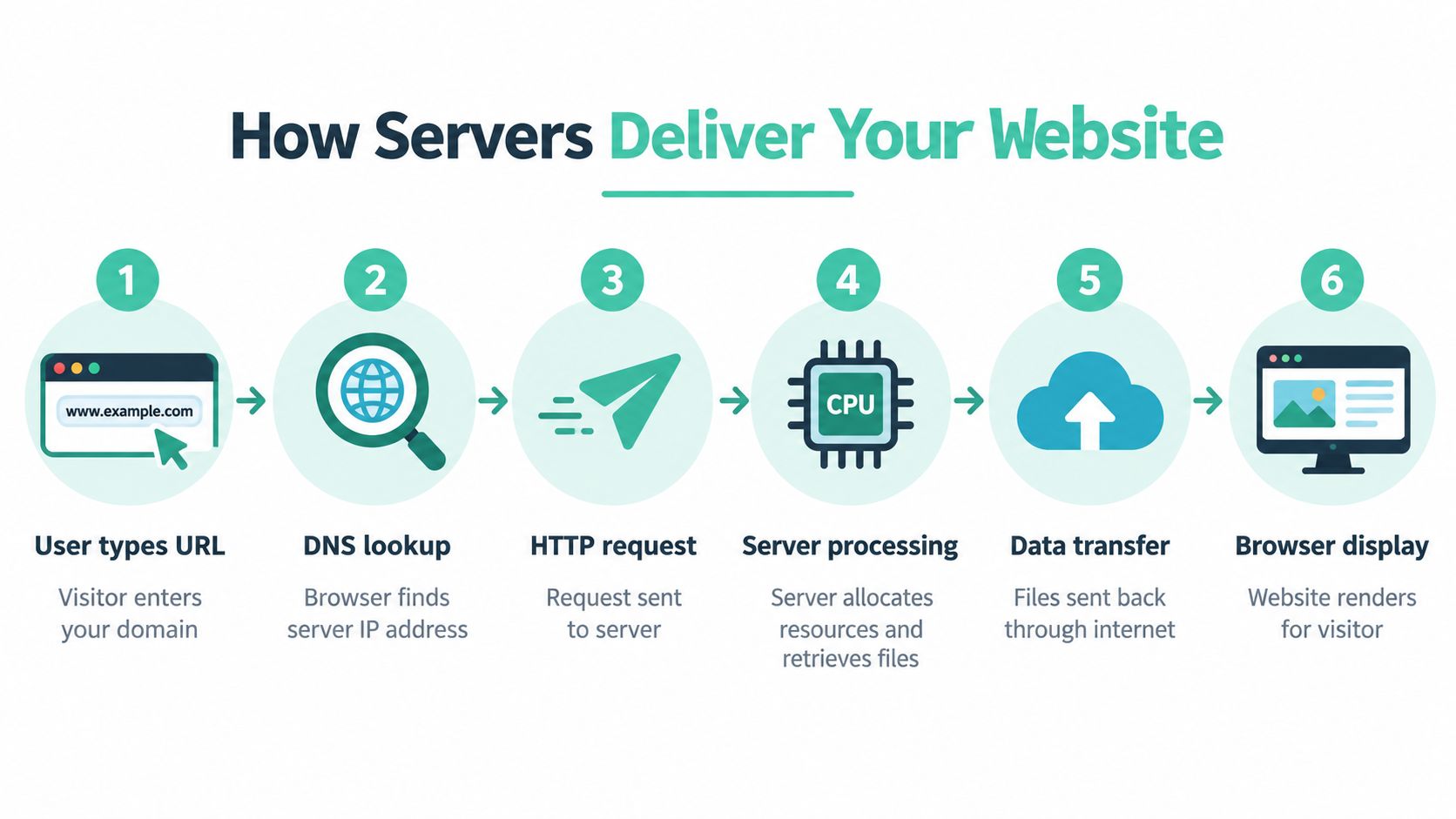
Why server resources matter
A static brochure page may just retrieve files such as HTML, images and stylesheets. A WordPress website, customer portal or online checkout usually asks the server to perform more work. It may query a database, run application code, validate a login or calculate an order before the browser receives the result.
The hosting environment allocates CPU, memory, bandwidth and storage for these tasks. If the plan has limited resources, a busy period or inefficient application can make pages slower, cause timeouts or interrupt administrative work. A host's server response time guidance provides useful context for understanding the delay between a browser request and the server's first response.
Latency and Australian visitors
Latency is the time data takes to travel between a visitor and the origin server. A server physically located in Sydney or Melbourne can avoid an international round trip for many Australian visitors. That shorter network path can reduce delay and improve page-load behaviour, particularly when a site makes several backend requests.
This doesn't mean server location solves every speed problem. Large images, inefficient plugins, poor code and overloaded databases can still slow a site hosted nearby. It does mean that location is a real performance variable, not just a label in a provider's marketing.
For a Brisbane business serving mostly Australian customers, an Australian origin can make the administrative dashboard and customer-facing pages feel more responsive. For a national retailer, the same decision can support more consistent access across Australian cities when combined with sensible caching, efficient code and suitable resources.
Practical rule: Choose infrastructure based on where your visitors and data need to be, then assess the server resources and application support around it.
Host your website with our 5-star rated, cPanel website hosting plans.
Super fast servers, with security included and hosted in your choice of Australian Data Center.
View cPanel Plans
Comparing the Main Types of Web Hosting
Hosting types describe how server resources are arranged and how much technical responsibility falls to your team. The suitable option depends on the website's application, resource demands, traffic patterns and the level of server administration your business can handle.
- Shared hosting places multiple websites on one physical server, with CPU power, memory and other resources shared between them. It suits a small business site, portfolio or early-stage blog where cost and simple management matter.
- VPS hosting creates a virtualised environment on a physical server shared by several customers. Each environment receives a more defined allocation of resources and usually provides greater control than shared hosting. It can suit a growing website or application that needs more flexibility.
- Dedicated hosting assigns one entire physical server to a single customer. That customer receives extensive control over the server's software, configuration and available resources. It is appropriate for resource-intensive websites, specialised applications or organisations that require a specific environment.
- Cloud hosting draws capacity from a pool of servers rather than relying on one physical machine. This design can help a website respond to changing demand and provide alternative capacity when part of the infrastructure has a problem.
- Managed hosting describes the service level, not one particular server arrangement. The provider handles tasks such as updates, configuration, monitoring and troubleshooting, allowing the business owner to focus on the website and customers.
- Windows or ASP.NET hosting supports applications built for Microsoft's web technologies. A business using classic ASP, ASP.NET or MSSQL should confirm that the hosting environment supports each dependency before signing up.
The distinction between shared and managed hosting matters. Shared hosting explains how resources are allocated, while managed hosting explains who handles technical work. A provider can offer managed services on shared, VPS, dedicated or cloud infrastructure.
For an Australian business, hosting type and server location are separate decisions. A VPS or cloud plan may still store data outside Australia, while an Australian-based option may better suit an organisation with customer records or operational data that should remain under Australian control. Confirm the provider's data-centre location and relevant data-handling terms before choosing a plan.
Hosting Types at a Glance
| Hosting Type | Best For | Resource Allocation |
|---|---|---|
| Shared hosting | Small business websites, portfolios and simple content sites | CPU, memory and other server resources are shared across multiple websites |
| VPS hosting | Growing websites and applications needing more control | A virtual environment provides a more defined portion of a physical server |
| Dedicated hosting | Resource-intensive websites and specialised applications | One customer uses the physical server |
| Cloud hosting | Websites with variable demand or a need for distributed capacity | Resources are provided across multiple servers |
| Managed hosting | Owners who want technical maintenance handled for them | Allocation depends on the underlying hosting environment, with provider-managed operations |
| Windows or ASP.NET hosting | Microsoft-based websites and applications | Resources depend on the selected Windows hosting plan |
A clear comparison of web hosting and cloud hosting can help when the choice is between a conventional server environment and a multi-server platform. Start with the simplest setup that meets your requirements, then check how easily you can upgrade as the website gains visitors, integrations or new functions.
Essential Features Every Hosting Plan Needs
A hosting plan should do more than place files on a server. It should protect those files, make routine administration manageable and give the website enough headroom to serve visitors reliably.
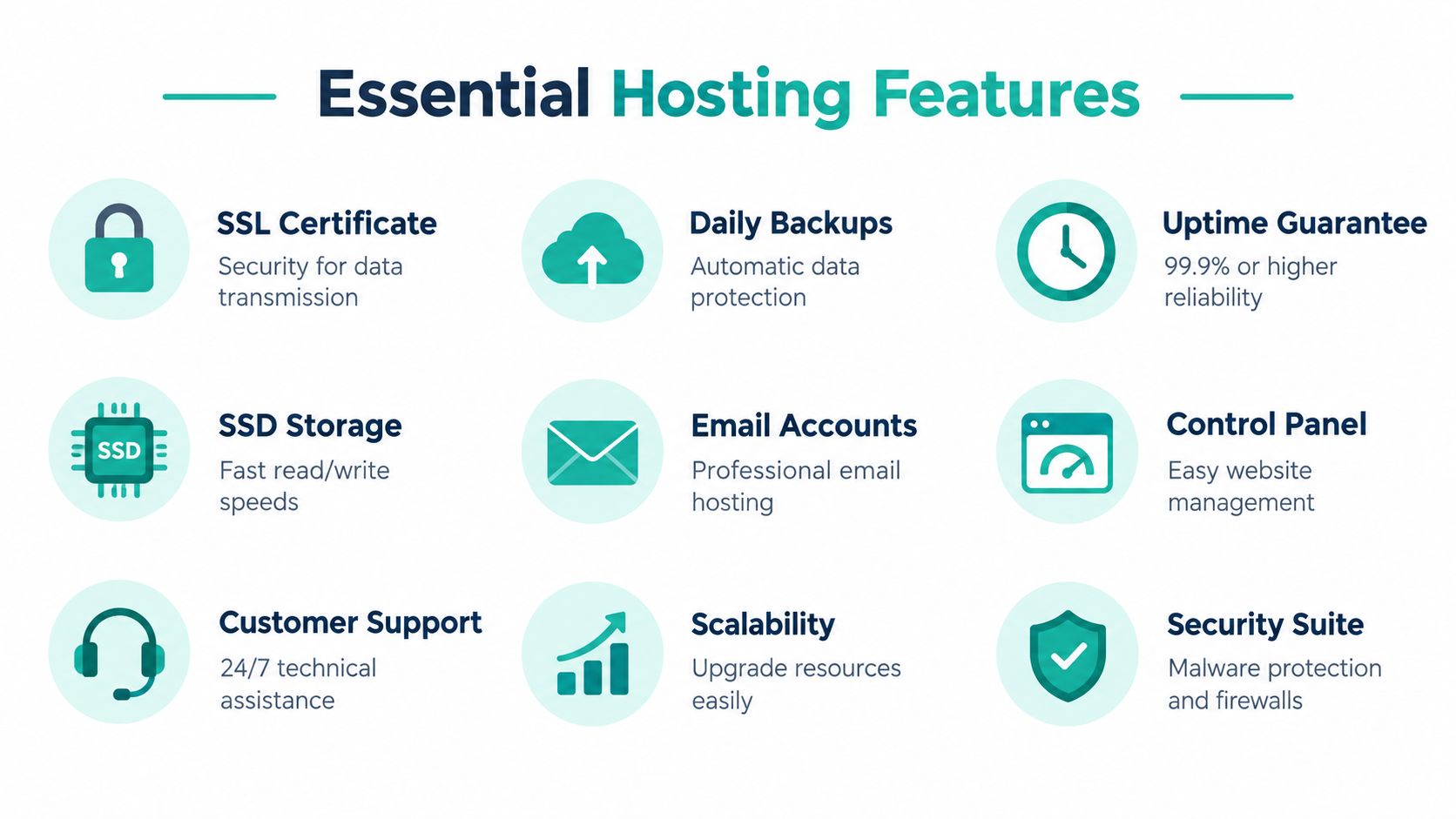
Security and recovery
Start with an SSL or TLS certificate. It encrypts data moving between the visitor's browser and the website, which is essential for forms, logins and online transactions. It also allows the site to use HTTPS, giving visitors a familiar security signal.
Backups provide a separate layer of protection. Look for automated off-site backups, a clear retention policy and a restoration process that doesn't leave you guessing after a plugin failure, accidental deletion or security incident. A backup stored on the same infrastructure as the live site may not help if that infrastructure becomes unavailable.
A hosting plan should also address common threats through malware scanning, firewalls and DDoS protection. These features don't replace secure passwords, patched software and careful access control, but they reduce the burden on a small business team. The practical details of secure web hosting are worth checking before you compare monthly prices.
Speed and administration
SSD storage can support faster file access than older storage technologies. Server software also matters. LiteSpeed, caching tools and application-specific optimisations can reduce the work required to generate and deliver pages, particularly for WordPress sites.
A control panel such as cPanel gives non-specialists a place to manage domains, email accounts, files, databases and security settings. Without a usable control panel, a simple task may require technical assistance. Managed hosting can go further by assigning updates, monitoring and troubleshooting to the provider.
Use this checklist when reading plan details:
- Backups: Confirm that copies are automatic, off-site and restorable.
- Security: Check SSL, malware scanning, firewall controls and DDoS protection.
- Resources: Read how CPU, memory, storage and bandwidth are allocated.
- Email: Confirm that domain-based email and spam filtering meet your needs.
- Scalability: Find out how you upgrade resources when the website grows.
- Support: Check the available contact methods and the technical scope of assistance.
An attractive price can't compensate for a plan that excludes the controls you need to protect and operate a business website.
The Case for Local Australian Infrastructure
A provider's Australian branding doesn't prove that the production server is in Australia. Local hosting usually means the website's origin server sits physically in Australia, often in Sydney, Melbourne, Brisbane or Perth. Depending on the architecture, backups, monitoring and logs may also remain onshore.

Performance and sovereignty
Australian infrastructure can reduce routing delays for Australian visitors because requests don't need to travel to an overseas origin before the server responds. That difference is particularly relevant to database-driven sites, customer portals and checkout processes. A page that makes several backend requests can feel slow when each request travels a long distance.
Data sovereignty is a separate but related consideration. If your organisation has reasons to keep production data, backups, logs or monitoring information onshore, ask where each part of the hosting stack is located. Choosing an Australian-registered business isn't enough if the actual servers and supporting systems sit elsewhere. Australian data sovereignty hosting information offers a useful starting point for that discussion.
Local hosting also makes operational support easier for many Australian teams. A support contact working in a compatible time zone can help during the business day, while local infrastructure may simplify conversations about maintenance windows, data location and incident response. Those benefits don't remove the need to check service quality, but they can reduce friction when something needs attention.
The decision has business context
Australia has more than four million registered .au domain names, covering namespaces such as .com.au, .edu.au, .gov.au and .net.au, according to auDA domain name data. That installed base reflects the range of organisations relying on Australian online infrastructure.
Local hosting isn't automatically necessary for every website. An Australian business with a global audience may use a broader distribution strategy, while a local service business may gain more from an Australian origin. The sensible approach is to match server geography to visitor geography, application needs and data-handling expectations.
Australian security and continuity risks also deserve attention. An industry analysis reports that 22% of surveyed Australian small businesses experienced a website security breach, with 75% of those businesses suffering downtime and 40% of outages lasting more than three days. Those figures are reported in Australian cloud hosting and data processing market information, and they underline why backups, monitoring and recovery support deserve as much scrutiny as location.
Register your new domain name at competitive market prices including free domain add-ons like privacy, DNS Hosting, Custom Nameservers and Forwarding.
Always the best price and no nasty renewal price hikes.
Register A Domain Name
How to Choose the Right Hosting Provider
Begin with the website rather than the plan name. Write down the platform, expected content, email needs, application dependencies, visitor geography and the tasks your team can manage without help.
A practical buying sequence
- Match the environment to the application. A basic brochure site may only need shared hosting. WordPress, an online store or a custom application may require managed WordPress, VPS, cloud or Windows support.
- Verify the physical location. Ask where the production server, backups, monitoring and logs are held. Don't treat an Australian company address as proof of Australian infrastructure.
- Read the resource terms. Check storage, CPU, memory, bandwidth, databases, email and upgrade paths. “Unlimited” or “uncapped” wording still deserves a clear explanation of fair-use conditions.
- Inspect security and recovery. Confirm SSL, malware scanning, firewall protection, DDoS mitigation and off-site backups. Ask how restoration works before an incident occurs.
- Test the support route. Look for local phone support, tickets or call-backs, and identify whether the team can assist with the platform you use.
- Compare the full cost. Check whether GST is included, whether renewal pricing changes, and whether setup, migration, email or backups cost extra. Avoid judging a plan only by its introductory price.
For orientation, an Australian hosting guide places .com.au domain registration at around A$10 to A$23 per year, shared hosting for small sites at around A$5 to A$30 per month, and managed WordPress hosting from around A$18.50 to A$42 or more per month, as outlined in this Australian web hosting cost guide. Treat these as comparison points rather than promises, because the final price depends on the service and inclusions.
A contract-free plan can preserve flexibility while your requirements are still changing. Transparent billing, clear renewal terms and a practical migration process matter more than a long feature list that your business won't use.
Frequently Asked Questions About Web Hosting
Can I move an existing website?
Yes. A migration usually involves copying the website files and database, preparing the new hosting environment, testing the site and changing the connection once the new version works. A careful provider can help reduce disruption, but no migration should be treated as an instant button press.
Does hosting include email?
Not always. Some hosting plans include email accounts and DNS services, while others provide website hosting separately. Confirm who hosts your mail, where messages are stored and what spam protection is included before changing providers.
What happens when shared hosting is no longer enough?
You can usually move to a plan with more resources, a VPS, cloud hosting or a managed application environment. The right upgrade depends on whether the constraint is CPU, memory, storage, database performance or a need for greater control.
Do I need Australian hosting?
Not automatically. If your visitors and operational requirements are mainly Australian, an Australian origin can support lower routing delays and onshore infrastructure. If your audience is international, compare geographic distribution, application performance and data requirements together.
UpTime Web Hosting offers Australian website, WordPress and Windows hosting with servers in Sydney, Melbourne, Brisbane and Perth, alongside domains, email and managed VPS services. Visit UpTime Web Hosting to compare local hosting options and choose an infrastructure setup that fits your website, visitors and support needs.