Your shared host is groaning, the ASP.NET app is sluggish, and the MSSQL database keeps bumping into limits every time the team logs in over Remote Desktop. That's the point where Windows VPS hosting plans stop being a nice-to-have and become the sensible move, especially for Australian businesses that need a stable Windows Server environment without jumping straight to a dedicated server.
For most SMBs, the question isn't whether to move, it's how to buy without getting stung by hidden license charges, GST surprises, or a data centre on the wrong side of the country. In Australia, hosting is part of a much larger cloud and data-processing market, which reached an estimated $4.1 billion in 2026 with 2,210 businesses operating in the sector, and that scale makes Windows VPS a mainstream infrastructure choice rather than a niche add-on, according to IBISWorld's cloud hosting and data processing services profile. The practical takeaway is simple, local infrastructure, clear pricing, and real Windows support matter more than flashy headline specs.
Table of Contents
- Why Australian Businesses Are Moving to Windows VPS
- Technical and Service Features to Compare Across Plans
- Managed Versus Unmanaged Windows VPS Trade-Offs
- Understanding Windows Licensing and MSSQL Costs
- Security Requirements and Australian Data Centre Considerations
- Migration Checklist and Sample Configurations for Common Use Cases
- Choosing the Right Australian Windows VPS Provider

Performance you can feel, backed by clients who depend on it. Read how our support and uptime create long‑term customer success.Power Your Business with Better Hosting
Why Australian Businesses Are Moving to Windows VPS
A Melbourne bakery chain does not need a full rebuild to hit this point. The website starts fine on shared hosting, then the online ordering app slows down, the accounting team wants direct server access, and the old SQL back end times out once more than a few staff log in through Remote Desktop. A Windows VPS fixes that by giving you a virtual private server on Windows Server with dedicated CPU, RAM, and storage, instead of making your workloads fight for space on a shared box.
What actually changes when you move
The value is in the middle ground. Shared hosting is cheap, but it buckles fast once you depend on ASP.NET, Microsoft SQL Server, or Remote Desktop Services. A full dedicated server gives you total control, but many SMBs do not need that level of spend or administration overhead.
Practical rule: if your team needs Windows-specific software, direct server access, and predictable resources, a VPS is usually the first upgrade that makes sense.
Australian businesses have been moving toward cloud-delivered IT for years. ABS-based research showed paid computing services use among Australian businesses rising from 19.4% in 2013–14 to 55.4% in 2019–20, while cloud spending was estimated at about $14 billion in 2021 and expected to reach about $17 billion in 2022, according to State Globe's Australian cloud hosting growth statistics. That shift explains why more local buyers now want hosted Windows environments instead of nursing ageing in-house servers.
The infographic above points to the three reasons that keep coming up, ASP.NET growth, MSSQL pressure, and dedicated control. Those are real operational drivers, not marketing fluff. Local data centres matter because RDP is latency-sensitive, support is easier when your provider works Australian hours, and distance from Sydney, Melbourne, Brisbane, Perth, or Adelaide users adds friction they can feel.
Pricing also changes the decision. GST-inclusive quotes, Windows Server licensing, and MSSQL edition choices can make a plan look cheap on paper and expensive in practice. A low headline price does not help if the licence model is unclear or the database tier forces you into a bigger spend than you expected.
If you are still comparing local hosting options, this piece on why local Australian hosting changes the experience is worth a read. Once the workload becomes business-critical, locality, control, and the total cost of ownership stop being optional.
Technical and Service Features to Compare Across Plans
The biggest mistake buyers make is comparing only RAM and disk size. That's lazy shopping, and it gets expensive fast when a Windows workload starts chewing through IOPS, bandwidth, or support time. A proper comparison needs to separate raw infrastructure from the service layer on top of it.
Read the spec sheet like an operator
CPU allocation is the first check. Ask whether the cores are dedicated or shared across a host node. Shared compute can be fine for low-risk workloads, but it's not where I'd place a busy SQL-driven app or a remote desktop environment with multiple staff logged in at once.
RAM should also be clear. Some plans advertise memory that can burst or be borrowed under light load, which sounds generous until your database or IIS pool gets squeezed during business hours. NVMe storage is the right choice for most Windows VPS use cases because database-heavy applications care about responsiveness more than raw capacity.
Bandwidth deserves real attention in Australia. For Australian-hosted Windows VPS workloads, Microsoft's Azure bandwidth pricing shows outbound data from Australia is free for the first 100 GB per month, then billed at tiered rates of US$0.12/GB for the next 10 TB, US$0.085/GB for the next 40 TB, US$0.082/GB for the next 100 TB, and US$0.08/GB beyond that, which makes traffic patterns a real cost driver for busier deployments, as outlined on Azure's bandwidth pricing page.
Don't buy a “cheap” Windows VPS without checking storage performance and transfer terms first. Database lag and traffic overages are where low headline pricing turns into a messy invoice.
Service features separate the real providers from the bargain bins
Look for automated provisioning, control panel access, sensible uptime SLAs, and a knowledge base that helps with Windows administration. A provider with strong documentation saves you from waiting on tickets for routine tasks, and that matters more than people admit. Good operational guides are especially useful when you're automating routine jobs, and a resource like automation with Server Scheduler can help you think about server management in a more systematic way.
The support side matters just as much as the hardware. If a provider can't explain how it handles backups, RDP access, Windows patching, or SQL configuration, move on. A useful local benchmark is UpTime Web Hosting's VPS and dedicated server guidance, because it reflects how much Australian buyers should expect in terms of clarity and service detail.
| Feature Category | What to Look For | Why It Matters for Windows |
|---|---|---|
| CPU allocation | Dedicated or clearly stated shared cores | Windows apps and RDP sessions need predictable processing |
| RAM | Guaranteed memory, not vague burst limits | SQL Server and IIS are memory-hungry under load |
| Storage | NVMe, clear IOPS expectations | Databases and app response times depend on disk speed |
| Bandwidth | Transparent transfer terms | Traffic-heavy Windows apps can inflate monthly costs |
| Provisioning | Fast, automated setup | You want new environments online quickly |
| Support | Windows-aware help and documentation | Patching, RDP, and SQL issues aren't Linux problems |
| Backups | Scheduled, off-server backups | Recovery matters more than marketing claims |
| Network | Good local peering and Australian routing | Remote Desktop feels better when latency stays low |
Host your website with our 5-star rated, cPanel website hosting plans.
Super fast servers, with security included and hosted in your choice of Australian Data Center.
View cPanel Plans
Managed Versus Unmanaged Windows VPS Trade-Offs
This is the decision that trips people up most often. If you choose wrong, you either overpay every month or spend too many nights fixing things you didn't want to own in the first place. Managed and unmanaged Windows VPS plans solve different problems, and the right answer depends on who's looking after the server.
Managed makes sense when time is tighter than budget
A managed Windows VPS usually covers OS patching, security updates, monitoring, backup administration, and access to a support team that understands Windows Server. That's the model I push for business owners who don't want to hire server admins or keep a staff member on call for patch night.
An unmanaged plan gives you the infrastructure and hands you the keys. You handle configuration, updates, firewall rules, software installs, backups, and troubleshooting. If you're a developer or sysadmin who knows Windows Server inside out, that control is useful. If you're not, it becomes a distraction fast.
If one person in your company knows how to harden a Windows server, keep patch cycles tidy, and recover a bad update at 8 pm, unmanaged can work. If not, pay for management and get on with the business.
For agencies, the decision is usually about repeatability. If you manage several client environments, unmanaged can make sense when you've standardised your own scripts and admin process. For solo developers running one ASP.NET application, managed is often the cleaner choice because it removes the operational chores that steal billable time.
There's also a cost reality here. A service resource like pricing for remote IT services shows how quickly support and admin time become real budget items once you start relying on external help. That's why I tell buyers to compare monthly hosting fees against the cost of the hours they'll spend maintaining the box.
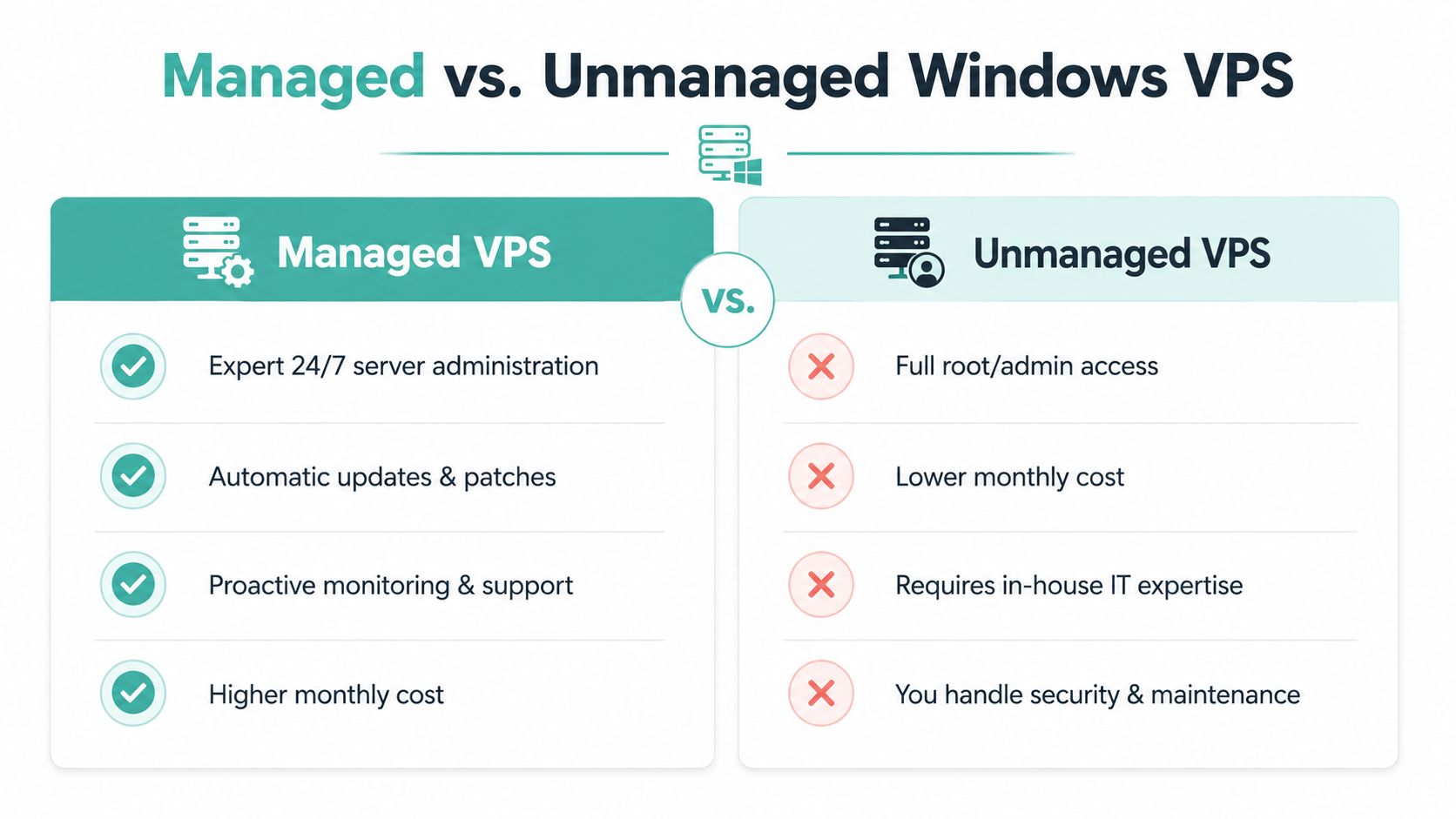
The managed versus unmanaged choice is also where UpTime Web Hosting's managed VPS overview is relevant, because Australian buyers should expect local support, not vague ticket queues. If a provider can't explain exactly what's included in management, it usually means the plan isn't as hands-off as it sounds.
Understanding Windows Licensing and MSSQL Costs
This is the section most comparison pages dodge, and it's where Australian buyers get caught. The advertised VPS price is only part of the bill. Windows Server licensing, Microsoft SQL Server edition choice, GST, and renewal pricing all shape the true monthly cost.
Start with the OS licence model
Windows Server in a VPS environment can be bundled into the hosting plan or handled as a bring-your-own-license setup. Microsoft's Australian Windows Server pricing page directs buyers to contact a Microsoft reseller for specific pricing, which tells you enough on its own, the license model matters, and the provider's pricing sheet won't tell the full story. You can check the structure on Microsoft's Australian Windows Server pricing page.
If the provider bundles the licence, you want that stated clearly. If it doesn't, ask exactly how the Windows licence is handled before you commit. In Australia, there's no reason to accept fuzzy wording on something that affects your invoice every month.
Choose the SQL Server edition for the workload, not the sales page
SQL Server choice is just as important. Express is fine for small, light workloads. Web, Standard, and Enterprise are for progressively more demanding environments, especially when the database drives your app, reporting, or internal operations.
One Australian provider's Windows SQL service lists Windows Server editions including 2016, 2019, 2022, and 2025, plus SQL Server configuration options such as Lite, Starter, and Standard, and describes its Sydney infrastructure as a Tier III-certified datacentre, which is a good example of how bundled Windows and MSSQL options are presented in the local market, see its Windows SQL Server hosting service. If your application only needs a small database, don't pay for more SQL than you'll use. If it powers revenue, don't try to save money by under-specifying it.
GST and renewal pricing are where the invoice gets real
Australian VPS quotes are often shown without GST, so the sticker price can look cleaner than the first invoice. That's a practical problem, not a minor accounting note. Independent Australian provider pages show Windows VPS plans ranging from about A$13.25/month to A$106+/month, and one provider explicitly states prices exclude GST while another highlights GST-included, transparent pricing as a differentiator, according to Binary Lane's Windows VPS pricing page.
A sensible buying process is blunt:
- Check whether GST is included.
- Ask whether Windows Server licensing is bundled or extra.
- Confirm which SQL Server edition is included, if any.
- Look at renewal pricing, not just intro discounts.
- Add bandwidth charges if your traffic is heavy.
If you run an app with frequent data transfers, the bandwidth note from the earlier section matters just as much as licensing. A cheap plan with expensive transfer or upgrade pressure is not cheap at all.
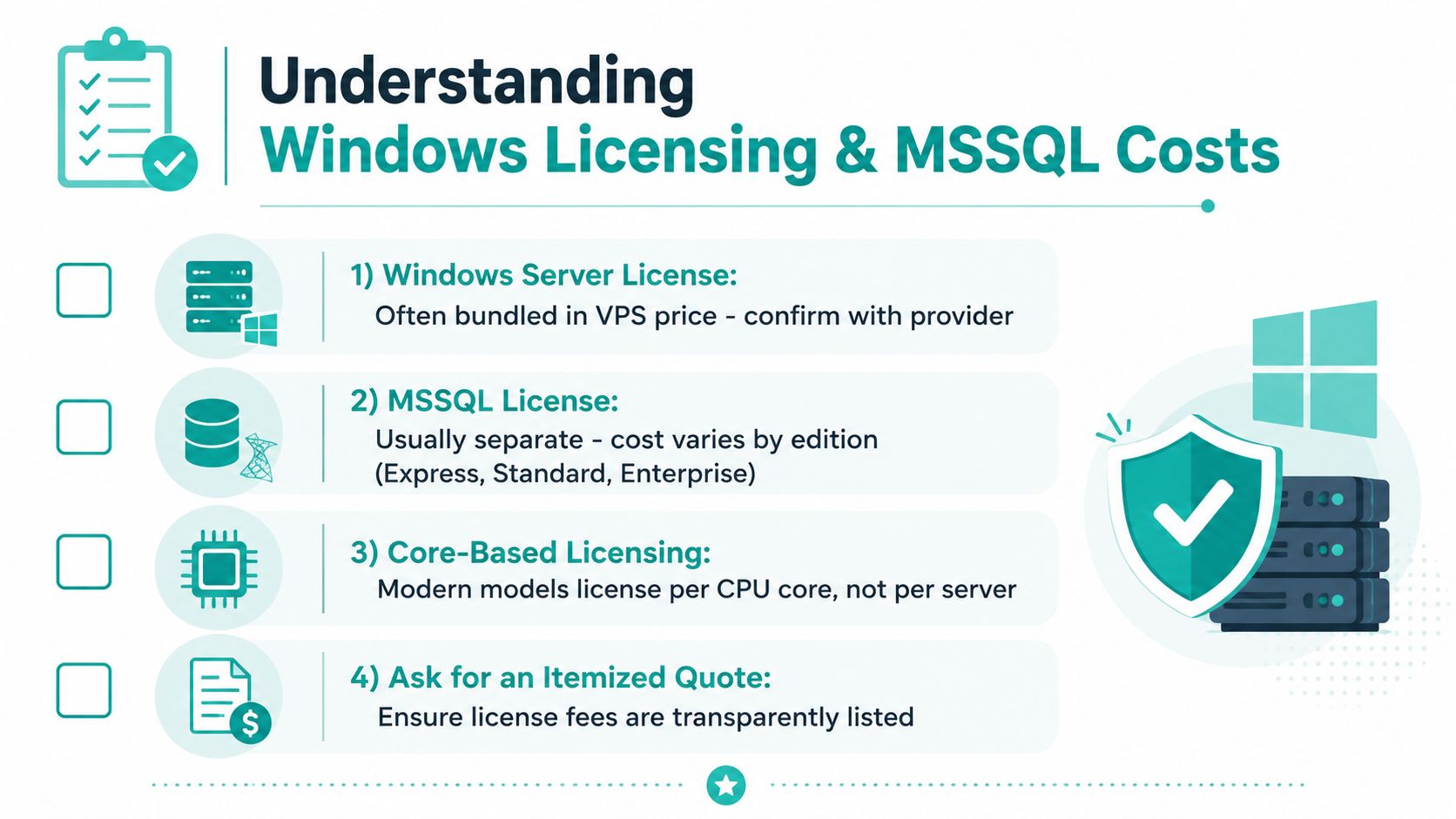
For Australian operators, UpTime Web Hosting's Windows Server 2022 information is a useful reference point because it shows how Windows server choices should be presented plainly, with the operating system and licensing approach treated as core buying factors rather than fine print.
Security Requirements and Australian Data Centre Considerations
Security isn't a nice bonus on a Windows VPS. It's the baseline. If a provider leaves you to figure out firewalling, patching, backups, and recovery alone, you're not getting a hosting service, you're renting a server with a support ticket queue.
The checklist I'd insist on
A serious Windows VPS plan should include DDoS-protected firewalls, malware scanning, automated security patching, and encrypted off-site backups. Those are the features that keep a small Windows environment from becoming a recovery project after one bad update or one ugly intrusion attempt.
Backups need to be Windows-aware. A system image is useful, but you also want system state backups and regular MSSQL database backups, because database recovery is rarely the same as restoring a full disk snapshot. Snapshot-based backup can be quick for rollback, while file-level backup is better for granular recovery, and most businesses need both disciplines in some form.
Practical rule: if the provider can't explain how it restores Windows and SQL separately, the backup plan isn't finished.
Why the Australian data centre matters beyond latency
The location question isn't just about speed. For customer data, local hosting helps with data sovereignty expectations, and for many businesses that's a commercial requirement even before it becomes a legal one. Australia's .au domain system is administered by auDA, which is endorsed by the Australian Government, and Business.gov.au notes that registering a .com.au or .net.au domain requires a commercial entity with an ACN or ABN; that's a very Australian context for hosting and domain management, and it's explained in the government's domain names guidance.
The same local logic applies to public-sector work. The Australian government says the gov.au domain is reserved for Australian Government, state, territory, and local government entities, with registrations and changes handled through official workflows, which you can read about in the gov.au domain administration system guidance.
A provider's infrastructure standard matters too. If the datacentre is Tier III-certified or comparable, that's a better sign of operational resilience than a vague “enterprise grade” badge. Local peering also helps Australian traffic stay efficient, which is why support teams based in Australian time zones are more useful when something breaks during the workday.
UpTime Web Hosting's Australian data sovereignty hosting guidance fits this discussion because it reflects the way local businesses think about custody, access, and jurisdiction. If your customers are in Australia, your host should be able to answer those questions without hand-waving.
Register your new domain name at competitive market prices including free domain add-ons like privacy, DNS Hosting, Custom Nameservers and Forwarding.
Always the best price and no nasty renewal price hikes.
Register A Domain Name
Migration Checklist and Sample Configurations for Common Use Cases
A migration goes well when the prep is boring. The businesses that rush it usually discover forgotten dependencies, old scheduled tasks, or a database restore that behaves differently from the one they tested. Do the groundwork first, then cut over in a controlled window.
The checklist I use before moving a Windows workload
- Audit the current stack. List the application, database, plug-ins, services, scheduled jobs, and any Remote Desktop dependencies.
- Check the Windows version and SQL version. Legacy software often depends on older builds, and that affects the target server choice.
- Choose the migration window carefully. Pick a low-traffic time and tell staff exactly when access may be interrupted.
- Build a staging copy first. Test the app, login flow, database connectivity, and background tasks before you touch production.
- Verify backups before the move. Don't assume a restore will work because a backup job says it succeeded.
The migration itself should be simple once those steps are done. Transfer the files, restore the database, test the application, confirm Remote Desktop access, then update DNS only when you're happy the new server behaves properly. If you skip the staging test, you're gambling with downtime.
Sample configurations that actually fit common SMB workloads
For a light ASP.NET app with a small MSSQL Express database, I'd start with 2 vCPU, 4 GB RAM, modest NVMe storage, and Windows Server 2022 or newer if the app supports it. That's enough for a small internal app, a modest brochure site with login, or a department tool that doesn't get hammered all day.
For a Remote Desktop Services setup for five to ten users, move up to 4 vCPU, 8 to 16 GB RAM, faster storage, and a Windows Server edition that matches your app stack. The important part is consistency, not bragging rights on paper. Shared or cramped resources will show up fast once multiple people log in and start opening the same files and apps.
For a higher-spec e-commerce platform running MSSQL Standard, look at 4 or more vCPU, 16 GB RAM or more, and generous NVMe storage with room to grow. The SQL layer and the web front end should not be fighting for scraps. If the site earns revenue, budget for headroom.
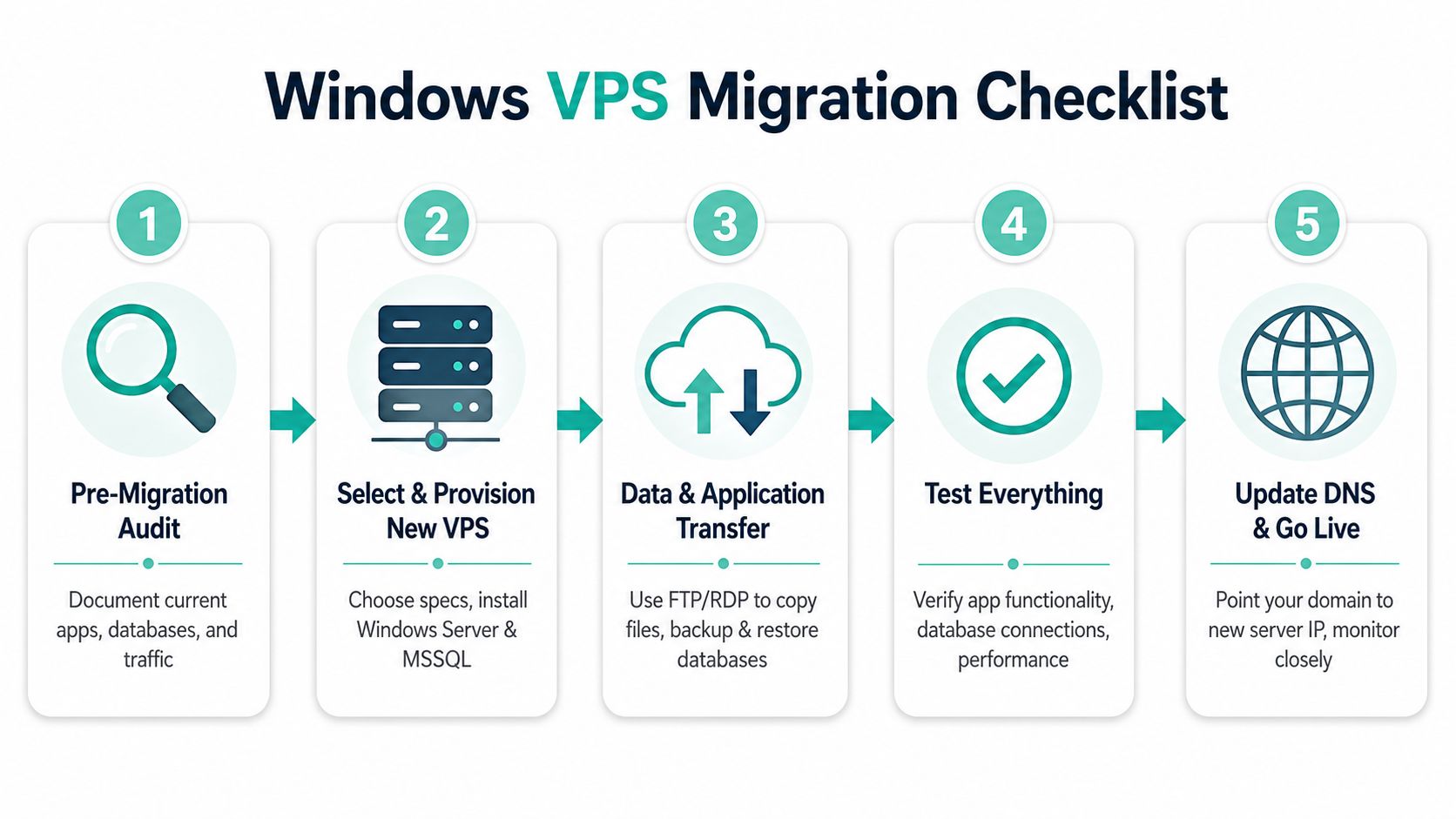
Australian buyers who want help understanding server layout and migration fit can compare their own plan against UpTime Web Hosting's Windows hosting and migration context. The main point is still the same, don't overbuy, but don't under-spec a business system either.
Choosing the Right Australian Windows VPS Provider
A good Australian provider should make your life easier, not force you to decode a pricing puzzle. I'd pick local infrastructure, Australian support hours, GST-inclusive pricing, and a clear renewal policy over a cheaper headline price that shifts the cost into addons and fine print.
What matters when you compare providers
Look for Sydney, Melbourne, Brisbane, or Perth data centres if your users are in Australia, and insist on no-lock-in terms if you don't want to get stuck with the wrong fit. A provider should also spell out whether SSL, DDoS protection, and backups are included in the base plan or sold separately. That's where many plans fail the test.
A useful framework from IT Cloud Global's cloud infrastructure provider features guide is to check not just the product, but the service behaviour around it. That approach suits Windows VPS especially well because the operating system, licence model, and support workload all affect the final bill.
The provider I'd recommend you investigate first is one that publishes transparent Australian pricing, supports Windows workloads properly, and documents how its VPS options handle storage, backups, and support. UpTime Web Hosting fits that local model because it offers Australian hosting, Windows and ASP.NET support, and clear service information for SMBs that want local help rather than a generic offshore queue.
Don't choose on the monthly number alone. Choose on the invoice you'll actually pay, the support you'll actually get, and the Windows knowledge base you'll actually use.
If your shortlist doesn't answer those questions plainly, keep looking. The right provider should make Windows VPS feel like a business tool, not a hobby project.
If you want a local Australian host that keeps the pricing plain, the support close to home, and the Windows stack properly documented, take a look at UpTime Web Hosting. Their Windows VPS options, ASP.NET hosting, and Australian support setup are built for SMBs that need predictable costs and real help, not guesswork.