An Australian founder usually reaches this point in the same way. The product is solid, the service is clear, but the team can't explain it fast enough on a landing page, in a sales deck, or during a first customer call. That's when an explainer video studio stops being a nice-to-have and becomes a commercial decision.
The right studio doesn't just make something attractive. It shapes the message, keeps the production on schedule, and hands back files that work on a website, in an email flow, and inside an Australian hosting setup. That matters because web video consumption rose by 800% in five years, viewers retain 50% more information when sight and sound are combined, and a widely cited benchmark found that 30% of site visitors watch a video with conversion lifts of 10%–20% in some cases, while average viewing time sits at 2.7 minutes source. Those numbers explain why short, structured videos keep winning attention.
Australian buyers also need more than a global creative pitch. They need accessible content, local spelling and tone, and a hosting plan that doesn't make the video load like a dead weight. The best projects connect the studio brief to the hosting layer from day one, then pair the video with a support article so customers can watch, read, and act without chasing help from scratch.
Table of Contents
- Why an Explainer Video Studio Matters for Australian Businesses
- What an Explainer Video Studio Does
- How an Explainer Video Production Workflow Actually Runs
- Explainer Video Pricing and Budgeting in Australia
- How Knowlify Can Help
- How to Evaluate and Choose the Right Studio
- Hosting, Embedding and Streaming Your Explainer Video
- Accessibility, Localisation and Australian Compliance Essentials
- Your Action Plan for Choosing and Launching an Explainer Video

Performance you can feel, backed by clients who depend on it. Read how our support and uptime create long‑term customer success.Power Your Business with Better Hosting
Why an Explainer Video Studio Matters for Australian Businesses
A typical Australian SME gets here fast. A founder has a hosting plan, a SaaS feature, or a professional service that makes sense after ten minutes of conversation, but not in the first ten seconds of a homepage visit. A solid explainer video studio turns that confusion into a clear, disciplined story that buyers can absorb quickly.
That's why this isn't a design purchase. It's a conversion asset, and the studio choice decides whether the video is sharp, brief, and useful, or bloated and vague. The best teams understand how to explain value without leaning on jargon, overproduction, or generic global language that feels disconnected from Australian customers.
For Australian businesses, the brief also needs to extend past the animation itself. The production has to work inside local hosting, accessibility, and search requirements, especially when the video sits on a site that needs to rank, load quickly, and support self-service. A video that looks polished but breaks the page, misses captions, or lacks a companion help article is not finished properly.
Practical rule: if the studio can't explain how the video will live on the page, not just how it will look in a reel, the brief is too shallow.
The right buyer mindset is simple. Choose a studio that can help shape the message, build a sensible delivery plan, and think beyond the edit suite. Australian SMEs need creative work that supports sales, support, and search, not just a nice-looking asset for social media. A project done properly earns its keep across the funnel.
What an Explainer Video Studio Does
A studio starts by turning a messy brief into one clear story. The script sets the message, the storyboard maps the sequence, the visual production handles the look, the voiceover sets the tone, and the editing pulls it into one coherent piece. If one stage is weak, the video feels off from the first frame.

A credible explainer video studio usually begins with scriptwriting and messaging strategy. That means turning a product, service, or workflow into a single narrative with one clear job, not a bundle of competing points. For an Australian hosting provider, that might mean explaining cPanel access or email setup without burying the viewer in account jargon. For a WordPress agency, it could mean showing a migration path that feels calm rather than technical.
The better studios also shape the message with the end use in mind. If the video will sit on a homepage, support page, or campaign landing page, the script needs to work with the page, not against it. That is where planning multiple website pages and hosting contexts matters, because the same asset often needs to support more than one placement without losing clarity.
The core services that matter
A serious studio should handle storyboarding and concept art, because that is where weak ideas get corrected before expensive production starts. Voiceover casting and recording matter too, especially when the audience expects an Australian tone rather than a generic international delivery. Sound design, music licensing, motion graphics, revisions, and final editing round out the job.
A freelancer might cover one part of that process. A template-driven vendor usually covers only a narrower slice. A full-service studio coordinates the whole job, which cuts back-and-forth and keeps the story aligned with the business goal. That difference shows up later, when the video needs cut-downs, localisation, or a version for another landing page.
- Scriptwriting and messaging strategy: turns product detail into a concise buyer story.
- Storyboard and concept art: shows the structure before production starts.
- Animation or live-action production: builds the visual version of the approved concept.
- Voiceover and audio: gives the video pace, tone, and clarity.
- Revisions and finishing: fixes problems before delivery, not after launch.
The buyer's job is to scope the brief around those pieces. If a studio starts selling extras before the core story is clear, the project is already drifting. Keep the language practical, keep the scope tight, and tie every service to a real business outcome.
Host your website with our 5-star rated, cPanel website hosting plans.
Super fast servers, with security included and hosted in your choice of Australian Data Center.
View cPanel Plans
How an Explainer Video Production Workflow Actually Runs
A clean workflow saves more projects than talent does. The usual sequence starts with a discovery call and a brief, then moves into research and messaging, script drafting, storyboard and visual style, voiceover casting, rough cut, full production, sound mix, review, and delivery. The sensible output is a 1920×1080 MP4 H.264 web master at about 8–12 Mbps, which typically comes out around 60–90 MB per minute. If the project might need future re-edits or multiple versions, the studio should also retain a ProRes 422 archive master source.
What the client has to provide at each gate
The client side matters just as much as the studio side. At discovery, the business needs a single goal, a named approver, and a plain-English description of the buyer problem. At script stage, it needs accurate terminology, product screenshots if relevant, and a list of things the video must not say. At storyboard review, it needs fast feedback, because that's where production waste is still cheap.
Late approvals are the usual killer. So is letting three people give conflicting comments without one decision-maker to reconcile them. Studios move faster when the client hands over source material early, keeps one approver in charge, and understands that revisions are easiest before animation locks in.
| Phase | What happens | Typical AU timeline |
|---|---|---|
| Discovery and brief | Goal, audience, scope, and format are set | Early stage |
| Research and messaging | Studio clarifies the story and value proposition | Early stage |
| Script draft | First narrative version is written | Early stage |
| Storyboard and style frame | Visual logic and look are approved | Mid stage |
| Voiceover casting and recording | Voice talent is selected and recorded | Mid stage |
| Production, mix, and delivery | Animation, audio, QA, and final export | Final stage |
For teams managing multiple assets, this workflow also needs clean file handling and version control, especially when the same campaign has a video, help article, and website update in flight. A practical reference is the process for managing multiple websites, because the same discipline applies when several digital assets need to stay aligned.
Keep approvals tight. A good studio can recover from a creative disagreement. It can't recover from five stakeholders changing direction after the storyboard is signed off.
Explainer Video Pricing and Budgeting in Australia
Pricing should be treated as a scope question, not a mystery. A 60-second motion-graphics animation usually sits at the lower end of studio complexity. A 90-second animated explainer costs more because it has more narrative room, more scenes, and often more revision points. Whiteboard and character-led work usually sits somewhere between those two depending on illustration detail, while a short live-action hybrid can climb quickly because it adds filming, talent, and location considerations.
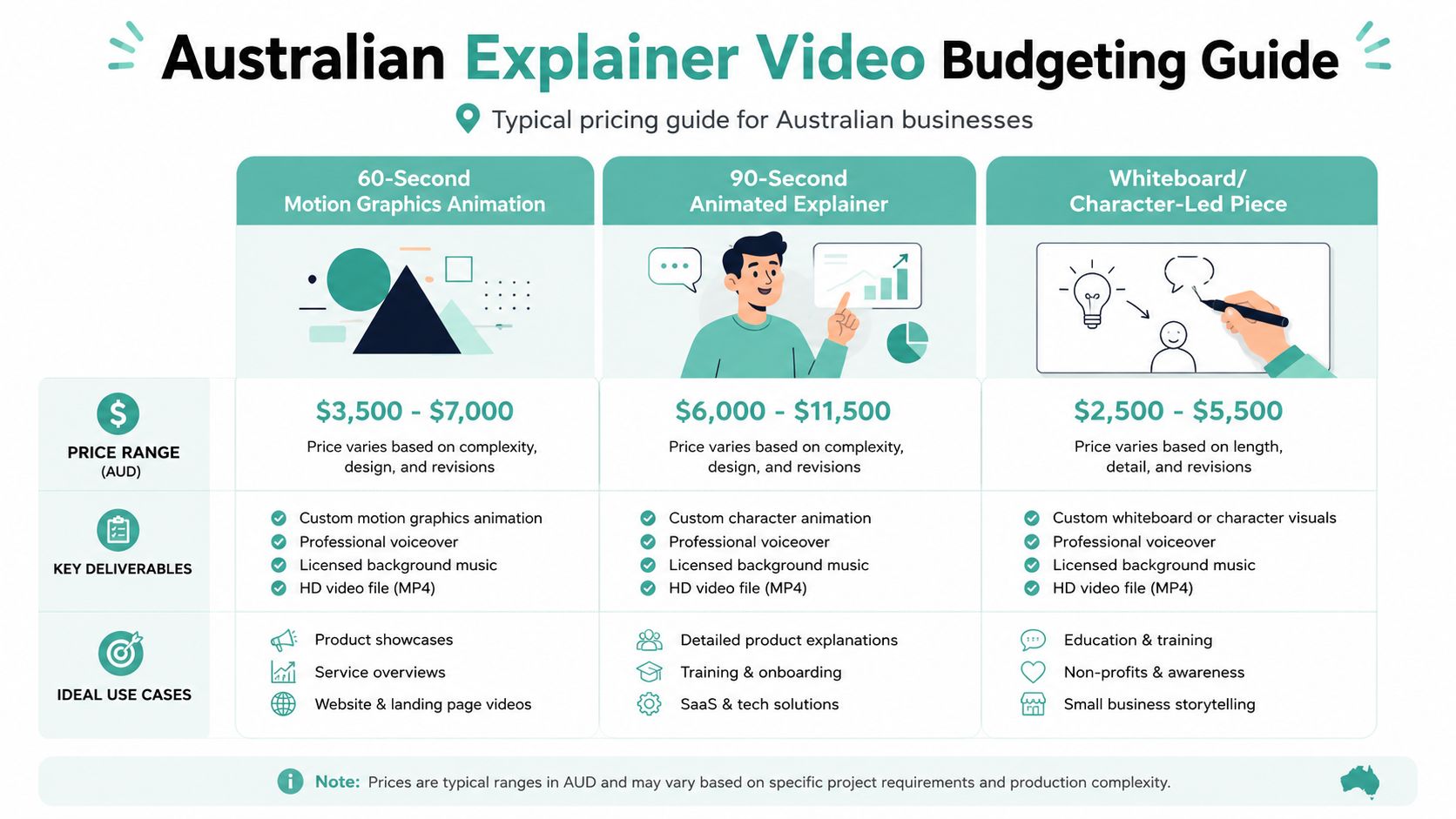
What should be in the quote
A proper quote should spell out script development, storyboard, voiceover, music, and revisions. It should also say whether custom illustration is included, whether on-screen UI mockups are being built from a real product, and whether extra language versions are priced separately. Rush delivery should be explicit too, because compressed timelines force trade-offs.
- Script and storyboard: these are not optional if the studio is shaping the message.
- Voiceover and music: confirm whether licensing is limited or open-ended.
- Revisions: define how many rounds are included and what counts as a revision.
- File delivery: ask for the web master and, if needed, the archive master.
The cleanest budgeting rule is to keep studio production as one line item and paid distribution and hosting as another. Buyers also forget the quiet costs, like captions, future re-edits, and music usage beyond the original term. The best way to protect the budget is to ask what happens if the video needs a shorter cut-down for ads or a revised ending for a new offer.
For cost planning around a broader website project, the website creation cost guide is a useful comparator because video rarely exists in isolation. A landing page, supporting article, and hosting setup can change the project cost more than the animation itself.
A disciplined buyer doesn't chase the cheapest quote. The buyer asks what's included, what's missing, and what will cost more later.
How Knowlify Can Help
Knowlify sits in a different place from a traditional studio, and that matters. It combines an AI video platform with a full-service studio, so businesses can move from documents, URLs, or rough ideas to narrated animated videos without starting every project from a blank page. For teams that need speed, consistency, and an option to hand off the hard parts, that combination is useful.
Where it fits
The self-serve platform is the right choice when a business needs to turn policy documents, SOPs, product notes, or training material into short animated explainers quickly. Its chat-based editing, brand kit controls, custom characters, reference images, avatars, translation, captions, quizzes, SCORM packaging, and LMS integrations make it useful for internal training and repeatable customer education. The studio service suits teams that want scripting, storyboards, and animation handled end to end, with turnaround in as little as 72 hours.
For readers who want to compare a managed production path with a platform-first workflow, the explainer video studio page is a practical place to review how that model works. It's especially relevant when the brief includes multiple versions, localisation, or training distribution rather than a single standalone clip.
What problems it solves
Knowlify is strongest when the bottleneck is content throughput, not just creativity. It helps when a team has too much text and not enough production bandwidth. It also helps when brand consistency matters across regions, because templates, saved assets, and translations reduce drift. For learning and customer education, SCORM and LMS support make the output easier to deploy than a simple downloadable file.
- Text-heavy material: turns dense documents into shorter narrated content.
- Low internal bandwidth: reduces dependence on manual editing for every new asset.
- Consistency across teams: keeps voice, visuals, and formatting aligned.
- Training distribution: supports structured rollout, not just one-off publishing.
It's the right choice when a business needs speed, repeatability, or an internal training library. It's less useful if the project needs a highly bespoke cinematic style with heavy live-action production. The decision comes down to whether the goal is rapid, scalable explainers or a single premium campaign asset. Most Australian SMEs need more of the first than they admit.
Register your new domain name at competitive market prices including free domain add-ons like privacy, DNS Hosting, Custom Nameservers and Forwarding.
Always the best price and no nasty renewal price hikes.
Register A Domain Name
How to Evaluate and Choose the Right Studio
A good shortlist takes one afternoon, not three weeks. Start with portfolio relevance. A studio that has only flashy motion but no proof it can explain a product clearly is not automatically a good fit. The strongest cue is whether the work feels like it was built for a real buyer journey, not just a showreel.
Questions that expose weak vendors
Ask who owns the work, what revision rounds are included, whether voiceover talent fees are transferable, what happens if a delivery date slips, and whether the studio can hand over source files. If the team dodges those questions, that's a bad sign. If it can answer them plainly, the project will usually run better.
A useful filter is the studio's ability to talk about outcomes, not just views. For Australian SMEs, the question is whether the video helps sales, support, or onboarding. A clever animation that doesn't move those needles is decorative.
A storyboard should be visible before contract. If the studio won't show the structure early, it usually hasn't solved the message yet.
Red flags to reject fast
Watch for studios that quote per minute without scoping revisions. That usually means the project will expand later. Also watch for teams that outsource everything without naming a producer. One accountable person matters more than a glossy pitch.
A practical checklist for a buyer also has to include deployment. The video should be able to embed responsively, load cleanly on a content page, and fit the wider website design. If the business needs help aligning the asset with a site build, the small business website design services reference is useful for thinking about the surrounding page, not just the video itself.
The scorecard is simple. Relevance, clarity, process, accountability, and deliverables. Weak vendors fail on at least two of those five. Strong studios make the answers boring, which is exactly what a buyer wants.
Hosting, Embedding and Streaming Your Explainer Video
Once the studio delivers the file, the hosting decision starts. Australian businesses usually have three sensible options. The first is to self-host an MP4 H.264 file on their own infrastructure. The second is to use YouTube or Vimeo for reach. The third is a hybrid, where the hero video sits on-page and a teaser version lives on a wider distribution channel.
The technical default that works
The safe default is H.264 MP4 at 1080p with an HTML5 player. A WebM fallback is useful where browsers want it, and adaptive bitrate helps the player match the visitor's connection rather than forcing one heavy file on everyone. A CDN still matters on local hosting because it reduces friction for media-heavy pages and keeps playback smoother when other site assets are also being served.
SEO matters here too. The page should use video schema markup, a proper poster image, and a transcript on the page so search engines and users can understand the content. The site itself should also be on Australian infrastructure when the audience is local, because fast load times help both user experience and page quality. A video that doesn't embed responsively or loads too late damages the page it was meant to support.
For a technical reference on the delivery side, website speed optimisation for Australian users is relevant because video pages don't get a pass on performance. The same page that sells the product has to stay light enough to load quickly.
The best pattern is usually hybrid. Host the hero video where the page needs speed and control, use a teaser or social cut on a platform built for discovery, and keep the transcript close to the player. That gives the team control over UX without giving up reach.
If the developer can't tell the difference between a video file that looks good and one that embeds well, the project hasn't gone far enough into the hosting layer.
Experience Microsoft 365 Business Standard for free for 30 days.
Up to 25 users with full access to email, OneDrive and Teams. Includes full versions of desktop apps of Outlook, Word, Excel, PowerPoint and more.
Try Microsoft 365
Accessibility, Localisation and Australian Compliance Essentials
An explainer that looks sharp but misses accessibility fails the brief. Australian businesses should treat captions, readable on-screen text, and clear audio as part of the first draft, not the cleanup pass. The Australian Government's Digital Services Standard expects accessible digital content, and the Australian Bureau of Statistics reports that 1 in 5 Australians had a disability in 2022 source. That is enough reason to design for everyone from the start.
What needs to be locked in early
Get the audio mix right before the edit is signed off. The voice track should sit above background music, with enough separation that people can follow it on a laptop, on a phone, or in a noisy office. On-screen text needs strong contrast and a size that still reads on mobile. Captions and subtitles belong in the project scope from day one, because fixing them later costs time and usually weakens the final cut.
Localisation is just as important. Australian spelling, pronunciation, and tone should match the market. A voiceover that sounds imported can make a local product feel generic, even when the animation is strong. That matters most for hosting, privacy, and customer support topics, where people expect plain local language and direct answers.
The compliance side should be handled in the brief, not left to chance. The Privacy Act 1988 applies to many businesses with annual turnover above AUD 3 million, and also to some smaller businesses that handle sensitive information or operate in specific sectors source. For hosting and website services, that makes data handling part of the explainer's message, not a detail to tidy up later. For details on your obligations, see our guide to website legal requirements in Australia.
The cyber layer should be visible as well. The Australian Cyber Security Centre's Essential Eight includes application control, patching, restricting administrative privileges, multi-factor authentication, and regular backups as baseline mitigation strategies source. That gives hosting providers a clean way to show how backups, MFA, and patching reduce common risks in a managed environment.
A good final check is simple. The video should sit beside a knowledge-base article that preserves the process for people who want to read it later or share it internally. The video handles the quick explanation, and the article supports self-service after the first view. That is the standard a serious Australian brief should meet.
Your Action Plan for Choosing and Launching an Explainer Video
The next seven days should be blunt and practical. First, define the one job the video must do. Then write a one-page brief that names the audience, the problem, the desired action, and the place the video will live. If that brief can't be read in two minutes, it isn't ready.
Shortlist three studios using the evaluation framework above. Send each one the same scope, the same deadline, and the same expectations around revisions, source files, and accessibility. That makes the quotes comparable instead of decorative.
The launch checklist that matters
- Confirm the hosting plan: decide whether the hero video is self-hosted, platform-hosted, or hybrid.
- Lock accessibility requirements: captions, contrast, and readable on-screen text belong in the brief.
- Pair the video with a help article: the page should let visitors watch and read the same process.
- Approve the file format: ask for the web master and archive master before sign-off.
- Plan the page context: the landing page, transcript, and metadata should all support search and conversion.
Measure the first 30 days with discipline. Look at play rate, engagement, support deflection, and assisted conversions. If the video gets watched but doesn't help users act, the message is off. If support tickets fall but sales don't move, the call-to-action is weak.
For Australian businesses that want the project to keep working after launch, the smartest move is to host the video on Australian infrastructure, publish the supporting help article on the same landing page, and keep the language local. If the site, the video, and the article are aligned, the asset keeps earning its place long after the edit is finished. For hosting and implementation support, speak with UpTime Web Hosting and use the project as a chance to tighten the whole page, not just the clip.