You notice the problem during a normal workday. A customer says your Australian business website redirected them to an unfamiliar page. Your homepage loads slowly, a browser shows a warning, or a new administrator account appears in WordPress. The instinct is understandable: find the strange file, delete it, and put the site back online.
That quick fix often removes only the visible symptom. Malware can also sit in scheduled tasks, administrator accounts, databases, CMS plugins, PHP startup files, email rules, or stolen credentials. Removing malware means containing the incident, proving what was affected, rebuilding when necessary, and verifying the result.
The Australian Bureau of Statistics reported that 22% of Australian businesses experienced a cyber-security incident in 2021–22, with 5% involving computers infected with malicious software. Among affected businesses, 56% reported an impact, including lost time, service downtime, or reduced staff productivity. These figures make malware removal an operational continuity issue, not just a technical clean-up task. (Australian Bureau of Statistics cyber-security data)
Table of Contents
- Recognising the Warning Signs Before You Panic
- Containing the Infection Before It Spreads
- Removing Malware From WordPress, cPanel, and Windows Hosting
- Restoring from Backup and Verifying the Cleanup
- Hardening Your Site and Knowing When to Get Professional Help

Performance you can feel, backed by clients who depend on it. Read how our support and uptime create long‑term customer success.Power Your Business with Better Hosting
Recognising the Warning Signs Before You Panic
A small Australian retailer often notices malware through a customer rather than a security tool. Someone reports that the website opened a gambling page, a product page redirected to an unrelated domain, or a pop-up appeared over the checkout. Internally, the site may look normal because the attacker is showing the malicious behaviour only to visitors from selected locations, devices, or search results.
Slow loading can be another clue, particularly when the hosting account's resource usage changes without a corresponding increase in legitimate traffic. On a Windows endpoint, unusual browser extensions, repeated security alerts, unfamiliar software, or unexpected password changes deserve the same attention. In WordPress, Joomla, and shared hosting environments, suspicious administrator accounts and unfamiliar database entries are especially important because they can provide access after the obvious file has been removed.
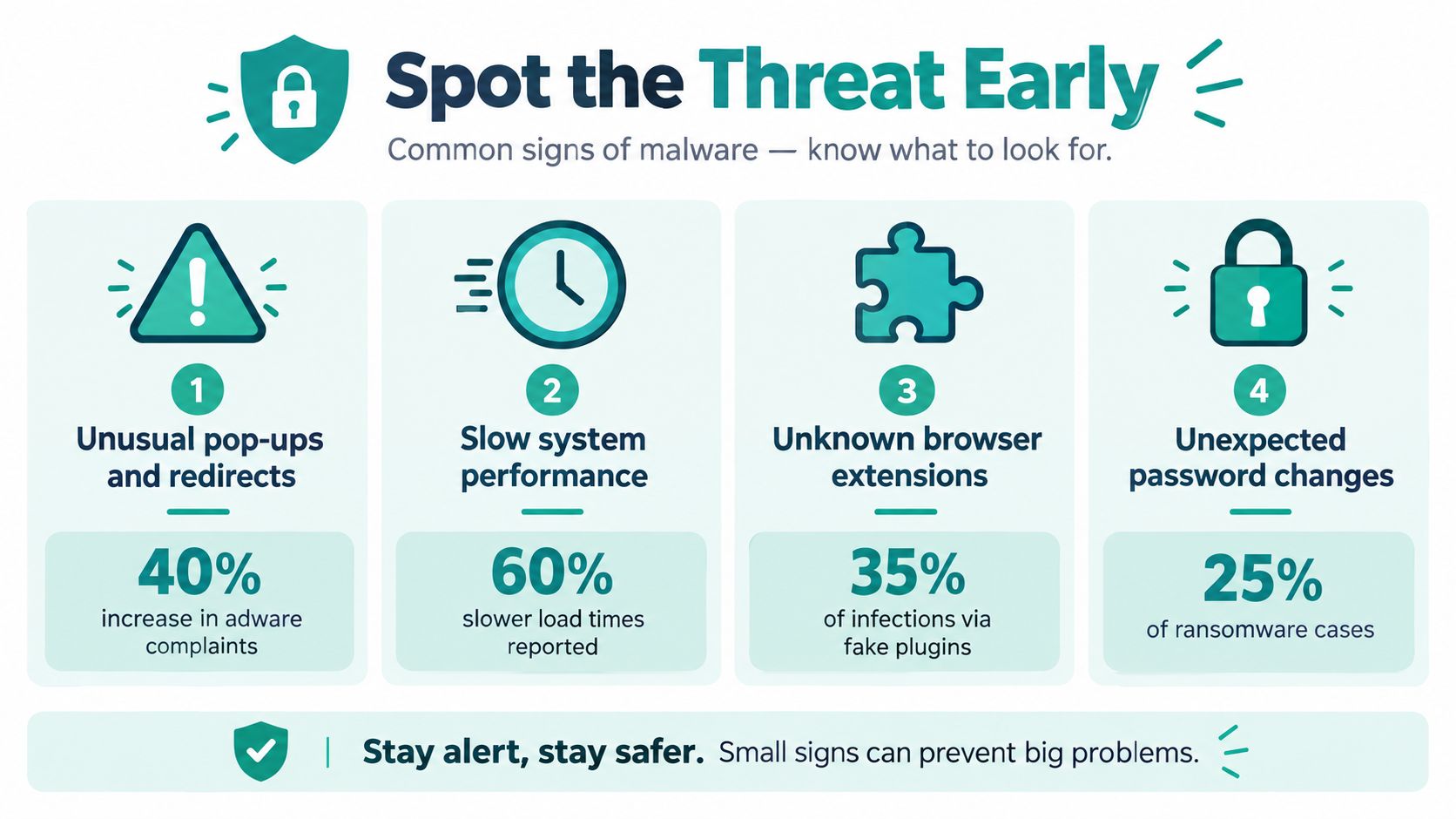
Look for evidence, not just symptoms
Start by recording what happened. Note the affected URL, the time, the browser message, the user account involved, and whether the behaviour occurs on one device or across several. Take screenshots and preserve relevant hosting, web server, CMS, authentication, and email logs before making changes.
A scanner can identify known malicious signatures and suspicious modifications, but a clean scan isn't proof that the account is safe. Review administrator accounts, recently modified files, scheduled tasks, plugin and theme changes, database content, outbound mail activity, and redirects. If the scanner finds one injected file, treat that as an indicator to investigate the wider environment rather than as a complete diagnosis.
Practical rule: A visible redirect is a symptom. The real question is how the attacker gained access and what access remains.
Silent infections can damage search visibility, customer trust, and email deliverability even when the website appears operational. If you need a structured starting point, a website health checkup can help identify performance, configuration, and security issues before you begin altering files.
Containing the Infection Before It Spreads
A compromised website can keep serving pages while an attacker uses a hidden administrator account, scheduled task, or CMS extension to regain access. Containment comes before deletion. Put the site into maintenance mode or restrict public access where practical. Disconnect an infected computer from networks and removable media, and stop using it to access hosting, email, banking, or administrator accounts.
Preserve evidence before cleaning. Retain relevant logs, record affected systems and times, and create a forensic copy or clean backup where your response process permits. Map connected services and removable media that may have been exposed. During a ransomware response, never attach recovery media to an infected device or network.
A containment workflow for small businesses
Adapt this workflow to the incident:
- Assign coordination: Give one person responsibility for technical decisions, customer communication, records, and business choices.
- Isolate the system: Take the website offline or separate the endpoint from networks, shared folders, and removable media.
- Protect evidence: Preserve logs, screenshots, ransom notes, suspicious emails, and relevant timestamps before deleting anything.
- Map access paths: Review hosting panels, CMS accounts, email, databases, APIs, backups, staff devices, scheduled tasks, plugins, and third-party integrations.
- Protect clean backups: Keep backups disconnected from infected systems and avoid overwriting the last known-good copy.
- Escalate early: Contact your hosting provider or an incident responder if privileged accounts, customer data, ransomware, or reinfection is involved.
Australian Signals Directorate guidance on isolating and removing malware explains that antivirus removal can be attempted after isolation, while restoration from a known-good backup or a rebuild may be the only reliable way to ensure eradication. Do not treat a stopped redirect as proof of a clean environment. Check persistence layers and verify access from a clean device.
Operational continuity matters during the investigation. A venue, retailer, or professional practice may still need to accept bookings, process enquiries, and communicate with customers. Guidance on crisis response for venues provides useful context for coordinating those decisions during a security incident.
A web application firewall can block or filter unwanted requests while you investigate, but it cannot remove malicious code or compromised credentials. Learn what a web application firewall does and use it as a containment layer, not as evidence that the underlying infection has gone.
Host your website with our 5-star rated, cPanel website hosting plans.
Super fast servers, with security included and hosted in your choice of Australian Data Center.
View cPanel Plans
Removing Malware From WordPress, cPanel, and Windows Hosting
Removal depends on the platform and the quality of your evidence. A known-clean rebuild is usually more defensible than trying to identify every malicious change in place, but rebuilding can mean downtime, lost customisations, or complicated database recovery. In-place cleaning can preserve the site, yet it carries a greater risk when you can't establish what the attacker changed.
WordPress and other CMS platforms
Start with the CMS core, plugins, themes, uploads, database, and user accounts. Compare core files with trusted versions, remove unused extensions, reinstall required plugins from legitimate sources, and review recently changed themes and configuration files. Don't just delete the plugin named by a scanner. An attacker may have modified another extension, added a hidden administrator, or inserted code into the database.
Review every administrator account and reset credentials from a clean device. Check scheduled tasks, application configuration, PHP startup files, and outbound email behaviour. A site that stops redirecting after one file is removed still needs validation because the attacker may retain access through credentials or persistence elsewhere.
For a WordPress site with repeated reinfection, unexplained privileged activity, or uncertain file integrity, restore the database and uploads carefully into a fresh application environment. Cleaning in place is more reasonable when you have reliable logs, a known entry point, trustworthy file comparisons, and a way to validate the complete account.
cPanel and shared hosting
In cPanel, inspect the entire account rather than only the public website directory. Review public HTML, subdirectories, upload folders, cron jobs, configuration files, parked or addon domains, email accounts, and recently modified files. Shared hosting accounts can contain several websites, and one neglected installation may provide a path back into another.
A hosting malware scanner can quarantine or remove suspicious files, which is useful for triage. It doesn't replace a review of credentials, application versions, administrator accounts, databases, and scheduled tasks. Delete quarantined files only after preserving the evidence needed to understand the incident, particularly when customer information or email compromise is possible.
Detailed guidance on WordPress malware removal can support the hands-on review. The important distinction is that a scanner identifies and handles files, while eradication requires you to address access and persistence.
Windows and ASP.NET hosting
Windows and ASP.NET incidents need attention beyond the website directory. Review IIS configuration, application pools, deployment packages, scheduled tasks, service accounts, administrator memberships, web.config files, upload paths, and authentication logs. An infected application can be restored while a scheduled task or compromised account reinstates the malicious code.
A server rebuild is preferable after ransomware, repeated reinfection, unexplained privileged-account activity, or uncertainty about the integrity of the operating system. If you clean the server in place, document every change and validate the application from a separate clean device before returning it to public service.
During the 2020–21 financial year, the Australian Cyber Security Centre responded to nearly 160 ransomware-related incidents and removed more than 7,700 websites or services hosting malicious coronavirus-related content. 58% of removals occurred within 24 hours, and 96.9% of detected malicious web services were eventually taken down. (ACSC Annual Cyber Threat Report) These figures reinforce the value of rapid containment followed by verification.
| Hosting type | Best first action | Common persistence locations | When to rebuild instead of clean |
|---|---|---|---|
| WordPress or CMS | Isolate the site, preserve logs, and review core files, plugins, themes, database entries, and administrators | Plugins, themes, uploads, database content, scheduled tasks, administrator accounts, PHP startup files | Repeated reinfection, ransomware, unknown file changes, or unexplained privileged activity |
| cPanel or shared hosting | Isolate the account and inspect all domains, directories, cron jobs, email accounts, and recent file changes | Public HTML, uploads, configuration files, addon domains, cron jobs, mailboxes, credentials | Multiple affected sites, uncertain account integrity, or no trustworthy clean state |
| Windows or ASP.NET | Isolate the server and review IIS, application pools, scheduled tasks, service accounts, and web files | Scheduled tasks, web.config, upload paths, deployment files, service accounts, application pools | Operating-system compromise, ransomware, persistent reinfection, or compromised administrator access |
Restoring from Backup and Verifying the Cleanup
A backup is useful only if it predates the compromise and can be restored reliably. Don't assume the newest copy is clean. Identify a known-good restoration point, preserve the affected environment where possible, and test the recovery process in an isolated location before replacing the public site.
For a website, restore the application files and database into a clean environment. Compare CMS core files against trusted versions, reinstall extensions from legitimate packages, and inspect uploads for executable content or unexpected scripts. If the backup contains the same persistence mechanism, restoration alone will reproduce the problem.
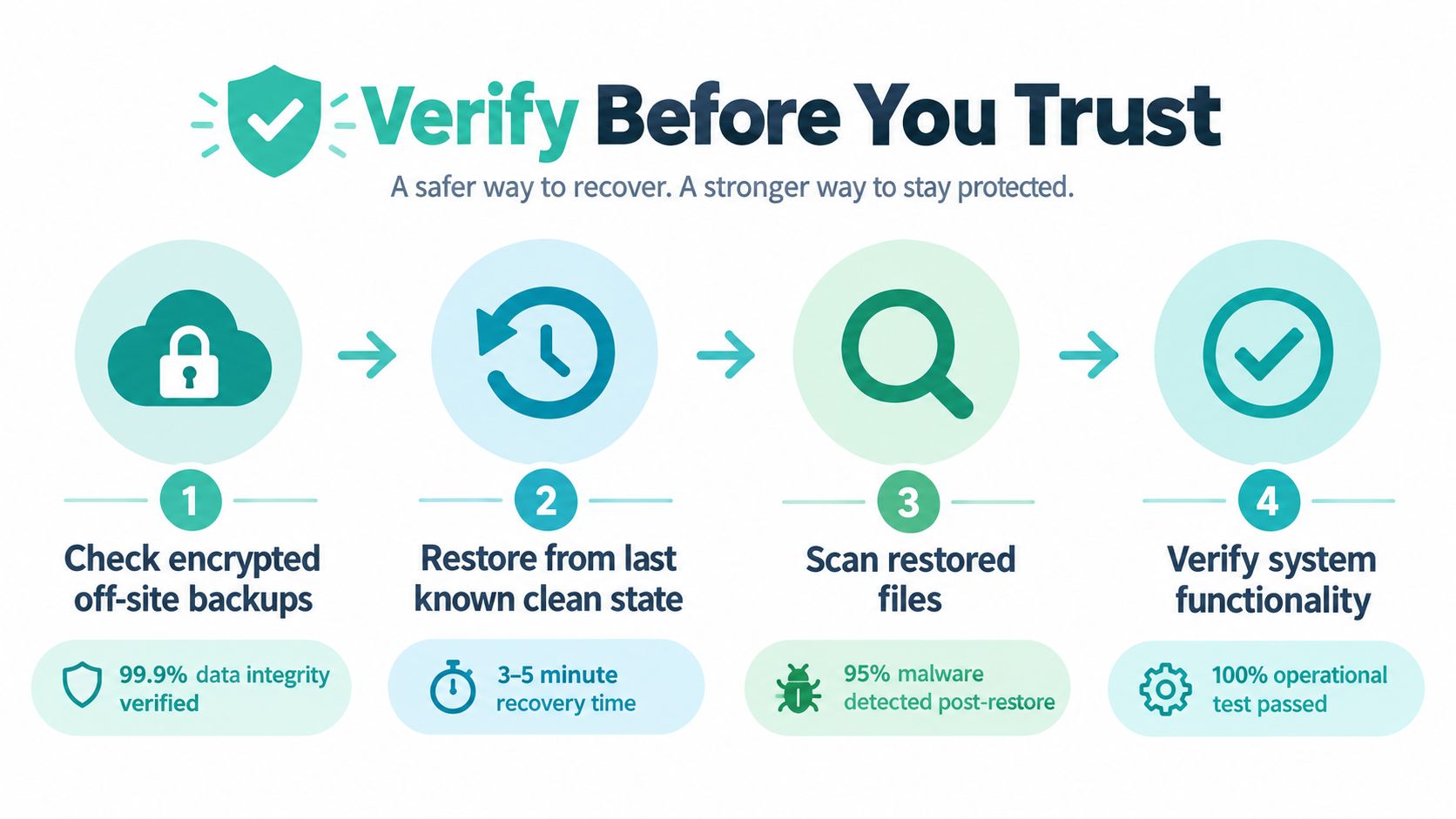
Verify each layer before public access
Use a written verification record. It should cover:
- Files and applications: Compare core software with trusted versions, review modified files, remove unused components, and scan restored content.
- Accounts and access: Check administrator, hosting, database, mailbox, SSH or SFTP, API, and service accounts. Remove unknown users and rotate credentials from a clean device.
- Persistence controls: Review scheduled tasks, cron jobs, PHP startup files, CMS hooks, email rules, and deployment processes.
- Website behaviour: Test every important page, form, login, redirect, download, checkout path, and outbound email function.
- Infrastructure evidence: Review authentication logs, DNS changes, hosting activity, firewall events, and unusual outbound connections.
- Monitoring: Keep heightened review in place after restoration so a returning redirect or new file change is detected quickly.
“Looks normal” is not the same as clean. Test from different browsers and devices, inspect redirects, review source changes, and confirm that administrator accounts match your records. Validate DNS and outbound mail behaviour before you tell customers the incident is resolved.
If malware may have accessed personal information, treat the event as a possible privacy incident. The OAIC recorded 532 notifiable data breaches from January to June 2025, and malicious or criminal attacks were responsible for 59% of those notifications. (OAIC data breach information)
Under the Notifiable Data Breaches scheme, an entity generally has a maximum of 30 days to assess whether a suspected breach is likely to result in serious harm. If an eligible data breach is confirmed, notification needs to identify the organisation, describe the breach and information involved, and provide recommendations for affected individuals. Preserve evidence and obtain privacy or legal advice where the facts warrant it.
You can also follow the procedure for creating and downloading a full cPanel backup, but don't treat the existence of a downloadable backup as proof that it has been tested or is free of malware.
Hardening Your Site and Knowing When to Get Professional Help
A restored website can be compromised again within hours if the entry point remains open. Patch the operating system, CMS, plugins, themes, libraries, and applications. Remove unused software, restrict administrative access, enforce SSL, tighten file permissions, and place exposed services behind a correctly configured firewall.
Reset every credential that may have been exposed, using a clean device. Include hosting panels, CMS accounts, databases, mailboxes, SSH or SFTP, APIs, administrator accounts, and service accounts. Enable multi-factor authentication where available, and never reuse a password that was active during the incident.
Build controls around the persistence you found
A deleted file does not remove a scheduled task that restores it. Audit scheduled tasks regularly and restrict who can create or edit them. Review newly created accounts and privilege changes after an administrator account has been compromised. If a plugin provided the entry point, update it, remove abandoned extensions, and monitor file changes after updates.
The ACSC recommends security software that scans regularly for suspicious files and programs, together with automatic updates for operating systems, applications, and security software. A small retailer can schedule scans on point-of-sale computers and office laptops, then investigate a quarantine alert rather than restoring the file without review. (ACSC small business cyber-security guide)
Use several controls because each addresses a different failure. Malware scanning identifies suspicious files, a DDoS-protected firewall filters hostile traffic, backups support recovery, monitoring exposes changes, and access controls limit stolen credentials. A practical website security checklist can turn these measures into recurring maintenance work.
Know when to stop cleaning in place
Contact a hosting provider or security professional if ransomware is involved, an attacker had administrator access, customer information may have been exposed, the site keeps reinfecting, or you cannot establish which files and accounts changed. Professional response work can preserve evidence, rebuild the environment, validate backups, rotate credentials, and coordinate technical remediation with privacy and operational decisions.
Australian businesses can report significant cyber incidents through the 24/7 Cyber Security Hotline on 1300 CYBER1, or 1300 292 371. The Australian Signals Directorate's posture guidance reports that 90% of surveyed entities had an incident-response plan in 2025, while only 35% said they reported at least half of observed incidents to ASD in 2024. (Australian Signals Directorate cyber-security posture guidance) Reporting decisions depend on the circumstances, but under-reporting can limit access to useful support and incident context.
Treat malware removal as a controlled business process. Contain first, preserve evidence, rebuild when eradication cannot be proven, rotate access, patch the entry point, and verify every public-facing function before reopening.
UpTime Web Hosting provides Australian cPanel, WordPress, and ASP.NET hosting with malware scanning, DDoS-protected firewalls, encrypted off-site nightly backups, and 24×7 monitoring. If your website has been compromised or you want a safer recovery setup, visit UpTime Web Hosting to review local hosting and support options.