When it comes to managing your website, you shouldn't need a degree in computer science. That’s where cPanel hosting comes in. Think of it as the simple, user-friendly dashboard for your entire web presence—an icon-based control panel that turns complex tasks into a few easy clicks.
From setting up a professional email address to installing WordPress, cPanel is the go-to for countless Australian businesses. It has long been the industry standard for a very good reason.
Why cPanel Hosting Still Dominates in Australia

If your website had an engine room, cPanel would be the control panel making sure everything runs smoothly. Even with new technologies popping up, this tried-and-true platform is still the first choice for thousands of Aussie businesses in 2026, from startups in Perth to big eCommerce stores in Sydney. Its lasting power comes down to one thing: it makes managing a website easy.
And we're not just talking about a handful of sites. Early 2026 data shows that 37,215 active websites across Australia run on cPanel. That figure really speaks to its reliability and popularity with the small and medium businesses that form the backbone of our digital economy. You can always explore more about cPanel's local market share and see how it stacks up.
So, what makes it so essential for a business owner? It’s all about turning technical jargon into simple, clickable actions. Instead of typing out code or wrestling with command lines, you get a clean, visual interface to handle all the important stuff behind the scenes.
To give you a clearer picture, here’s a quick breakdown of what you're actually getting with cPanel and why it matters for your business.
cPanel at a Glance: Core Features and Business Benefits
| Feature | What It Does for You | The Real-World Benefit |
|---|---|---|
| One-Click Installers | Lets you install apps like WordPress, Joomla, or Magento in seconds. | You can launch a blog, online store, or forum without needing a developer, saving you time and money. |
| Email Management | Create and manage professional email accounts (e.g., you@yourbusiness.com.au). | Builds brand trust and keeps your business communications separate and organised. |
| File Manager | A visual way to upload, edit, and organise your website files directly in your browser. | No need for confusing FTP software. It’s as easy as moving files around on your own computer. |
| Backup Wizard | Allows you to create and restore full or partial backups of your website. | Peace of mind. If anything goes wrong, you can quickly restore your site and get back online. |
| Security Tools | Tools to manage SSL certificates, block malicious IPs, and protect directories. | Helps keep your website and customer data safe from common online threats. |
| Domain Management | Add and manage addon domains, subdomains, and redirects from one place. | You can run multiple websites or marketing campaigns from a single hosting account, keeping everything tidy. |
Ultimately, cPanel gives you the keys to your website without forcing you to become a mechanic. It puts you in control.
The Strategic Advantage of Local cPanel Hosting
Choosing a provider that offers web hosting services with cPanel is a great start, but picking one with servers and support right here in Australia is the real game-changer. When your web host, like UpTime Web Hosting, has infrastructure in Aussie cities like Sydney and Melbourne, your website becomes noticeably faster for your local customers.
This isn't just a minor detail; it has a direct impact on your business.
Here’s what that means in practical terms:
- Faster Site Speed: A customer in Brisbane visiting your site hosted in Sydney gets a much snappier experience than if that same site was hosted in the US or Europe. Faster load times mean happier visitors.
- Improved SEO: Google knows where your users are searching from. It tends to favour local websites for local searches, giving you a valuable leg-up on your international competition.
- Local Support: When things go wrong (and sometimes they do), you want to talk to someone who's in your time zone and understands the challenges of running a business in Australia. No more waiting for a support team in another country to wake up.
cPanel isn’t just another tool; it’s a business enabler. It levels the playing field, allowing entrepreneurs to focus on what they do best—growing their business—instead of getting tangled up in technical headaches. Pair cPanel’s ease of use with a local host’s performance, and you’ve got a rock-solid foundation for success.
In the end, your choice of hosting isn't just a line item on a budget. It's a foundational business decision that provides the stability and tools you need to build, manage, and grow your presence online.

Performance you can feel, backed by clients who depend on it. Read how our support and uptime create long‑term customer success.Power Your Business with Better Hosting
Exploring the Practical Benefits of cPanel Hosting
Beyond the initial setup, the real magic of web hosting services with cpanel happens in the day-to-day running of your website. Its entire philosophy is built around one simple idea: putting powerful tools in your hands, without you needing to be a tech wizard. The result is a system that genuinely saves you time, cuts down on frustration, and gives you direct control over your corner of the internet.
Think about it. You need a professional email address for your new business. Instead of logging a support ticket and waiting around, you can jump into cPanel and create contact@yourdomain.com.au in less than two minutes. This isn't just a small win; it's an instant credibility boost for your brand.
Effortless Website and Application Management
One of the most loved features in cPanel is its use of one-click installers like Softaculous. This brilliant tool automates the installation of over 400 different applications, turning what could be a headache-inducing technical task into a single click.
For example, getting a new WordPress site up and running is almost laughably easy:
- Find the Softaculous Apps Installer inside cPanel.
- Choose WordPress and hit "Install Now."
- Pop in your site name, admin details, and select your domain.
- Click "Install," and your website is live in about a minute.
This is a massive advantage for small businesses and agencies. You can spin up a blog, get an eCommerce store going with Magento, or launch a customer forum with phpBB, all without ever looking at a line of code. It’s this level of accessibility that makes cPanel such a powerful ally for getting things done quickly.
The core benefit of cPanel isn't just the sheer number of features. It's the confidence it gives people who aren't developers. It turns complex server administration into a series of simple, manageable tasks, a bit like using an app on your phone.
Simplified Email and Domain Administration
Managing your business emails and domains is just as straightforward. The icon-based layout of cPanel makes even more advanced tasks feel intuitive. It’s not just about creating accounts; you can set up email forwarders, configure auto-responders for when you’re out of office, and tweak spam filters to keep your inbox clean.
cPanel also handles critical security for your communications, including advanced email authentication settings. Getting these right helps protect your domain’s reputation and makes sure your emails actually land in your customers' inboxes. To dig deeper, you can learn more about the impressive benefits of web hosting for businesses in our other guide.
Domain management is another area where cPanel shines. From one clean dashboard, you can:
- Add Subdomains: Easily create new sections for your site, like
blog.yourdomain.com.au. - Manage Addon Domains: Host multiple, entirely separate websites all under a single hosting plan.
- Set Up Redirects: Point an old URL to a new one, which is crucial for preserving your SEO rankings.
Powerful Tools for Performance and Security
Your cPanel dashboard also doubles as your command centre for keeping your site fast and secure. Most quality Australian hosts bake powerful tools right into the cPanel interface. For instance, hosts using LiteSpeed Web Server often include the LSCache plugin, which you can manage directly from cPanel to give your WordPress site a serious speed boost.
Security tools are also front and centre. You can install a free SSL certificate with just a couple of clicks, which secures your site and gives visitors that all-important padlock icon. You’re also able to manage firewalls, run malware scans, and create password-protected directories to lock down sensitive areas of your website.
Having all these tools integrated means you’re not jumping between different accounts and platforms to look after your site's health. Performance, security, and content management are all under one roof, giving you a crystal-clear view of your entire online presence.
Your Checklist for Choosing an Australian cPanel Host
Choosing the right provider for your web hosting services with cpanel goes way beyond just ticking boxes on a features list. It’s really about finding a dependable partner for your online presence. With so many hosts out there, it's easy to get tangled in technical jargon and tempting introductory offers that don't tell the whole story.
This practical checklist is designed to help you cut through that noise. It will help you weigh up what actually matters for your Australian business, ensuring you make a choice you won't regret later on.
This simple decision tree shows exactly where cPanel fits into the journey of getting your business online.
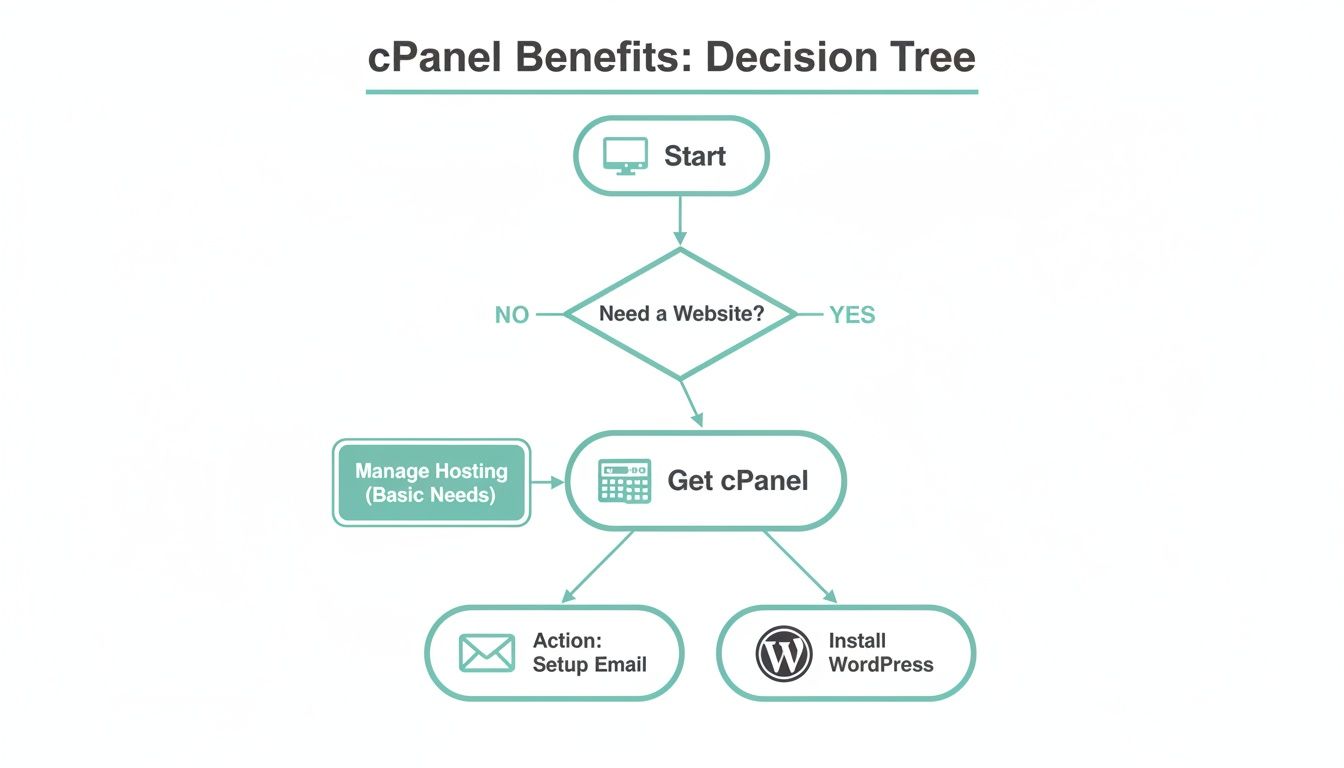
As you can see, once you've decided you need a website, cPanel's role is to make essential tasks like setting up emails or installing WordPress with a single click incredibly simple. It's the logical next step.
Australian Performance and Infrastructure
Where your website "lives" online directly impacts how fast it loads. For an Australian audience, local hosting isn't just a perk; it's absolutely vital for a snappy user experience and a leg up in local SEO.
- Data Centre Location: Does the host actually have servers in Australia? A provider with data centres in cities like Sydney or Melbourne guarantees lower latency for your local customers, which means a faster-loading website for them.
- Server Technology: Look deeper than just the location. Are they using modern tech like LiteSpeed Web Server? LiteSpeed is much faster than the old-school Apache servers and often comes with powerful caching tools like LSCache, which can give WordPress sites a massive speed boost.
- Resource Allocation: Get specific. A quality host will be upfront about the CPU, RAM, and storage that comes with your plan. If a host is vague about these crucial performance details, that's a red flag.
Think about it this way: a boutique eCommerce store in Adelaide will see a real-world benefit from hosting its site on a LiteSpeed server in Sydney. Product pages will load almost instantly for a customer in Perth, making it far less likely they'll get frustrated and abandon their cart.
Robust Security Features
In an online world full of threats, security can't be an afterthought. Your web host should be providing a multi-layered defence system to protect your website, your business data, and your customers' private information.
Security isn't a single product but a continuous process. A good cPanel host integrates multiple security layers, from the network level down to your individual website, creating a strong defensive posture against common threats.
Here are the key security features you should verify:
- Free SSL Certificates: Every website today needs an SSL certificate (that's the little padlock in the browser bar). This should always be a free, standard feature that you can easily switch on via cPanel.
- Malware Scanning: Does the host proactively scan for malware? Regular, automated scanning helps catch and isolate nasty threats before they can do serious damage to your site or your reputation.
- Firewall and DDoS Protection: Your first line of defence is a solid Web Application Firewall (WAF) and DDoS mitigation. Make sure your host has these critical protections in place at the network level.
Reliable Backups and Recovery
A dependable backup system is your ultimate safety net. It's the one feature you hope you never have to use, but you'll be incredibly thankful for it if disaster ever strikes. Don't settle for anything less than automated, comprehensive backups.
What to look for:
- Automated Daily Backups: Backups should run automatically every single day without you needing to lift a finger.
- Off-Site Storage: Backing up your site on the same server it lives on is a huge risk. Your host must store backups in a separate, secure, off-site location.
- Easy Restoration: How simple is it to restore a backup? With cPanel, you should be able to restore your entire site, a few files, or just a database with a few clicks. For instance, UpTime Web Hosting includes JetBackup in cPanel, allowing for simple one-click restores.
Responsive Australian Support
When you need help, you want to talk to a real person who understands your problem and is in a similar time zone. "24/7 support" doesn't mean much if you end up dealing with an overseas call centre agent who's just reading from a script.
A great support system includes:
- Local Australian Team: Is the support team actually based in Australia?
- Multiple Contact Methods: Can you reach them by phone (a 1300 number is a good sign), support ticket, and email?
- Genuine Expertise: Check out customer reviews. Do people praise the support team for their technical know-how and their genuine willingness to help?
Transparent Pricing and Hidden Fees
So many hosting providers hook you with unbelievably low introductory prices, only to have the cost skyrocket when it's time to renew. Transparent pricing is the mark of a host you can trust. There's a strong demand for clear, no-fuss pricing, which is one reason why cPanel is still so popular with Australian businesses.
In fact, data shows that 72% of cPanel users in Australia are businesses with fewer than 50 employees—a group that really values straightforward and predictable costs.
- GST Included: Is GST included in the advertised price, or is it a nasty surprise added at checkout?
- Renewal Costs: Be crystal clear on what the price will be after your initial term is over.
- No Hidden Fees: Watch out for sneaky setup fees, migration fees, or extra charges for things that should be standard, like backups.
As you build your checklist, it's also smart to see how cPanel stacks up against the broader landscape of the top website hosting options in Australia. For a complete overview, you can also read our guide on factors to consider when choosing web hosting services.
Host your website with our 5-star rated, cPanel website hosting plans.
Super fast servers, with security included and hosted in your choice of Australian Data Center.
View cPanel Plans
How the Right Host Fuels Your Business Growth in Australia
Choosing a provider for web hosting services with cPanel is about so much more than just finding a place to park your website. Think of it as a strategic investment in your Australian business's future. The right host works behind the scenes, acting as a silent partner that provides the solid foundation you need to scale, adapt, and make smarter decisions as you grow.
It’s a bit like choosing a commercial space for a new retail shop. A tiny, cheap location might seem like a good deal at first, but what happens when you get popular? If there’s no room to expand, poor foot traffic, and the power keeps cutting out, that cheap space will quickly start costing you business. A quality web host gives you the digital version of a prime location with plenty of room to build.
Planning for Scalability and Future Growth
Every business owner dreams of growth, but it's surprising how few plan for the technical side of it. A common mistake is picking a hosting plan that only covers what you need right now, which almost always leads to major headaches down the track. A good cPanel host offers a clear and painless upgrade path.
You might kick things off with a budget-friendly shared hosting plan when you’re just launching. But as your website traffic starts to climb and you add more features, you’ll need to easily upgrade to a plan with more power.
This scalability is absolutely crucial. It helps you dodge two massive business disruptions:
- Costly Migrations: Moving your entire website to a new host is a technical nightmare. It’s time-consuming and carries a real risk of downtime, which can instantly damage your reputation and stop sales in their tracks.
- Performance Bottlenecks: An overloaded server means a slow website. A slow website means frustrated customers and lost revenue. Seamless upgrades stop this from ever becoming a problem.
The Power of Local Data Centres and Speed
In Australia's fast-paced digital economy, speed isn't just a nice-to-have; it's everything. A fast-loading website has a direct impact on user experience, how many visitors turn into customers, and even where you show up in Google search results. This is where hosting with local data centres gives you a massive competitive edge.
When you choose a host with servers in Australian cities like Sydney or Melbourne, your website’s data doesn't have to travel halfway across the world to reach your local customers. This slashes something called "latency," making your site load noticeably faster for Aussie visitors. The result? Better engagement and more sales.
There’s a reason the Australian web hosting market is booming. Valued at AUD 4.07 billion in 2025, it's projected to skyrocket to AUD 11.56 billion by 2035, growing at an impressive 11% each year. With cPanel powering tens of thousands of Australian websites, it’s clear there’s a huge demand for fast, local hosting solutions. You can read the full research on Australia's web hosting market growth to get the complete picture.
Using cPanel Tools for Data-Driven Decisions
Beyond just pure speed, your cPanel dashboard is a goldmine of business intelligence. Many business owners completely overlook the powerful analytics tools built right into their control panel, but they can offer you incredibly valuable insights without needing any complex or expensive software.
For instance, cPanel comes with tools like AWStats and Webalizer, which give you a snapshot of your visitor statistics. You can see:
- How many people are visiting your site.
- Which pages are the most popular.
- Where your traffic is coming from (e.g., Google, Facebook).
- What search terms people are using to find you.
Imagine you run an online store and your cPanel stats show that a particular blog post is bringing in a lot of traffic. You can then jump on that opportunity, optimising that post with better product links or a special offer to turn those readers into customers. In the same way, the "Resource Usage" tool shows you if your site is getting close to its limits, giving you a clear heads-up that it’s time to upgrade your plan—before it starts to slow down.
If you're just getting started on your journey, be sure to check out our guide on how to start an online business in Australia for more practical tips.
Getting Started with Your New cPanel Hosting Account
Alright, you’ve picked a web host that uses cPanel and you’re ready to get your website online. This is where the magic happens! Diving in can feel a bit overwhelming, but with cPanel, it’s really just a series of straightforward, satisfying tasks.
We'll walk you through the five essential first steps to get your website live and looking professional. Think of this as turning technical jargon into a simple checklist, helping you get some quick wins under your belt right from the start.
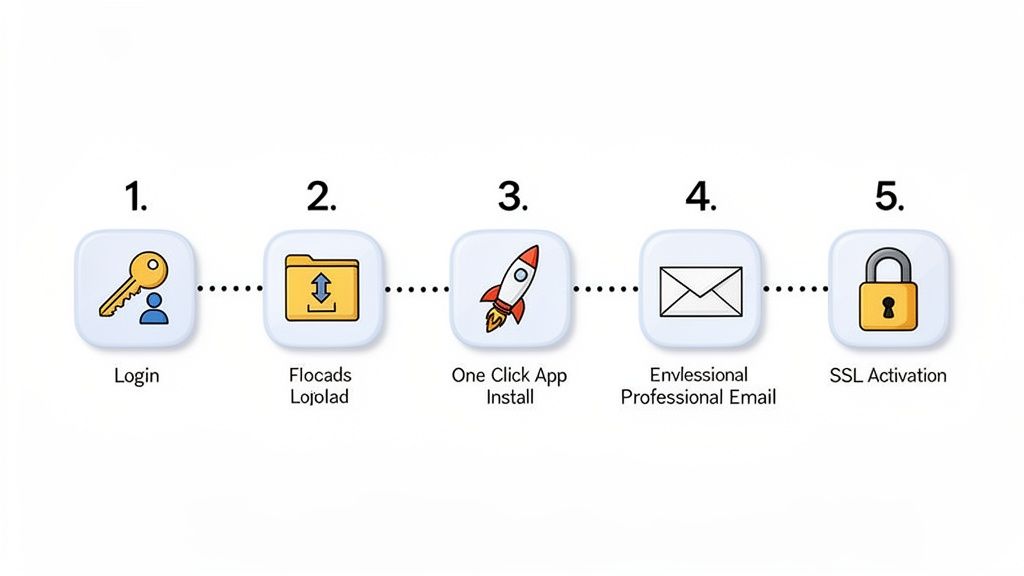
Step 1: Your First Login to the cPanel Dashboard
First things first, let's get you logged in and familiar with your new control centre. After you sign up with a hosting provider, they'll send a welcome email. Keep an eye out for it—this email contains the keys to the kingdom: your unique cPanel login URL, username, and password.
Once you’re in, just take a moment to look around. You’ll see icons neatly organised into sections like Files, Databases, Domains, Email, and Security. This is your command centre for everything related to your website.
Step 2: Uploading Your Website Files
If you've already had a site built or you’ve designed one yourself, you'll need to get those files onto the server. cPanel's File Manager makes this surprisingly simple; it works just like the file explorer on your own computer.
- Navigate to the 'Files' section and click on File Manager.
- Open the
public_htmldirectory. This is where all your publicly visible website files need to go. - Click the Upload button and select the
.zipfile of your website from your computer. - Once it's uploaded, just right-click the file and select Extract. This will unpack your site into the
public_htmlfolder.
And that's it. Your website’s files are now sitting on the server, ready for the world to see.
The
public_htmlfolder is the public-facing part of your web hosting. Any file you put in here can be accessed by visitors typing in your domain name. It’s like the front window of your digital shop.
Step 3: Installing WordPress with a Single Click
For countless businesses, WordPress is the go-to platform. And thanks to tools like Softaculous (which is included with most quality cPanel hosts), installing it is incredibly easy. Forget about manually creating databases or wrestling with config files.
Here’s how simple it is:
- In your cPanel dashboard, look for the Softaculous Apps Installer.
- Click the WordPress icon, then hit the Install Now button.
- Choose your domain, give your site a name, and create your admin username and password.
- Click Install, and Softaculous does all the heavy lifting for you in about 60 seconds.
Your brand-new WordPress site is now ready for you to log in and start customising. For a more detailed tour of the dashboard, check out our guide on how to use cPanel and its many features.
Step 4: Creating a Professional Email Address
Nothing says you’re serious about business like a custom email address, such as info@yourbusiness.com.au. It instantly builds more trust than a generic Gmail or Outlook account and reinforces your brand with every message you send.
Setting up your first professional email is a breeze:
- Head to the Email section in cPanel and click on Email Accounts.
- Click the Create button.
- Choose the right domain, type in the username you want (like 'contact' or 'yourname'), and set a secure password.
- Click Create, and your new email is ready to go.
You can then access it through Webmail right from cPanel or set it up in your favourite email app like Outlook or Apple Mail.
Step 5: Activating Your Free SSL Certificate
Today, an SSL certificate is non-negotiable. It encrypts the connection between your site and your visitors, protecting their data and earning you that little padlock icon in the browser address bar. All reputable web hosting services with cpanel should offer free SSL certificates as standard.
With hosts like UpTime Web Hosting, this is usually an automated process that happens behind the scenes. If you want to double-check or force it, just go to the Security section and click on SSL/TLS Status. From there, you can run the AutoSSL tool to make sure all your domains are secured, giving both you and your customers peace of mind.
Common Questions About cPanel Hosting in Australia
Choosing your web hosting can feel like a huge decision, especially when you're wading through a sea of technical terms and options. Even after settling on a web hosting service with cpanel, it's common to have a few last-minute questions. That's completely normal.
To help you move forward with confidence, we've gathered the most common questions we hear from Australian businesses. Let's get them answered so you can make your final choice.
What Is the Main Difference Between cPanel and Plesk?
This is a question we get all the time. The easiest way to think about it is like the operating system on your phone—some people prefer Android, others prefer iOS. Both cPanel and Plesk are excellent control panels that help you manage your website, they just have a different look and feel.
- cPanel: This is the undisputed king of Linux-based hosting. Its clean, icon-based layout is incredibly intuitive, which is why it has such a massive global community. If you ever get stuck, a tutorial or support guide is never more than a quick search away.
- Plesk: Plesk is the more flexible of the two, as it runs on both Linux and Windows servers. Its interface is often described as more modern, organising tools by domain. This is a big plus for agencies or developers who manage a portfolio of client websites in one place.
So, which is better? For most Australian small businesses, particularly if you're building a WordPress site on a Linux server, cPanel is often the more familiar and straightforward choice. Its popularity means you'll never feel lost. However, if you have very specific needs, like running ASP.NET applications that require a Windows server, then Plesk will be your go-to.
Is cPanel Genuinely Beginner-Friendly?
Yes, absolutely. In fact, you could argue that being easy for beginners is cPanel’s biggest selling point. It was built from the ground up to take complicated server tasks and turn them into simple, one-click actions. You don’t need to know a single line of code.
For instance, say you want to create an email forwarder so that messages sent to sales@yourdomain.com.au land in your personal inbox. Without cPanel, this can be a messy task. With it, you just:
- Click the "Forwarders" icon.
- Enter the address to forward from.
- Type in the destination address.
- Click "Add Forwarder."
cPanel's real magic for beginners is how it demystifies the technical side of running a website. It turns what could be an intimidating, technical chore into a simple two-minute job, empowering you to manage your own online presence without having to call a developer for every little thing.
This simplicity is consistent across the board, whether you're installing WordPress, creating a backup, or just checking your website's traffic statistics. While it’s packed with advanced tools for pros, its heart is with the everyday business owner.
How Do I Migrate My Website to a New cPanel Host?
Moving your website can feel like a nerve-wracking operation. The number one fear for most people is downtime—the thought of your site going offline, losing potential sales and visitor trust. The good news is, with a solid plan and the right host, a zero-downtime migration is entirely achievable.
The process generally follows these steps:
- Backup Your Current Site: This is the non-negotiable first step. Take a full backup of all your website files and databases from your old hosting provider.
- Upload to the New Host: Next, you'll upload that backup into your new cPanel account, usually via the File Manager. The database gets restored using a tool like phpMyAdmin.
- Test Before Going Live: A quality host (like UpTime Web Hosting) will give you a temporary URL to preview your site on the new server. This is your chance to click through everything and make sure it all works perfectly, from images to contact forms.
- Update Your DNS: Once you’re confident everything is working, the final step is to point your domain's nameservers to the new host. This change can take a few hours to filter across the internet, but your site remains live on the old server during this period, so your visitors won't notice a thing.
Many great Australian hosts even offer free or assisted migration services, taking the entire technical process off your hands. It's always worth asking about this before you sign on the dotted line.
Do I Still Need cPanel If I Only Use WordPress?
That’s a great question. While some "managed WordPress" hosts have their own stripped-back dashboards, having a full cPanel account offers some huge advantages, even if you spend 99% of your time in the WordPress admin area.
Think of it this way: your WordPress dashboard is the front office of your business, where you deal with content and customers. cPanel is the back office—the engine room that handles building maintenance and security. You might not visit it daily, but it's crucial for a few key tasks:
- Email Management: WordPress doesn't handle email. You'll need cPanel to create professional email addresses like
info@yourdomain.com.auand manage them. - File and Database Access: If a faulty plugin or theme update ever locks you out of WordPress, cPanel's File Manager and phpMyAdmin are your emergency keys to get back in and fix the problem.
- Server-Level Backups: WordPress backup plugins are useful, but a full cPanel backup is the ultimate safety net. It saves everything—your site files, databases, email accounts, and server settings.
In short, even as a dedicated WordPress user, having the power of cPanel in your back pocket gives you far more control and a vital fallback when you need to troubleshoot. You can learn more about how the control panel works with your software in our article on licensing cPanel.
Ready to experience the power and simplicity of cPanel hosting with a trusted local partner? At UpTime Web Hosting, we combine the industry's leading control panel with blazing-fast Australian servers and a support team that’s second to none. Find your perfect cPanel hosting plan today and get your business online with confidence.