
You launch a redesigned site. It looks sharp on the office Wi-Fi in Sydney. Then enquiries stay flat, carts get abandoned, and people in Perth, regional NSW, or outer Melbourne complain that the site feels clunky.
That pattern is common. The site isn’t always “broken”. It’s often just too heavy, hosted too far away, or measured from the wrong place.
For website speed optimization for Australian users, generic advice from US or European blogs only gets you part of the way. Australia’s distance, mobile usage, and uneven regional connectivity change the job. A fast site for Surry Hills can still feel sluggish in Broome. A homepage that seems fine on fibre can become frustrating on patchy mobile data.
Why Your Website Feels Slow in Australia (And What It's Costing You)
A typical version of this problem starts with a business owner who’s done nearly everything right. They’ve paid for a good design, written solid copy, set up forms, and launched on time. Then the bounce rate stays high and mobile conversions underperform.
The missing piece is usually speed.

Australian users don’t wait around
Australian visitors expect websites to load in under three seconds, and 40% abandon sites that take longer, according to this Australian website performance analysis. The same source notes that for Sydney e-commerce, a one-second delay can cause a 20% drop in conversions, and over 70% of traffic comes from mobile devices.
That matters because mobile users aren’t browsing under perfect conditions. They’re on trains, in shopping centres, in warehouses, on regional roads, and on home connections that vary by suburb and provider.
Why a nice-looking site can still feel bad
Three things usually create the problem:
- Distance to server: If your hosting sits outside Australia, every request travels further before the browser even starts rendering the page.
- Page bloat: Large hero images, multiple sliders, web fonts, tracking scripts, and page builders pile on weight quickly.
- Mobile friction: A desktop experience can mask problems that show up fast on phones.
Slow pages don’t just annoy people. They interrupt the exact moment a visitor is deciding whether to trust you.
The business cost is broader than sales
For a local service business, speed affects quote requests and phone calls. For a retailer, it affects product views and checkout completion. For a not-for-profit, it can affect donation flow and access for regional users.
There’s also the trust issue. When a site hesitates, people read that hesitation as risk. They wonder if the business is current, secure, and reliable.
If your audience is Australian, your infrastructure and optimisation choices should be Australian too. Hosting location sits near the top of that list, especially if you care about local control and compliance around data handling, which is why it’s worth understanding why data sovereignty is important when you host your website in Australia.

Performance you can feel, backed by clients who depend on it. Read how our support and uptime create long‑term customer success.Power Your Business with Better Hosting
Your First and Biggest Win Local Hosting and Accurate Measurement
The fastest fix is often not a plugin. It’s moving the site closer to the people using it.
If your origin server is in another country, every page load starts with unnecessary travel time. You can compress images and defer scripts all day, but if the first request starts from too far away, you’re building on a weak base.

Why local hosting changes the feel of a site
For Australian audiences, local hosting reduces latency. That’s the delay between a browser asking for something and the server starting to respond.
This isn’t only about user experience. In Australia, page speed is a core Google SEO ranking factor, and sites loading faster from local servers tend to see lower bounce rates and stronger visibility in search, according to this analysis of slow page speed and conversions for Australian websites. If your site is slow, you’re not only frustrating users. You’re making organic acquisition harder.
Choose hosting based on audience geography
If most of your customers are in Australia, your default should be hosting in Australia.
That doesn’t mean any local server automatically solves everything. You still need enough resources, a decent software stack, and clean site build quality. But local hosting removes one of the biggest structural causes of slowness.
Use this quick decision guide:
| Situation | Better choice |
|---|---|
| Most visitors are in Australia | Australian data centre |
| Customers are spread across multiple AU states | Australian origin plus CDN |
| You serve mainly local businesses or local shoppers | Local hosting first, then front-end optimisation |
| You run a WordPress or ASP.NET site with logged-in users | Prioritise stable local hosting and server tuning |
If you’re comparing options, Australian owned web hosting companies is a useful place to start because ownership, support hours, and data centre location all affect how quickly problems get fixed.
Measure from Australia, not from wherever the tool defaults to
One mistake I see often is people testing from North America or Europe, then making decisions for an Australian audience.
That gives you the wrong baseline.
Use speed tools that let you select an Australian region, or at least a nearby test point. Then look at the actual loading sequence rather than a single summary score.
Check these in particular:
- TTFB: This shows how long the browser waits before the server starts responding. It’s a quick way to spot poor hosting, overloaded apps, or caching issues.
- LCP: The earlier source on Australian performance notes Google uses Core Web Vitals and that Largest Contentful Paint should ideally be under 2.5 seconds. That’s a useful benchmark when you’re reviewing the main visible content.
- Request chains: These expose whether a page is stalling on third-party scripts, giant images, or render-blocking files.
- Mobile view: Always test mobile separately. Desktop can hide real-world problems.
Practical rule: If you only test from one city on one device, you’re not measuring Australian performance. You’re measuring a lucky path.
A simple testing workflow that works
Use a repeatable process. Don’t just run one test after a fresh deploy and call it done.
Test the homepage from an AU location
That gives you a baseline for first impressions.Test a heavy internal page
Product pages, service pages with galleries, and blog posts with embedded media often reveal the full picture.Compare first view and repeat view
This helps you separate server response problems from caching opportunities.Run tests on mobile conditions
The point isn’t perfection. The point is finding what breaks first.Retest after each meaningful change
Migrations, plugin installs, font changes, and new apps can all drag performance down.
What good measurement reveals fast
The pattern usually becomes obvious once you test properly.
If TTFB is high, fix hosting and server-side work first. If the server is fine but rendering is slow, trim the page. If a site loads quickly until tag managers, chat widgets, or video embeds appear, those scripts need attention before anything else.
Accurate measurement keeps you from wasting time on cosmetic tweaks while the primary bottleneck sits somewhere more basic.
Closing the Distance With CDNs and Smart DNS
Local hosting gives you a strong origin. It doesn’t put every file close to every visitor.
That’s where content delivery and name resolution matter. A CDN helps deliver static assets from edge locations, and responsive DNS helps users reach your site without unnecessary delay at the start of the request chain.
What a CDN actually fixes
A CDN stores copies of assets such as images, stylesheets, JavaScript files, and sometimes generated pages in multiple locations. For an Australian audience, what matters is whether the CDN has useful presence within Australia, not just “global coverage” as a marketing phrase.
If your main server is in Sydney and someone visits from Perth, a CDN can reduce the distance some assets need to travel. The effect is often most noticeable on image-heavy pages and repeat visits.
A CDN won’t fix a badly built application. It also won’t rescue a slow database query or a page builder that outputs huge amounts of markup. What it does well is shorten delivery for cacheable files and reduce pressure on the origin server.
Australian points of presence matter
Many setups fall short at this point. A business owner enables a CDN, sees a badge saying “global network”, and assumes the problem is solved.
It might not be.
For Australian traffic, you want CDN points of presence that serve Australian users effectively. That matters for visitors in different states, and it matters even more when you’re trying to reduce the gap between metro and regional browsing conditions.
To put it practically:
- Origin hosting handles where the website lives.
- CDN edge nodes handle where the browser fetches many assets.
- Browser caching handles what repeat visitors don’t need to fetch again.
If one of those is missing, the whole delivery chain feels less efficient.
DNS is small until it isn’t
DNS doesn’t usually get the same attention as image compression or caching plugins, but it affects the first step of every visit. Before a browser can request your page, it has to resolve the domain.
Slow or stale DNS can create an annoying pause before anything visible happens. It’s one of those issues users describe as “the site hesitates” rather than “DNS is misbehaving”.
Common DNS-related issues include:
- Slow propagation after changes
- Old records being cached longer than expected
- Third-party services pointing to retired infrastructure
- Confusion after migrations or CDN activation
If you’ve changed hosting, moved a site, or switched delivery layers, knowing how to flush DNS can help when you’re trying to separate a real performance issue from a cached lookup issue on a local machine or network.
A surprising number of “slow website” complaints turn out to be “users are reaching the wrong place” complaints.
Where CDN and DNS setups go wrong
The common mistakes are usually practical, not technical:
| Problem | What happens |
|---|---|
| CDN enabled but not configured well | Some assets speed up, others still come from origin |
| CDN used without cache rules | Frequent misses keep dragging requests back to the server |
| DNS changes made without validation | Some users hit the new setup, others hit the old one |
| Too many third-party domains | The browser spends time resolving and connecting to several providers |
The best result comes from treating CDN and DNS as support systems for local hosting, not replacements for it.
What works in real deployments
The reliable pattern is simple. Keep the origin in Australia. Put static assets behind a CDN that serves Australian users well. Keep the DNS layer clean and responsive. Then trim the number of external requests so the browser isn’t juggling too many handshakes before it can render the page.
That combination won’t make a bloated site light. But it will stop your delivery setup from making a decent site feel worse than it should.
Host your website with our 5-star rated, cPanel website hosting plans.
Super fast servers, with security included and hosted in your choice of Australian Data Center.
View cPanel Plans
Tuning Your Engine Server Caching and Application Tweaks
Once the hosting location is right and the delivery path is cleaner, the next gains usually come from the server itself. At this stage, many site owners reach for a generic plugin and assume the job is done.
It usually isn’t.
Caching works best when the server and the application agree on how pages should be generated, stored, and served. That’s why server-level caching tends to outperform bolt-on fixes.
Why server-level caching beats patchwork fixes
A browser requests a page. If the server has to build that page from scratch every time, it repeats the same work over and over. Database calls run again. PHP processes the same templates. Plugins run the same logic. On busy sites, that overhead piles up fast.
Server-level caching changes that by serving a ready-made result where appropriate.
The difference is practical:
- Basic plugin caching can help, especially on smaller WordPress sites.
- Server-integrated caching usually responds more cleanly because it’s built into the environment handling the request.
- Object caching and query improvements help when the bottleneck sits deeper than full-page delivery.
WordPress sites need more than “install a cache plugin”
WordPress can be fast in Australia. It can also become heavy quickly if the stack is messy.
Themes, builders, slider plugins, form plugins, analytics tags, and WooCommerce extensions all add work. Caching reduces the repeated work, but only if the rules are sensible. Logged-in users, carts, checkout pages, and personalised content all need different treatment.
If you want a grounded overview of trade-offs between tools, this roundup of best WordPress cache plugins is worth reviewing because it compares approaches rather than treating every plugin as interchangeable.
For hands-on setup, improving WordPress speed with a cache plugin is a good starting point for understanding what should be cached and what should be excluded.
What to tune on WordPress
Not every site needs every change. Start with the items that reduce repeated work first.
Full-page caching
Best for brochure sites, blogs, and public-facing content that doesn’t change per visitor.Asset optimisation
Minify and combine files carefully. If combining breaks theme behaviour, prioritise stability over forcing fewer files.Image delivery rules
A cached page still feels slow if it sends oversized images.Plugin cleanup
Remove plugins that duplicate functions. One bloated plugin often costs more than several lean ones.Scheduled task review
Sites with too many background jobs can feel slow even when front-end caching is enabled.
Cache what’s repeatable. Exclude what’s personalised. That’s the line that keeps sites fast without breaking carts, logins, or member areas.
ASP.NET and Windows hosting need their own thinking
ASP.NET sites don’t have the same plugin culture as WordPress, but they still suffer from common speed problems. Heavy middleware, chatty database calls, large view payloads, and inefficient asset delivery can all drag performance down.
For Windows hosting, the best improvements usually come from:
- Application-level caching for common queries
- Reducing unnecessary server-side rendering work
- Serving static assets efficiently
- Reviewing framework and runtime versions
- Checking whether the issue is code, database, or delivery
This is one area where infrastructure features matter. UpTime Web Hosting includes LiteSpeed and AccelerateWP on relevant hosting products, which is useful when the stack supports those delivery and optimisation features for WordPress workloads. That doesn’t replace proper application tuning, but it can reduce overhead in the right setup.
What doesn’t work well
Some “optimisation” work creates more problems than it solves.
| Approach | Real-world outcome |
|---|---|
| Turning on every performance option at once | Conflicts, broken layouts, hard-to-trace regressions |
| Caching dynamic pages blindly | Stale carts, session issues, user confusion |
| Keeping bloated plugins because caching “covers it” | Server load stays higher than it should |
| Ignoring database or app logic | You optimise delivery while the origin remains slow |
The best server tuning is boring in a good way. Fewer moving parts. Predictable cache behaviour. A stack that matches the CMS or framework. Clean exclusions for dynamic content. Consistent testing after each change.
When that foundation is right, front-end optimisation starts delivering its full benefit instead of compensating for a slow origin.
The On-Page Diet for Faster Rendering
If the server responds quickly but the page still feels sluggish, the browser is carrying too much weight. This is the part most users notice first. They don’t care whether your cache hit worked. They care whether the page becomes usable without stalling.
For Australian audiences, front-end discipline matters even more outside major metro conditions.

Start with the heaviest files first
On most sites, images are still the biggest payload by far. They’re also the easiest place to waste bandwidth.
The regional reality matters here. The gap between urban and regional connectivity is often ignored, and while one Sydney retail client reportedly reduced page weight by 40% for city users, the bigger lesson is that sites serving regional customers need aggressive bloat reduction because slower networks make every kilobyte matter, as discussed in this article on slow loading and poor user experience.
The fastest image is the one you never send
Use a simple order of operations:
Resize before upload
Don’t upload a massive image and rely on CSS to shrink it.Choose modern formats where supported
WebP and AVIF often help, but always test visual quality and browser support against your audience and CMS workflow.Use responsive images
A mobile device shouldn’t download a desktop hero image if it only needs a smaller version.Lazy load below-the-fold media
Let the browser prioritise what the visitor sees first.
CSS and JavaScript need restraint
Many sites slow down because the browser has to download and evaluate too much code before it can render anything useful.
The usual culprits are predictable:
| Common issue | Better approach |
|---|---|
| Page builders outputting large CSS bundles | Remove unused features and trim templates |
| Theme scripts loading everywhere | Load scripts only where needed |
| Animation libraries on every page | Keep effects limited and purposeful |
| Third-party widgets starting early | Delay or defer anything non-essential |
A slider that rotates testimonials might look polished in a design review. On a real phone connection, it often acts like a tax on every visitor.
The first screen should load like it matters more than the rest of the page, because it does.
Fonts can quietly drag a whole page down
Custom fonts are a common source of delay and layout shift.
Good practice is straightforward:
- Keep the number of font families low.
- Reduce the number of weights and styles.
- Preload only the files that affect the first visible screen.
- If brand rules allow it, consider a system font stack for parts of the site where speed matters more than typography.
This is one of the easiest trade-offs to explain to stakeholders. They may not notice the difference between three font weights and six. They will notice if text appears late or jumps around.
Build for the outback factor
A site optimised only for capital city office internet isn’t really optimised for Australia.
That means designing pages that stay usable when conditions are poor:
Progressive enhancement
The core content and primary action should work before fancy extras load.Simple layouts
Dense nested containers, motion effects, and interactive flourishes increase rendering cost.Fewer requests
Every extra file and external service creates another chance for delay.Lean HTML output
Bloated markup from builders and widgets slows parsing before styling and scripting even begin.
For website speed optimization for Australian users, this is the front-end standard I’d push hardest. Build pages that survive rough conditions. If they perform well on an average regional mobile connection, they’ll usually feel excellent in stronger metro conditions too.
Your Australian Speed Optimisation Checklist and Ongoing Plan
A fast site doesn’t come from one big fix. It comes from a stack of sensible decisions that support each other. Hosting close to users helps. CDN delivery helps. Server caching helps. A lean front end helps. Monitoring stops the gains from drifting away.
That’s why the best approach is operational, not cosmetic.
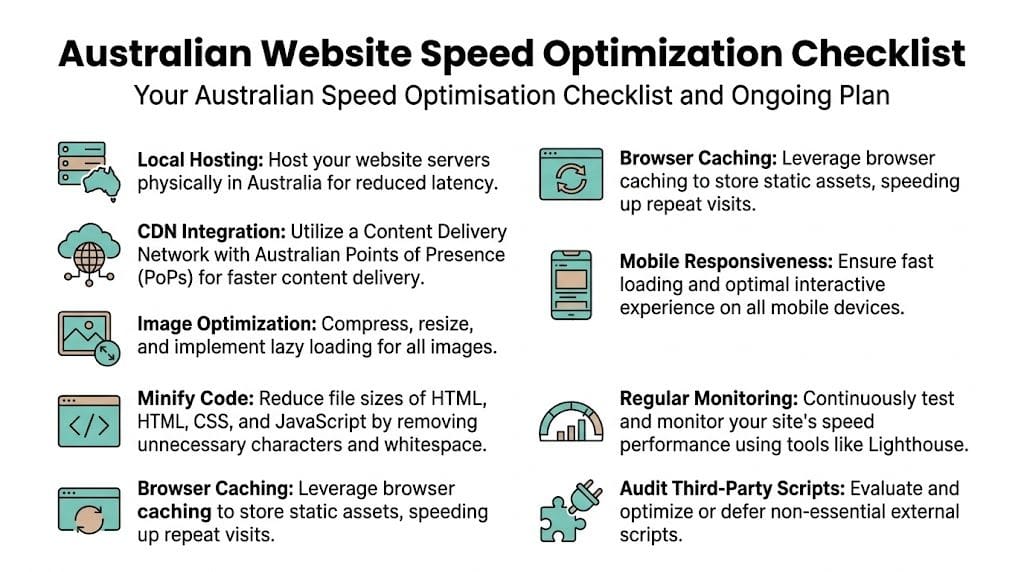
The checklist to work through site by site
Use this as a practical audit. Don’t try to do everything at once. Work from foundation to finish.
Confirm server location
Make sure your origin hosting is in Australia if your audience is primarily Australian.Test from Australian locations
Run performance checks from local points, not default overseas settings.Review initial server response
If the site hesitates before loading begins, investigate origin performance and cache behaviour.Add a CDN with useful Australian coverage
Use it for static assets and check that caching rules are working.Clean up DNS-related confusion after changes
Migrations and CDN rollouts often create temporary mismatches that look like speed issues.Enable server-side caching properly
Keep dynamic exclusions sensible for carts, checkout, account areas, and forms.Compress and resize every image
Don’t leave oversized uploads in place because “the theme handles it”.Cut unnecessary CSS and JavaScript
Remove assets that don’t support a clear page purpose.Audit fonts and third-party scripts
If they don’t help conversion, trust, or required functionality, question them.Check key templates separately
Homepage, service page, product page, blog article, and contact page often behave differently.
A monthly routine prevents performance drift
Most slow sites weren’t launched slow. They became slow through accumulation.
A script gets added for marketing. A plugin stays installed after a campaign. New staff upload giant images. A redesign introduces new fonts and heavier templates. Six months later, the site is carrying a lot more than it needs to.
A simple maintenance rhythm helps:
| Frequency | What to review |
|---|---|
| Monthly | Speed tests from AU locations, plugin list, new scripts, image uploads |
| After major changes | Theme updates, redesigns, migrations, marketing tags, checkout flow |
| Quarterly | Full template audit, CDN rules, cache exclusions, form performance |
| Ongoing | Watch complaints from mobile and regional users for patterns |
What to prioritise when time is tight
If you can only fix a few things this month, use this order:
- Hosting and origin response
- Caching
- Images
- Third-party scripts
- Template cleanup
That order works because each step supports the next. There’s no point shaving tiny amounts off CSS if the server itself is slow or if hero images are oversized.
Keep the whole business involved
Speed optimisation isn’t only a developer task.
Content teams affect it through uploads. Marketing teams affect it through tracking scripts, embeds, and widgets. Designers affect it through layout choices, animation, and font decisions. Hosting providers affect it through infrastructure, support, and tooling.
When everyone understands the trade-off, decisions get better. A landing page doesn’t need five third-party trackers and autoplay media just because each addition looked harmless in isolation.
If you want another practical perspective on process and priorities, this guide on how to optimize website performance is a useful companion read because it frames optimisation as ongoing operational work rather than a once-off technical sprint.
Treat speed like site hygiene. If nobody owns it, it slips.
Support and maintenance matter more than one-off wins
A site can test well today and feel poor next quarter if nobody is watching it.
That’s why ongoing maintenance is part of speed work. You need someone checking plugin updates, reviewing conflicts, monitoring delivery changes, and catching regressions before customers do. If you need help with that side of the job, web maintenance and support is the kind of service layer that keeps performance from sliding backwards after launch.
Achieving consistency is the primary goal. Not a flashy benchmark screenshot. A site that loads quickly for the people who use it, whether they’re in Parramatta, Perth, Geelong, or further out where network conditions are less forgiving.
For website speed optimization for Australian users, that’s the standard worth building to.
If your site feels slower than it should for Australian visitors, UpTime Web Hosting offers local hosting in Sydney, Melbourne, Brisbane and Perth, with WordPress, cPanel and ASP.NET options that suit businesses wanting faster local delivery, practical support, and a cleaner foundation for ongoing speed work.