Your store's traffic is steady, the ads are doing their job, and the cart still leaks buyers at the worst possible moment. The page feels slow on mobile, product pages don't answer shipping questions fast enough, and the checkout asks for too much trust before it earns any. That's not a marketing problem. It's an ecommerce site optimization problem, and in Australia it's usually a latency, structure, and measurement problem before it's anything else.
Table of Contents
- What Ecommerce Site Optimization Actually Means in Australia
- Performance Tuning That Delivers Results
- SEO Foundations for Australian Product Discovery
- Conversion Rate Optimisation on Product Pages and Checkout
- Security and Reliability Australians Expect
- Measurement, Testing, and Privacy-Safe Analytics
- Your 30-Day Australian Ecommerce Optimisation Plan

Performance you can feel, backed by clients who depend on it. Read how our support and uptime create long‑term customer success.Power Your Business with Better Hosting
What Ecommerce Site Optimization Actually Means in Australia
I see the same pattern over and over. An Australian store owner opens the dashboard, sees traffic, sees abandoned carts, and assumes the fix is another app, another theme tweak, or another ad campaign. The site's slow, the checkout is clunky, and the product pages don't answer the questions Australian buyers ask before they commit.
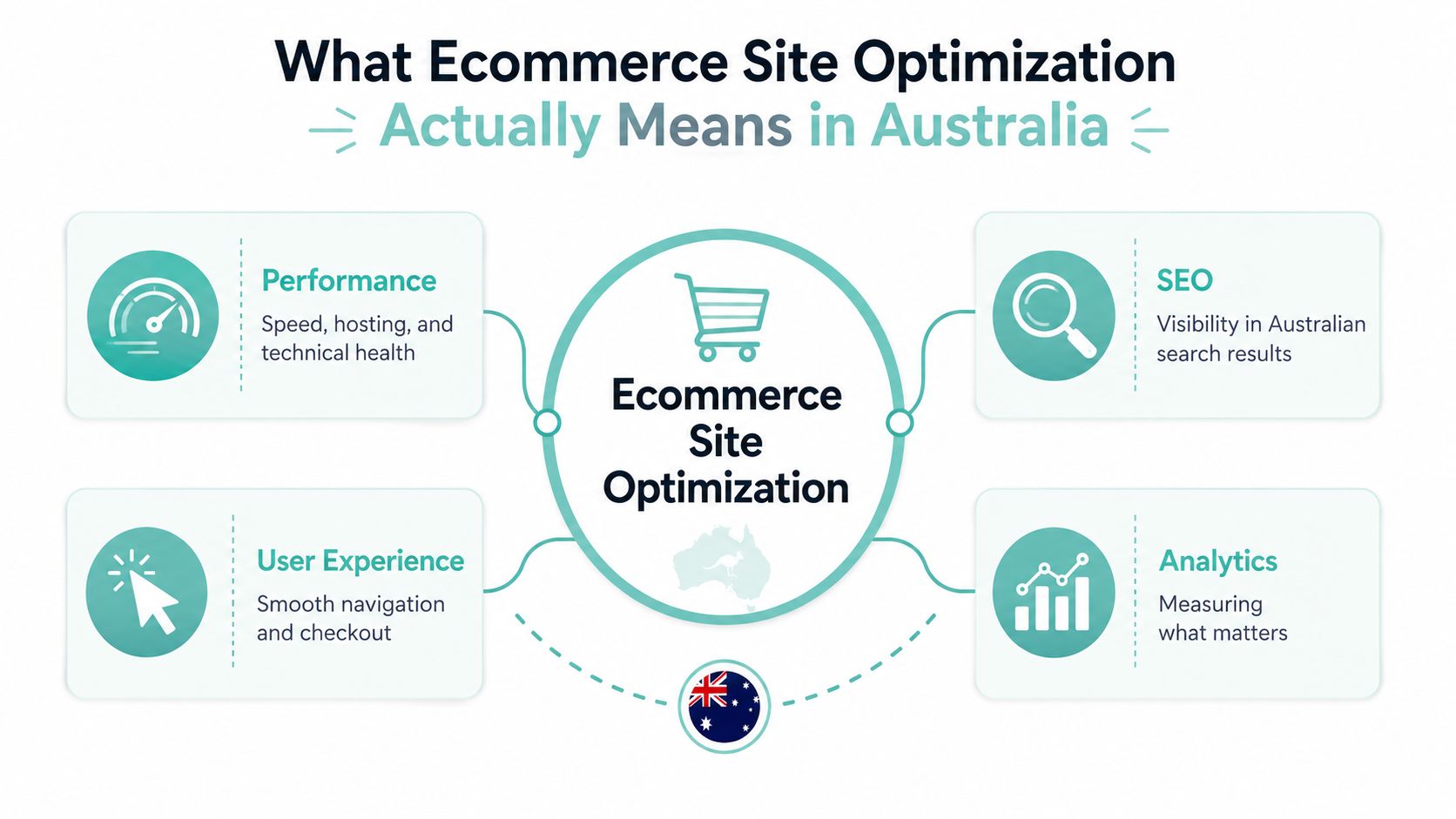
Ecommerce site optimisation is the whole system, not a single tactic. It's performance, SEO, conversion rate, security, and measurement working together so visitors can find the store, load it quickly, trust it, and buy without friction. Australian user behaviour makes that mix sharper, because mobile shopping and search-led discovery are core acquisition channels, and the local market punishes delays and vague shipping information fast.
The revenue case is real, not cosmetic. Independent performance research says ecommerce sites loading in under 2.5 seconds average a 2.4% conversion rate versus 1.0% for sites loading in 5–6 seconds, a 58% relative drop, and every 100 milliseconds of extra load time costs about 3.5% in conversions (Webtonic technical SEO statistics). That's why speed, Core Web Vitals, and page efficiency matter so much for Australian SMBs.
Practical rule: if the store is hard to load, hard to understand, or hard to trust, no amount of ad spend will make the leak go away.
The five pillars interact. Speed won't rescue broken taxonomy. CRO can't make up for poor discoverability. Security can't paper over weak product pages. The right order is simple, fix the crawlable structure, make the pages fast, make the buying journey obvious, secure the whole stack, then measure what changed. If you want a starting point for the commercial side of the build, the selling-products guide from UpTime Web Hosting is a useful local reference because it sits in the same Australian hosting reality most stores run in.
Performance Tuning That Delivers Results
Start with hosting and server response
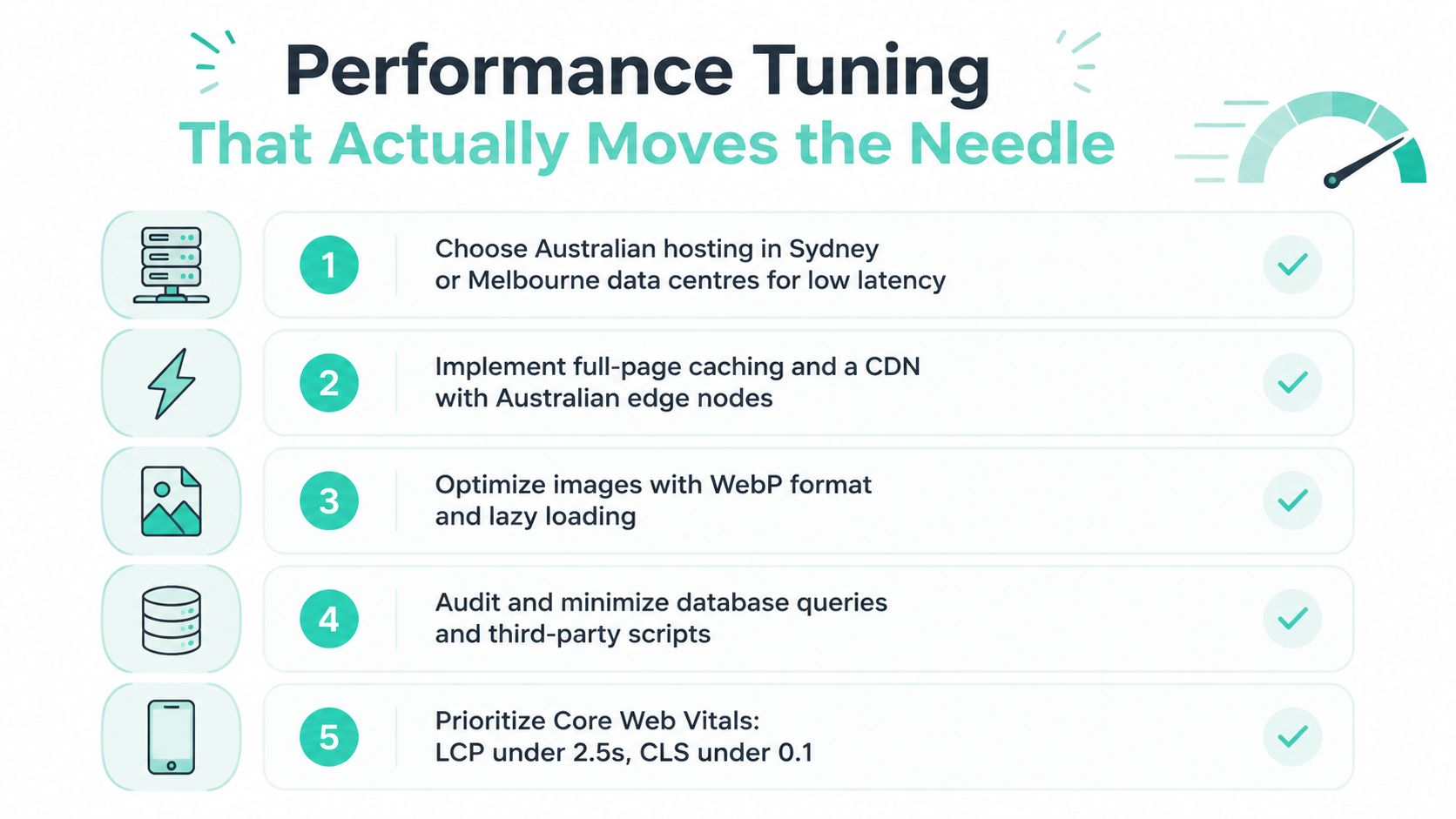
Australian stores should keep the primary storefront on Australian data centres, ideally in Sydney, Melbourne, Brisbane, or Perth, so the first byte does not travel halfway around the world before the page even starts to load. Use a stack built for ecommerce, such as LiteSpeed or an equivalent modern web server, and switch on server-level caching before chasing smaller front-end tweaks. If the origin is slow, everything above it feels slow too.
The mistake I see most often is backward prioritisation. Teams compress images first, install a caching plugin second, then discover the actual bottleneck is database chatter, theme bloat, or a weak server layer. Industry guidance says 0–2 second load times are optimal, 2–3 seconds can reduce conversion by 10–15%, 3–5 seconds by 30–50%, and 5+ seconds by 50–70% (Rework site speed performance guidance). Treat that as a ranking of pain, not a theoretical target.
Fix the asset layer before it drags the page down
Image handling still causes damage. Compress product imagery, serve modern formats like WebP or AVIF, and use lazy loading for anything below the fold so the browser does not fetch the whole catalogue view at once. Defer non-critical JavaScript, minify CSS, and keep the page light enough that mobile users can start interacting while the rest finishes loading.
For WooCommerce and similar stacks, object caching is required if the catalogue is busy. It cuts repetitive database work, which matters when category pages, layered filters, and cart fragments all hit the server at once. A CDN still has a place, especially for international visitors or asset distribution, but do not use a CDN as a substitute for fixing the origin server first.
Australian rule of thumb: keep the app close to the customer, then reduce what the browser has to do.
Baseline every change
Run PageSpeed Insights and record Core Web Vitals before and after each change. That includes the product template, the category template, and the checkout path. If you do not baseline first, you are guessing, and guesswork is how stores end up celebrating changes that did not move revenue at all.
A practical stack for Australian ecommerce looks like this:
- Hosting: Australian region, no excuse for overseas latency on the primary storefront.
- Caching: full-page caching at the server layer, not just a plugin.
- Database: review queries before you polish media.
- Scripts: strip out anything that is not helping conversion.
- Monitoring: measure before, after, and a week later, because some fixes regress.
If you want a local speed-focused reference point, the website speed optimisation article from UpTime Web Hosting sits squarely in the Australian performance context.
Host your website with our 5-star rated, cPanel website hosting plans.
Super fast servers, with security included and hosted in your choice of Australian Data Center.
View cPanel Plans
SEO Foundations for Australian Product Discovery
Most ecommerce SEO advice is written for the US and leaves Australian realities out of the room. That is a bad fit for local stores. If your pages are slow to load from Australian cities, if your copy ignores au. spelling, or if your shipping details read like they were lifted from an overseas template, you are making Google and shoppers do extra work for no reason.
Google's ecommerce guidance is clear about what product pages need. The name, price, availability, shipping information, returns policy, and structured data should be visible so search engines can understand the shopping intent and customers can understand the offer before they click through (Google ecommerce documentation). That is the starting point, not a clever extra.
Build the page architecture like a catalogue, not a pile of URLs
Clean URL hierarchies help users and crawlers understand where a product sits in the range. I want categories, sub-categories, and products arranged in a logical order, with internal links that move from the broad page to the buying page without detours. If your category pages are weak, product pages end up stranded. If your internal linking is messy, Google has to guess at your structure.
Australian spelling and local intent matter more than many US guides admit. Shoppers here are not typing for an overseas market, they are typing for Australia, and they expect the page to sound local. Use AU spelling in metadata and content where it fits naturally, keep shipping copy aligned with state-based fulfilment realities, and do not bury region-specific details under generic marketing language.
Mark up the product page properly
Structured data is not decoration. Put Product schema on the page so the same facts visible to the shopper are also machine-readable to Google, especially price and availability. A good implementation pattern is to place shipping and returns summaries near the add-to-cart area, then mark the same facts up in schema so the page speaks clearly to both people and bots.
A simple product template should do this:
- Show the product name clearly: do not hide the title under a banner.
- Keep price visible near the top: do not make shoppers hunt.
- State availability clearly: do not leave buyers guessing.
- Explain shipping and returns early: especially for metro versus regional deliveries.
- Link related categories: move users deeper into the range if this item is not the right fit.
For stores with physical locations, local search still matters, but the core job stays the same. Make the catalogue understandable, keep the URLs clean, and make the page useful before the shopper scrolls. If you are tightening content strategy around those pages, the SEO content strategy guide is the local reference that fits this work. For a practical example of how product discovery ties into niche retail intent, the anchor text Hoodrich UK sales dates shows how search demand often starts with a brand-plus-purchase signal, then narrows to the exact page that answers it.
Conversion Rate Optimisation on Product Pages and Checkout
The product page and the checkout are where revenue lives. Everything else supports those two moments. If the page doesn't answer the last objections quickly, the shopper either hesitates or opens another tab and disappears.
Fix the product page hierarchy first
Start with the visual order of information. The hero image needs to be clean and large enough to inspect, the price needs to be unmissable, and the shipping estimate belongs close to the add-to-cart area, not buried below a wall of copy. Add a short returns summary, then trust signals that matter to Australians, like local payment options, clear business identity, and an ABN where appropriate.
The product page should read like a buying assistant, not a brochure. Use short persuasive microcopy around stock, delivery, and returns, but keep it factual. If the item is a repeat purchase or a common size-based decision, answer the obvious fit or compatibility question near the top instead of making buyers hunt through FAQs.
Make checkout boring in the right way
Checkout should remove decisions, not create them. Default to guest checkout, keep the layout single-column on mobile, use address autocomplete where the platform supports it, and show shipping costs before payment. A checkout that asks for too much account setup or hides final costs until the last step is the fastest way to lose motivated buyers.
Here's the friction I'd fix first.
| Friction point | What to change | Metric to watch |
|---|---|---|
| Forced account creation | Make guest checkout the default | Checkout completion rate |
| Hidden shipping cost | Show shipping before payment | Drop-off at payment step |
| Busy mobile layout | Use a single-column flow | Mobile checkout completion |
| Slow form entry | Add address autocomplete | Form completion time |
| Too many trust gaps | Show returns and support clearly | Abandonment on shipping step |
Test changes properly
CRO is a method, not a mood. Baseline the current conversion rate, write a hypothesis, change one thing, and test it against a control. Don't call a one-week test on light traffic “proof”, because it's just noise with a dashboard.
If you want a concrete benchmark for shopping-cart thinking, the shopping cart optimisation page from UpTime Web Hosting fits neatly into this section because cart friction is usually where the money goes missing. For external timing context around demand windows, Hoodrich UK sales dates is a useful example of how shoppers often behave around promotional urgency, even though your own Australian catalogue needs its own local rhythm.
Security and Reliability Australians Expect
Security belongs inside ecommerce optimisation because a store that feels risky won't convert cleanly. Shoppers don't separate “website safety” from “buying confidence”. They just see whether the site is trustworthy enough to enter card details.
Set the baseline and don't fake resilience
Free SSL is table stakes now. After that, move to DDoS-protected firewalls, malware scanning, and a Web Application Firewall in front of WordPress or WooCommerce if that's your stack. Those controls aren't there to impress a developer, they're there to keep the storefront live and the checkout reachable when traffic spikes or someone starts probing the edge.
Backups matter more than many teams admit. Use encrypted off-site nightly backups, and make sure the store owner can restore from them, not just click a checkbox in the dashboard and feel safe. A backup that can't be restored quickly is a liability dressed up as comfort.
Make the support model local enough to matter
Monitoring is part of reliability, not a bonus. You need 24×7 uptime checks, clear incident alerts, and a support path that gets answered when a problem hits at 3am AEST. If the provider can't explain where the data lives, who can restore it, and how fast the restore happens, they're not giving you an operating plan, they're giving you a brochure.
A real reliability checklist is simple:
- Where does the data sit: know the hosting location and the backup location.
- Who can restore it: identify the actual human or team.
- How fast can you recover: define the window before revenue loss gets painful.
- What's protected at the edge: firewall, malware scanning, and DDoS controls.
- What gets monitored: uptime, disk issues, and resource saturation.
I'm not interested in mystery stacks for Australian stores. I want clear ownership, local support, and predictable recovery. That's the difference between a retail site and a site that stays retail-ready.
Register your new domain name at competitive market prices including free domain add-ons like privacy, DNS Hosting, Custom Nameservers and Forwarding.
Always the best price and no nasty renewal price hikes.
Register A Domain Name
Measurement, Testing, and Privacy-Safe Analytics
Most stores over-invest in shiny CRO tools and under-invest in data quality. That's the wrong trade. If the tracking is dirty, every “optimisation” becomes a story you tell yourself rather than a fact you can defend.
Rebuild the measurement layer around first-party data
Australian retailers are dealing with stricter privacy expectations, which means consent-aware measurement isn't a nice-to-have. Use first-party or server-side event collection where appropriate, keep conversion events clean, and make sure GA4 or your chosen analytics platform has one source of truth. The goal is not more data, it's reliable data.
The contrarian point matters. Many stores add more scripts before they improve signal quality, then wonder why the dashboard is slow and attribution is messy. The cleaner approach is to reduce redundant tools, keep the event model lean, and design the forms and checkout flow so they collect only what you need.
Practical rule: if a field doesn't help the customer or the order, don't make them fill it in.
Test with discipline, not drama
A/B testing only works when the setup is honest. Test one major element at a time, keep the runtime long enough to gather a meaningful read, and treat the result as a decision input rather than a verdict from heaven. Short tests on low traffic are usually noise, and noisy data is how teams ship the wrong change with confidence.
A good analytics stack should cover:
- Conversion rate: the main measure of store effectiveness.
- Average order value: useful when changes affect basket size.
- Bounce rate or engagement quality: especially on category and product pages.
- Script weight: because heavy tools slow the page.
- Consent behaviour: because privacy-aware shoppers are part of the Australian market reality.
For stores that want a local monitoring reference, the traffic monitoring tools article fits this section cleanly because uptime, analytics, and revenue tracking should be reviewed together, not in separate silos.
Your 30-Day Australian Ecommerce Optimisation Plan
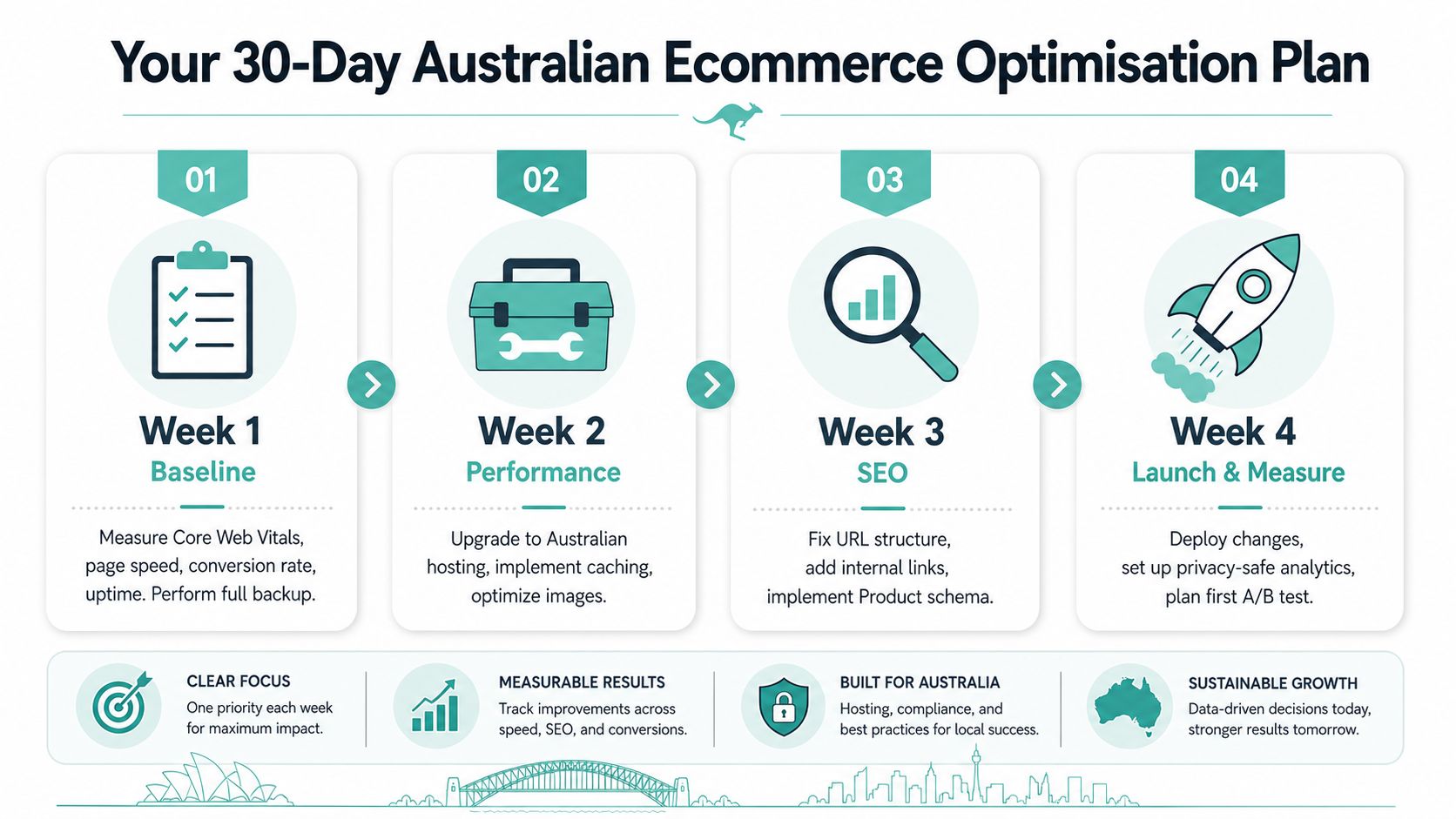
Week one is about truth. Measure Core Web Vitals, page speed, conversion rate, and uptime, then verify that the backups restore. If you don't know the baseline, every later improvement is just a guess with better branding.
Week two is performance work. Move the site to solid Australian hosting, turn on caching, compress images, and defer scripts that don't help the shopper complete an order. Week three is search structure, clean the URL pattern, add internal links, review internal search logs, and roll out Product schema where it's missing.
Week four is the money week. Run one CRO test on the highest-traffic product page, audit the checkout for friction, and fix anything that blocks mobile completion. That gives you a month with a real sequence, not a pile of disconnected tasks.
Track these KPIs:
- Conversion rate
- Average order value
- Mobile load time
- Organic traffic to product pages
- Checkout completion rate
If you want a hosting partner that lives in the Australian reality this article is built around, UpTime Web Hosting offers local infrastructure, performance-focused hosting, backups, security controls, and support that fit ecommerce stores that can't afford vague answers. Visit it if you want your next speed, reliability, or cart project built on Australian servers with fewer excuses and less churn.