Your online shop has been steady all month. Then a local promotion, email campaign or seasonal rush sends a wave of visitors your way, and the site slows down just when customers are ready to buy. If the website depends on one server with limited capacity, that sudden demand can expose the hosting setup very quickly.
Cloud hosting gives businesses another way to run websites, applications and data. Instead of relying on one physical machine, it uses virtualised resources across connected infrastructure, allowing workloads to draw capacity as demand changes. That can make a meaningful difference for Australian businesses that need dependable service without building and managing their own data centre.

The phrase what is cloud hosting sounds technical, but the basic idea is practical. Your website or application runs on hosted computing resources that can be distributed, monitored and adjusted rather than being permanently tied to a single server. You still use familiar services such as websites, email, databases and storage, but the underlying infrastructure is more flexible.
Australia's businesses have adopted cloud services rapidly. The Australian Bureau of Statistics cloud computing analysis reported that paid cloud service use rose from 19.4% of Australian businesses in 2013–14 to 55.0% in 2019–20. Adoption in that later period reached 81% among businesses with 200 or more employees, while software was the most common paid cloud service at 85%.
This guide focuses on the decisions that matter locally. You'll learn how cloud infrastructure works, which hosting model suits different workloads, when cloud can beat shared or VPS hosting on total cost, and why an Australian server location doesn't automatically mean complete data sovereignty. You can also review cloud computing hosting options for Australian websites if you're comparing practical services.
Table of Contents
- Introduction to Cloud Hosting for Australian Businesses
- How Cloud Hosting Works Behind the Scenes
- Types of Cloud Hosting Explained
- Advantages and Limitations of Cloud Hosting
- Pricing, Performance, Security and Compliance in Australia
- Practical Migration Checklist and Buyers Guide
- Choosing the Right Cloud Hosting Path Forward

Performance you can feel, backed by clients who depend on it. Read how our support and uptime create long‑term customer success.Power Your Business with Better Hosting
Introduction to Cloud Hosting for Australian Businesses
A business website rarely fails at a convenient time. A café might receive a burst of online orders after a local media mention. A trades business might launch a new service page just as a property development sends more enquiries. An online retailer might prepare for a seasonal sales period and discover that its existing hosting plan handles normal traffic well, but not sudden demand.
Traditional shared hosting can be a sensible starting point for a small website with predictable activity. A VPS can provide a more defined allocation of CPU, memory and storage. Both options can work well, but they usually require the business owner to plan capacity around expected demand. If demand changes sharply, the owner may need to upgrade, move workloads or accept slower performance while the provider makes changes.
Cloud hosting changes the capacity question. A website can use virtual resources supported by multiple physical servers, rather than depending on one machine. The provider still needs to configure the environment correctly, but the architecture can support scaling, redundancy and workload distribution.
Practical rule: Cloud hosting isn't a guarantee that every website stays fast under every condition. It gives your provider more infrastructure options to manage demand and failure.
Australian location matters because visitors usually benefit when the hosting environment is geographically closer to them. Local infrastructure can also support organisational requirements around residency, governance and support. However, local hosting and sovereign hosting aren't identical. The provider's ownership, jurisdiction, operational access, contractual controls and shared-responsibility arrangements still matter.
The ABS data shows why this has become a mainstream business decision rather than a specialist concern. Paid cloud service adoption rose from 30.7% in 2015–16 to 42.4% in 2017–18, before reaching 55.0% in 2019–20, according to the ABS research paper on firm performance and cloud computing. For an Australian SME, the right question isn't whether cloud sounds modern. It's whether the extra flexibility, resilience and management cost match the website's actual needs.
How Cloud Hosting Works Behind the Scenes
Start with the electricity grid. Your appliances don't need their own power station. They draw electricity from a connected network, and the grid operator balances supply as demand changes. Cloud hosting uses a similar principle for computing, although the engineering is much more complex.
Physical servers form the foundation
A cloud environment begins with physical servers in one or more data centres. These machines provide processors, memory, storage and network connections. Rather than assigning one entire physical server to one customer, a provider can connect many machines and manage them as a coordinated environment.
The next layer is virtualisation. A hypervisor separates physical hardware into virtual machines or other isolated resource units. Each workload receives an allocated combination of CPU, RAM and storage, while the underlying hardware remains part of a wider pool.
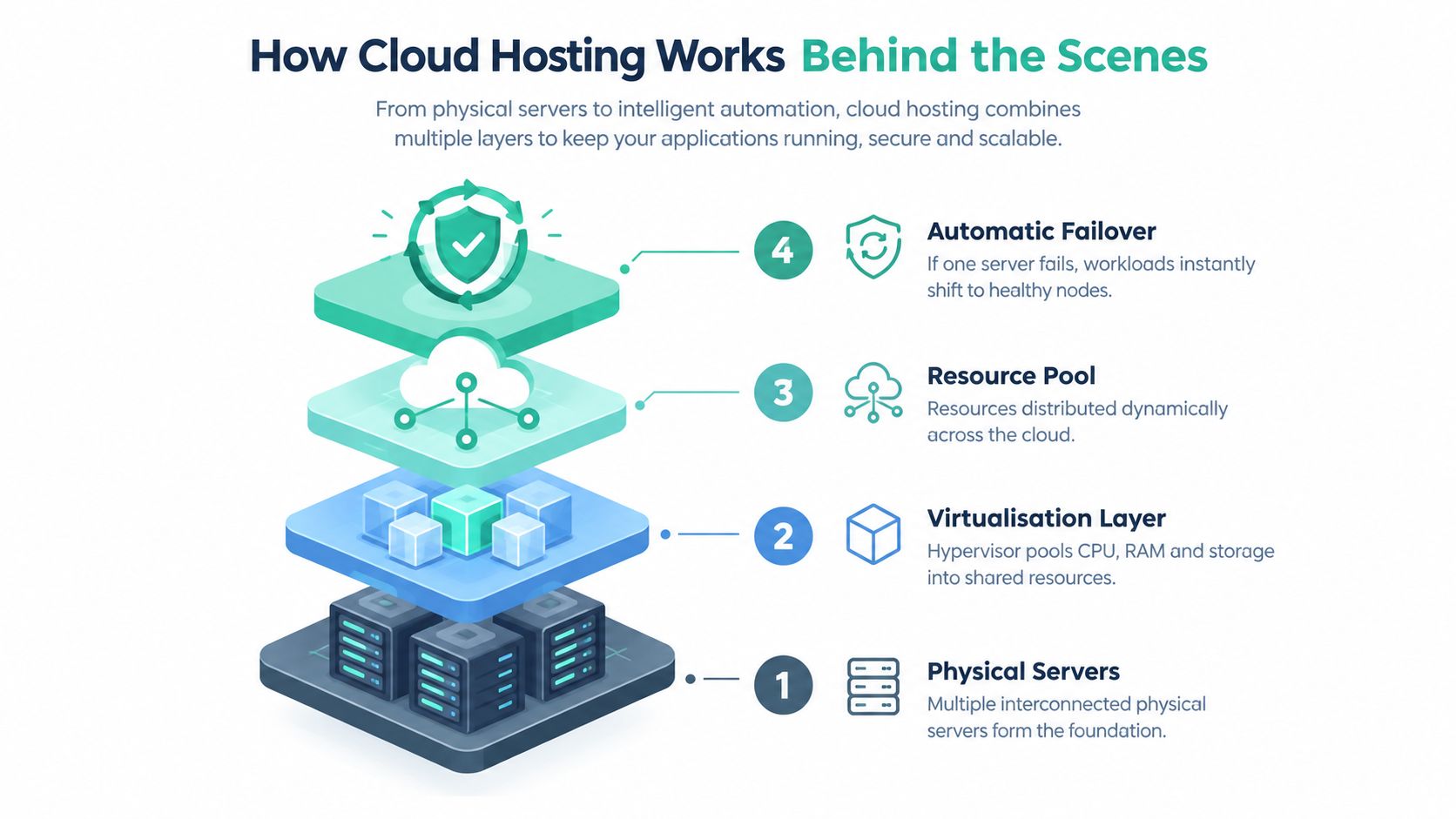
Resources move where the workload needs them
The resource pool is the important distinction. In a basic single-server arrangement, a website is closely tied to one machine. In a cloud environment, management software can allocate or rebalance resources across connected nodes, subject to the provider's design and the service plan.
A load balancer can distribute requests between healthy application instances. Monitoring systems can watch resource use, errors and server health. If demand rises, the environment may add capacity where automatic scaling has been configured. If a physical node fails, failover systems can move or restart workloads on healthy infrastructure.
Cloud hosting doesn't remove hardware. It makes the hardware work as a managed pool rather than as an isolated box.
This doesn't mean every cloud plan automatically scales without limits. Scaling may require configuration, approval, available capacity and budget controls. A provider should explain what happens automatically, what needs customer action and what costs can increase when resource use rises.
Redundancy supports continuity
Redundancy means the provider has more than one component capable of supporting the service. That could involve multiple servers, storage copies, network paths or application instances. The exact level depends on the architecture, so buyers should ask whether redundancy covers only the physical host or the full website stack, including databases, backups and external services.
Developers evaluating virtual resources, deployment requirements and application workloads can also review cloud hosting guidance for developers. The same mental model applies to a business website, but applications often add databases, background jobs, APIs and deployment pipelines that need separate planning.
Host your website with our 5-star rated, cPanel website hosting plans.
Super fast servers, with security included and hosted in your choice of Australian Data Center.
View cPanel Plans
Types of Cloud Hosting Explained
The word cloud describes the infrastructure approach, not one single product. Businesses can choose different deployment and management models depending on how much control they need, how variable demand is, and whether compliance requirements affect the design.
Public cloud
A public cloud uses infrastructure shared among customers, with each workload logically isolated. It can suit an SME that needs flexible capacity without buying or operating dedicated hardware. Costs commonly follow the resources provisioned or consumed, although each provider uses its own billing rules.
A retail website with changing demand might choose this model because it can add services as the business grows. The business owner still needs to understand security settings, backups, access controls and data location.
Private cloud
A private cloud dedicates the environment to one organisation. It can provide stronger control over infrastructure design, access and isolation, but that control usually brings more management responsibility and expense. It may suit an organisation with strict internal requirements or specialised workloads.
Private infrastructure isn't automatically secure. The organisation still needs sound identity management, patching, monitoring, backup and incident procedures.
Hybrid cloud
A hybrid cloud combines private and public environments. For example, a business might keep a sensitive database in a controlled environment while using public cloud capacity for a customer-facing application. The model can support flexibility, but connecting environments securely adds design and operational complexity.
Managed cloud
With managed cloud hosting, the provider handles infrastructure operations such as provisioning, updates, monitoring, backups or security maintenance, depending on the service scope. This can suit an agency or SME that needs more capacity than basic hosting provides but doesn't have a dedicated infrastructure team.
| Hosting Type | Best For | Control Level | Cost Pattern |
|---|---|---|---|
| Public cloud | Growing SMEs and variable workloads | Shared infrastructure with logical isolation | Resource-based or usage-based costs |
| Private cloud | Organisations needing dedicated control | High control over the environment | Higher dedicated infrastructure and management commitment |
| Hybrid cloud | Workloads with mixed flexibility and compliance needs | Control split across connected environments | Combined public and private costs |
| Managed cloud | Businesses wanting cloud capability without daily infrastructure administration | Provider-managed, within agreed boundaries | Service fee plus included or usage-based resources |
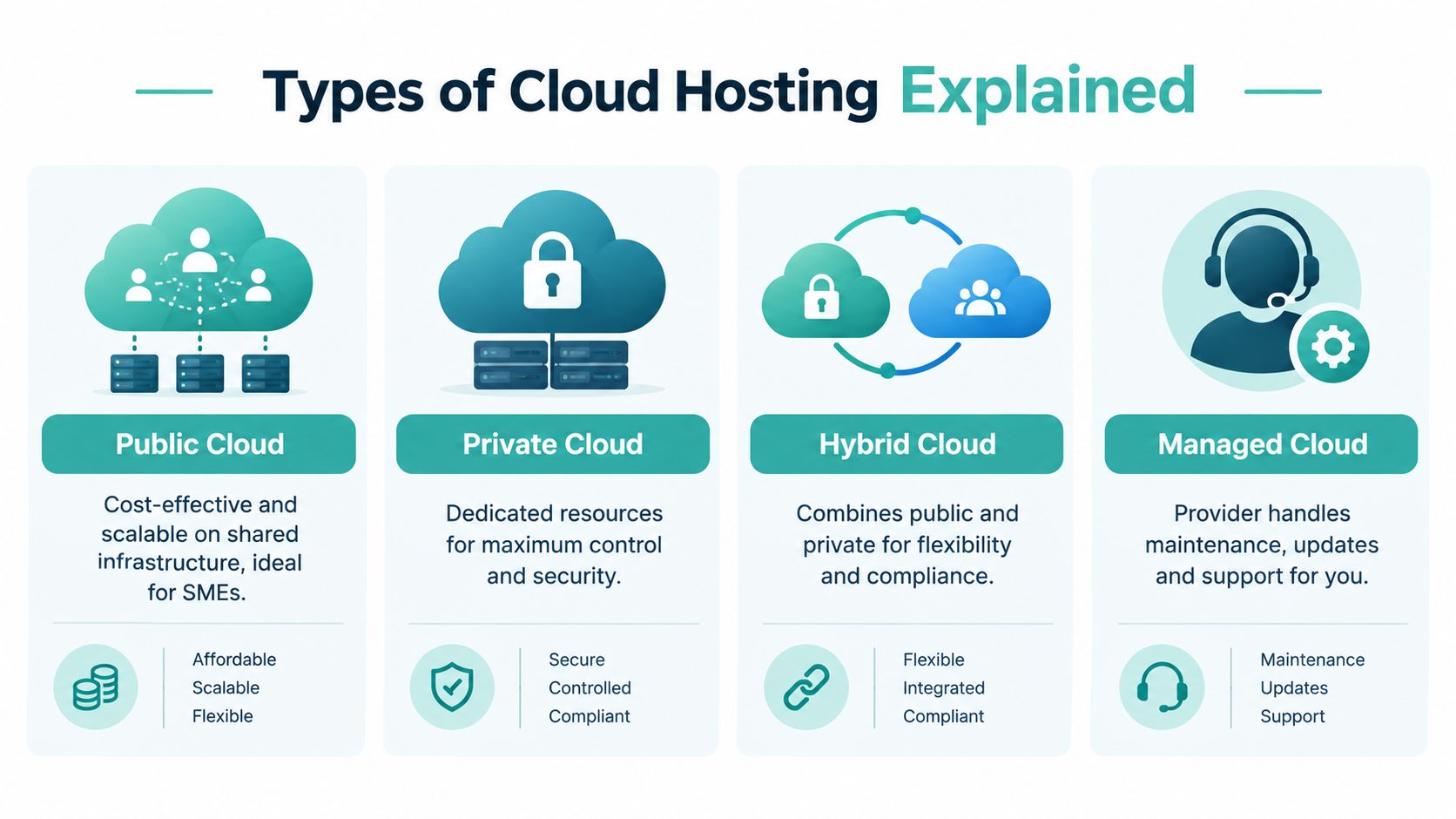
For many Australian SMEs, the choice is less about selecting a label and more about matching responsibility to capability. A managed service may cost more than an unmanaged virtual server, but it can reduce the time your team spends on maintenance and troubleshooting. A private arrangement may provide control that a small brochure website doesn't need.
Advantages and Limitations of Cloud Hosting
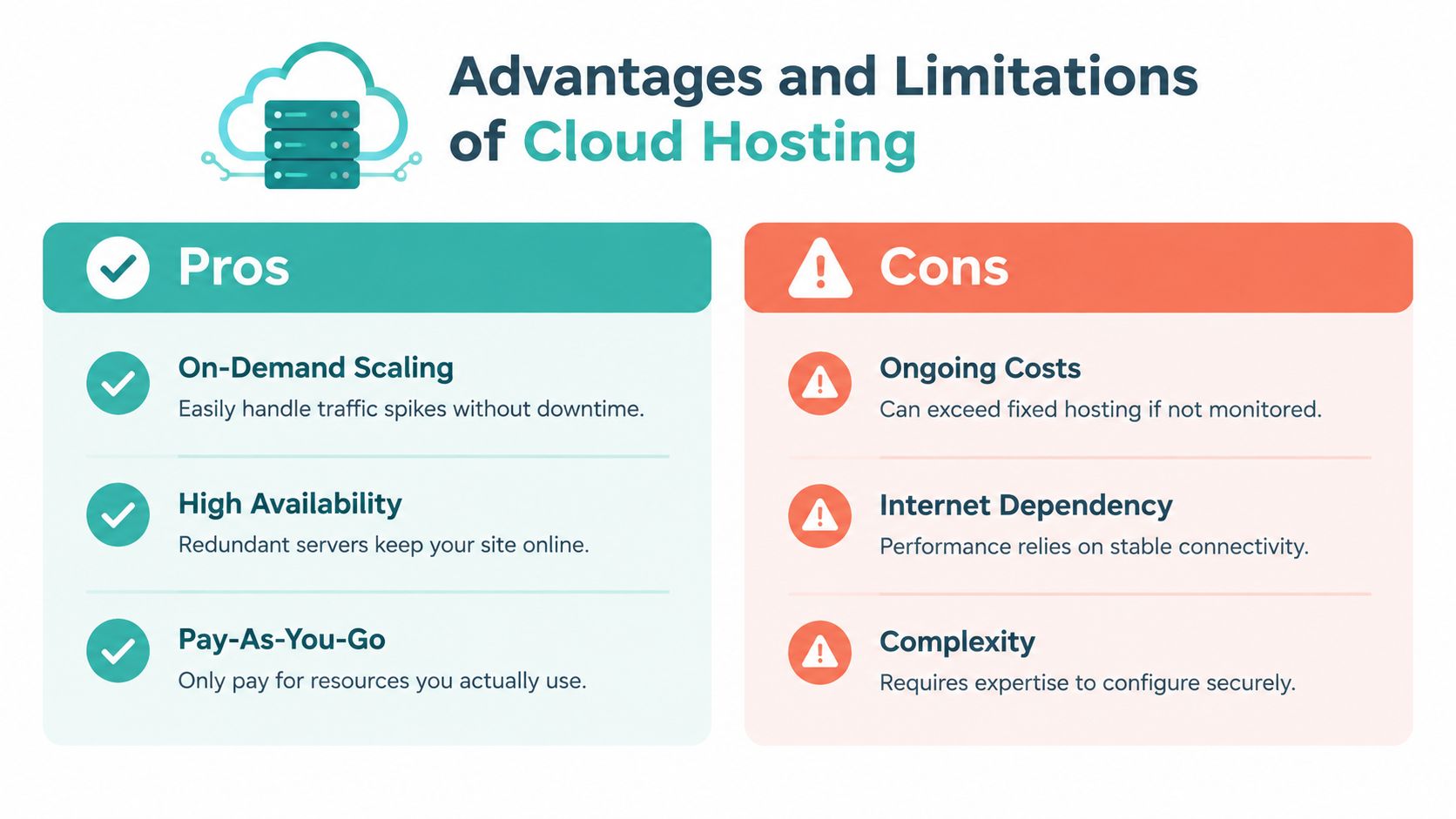
Cloud hosting earns its place when a workload has changing requirements or when a business needs stronger continuity than a single server can provide. It isn't automatically cheaper, faster or simpler. The result depends on resource sizing, configuration, management and the workload itself.
Where cloud hosting helps
A campaign-driven website can need extra capacity at short notice. A growing online service may need more application instances as customers arrive. A business with several websites may also value centralised monitoring, scalable storage and recovery options.
The main advantages include:
- On-demand capacity: The environment can be adjusted as workload requirements change, subject to the provider's configuration and available resources.
- Resilience options: Multiple servers and failover design can reduce the effect of individual hardware faults.
- Operational flexibility: Teams can deploy applications, databases and supporting services without purchasing physical equipment.
- Recovery planning: Cloud environments can be paired with off-site backups and documented restoration procedures.
- Growth alignment: A business can begin with a modest setup and expand when its actual requirements justify more resources.
The Australian market's scale reflects this broader adoption. The Productivity Commission cited Australian cloud spending at about A$14 billion in 2021, with expectations of about A$17 billion in 2022, in its research on cloud computing and firm performance. Those figures describe cloud services broadly, not one hosting package, but they show why cloud infrastructure has become a mainstream business consideration.
Where cloud hosting can disappoint
Cloud billing can rise when teams leave resources running, store unnecessary data or overlook transfer and management charges. The same elasticity that helps during a busy period can create a larger invoice if no one sets budgets, alerts and limits.
A cloud platform also introduces shared responsibility. The provider may secure the underlying facilities and hardware, while the customer remains responsible for account access, application security, permissions, data handling and backup choices.
Cost check: Compare the complete monthly cost, including migration, backups, monitoring, administration, support and recovery. A cheaper server line item may not produce a cheaper operating model.
Cloud may not be the right fit for a small informational website with stable demand and straightforward requirements. Shared hosting or a VPS can remain sensible when the workload is predictable, the site owner values fixed capacity and the business doesn't need complex scaling. A practical overview of the benefits of cloud hosting can help identify which advantages apply to your situation rather than assuming every site needs the same architecture.
Pricing, Performance, Security and Compliance in Australia
Cloud hosting pricing becomes clearer when you separate the advertised plan from the services around it. Providers may charge for compute, memory, storage, backups, data transfer, support, managed services and extra environments. A low starting price can become harder to predict when nobody reviews usage.
Read the billing model closely
Check whether the service uses fixed allocations, usage-based billing or both. Match those charges to the resources your website needs. A small company site may place greater value on included backups, email, support and predictable invoices than on a long list of application services.
An online store with changing demand may accept variable costs if extra capacity supports sales. A local professional service with steady traffic may prefer a managed fixed plan, particularly when staff do not have time to monitor infrastructure metrics.
Cloud does not automatically mean faster performance. Server location, application code, database design, image sizes, caching, content delivery, network paths and monitoring all affect the customer experience. Infrastructure near Australian users can help, although local placement will not correct an inefficient website.
Treat Australian location as one part of the decision
The Australian Government's Hosting Certification Framework applies to sensitive government data, whole-of-government systems and systems classified as PROTECTED. It uses Strategic, Assured and Uncertified certification levels, and assessment can take 3 to 6 months, as described in Google Cloud's overview of the Australian Hosting Certification Framework.
Certified providers include Google Australia cloud services, Microsoft Azure Australian regions, Oracle Australia cloud services and AWS through its Sydney region. Dedicated government clouds in Canberra are isolated from hyperscale commercial regions and designed to meet Australian data-protection requirements, according to Data Center Dynamics' report on certified providers.
Private businesses should separate residency from sovereignty. Data stored in Australia may still be subject to a provider's wider corporate jurisdiction and access arrangements. Residency can support latency and governance, while sovereignty also concerns operational control, legal exposure, personnel access, supply chains and technical administration. For a deeper look at that distinction, see Australian data sovereignty and hosting.
Build a compliance evidence trail
The Whole-of-Government Cloud Computing Policy connects cloud procurement with the Privacy Act 1988, the Australian Privacy Principles and the Hosting Certification Framework, as set out in the Australian Government cloud policy requirements.
For government-related workloads, the Australian Signals Directorate recommends a provider certified against the HCF and with an IRAP assessment against the Information Security Manual completed within the previous 24 months, according to cloud security guidance for executives.
Document the data classification, authorisation boundary, shared security responsibilities and relevant ISM controls. The Australian cloud assessment and authorisation guidance identifies the Cloud Security Assessment Report Template and Cloud Controls Matrix as evidence tools.
Register your new domain name at competitive market prices including free domain add-ons like privacy, DNS Hosting, Custom Nameservers and Forwarding.
Always the best price and no nasty renewal price hikes.
Register A Domain Name
Practical Migration Checklist and Buyers Guide
A migration works best when the business treats it as a controlled change rather than a last-minute hosting swap. Start by recording the current website, application, database, email, backup and domain arrangements. Identify what must remain available during the move and who can approve a rollback.
Prepare before the move
- Audit the current environment: Record software versions, plugins, applications, databases, storage use, scheduled tasks and third-party integrations.
- Create an independent backup: Keep a verified copy before changing anything. A backup isn't useful if nobody has tested restoration.
- Choose the destination: Confirm the data centre location, resource allocation, operating system, control panel, support scope and migration assistance.
- Test a copy: Check forms, checkout flows, logins, email notifications, media, redirects and application integrations in the new environment.
- Plan the DNS change: Reduce uncertainty by documenting the change process and assigning one person to confirm propagation and service status.
- Set a rollback point: Keep the old service available until the new website has passed functional checks and customer-facing traffic behaves normally.
Shortlist providers for Australian needs
Ask whether the provider operates local infrastructure in Sydney, Melbourne, Brisbane and Perth, and whether its plans support the technologies you use. WordPress owners may need cPanel, LiteSpeed, SSL, malware scanning, backups and application support. A business running Windows applications may instead require ASP.NET and MSSQL support.
Pricing deserves equal attention. Look for transparent GST-inclusive pricing, clear renewal terms, no hidden fees and a support channel that your team can use during an incident. Local 24×7 monitoring and responsive Australian support can be more valuable than an impressive list of advanced features you won't use.
UpTime Web Hosting offers Australian hosting services including cPanel, WordPress and ASP.NET Windows hosting, managed VPS options, local server locations, free SSL, malware scanning, DDoS-protected firewalls, LiteSpeed, AccelerateWP and encrypted off-site nightly backups. Its website migration checklist provides a practical reference for organising the move.
Confirm the service boundary
Before signing up, ask who applies updates, checks backups, responds to alerts, handles security incidents and supports application-level problems. A managed service is only useful when the management scope is written clearly.
Choosing the Right Cloud Hosting Path Forward
The right hosting path starts with the workload, not the label. A simple website with stable demand may be well served by shared hosting or a VPS. A growing store, agency platform or application with unpredictable demand may benefit from cloud resources and managed operations. A regulated workload needs a deeper review of residency, provider jurisdiction, certification, authorisation boundaries and shared responsibilities.
Australian SMEs also need to judge total cost rather than comparing server prices alone. The Gartner forecast for Australian public cloud spending projects that Australian organisations will spend more than A$33.6 billion on public cloud in 2026, with spending projected to rise 17.9% from 2025. Australian SMEs make up 96% of Australian organisations, which makes practical cost control and straightforward management especially important.
Review your current hosting limits, identify the business events that create demand, map the data you hold and decide how much infrastructure responsibility your team can carry. Then compare local performance, support, backups, security controls and billing in one shortlist.
UpTime Web Hosting provides Australian hosting with local infrastructure, managed VPS options, WordPress and cPanel support, SSL, security monitoring, off-site nightly backups and local assistance. Visit UpTime Web Hosting to review hosting options and discuss a setup that fits your website, workload and Australian data requirements.