In short
A 550 sender frequency limited bounce means the receiving mail system has refused a message because it considers the sender address, domain, IP address or connection rate too high. Stop repeated retries, preserve the full bounce, identify the rejecting server, then reduce traffic and fix any authentication, reputation or account-security problem before testing one message.
Key takeaways
- SMTP classifies a 550 response as permanent, but some providers use the exact frequency-limit wording for a restriction that may clear after a pause and corrective action.
- Repeated manual retries can create more failures and may trigger additional protection on the sending server.
- The full bounce must identify whether the limit applies to one sender, a domain, an IP address, a connection pattern or a recipient provider.
- A safe recovery test sends one legitimate message after investigation, not another batch from a different address or server.
Table of contents
- What does 550 sender frequency limited mean?
- Is a 550 frequency limit temporary or permanent?
- What should you capture from the bounce before changing anything?
- What usually causes a sender-frequency rejection?
- How do you fix a 550 sender frequency limited error safely?
- What if only one mailbox provider rejects the message?
- How can you prevent the error from returning?
- What else do administrators ask about SMTP 550 errors?
- When should your hosting provider investigate?
The fastest fix is not to resend from a different address. First determine which system rejected the message, which sending identity it limited and whether the traffic was legitimate.
What does 550 sender frequency limited mean?
The message means the receiving system rejected an SMTP transaction after deciding that a sending identity or connection had crossed its policy threshold. The limited identity may be one mailbox, the whole sender domain, the sending IP address or the number of connections.
Why does a permanent code sometimes describe a temporary limit?
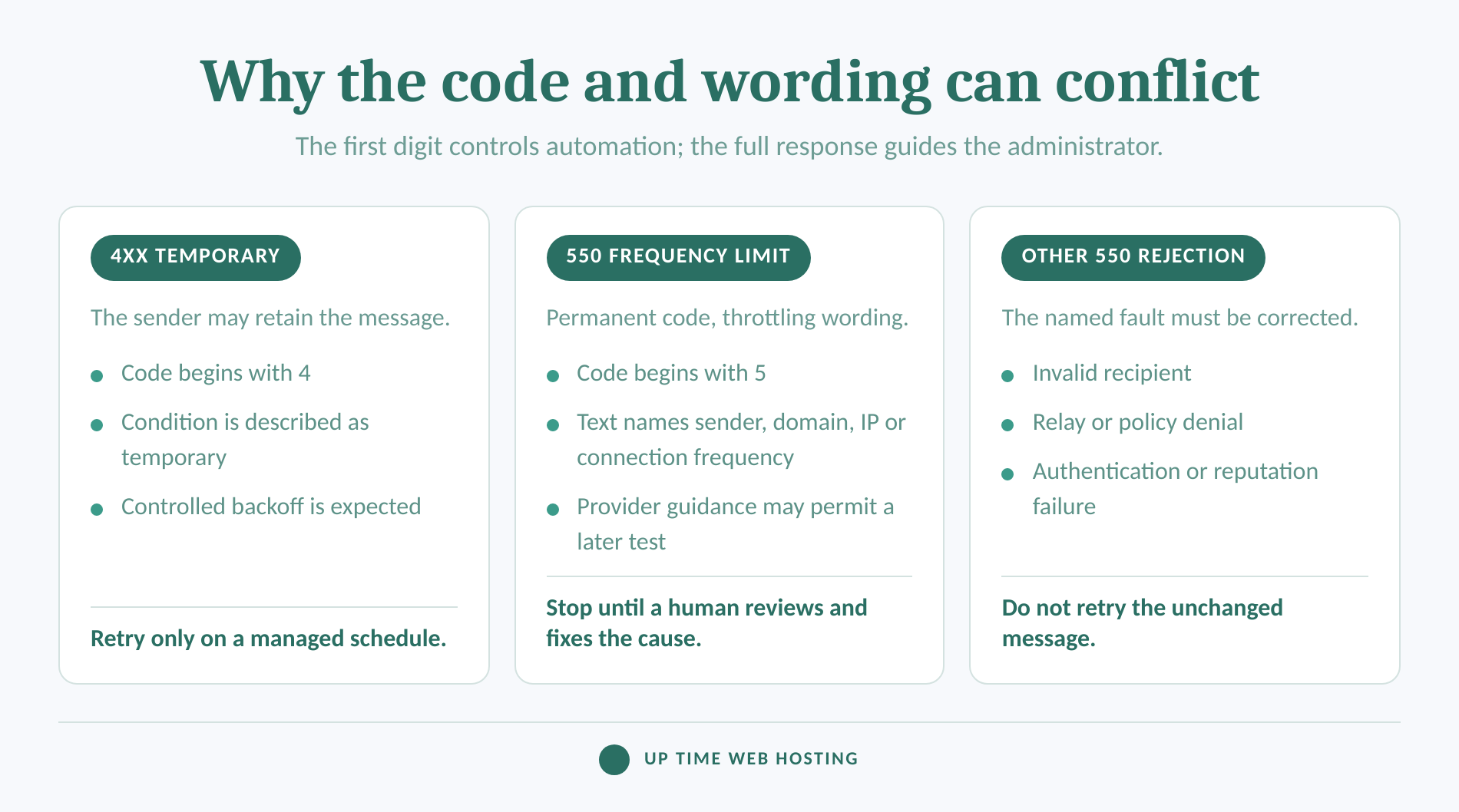
SMTP's first digit normally controls how sending software handles a failure. IETF's RFC 5321 (2008) classifies a 4yz response as a temporary negative reply and a 5yz response as a permanent negative reply. After a 5yz response, the client should not attempt the same delivery again without user review and appropriate intervention.
A 2026 recipient-provider bounce-code guide lists the exact text 550 Sender frequency limited as a sender-account frequency restriction. Its guidance says to pause sending, reduce the frequency and try later. It also says the provider's frequency threshold is confidential rather than publicly documented.
The SMTP code and the provider's wording therefore conflict. A 550 response is permanent for automatic SMTP handling, but the exact sender frequency limited text may describe a condition that clears only after a pause and corrective action.
The enhanced code provides more detail when one is present. RFC 3463 (2003) defines 5.7.1 as delivery not authorised or message refused, which can cover host-level or recipient-level policy filtering. It does not, by itself, prove that the problem is a sending-rate limit.
Treat the exact phrase as an immediate hard stop, then use the full text to identify which sender identity was limited.

Performance you can feel, backed by clients who depend on it. Read how our support and uptime create long‑term customer success.Power Your Business with Better Hosting
Is a 550 frequency limit temporary or permanent?
Do not call every 550 permanent in the operational sense, and do not call every frequency message safe to retry. The numeric class controls automatic handling, while the enhanced code and provider text tell a human what must change.
Use these distinctions:
- 421 or 451 with a 4.x.x status: The receiving server is describing a temporary condition. The sending server may retain the message and retry with controlled backoff.
- 550 with 5.1.1: The recipient usually does not exist. Correct or remove the address rather than retrying it.
- 550 with 5.7.1: A policy, authorisation, authentication or reputation rule refused the message. Read the response text for the specific reason.
- 550 sender, domain, IP or connection frequency limited: The receiving provider has used a permanent reply code for a frequency policy. Stop automatic or manual repetition until an administrator reviews the traffic and applies the provider's instructions.
The distinction matters because a queue may immediately bounce a 550 response instead of retaining it. Even if the underlying restriction later clears, blindly resending the same batch can produce another block and more non-delivery reports.
A frequency-limited 550 is recoverable only when the provider's wording supports a later test and the cause has been reviewed.
What should you capture from the bounce before changing anything?
Save the complete non-delivery report and the corresponding mail-server log entry before editing DNS, changing client settings or resending. The evidence must show the rejecting server, the full SMTP response and the affected sender and recipient.
Which fields identify the real rejecting system?
| Evidence in the bounce or log | Likely scope | First administrator check |
|---|---|---|
| Failures occur only at one recipient domain | Receiving-provider policy | Pause traffic to that destination and read its complete response |
| One sender fails across several recipient domains | Sender account or domain | Check account activity, authentication and recent sending changes |
| Several senders fail from the same server or IP | Server, IP or local protection | Review the outbound queue, server logs and hosting limits |
| Only one recipient fails with 5.1.1 or user unknown | Recipient address | Confirm the address and suppress it if invalid |
| The local log reports maximum hourly mail or excessive defers | Sending-server limit | Stop the queue and ask the server administrator to review the account |
For cPanel accounts, cPanel's Track Delivery documentation explains how to filter delivery records by recipient and display blocked, deferred and failed messages. The result field, sender, recipient and sent time help connect a user-visible bounce to the server event that produced it.
Capture these details:
- Full three-digit SMTP reply and any enhanced status code
- Exact response text after the code
- Sender and rejected recipient
- Date, time and timezone
- Remote server hostname and IP address, when shown
- Message ID or queue ID
- Whether other recipients in the same message succeeded
- Whether the message came from a person, website, application or mailing system
Redact message content, credentials and unrelated addresses before sharing the report outside the organisation. Do not remove the code, timestamp, server names or queue identifier.
A remote frequency rejection is not normally fixed by changing incoming-mail settings. If the mailbox also has connection problems, use pop3s ports explained and find your imap server, port and email login settings as separate checks rather than treating them as the cause of the remote 550.
The full bounce and matching server log are the minimum evidence needed for a reliable diagnosis.
Host your website with our 5-star rated, cPanel website hosting plans.
Super fast servers, with security included and hosted in your choice of Australian Data Center.
View cPanel Plans
What usually causes a sender-frequency rejection?
A sender-frequency rejection is usually caused by a sending pattern that the receiving or sending system considers excessive or unsafe. The pattern may be legitimate, accidental or the result of a compromised account or website.
Common causes include:
- A sudden burst: A website, invoicing tool, monitoring system or user sends many messages or opens many connections within a short period.
- A new sending pattern: A previously quiet domain starts sending a campaign, imports a customer list or routes a new application through the same mailbox.
- Authentication problems: SPF, DKIM or DMARC failures can make ordinary traffic look less trustworthy. Check the domain with an SPF record check and confirm that every legitimate sender is authorised.
- A compromised credential: A stolen mailbox password can produce outbound traffic that the business did not approve. Website scripts and vulnerable forms can create the same symptom.
- Repeated invalid recipients: A list containing old, mistyped or disabled addresses produces failures that can activate sending-server protections.
- IP or domain reputation: The recipient may restrict traffic associated with the sending domain or IP address. On shared infrastructure, the hosting provider may need to determine whether the sending IP is part of the rejection.
- A local cPanel limit: The message may never reach the recipient provider if the hosting server has already limited the domain or account.
The local and remote limits are separate. cPanel's mail-limiting documentation, last modified on July 8, 2026, documents hourly domain limits and protections based on failed or deferred messages. A local log referring to maximum hourly email or maximum defers is not the same event as a remote server returning sender frequency limited.
Do not assume the word frequency proves a blocklist entry. The response may describe account frequency, domain frequency, IP frequency, connection frequency or a daily provider limit, and the exact threshold may not be published.
The cause is found by matching the limited identity to the sending activity that changed.
How do you fix a 550 sender frequency limited error safely?
Fix the error by stopping repeated attempts, confirming that the mail was authorised, correcting the cause and making one controlled test. Do not rotate addresses, domains or IPs simply to get around the recipient's restriction.
What is the safe five-step recovery sequence?
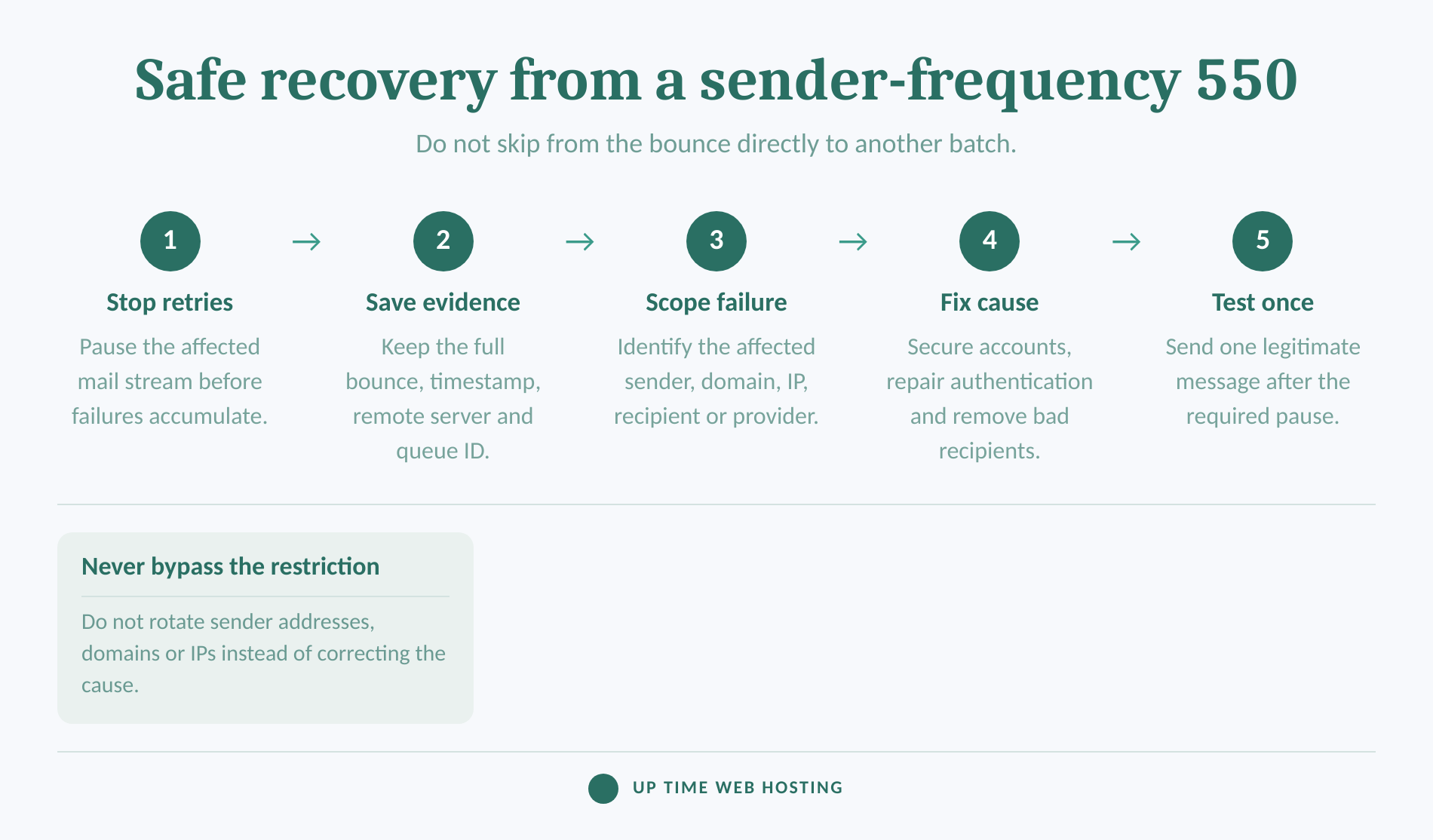
- Stop the affected retries. Pause the campaign, application job or manual resend process. If the traffic appears unauthorised, stop outbound mail from the account until it is secured.
- Scope the rejection. Test the evidence, not a new batch. Determine whether the same sender fails at one provider, several providers or every external destination. Check whether other senders on the domain still work.
- Secure the source. If the volume was not expected, change the mailbox and control-panel passwords, terminate active sessions where possible, enable two-factor authentication and inspect website forms, scheduled tasks, plugins and applications that can send mail. Preserve logs before removing evidence.
- Correct the technical or data problem. Repair missing or failed SPF, DKIM and DMARC records, confirm the server's reverse DNS and HELO identity with the host, remove permanently invalid recipients and correct any application that creates duplicate or rapid connections. cPanel's Email Deliverability documentation explains where cPanel reports SPF, DKIM, DMARC and mail-HELO problems.
- Test once, then monitor. Follow any wait period stated in the bounce or recipient-provider documentation. If no period is given, ask the hosting provider or recipient administrator rather than creating a rapid retry loop. Send one ordinary message to a known, expecting recipient and check the server result before slowly restoring legitimate traffic.
The test must use the corrected, authorised sending path. Sending from a replacement account or IP without fixing the cause is an attempted bypass, not remediation.
If the single test receives the same 550 response, stop. Provide the recipient administrator or hosting provider with the original bounce, test result, timestamps, remote server, sender, recipient and the corrective work already completed.
A safe retry is one message after review and remediation, not the original batch sent again unchanged.
What if only one mailbox provider rejects the message?
A failure limited to one recipient domain usually points to that receiving provider's policy rather than a broken mail client. The application displaying the bounce is not necessarily the system that rejected the message.
Use the pattern to narrow the owner of the fix:
- One recipient domain fails: Pause delivery to that domain and follow the remote response.
- Several unrelated domains fail: Investigate the sender account, domain authentication, IP reputation and local server first.
- One sender fails while colleagues succeed: Inspect that mailbox, its credentials and the applications using it.
- One recipient fails while other addresses at the same domain work: Confirm the address and ask the recipient to check mailbox-specific restrictions.
- Sending works but incoming mail fails: Treat it as a separate receiving problem and use can send email but not receive it? check these settings first.
Changing desktop mail software rarely changes a remote frequency decision because the receiving server evaluates the SMTP transaction, sending identity and connection that reached it. Client changes matter only if the client is using the wrong outgoing server, authentication method or sender account.
The rejecting server and failure pattern matter more than the name of the application showing the bounce.
Register your new domain name at competitive market prices including free domain add-ons like privacy, DNS Hosting, Custom Nameservers and Forwarding.
Always the best price and no nasty renewal price hikes.
Register A Domain Name
How can you prevent the error from returning?
Prevention depends on steady sending, valid recipients, complete authentication and fast detection of unusual outbound activity. Frequency limits are less likely to become a business outage when mail streams are monitored before failures accumulate.
Which habits prevent another frequency block?
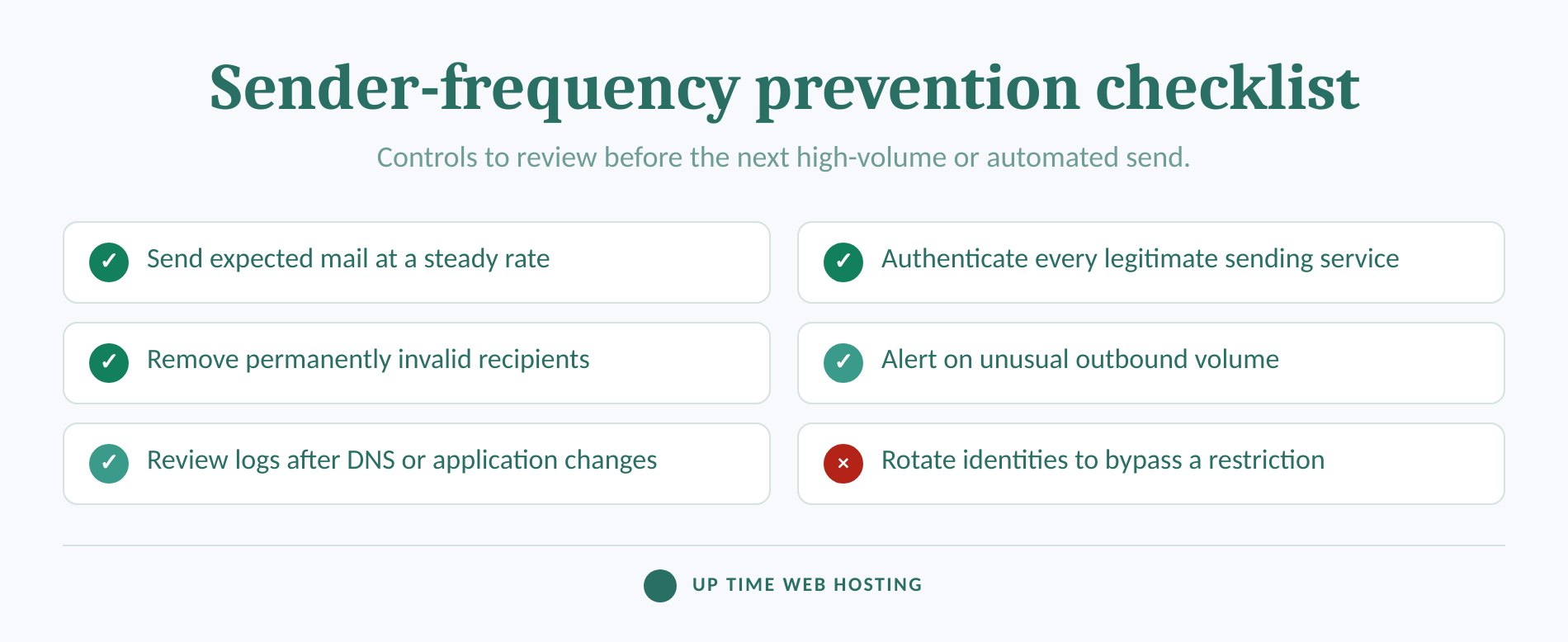
A large recipient provider's 2026 sender guidance recommends sending at a consistent rate, avoiding sudden volume spikes and reducing traffic when messages begin bouncing or being deferred. Those principles also help smaller business senders identify abnormal behaviour early.
Build these controls into normal operations:
- Keep one register of every person, website and application authorised to send for the domain.
- Review SPF, DKIM and DMARC after migrations, DNS edits and new software launches.
- Alert an administrator when a mailbox or domain suddenly sends more mail than normal.
- Centralise suppression data so invalid recipients do not return through another application.
- Separate person-to-person, transactional and marketing workflows only as a planned and authenticated design, never as a response intended to evade a block.
- Monitor failures by recipient domain so a provider-specific restriction is visible before users repeatedly resend.
- Patch website software and remove unused mail credentials.
- Document rate-limit, queue and authentication changes so the next administrator can understand the current setup.
No public threshold can guarantee delivery to every receiving system. The practical goal is expected traffic, good evidence and a controlled response when a provider says no.
Stable sending habits and early alerts prevent a temporary restriction from becoming a repeated outage.
What else do administrators ask about SMTP 550 errors?
SMTP 550 covers several unrelated permanent-rejection categories, so the full response must guide the fix. The following answers separate frequency limits from size, recipient and relay errors.
How do I fix a 550 error?
Fix a 550 error by reading the complete enhanced code and response text, not the number alone. Correct the named problem, such as an invalid recipient, failed authentication, relay denial, reputation block or frequency limit. For a frequency message, stop repeated attempts, investigate the sending pattern and make one controlled test after remediation.
How do I fix 552 size limit exceeded?
A 552 size limit exceeded error means the message is larger than the receiving or sending system allows. Remove or compress attachments, split the content, or send the file through an approved sharing method. Create a new message after reducing the total size, because repeating the unchanged message will produce the same result.
What does SMTP code 550 mean?
SMTP code 550 is a permanent negative completion reply at the protocol level. The text after 550 explains the actual reason, which may be an invalid address, policy refusal, relay denial, authentication failure, reputation problem or a provider-specific frequency restriction. Administrators should use the full response before deciding what to change.
How to fix 550 relay not permitted?
A 550 relay not permitted error means the server will not forward the message under the current connection or identity. Check SMTP authentication, the authorised outgoing server, sender domain, connector or allowed IP settings. Do not treat relay denial as a frequency problem, and do not enable an open relay to work around it.
The complete status code and response text decide the fix, not the number 550 by itself.
Experience Microsoft 365 Business Standard for free for 30 days.
Up to 25 users with full access to email, OneDrive and Teams. Includes full versions of desktop apps of Outlook, Word, Excel, PowerPoint and more.
Try Microsoft 365
When should your hosting provider investigate?
Ask the hosting provider to investigate when the rejection persists after the documented pause and one controlled test, affects several recipient domains, or points to the sending IP, PTR record, HELO identity or local mail queue. Send the provider a complete evidence packet rather than a screenshot containing only the words delivery failed.
The evidence packet should include the original bounce, exact timestamp and timezone, sender, recipient, remote server, full SMTP response, queue or message ID, sending application and the result of the controlled test. State whether the traffic was expected and whether passwords, DNS records or website applications were changed.
Businesses that need cPanel Website Hosting with business email capability and Australian support can review email for business and provide the support team with the evidence collected above.
Escalate one complete evidence packet before sending another batch.