
You've probably landed here because someone in your business or agency said, “The site runs on ASP.NET,” and that answer didn't help much.
Maybe you inherited a customer portal from a previous developer. Maybe your internal booking system needs a new host. Maybe your junior dev can write some C#, but the business owner still needs to decide whether this app belongs on local Windows hosting, a VPS, or Azure. In Australia, that question matters because ASP.NET isn't just a coding choice. It's also a hosting, support, and modernisation decision.
A lot of “what is ASP.NET” guides stop at a tidy definition. That's not enough when you're trying to keep a real site online, choose the right server, or work out whether your current app is old ASP.NET Framework, newer ASP.NET Core, or a mix of both ideas in conversation.
Table of Contents
- Introduction to What ASP.NET Really Is
- How ASP.NET Works Under the Hood
- ASP.NET Framework vs ASP.NET Core Explained
- Common Application Types You Can Build with ASP.NET
- Hosting and Deployment Options for Australian Websites
- Security and Performance Essentials for ASP.NET Apps
- Choosing ASP.NET and Your Next Steps in Australia

Performance you can feel, backed by clients who depend on it. Read how our support and uptime create long‑term customer success.Power Your Business with Better Hosting
Introduction to What ASP.NET Really Is
ASP.NET is Microsoft's web application framework for building websites, web apps, APIs, and business systems on the .NET platform. If that sounds broad, that's because it is. An ASP.NET application can be a public marketing website, an online form system, a staff dashboard, a customer login area, or the backend that feeds data to a mobile app.
In plain English, ASP.NET is the part of the Microsoft development stack that helps a developer turn business rules and database content into something people can use in a browser or app.
Why Australian businesses keep running into it
ASP.NET has been around a long time. It first shipped on 16 January 2002 as version 1.0, and ASP.NET 1.1 followed on 24 April 2003. That history matters locally because SSW says it worked with the beta version of .NET Framework 1.0 and released the very first ASP.NET web application in Australia, which shows how early Australian firms adopted the Microsoft web stack (SSW company news).
That early adoption helps explain why so many Australian organisations still rely on it. This isn't just an old technology sitting untouched on forgotten servers. TheirStack lists 561 companies in Australia using ASP.NET and 169 companies in Australia using ASP.NET Core, including names such as Westpac Group, Computershare, NSW Government, WiseTech Global, and Aristocrat (TheirStack ASP.NET in Australia).
What people usually mean when they say “ASP.NET”
They might mean any of these:
- A classic ASP.NET Framework app running on Windows and IIS
- A newer ASP.NET Core app that can run on Windows or Linux
- A Microsoft-based site with SQL Server behind it
- An internal business application rather than a simple brochure site
Practical rule: If you're asking “what is ASP.NET?”, you're usually also asking three hidden questions. What server does it need, what skills does it need, and how hard will it be to upgrade later?
That's why the label matters. If you misread the app type, you can end up choosing the wrong hosting plan, the wrong deployment method, or the wrong migration path.
How ASP.NET Works Under the Hood
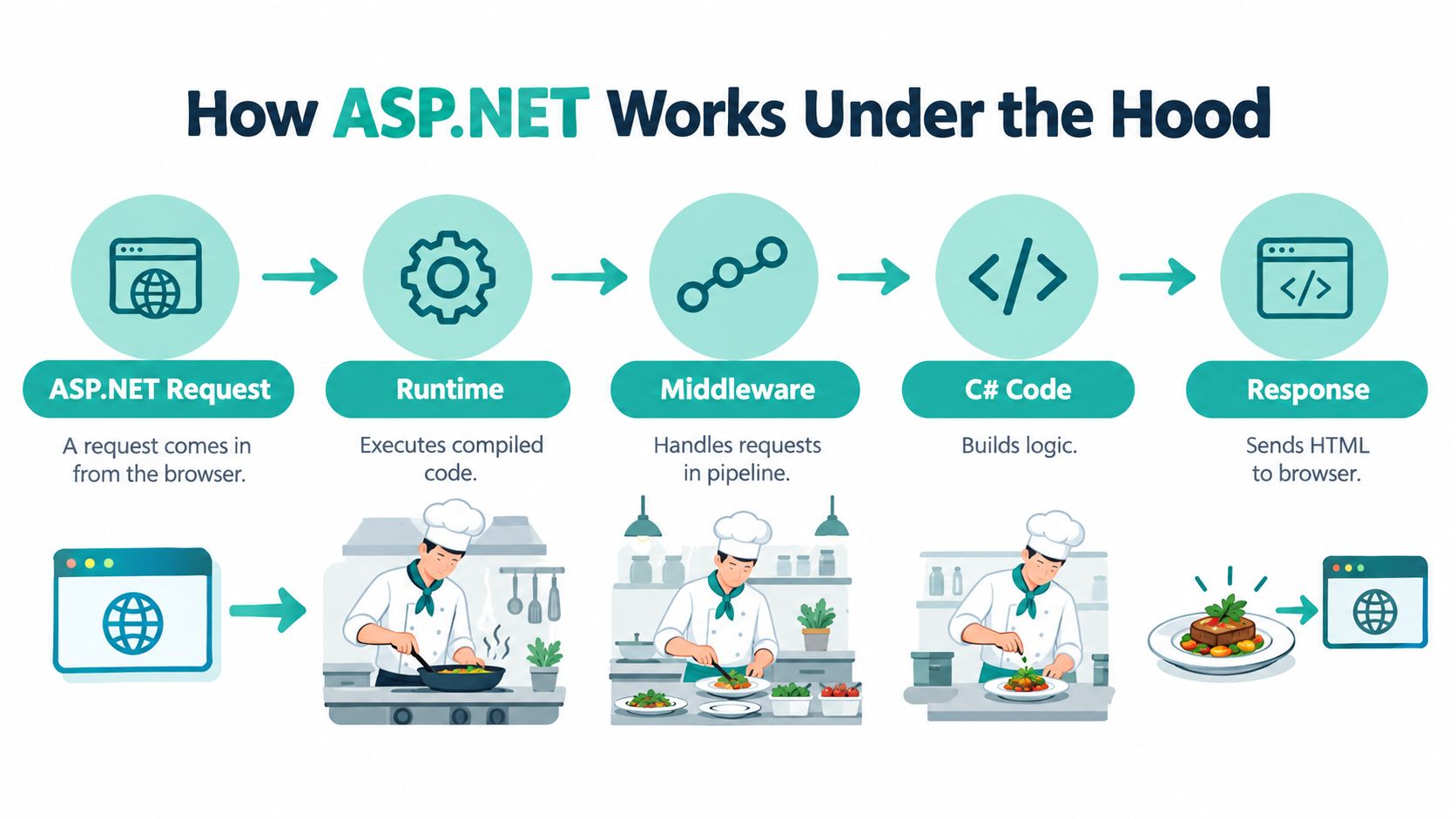
The easiest way to understand ASP.NET is to compare it to a restaurant kitchen.
A customer places an order. The kitchen receives it, checks what's needed, cooks the meal, and sends back the finished plate. A web app does something similar. The browser asks for a page or data, the server processes that request, and ASP.NET sends back HTML, JSON, or another response.
The main moving parts
Here's the stack in simple layers:
C# code
Developers usually write ASP.NET apps in C#. That code contains your business rules. For example, “show only invoices for the logged-in customer” or “calculate GST before checkout”.The .NET runtime
This is the engine that runs the compiled code. It handles memory, execution, and the plumbing needed to make the application work reliably.ASP.NET itself
ASP.NET provides the web framework pieces. Routing, page rendering, controllers, APIs, middleware, request handling, and common web patterns live here.The web server
On Windows, this is often IIS. In newer setups, ASP.NET Core apps also run with Kestrel, and IIS can sit in front depending on the deployment model.
What happens during a request
A simple example helps.
Say a Melbourne customer opens /orders/123 in their browser:
- The browser sends a request to the web server
- The server passes that request into the ASP.NET application
- ASP.NET works out which code should handle it
- The app checks authentication, loads order data from a database, applies business rules
- ASP.NET returns a finished response, such as an HTML page
That's why ASP.NET suits business systems well. It isn't just displaying static files. It's handling identity, logic, database access, and dynamic output in one organised platform.
Why the server still matters
Business owners often get caught out. They hear “web framework” and assume any hosting will do. It won't.
Classic ASP.NET usually expects a Windows-friendly environment with IIS. ASP.NET Core is more flexible, but the hosting still needs the right runtime and deployment setup. If you're tightening response headers on a .NET app, this kind of knowledge base guide for removing X-Powered-By and server headers in .NET gives you a good example of how hosting and application behaviour overlap.
The code is only one part of the app. The runtime, web server, and deployment settings all affect how the site behaves in production.
Host your website with our 5-star rated, cPanel website hosting plans.
Super fast servers, with security included and hosted in your choice of Australian Data Center.
View cPanel Plans
ASP.NET Framework vs ASP.NET Core Explained
This is the point where most confusion starts.
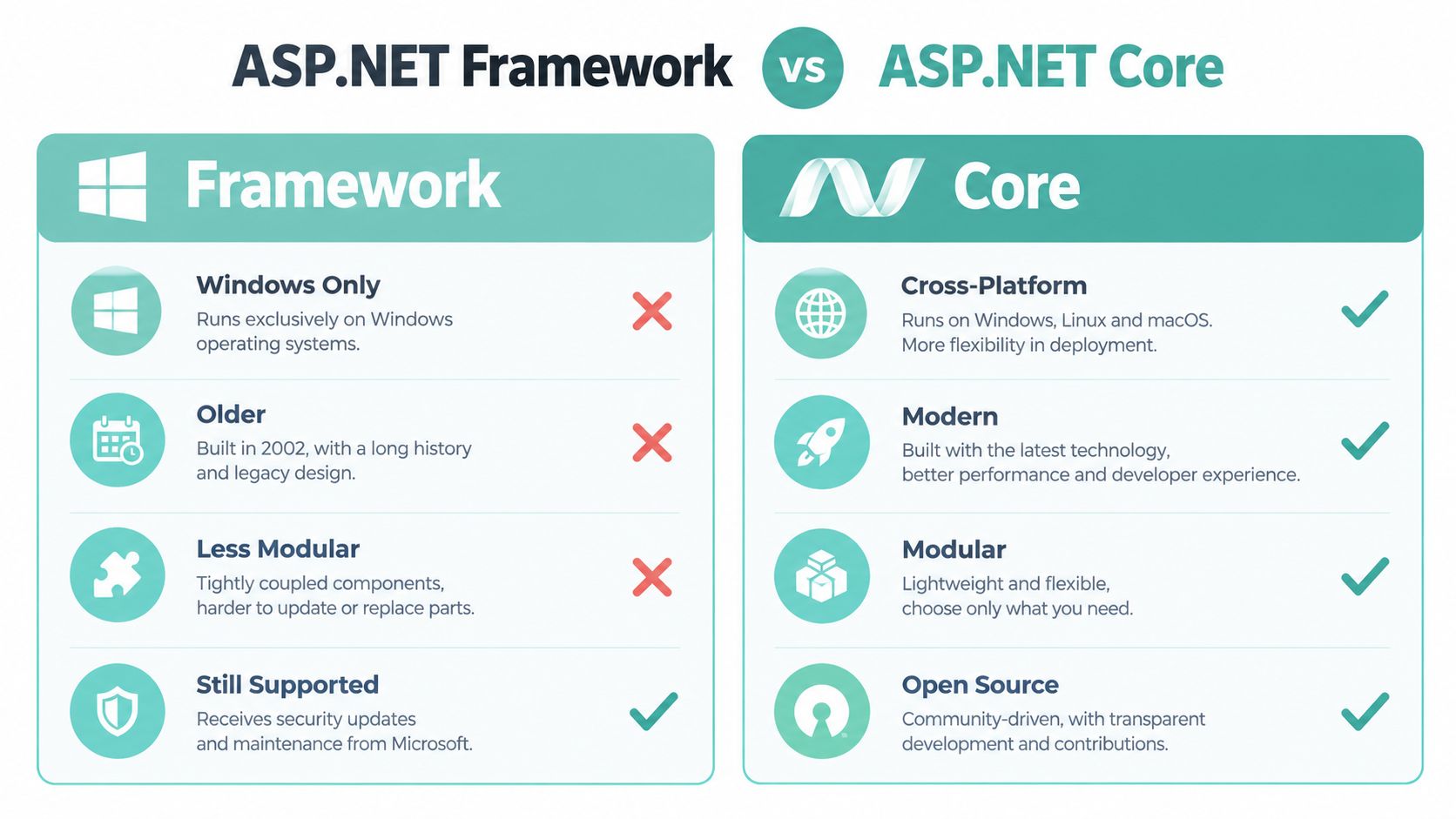
When someone says “ASP.NET”, they might mean the older ASP.NET Framework family or the modern ASP.NET Core family. Those aren't just different names for the same thing. They overlap in purpose, but they differ in hosting model, platform flexibility, and how you approach future development.
The simplest way to separate them
ASP.NET Framework is the older Windows-centric web stack. It commonly lives with IIS, Windows Server, and long-running business applications.
ASP.NET Core is the newer cross-platform web stack. It supports more modern deployment patterns and can run on Windows or Linux.
That doesn't mean Framework is irrelevant and Core is the only sensible option. In Australia, many teams still support revenue-generating or operationally important Framework apps while building new work in Core.
Independent tracking shows ASP.NET is used on 4.2% of websites globally, and one country-level tracker reports ASP.NET at 41.1% backend framework share in Australia, with ASP.NET Core separately at 3.4% (W3Techs ASP.NET comparison data). That split is exactly why the naming confusion persists.
ASP.NET Framework vs ASP.NET Core at a Glance
| Feature | ASP.NET Framework | ASP.NET Core |
|---|---|---|
| Platform style | Windows-focused | Cross-platform |
| Typical hosting | IIS on Windows Server | IIS, Kestrel, Windows, or Linux |
| Common use case | Existing business apps, older MVC sites, legacy dependencies | New web apps, APIs, modern services |
| Legacy component support | Better fit for older Windows-only integrations | Better fit for modern rebuilds and portable deployments |
| Migration approach | Often maintained in place first | Often chosen for new development or staged migration |
When staying on Framework makes sense
A business should usually stay on ASP.NET Framework for now if the app depends on older libraries, COM interop, older framework targets, or a tightly integrated Windows and SQL Server environment. In those cases, forcing a migration too early can create risk without adding immediate value.
Australian Windows hosting providers that advertise ASP.NET support commonly pair it with IIS, Windows Server, SQL Server, and versioned .NET support, which is why legacy MVC and long-lived line-of-business applications still fit that model well (Australian Windows web hosting with ASP.NET support).
When Core is the better path
Choose ASP.NET Core when you're starting something new, want more deployment flexibility, or plan to modernise steadily rather than all at once. If your team needs a practical walkthrough, this guide on hosting an ASP.NET Core application in IIS is useful because it sits right at the boundary between development and real hosting.
Decision shortcut: Keep Framework when the business depends on Windows-specific behaviour. Choose Core when you want a cleaner future path and fewer platform constraints.
Common Application Types You Can Build with ASP.NET
Once people grasp that ASP.NET is a platform rather than a single app template, the next question is usually, “What do we build with it?”
The answer depends on the project. ASP.NET supports several development models, and each suits a different business outcome.
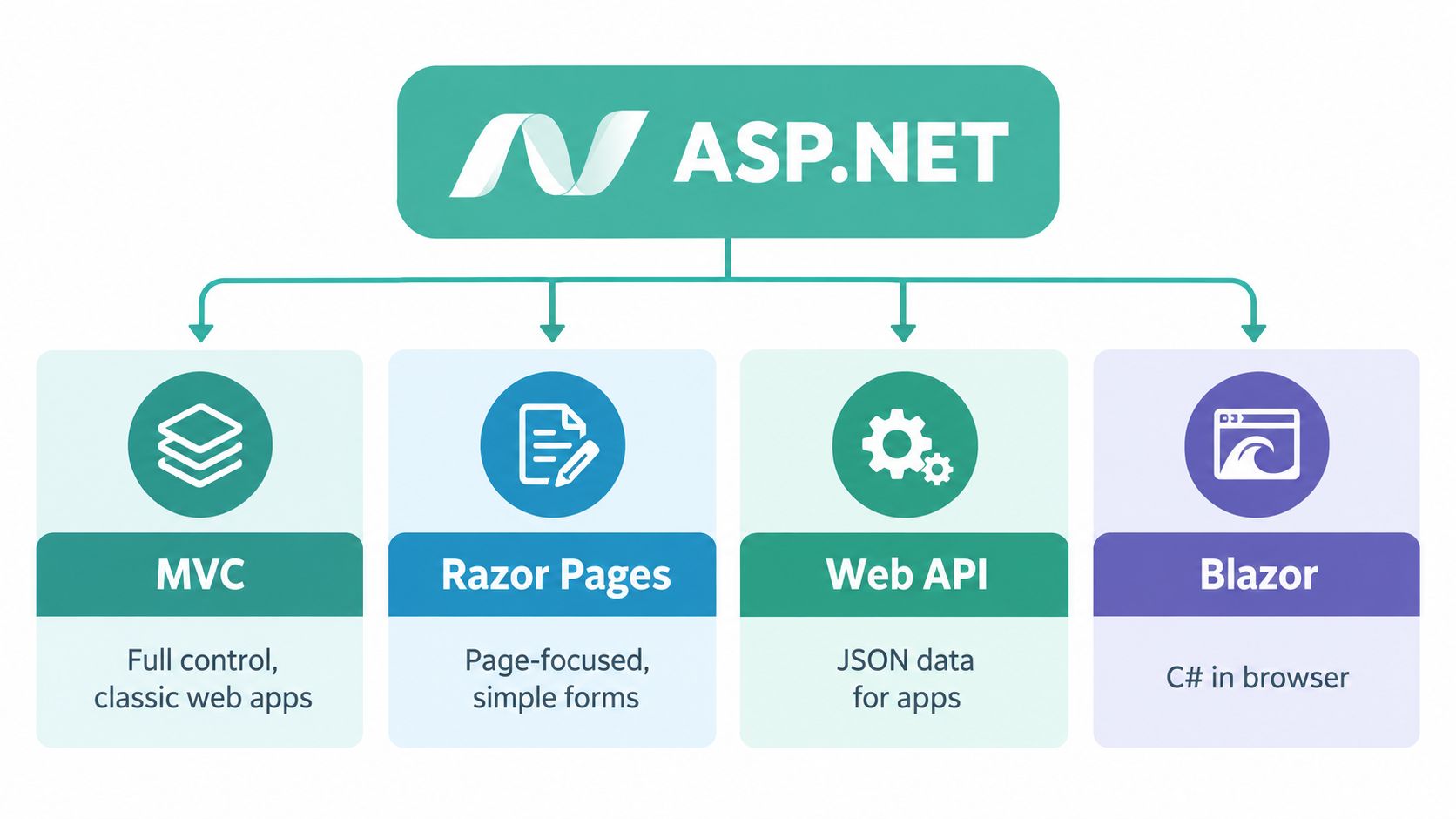
MVC for structured business websites
MVC stands for Model View Controller. You don't need to memorise the pattern. Just think of it as a way to keep data, screen output, and application logic organised.
A common Australian example would be a services company website with enquiry forms, staff login, quote requests, and a customer portal. MVC suits projects where the site has many moving parts and needs clear separation between rules and presentation.
Razor Pages for straightforward page-driven sites
Razor Pages is often easier for smaller web applications. If your app is page-focused, such as a training registration site, member renewal form, or simple internal approval workflow, Razor Pages can feel more direct than MVC.
It's a good fit when the team wants to work page by page without building a larger controller structure than necessary.
Web API for mobile apps and integrations
Web API is for data exchange. Instead of sending a finished web page to a browser, the app sends structured data that another system can use.
That might power:
- A mobile app backend for bookings or account information
- A partner integration between a website and a stock system
- A single source of business data for multiple front ends
If the app needs Microsoft-style database support, local teams often pair this type of project with MSSQL database hosting so the application and data layer stay aligned.
Blazor for interactive interfaces with C#
Blazor lets developers build richer interactive interfaces using C# rather than switching heavily into JavaScript for every front-end feature.
That can suit dashboards, internal admin tools, and customer-facing systems where users interact with filters, reports, live forms, or account screens throughout the day.
A useful way to choose is to start with the user experience, not the framework name. If you know whether you're building pages, APIs, or a dashboard-style interface, the app model usually becomes much clearer.
Hosting and Deployment Options for Australian Websites
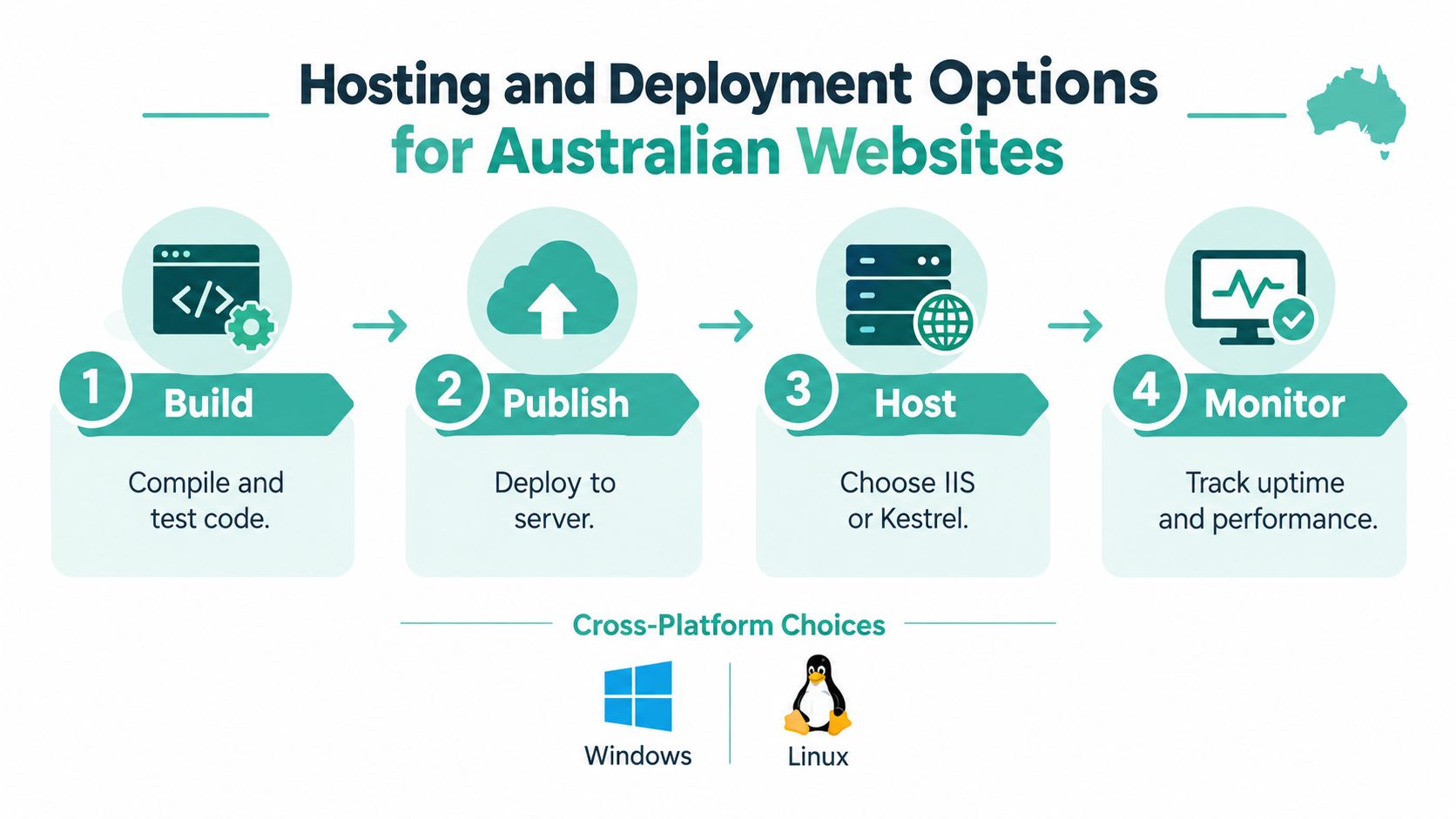
A solid ASP.NET app can still perform badly if it's deployed to the wrong environment.
For Australian businesses, hosting choice affects speed, support, data location, and how easy it is to maintain the application. That matters more with server-rendered pages, frequent database queries, and login-heavy systems where every round trip counts.
Why local hosting matters in Australia
Australian hosting providers market data centres in Sydney, Melbourne, Brisbane, or Brisbane-based locations and emphasise local routing and support, which is practical for applications with heavy server-side rendering, frequent database calls, or session state (Australian ASP.NET hosting overview).
For a business owner, the simple version is this: if your users are in Australia, keeping the app closer to them usually makes operations simpler. It can also help with internal compliance expectations when teams prefer local infrastructure and support.
The main hosting paths
There isn't one correct answer. The right choice depends on the age of the app and what it depends on.
Windows shared hosting
This is often the easiest fit for smaller classic ASP.NET sites and lighter business applications. If the host provides a Windows stack with IIS and the right .NET support, deployment can stay relatively simple.
This path suits:
- Existing ASP.NET Framework sites that don't need custom server access
- Company portals using SQL Server and standard IIS hosting
- Smaller agency builds with familiar Windows deployment needs
One Australian option in this category is Windows web hosting in Australia, which is relevant when you need local Windows hosting rather than a generic Linux plan.
VPS with IIS
A VPS makes sense when the application needs more control. You might need custom IIS configuration, scheduled tasks, access to server settings, or tighter isolation from other sites.
Microsoft's IIS guidance says that on Windows Server 2012 or Windows 8, you install Internet Information Services, then enable Application Development Features and select ASP.NET 4.5 to support ASP.NET applications (Microsoft IIS installation guidance).
That's an older example, but it captures an important truth. Classic ASP.NET hosting is not just “upload files and hope”. IIS role configuration is part of the application environment.
Cloud PaaS with Azure App Service
If you want a managed path with less server administration, Azure App Service is one of the most natural options for ASP.NET. Microsoft explicitly recommends Azure App Service and IIS as deployment targets for ASP.NET workflows, and its quickstart shows publishing from Visual Studio by choosing Azure App Service on Windows or Linux, creating a resource group and app service plan, and selecting the Free (F1) tier for the example (Azure App Service .NET quickstart).
Microsoft also states that Azure App Service supports ASP.NET and ASP.NET Core and is available in most Azure regions, which makes it a region-aware choice for Australian deployments when paired with Australian Azure regions (Azure App Service product page).
How to choose between them
A practical way to decide is to ask four questions:
Does the app rely on Windows-only behaviour?
If yes, IIS and Windows hosting stay central.Does the team want less server management?
If yes, Azure App Service is worth serious consideration.Does the app need custom server control?
If yes, a VPS is often more suitable than shared hosting.Are most users in Australia?
If yes, local infrastructure should be part of the conversation, not an afterthought.
Hosting rule of thumb: Keep the environment as simple as the application allows, but no simpler than its dependencies require.
Register your new domain name at competitive market prices including free domain add-ons like privacy, DNS Hosting, Custom Nameservers and Forwarding.
Always the best price and no nasty renewal price hikes.
Register A Domain Name
Security and Performance Essentials for ASP.NET Apps

Security and performance don't come from one magic setting. They come from the combination of application design and hosting setup.
ASP.NET gives developers solid building blocks for authentication, request handling, and data protection. But once the app reaches production, the hosting environment starts to matter just as much. SSL, firewalls, backups, malware scanning, and monitoring all shape how resilient the service is.
What to check on the server side
For ASP.NET Core hosted on IIS, Microsoft says the .NET Hosting Bundle installs the .NET Runtime and the ASP.NET Core Module to allow ASP.NET Core apps to run with IIS (Microsoft .NET Hosting Bundle guidance).
That's a technical detail, but an important one. If the runtime pieces aren't present, the application won't behave properly no matter how good the code is.
A sensible review should include:
- TLS and SSL readiness so traffic is encrypted
- Runtime alignment between the app and the server
- Firewall coverage for common web threats
- Backup routines that suit the business impact of downtime
- Monitoring and alerting so failures aren't discovered by customers first
If you're assessing the protection layer around a hosted app, a plain-language guide to what a web application firewall does is a good place to start.
Why Australian performance is often a latency question
Performance tuning isn't only about code quality. Distance matters.
If your ASP.NET application generates pages on the server and makes regular database calls, every extra round trip adds friction. That's why Australian businesses often benefit from local hosting for customer portals, booking tools, account areas, and internal systems used by local staff.
Good performance is usually the result of ordinary things done well. The right runtime, local hosting, sensible security layers, and an app that isn't fighting its own dependencies.
Choosing ASP.NET and Your Next Steps in Australia
ASP.NET is a strong fit when your business already lives comfortably in the Microsoft world. If you use C#, SQL Server, Windows-integrated tooling, or you depend on a long-running internal web app, it remains a practical choice rather than a nostalgic one.
That matters in Australia because the decision often isn't “ASP.NET or not”. It's whether you should keep a Framework app stable on Windows and IIS, build new work in ASP.NET Core, or migrate gradually without breaking the parts the business relies on daily.
A sensible decision framework
Choose ASP.NET, or keep investing in it, when these points describe your situation:
- You have a Windows-based business app that already works and still meets operational needs
- Your application relies on SQL Server or Microsoft-friendly integrations
- Your team uses C# and .NET already
- You need local Australian hosting and support options for production
Think harder before committing if the app doesn't need the Microsoft stack at all, or if a simpler platform would meet the need with less operational weight.
If you're modernising an older app
Don't start by asking, “How do we rewrite everything?”
Start with:
- What must stay on Windows today
- What can move with minimal code change
- Which parts are public-facing and performance-sensitive
- Whether the app should remain server-rendered or shift toward API-first design
TheirStack separately lists 168 identified Australian companies using ASP.NET Core in one public dataset, which is a useful sign that Core adoption is commercially real across local industries (TheirStack ASP.NET Core in Australia).
That doesn't mean every Framework app should be migrated immediately. It means you have a live path forward when the business case is there.
The practical next step
If you're a business owner, ask your developer one simple question: Is this app ASP.NET Framework or ASP.NET Core, and what does that mean for hosting?
If you're a junior dev, document the runtime version, hosting dependencies, database requirements, and deployment method before recommending any move. That short audit usually saves more pain than a rushed migration plan.
If you need Australian hosting for a Microsoft-based site or application, UpTime Web Hosting offers local Windows hosting, MSSQL support, managed VPS options, and Australian-based infrastructure that fits common ASP.NET deployment needs. It's a practical place to start if you're trying to host an existing IIS app, plan a Core deployment, or get clearer on which local setup matches your application.