In short
An HTTP 504 Gateway Timeout means a gateway or proxy did not receive a timely response from the upstream server needed to load the page. Visitors can retry once, but website owners should check the failing URL, cPanel resource usage and error logs before changing timeout settings or contacting their host.
Key takeaways
- An HTTP 504 is a server-side timeout between a gateway and an upstream system, not usually a fault in the visitor's browser. (rfc-editor.org)
- Record the affected URL, time and scope before restarting services or changing settings.
- cPanel can expose account resource usage and recent web-server errors that help narrow the cause. (docs.cpanel.net)
- Increasing a timeout is not a complete fix when slow code, a database query or an external service caused the delay.
- Persistent 5xx errors can cause search crawlers to slow down and may eventually affect indexed URLs. (developers.google.com)
Contents
- Why is my website showing an HTTP 504 error?
- What should I check first if I am only visiting the site?
- Which part of the request is actually timing out?
- What should a cPanel site owner check, step by step?
- How do WordPress 504 errors differ from other 504 errors?
- How do HTTP 502, 503, 504 and 404 errors differ?
- Can recurring 504 errors affect customers and search crawling?
- When should I ask the hosting provider to investigate?
- What are the common questions about HTTP 504 errors?
- What should you do if the 504 keeps coming back?
A 504 is best treated as a timing failure across a chain, not as a browser message to clear and forget. The practical job is to identify which link in the chain stopped responding, then collect enough evidence to correct that layer without masking the problem.
Why is my website showing an HTTP 504 error?
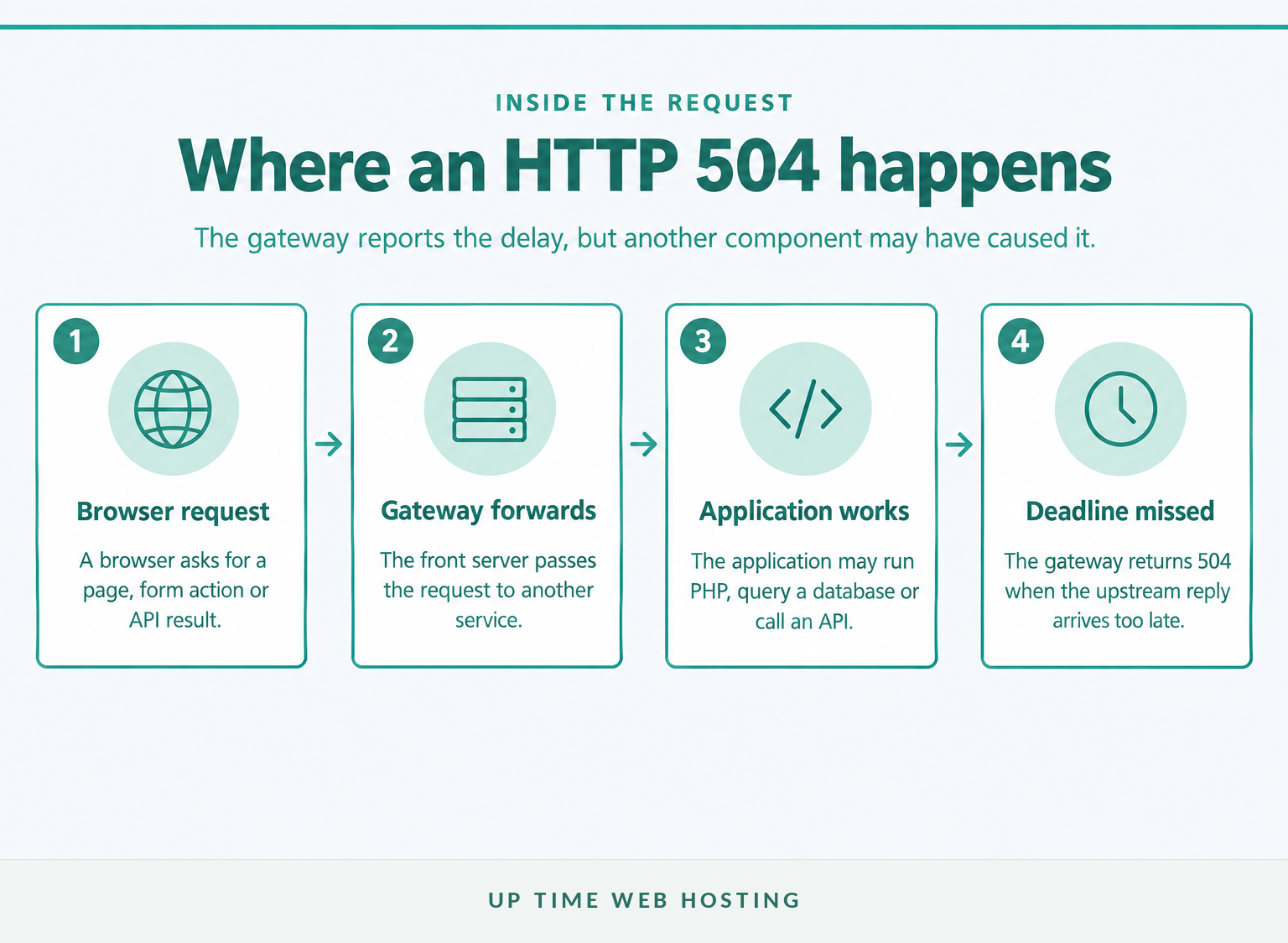
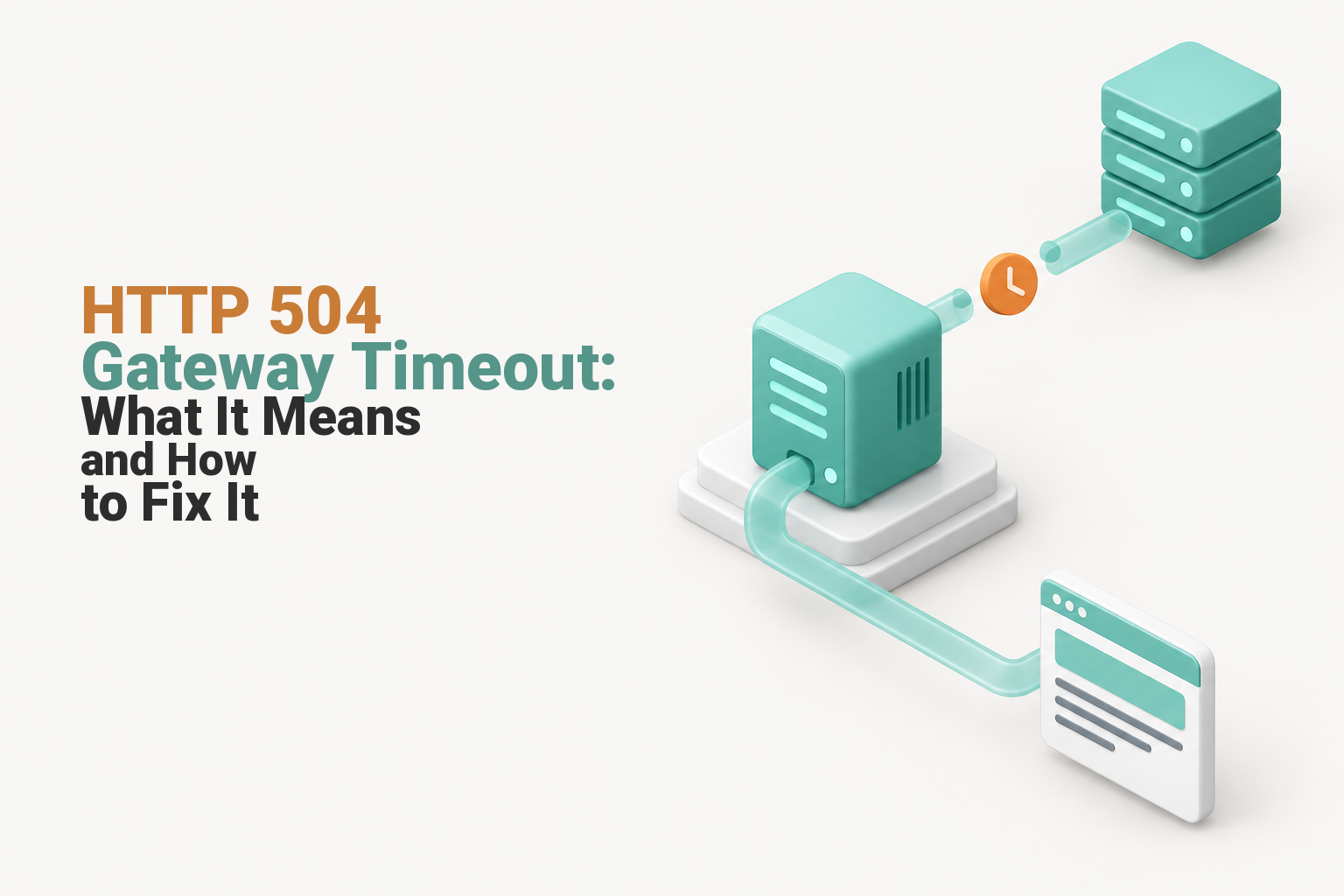
An HTTP 504 appears because a server acting as a gateway or proxy waited too long for another server it needed. The browser reached part of the website's infrastructure, but the upstream response did not arrive within the gateway's allowed time.
The IETF's 2022 HTTP Semantics standard defines status 504 as a gateway or proxy failing to receive a timely response from an upstream server required to complete the request. The phrase gateway 504 timeout is simply another wording of the same status. (rfc-editor.org)
A typical request may pass through several components:
- A browser requests a page or submits an action.
- A gateway, reverse proxy or web server accepts the request.
- The gateway passes work to an application, PHP process, database or external service.
- The gateway returns HTTP 504 if the required reply does not arrive in time.
The error identifies where the failure was noticed, not necessarily where it began. A slow database can delay PHP, PHP can delay the origin response, and the gateway can be the component that finally displays the 504 page.
A 504 identifies a missed upstream deadline, not the exact component that ran late.

Performance you can feel, backed by clients who depend on it. Read how our support and uptime create long‑term customer success.Power Your Business with Better Hosting
What should I check first if I am only visiting the site?
If you are only visiting the website, retry once after a short wait and check whether other pages on the same site work. A persistent error across devices or networks should be reported to the site owner rather than repeatedly refreshed.
Use these checks to rule out a local connection path problem:
- Open another page on the same website. One failing action may indicate an application or database problem, while every page failing may indicate a broader outage.
- Try a private browser window or another network. Temporarily disconnect a VPN or local proxy if one is active.
- Check the website's status page or support channel if one is available.
- If the error followed a form, order or payment submission, confirm the result before submitting the same action again.
MDN's HTTP 504 reference notes that most fixes require server-side investigation, although a visitor's VPN, proxy, firewall, DNS or custom network configuration can occasionally contribute. (developer.mozilla.org)
Visitors can rule out a local path problem, but a repeated 504 usually needs server-side investigation.
Which part of the request is actually timing out?
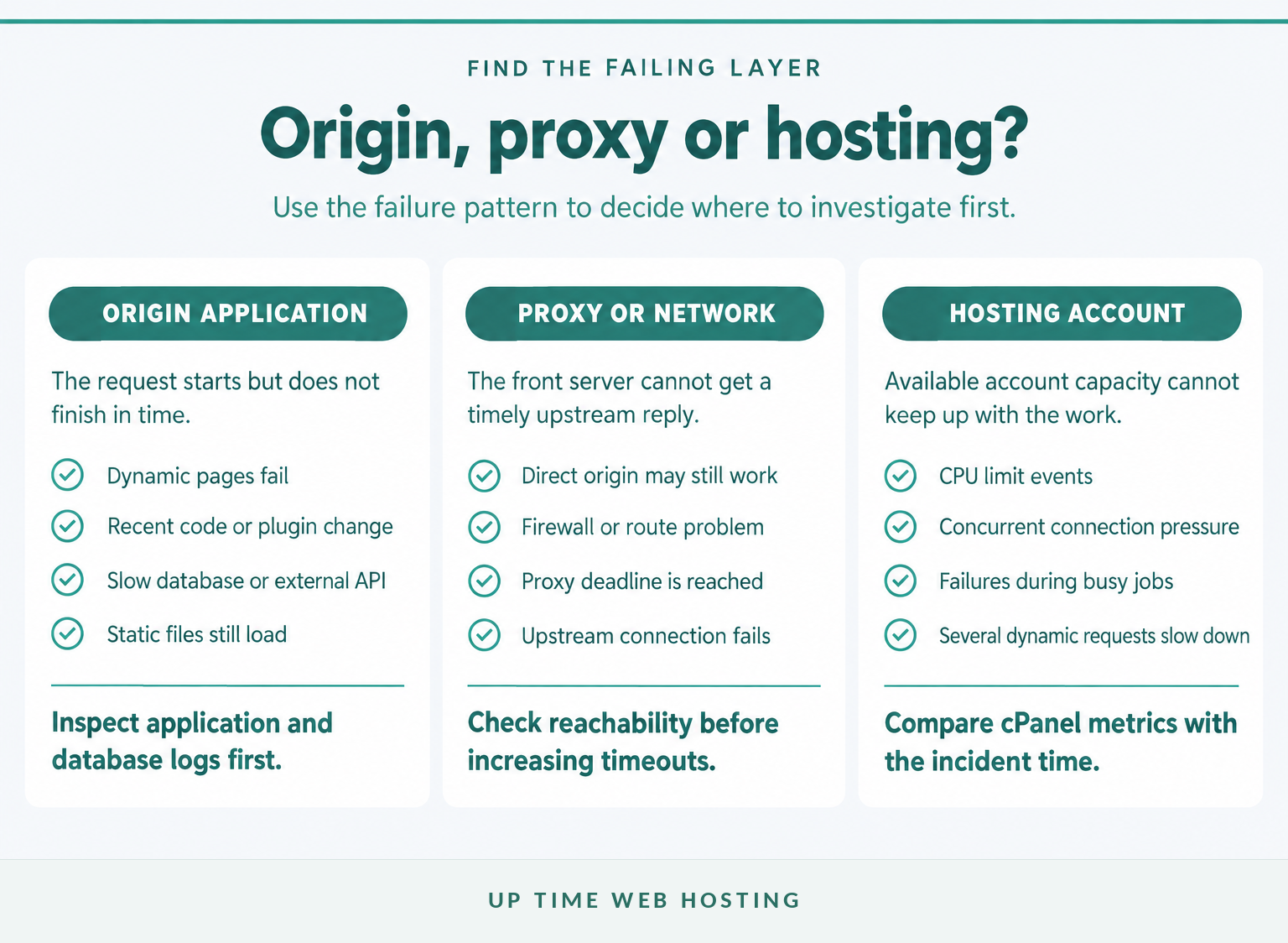
The likely cause sits in one of three broad areas: the origin application, the proxy or network path, or the hosting environment. These areas can overlap, so compare symptoms rather than assuming the error page names the faulty server.
Is the origin application too slow?
The origin is the system responsible for producing the requested content. It may be a PHP application, WordPress site, database-backed store, API or another web service.
Origin-side clues include:
- Static files load, but search, login, checkout or administration pages time out.
- The problem began after a deployment, plugin update, import or scheduled task.
- Only requests that perform database or external API work fail.
- The site's server response time becomes slow before 504 errors appear.
The root cause may be slow code, a blocked PHP worker, an expensive database query, a failed external service or more simultaneous work than the application can process.
Is the proxy giving up first?
A reverse proxy has its own connection and read limits. NGINX's official proxy documentation, for example, documents a default proxy_read_timeout of 60 seconds between successive reads from the proxied server. (nginx.org)
A higher proxy limit may be justified for a deliberately long-running operation, but it should not be the first response to an unexplained timeout. Raising the limit can make users wait longer while the slow query, blocked process or failed dependency remains unchanged.
Is the path between servers failing?
The gateway may be unable to establish or maintain a connection to the upstream service. Firewall rules, name-resolution failures, unreachable ports and network interruptions can all stop a timely reply.
This layer usually requires server or hosting access. A cPanel account holder may see the resulting error without having permission to inspect the reverse proxy, firewall or private network route that caused it.
Is the hosting account running out of capacity?
A site may respond normally at low load and time out when CPU or concurrent connection limits are reached. Background jobs, traffic spikes, imports, backups and inefficient requests can compete for the same account resources.
As of July 2026, cPanel's CPU and Concurrent Connection Usage documentation describes an interface for monitoring account resource usage on servers where that feature is available. (docs.cpanel.net)
The right fix depends on which layer stopped answering, so identify the layer before changing limits.
Host your website with our 5-star rated, cPanel website hosting plans.
Super fast servers, with security included and hosted in your choice of Australian Data Center.
View cPanel Plans
What should a cPanel site owner check, step by step?
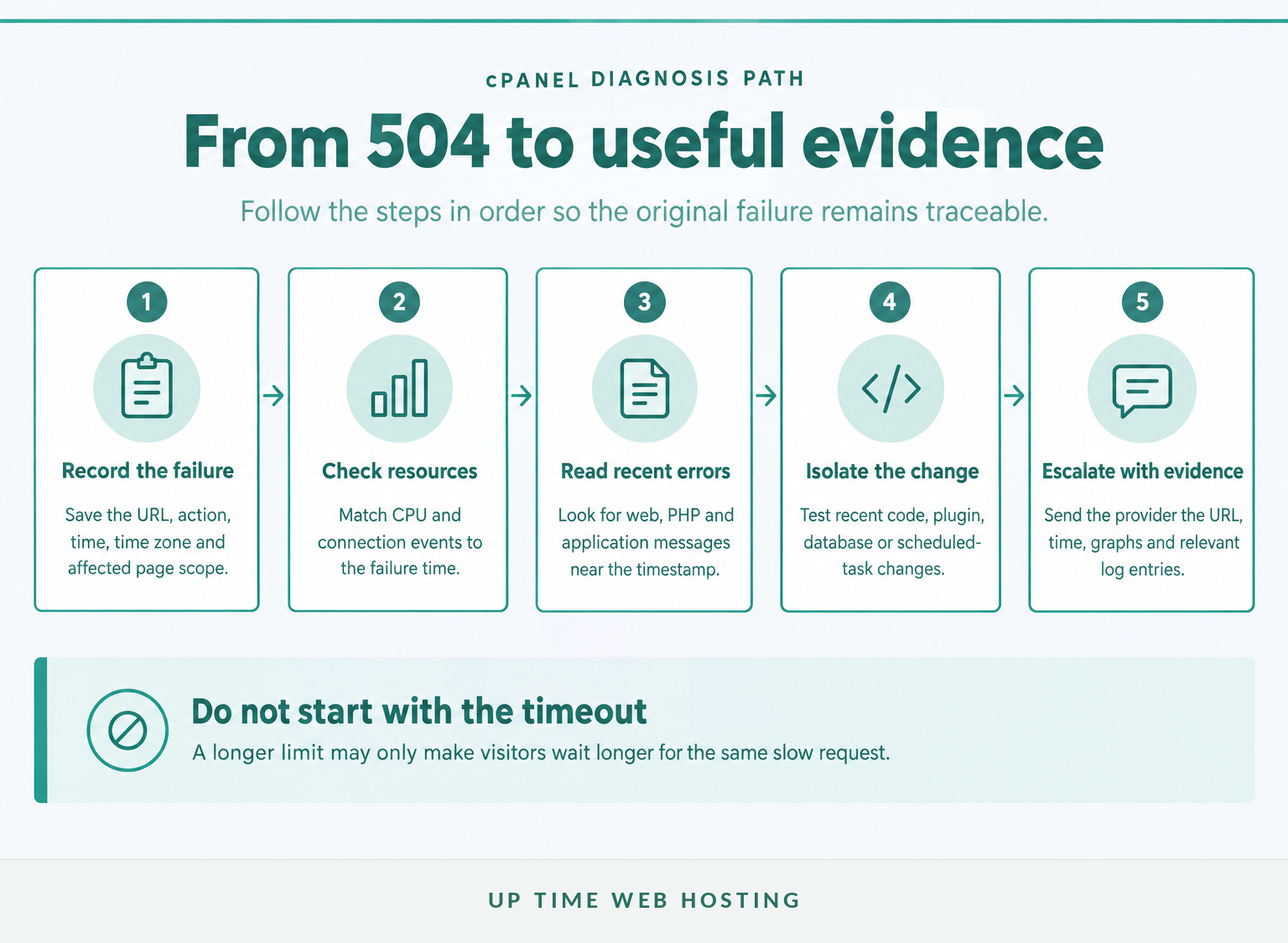
Start by recording the failure, then check resource data and logs before altering PHP or proxy settings. This order preserves evidence and reduces the chance of replacing a useful error with a slower, harder-to-diagnose failure.
- Record the URL, time and action. Note the time zone and whether the error appeared during a page view, login, search, import, form submission or scheduled task. Test one simple page and one dynamic action.
- Check resource usage. Open cPanel > Metrics > CPU and Concurrent Connection Usage if the interface is available. Look for limits or spikes that line up with the incident, then compare the pattern with the site's normal server monitoring metrics.
- Read recent errors. Open cPanel > Metrics > Errors. cPanel's Metrics documentation states that the interface can display up to 300 recent entries from the web server's error logs in reverse chronological order. Search near the recorded timestamp. (docs.cpanel.net)
- Compare simple and complex requests. If an image or plain HTML file loads but a search, checkout or administration request fails, the application or database path deserves attention. If every request fails, ask the provider to check the proxy, web service and network path.
- Review what changed. Check deployments, plugin and theme updates, PHP version changes, database work, firewall changes, imports, backups and scheduled tasks. Reverse only a well-understood recent change, preferably after taking a backup.
- Isolate an application conflict. For WordPress, deactivate a recently changed plugin and retest. WordPress.org's plugin troubleshooting documentation, updated January 2026, recommends testing plugins individually when the cause is unknown. (wordpress.org)
- Review PHP settings last. The cPanel MultiPHP INI Editor documentation explains how domain-level PHP directives can be reviewed and changed. Do not raise
max_execution_timeblindly: the gateway may still stop waiting first, and an unnecessarily long limit can allow inefficient requests to consume resources for longer. (docs.cpanel.net)
A useful cPanel diagnosis combines scope, resource data, logs and recent-change history.
How do WordPress 504 errors differ from other 504 errors?
The HTTP meaning does not change for WordPress, but WordPress adds common application-level causes such as plugin conflicts, heavy database work and scheduled background jobs. Start by finding the specific request or recent change rather than disabling the whole site at random.
Check these patterns:
- Only wp-admin fails: An administration action, plugin process or background task may be taking too long.
- Only search, checkout or forms fail: The request may depend on an expensive database query, remote API or plugin workflow.
- The error followed an update: Test the changed plugin or theme first, then check the PHP error log.
- The error occurs on a schedule: Look for backups, security scans, imports, cron jobs or reporting tasks running at the same time.
If the WordPress dashboard is unavailable, the official troubleshooting documentation describes deactivating plugins through File Manager by renaming the plugin directory. Take a backup first and restore the directory name before reactivating plugins individually. (wordpress.org)
For WordPress, isolate the request and the recent change before disabling or increasing anything.
How do HTTP 502, 503, 504 and 404 errors differ?
These codes point to different failure conditions, even when visitors see a similar unavailable page. The key question is whether the upstream response was invalid, unavailable, late or unnecessary because the resource was not found.
| Status | What it means | First place to inspect |
|---|---|---|
| 502 Bad Gateway | A gateway received an invalid response from an upstream server. | Upstream crashes, malformed responses and proxy configuration. |
| 503 Service Unavailable | The server is temporarily unable to handle the request, commonly because of overload or maintenance. | Service status, capacity and maintenance controls. |
| 504 Gateway Timeout | A gateway did not receive a timely upstream response. | Application latency, network reachability and proxy timeout settings. |
| 404 Not Found | The requested resource could not be found. Read the separate guide to 404 not found errors. | URLs, routing rules, deleted files and application permalinks. |
These meanings come from the IETF HTTP Semantics standard rather than the wording or design of a particular error page. (rfc-editor.org)
The fastest way to separate similar errors is to ask whether the response was missing, invalid, unavailable or not found.
Register your new domain name at competitive market prices including free domain add-ons like privacy, DNS Hosting, Custom Nameservers and Forwarding.
Always the best price and no nasty renewal price hikes.
Register A Domain Name
Can recurring 504 errors affect customers and search crawling?
A brief incident does not automatically remove pages from search, but recurring 504 responses stop visitors and crawlers from receiving content. Repeated availability failures should therefore be treated as a business and technical problem, not only a log entry.
As of September 2026, Google's HTTP status code guidance says 5xx responses cause its crawlers to slow down temporarily. Previously indexed URLs are initially preserved, but persistent server errors can eventually cause those URLs to be dropped. (developers.google.com)
Customers experience the immediate effect: failed checkouts, unavailable forms, interrupted logins and reduced confidence in the site. Monitoring, capacity planning, controlled updates and tested recovery procedures are all part of preventing website downtime, even when the first warning is only intermittent.
A short 504 incident is recoverable, but repeated server errors should be treated as an availability problem.
When should I ask the hosting provider to investigate?
Contact the hosting provider when the error affects multiple pages or domains, cPanel is unavailable, account metrics do not explain the timeout, or the required proxy and network controls are outside the account. Send evidence with the request so the provider can inspect the correct server and time window.
Include:
- The full failing URL and exact action performed.
- The date, time and time zone of at least one failure.
- Whether the error affects every page or only dynamic requests.
- Whether another device or network produced the same result.
- Relevant cPanel resource graphs and error-log entries.
- Any deployment, update, import or configuration change made shortly before the incident.
- Whether the error is constant, intermittent or linked to a particular schedule.
Ask the provider to check the reverse proxy, origin web service, PHP workers, account limits, database availability, firewall rules and the path to any upstream service. Avoid demanding a timeout increase before the provider has confirmed which component is late.
Good evidence lets the hosting provider investigate the right server and time window first.
Experience Microsoft 365 Business Standard for free for 30 days.
Up to 25 users with full access to email, OneDrive and Teams. Includes full versions of desktop apps of Outlook, Word, Excel, PowerPoint and more.
Try Microsoft 365
What are the common questions about HTTP 504 errors?
The following answers cover the questions most often asked after a gateway timeout appears. Each answer points back to the same diagnostic principle: identify which upstream component did not respond in time.
What does HTTP 504 mean?
HTTP 504 means a server acting as a gateway or proxy waited for an upstream server but did not receive a response in time. The browser reached part of the website's infrastructure, but another server, application, database or service behind it was too slow or unreachable. (rfc-editor.org)
How do I fix a 504 error?
To fix a 504 error, record the affected URL and time, check whether the whole site or one action fails, then review cPanel resource usage and error logs. Investigate recent code, plugin, database or network changes. Increase timeouts only after identifying why the upstream response is late.
What is the difference between HTTP errors 504 and 502?
A 502 Bad Gateway means the gateway received an invalid response from the upstream server. A 504 Gateway Timeout means the gateway did not receive a timely response. Both point to communication beyond the browser, but a 502 is about response validity while a 504 is about waiting too long. (rfc-editor.org)
Is a 504 error my fault?
A 504 error is usually not caused by an ordinary visitor. It normally means a gateway could not get a timely upstream response. A visitor's VPN, proxy, DNS or network path can occasionally contribute, but repeated reports from multiple users usually require the website owner or hosting provider to investigate. (developer.mozilla.org)
The four common questions all point back to the same rule: identify the delayed upstream layer.
What should you do if the 504 keeps coming back?
A recurring 504 needs root-cause work, not repeated refreshing. If the evidence points to account limits or a hosting setup that cannot support the application's workload, review Australian cPanel website hosting and provide the support team with the failed URL, timestamp and log evidence.
If the timeout returns, move from retrying to measuring and fixing the slow layer.