In short
Starlink can carry reliable business VoIP in Australia when the dish has a clear sky view, the phones use a wired or well-managed network, voice traffic is prioritised, and power and internet failover are planned. The deciding factors are consistent latency, low jitter and packet loss, not headline download speed alone.
Key takeaways
- Starlink's current specifications list typical land latency of 25–60 ms, but performance and uninterrupted service are not guaranteed.
- The ITU treats 0–150 ms one-way delay as acceptable for most voice applications, while its highest VoIP network class sets tighter objectives for delay variation and packet loss.
- Starlink says Residential and Roam services use CGNAT with a 1,200-session limit, which can matter for sites running many phones, apps and connected devices.
- Current Starlink hardware averages between 20 W and 150 W of AC input power, depending on the model, before adding switches, phones and other network equipment.
- ACMA says Australian phone numbers must remain active to be ported, with individual local-number ports generally taking 8 to 15 days.
Contents
- Can Starlink support reliable business VoIP in Australia?
- What does Starlink VoIP cost for a business?
- What call-quality numbers should you test?
- How should you connect phones and configure the router?
- What power backup does a Starlink VoIP setup need?
- How do you keep calls working when Starlink drops?
- Can you keep your Australian business number?
- What must you plan for Triple Zero and power failures?
- What should you test before going live?
- What else do Australian businesses ask about Starlink VoIP?
- What should you do before moving business calls to Starlink?
The useful question is not whether Starlink can pass a voice packet. It can. The useful question is whether the complete system will keep calls intelligible during peak traffic, brief satellite interruptions, power faults and the day the old number is ported.
Can Starlink support reliable business VoIP in Australia?
Yes, Starlink can support business VoIP, and its current specifications list typical land latency of 25–60 ms. Starlink also says speeds and uninterrupted service are not guaranteed, so performance must be assessed at the actual site and during its busiest periods.
Download speed is rarely the main obstacle. A voice call uses relatively little bandwidth, but it needs packets to arrive consistently and in the correct order. Short interruptions, variable delay and lost packets are more noticeable in a conversation than in ordinary web browsing.
For business use, choose a plan whose current terms permit the intended use. Starlink's Australian business service says its Priority plans include prioritised network access, a publicly routable IPv4 address, telemetry, priority support and a service level agreement.
Plan architecture also matters. Starlink says Residential and Roam plans use CGNAT and allow 1,200 concurrent sessions, with possible symptoms including dropped calls, failed connections and one-way audio when the limit is reached. That does not mean a small office will automatically have trouble, but a busy site should test its actual endpoint count and applications.
If the business is still deciding what should replace its existing lines and equipment, the guide to VoIP versus traditional phone systems explains the wider migration decision.
Starlink is suitable for business VoIP only after the actual site proves stable, low-loss performance across normal and peak periods.

Performance you can feel, backed by clients who depend on it. Read how our support and uptime create long‑term customer success.Power Your Business with Better Hosting
What does Starlink VoIP cost for a business?
A realistic Starlink VoIP cost has several parts rather than one monthly phone fee. Budget for the internet service, VoIP users and numbers, compatible devices, network equipment, installation, power backup and any secondary connection.
The main cost categories are:
- the Starlink hardware and a plan permitted for the business's use
- VoIP users, numbers, call inclusions and optional features
- desk phones, headsets or analogue telephone adaptors where required
- a router capable of traffic prioritisation and dual-WAN failover
- an uninterruptible power supply or battery system
- installation, testing, number porting and staff training
Starlink's live Australian plan pages can change by address, promotion, hardware and service type. As of 14 November 2026, use the checkout quote and the applicable critical information summary rather than relying on an undated price copied from another website.
The cheapest monthly plan is not the cheapest business system if every power cut or network interruption stops customers from calling.
What call-quality numbers should you test?
Test end-to-end latency to the VoIP platform, jitter, packet loss and completed calls, not just a browser speed test. The connection should remain within acceptable limits during uploads, cloud backups, video meetings and other normal business traffic.
The ITU's G.114 recommendation treats 0–150 ms one-way transmission time as acceptable for most applications. The ITU's VoIP network performance objectives use a tighter Class 0 objective of no more than 100 ms delay, 50 ms delay variation and a 0.1% packet-loss ratio for PSTN-quality VoIP.
| Metric | Practical acceptance target | What poor results may cause |
|---|---|---|
| One-way latency | Under 150 ms, with lower preferred | Talk-over, awkward pauses and delayed responses |
| Jitter | Well below 50 ms and stable | Robotic speech, broken words and uneven audio |
| Packet loss | As close to zero as possible | Missing syllables, one-way audio and dropped calls |
| Recurring outages | None during the acceptance period | Registration failures and call disconnections |
Do not compare Starlink's published 25–60 ms figure directly with a one-way end-to-end voice limit. Starlink defines its latency measurement as round-trip time, while a complete VoIP call also passes through the local network, the internet and the VoIP provider's infrastructure.
Use the phone platform's call-quality reports where available. The Starlink app also reports speed, uptime, latency, outages and alerts, which helps separate a satellite interruption from a handset, Wi-Fi or provider problem.
Voice reliability is proven by stable latency, low variation and near-zero loss during real business load, not by one fast speed test.
Host your website with our 5-star rated, cPanel website hosting plans.
Super fast servers, with security included and hosted in your choice of Australian Data Center.
View cPanel Plans
How should you connect phones and configure the router?
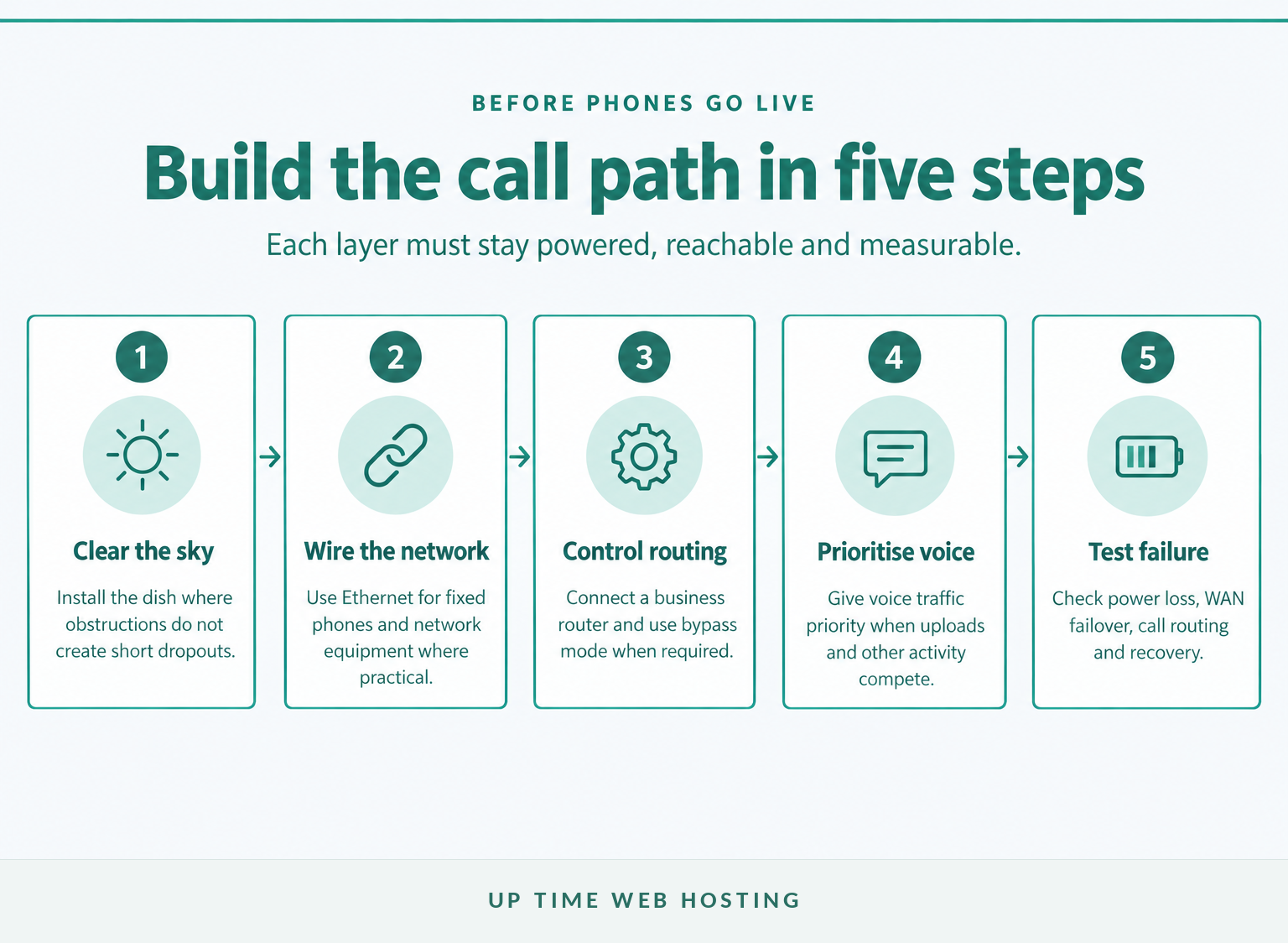
Use Ethernet for fixed desk phones wherever practical, then let a business-grade router manage voice priority, failover and monitoring. Starlink supports third-party routers on most kits, but the required cable, adaptor or bypass setting depends on the installed hardware.
A VoIP phone for Starlink does not need to be satellite-specific. It must be compatible with the chosen VoIP service and able to reach that service through the local network.
Starlink's third-party router instructions say to use DHCP on the router's WAN interface. Some kits have native Ethernet, while others require a Starlink Ethernet adaptor.
Use bypass mode when a separate router needs full control of Wi-Fi, traffic queues and failover. Bypass mode disables the Starlink router's Wi-Fi, and some models require a factory reset to reverse it. Bypass mode does not remove upstream CGNAT from a plan that uses it.
Configure quality of service so voice traffic receives priority when the connection is busy. Do not copy a generic port-forwarding list or disable SIP ALG blindly. Follow the VoIP provider's instructions for the actual phones, signalling method and media ports.
The phone platform also matters. A cloud PBX delivered over VoIP manages numbers, extensions, queues, voicemail and fallback routing separately from the Starlink connection.
The router should make voice traffic predictable and measurable rather than merely sharing the connection with every other device.
What power backup does a Starlink VoIP setup need?
Back up the whole call path, not just the dish. The UPS or battery must power the Starlink terminal, router, network switch, phone base stations and powered desk phones for the required outage period.
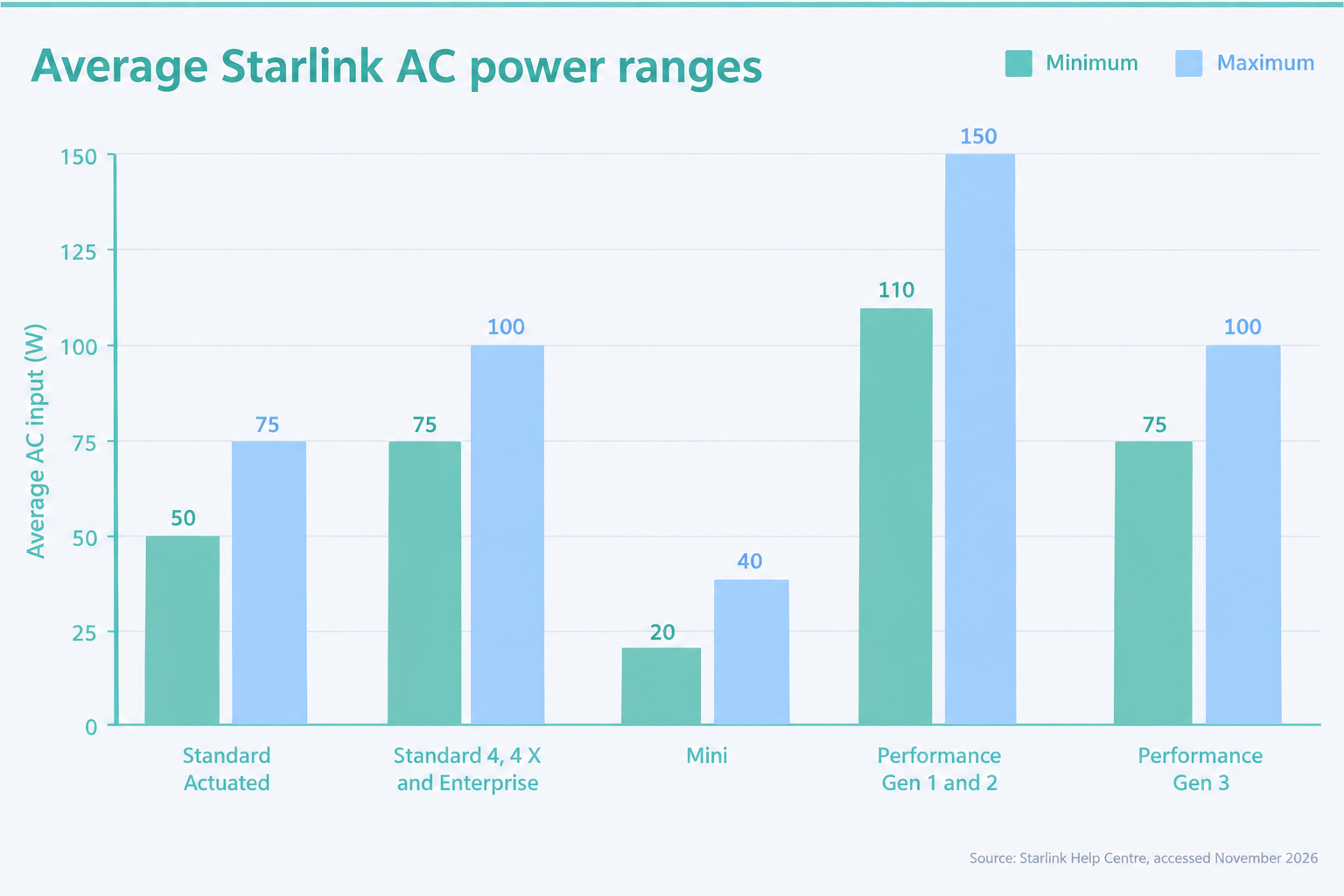
Starlink's current power guidance says these figures include the terminal, Starlink router, power supply and cables:
- Standard Actuated averages 50–75 W.
- Standard 4, Standard 4 X and Enterprise average 75–100 W.
- Starlink Mini averages 20–40 W.
- Performance Gen 1 and Gen 2 average 110–150 W.
- Performance Gen 3 averages 75–100 W.
Add the measured draw of the separate router, switch, cordless phone base, desk phones and any on-site PBX appliance. Power over Ethernet phones draw from the switch, so excluding the switch produces an unrealistic runtime estimate.
Starlink's fixed business installation guide recommends a UPS and warns that even a short power interruption can trigger a reboot and an internet outage of 10 minutes or more.
Use this basic sizing check:
Approximate runtime in hours = usable battery watt-hours ÷ total measured watts
For example, 400 usable Wh divided by a 100 W total load gives about four hours. Allow for conversion losses, battery ageing and higher Starlink consumption in some conditions, then test the finished system under load.
Power backup is adequate only when it keeps every required part of the call path running for the business's chosen recovery period.
How do you keep calls working when Starlink drops?
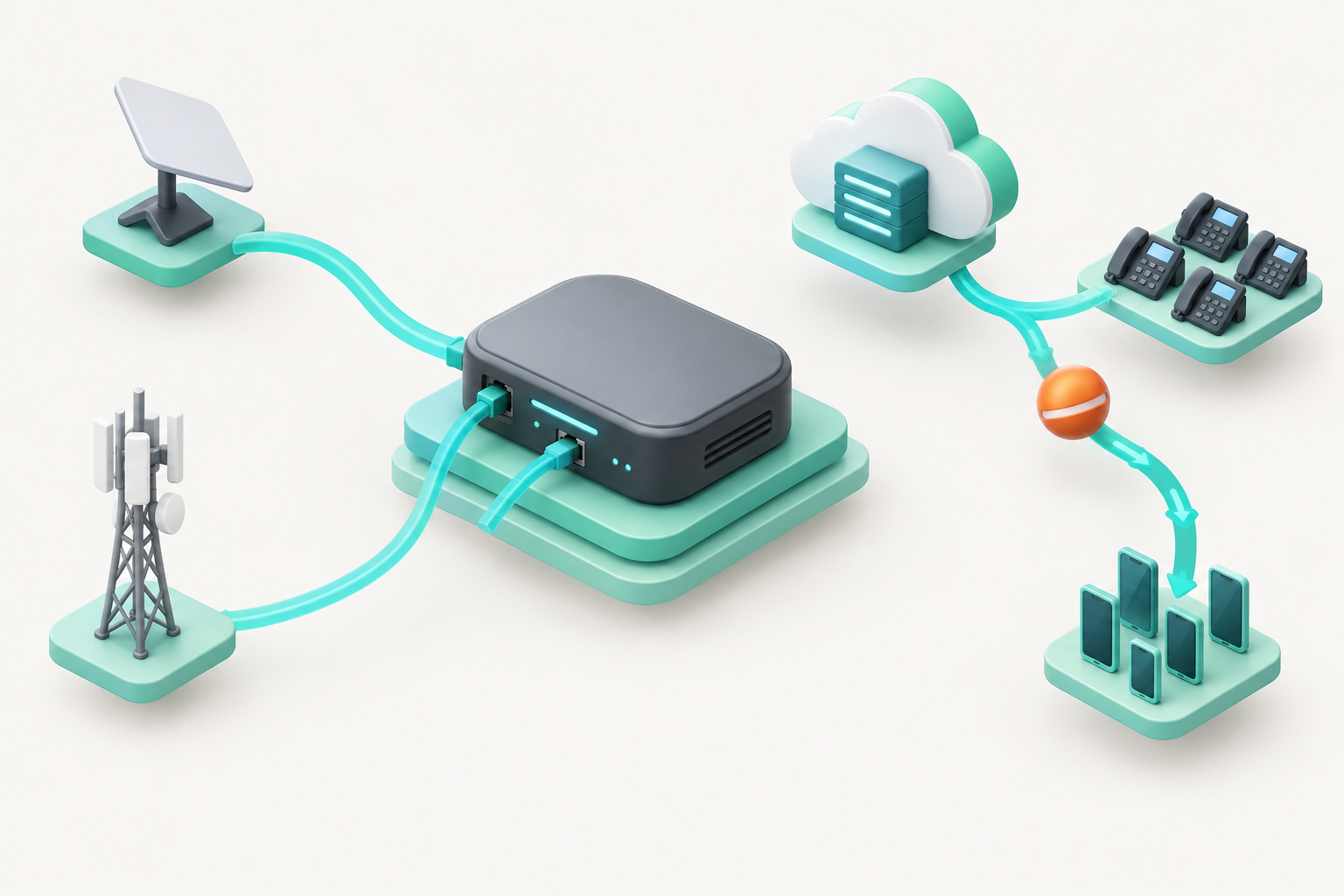
Use two layers of failover: a second internet path for the network and a call-routing fallback in the hosted phone system. A dual-WAN router can move new traffic to mobile broadband or another service, while the PBX can redirect inbound calls to mobiles or another location.
Internet failover may restore registrations and new calls, but an active call can still drop when the network path changes. Test the behaviour rather than assuming the router or phone platform will preserve the session.
Call routing provides a second safety net. If the office phones are unreachable, the hosted system can send new calls to staff mobiles, voicemail or another site. That logic belongs in the wider business continuity plan, not in an instruction written after an outage has started.
A virtual office phone system can also let authorised staff answer the business number through mobile or desktop apps when the office connection is unavailable.
Fix physical interruption risks before adding complex routing. Starlink says obstructions can cause outages, so review the obstruction map after installation and after nearby trees, structures or equipment change.
Network failover restores connectivity, while cloud call routing keeps the business reachable when the office itself remains offline.
Register your new domain name at competitive market prices including free domain add-ons like privacy, DNS Hosting, Custom Nameservers and Forwarding.
Always the best price and no nasty renewal price hikes.
Register A Domain Name
Can you keep your Australian business number?
Usually, yes. ACMA says active Australian local, mobile, 13, 1300 and 1800 numbers can generally be ported, although the new provider must agree to accept the number.
Do not cancel the old service first. ACMA's number-porting guidance says disconnected numbers cannot be ported. Individual local-number ports generally take 8 to 15 days, while complex ports involving multiple numbers can take up to 30 days.
Before submitting the request, confirm the account name, service address, number range and account details with the losing provider. Small mismatches can delay a port.
Keep both systems available during the migration window where possible. Test temporary call routing, publish an internal escalation contact and wait for written confirmation before cancelling the previous service.
Keep every number active until its port is complete and independently tested for inbound and outbound calls.
What must you plan for Triple Zero and power failures?
Do not treat a Starlink VoIP phone as the only emergency calling method. ACMA says 000 is available from certain VoIP and satellite services, but the caller may need to state the town and state, and powered equipment may stop working during an outage.
ACMA's emergency-call guidance recommends another way to contact 000 during a power failure, such as a charged mobile phone. Keep the VoIP service address current and make sure staff know the site's physical address, especially at remote properties without obvious street references.
The Emergency+ app can help a mobile caller provide a street address or location information. Do not place a routine test call to 000, because Triple Zero should be used only for genuine emergencies.
Medical alarms, lift phones, fire panels, back-to-base security systems, fax devices and EFTPOS equipment may have separate connectivity requirements. Confirm compatibility and backup arrangements with each equipment or monitoring provider before removing an existing line.
A Starlink VoIP service needs a separate, charged emergency-calling option whenever internet or site power may be unavailable.
Experience Microsoft 365 Business Standard for free for 30 days.
Up to 25 users with full access to email, OneDrive and Teams. Includes full versions of desktop apps of Outlook, Word, Excel, PowerPoint and more.
Try Microsoft 365
What should you test before going live?
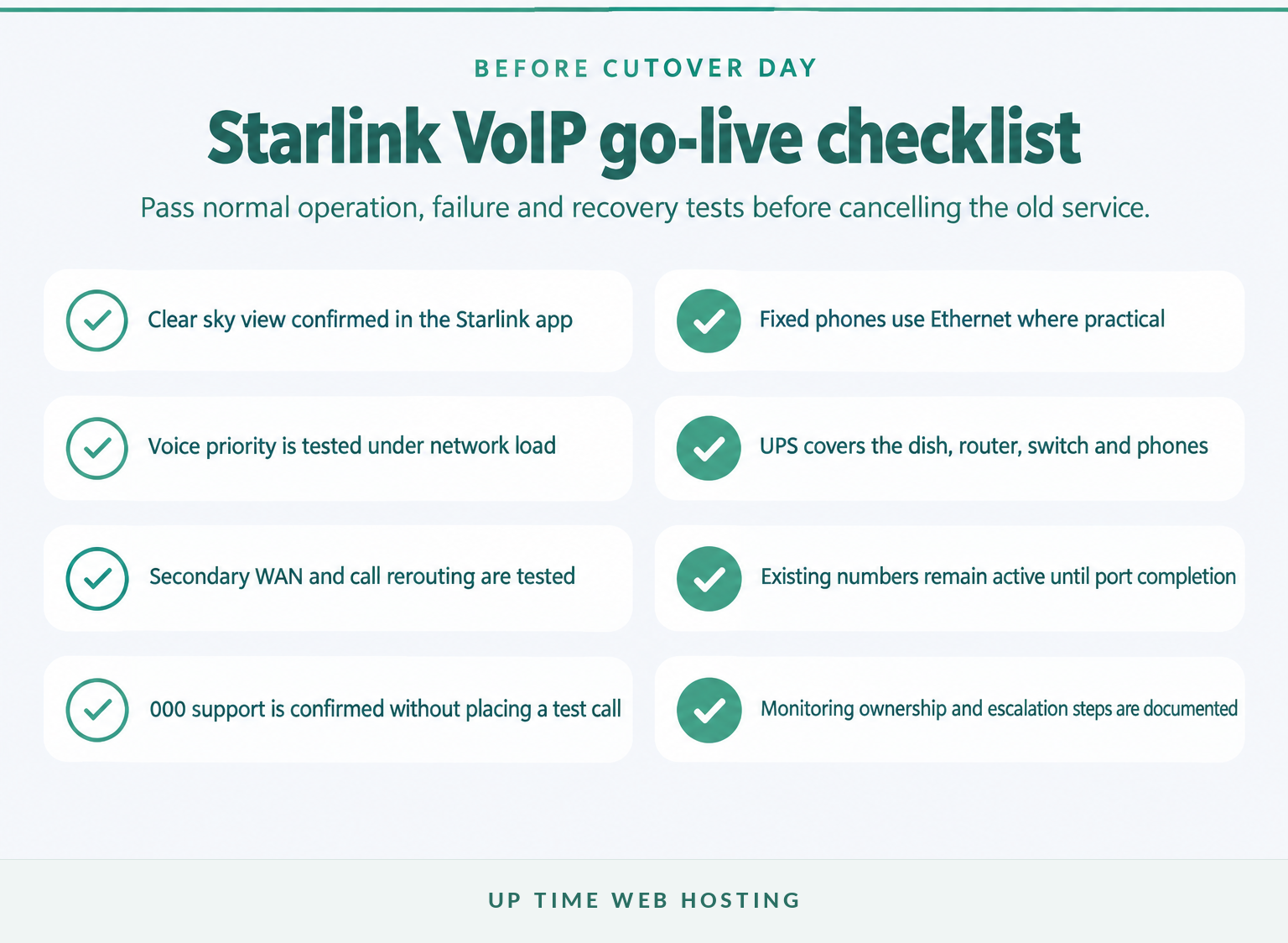
Complete a staged acceptance test before porting numbers or cancelling the previous service. The test should cover ordinary calls, peak network load, power loss, internet failover and recovery to the primary connection.
Run the system for at least a representative business week before final cutover. Include busy periods and any scheduled cloud backup, file synchronisation or video-conferencing load.
Test:
- inbound and outbound calls on every number
- two or more simultaneous calls where the business expects concurrency
- transfers, hold, voicemail, call queues and after-hours routing
- keypad input for automated menus and payment systems
- caller ID presentation and return calls
- desk phones, cordless phones, headsets and mobile apps
- the secondary internet connection and hosted call fallback
- brief power loss, sustained battery operation and orderly recovery
- monitoring alerts and the support escalation process
Record latency, jitter, loss, Starlink outages and call-quality reports during the test. Define the result that triggers investigation, such as recurring one-way audio, repeated registrations, dropped calls or obstruction alerts, instead of waiting for staff to describe the service as unreliable.
Do not cancel the previous service until normal calls, failure tests, recovery and number routing have all passed.
What else do Australian businesses ask about Starlink VoIP?
Starlink provides the internet path, while a separate VoIP service usually provides the phone number and calling functions. The answers below distinguish those parts of the system.
Can I have VoIP with Starlink?
Yes. VoIP can run over Starlink in Australia because the service provides IP connectivity with latency suitable for real-time applications. Reliability depends on clear sky, low packet loss and jitter, power backup, router configuration and tested failover. A business should test its actual site and VoIP provider before cutover.
Can I make voice calls using Starlink?
Yes, through a VoIP service or calling app that uses the Starlink internet connection. Starlink supplies the data connection, while the VoIP provider supplies the number, call routing and access to the public phone network. The phones, router and power system must remain online for calls to work.
Does Starlink do mobile phone plans in Australia?
As of November 2026, Starlink Australia's public plan pages list satellite internet services for homes, travel and businesses, not a conventional Australian mobile voice plan. Smartphones can make VoIP calls over Starlink Wi-Fi, but mobile numbers, cellular coverage and emergency arrangements remain separate unless a telco states otherwise.
Starlink supplies the internet path; a separate VoIP service supplies the phone number and calling functions.
What should you do before moving business calls to Starlink?
Treat the move as a network and continuity project, not a handset purchase. Document concurrent calls, number ports, power runtime, the backup connection and call-routing rules, then run acceptance tests before cancelling any existing service.
Bring the Starlink hardware model, current network diagram, phone-number list, required call features and expected concurrent-call count to the design discussion. Those details determine the router, power and failover requirements far more accurately than the business's total staff number.
For help mapping the VoIP service, number porting, devices and fallback routes, ask about UpTime's Australian business VoIP service.
A reliable Starlink phone system is one whose failure modes have already been tested.