In short
Remote server monitoring combines an external availability check with internal health telemetry, alert rules and a named response process. The monitor should detect service failure, resource pressure, storage risk, security events and backup problems, then route each alert to a person who has the access and authority to investigate or escalate it.
Key takeaways
- External checks prove that users can reach a service, while internal telemetry helps explain why the service is slow or unavailable.
- Agent-based monitoring provides detailed local data, while agentless monitoring relies on existing interfaces and may provide less depth.
- A useful baseline covers availability, latency, errors, CPU, memory, storage, network activity, critical services, logs, backups and relevant hardware conditions.
- Monitoring paths should use limited privileges, encrypted transport, controlled network access and multi-factor authentication for human administration.
- Every serious alert needs a named person responsible for acknowledgement, investigation, escalation, communication and closure.
Table of contents
- What does remote server monitoring need to prove?
- Should you use an agent or agentless monitoring?
- What should you monitor on an off-site server?
- How should remote monitoring access be secured?
- How should alerts be tuned so people act on them?
- What happens after an alert fires?
- Who is responsible for fixing the server?
- How do you evaluate a remote monitoring service?
- What are the common questions about remote server monitoring?
- What should you do next?
A remote monitoring server setup can look complete because a dashboard is green. The real test is whether it can detect a user-visible failure, explain the likely cause and reach someone who is ready and authorised to act.
What does remote server monitoring need to prove?
Remote server monitoring must prove that people can use the service and that the server has enough capacity to keep providing it. An external check answers the first question, while internal telemetry helps answer the second.
Why two viewpoints matter

An internal monitor can see CPU usage, memory pressure, storage growth, network errors, service state and logs. It may still report normal figures while a firewall, DNS error, expired certificate or failed network path prevents users from reaching the service.
An external monitor sees the service from outside the server's location. It can check more than a ping by opening the required protocol, requesting a web page, confirming a response or completing a small test transaction.
A practical design uses three layers:
- Reachability: Can an independent monitoring location contact the remote site or server?
- Service behaviour: Does the required website, database endpoint, mail service or business application respond correctly?
- Internal health: Are the operating system, storage, network interfaces, processes and supporting services healthy?
The external check should not depend on the same server, power supply or internet connection it is monitoring. Otherwise, the failure can silence both the service and the monitor.
For public websites, remote monitoring is one part of the broader work involved in preventing website downtime, which also includes maintenance, capacity planning and recovery preparation.
A remote server is not healthy merely because it answers a ping; monitoring must prove both service availability and internal capacity.

Performance you can feel, backed by clients who depend on it. Read how our support and uptime create long‑term customer success.Power Your Business with Better Hosting
Should you use an agent or agentless monitoring?
Use an agent when detailed local telemetry or outbound-only collection is required, and consider agentless monitoring when existing interfaces provide enough information. Neither option is automatically safer because security depends on privileges, credentials, network exposure and maintenance.
Agent and agentless collection compared
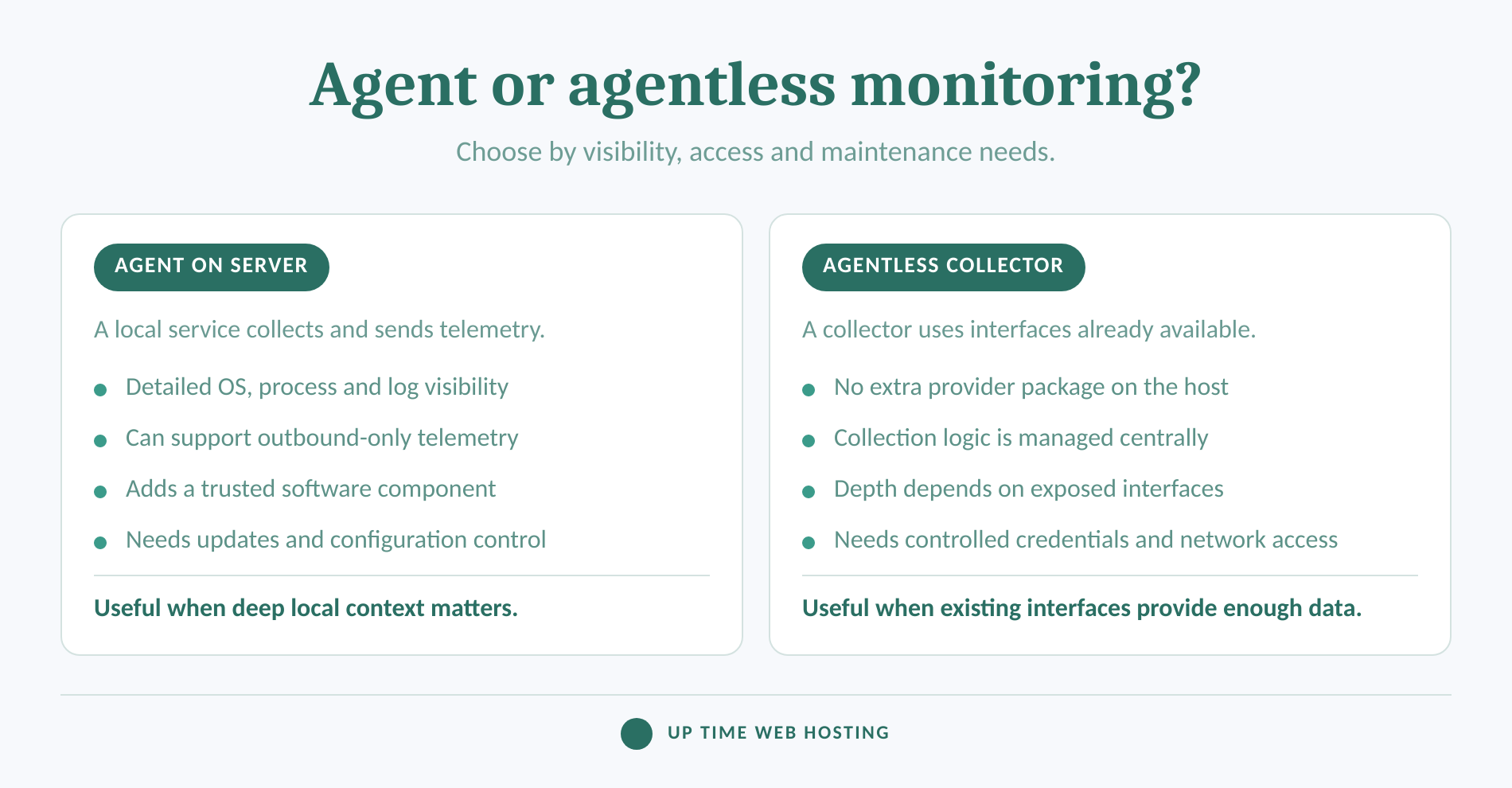
Agent-based monitoring installs a small service on the monitored host. CISA's 2023 guide to securing remote access software describes remote monitoring and management as an endpoint agent that continuously monitors system health and status and may also enable administration.
An agent can collect detailed operating-system metrics, process data, event logs, application information and configuration state. It can also support a design in which telemetry leaves the remote network through an encrypted outbound connection, without allowing a central collector to initiate broad inbound access.
The trade-off is another trusted component. The agent needs controlled configuration, software updates, health monitoring and an account with no more access than its collection duties require.
Agentless monitoring means no additional monitoring package from the selected provider is installed on the target. A central collector instead uses interfaces already available through the operating system, hardware controller, network device or application.
The name can be misleading. For example, IETF RFC 3411 explains that managed devices using SNMP contain their own SNMP entities, traditionally called agents. In commercial use, agentless generally means no extra vendor agent, not that the server runs no monitoring code at all.
Agentless collection can reduce local software maintenance, but it may require polling credentials and network access to management interfaces. The available detail depends on what those interfaces expose and how safely they can be reached.
A hybrid approach is often sensible: external checks for user-visible behaviour, an agent for detailed host data and existing management interfaces for hardware or network devices. Platform-specific ownership still matters, especially for the patching, access and recovery duties covered by Windows Server management responsibilities.
Choose the collection method by the depth, exposure and maintenance burden it creates, not by the agentless label.
What should you monitor on an off-site server?
Monitor the full service path rather than collecting a long list of unrelated numbers. Each signal should help detect user impact, explain a likely cause, predict a capacity problem or confirm that a protective control is working.
A monitoring coverage map
As of September 2026, OpenTelemetry's system metrics specification groups common host telemetry into uptime, processor, memory, paging, disk, file-system, network and process measures. The specification is still marked Development, so metric names may change, but the coverage categories provide a useful planning checklist.
External availability and service behaviour
Check DNS resolution, network reachability, protocol response, certificate validity, application response time and expected output. A successful connection is not enough if the application returns an error page, stale information or an incomplete response.
Host resources
Track CPU utilisation, available memory, paging or swap activity, file-system use, disk operations, storage latency where available, network throughput, dropped packets and network errors. Look at trends and duration, not only one sample.
Critical workloads
Confirm that required processes, services, scheduled tasks, application pools, database listeners and job queues are running. For user-facing workloads, measure latency, traffic, errors and saturation as separate signals rather than treating uptime as a complete health measure.
Logs and security events
Collect relevant authentication failures, privilege changes, unexpected restarts, service crashes, malware detections and configuration changes. NIST SP 800-137, published in 2011, describes continuous security monitoring as a way to maintain visibility into assets, threats, vulnerabilities and control effectiveness so risks can be addressed in time.
Backups and recovery dependencies
Monitor backup job results, the age of the newest usable backup, replication failures and the result of scheduled restore tests. A successful backup notification does not prove that the application can be recovered correctly.
Physical conditions
For a physical server in a branch office, communications room or data centre, include temperature, fans, power supplies, storage controllers and uninterruptible power equipment where sensors are available. The current hardware metric conventions include categories for temperature, fans, power, voltage, memory and physical disks.
There is no universal CPU, memory or disk threshold that suits every workload. Establish normal behaviour, account for scheduled jobs, add a persistence period and test the alert under a controlled failure before production. A production readiness checklist can help identify critical services and test paths before those alerts become operational dependencies.
Monitor the service, the host, the data protection path and the surrounding environment, then tune each signal to the workload.
Host your website with our 5-star rated, cPanel website hosting plans.
Super fast servers, with security included and hosted in your choice of Australian Data Center.
View cPanel Plans
How should remote monitoring access be secured?
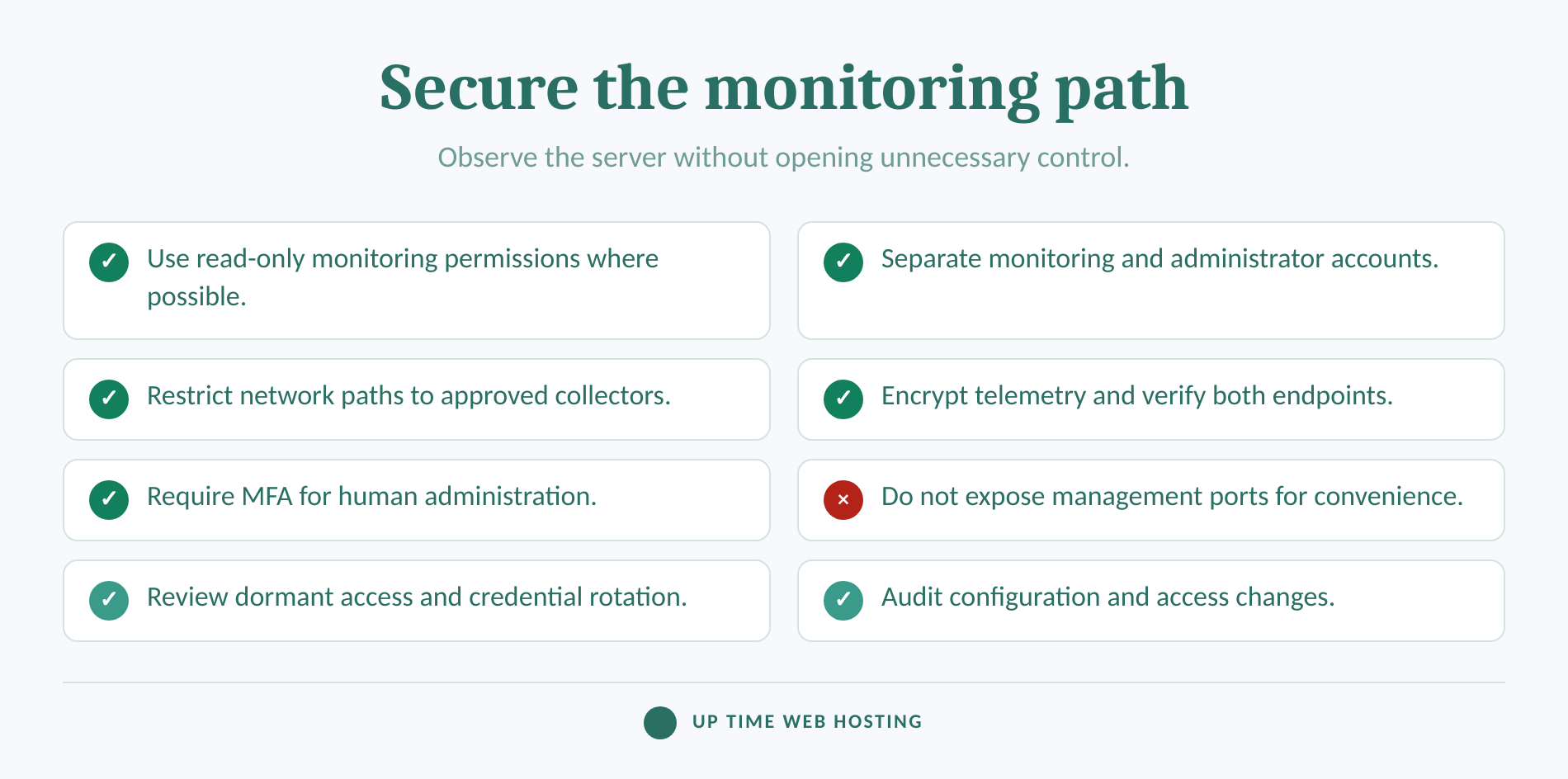
Monitoring should receive enough access to observe health without receiving unrestricted control of the server. Human administration should use a separate, stronger access path with individual authentication and an audit trail.
A secure monitoring access checklist
NIST SP 800-207, published in 2020, states that trust should not be granted solely because a user or system is inside a particular network. Authentication and authorisation should be evaluated for the user, device and requested resource.
Apply that principle to monitoring:
- Give monitoring accounts read-only access wherever the required data can be collected without write privileges.
- Keep monitoring credentials separate from administrator accounts and ordinary user accounts.
- Prefer private connectivity, tightly restricted source addresses or outbound telemetry over publicly exposed management interfaces.
- Encrypt telemetry in transit and verify the identity of both ends of the connection.
- Store secrets in a controlled credential system, rotate them and remove access that is no longer required.
- Record administrative sessions, configuration changes, failed logins and changes to monitoring rules.
- Patch and review monitoring agents, collectors, gateways and remote access components as part of normal maintenance.
- Require multi-factor authentication for people who can administer the server or change monitoring access.
As of September 2026, ASD's Essential Eight maturity model calls for privileged access to be limited to required duties and for dedicated privileged accounts to be used for administrative work.
Monitoring and remote control should not be treated as the same permission. A person who can view a dashboard may not need a server login, while someone authorised to restart a service may still lack authority to change a firewall rule, restore a database or take the application offline.
Monitoring access should reveal health without creating a broad new route to administer the server.
How should alerts be tuned so people act on them?
An alert should identify a condition that needs a defined action within a defined period. If the recipient cannot tell what happened, what is affected or what to do next, the alert is unfinished.
Site Reliability Engineering monitoring guidance distinguishes urgent pages from tickets and lower-priority notifications. It also warns that excessive noise can cause people to skim or ignore alerts, including the alert that represents a real incident.
Build useful rules by applying five tests:
- Business impact: Does the condition affect users, a critical process, data protection or security?
- Persistence: Must the condition continue for several checks before it becomes actionable?
- Context: Does the alert include the server, service, time, recent change and relevant metric or log entry?
- Ownership: Is the alert routed to a person or team that can investigate it?
- Escalation: What happens if the alert is not acknowledged or the first responder cannot resolve it?
Severity should reflect impact rather than how dramatic a metric looks. A failed public service or credible security event may require immediate human attention. Sustained resource pressure, repeated process failures or a backup failure may need urgent investigation. Capacity trends and approaching certificate expiry may be better handled as planned work.
Maintenance windows, dependency rules and duplicate suppression can reduce noise. Keep these rules understandable. A complex alert that nobody can explain during an incident is difficult to trust.
An alert deserves immediate attention only when it is actionable, assigned and tied to real or imminent business impact.
What happens after an alert fires?
A high-severity alert should move through a documented sequence of validation, assignment, triage, escalation, recovery and review. The sequence should be tested before an actual outage so the first responder is not inventing it under pressure.
The alert-to-closure path
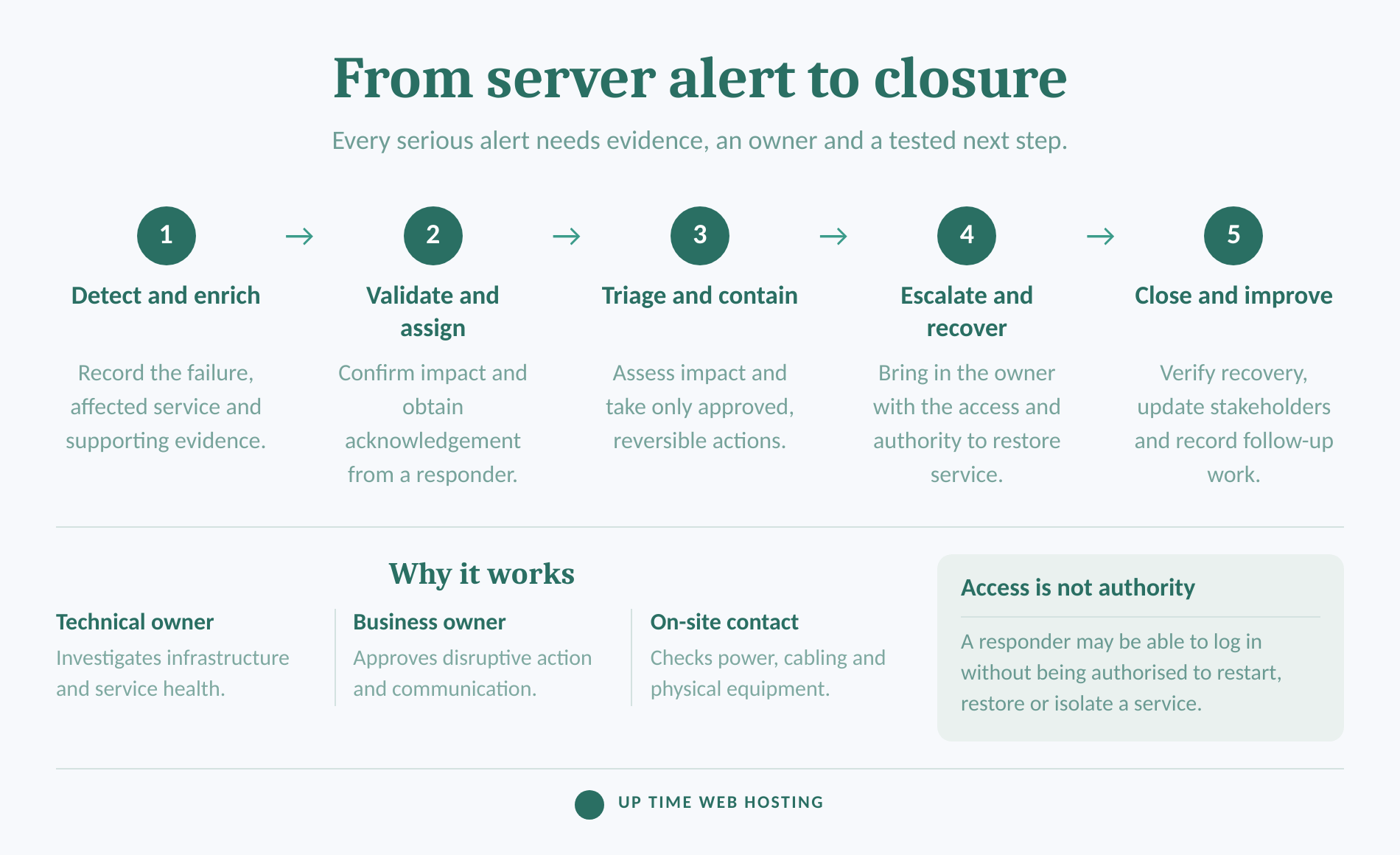
ASD's December 2024 incident response practitioner guidance recommends defined contacts for initial notification, an operational response team and senior decision-makers. It also calls for supporting playbooks covering detection, triage, containment, remediation, recovery and communication.
A practical server escalation path has five stages:
- Detect and enrich. The monitoring system records the failing check, affected service, recent changes and supporting metrics or logs.
- Validate and assign. A second check confirms the condition where possible, and an accountable responder acknowledges the alert.
- Triage and contain. The responder identifies likely impact and performs only approved, reversible actions within their authority.
- Escalate and recover. The issue moves to the application owner, server administrator, network team, security contact, hosting facility or business decision-maker as required.
- Close and improve. The service is verified from the user's viewpoint, stakeholders receive a final update and the team records any needed monitoring or process changes.
NIST SP 800-61 Revision 3, finalised in April 2025, places incident response across wider cybersecurity risk management rather than treating it as an isolated technical activity.
That matters when an unhealthy server affects customers, staff or revenue. Technical recovery should connect to the organisation's business continuity plan, including who approves disruptive action and who communicates with affected people.
Escalation works when every alert moves through a tested path from evidence to ownership, recovery and review.
Register your new domain name at competitive market prices including free domain add-ons like privacy, DNS Hosting, Custom Nameservers and Forwarding.
Always the best price and no nasty renewal price hikes.
Register A Domain Name
Who is responsible for fixing the server?
The business remains responsible for making sure every required task has an owner, even when monitoring is outsourced. A monitoring provider may notify, investigate or remediate, but those are separate commitments that must be stated in writing.
Use a responsibility table before onboarding a service:
| Task | Question that needs an answer |
|---|---|
| Monitoring configuration | Who adds new servers, services and alert rules? |
| Platform maintenance | Who keeps agents, collectors and gateways updated? |
| Alert acknowledgement | Who receives the first alert, and what happens if it is missed? |
| Initial investigation | Who checks logs, metrics and recent changes? |
| Remote administration | Who is permitted to log in and perform recovery actions? |
| Application support | Who owns the website, database or business application? |
| Physical intervention | Who can check power, cabling or hardware at the remote site? |
| Backup restoration | Who can approve and perform a restore? |
| Communication | Who updates staff, customers and management? |
| Incident closure | Who confirms recovery and records follow-up work? |
Monitoring-only services may stop after sending an alert. Managed response may include investigation and approved actions, but scope can vary by server, operating system, application and support period.
Ask what happens when the provider cannot fix the problem. The answer should identify the next contact, the information supplied during handover and who retains decision-making authority.
The contract is incomplete until each monitoring, access, remediation and communication task has a named owner.
How do you evaluate a remote monitoring service?
Evaluate a remote monitoring service by testing its coverage, security and response process against a real server workload. A polished dashboard is useful, but it does not prove that an alert will reach the right person with enough evidence to act.
Ask each provider or internal team to document:
- Which operating systems, applications, protocols and hardware interfaces are supported.
- Whether collection uses an agent, existing interfaces or a hybrid design.
- Which checks run from outside the server's network.
- How monitoring credentials, encryption and administrative access are controlled.
- Which conditions create an immediate alert, a ticket or a report.
- Who acknowledges alerts and during which hours.
- Whether investigation, remote remediation or on-site work is included.
- How long metrics, logs and incident records are retained.
- How backup results and restore tests are monitored.
- How planned maintenance and expected workload spikes are handled.
- What reports show recurring faults, capacity trends and unresolved risks.
- How data and configurations can be exported if the service changes.
Pricing should be compared against the same scope. A quote for automated checks is not equivalent to a service that includes after-hours acknowledgement, investigation and authorised recovery work.
Request a controlled onboarding test. Stop a non-critical service, interrupt an external test endpoint or trigger a safe test condition. Confirm how long detection takes, what the alert contains, who receives it, how escalation occurs and how the monitor recognises recovery.
Choose a service by testing its response model and security controls, not by counting dashboard features.
Experience Microsoft 365 Business Standard for free for 30 days.
Up to 25 users with full access to email, OneDrive and Teams. Includes full versions of desktop apps of Outlook, Word, Excel, PowerPoint and more.
Try Microsoft 365
What are the common questions about remote server monitoring?
Remote monitoring questions often sound like tool questions, but the useful answer depends on coverage, access and responsibility. The following answers stay vendor-neutral because those decisions matter more than a product name.
What is a remote monitoring service?
A remote monitoring service collects health and availability data from servers, networks or applications at another location, then applies alert rules and reports problems. Service scope varies: some providers only notify a contact, while others investigate, perform approved recovery actions and coordinate escalation. The agreement should state where monitoring ends and remediation begins.
What is the best tool for monitoring servers?
The best tool for monitoring servers is the one that covers the operating system, applications, external availability, logs and alert routing the business needs. Check deployment method, access controls, supported metrics, retention, reporting and response workflows. A longer feature list is less valuable than clear, actionable alerts and dependable ownership.
How much does remote monitoring cost?
Remote monitoring cost depends on the number and type of servers, check frequency, data retention, integrations, response hours and whether human investigation or remediation is included. Ask for an itemised quote that separates monitoring, alert response, remote administration, on-site work and after-hours support because these are different services.
What is the best remote monitoring software?
The best remote monitoring software fits the environment without creating unnecessary access risk or alert noise. Compare agent and agentless coverage, operating-system support, encrypted transport, limited credentials, external checks, dashboards, maintenance needs and escalation options. Test the software with a controlled failure before relying on it for a critical server.
The best monitoring choice is the one whose coverage, access and response duties are clear before the first alert.
What should you do next?
List the off-site server's critical services, owners, remote access paths and acceptable interruption before choosing a monitoring tool. Then test one complete alert from failed check to acknowledgement, escalation, recovery and closure while the system is healthy.
If secure oversight and human escalation are not covered internally, ask about managed server monitoring through UpTime Networks Security and Protection and request a written breakdown of monitoring, alert handling, access and remediation responsibilities.
The monitor matters, but the tested response path is what keeps an off-site server from becoming an unattended business risk.