In short
A website down checker tests a URL from outside your connection. If the checker also fails, the site, DNS or hosting may be unavailable; if it succeeds, the problem is more likely your browser, device, account or network. Confirm the result with a second network before changing anything.
Key takeaways
- A checker that fails from outside your network suggests a public availability problem, but a second independent check should confirm it.
- If the site works on mobile data but not Wi-Fi, investigate local DNS, cached data, the router, a VPN or firewall conditions.
- A
403or429response proves the server answered, so it is not the same as a server that cannot be reached. - A
5xxresponse identifies a server, gateway or application error class, while DNS and TLS failures happen before a usable HTTP response. - Website owners should record the exact URL, error, time, affected functions and recent changes before escalating or restoring anything.
Table of contents
- How do I tell if a website is down for everyone or just me?
- What should I check before blaming the web host?
- What do website down checker results actually mean?
- How can I tell whether DNS, SSL or hosting is the problem?
- What should I do after confirming my website is down?
- How do I stop finding out about outages from customers?
- FAQ about website down checkers
- What is the next step?
How do I tell if a website is down for everyone or just me?
Start with an external checker, then repeat the test on mobile data or another network. Agreement between independent checks is more useful than repeatedly refreshing the same browser and connection.
When searching for a website down checker in Australia, prioritise a tool that can test from an Australian location and at least one overseas region. This helps reveal an outage that affects only one server location, route or regional configuration.
Use this five-check sequence
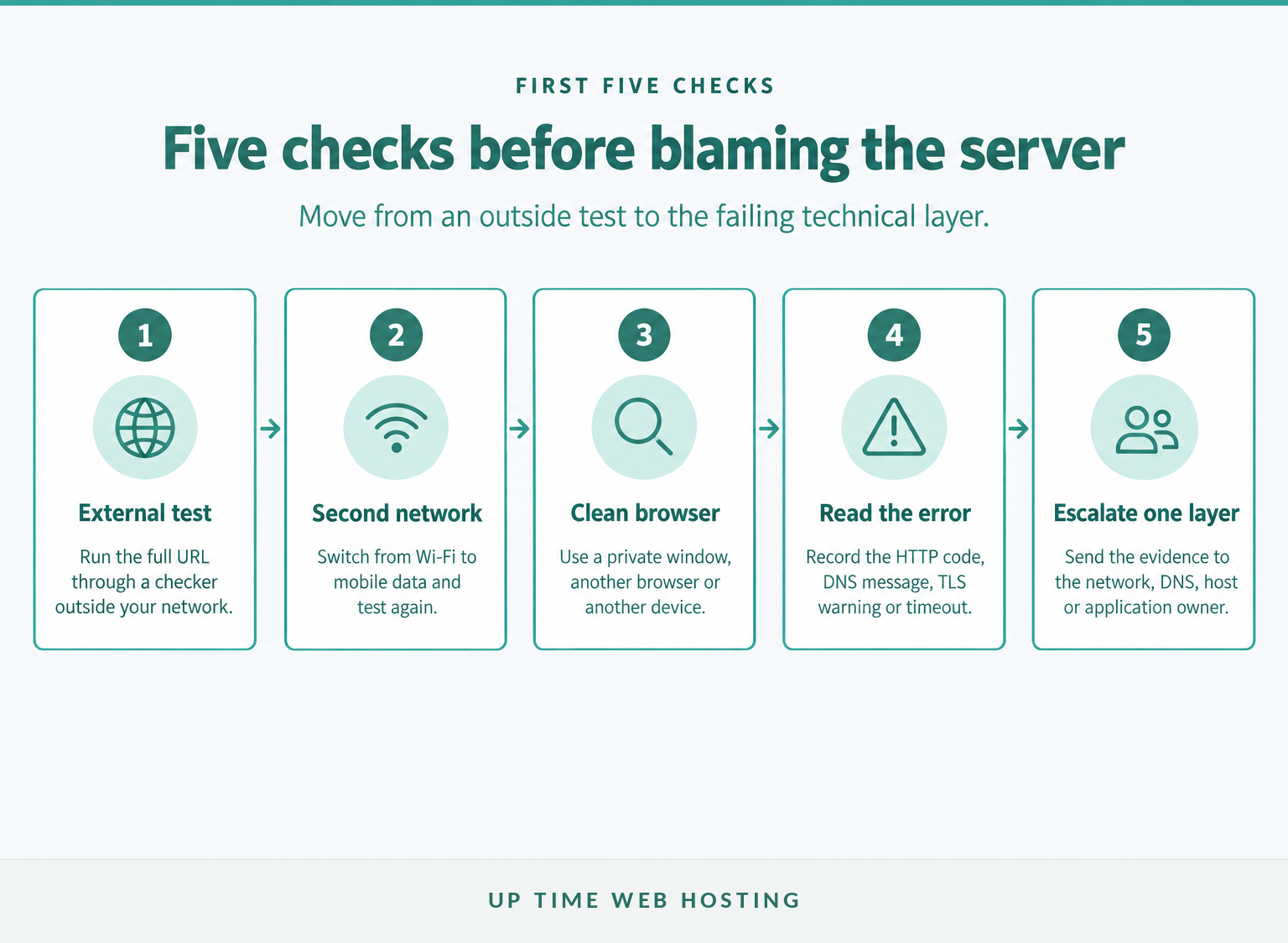
- Copy the full URL. Include the protocol and page path, because the home page may work while a checkout, login or individual article fails.
- Run an external check. A test outside your network helps separate a public website problem from a fault on your device or connection.
- Change networks. Turn off Wi-Fi and test with mobile data, or ask someone on another connection to open the same URL.
- Change the local environment. Try a private window, another browser and another device without changing the website itself.
- Record the exact result. Save the status code, browser message, URL, local time and time zone before starting deeper work.
If the checker reports that the site is available, that only proves the checker reached the tested URL. It does not prove that your account, region, form, login, database-backed page or transaction path works.
If the external checker and a second network both fail, follow check why website is down, explained for a deeper layer-by-layer diagnosis.
A website is probably down beyond your connection only when independent external and network checks agree.

Performance you can feel, backed by clients who depend on it. Read how our support and uptime create long‑term customer success.Power Your Business with Better Hosting
What should I check before blaming the web host?
Before contacting hosting support, isolate the browser, device and connection. These checks take only a few minutes and prevent a local fault from being mistaken for a server outage.
- Check the address. A typing error, old bookmark or broken link may point to a page that no longer exists.
- Test the home page. If the domain loads but one page returns
404, the website is available and the page path is the problem. - Open a private window. This reduces interference from existing cookies, sessions and some cached data.
- Try another browser and device. If only one browser fails, inspect its extensions, proxy settings, cached data and security software.
- Switch from NBN or office Wi-Fi to mobile data. If the site works, investigate the router, local DNS resolver, VPN or network firewall.
- Open several unrelated websites. If many sites fail, the internet connection or DNS service is a more likely cause than one web host.
- Check whether the problem is account-specific. A public page may load even when a login, subscription or security rule blocks one user.
A browser message such as DNS server not responding indicates that the device could not complete name resolution. Use the detailed DNS server troubleshooting steps before editing the domain's live records.
If the site works on another device or network, fix the local path before touching hosting.
What do website down checker results actually mean?
Read the HTTP status or failure category, not only a red or green label. A response can prove that a server answered without proving that the requested page, login or transaction works.
The IETF's 2022 HTTP Semantics standard defines the HTTP response classes and the meanings of 500, 502, 503 and 504. The 2012 RFC 6585 defines 429 Too Many Requests. (rfc-editor.org)
Match the result to the next check
| Checker result | What the result establishes | Best next check |
|---|---|---|
200 to 299 | The tested request succeeded. | Check the visible content, forms, login and other critical pages. |
300 to 399 | The URL redirected elsewhere. | Confirm the final URL and check for a redirect loop. |
403 Forbidden | The server answered but refused access. | Test in a normal browser and review access, IP, region and security rules. |
404 Not Found | The requested page was not found. | Test the home page and correct the path or link. |
429 Too Many Requests | The requester was rate limited. | Wait, test normally and check whether automated tests are being restricted. |
500 Internal Server Error | The server met an unexpected condition. | Review application and server logs plus recent changes. |
502 Bad Gateway | A gateway or proxy received an invalid upstream response. | Check the application server, proxy and upstream service. |
503 Service Unavailable | The server cannot currently handle the request. | Check maintenance, load, resources and the provider status page. |
504 Gateway Timeout | A gateway did not receive a timely upstream response. | Inspect slow or unavailable upstream services. |
| DNS or connection failure | The checker did not receive a usable HTTP response. | Test DNS resolution, routing, the network and the hosting server. |
| TLS or certificate error | The secure connection failed before a usable page loaded. | Check the certificate, domain name, expiry, chain and system clock. |
A 403 or 429 result means the server responded; the checker may have been refused or rate limited, so neither code proves a full outage. Likewise, a green result for the home page does not prove that an ecommerce checkout or authenticated dashboard works.
Some server down checkers test a host, port or protocol rather than a full website journey. Confirm what the tool actually tested before treating its result as proof that the website is healthy.
A red result is useful only when the status code or failure category explains what failed.
Host your website with our 5-star rated, cPanel website hosting plans.
Super fast servers, with security included and hosted in your choice of Australian Data Center.
View cPanel Plans
How can I tell whether DNS, SSL or hosting is the problem?
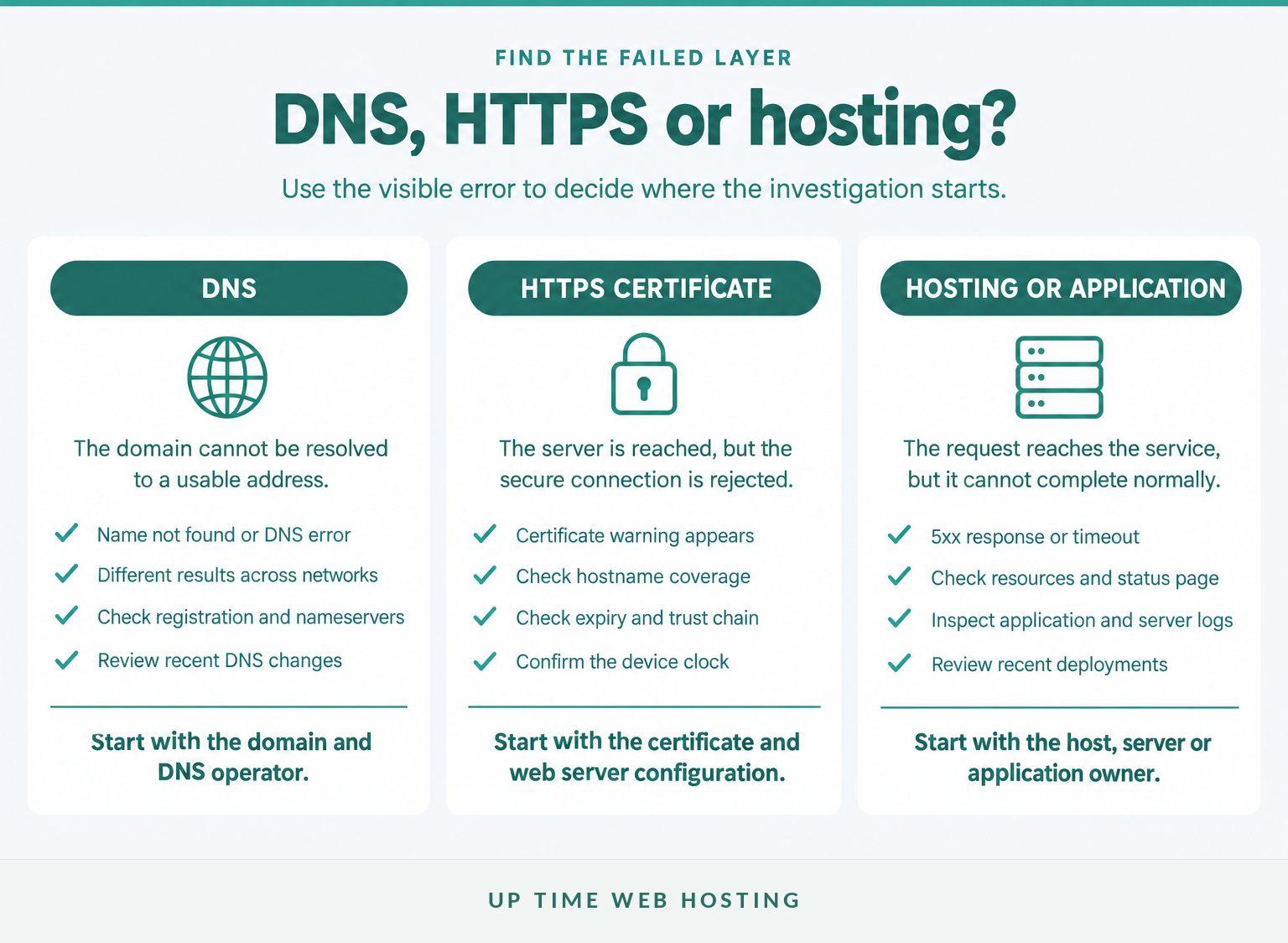
DNS, SSL and hosting failures happen at different layers, so the browser message matters. Record the exact wording and time before changing records, certificates, plugins or server services.
Compare the failure layers
Does the domain name resolve?
A name-resolution error means the browser could not turn the domain name into a usable server address. Test the domain from another network and inspect its registration status, nameservers and essential DNS records.
Recent DNS changes can produce different answers while cached records remain valid in some locations. Do not repeatedly edit the records during that period, because each change makes the investigation harder to interpret.
Does HTTPS fail before the page loads?
A certificate warning points to the secure connection rather than proof that the server is completely offline. Check whether the certificate covers the requested hostname, remains valid, has a complete trust chain and is being served by the expected server.
Also check the device clock. A substantially incorrect date or time can make a valid certificate appear outside its permitted period on that device.
Does the server return a 5xx response or time out?
A 5xx response means the request reached a server or gateway that could not fulfil it normally. Review the hosting status page, resource usage, web server and application logs, database availability and any deployment or plugin change made shortly before the outage.
A timeout without an HTTP status may occur earlier in the path. Check whether the server is reachable, whether the expected service is listening and whether a firewall or routing fault prevents the connection.
The first failing layer, DNS, HTTPS, server or application, determines who should act next.
What should I do after confirming my website is down?
If independent checks confirm an outage, preserve evidence, assess the impact and escalate to the owner of the failing layer. Avoid random changes because they can erase useful clues or create a second fault.
Act without destroying the evidence
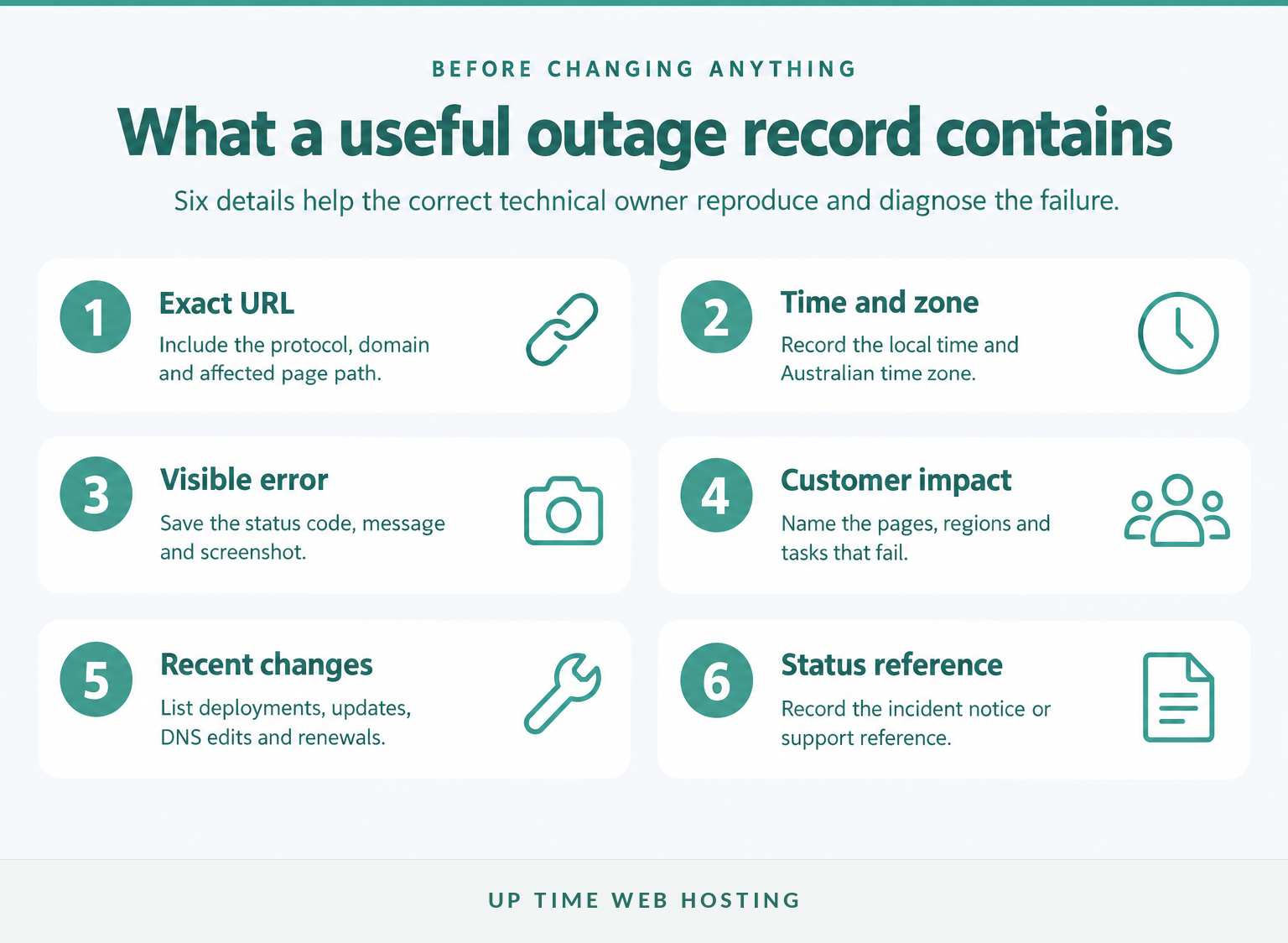
- Record the incident. Save the exact URL, error, screenshot, local time and time zone, device, browser and network used.
- Check the status page. Look for planned maintenance or a recognised incident before opening duplicate requests.
- Define the impact. Confirm whether the whole site, one region, one page, email, checkout, login or another customer journey is affected.
- Review recent changes. Check deployments, plugin or theme updates, DNS edits, certificate renewals and server configuration changes.
- Inspect logs and resources. Look for application errors, exhausted storage, memory pressure, database failures and abnormal traffic.
- Roll back carefully. Restore a known-good version only when there is a tested backup and a clear reason to believe the change caused the outage.
- Communicate confirmed facts. State what is affected, what still works and when the next update will be issued.
Up Time Web Hosting's 2026 support guidance tells hosted customers to check the network status page first. When an incident is already listed, progress and resolution updates are published there while work continues. (clients.uptimewebhosting.com.au)
If customers cannot pay, book, log in or complete urgent work, use a clear website down message to customers rather than promising an unsupported recovery time.
Preserve the error and time first, then escalate the failing layer without making random changes.
How do I stop finding out about outages from customers?
A manual checker only answers the moment you run it. Uptime monitoring repeats checks and alerts the site owner, while performance monitoring tests whether important pages and customer journeys continue to work.
As of November 2026, Up Time Web Hosting's free Lite monitoring option checks one website every 10 minutes, emails the primary account holder when the site goes offline and allows the monitoring location to be changed to Sydney. (clients.uptimewebhosting.com.au)
For useful monitoring:
- Test the home page and at least one business-critical page, such as a booking, product or login page.
- Use an Australian test location when most customers are in Australia, plus an overseas location where available.
- Send alerts to an address or channel that does not depend on the affected website or server.
- Require confirmation from repeated checks before paging someone, while keeping the interval short enough for the site's business impact.
Uptime alone cannot confirm that a page rendered correctly or a form completed. Use website performance monitoring when the customer journey matters as much as the server response.
Monitoring should tell the site owner before a customer has to.
Register your new domain name at competitive market prices including free domain add-ons like privacy, DNS Hosting, Custom Nameservers and Forwarding.
Always the best price and no nasty renewal price hikes.
Register A Domain Name
FAQ about website down checkers
Use the FAQ below to interpret common grey areas that a one-line checker result cannot settle. Each answer stands alone when a visitor or website owner needs a quick decision.
How accurate is a website down checker?
A website down checker is useful for confirming whether an external system can reach a URL, but it is not absolute proof. A checker may be blocked, rate limited, redirected or tested from a region unlike yours. Confirm important results with another network, the hosting status page and the exact browser error.
Why is a website down for me but not others?
A site may fail only for you because of cached data, a DNS resolver problem, a blocked IP address, a VPN, a browser extension, an account issue or local network filtering. Test a private window, another device and mobile data. If one network works, investigate the failing connection before changing the website.
Can a website be down in Australia but work overseas?
Yes. Regional DNS answers, routing faults, content delivery settings, firewall rules or a failure at one server location can affect Australian visitors while other regions still work. Use checks from an Australian location and at least one overseas location, then compare the returned address, status code and response time before escalating. (developers.google.com)
What does 503 Service Unavailable mean?
A 503 Service Unavailable response means the server is currently unable to handle the request, commonly because of temporary overload or maintenance. The IETF standard allows a Retry-After value, but a server is not required to send one. Check the status page, server resources and recent changes before repeatedly retrying. (rfc-editor.org)
Should I use more than one website status checker?
Use a second independent check when the result matters, especially before changing DNS or contacting customers. Two services may test from different regions and receive different treatment from security controls. If the results conflict, test from mobile data, check the provider status page and record the exact HTTP or browser error.
A website down checker is most reliable when its result is confirmed by a second network and the exact error.
What is the next step?
Choose the next action from the first layer that failed, then keep a record of the incident. If outages recur, replace manual checks with monitoring and review whether the current hosting setup provides the resources and support the site needs.
If repeated incidents point to resource limits, weak visibility or slow support, compare Up Time Web Hosting's cPanel website hosting plans before the next outage.
The next useful action is to automate detection and retain evidence from every incident.