In short
A website down message should tell customers what is unavailable, what still works, what the business is doing, when the next update will arrive and where urgent help is available. State only confirmed facts, use an Australian date and time zone, apologise briefly, and never promise a recovery time the technical team cannot support.
Key takeaways
- Send an initial acknowledgement as soon as the customer impact is confirmed, even if the cause is still under investigation.
- Promise a time for the next update rather than an unsupported restoration time.
- A planned maintenance notice should name the affected service, date, start and finish times, time zone and available workaround.
- Escalate from a banner to direct email, SMS or phone contact when the outage stops customers from paying, booking, logging in or completing urgent work.
- Announce recovery only after testing the customer actions that were affected.
Table of contents
- What should you tell customers when your website is down?
- Which website down message should you send first?
- What should a planned maintenance message say?
- How often should you update customers during an outage?
- Which channels should you use if the website itself is unavailable?
- When should you escalate from a banner to email, SMS or phone?
- What should you say after the website is back online?
- What mistakes make an outage message worse?
- How can you prepare before the next outage?
- What do businesses ask about website downtime messages?
- What should you do next?
What should you tell customers when your website is down?
Tell customers what is unavailable, how it affects them, what action is under way, when the next update will appear and how to get urgent help. If the cause or restoration time is not confirmed, say that plainly instead of filling the gap with a guess.
A simple website down message to customers template has five parts:
- Current status: Say that the website or affected function is unavailable.
- Confirmed impact: Name what customers cannot do, such as place an order, make a booking or access an account.
- Action under way: State that the issue is being investigated or repaired.
- Next update: Give an absolute time and time zone.
- Alternative help: Provide a working phone number, email address, status page or manual workaround.
Use an absolute time such as 2:30 pm AEDT on Monday 2 November, not phrases such as “later today”. Australian businesses serving several states should name the relevant time zone and account for daylight-saving differences.
Website temporarily unavailable
[Business name]'s website is currently unavailable. The technical team is investigating the issue. The next update will be posted by [time, date and time zone]. For urgent assistance, contact [working phone number or email address]. The team apologises for the interruption.
For planned maintenance, the page itself should also indicate that the interruption is temporary. The HTTP Semantics standard, RFC 9110, published in June 2022, defines HTTP 503 for temporary overload or scheduled maintenance and permits a Retry-After header to suggest when a client should try again. (rfc-editor.org)
A useful outage message gives confirmed impact, next-update timing and a working help path without guessing.

Performance you can feel, backed by clients who depend on it. Read how our support and uptime create long‑term customer success.Power Your Business with Better Hosting
Which website down message should you send first?
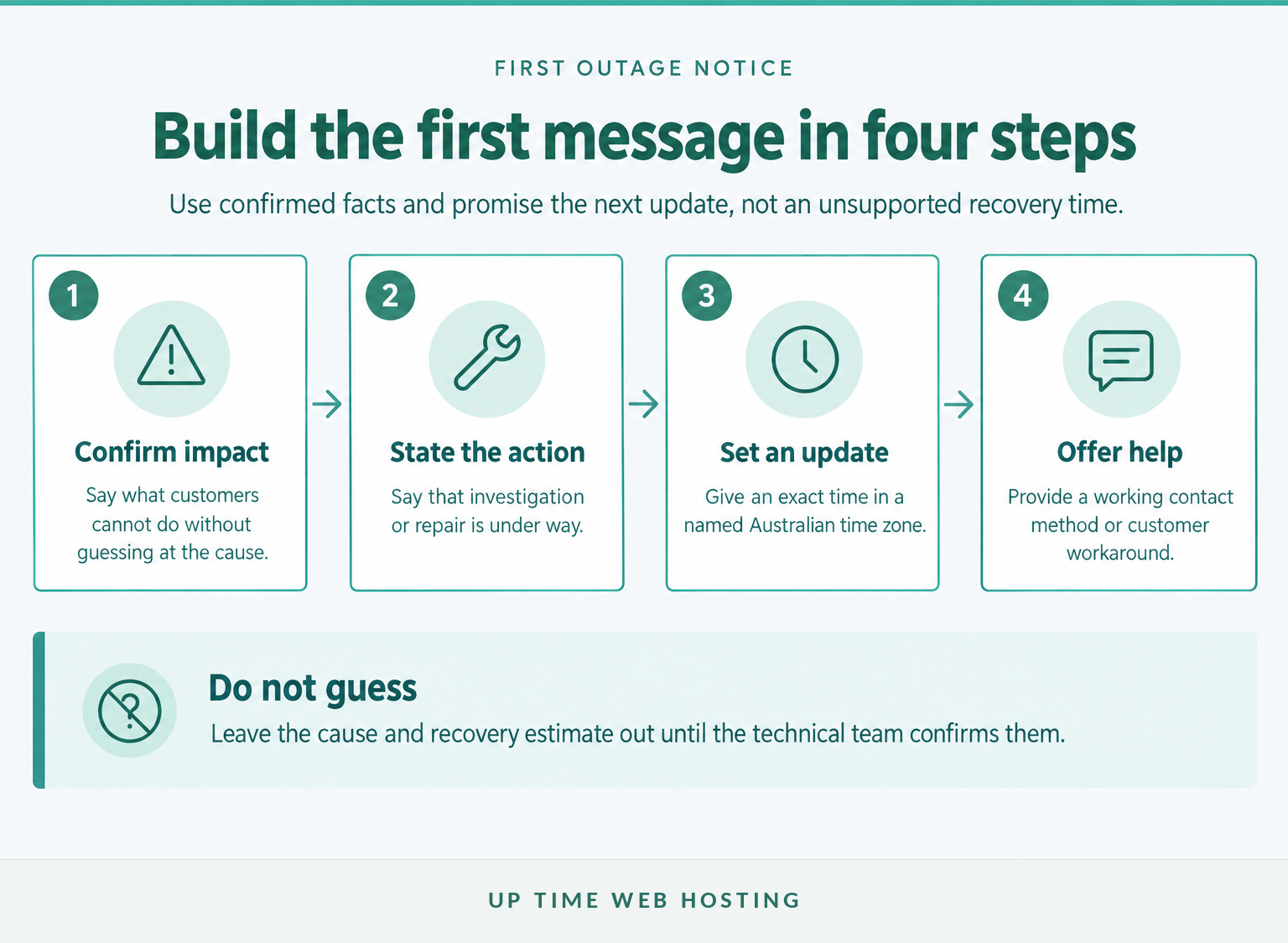
The first message should acknowledge the issue as soon as the impact is confirmed, even if the cause is still unknown. Promise a specific time for the next update, not a restoration time that has not been approved.
These website down message examples can be adapted to match the incident stage.
What should the first unexpected outage message say?
Subject: Website issue under investigation
Customers are currently unable to [confirmed affected action] on [Business name]'s website. The technical team began investigating at [time and time zone]. A restoration time is not yet confirmed. The next update will be provided by [time and time zone]. For urgent assistance, contact [phone number or email address].
The phrase “under investigation” is useful when the failure is real but the cause is not yet confirmed. Avoid naming a server, software update, cyberattack or hosting provider until evidence supports that explanation.
What should a partial outage message say?
[Business name]'s website is online, but [checkout, bookings, account login or contact forms] is currently unavailable. Other website functions remain available. The technical team is investigating, and the next update will be posted by [time and time zone]. Customers needing urgent help can use [alternative channel or workaround].
A partial-outage message prevents customers from assuming that every service has failed. It also directs them away from repeatedly retrying a transaction that cannot currently succeed.
What should support staff say?
Thank you for reporting the website issue. [Business name] is aware that customers cannot currently [affected action], and the technical team is investigating. The next confirmed update is due at [time and time zone]. No additional troubleshooting is required from the customer at this stage.
Independent website performance monitoring can reduce the time between a failure beginning and the first customer notice, especially when the business does not have staff watching the site continuously.
The first message should acknowledge confirmed impact quickly and promise only the next update, not an unsupported recovery time.
What should a planned maintenance message say?
A planned website maintenance message should give customers enough notice to complete urgent work or choose another channel. Include the purpose, affected function, start and expected finish, Australian time zone, likely impact and alternative contact method.
The website under maintenance message text should use a full date rather than only a weekday. If the customer base spans Australia, either list the main time zones or clearly state the single time zone used throughout the notice.
Subject: Planned website maintenance on Tuesday 10 November
[Business name]'s website will be unavailable from 10:00 pm to 11:30 pm AEDT on Tuesday 10 November while [brief reason for the work]. During this period, customers will not be able to [affected action]. [Alternative channel or workaround] will remain available. If the website has not returned by 11:15 pm AEDT, a progress update will be posted at [status page or channel]. The team apologises for the inconvenience.
Send a reminder close enough to the maintenance window to be useful. The reminder can be shorter, but it should repeat the date, time zone, impact and alternative contact method rather than assuming customers remember the original email.
Planned maintenance notices work when customers receive the date, time zone, impact and workaround before access is interrupted.
Host your website with our 5-star rated, cPanel website hosting plans.
Super fast servers, with security included and hosted in your choice of Australian Data Center.
View cPanel Plans
How often should you update customers during an outage?
There is no single update interval that suits every incident. Choose a schedule based on customer impact and assign an owner who can publish at that time, even when the update is simply that investigation continues.
For a complete outage affecting payments or bookings, updates every 30 or 60 minutes may be practical examples. A lower-impact problem may need less frequent communication, while planned maintenance normally needs a start notice, an overrun notice if required and a completion notice.
What can a progress update say?
Progress update, [time and time zone]
[Business name]'s website remains unavailable for [affected action]. The technical team has [confirmed progress, if suitable for customers], but a restoration time is not yet confirmed. The next update will be posted by [time and time zone]. Urgent assistance remains available through [channel].
What can an overrun notice say?
Maintenance delay, [time and time zone]
The planned website maintenance is taking longer than expected, and [affected function] remains unavailable. The technical team is continuing the work and has not confirmed a revised completion time. The next update will be provided by [time and time zone]. [Alternative channel] remains available.
Every update should carry a timestamp, the current customer impact, any meaningful change and the next update time. Do not publish a new recovery estimate merely to make the message sound more reassuring.
A reliable update cadence matters more than frequent messages that add no new information.
Which channels should you use if the website itself is unavailable?
Use at least one channel that does not depend on the affected website. Keep a separately available status page or support channel as the source of truth, then repeat the same confirmed status through the channels customers already use.
Useful options include:
- Status page: Publish the incident state, timestamps and update history in one place.
- Email: Use email for planned maintenance, longer outages and incidents affecting a known customer group.
- SMS: Reserve SMS for urgent, time-sensitive impact where text messaging is already an established customer channel.
- Social media: Post a short acknowledgement and direct readers to the source of truth.
- Phone recording: Update the recorded message if the support team is likely to receive repeated outage calls.
- Support script: Give staff the same approved wording, update time and workaround.
As of November 2026, Google Search Central guidance recommends limiting website functionality and displaying clear status information rather than taking the entire site offline when that option is practical. For a short full-site shutdown, its guidance calls for a 503 response and customer information such as the next update or support contact. (developers.google.com)
Every outage needs one source of truth and at least one communication channel outside the affected website.
When should you escalate from a banner to email, SMS or phone?
Escalate communication when the outage creates greater customer harm, requires customers to take action or continues beyond the promised update. A brief cosmetic problem may need only a banner, while a failed checkout or account system may justify direct contact.
| Situation | Minimum communication | Add direct contact when |
|---|---|---|
| Planned, low-impact maintenance | Website banner and status notice | Customers must complete work before the maintenance window |
| One function is unavailable | Banner or status update naming the function | Payments, bookings, account access or urgent forms are affected |
| The whole website is unavailable | External status update, social notice and support script | The outage continues beyond the first promised update |
| The outage is extended or uncertain | Status updates plus email to affected customers | Customers need a workaround, revised deadline or manual assistance |
| A security impact is possible | Approved holding statement from the incident owner | Confirmed facts require individual customer instructions |
If a security or privacy incident is possible, confirm the service impact without declaring customer data safe or compromised before the facts are established. Escalate wording to the organisation's incident response owner before publishing claims about information exposure.
Every channel should use the same timestamp, incident state and next update time. Contradictory messages create more support work and make even accurate information harder to trust.
Escalate communication when customer harm increases, not simply because more time has passed.
Register your new domain name at competitive market prices including free domain add-ons like privacy, DNS Hosting, Custom Nameservers and Forwarding.
Always the best price and no nasty renewal price hikes.
Register A Domain Name
What should you say after the website is back online?
Send a restoration message only after the affected customer journey has been tested. A homepage loading successfully does not prove that account login, checkout, booking forms, confirmation emails or connected services are working.
What can a restoration message say?
Website service restored, [time and time zone]
Access to [affected website function] was restored at [time and time zone]. Customers should now be able to [completed action]. The team has tested [key functions tested] and is continuing to monitor the service. Customers still experiencing a problem can contact [support channel] and include [useful details]. The team apologises for the interruption.
Before publishing that message, test the functions customers depend on:
- homepage and important landing pages
- account login and password reset
- checkout, payment or booking flow
- enquiry forms and confirmation emails
- mobile access
- critical third-party integrations
A broader website health check can identify related availability, performance, security or backup problems after the immediate customer impact has been resolved.
For a significant incident, publish a short follow-up once the facts are confirmed. State the impact window, the cause at an appropriate level, the corrective action and any customer step that is genuinely required.
Service is not restored for communication purposes until the customer journey has been tested.
What mistakes make an outage message worse?
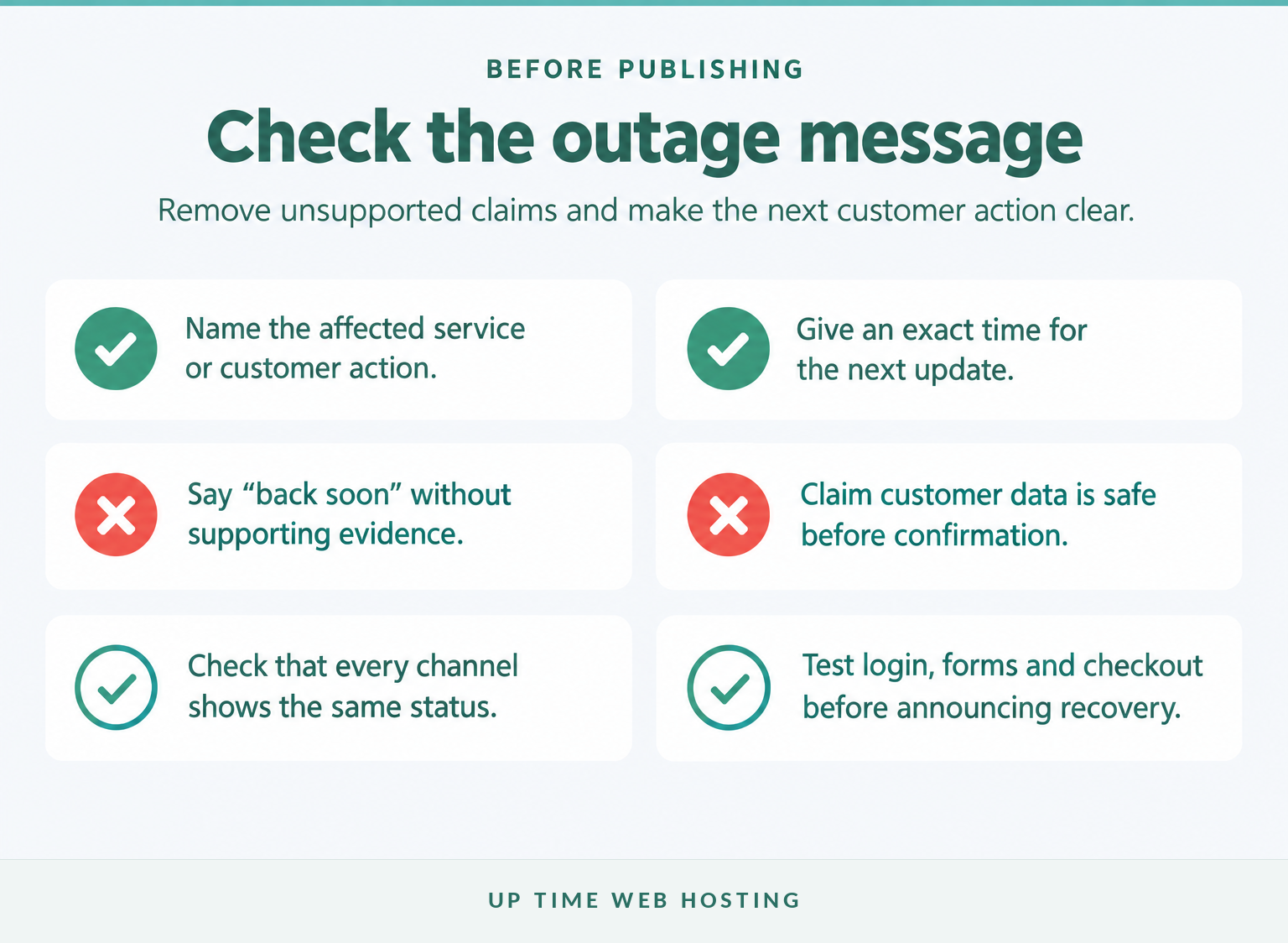
Vague reassurance, silence and conflicting estimates usually cause more frustration than a short factual notice. The message should help customers decide what to do next, not merely confirm that the business knows there is a problem.
Avoid these common mistakes:
- Saying only “the website is down” without naming the affected action.
- Promising that service will be “back soon” when no restoration time is confirmed.
- Claiming customer data is safe before a possible security impact has been assessed.
- Blaming a developer, provider or staff member in a customer-facing update.
- Using jokes when customers cannot pay, book, work or access important information.
- Publishing different recovery times across email, social media and support channels.
- Announcing recovery before checkout, forms, login and integrations have been tested.
- Removing old updates instead of preserving a clear incident timeline.
Clear facts build more trust than vague reassurance, blame or humour.
Experience Microsoft 365 Business Standard for free for 30 days.
Up to 25 users with full access to email, OneDrive and Teams. Includes full versions of desktop apps of Outlook, Word, Excel, PowerPoint and more.
Try Microsoft 365
How can you prepare before the next outage?
Preparation should happen while the website is working. Assign ownership, save approved templates and make sure the communication channels remain accessible when the main website or hosting account is not.
Create a small outage communication kit containing:
- A named incident owner: One role approves customer-facing updates and keeps timestamps consistent.
- Prewritten message templates: Store versions for investigation, partial failure, planned maintenance, overrun, restoration and follow-up.
- Independent alerts: Configure monitoring so the business is not relying only on customer complaints.
- An external communication path: Keep the status page, contact list or phone system outside the website's main failure point where practical.
- Customer groups: Know which customers need a general update and which need direct instructions.
- Approved workarounds: Document manual booking, ordering, payment or support options that genuinely work.
- An incident log: Record detection, messages, decisions, recovery tests and the final review.
Add the communication process to the organisation's business continuity plan rather than leaving it in one staff member's inbox. Technical reviews should also cover practical measures for preventing future website downtime, including monitoring, updates, backups and recovery preparation.
Prepared owners, channels, templates and monitoring turn outage communication into a repeatable process.
What do businesses ask about website downtime messages?
The best answers remain specific about the affected service, timing and next action. The following questions cover the wording and maintenance issues Australian website managers commonly need to resolve.
Can you provide an example of a website maintenance message?
Yes. “[Business name]'s website is currently unavailable, and the team is investigating. Customers cannot access [affected service] at present. The next update will be posted by [time and time zone]. For urgent help, contact [phone or email]. The team apologises for the interruption and will confirm when service has been restored.”
How do you write a maintenance email?
A maintenance email should state the affected service, reason at a useful level, start and expected finish, Australian time zone, likely customer impact, available workaround and contact method. Send it early enough for customers to act, then send a reminder, an overrun notice if required, and a completion message after testing.
What does it mean when a website is down for maintenance?
When a website is down for maintenance, the operator has deliberately limited or stopped access while updates, repairs or infrastructure work are completed. Planned maintenance should be announced in advance where possible. The message should explain what is unavailable, when access is expected to return and where customers can get help.
How do I remove a website from maintenance mode?
Removing maintenance mode depends on the platform and what enabled it. First confirm that updates or deployment work have finished, then use the CMS, hosting panel or deployment tool that activated the mode. If the site is stuck, contact the developer or host before deleting files, and test key functions before announcing recovery.
Website downtime questions are easiest to answer when the status, impact and next action remain specific.
What should you do next?
Copy the relevant outage notification template into the business's incident plan and replace the placeholders before an emergency occurs. Confirm who approves each message, which channel remains available outside the website and how the technical team will provide the next-update time.
If outages are becoming a pattern, use the hosting reliability checklist for Australian businesses to decide whether the current hosting and support arrangement still fits the business.