Your website looks fine on the office computer, and the uptime dashboard is green. Yet a customer calls because the booking form won't submit, while someone on a regional mobile connection waits for a product page that never seems ready. You've got an online website, but you haven't necessarily got a working customer journey.
Website performance monitoring closes that gap. The useful question isn't whether a server responds. It's whether Australian customers can find what they need, interact with the page and complete the task they came for.
Table of Contents
- Why Performance Monitoring Needs More Than Uptime
- Define the Metrics and User Journeys That Matter
- Choose the Right Monitoring Types
- Set Thresholds and Alerts That Reduce Noise
- Build and Integrate Your Monitoring Workflow
- Troubleshoot Alerts and Optimise the Site
- Run an Ongoing Performance Review

Performance you can feel, backed by clients who depend on it. Read how our support and uptime create long‑term customer success.Power Your Business with Better Hosting
Why Performance Monitoring Needs More Than Uptime
Consider an Australian retailer running a WordPress shop. The homepage loads, product pages return successful responses, and the hosting account remains available. But after a plugin update, customers can't select a delivery option at checkout.
That's a representative failure, not a measured case study. An uptime check might stay green because it never attempts the action that customers can't complete. Monitoring needs to separate technical availability from usable service.
Measure the experience in layers
Start with the delivery path, then move towards the customer's task:
- Server response and TTFB: Establish how long the browser waits before receiving the first response bytes.
- Page loading: Record when content appears and when the important parts become usable.
- Synthetic journeys: Rehearse actions such as submitting an enquiry or reaching a booking confirmation.
- Real-user measurements: Observe the conditions actual visitors encounter, rather than assuming everyone shares your office connection.
Australian network conditions make this distinction practical. The ACCC's April 2023 broadband report recorded 99.1% of advertised download speed across all hours and 97.7% during busy periods, alongside 0.35 outages per day, with 58% lasting no longer than three minutes.
Those are broadband findings, not website outage statistics. They nevertheless show why testing from a stable office connection can miss interruptions and busy-period variation experienced elsewhere.
Practical rule: A successful server response is evidence that something answered, not proof that a customer completed their task.
Occasional manual testing remains useful, especially for unusual interactions. Continuous monitoring serves a different purpose: it records what happened between those manual checks and gives the team evidence when customers report intermittent problems. For a small website, a focused set of checks on important journeys is more useful than an impressive dashboard nobody acts on.
Define the Metrics and User Journeys That Matter
Choose the business outcome before choosing the metric. An enquiry site needs working forms and reliable confirmation messages. A booking service needs available appointments, successful reservations and clear completion feedback.
Write down the journey, the expected result and the person responsible when it fails. Include the homepage, important landing pages, login, contact forms, checkout or booking workflow, and the API endpoints those workflows depend on.
Separate delivery, rendering and interaction
Use a concise measurement plan rather than collecting everything indiscriminately.
| Measurement | What it helps you investigate |
|---|---|
| Availability and HTTP status | Whether the endpoint responds successfully |
| TTFB | Delays before the initial response arrives |
| First visual content | How long visitors face an apparently blank page |
| Complete page load | Whether remaining resources delay the overall load |
| Application errors | Failed operations inside an otherwise available website |
| Core Web Vitals | Main-content visibility, interaction responsiveness and visual stability |
Within Core Web Vitals, Largest Contentful Paint concerns the main visible content, Interaction to Next Paint concerns responsiveness, and Cumulative Layout Shift concerns unexpected movement. Don't treat a complete-load measurement as interchangeable with any of these.
The Australian Government Digital Service Standard identifies error rates, uptime and response/load times as core indicators, and states that current best practice for response time is two seconds or less. Treat that as a reference point, not a reason to label every timing metric with the same target.
For a deeper distinction between backend waiting and page delivery, use this server response time knowledge-base article.
Prioritise by customer consequence
For WordPress, a sensible starting journey might open a service page, complete the contact form and verify that the application records the enquiry. A visible success message alone isn't enough if the submission disappears afterwards.
For an ASP.NET booking application, check authentication, appointment retrieval and reservation confirmation. Monitor the relevant API response alongside the browser journey so developers can distinguish a frontend problem from an application failure.
- Business outcome: Define what successful completion means.
- Audience: Identify the devices, Australian regions and connection types that matter.
- Priority: Put revenue-critical and lead-generating journeys ahead of low-impact archive pages.
The resulting inventory should be short enough that someone can explain why every check exists.
Host your website with our 5-star rated, cPanel website hosting plans.
Super fast servers, with security included and hosted in your choice of Australian Data Center.
View cPanel Plans
Choose the Right Monitoring Types
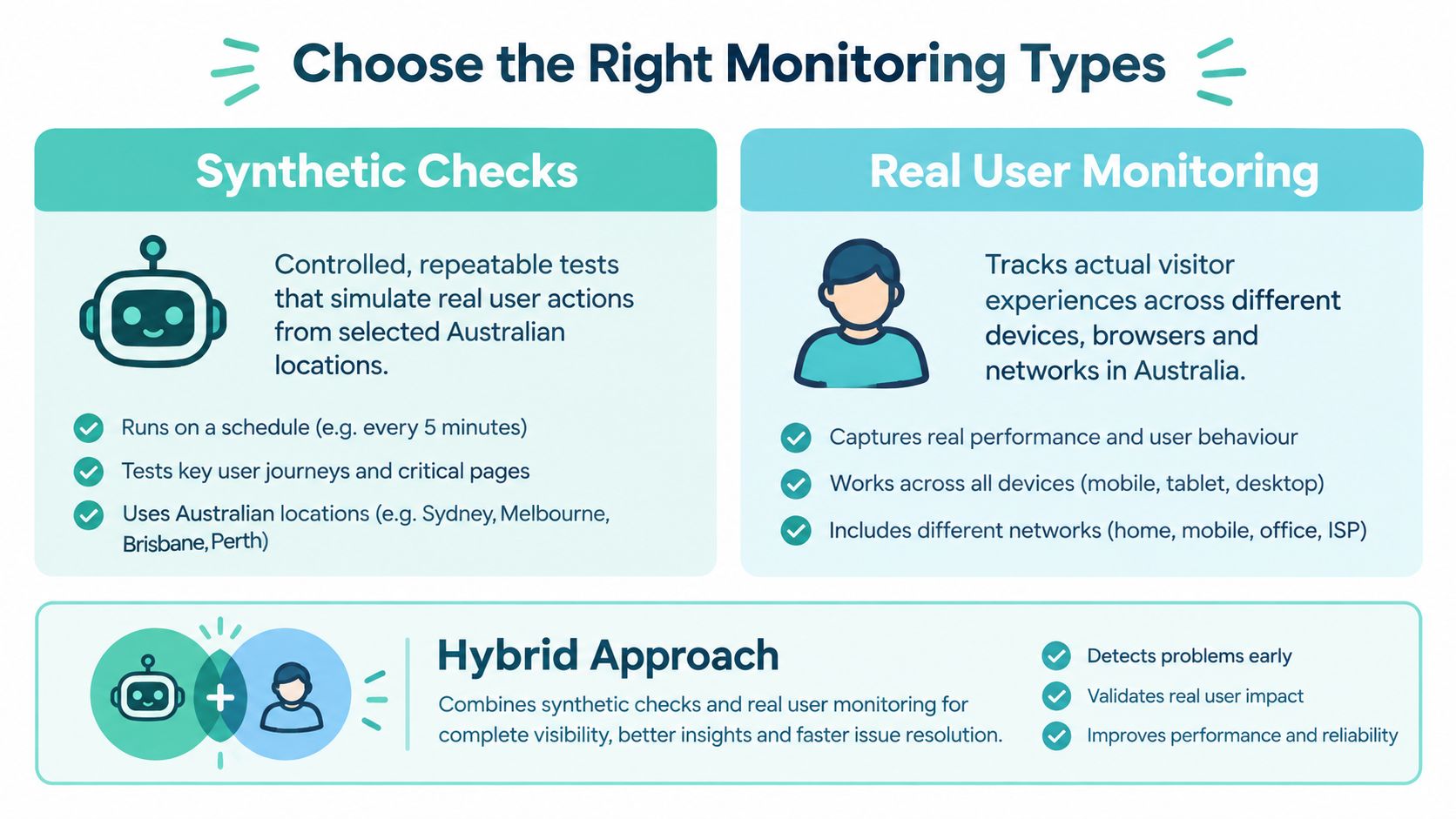
Synthetic monitoring and real-user monitoring answer different questions. Synthetic tests ask whether a controlled journey still works under repeatable conditions. Real-user monitoring, often shortened to RUM, shows what visitors experienced.
Neither replaces basic availability checks or access to hosting diagnostics. The useful combination depends on the consequences of failure, not the number of charts available.
Compare by the question you need answered
| Monitoring type | Operational strength | Important limitation |
|---|---|---|
| Uptime and protocol checks | Detect reachability, DNS, TLS and response problems | Don't prove the application works |
| Synthetic browser checks | Repeat a defined task, including when traffic is quiet | Represent configured conditions |
| Real-user monitoring | Reveal differences across actual visits | Need sufficient relevant observations |
| Infrastructure checks | Expose resource pressure and server-side symptoms | Don't establish customer success alone |
Connection speed isn't a substitute for these measurements. ACCC web performance testing, across 12/5, 25/5, 50/20 and 100/40 Mbps plans, recorded first visual content at 1.9–2.0 seconds and visual completion at 2.7–2.9 seconds for its reference websites; access speed and provider choice didn't materially affect the tested browsing performance.
That finding applies to the tested sites, not every Australian website. Operationally, it's a good reason to investigate the application and delivery path rather than assuming a faster customer connection will solve the problem.
Spend effort where failure matters
A brochure website can start with availability checks and a scripted enquiry test. A transactional application warrants deeper journey coverage, real-user measurements and infrastructure evidence that developers can correlate with failures.
A controlled test tells you whether a known scenario changed. Field data tells you who experienced the problem.
Ask whether your monitoring can verify the final outcome, retain diagnostic evidence and distinguish location-specific failures. Also consider maintenance: scripted journeys need updating when forms or checkout flows change.
This platform-neutral guide to testing website performance provides a useful knowledge-base starting point for planning repeatable tests.
Set Thresholds and Alerts That Reduce Noise
An alert should identify an action, an owner and a reason it can't wait. If every slow image generates an urgent notification, the team will struggle to distinguish inconvenience from a broken customer journey.
Use absolute thresholds for unacceptable conditions, regression thresholds for deterioration against a baseline, and sustained-condition rules to avoid escalating isolated noise. A business-impact trigger adds context, such as a failed checkout rather than a slow background request.
Establish budgets without treating them as universal laws
Google's Australian and New Zealand mobile benchmark reported an average load time of nine seconds, rising to 15 seconds with backend load time included, and noted likely mobile abandonment beyond three seconds. This is a historical reference, not a current estimate for your website.
A mobile load budget based on that user-risk threshold can be useful. Still, calibrate it against the page's purpose, actual Australian visitors and the timing definition your monitoring tool uses.
Example alert policy for a small Australian website
| Signal | Example trigger | Owner response |
|---|---|---|
| Server response | Exceeds the government response-time reference noted earlier | Developer reviews backend timing and recent changes |
| Mobile load | Exceeds a three-second budget | Investigate delivery and rendering separately |
| Release regression | Five-run median worsens against the accepted baseline | Release owner investigates before proceeding |
| Checkout failure | Exceeds 1% of attempts | Application owner validates impact and considers rollback |
| Journey availability | Falls below an agreed 99.9% target | Service owner starts incident handling |
| Australian INP | Degradation persists for 15 minutes | Frontend owner checks affected devices and releases |
| Critical form | Submission or recorded outcome fails | Notify the responsible owner immediately |
These are example business policies, not universal standards or observed results. Define the availability reporting window, qualifying failures and minimum transaction volume before using percentage-based alerts.
Make escalation explicit
Send warnings to the normal work queue. Reserve urgent notifications for incidents requiring immediate intervention, and assign a backup owner so the response doesn't depend on someone seeing an email.
- Attach evidence: Include the affected journey, location, timing comparison and failure detail.
- Group related alerts: Keep a single incident from producing unrelated notification threads.
- Define recovery: Require successful retesting before closing the incident.
- Record exceptions: Suppress planned maintenance deliberately, with an expiry and owner.
A regression can deserve investigation even when it remains under budget. Conversely, a single unusual result shouldn't automatically trigger a rollback without confirmation.
Build and Integrate Your Monitoring Workflow
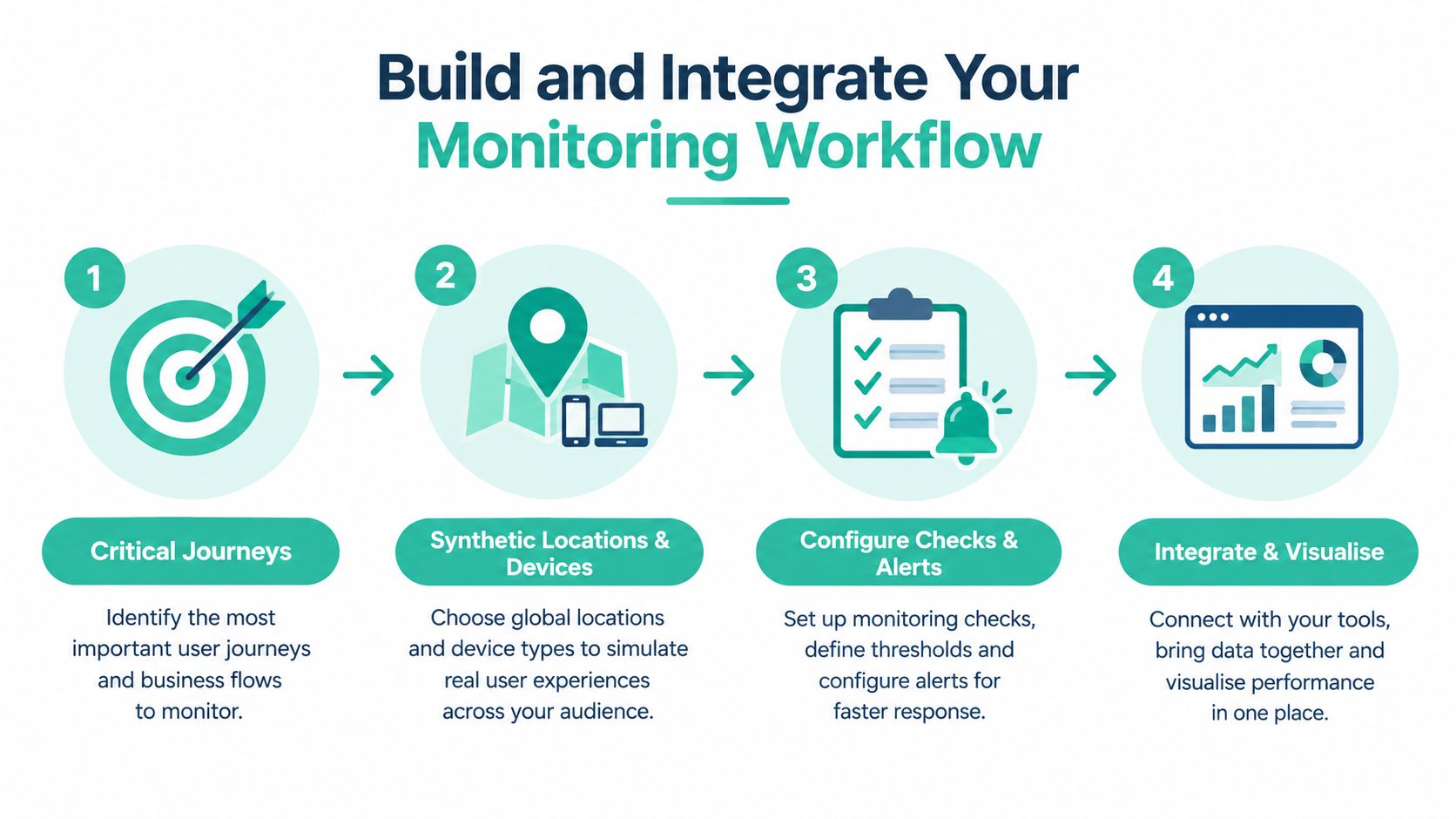
Configure monitoring from the customer task outward. Define what the test must do, what confirms success, and which dependencies it touches before choosing locations or notification channels.
Use a dedicated test account where authentication is necessary. For booking and checkout tests, agree on a safe method that won't create genuine reservations, charges or misleading operational records.
Configure Australian viewing conditions
Where practical, run synthetic tests from Sydney, Melbourne, Brisbane and Perth. Keep the browser, device profile, bandwidth, latency and cache state consistent when comparing results, and include evening peak periods in the schedule.
Segment RUM by state, device, connection type and landing page where collection supports it. Don't infer a regional mobile experience from a capital-city desktop result, and don't treat a sparse segment as conclusive.
For release verification, retain an accepted baseline and repeat the same test conditions after deployment. Report both the typical result and the worst result from the repeated runs, with deployment annotations so developers can investigate changes without guessing.
Connect hosting evidence to browser evidence
UpTime Web Hosting is one Australian hosting option with local support and 24×7 monitoring; ask how its monitoring coverage relates to your own application checks. Hosting-level observation shouldn't be assumed to validate a custom checkout, authenticated booking flow or form submission.
Arrange access to TTFB trends, resource-use information, application errors and deployment timestamps. Hosting location is relevant context, but diagnose the actual delay before deciding that relocation or extra resources are the answer.
Use the traffic monitoring tools knowledge-base guide to help connect visitor activity with operational measurements.
The Australian Government Digital Performance Standard calls for monitoring service availability, service success, user needs and ongoing analysis, with a plan for capturing, maintaining and reporting data. It's a useful documentation model for a small team, not an assertion that government requirements automatically apply to every business.
- Journey configuration: Success conditions, safe test data and dependency coverage.
- Collection settings: Australian locations, device profiles and documented cache behaviour.
- Operational ownership: Alert recipient, backup contact and escalation route.
- Evidence handling: Retention, access controls and removal of personal information from captured errors.
Keep this configuration alongside the application's maintenance notes so another developer can operate it.
Register your new domain name at competitive market prices including free domain add-ons like privacy, DNS Hosting, Custom Nameservers and Forwarding.
Always the best price and no nasty renewal price hikes.
Register A Domain Name
Troubleshoot Alerts and Optimise the Site
When an alert arrives, preserve the evidence before changing anything. Record the affected journey, test location, device profile, error detail and deployment context, then confirm the symptom from another Australian location.
Check reachability, DNS and TLS first. Inspect HTTP responses and application errors next, then compare backend waiting with browser-side timing.
Match the fix to the measured cause
High TTFB across locations warrants investigation of application execution, database calls, resource pressure and cache behaviour. For an ASP.NET application, inspect slow dependency calls or database work before assuming the Windows hosting allocation needs increasing.
Acceptable TTFB with delayed first visual content shifts attention towards the browser. Inspect render-blocking styles, font delivery, script execution and request dependencies.
For an image-heavy WordPress page, compare the uploaded images with their displayed dimensions and inspect the loading sequence. Resize and compress appropriately, while preserving the quality customers need to assess products.
- JavaScript-heavy interaction delays: Review long-running work and third-party tags. Removing unnecessary code may be more effective than delaying it.
- Intermittent short outages: Correlate timestamps across checks and logs. A later successful manual visit doesn't invalidate the original failure.
- Failed forms or bookings: Inspect validation, API responses, session handling and confirmation records, not just the visible page.
Caching needs particular care. It may help public pages, but applying it indiscriminately to personalised content can introduce a different customer problem.
Verify the original task after the change
Compare affected RUM segments and deployment timestamps to identify whether the issue followed a release, content upload or third-party change. If rollback is safer than an uncertain live fix, make that decision against the documented incident policy.
Verification test: Repeat the failed customer action under the original conditions. A better score isn't sufficient evidence that the problem is resolved.
Use this website speed improvement guide to support optimisation work, but choose changes from the measured bottleneck rather than applying every suggestion.
Include accessibility regression checks when changing layouts, scripts or forms. Western Australia's Accessibility and Inclusivity Guidelines require the latest WCAG Level AA and regular testing before launch and afterwards within their scope.
Check keyboard navigation, focus behaviour, field instructions and mobile layout after the release. Automated checks can assist, but manually complete the affected journey before declaring recovery.
Run an Ongoing Performance Review
Review incidents and significant changes weekly, then produce a monthly summary that connects technical measurements with customer outcomes. The report should explain what failed, who was affected, what changed and whether the fix held.
Don't turn the meeting into a tour of every chart. Start with unresolved customer impact and use the measurements to decide what deserves engineering time.
Separate technical health from business impact
| Dashboard area | Include in the review |
|---|---|
| Technical health | Availability, TTFB trends, response errors and certificate issues |
| Customer experience | Page-load trends, Core Web Vitals and Australian RUM segments |
| Journey outcomes | Failed enquiries, booking errors and checkout problems |
| Change quality | Release regressions, completed fixes and verification evidence |
| Operational readiness | Unowned alerts, stale tests and escalation gaps |
A technically healthy month can still include a broken lead-generation form. Equally, fewer completed bookings don't automatically prove a performance problem. Keep those observations separate until the evidence supports a connection.
Assign each improvement an owner and a validation condition. “Optimise the website” is too vague; “remove the unnecessary booking-page script and confirm responsive date selection on the affected mobile profile” gives the developer a testable task.
Keep the monitoring useful as the site changes
Retire checks for removed features, update scripts after interface changes and revisit alert thresholds after meaningful improvements. Investigate repeated false alarms rather than training the team to ignore them.
A recurring website health checkup can support this maintenance routine. Use the Australian public-sector performance references discussed earlier as documentation aids, while retaining targets that reflect your customers and operational responsibilities.
- Confirm coverage: Important customer tasks still have working checks.
- Review evidence: Compare controlled results with actual Australian user conditions.
- Close the loop: Verify completed fixes against the original symptom.
- Test ownership: Ensure the current team knows who responds and who can authorise rollback.
Monitor a small set of critical journeys continuously, combine measurement types where the service warrants them, and verify every fix against the customer's original problem. That discipline matters more than collecting a larger volume of disconnected metrics.
UpTime Web Hosting offers Australian hosting for WordPress, cPanel and ASP.NET websites, with local support and hosting-level monitoring. Visit UpTime Web Hosting to discuss your hosting requirements and clarify which infrastructure checks you'll need to complement with customer-journey monitoring.