
A green tick from a DMARC Checker feels reassuring, especially when invoices, booking confirmations and password resets all leave from different systems. That tick usually proves something much narrower than protection. It proves a record exists. Whether spoofed mail gets blocked, and whether legitimate mail survives enforcement, are separate questions.
Table of Contents
- Why a Green DMARC Checker Result Still Leaves You Open
- What the Policy Tags Actually Mean
- How to Check a Domain DMARC Record
- Turning Raw DMARC Reports Into Readable Results With Suped
- How SPF and DKIM Decide the DMARC Result
- Read Aggregate Reports to Sort Senders
- Fixes for the Failures Australian Mail Hits Most
- Raise Enforcement Only After Every Sender Passes

Performance you can feel, backed by clients who depend on it. Read how our support and uptime create long‑term customer success.Power Your Business with Better Hosting
Why a Green DMARC Checker Result Still Leaves You Open
It's a Tuesday in a Melbourne bookkeeping office. Invoices leave from accounting software, booking replies leave from Microsoft 365, and the website contact form sends through the host. The owner pastes the .com.au domain into a DMARC Checker and gets a green pass.
That pass is mostly a syntax result. A TXT record exists at the DMARC location and starts correctly. It doesn't prove that a forged invoice will be stopped, or that every genuine sender would survive a stronger policy.
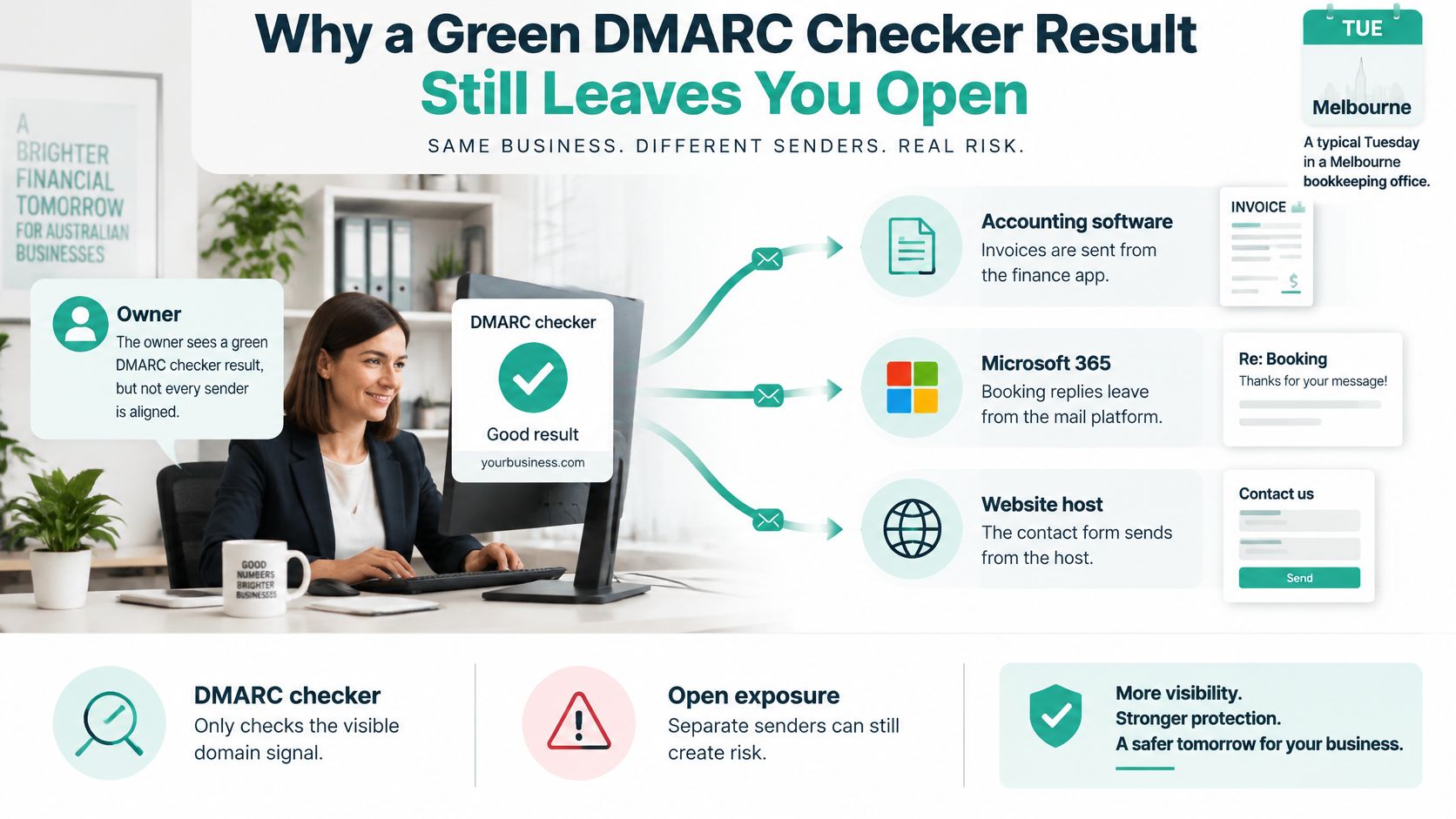
Australian figures show why the distinction matters. According to a 2025 study of DMARC adoption in Australia, DMARC coverage increased from 9.89% to 26.34% between June 2024 and June 2025, yet 70% of Australian domains with DMARC still used the non-enforcing p=none policy, only 16.9% used reject, and just 13.5% were fully protected against phishing.
A Brisbane retailer on p=none can therefore look compliant while payment-redirection mail still reaches customers, because receiving systems have been told to monitor rather than act. Visibility helps, but it isn't blocking.
What the useful verdict looks like
A useful result answers three practical questions. How strong is the policy, which real senders pass aligned SPF or DKIM, and what mail would break under quarantine or reject tomorrow.
Practical rule: Treat "record found" as the start of the check, never as proof the domain can't be spoofed.
For local reference points, the Australian Cyber Security Centre email guidelines are more relevant than overseas tool roundups, and they pair well with practical email deliverability best practices for day-to-day sending. The breakage question should stay open until every stream in that Melbourne office has been tested.
What the Policy Tags Actually Mean
Three versions of a record for a billing domain show the whole problem. A monitoring record collects reports and lets failed mail through. Changing the policy value to quarantine asks receivers to treat failures as spam. Changing it to reject asks them to refuse those messages.
The Australian Cyber Security Centre email security guidance defines those choices directly: none takes no action, quarantine generally causes the receiving system to treat the message as spam, and reject instructs the receiving server to refuse it. Reporting then shows how receivers handled the mail.
| Tag or policy | What it does | What to flag |
|---|---|---|
| p=none | Collects reports and takes no action on failed mail | Syntax pass with no anti-spoofing |
| p=quarantine | Asks receivers to treat failures as spam | Legitimate senders not yet aligned |
| p=reject | Asks receivers to refuse failed mail | Any unexplained legitimate failure |
| sp | Subdomain policy when it differs from p | Subdomains left on none while the parent rejects |
| pct | Share of mail the policy applies to | A value under 100, which is only partial enforcement |
| rua | Where aggregate reports are sent | Missing mailbox or a destination that is not authorised |
| ruf | Where forensic failure samples are sent | Empty or unused because many receivers will not send samples |
| adkim and aspf | Relaxed (r) or strict (s) alignment | Strict mode failing mail sent or signed by a subdomain |
The tags owners misread most
sp catches businesses with a tidy main domain and an exposed marketing subdomain. The parent can reject while subdomains still take no action, leaving a familiar-looking From address available for abuse.
pct is quieter but just as important. A reject policy applied to only part of the mail is partial enforcement, even if a DMARC Checker paints the whole record green. Always read the percentage before calling a domain protected.
Reporting tags decide whether anyone learns from failures. rua receives aggregate reports that reveal sending sources and pass rates. ruf is meant for forensic samples, but it's often empty because many receivers won't send message copies. An empty ruf is common. A missing or unread rua destination is a real blind spot.
Alignment tags need a quick plain-English translation. Relaxed mode lets a subdomain match its parent organisational domain. Strict mode demands an exact match, so legitimate mail signed or sent by a subdomain can fail until the setup is corrected.
Mark any result with p=none or a missing rua as visible but not protected. Carry that exact verdict into the DNS check instead of accepting a simple pass.
Host your website with our 5-star rated, cPanel website hosting plans.
Super fast servers, with security included and hosted in your choice of Australian Data Center.
View cPanel Plans
How to Check a Domain DMARC Record
Order matters here. Checking the policy before listing senders invites the classic mistake, tightening enforcement and then discovering the accounting platform was never aligned.
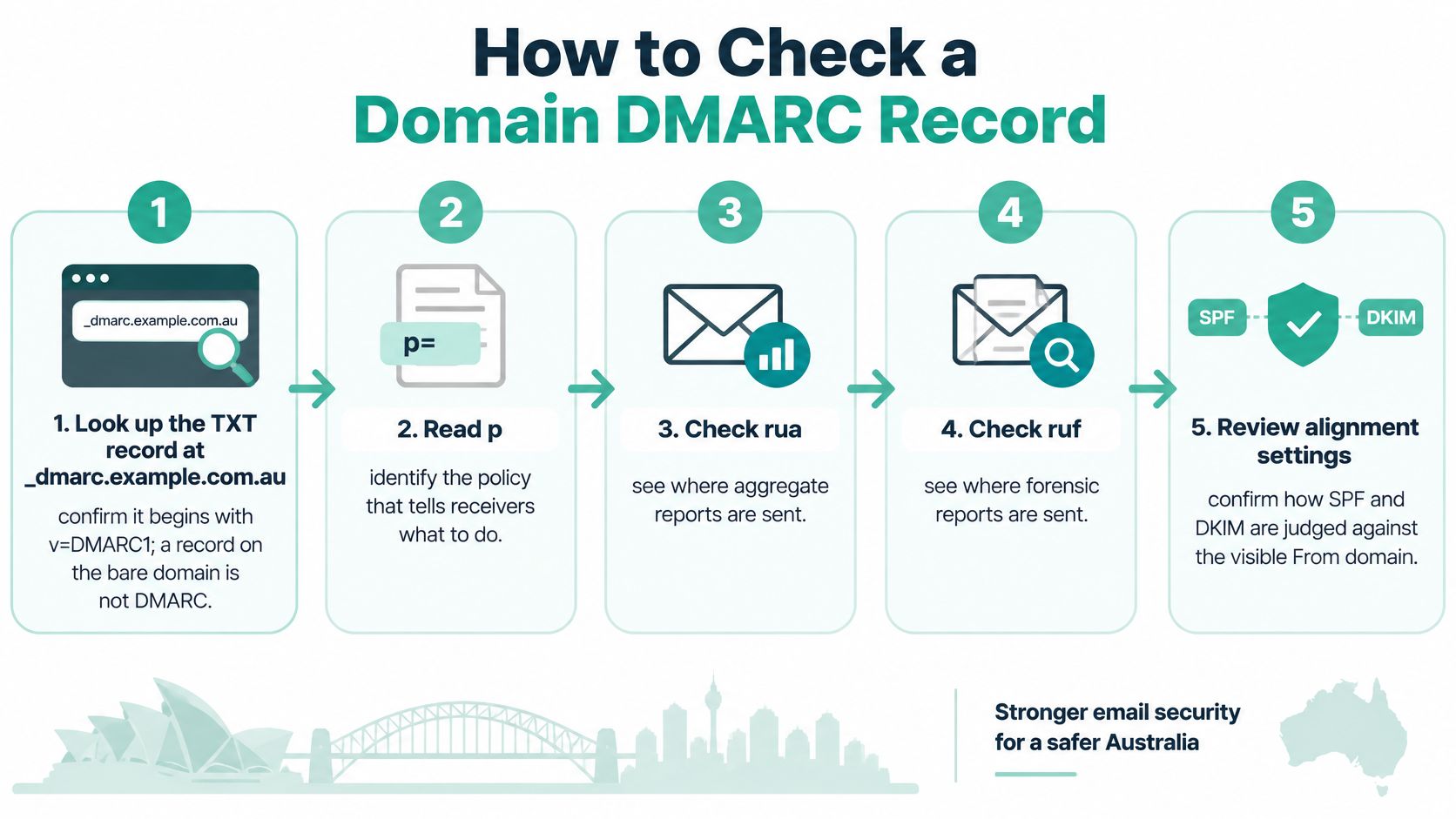
The ACSC guide to combating fake emails identifies three separate record locations: SPF at the domain name, DKIM at the selector location, and DMARC at its own prefixed name. It also notes that receiving servers must honour those protocols for the protection to work. Understanding what an email domain includes helps owners keep those locations straight.
Seven steps in working order
- Query the DMARC name first: Confirm a TXT record exists at the DMARC location and begins with the DMARC version tag. A similar record on the bare domain isn't DMARC.
- Decode every tag: Read policy, subdomain policy, percentage, report addresses and alignment modes. Confirm reports go to a mailbox someone regularly opens.
- Write the sender inventory: List Microsoft 365 or Google Workspace, Xero or MYOB, the newsletter platform, website forms, booking tools, CRM mail and payment notices before changing anything.
- Check SPF at the apex: There should be one SPF record only. Count included lookups carefully, remove services no longer used, and close domains that send no mail.
- Check DKIM from a real message: Open a delivered email, find its selector in the headers, and confirm the matching public key exists. A guessed selector proves nothing.
- Repeat on active subdomains: Check the shop, bookings or marketing subdomain separately. Subdomain policy can leave it weaker than the parent.
- Monitor before enforcing: Stay on monitoring for at least a fortnight and read aggregate reports. That window exposes monthly invoicing runs and occasional newsletters.
Don't change the policy on the same day the first clean report arrives. Wait for the slow, infrequent senders to appear.
The success test is strict but fair. Every known legitimate stream passes aligned SPF or aligned DKIM before reject is set. Anything unexplained keeps the domain in monitoring.
Turning Raw DMARC Reports Into Readable Results With Suped
Aggregate reports arrive as XML. They're accurate, repetitive and hard to act on at a glance, which is why many owners collect them and never read them. Suped addresses that gap by turning report data into readable analysis of sending sources, authentication results, compliance trends and recommended fixes.
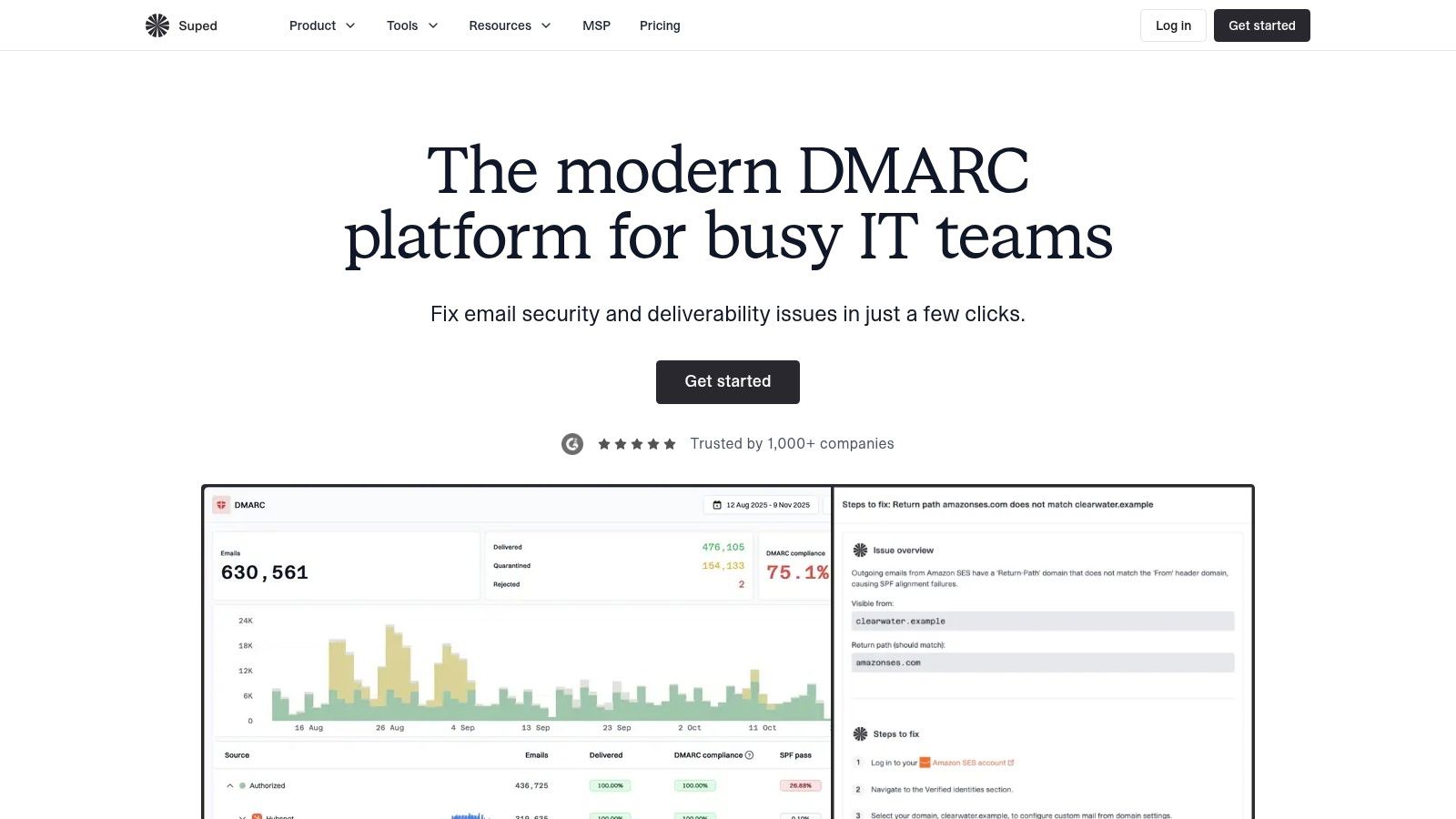
For a single .com.au domain, the practical value is triage. Senders get categorised, failures become visible by source, and new or declining streams can trigger email or webhook alerts instead of sitting unnoticed in a reports mailbox. Starting with the free dmarc checker gives an owner a record-level view before committing to ongoing monitoring.
Where hosted management helps
Suped also offers hosted DMARC, SPF, DKIM and MTA-STS management. SPF flattening is the standout for businesses stacking includes from Microsoft 365, accounting software, a CRM and a newsletter tool, because it reduces the manual work around lookup limits. Central policy changes are also safer than editing several records from memory.
Deliverability, blocklist, reputation and lookalike-domain monitoring sit alongside authentication. That matters because a domain can pass DMARC while its sending reputation deteriorates, or while a similar-looking domain appears. BIMI setup and hosting are available for organisations that later want a verified logo in supporting inboxes.
The fit is strongest for owners with several senders, agencies handling client domains, and managed service providers using the multi-tenant dashboard. A free plan covers one domain with limited volume and retention, while paid, enterprise and MSP options expand capacity, support, reporting and access controls. A business with one mailbox and no third-party senders may not need that depth. One sorting weekly XML by hand probably does.
How SPF and DKIM Decide the DMARC Result
Take one invoice. The visible From domain belongs to the business, the sending host is authorised by SPF, and the SPF domain aligns. DMARC can pass through that path even if DKIM is absent.
Now forward that invoice through a client's gateway. SPF often breaks because the forwarding server isn't the original sender. If the DKIM signature survives unchanged and its signing domain aligns with the visible From domain, DMARC still passes.
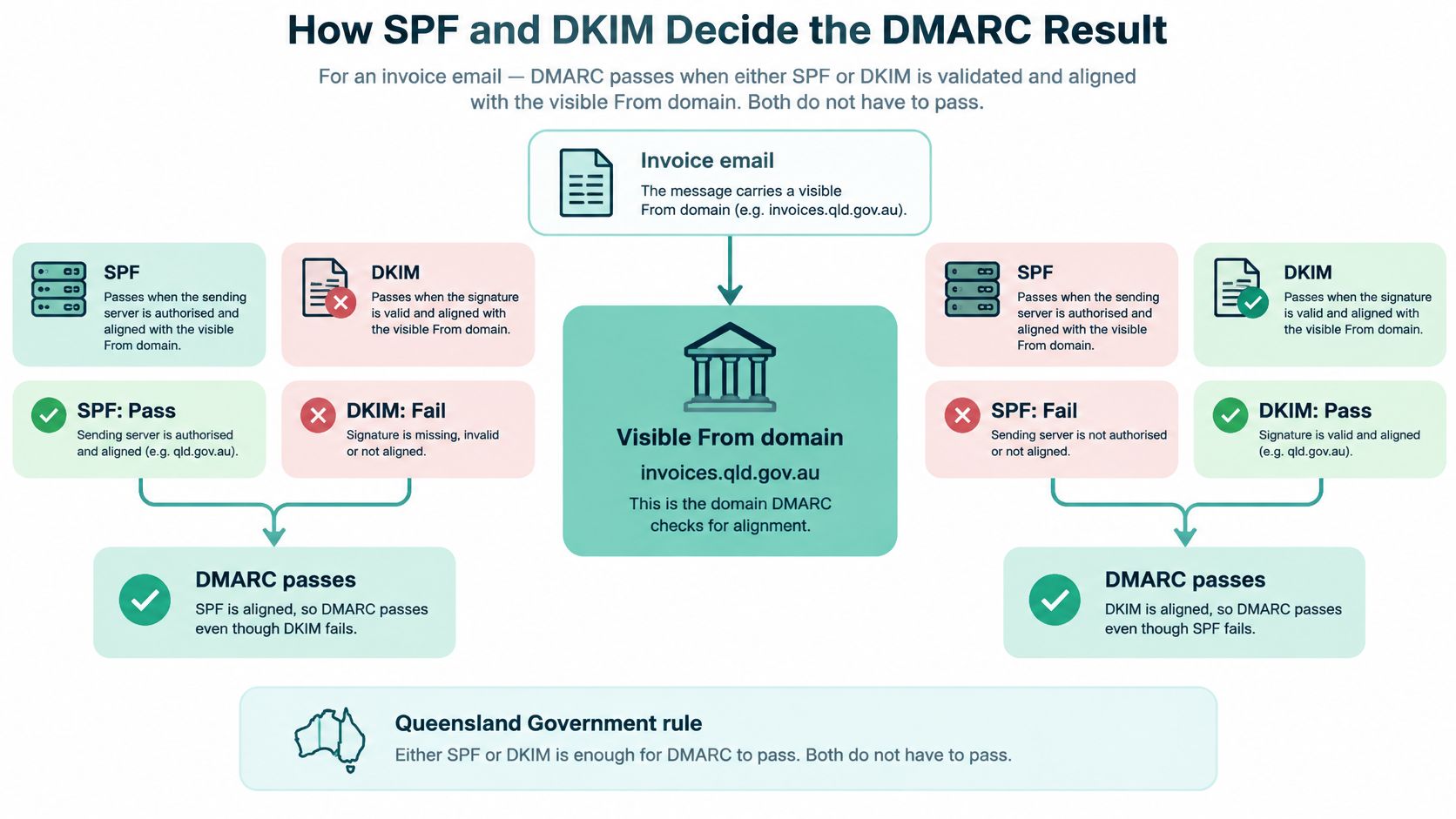
That either-path outcome is the core rule in the Queensland Government email domain security guideline, which states that DMARC passes when either SPF or DKIM is validated and aligned with the visible sender domain. Both don't have to pass. Using an SPF record check alongside header results keeps the two paths separate.
Read four results, not one colour
- SPF authentication: Did the sending host have permission.
- DKIM authentication: Did the signature validate.
- Alignment: Did the authenticated domain match the visible From domain under the chosen mode.
- Final DMARC result: Did at least one aligned path succeed.
A checker that turns the whole test red because SPF failed can push an owner to dismantle a working DKIM setup. Relaxed alignment allows a subdomain to match the organisational domain. Strict alignment doesn't, which is why the same forwarding example can pass under one setting and fail under another.
| Result | What it means | Action |
|---|---|---|
| Aligned pass | SPF or DKIM validates and aligns with the From domain | Count the stream as protected |
| Alignment fail | Authentication passes on a domain that does not match the From domain | Fix the signing domain or alignment mode before enforcing |
| Unauthorised sender | No aligned SPF or DKIM from a source the business controls | Investigate, then candidate for quarantine or reject |
| Visible but not protected | Record at p=none or rua missing | Keep monitoring; do not treat as protection |
DMARC only steers receivers that honour it, for the visible organisational domain. It doesn't secure a compromised mailbox or stop a lookalike domain.
Register your new domain name at competitive market prices including free domain add-ons like privacy, DNS Hosting, Custom Nameservers and Forwarding.
Always the best price and no nasty renewal price hikes.
Register A Domain Name
Read Aggregate Reports to Sort Senders
Open each aggregate report and note the reporting organisation, date range and From domain first. Then work through each sending source and record its SPF result, DKIM result and the disposition the receiver applied.
Match every source to a known service. Microsoft 365, Google Workspace, Xero or MYOB, the CRM, the newsletter platform, the website host and booking tools should each have a named owner inside the business.
Three buckets are enough
- Aligned pass: Keep the source on the protected inventory.
- Alignment fail: Authentication exists, but the domain relationship is wrong. Fix signing or alignment before enforcing.
- Unknown source: Investigate before any policy change. Unknown invoice or payment mail deserves priority because it may be spoofing.
One common row causes needless panic. A legitimate service signs with a subdomain while the visible From uses the parent domain. Under relaxed DKIM alignment that can pass. Under strict alignment it's an alignment fail to repair in the signing setup, not evidence of an attack.
Keep the sorted rows. They become the sender inventory that decides whether enforcement is safe.
Fixes for the Failures Australian Mail Hits Most
Treating SPF as the whole solution causes more trouble than a missing record. SPF authorises sending hosts, but forwarding can break it for legitimate mail. DKIM can preserve the result only when the signature remains valid and aligned.
The Australian Government gateway security standard consultation paper supports publishing SPF for managed domains and subdomains, using a hard-fail record where no mail is sent, publishing DKIM, keeping SPF authorisation to necessary hosts only, and moving to quarantine or reject for enforcement. For cPanel users, the guide to implementing SPF, DKIM and DMARC in cPanel covers the record changes directly.
| What the checker shows | Likely cause | Fix |
|---|---|---|
| No TXT at _dmarc.domain | Record missing or published on the wrong host | Publish a record starting with v=DMARC1 at _dmarc |
| Valid record with p=none | Monitoring only | Keep it until every legitimate sender passes, then raise policy |
| SPF permerror | Duplicate SPF TXT records or more than 10 DNS lookups | Keep one SPF record and remove unused includes |
| DKIM fail | Wrong selector or an expired key | Query selector._domainkey and match the live provider key |
| SPF fail, DMARC pass | Forwarding broke SPF while DKIM stayed aligned | Keep the aligned DKIM signature; do not treat SPF as the only path |
| Website form or newsletter fails | Sender missing from SPF and unsigned | Authorise that host or sign with a key aligned to the From domain |
| rua reports never arrive | Mailbox missing or external destination not authorised | Create the mailbox and authorise the report receiver |
Use the report buckets to choose the row. An alignment fail needs a signing fix, while an unauthorised sender needs investigation. Applying both fixes to every failure wastes time and can break working mail.
The bar stays clear. 100% of known legitimate mail streams passing aligned SPF or DKIM before reject is set, with unexplained failures left in monitoring.
Experience Microsoft 365 Business Standard for free for 30 days.
Up to 25 users with full access to email, OneDrive and Teams. Includes full versions of desktop apps of Outlook, Word, Excel, PowerPoint and more.
Try Microsoft 365
Raise Enforcement Only After Every Sender Passes
Enforcement works as a ladder, not a switch.
- Stay on p=none: Remain in monitoring while any known sender shows an unexplained failure.
- Move to p=quarantine: Step up once the inventory is complete and every stream passes an aligned path.
- Move to p=reject: Reject only after the last fortnight of reports shows no unexplained legitimate mail.
The staged progression in guidance from the WA Cyber Security Unit frames DMARC as protection against spoofing, phishing and business email compromise. Owners editing cPanel can follow the steps for adding a DMARC record using cPanel for the DNS change itself.
Keep three pieces of evidence before each step. The sender list with owner and purpose, one passing header per service, and proof that the report address receives mail. Jumping straight to reject can drop the accounting platform, website form or newsletter that never made the inventory.
UpTime Web Hosting customers don't have to edit the zone alone. Hosting Configuration support covers email tasks and domain and DNS changes, and outbound email includes SPF, DMARC and DKIM through its delivery setup.
Run a DMARC Checker on the main .com.au domain this week, write down the policy instead of the colour, and list every service that sends as that domain. If the result is p=none, keep monitoring, fix the failing senders, and contact UpTime Web Hosting for help with the DNS change before raising enforcement.