Unlimited bandwidth removes a monthly data-transfer quota, but CPU, memory, disk I/O, PHP workers and file counts still limit a WordPress site. The popular advice is to pick the plan with the biggest unlimited claim and stop asking questions. That's backwards. Your job isn't to find a host with no limits, because there isn't one. It's to find which limit your site hits first, then choose a plan where that limit sits safely above your busiest day.
Table of Contents
- What Unlimited Bandwidth Actually Covers
- How Much Transfer Your WordPress Site Really Uses
- Fair-Use Rules and When Hosts Step In
- How CPU, Memory and Disk I/O Set Your Speed
- How to Stress-Test Your Site Before a Traffic Spike
- Caching and CDNs That Protect Your Resource Limits
- Choose a Plan Only After Checking Host Claims

Performance you can feel, backed by clients who depend on it. Read how our support and uptime create long‑term customer success.Power Your Business with Better Hosting
What Unlimited Bandwidth Actually Covers
Unlimited bandwidth means there's no fixed monthly cap on the bytes your server sends to visitors. It doesn't mean the server can generate pages infinitely fast, hold unlimited files, or serve unlimited people at once. Those jobs belong to separate resources, and each one has its own ceiling.
Think of a restaurant that never runs out of bread. It can still have a kitchen that serves only a few tables at once, so diners wait even though the bread basket is endless. WordPress hosting with unlimited bandwidth works the same way. Transfer can be uncapped while the kitchen, your CPU and PHP workers, falls behind.
Why uncapped transfer still matters in Australia
The scale of local demand is real. The ACCC internet activity report counted 14.4 million terabytes downloaded across Australian retail broadband and mobile services from 1 October to 31 December 2024, a 1.8% increase on the preceding comparable period. If you publish image galleries, video, downloads, or a product catalogue, removing a hard transfer cap removes one billing and suspension risk. It says nothing about page speed.
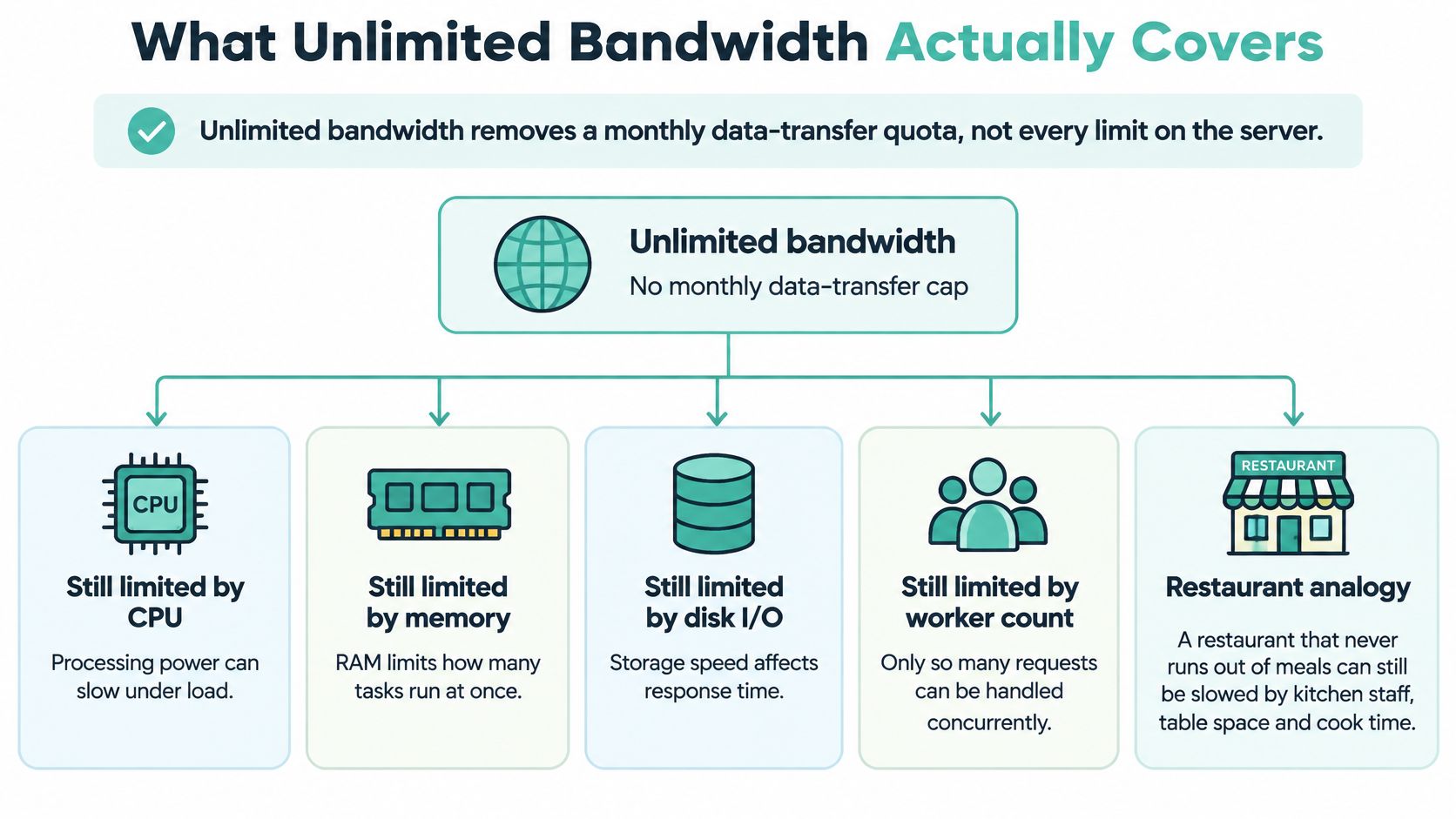
| Resource | What It Controls | Covered by Unlimited Bandwidth? | What to Check With Your Host |
|---|---|---|---|
| Data transfer | Bytes sent from server to visitors | Yes, on most plans | Confirm the fair-use wording |
| CPU | Processing for PHP, plugins and database queries | No, usually limited | Look for a vCPU or CPU percentage figure |
| Memory (RAM) | Space for PHP processes and page generation | No | Check the per-account or per-site memory limit |
| Disk I/O | Read and write speed for files and the database | No | Ask for throughput in MB/s or IOPS |
| PHP workers | Number of PHP requests processed at once | No | Ask how many workers run simultaneously |
| Inodes and files | Count of files and folders, including media libraries and cache files | Often capped | Check the file limit before uploading large media libraries |
| Database connections | Number of simultaneous database queries | No | Ask about the maximum connections per site |
Say a 40-page brochure site and a 400-product WooCommerce store sit on the same unlimited plan. The brochure site serves mostly cached pages and rarely strains anything. During a sale, the store runs stock checks, cart updates, and checkout queries that can't be cached, so it hits CPU and PHP worker limits while its transfer total stays modest. Same headline, opposite outcomes.
Practical rule: Treat unlimited transfer as one row in the table, not the whole table. The other rows decide whether your site stays fast under load.
How Much Transfer Your WordPress Site Really Uses
A site's monthly transfer is usually straightforward to estimate: multiply average page weight by page views per visit, then by monthly visits. Page weight includes the HTML, images, CSS and JavaScript loaded for each visit. Measure several real pages in your browser's developer tools; the homepage alone may not represent product pages or other image-heavy content.
For example, a 3 MB page served to 100,000 monthly visits transfers roughly 300 GB. That illustrative calculation excludes separately loaded images, bots, retries, feeds and administrative traffic. Use the table to estimate ordinary page loads, then account for what your site serves beyond them.
| Average page weight | 10,000 visits | 50,000 visits | 100,000 visits |
|---|---|---|---|
| 1 MB | 10 GB | 50 GB | 100 GB |
| 2 MB | 20 GB | 100 GB | 200 GB |
| 3 MB | 30 GB | 150 GB | 300 GB |
| 5 MB | 50 GB | 250 GB | 500 GB |
What pushes real usage above the table
- Uncompressed images: A full-width photo uploaded straight from a phone can outweigh a page's HTML, CSS and scripts combined.
- Video and downloads: Self-hosted video, PDFs and software files transfer with every request, adding far more than ordinary page views.
- Image-heavy product pages: Galleries, zoom images and related-product thumbnails increase the number of assets loaded during a visit.
- Automated traffic: Search crawlers, uptime monitors, backup plugins and scrapers can all request pages without generating a sale.
Estimate your peak month as well as a typical one. Promotions and seasonal demand can lift visits and transfer well above normal levels. Compare both estimates and use the difference to judge how much headroom you need.
Host your website with our 5-star rated, cPanel website hosting plans.
Super fast servers, with security included and hosted in your choice of Australian Data Center.
View cPanel Plans
Fair-Use Rules and When Hosts Step In
“Unlimited bandwidth” does not mean every kind of hosting activity is unlimited. Fair-use rules set the conditions for using shared resources, so read the acceptable use policy before choosing a plan. The practical question is which limit your site is most likely to hit first: transfer, CPU, memory, disk I/O, or a restriction on particular activity.
Hosts may review sustained high resource use, traffic beyond what a plan is designed to handle, mass email sending, large file libraries, streaming media, or heavy automated requests. These can strain a server even when total data transfer is modest. Check how the policy defines acceptable use and what happens if your site approaches those limits.
The usual enforcement ladder
A host may start with a warning or support ticket, then limit CPU or processes, ask you to optimise or upgrade, and review the account. Serious or repeated breaches, including abuse complaints, can lead to suspension. Before signing up, check what notice you will receive and what steps you can take before service is interrupted.
Three kinds of abnormal traffic
First identify the source. Genuine demand from a successful campaign calls for caching or more server resources. Scrapers or a misconfigured tool may call for rate limiting and firewall rules. A denial-of-service attack is a security incident; unlimited transfer does not prevent it from overwhelming server resources.
Ask what protection the plan includes, such as DDoS mitigation, web application firewall rules, malware scanning, rate limiting, backups, and tested restores. The Australian Institute of Criminology's cybercrime report found that nearly half of surveyed Australians had experienced some form of cybercrime in the preceding year. For a site owner, the practical test is whether you can detect an incident and restore the site, not just whether data transfer is unlimited.
How CPU, Memory and Disk I/O Set Your Speed
Every uncached visit follows the same chain. The browser asks for a page, the server assigns a PHP worker, the worker runs WordPress core, your theme and plugins, queries the database, and returns HTML. Each concurrent visitor needs a worker and a slice of CPU time for the duration of that work.
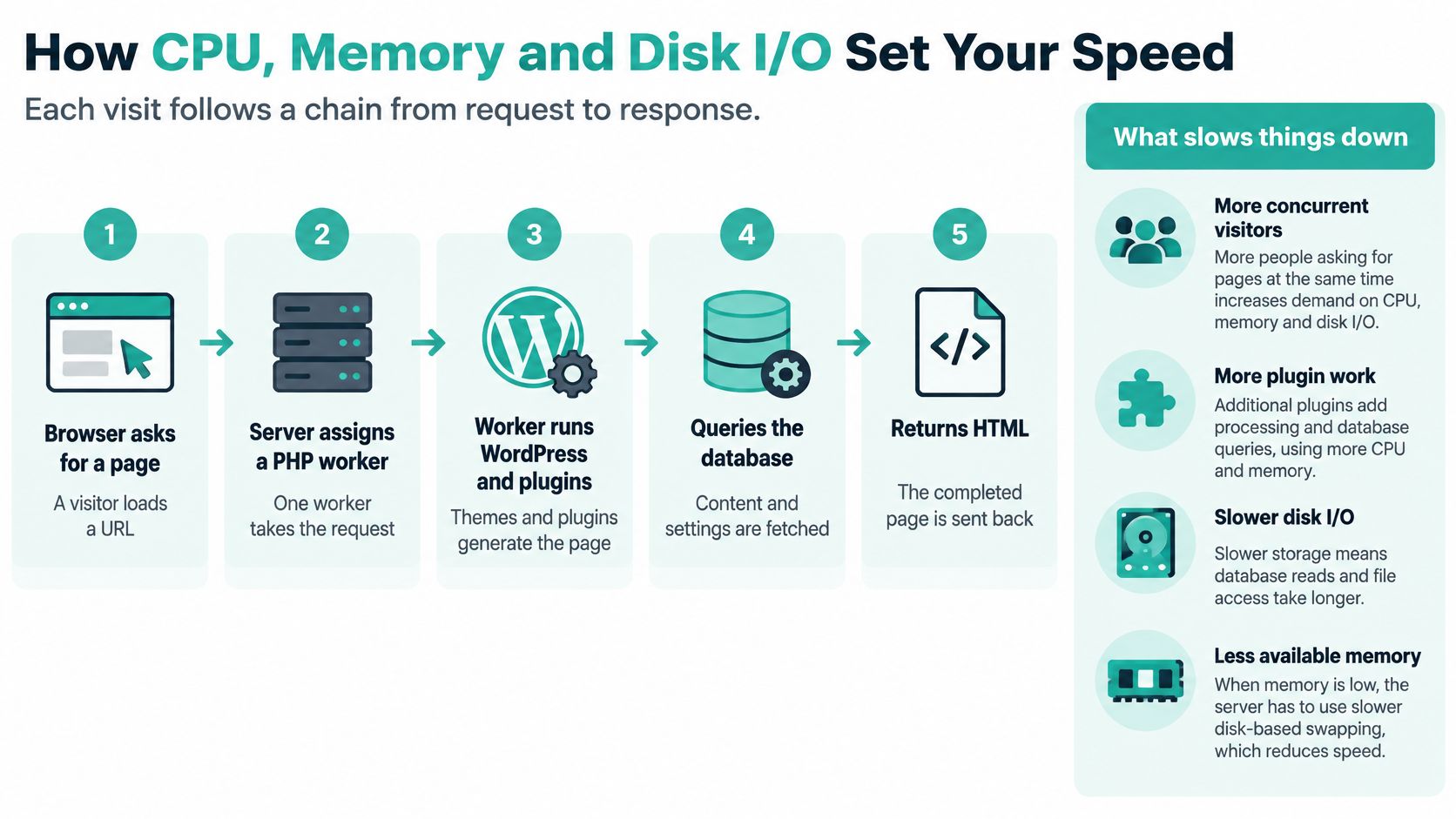
When all workers are busy, new requests don't fail immediately. They queue. That queue shows up as a slower time to first byte (TTFB), which is the wait before the browser receives anything at all. Memory limits how many processes can run comfortably at once, and slow disk I/O stretches every file read and database write inside each request. A heavy plugin, say a page builder running complex queries on every load, holds its worker longer and makes the queue worse for everyone behind it.
Test at the time Australians are actually online
Timing matters. The ACCC broadband performance data explainer notes that the ACCC measures broadband performance during the 7 to 11 pm busy period because congestion is most likely to affect customers then. Your visitors' connections and your host's shared environment are both busiest in those same evening hours. A benchmark taken at 10 am on a Tuesday tells you almost nothing about a 9 pm campaign launch.
A traffic surge increases concurrent origin requests, workers saturate, requests queue, responses slow, and visitors leave. Transfer allowance never enters that chain.
Record your numbers from Australian test locations, in both daytime and evening windows. As a working benchmark, I would want uncached TTFB under 800 ms, with cached pages responding much faster, and I'd treat anything consistently worse as a capacity or code problem to investigate. Check your plan's published figures against the WordPress hosting requirements so you know whether slow results point to the plan, the site, or both. Geography helps at the margins too. Infrastructure close to your visitors reduces round-trip latency on every request, which no transfer allowance can fix after the fact.
How to Stress-Test Your Site Before a Traffic Spike
Don't guess your breaking point during a live campaign. The baseline is already sobering: independent Australian small-business website research found 66.4% of small-business sites took more than one second to return the first byte, with a median response time of 1.5 seconds and 28.2% taking more than three seconds. Many sites are near their limit on an ordinary day.

The six-step test
- Record your baseline: Measure TTFB off-peak and during the evening peak from a Sydney or Melbourne test point, following a consistent method such as the one in this guide to testing website performance.
- Write down your plan limits: Note CPU, memory, PHP worker count, and any monthly visitor figure, so you can match symptoms to ceilings.
- Ramp the load: Use a load-testing tool to build simultaneous visitors to twice, then five times, your expected peak over about ten minutes.
- Watch the right metrics: Track PHP worker saturation, memory use, database connections, TTFB, cache-hit ratio, PHP response time, database query time, and error rates during the ramp.
- Toggle caching: Repeat with full-page caching off and on, so you can see exactly how much origin load caching removes.
- Decide from evidence: If origin load collapses once caching is on, fix caching first. If CPU or memory saturates, upgrade resources. If requests queue while CPU looks idle, ask about worker limits.
Run the test on a staging copy that mirrors your live plugins, theme, and content volume. A clean staging site with three dummy posts will sail through a load test that your real store, with its filters, search, and checkout plugins, would fail in the first minute. The point isn't a flattering score. It's knowing, before the email campaign goes out, whether your bottleneck is workers, memory, or database contention, because each one has a different fix and a different price.
Register your new domain name at competitive market prices including free domain add-ons like privacy, DNS Hosting, Custom Nameservers and Forwarding.
Always the best price and no nasty renewal price hikes.
Register A Domain Name
Caching and CDNs That Protect Your Resource Limits
The cheapest capacity is the request that never reaches PHP at all. Order your defences by how much origin load each one removes, and you'll stretch every limit on your plan without paying for a bigger one.
Start with full-page caching
Full-page caching stores finished HTML and serves it to anonymous visitors without running WordPress, plugins, or database queries. For a content-led site, that removes most worker and database load in one move. Exclude dynamic areas, including carts, checkout, logged-in pages, and forms that must process per visitor. Whether this is built into your plan or needs a plugin depends on the plan, so confirm it rather than assuming.
Object caching comes next for busy or dynamic sites. Tools such as Redis or Memcached, where your plan supports them, store the results of repeated database queries in memory, which helps stores and membership sites where full-page caching can't cover logged-in traffic. Then set browser caching headers so returning visitors reuse CSS, JavaScript, and images from their own device instead of downloading them again.
Fix images, then add a CDN
Images are usually the heaviest part of an Australian small-business site. Convert photos to WebP or AVIF, resize them to their actual display dimensions before upload, and lazy-load anything below the fold. That cuts transfer and load time together, and it shrinks the media library pushing against your file limits.
A CDN then serves static assets from edge locations and absorbs sudden demand before it reaches your origin. Setup details, including connecting a service such as Cloudflare, are covered in this guide to speeding up WordPress with Cloudflare. Check how much CDN traffic is included and what's billed beyond it, because premium CDN usage is often metered separately from standard website traffic even when the hosting itself is uncapped.
Finally, add bot controls. Rate-limit login and search pages, and block obvious scraper behaviour, so automated traffic doesn't consume workers your customers need. After each change, rerun your stress test. Caching changes the numbers, and a fix you haven't retested is a hope, not a result.
Choose a Plan Only After Checking Host Claims
Here's the verdict I'd give any Australian owner. A plan suits you when its CPU, memory, worker, and fair-use figures match the peak load from your stress test, not when its headline says unlimited. Headline claims are marketing. The numbers underneath them are your actual ceiling.
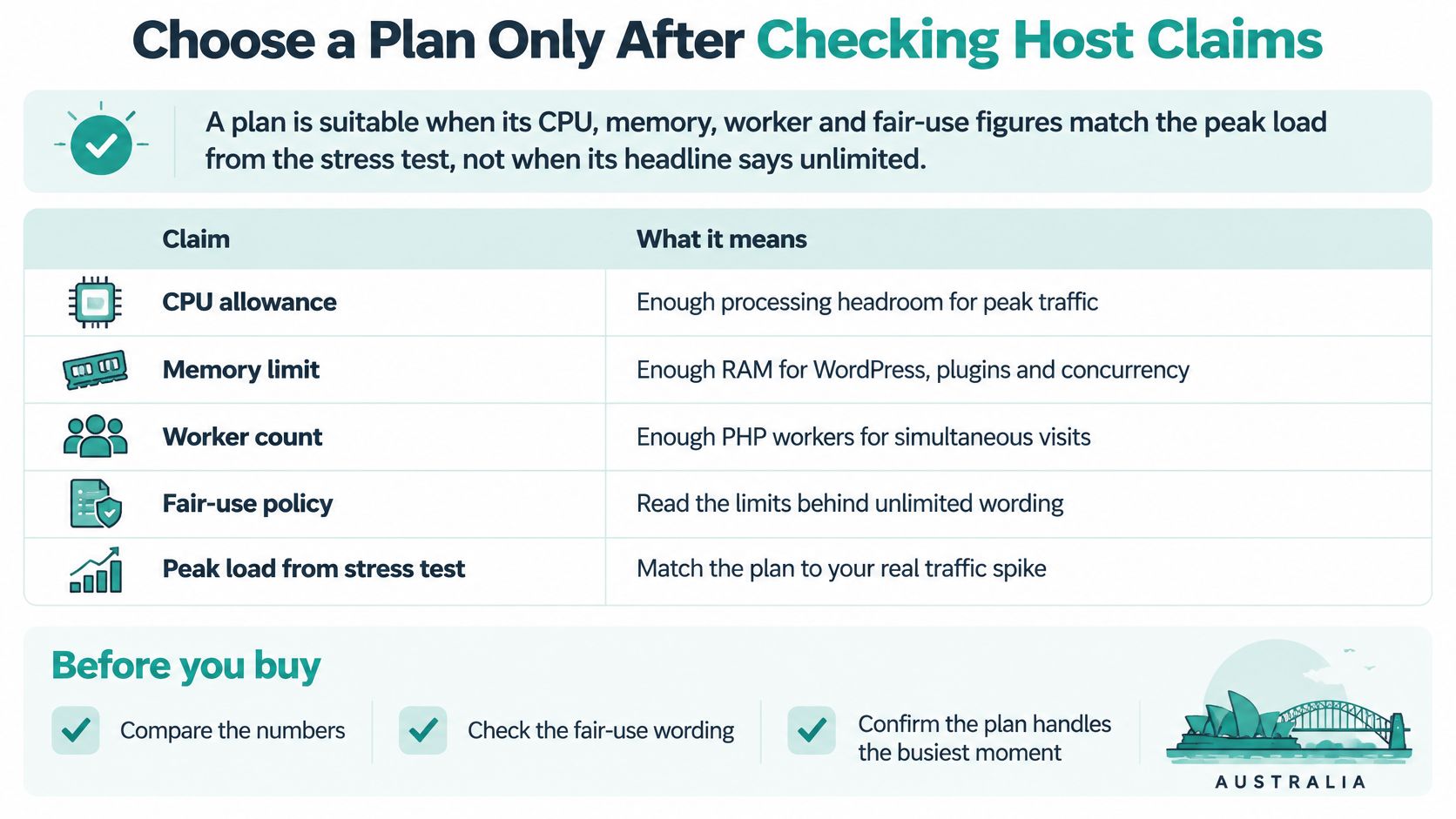
| Claim | Question to Ask | Red Flag |
|---|---|---|
| Unlimited bandwidth | Is there a fair-use clause, and what triggers a review? | Fair-use terms are hidden or undefined |
| Unlimited visitors | What monthly visitor figure applies to this plan? | No visitor figure is given at all |
| Unlimited storage | Are inode or file-count limits stated? | Large media libraries are blocked without warning |
| Fast servers | What CPU, RAM and PHP worker limits apply? | Only the word 'powerful' appears, with no numbers |
| Built-in caching | Is full-page caching on by default, and for which sites? | Caching is sold as an add-on with no explanation |
| Free CDN | How much CDN traffic is included, and what is billed beyond it? | An unlimited CDN claim with no usage terms |
| Scaling on demand | What happens when a site exceeds its limits? | Suspension without notice |
Match the plan to the site, then verify
A light brochure site mainly needs clear fair-use terms and working caching. A publishing site or store with real peaks needs published CPU, memory, and worker headroom. As a concrete reference point for what published figures look like, our WordPress + WooCommerce plan for small online stores includes 400% vCPU with 4GB RAM, 30GB NVMe storage, unlimited data transfer, and a limit of 45,000 monthly visitors. Standard website traffic is unlimited under a fair-use policy, optional premium CDN traffic is usage-based with 1GB per month included, and every Australian WordPress Hosting on cPanel plan includes the built-in LiteSpeed server cache.
Use the support material as your verification checklist: the fair-use terms for what unlimited permits, the resource-limit pages for CPU, memory, and visitor figures, and the CDN billing notes for what's included and what's metered. Cross-check any shortlist against an Australian web hosting comparison so you're comparing like with like. Then shortlist two plans, read the fair-use wording in full, get unpublished figures confirmed in writing, and run your stress test on a trial or staging site before you commit. If a host won't state a number, treat that silence as the answer.
If you'd rather not decode fair-use clauses alone, talk to us at UpTime Web Hosting about Australian WordPress hosting with unlimited data transfer, published CPU and memory figures, and built-in LiteSpeed caching. Bring your peak-month traffic estimate and your stress-test results, and we'll help you match a plan to the limit your site hits first.