In short
A WordPress speed optimisation service should find and fix the actual bottlenecks across hosting, caching, database queries, images, themes, plugins and front-end code. Hire one when a plugin has not produced stable gains, Core Web Vitals remain poor, the site slows under traffic, or changes require server access and careful testing.
Key takeaways
- A speed plugin can handle useful settings, but it cannot add hosting capacity, tune the server or repair inefficient custom code.
- A professional engagement should record a baseline, protect the site, diagnose the bottleneck, apply controlled changes and prove the result.
- Good Core Web Vitals currently mean LCP of 2.5 seconds or less, INP of 200 milliseconds or less and CLS of 0.1 or less at the 75th percentile. Google’s Core Web Vitals guidance explains the current targets. (developers.google.com)
- A PageSpeed score is a diagnostic clue, not a complete acceptance test, because controlled lab results and real-user field data measure different conditions.
- Safe optimisation includes backups, rollback planning and tests for forms, logins, search, analytics and checkout functions.
Table of contents
- When is a plugin not enough?
- What does a professional WordPress speed service actually do?
- What can make WordPress slow?
- How do hosting, caching and code work together?
- What should improve after optimisation?
- How can you tell if the work is safe and effective?
- How do you choose a WordPress speed optimisation service?
- How much should you expect the service to change?
- What do site owners ask about WordPress speed services?
- What should you do next?
The useful buying question is not whether a provider can install a cache plugin. It is whether the provider can identify why representative pages are slow, make the required changes without damaging business functions and show evidence that the improvement lasts outside one favourable test.
When is a plugin not enough?
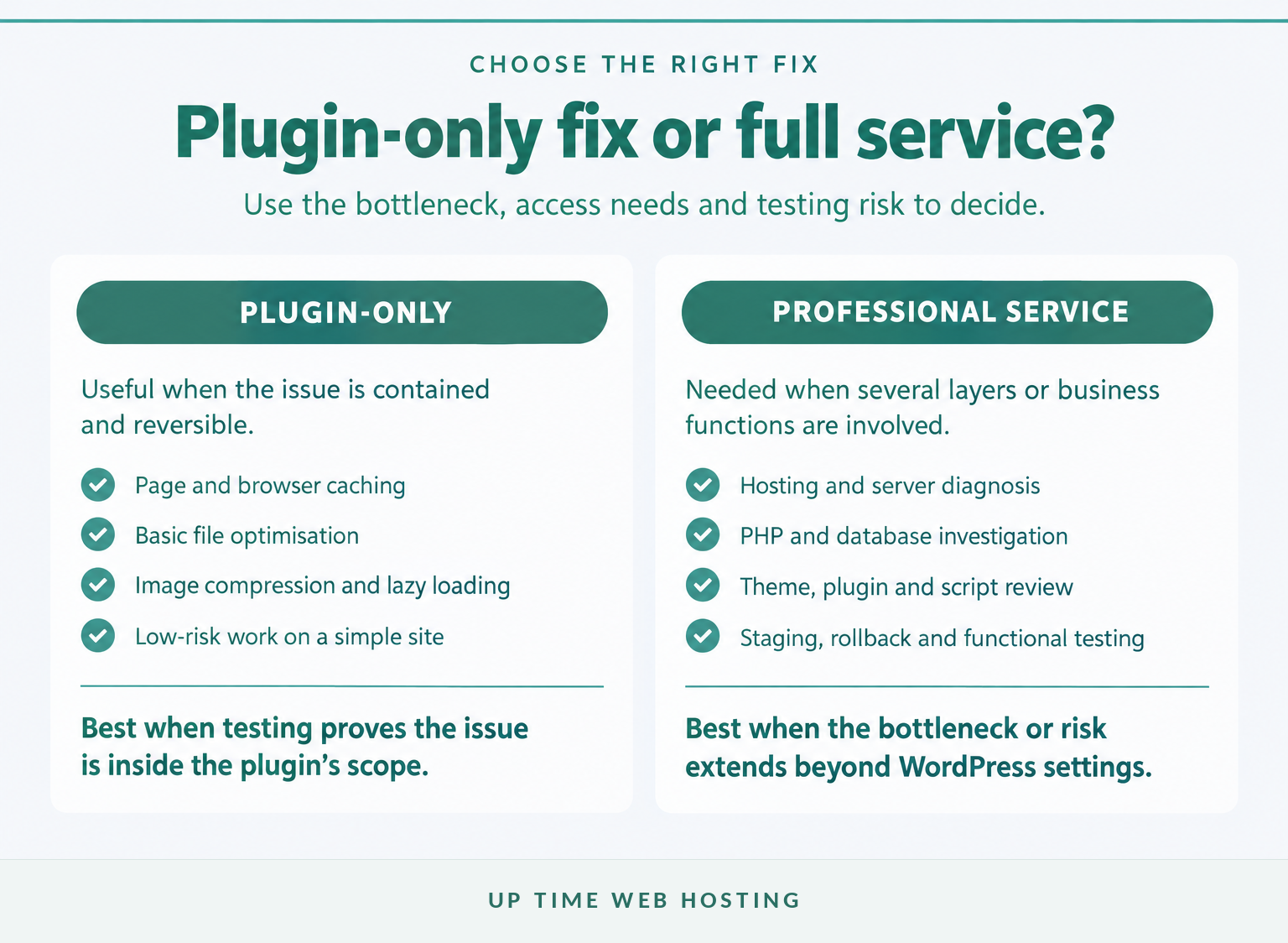
Use more than a plugin when the site stays slow after sensible caching and image work, or when the problem appears in hosting, PHP, the database, a theme, another plugin, third-party scripts or traffic handling. A plugin can change WordPress settings; it cannot add server capacity, inspect every slow query or guarantee that a complex checkout still works after aggressive optimisation.
Strong signs that plugin-only work has reached its limit include:
- The public page is fast after a repeat visit, but the first uncached request remains slow.
- WordPress administration, logged-in pages or account areas feel sluggish because page caching does not cover them.
- Product, cart or checkout pages cannot use the same cache rules as static marketing pages.
- Performance falls sharply during traffic spikes or resource limits appear in the hosting control panel.
- Buttons, menus or filters hesitate because the browser is processing too much JavaScript.
- Each new plugin update, campaign tag or design change causes the speed problem to return.
The official WordPress optimisation handbook lists the hosting environment, hardware, server load, WordPress configuration, software versions, images, themes, plugins, caching and database behaviour among the factors that affect performance. That range is why installing one more plugin cannot be a complete diagnosis. (developer.wordpress.org)
Caching still matters. A well-configured page cache can prevent WordPress from rebuilding the same public page for every visit, while browser caching can reduce repeat downloads. The limitation is scope: caching cannot remove an inefficient query, shorten a distant network route, provide missing memory or make unnecessary browser scripts disappear.
A plugin is not enough when the bottleneck sits outside the plugin’s control or the fix cannot be tested safely with one switch.

Performance you can feel, backed by clients who depend on it. Read how our support and uptime create long‑term customer success.Power Your Business with Better Hosting
What does a professional WordPress speed service actually do?
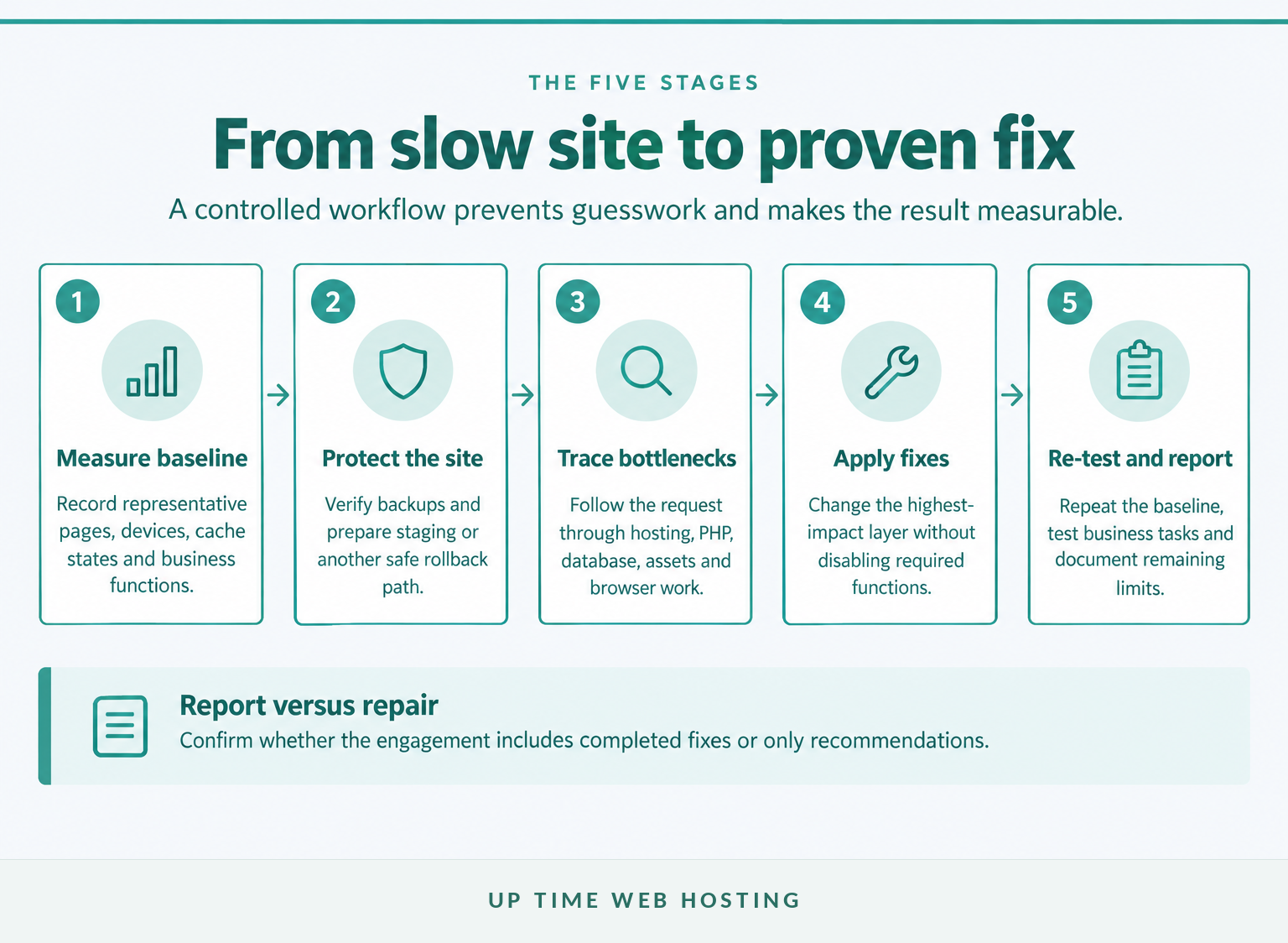
A professional service should begin with evidence rather than a standard bundle of settings. The work should move through five stages: measure, protect, diagnose, fix and validate.
What should the baseline contain?
The baseline should cover more than the homepage. A useful sample normally includes the homepage, a standard content page, the main lead or sales page, an archive or search view and any important WooCommerce or logged-in journey.
For each page, the provider should record:
- mobile and desktop conditions;
- the test location and date;
- cold and warm cache behaviour;
- LCP, INP and CLS where data is available;
- server response, waterfall and browser work that explain the result; and
- the condition of forms, menus, search, login and checkout before changes begin.
The PageSpeed Insights documentation separates controlled lab data from real-user field data. Lab data helps reproduce and debug a problem, while field data reports how users experienced the page during the previous 28-day period when sufficient data exists. A provider should not substitute one for the other. (developers.google.com)
Which changes belong in scope?
The diagnosis should determine the order. Common work may include:
- Correcting cache rules and exclusions.
- Addressing hosting resource limits, PHP configuration or server caching.
- Reducing slow database work and unnecessary scheduled processes.
- Resizing, compressing and correctly loading images and fonts.
- Removing, replacing or conditionally loading expensive theme, plugin and third-party assets.
Before approval, the scope should state whether the engagement includes the fixes or only an audit report. It should also identify tasks that need a developer, a hosting change, a paid licence or a design decision from the site owner.
A credible final report records the original conditions, changes completed, before-and-after results, remaining constraints and any settings that future maintainers must preserve. Without that record, the next update can quietly reverse the work.
A professional service should measure, protect, diagnose, fix and prove the result under repeatable conditions.
What can make WordPress slow?
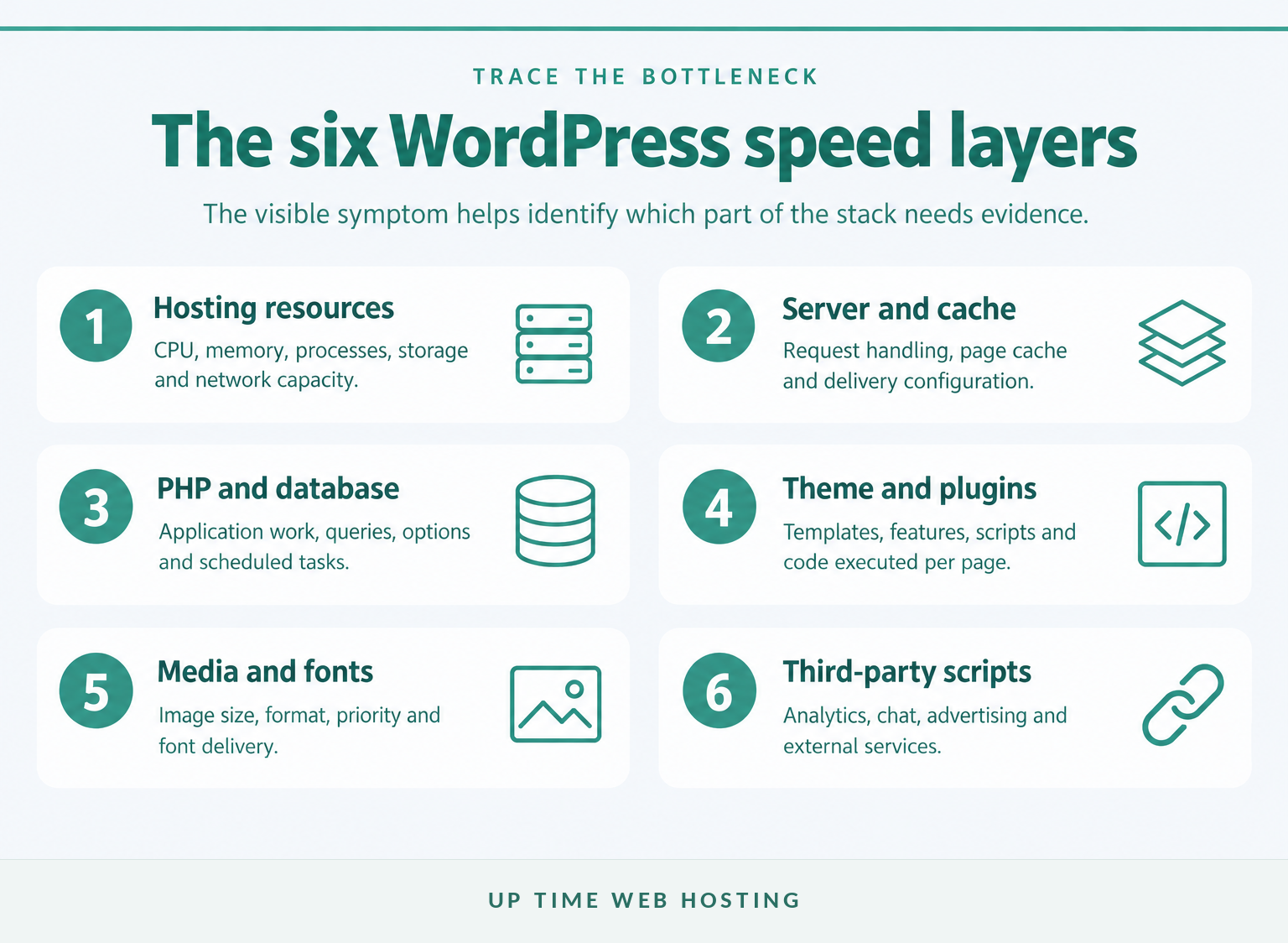
WordPress can be slow at the server, application, database, asset or browser layer, and several layers may fail at once. The visible symptom is useful because it tells the provider where to investigate first.
WordPress documentation identifies hosting, hardware, server load, themes, plugins, images, caching and database work as connected performance factors. Professional WordPress performance optimisation should therefore diagnose the whole request path rather than treat every problem as an image-compression task. (developer.wordpress.org)
Common symptoms point towards different layers:
- A long blank wait before content starts: investigate the origin server, page cache, PHP work, external calls and database queries.
- The page appears, but the main image or heading arrives late: inspect the LCP resource, its size, discovery priority, CSS and font dependencies.
- Buttons or menus hesitate after a click: inspect long JavaScript tasks, event handlers and browser rendering work.
- Content jumps while loading: check missing media dimensions, injected banners, advertisements, fonts and late interface changes.
- Only checkout, search or logged-in pages are slow: examine uncached PHP, database work, sessions, personalised content and external services.
Google’s LCP optimisation guidance breaks loading delay into server response, resource discovery, resource loading and render delay. Its INP optimisation guidance recommends starting with field evidence and tracing the interactions that are actually slow. (web.dev)
One symptom can still have several causes. A late hero image might be oversized, hidden behind JavaScript or delayed by slow HTML. A slow checkout might involve the host, the database and a payment request. The purpose of the service is to separate those causes before money is spent on the wrong fix.
The symptom points to the layer, so diagnosis should come before optimisation.
Host your website with our 5-star rated, cPanel website hosting plans.
Super fast servers, with security included and hosted in your choice of Australian Data Center.
View cPanel Plans
How do hosting, caching and code work together?

Hosting supplies the resources and request handling on which every WordPress page depends, while caching avoids repeating work that has already been completed. Front-end code then determines how much the visitor’s browser must download, parse, execute and display.
The host sets the floor. If CPU, memory, processes, disk input and output, PHP workers or database resources are constrained, WordPress can queue requests before the browser receives useful HTML. This guide to how hosting affects website speed explains why infrastructure must be considered alongside page-level work.
Caching creates shortcuts. Page caching can serve prepared HTML for suitable public pages, object caching can reduce repeated database work, browser caching can reuse static files and a CDN can move eligible assets closer to visitors. Dynamic pages still need careful exclusions so that private, personalised or transactional content is never served to the wrong visitor.
When the web server and WordPress cache are designed to work together, fewer requests need to pass through the full PHP and database path. The practical role of that arrangement is covered in the guide to LiteSpeed WordPress hosting. The official WordPress handbook likewise treats caching, server configuration and content delivery as connected parts of performance work. (developer.wordpress.org)
Lean code remains necessary because a fast server cannot prevent a visitor’s device from processing unnecessary scripts. A CDN also cannot repair a slow database query or remove render-blocking code. Each layer must do its own job.
Hosting supplies capacity, caching avoids repeated work, and lean code reduces what the browser must process.
What should improve after optimisation?
The service should improve representative page experiences under comparable conditions, not merely produce one attractive screenshot. Core Web Vitals provide current user-experience targets, while server and functional checks explain whether the result is stable and useful.
| Metric | Good | Needs improvement | Poor | What it reveals |
|---|---|---|---|---|
| Largest Contentful Paint (LCP) | 2.5 seconds or less | Over 2.5 to 4 seconds | Over 4 seconds | How quickly the main visible content appears |
| Interaction to Next Paint (INP) | 200 milliseconds or less | Over 200 to 500 milliseconds | Over 500 milliseconds | How promptly the page responds to interaction |
| Cumulative Layout Shift (CLS) | 0.1 or less | Over 0.1 to 0.25 | Over 0.25 | How visually stable the page remains |
As of November 2026, Google applies these thresholds at the 75th percentile of page views. A page or origin passes the Core Web Vitals assessment when all available Core Web Vitals are in the good range at that percentile. The threshold methodology explains the categories. (developers.google.com)
A Lighthouse or PageSpeed lab score still has value, but it represents a simulated run. Field data reflects a variety of real devices, networks and user sessions over a trailing 28-day period. A newly completed fix can improve lab results immediately while field reporting takes time to reflect the change. (developers.google.com)
If a provider still reports only First Input Delay, or FID, the measurement plan is outdated. INP is the current responsiveness Core Web Vital and considers interactions throughout the page visit rather than only the first input.
Useful acceptance evidence includes:
- before-and-after tests under the same conditions;
- results for several important page templates;
- cold and warm cache behaviour;
- field data where the site has enough traffic; and
- confirmation that forms, analytics, login and checkout still work.
The guide to testing website performance provides a broader method for recording conditions, reading waterfalls and validating changes for Australian visitors.
Success means better real-user metrics and reliable business functions, not merely a higher lab score.
How can you tell if the work is safe and effective?
Safe optimisation is reversible, limited to a defined scope and followed by functional testing. The provider should be able to explain what changed, why it changed and how the site can be restored if the change creates a problem.
A sensible change process includes:
- taking and verifying a current backup;
- using staging when the site and hosting setup permit it;
- changing related settings in controlled groups;
- checking the browser console and server logs for new errors;
- testing forms, menus, search, login, account pages and checkout;
- purging the relevant cache layers after changes; and
- monitoring performance and errors after deployment.
Blindly enabling every optimisation option is risky. Delaying a script can break a menu, combining files can expose an ordering dependency, and caching the wrong page can affect personalised content.
Hero-image handling is a practical example. Google’s LCP guidance warns against lazy-loading an image that is likely to be the LCP element because that delays its request. A provider should identify the actual LCP element and test the change instead of applying lazy loading to every image. (web.dev)
The final check must use real business tasks. A page that opens quickly but loses enquiry submissions, purchase tracking or account functions has not been successfully optimised.
Safe optimisation is reversible, testable and documented.
Register your new domain name at competitive market prices including free domain add-ons like privacy, DNS Hosting, Custom Nameservers and Forwarding.
Always the best price and no nasty renewal price hikes.
Register A Domain Name
How do you choose a WordPress speed optimisation service?
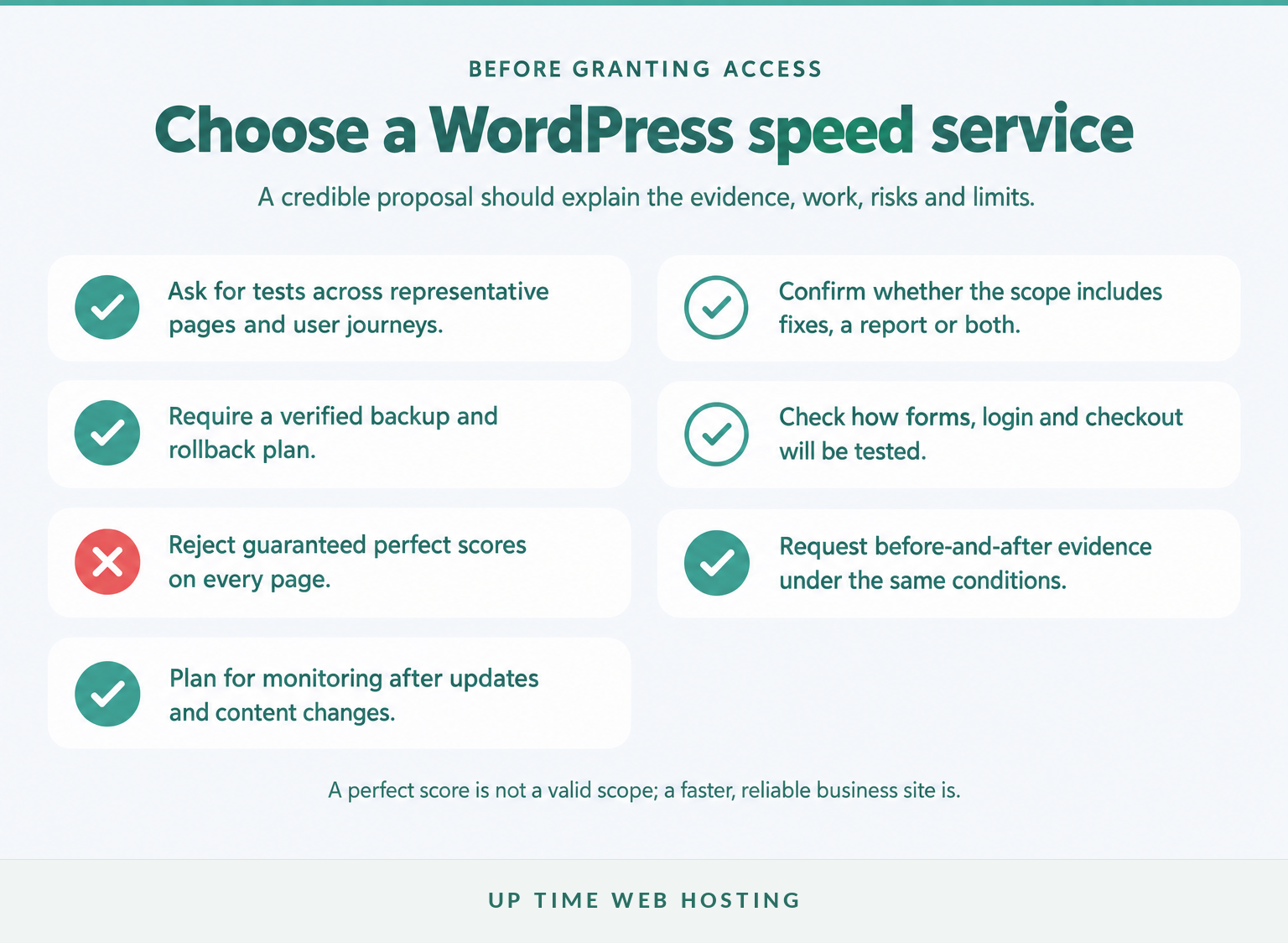
Choose a provider by examining the proposed method, access requirements, deliverables and limits rather than a guaranteed score. A trustworthy scope explains which pages will be tested, which fixes are included and how important site functions will be protected.
Ask these questions before approving the work:
- Which URLs and user journeys will be measured?
- Will the provider use both lab results and field data where available?
- Does the fee cover completed fixes, an audit report or both?
- Will the provider inspect hosting resources, PHP and database behaviour if necessary?
- How will backups, staging and rollback be handled?
- How will forms, logins, search, analytics and WooCommerce be tested?
- What before-and-after evidence and change documentation will be supplied?
- Which recommendations may require extra development, hosting or licence costs?
Red flags include:
- a guaranteed perfect score on every page;
- testing only the desktop homepage;
- installing overlapping caching tools without explaining their roles;
- refusing to disclose the changes made; and
- presenting a result without the test date, device, location or cache condition.
A credible WordPress speed service should also be willing to say when a requested change is not worth the risk. Removing an essential analytics, accessibility, booking or payment function to gain a few lab-score points is not a sensible business outcome.
Access should be proportionate. Temporary accounts, limited permissions where practical and removal of access after completion reduce unnecessary exposure. The proposal should state whether WordPress, hosting control panel, database, CDN or DNS access is required.
Choose the provider that can explain the evidence, the changes, the risks and the limits before touching the site.
How much should you expect the service to change?
The result depends on the bottleneck, the site’s complexity and the changes the business is prepared to accept. No responsible provider can promise the same percentage improvement for a cached brochure site, a membership platform and a busy WooCommerce store.
Most engagements fall into one or more categories:
- Configuration work: correcting cache settings, image delivery, browser caching, font loading and unnecessary options.
- Engineering work: changing theme or plugin behaviour, reducing JavaScript, repairing database work or adjusting custom code.
- Infrastructure work: changing hosting resources, PHP settings, server caching, database capacity or delivery architecture.
A site with one clear configuration problem may improve without a redesign. A site built around an inefficient theme, many third-party services or complex custom functions may need staged engineering work beyond an initial optimisation engagement.
The final report should separate:
- completed and validated changes;
- recommendations deferred by the owner;
- constraints that could not be removed safely; and
- maintenance tasks needed to preserve the result.
Some trade-offs are legitimate. Keeping accurate analytics, secure payment processing, accessibility functions or required marketing tools may produce a lower lab score than a stripped demonstration page. The correct target is the fastest reliable version of the site the business actually needs.
Expect the service to fix proven bottlenecks, not to promise a universal score or percentage.
Experience Microsoft 365 Business Standard for free for 30 days.
Up to 25 users with full access to email, OneDrive and Teams. Includes full versions of desktop apps of Outlook, Word, Excel, PowerPoint and more.
Try Microsoft 365
What do site owners ask about WordPress speed services?
The questions below cover the decisions that commonly remain after the technical scope is understood. They focus on when to use a plugin, what professional work can change and how to judge the result.
Can a WordPress speed plugin replace professional optimisation?
A WordPress speed plugin can handle page caching, file optimisation and some media tasks, but it cannot increase hosting resources, tune the web server, repair slow database queries or rewrite inefficient theme code. A plugin may be enough for a simple site only when testing shows the bottleneck is within its scope.
How long does WordPress speed optimisation take?
WordPress speed optimisation has no reliable fixed duration because the scope varies. A cache configuration or image clean-up may be straightforward, while staging, hosting changes, database work, theme changes and checkout testing require more care. A provider should define the scope, dependencies and validation steps before giving a timeframe.
Will speed optimisation improve Google rankings?
Speed optimisation can support search performance by improving page experience, but it does not guarantee higher rankings. Google says Core Web Vitals align with what its ranking systems seek to reward, while relevance and other signals still matter. Treat better visibility as a possible benefit, not the sole acceptance test. (developers.google.com)
Can optimisation break a WordPress site?
WordPress speed optimisation can break layouts, forms, logins or checkout flows if caching, script delay, minification or database changes are applied without testing. The risk is managed with a verified backup, staging where practical, a change log, functional tests and a rollback plan. Faster but broken is not a successful result.
Do I need ongoing WordPress speed maintenance?
Most WordPress sites need ongoing performance checks because updates, new content, analytics tags, advertising, design changes and traffic growth can reintroduce delay. Ongoing maintenance does not mean repeating a full optimisation every month. It means watching key pages, reviewing regressions after changes and acting before a small slowdown becomes a business problem.
Plugins are useful tools, but professional help is justified when performance work crosses into hosting, code, database or ongoing monitoring.
What should you do next?
Start by testing representative pages and recording the current conditions before installing another optimisation tool. If the evidence points to several layers, request a scope that covers diagnosis, completed fixes, functional testing and a clear before-and-after report.
For Australian businesses that want updates, security monitoring, incremental backups, uptime and performance tracking handled together, review Up Time Web Hosting’s WordPress maintenance service and confirm which performance work is appropriate for the site. (uptimewebhosting.com.au)
Measure first, fix the proven bottleneck, and keep watching the site after the work is finished.