
Your website looked fine yesterday. This morning it's sluggish, checkout feels sticky, and a customer says the site timed out just as they tried to pay. You haven't changed anything. Your traffic hasn't suddenly exploded. Yet your site is suffering anyway.
That's one of the most frustrating parts of shared hosting. The problem often isn't your own website. It can be another account on the same server using far more than its fair share of resources. If you've been searching what is CloudLinux, you're probably trying to work out whether it's just another bit of hosting jargon or something that protects your business website. For many Australian small businesses, it's the latter.
Table of Contents
- Why Your Website's Neighbours Matter
- Defining CloudLinux Your Virtual Private Space
- How CloudLinux Creates a Secure Digital Cage
- What CloudLinux Means for Your Business Website
- What to Ask Your Web Host About CloudLinux
- Your CloudLinux Questions Answered

Performance you can feel, backed by clients who depend on it. Read how our support and uptime create long‑term customer success.Power Your Business with Better Hosting
Why Your Website's Neighbours Matter
Shared hosting works a bit like renting a shop inside a busy commercial building. You've got your own front door and your own fit-out, but the building still shares core infrastructure. If another tenant causes chaos, everyone can feel it.
That's where the “noisy neighbour” problem comes from. One website on the server gets hammered by traffic, runs a broken script, or uses too much CPU and memory. Suddenly nearby accounts feel slow, even if those sites are well built and lightly loaded.
A common example is a local tradie, café, or online retailer on an entry-level hosting plan. Their website is modest, fast enough for everyday traffic, and doesn't need a giant server. Then another account on the same machine starts chewing through resources. The business owner sees slow pages and assumes their own site is broken.
Your hosting plan can be “shared” without being chaotic. The difference is whether the server enforces boundaries between accounts.
That's why the operating system matters. Traditional shared hosting can leave too much room for one account to affect others. A more specialised setup puts guardrails around every user so one person's spike doesn't become your outage.
If you're comparing shared web hosting for Australian business websites, this is one of the most useful questions to ask: how does the host stop one customer from hurting another customer's performance?
CloudLinux was built to answer exactly that question.
Defining CloudLinux Your Virtual Private Space
CloudLinux isn't a desktop operating system like the one on your laptop. It's a commercial Linux distribution built specifically for shared hosting providers. According to VentraIP's CloudLinux overview, CloudLinux OS runs over 20 million websites globally, which shows how widely it's used in hosting environments.
Why CloudLinux exists
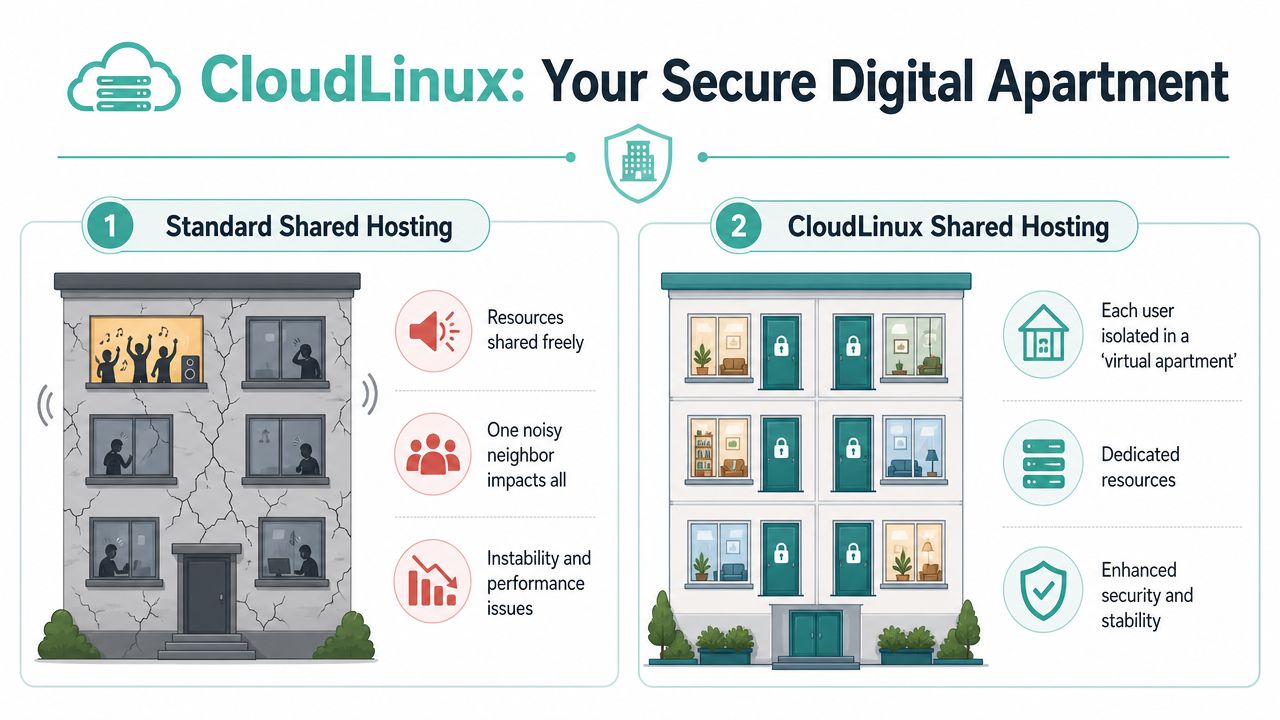
The easiest way to understand CloudLinux is to compare two apartment buildings.
In a basic shared hosting setup, everyone lives in the same building with thin walls, dodgy locks, and a shared power board in the hallway. If one unit throws a loud party or overloads the power, the rest of the building suffers.
CloudLinux rebuilds that same building into self-contained apartments. Each tenant still lives inside one larger property, but their space is partitioned, their door is locked, and their utilities are controlled. That's why its smaller overall market share among website operating systems isn't a weakness. It's a sign that CloudLinux is specialised, not generic. One source notes that while Linux dominates public cloud infrastructure, CloudLinux holds less than 0.1% of known website operating systems because it serves a specific shared hosting role rather than every possible Linux use case, as discussed by CommandLinux's market-share commentary.
If you're still sorting out the broader hosting environment, this guide to understanding cloud hosting helps explain where shared hosting, VPS hosting, and cloud infrastructure fit together.
What LVE means in plain English
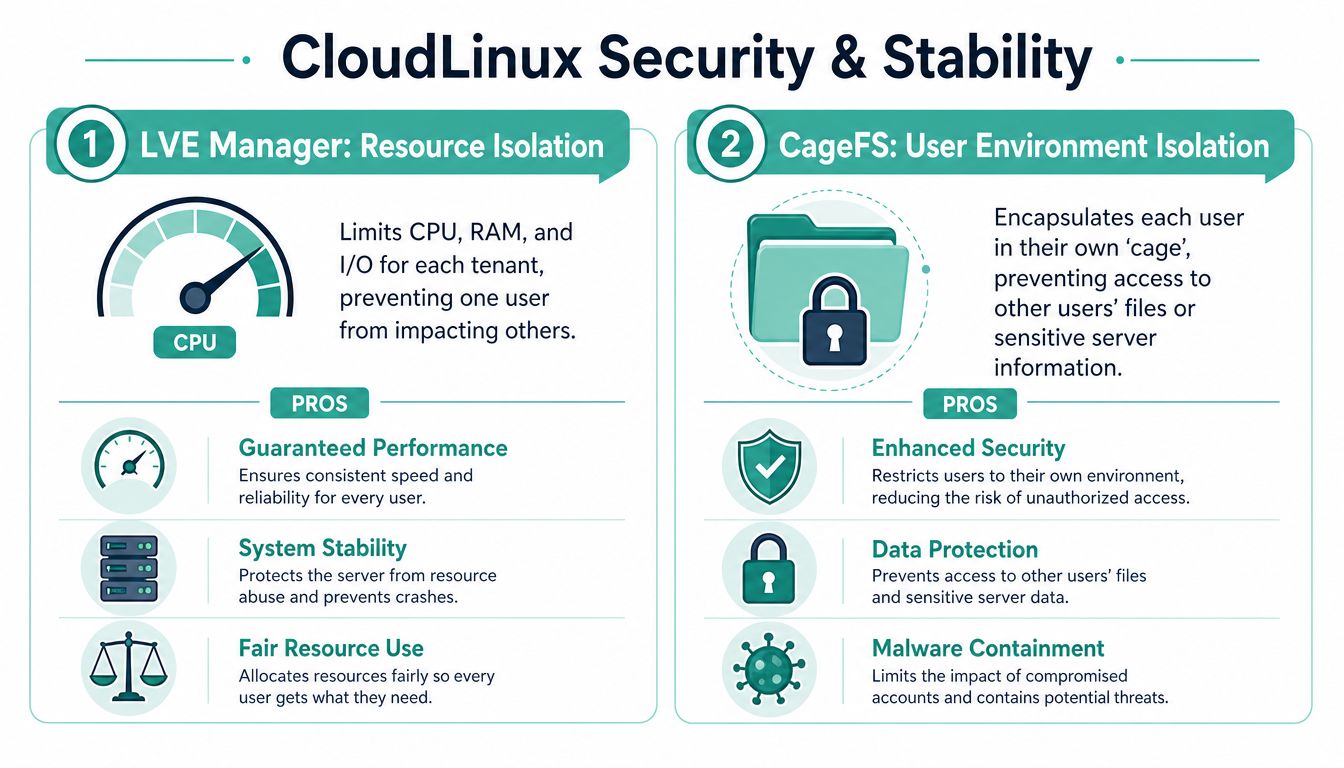
The key CloudLinux feature is LVE, short for Lightweight Virtual Environment. Think of it as your website's fenced-off part of the server. Your account gets defined limits for core resources, so another account cannot push you aside.
That matters because shared hosting only works well when sharing is controlled. Without boundaries, “shared” often becomes “unpredictable”. With boundaries, shared hosting becomes far more stable and practical for ordinary business sites.
Here's the simple version:
| Setup | What happens |
|---|---|
| Standard shared hosting | Accounts can affect one another more easily |
| CloudLinux hosting | Each account operates in its own controlled space |
That's also why CloudLinux pairs naturally with control panels used by hosting providers. If you've ever wondered how these server environments are managed behind the scenes, the difference between cPanel and Plesk in Australian hosting gives useful context.
Host your website with our 5-star rated, cPanel website hosting plans.
Super fast servers, with security included and hosted in your choice of Australian Data Center.
View cPanel Plans
How CloudLinux Creates a Secure Digital Cage
CloudLinux earns its reputation through a few specific tools. The names sound technical, but the business outcome is straightforward. Your website gets clearer boundaries, steadier performance, and less exposure to problems caused by nearby accounts.
LVE acts like a circuit breaker
CloudLinux uses kernel-level isolation to cap each account's CPU, RAM, and I/O. As explained in GeeksforGeeks' CloudLinux overview, CloudLinux OS implements Lightweight Virtual Environment technology to enforce hard resource quotas at the kernel level, isolating each cPanel user so one tenant's spike can't degrade others on the same physical server.
For a non-technical owner, the best analogy is a circuit breaker. If one tenancy overloads its power, that fault is contained. The whole building doesn't go dark.
That changes the day-to-day experience of shared hosting:
- Your pages stay steadier: A burst on another site is less likely to drag your site down.
- Server problems stay localised: One account hitting limits doesn't have to become everybody's problem.
- Resource use becomes fairer: Accounts operate within defined boundaries rather than fighting over a shared pool.
CageFS locks each account away from others
Resource isolation solves the performance side. CageFS deals with visibility and containment.
CloudLinux implements CageFS as a per-user file system that places each account in its own “cage”, preventing users from seeing other users' files, configuration data, or sensitive server information, as described in KnownHost's explanation of CageFS.
Imagine a locked apartment rather than an open hallway. A resident can access their own flat, but they can't wander into yours to inspect your paperwork, poke through your cupboards, or even confirm what's inside.
Practical rule: On shared hosting, good security isn't only about blocking outsiders. It's also about preventing sideways movement between accounts on the same server.
That's one reason CloudLinux suits Australian businesses that care about customer trust and sensible data handling. It creates technical barriers between users instead of relying on everyone behaving perfectly.
If you're reviewing layered protection more broadly, a web application firewall guide for hosting security is worth reading alongside CloudLinux's account isolation.
PHP Selector helps mixed websites coexist
Many shared servers host a mix of websites built at different times. One client may run a newer application. Another may still rely on an older codebase that hasn't been updated yet.
CloudLinux adds tools such as PHP Selector, letting administrators assign specific PHP versions per account. That means websites don't all have to live on one global version. It's a practical feature for agencies, legacy apps, and businesses migrating gradually rather than rebuilding everything at once.
What CloudLinux Means for Your Business Website
A lot of small business owners only notice hosting when something goes wrong. Your site slows down on a busy morning, checkout feels patchy, or a contact form stops behaving properly. CloudLinux is designed to reduce that kind of shared hosting unpredictability.

For an Australian SMB, the practical benefit is simple. You get a shared hosting environment that behaves more like an organised set of separate shopfronts than one crowded room where everyone competes for attention. CloudLinux is a niche operating system, and that is part of the appeal. It was built for hosting providers that want tighter control, better account separation, and fewer surprises on shared servers.
That narrower focus is useful for businesses that care about stability and security more than buzzwords.
For small business owners
If you run a clinic, trade business, consultancy, café, or local online store, you probably want your website to do its job without turning into another thing to manage. You want steady performance, fewer odd outages, and less chance that another customer on the same server affects your day.
CloudLinux helps make shared hosting more predictable by setting clearer boundaries around each account. The result is fewer support headaches such as:
- Mystery slowdowns: Your site is less likely to drag because another account suddenly uses a large share of server resources.
- Avoidable instability: Short traffic spikes are more likely to stay contained instead of affecting unrelated websites.
- Extra admin work: You spend less time chasing vague hosting problems that are hard to reproduce.
That predictability is often the true upgrade. Not more features on a sales page. Fewer interruptions to normal business.
For WordPress stores and campaign spikes
WordPress sites, booking systems, and online stores rarely have perfectly even traffic. A sale starts, an email campaign goes out, or a popular social post sends a rush of visitors all at once. On ordinary shared hosting, those bursts can expose weak resource handling very quickly.
CloudLinux does not create unlimited capacity. What it does do is enforce cleaner rules about how server resources are shared, so your website has a better chance of staying responsive when conditions get busy.
If your website brings in enquiries or processes payments, consistency has real value. A stable quiet Tuesday matters. A stable promotional weekend matters even more.
For site owners running PHP-heavy plugins or custom themes, PHP performance tuning for business hosting is a useful companion topic, because isolation works best when the application itself is also tuned properly.
For agencies and multi-site setups
Agencies, freelancers, and businesses with several websites often deal with a mixed bag. One site is a simple brochure build. Another runs WooCommerce. Another depends on older custom code that cannot be replaced overnight.
In that kind of setup, CloudLinux gives each account a more controlled operating space. Troubleshooting gets clearer. If one website starts misbehaving, the problem is easier to isolate to that account instead of turning into a server-wide guessing game.
That is one reason CloudLinux can be the smarter choice for Australian SMB hosting, even though it is less common than general-purpose server operating systems. Its smaller market share is not a weakness in shared hosting. It reflects a specialised design. For businesses that value steady performance, cleaner separation between accounts, and sensible security controls, specialised is often exactly what you want.
What to Ask Your Web Host About CloudLinux
A host can mention CloudLinux on a feature list, but the useful part is how they use it. Ask a few direct questions and you'll quickly tell whether the provider treats account isolation as core infrastructure or just a buzzword.
Questions worth asking before you buy
Start with these:
- Do you use CloudLinux on shared hosting plans? If the answer is vague, ask whether accounts are isolated at the operating-system level.
- What limits apply to each account? You don't need deep technical detail. You do want a clear explanation of how CPU, memory, and I/O are managed.
- Do you use CageFS or similar account isolation? That tells you whether users are separated beyond basic file permissions.
- How is PHP handled across different accounts? This matters if you run older plugins, custom code, or multiple client sites.
- What else is paired with CloudLinux? According to the CloudLinux installation documentation, benchmark data from independent hosting reviews indicates CloudLinux-enabled servers with LiteSpeed integration achieve 30–50% faster page load times compared to standard Apache configurations under high concurrent request loads.
A practical shortlist of buying questions also helps when you're comparing plans more generally. This guide on how to choose the best web hosting service for your needs is a useful companion.
How to read the answers
Look for plain, concrete answers. “We isolate accounts using CloudLinux and enforce per-account limits” is useful. “Our hosting is fast and secure” isn't.
You should also listen for whether the host understands Australian business reality. Local support, local server locations, and managed features matter when you don't have an in-house sysadmin. A good host should explain CloudLinux in terms of uptime, stability, and reduced headaches, not just server jargon.
Ask what happens when one account gets busy. The answer tells you more than a long feature table ever will.
Register your new domain name at competitive market prices including free domain add-ons like privacy, DNS Hosting, Custom Nameservers and Forwarding.
Always the best price and no nasty renewal price hikes.
Register A Domain Name
Your CloudLinux Questions Answered
Do I need to manage CloudLinux myself?
No. On managed shared hosting, the host handles the operating system. You use your normal hosting tools and control panel. CloudLinux works in the background to control resources and isolate accounts.
Is CloudLinux slower because it limits resources?
Usually, that's the wrong way to think about it. CloudLinux doesn't exist to make your site slower. It exists to stop somebody else from consuming the shared server in a way that harms your site. In practice, many businesses prefer guaranteed boundaries over uncontrolled sharing.
Is CloudLinux better than standard server software?
For shared hosting, yes, its specialisation is the point. CloudLinux was specifically developed in 2009 to address the limitations of traditional shared hosting based on CentOS, offering a dedicated OS for shared and reseller hosting that prioritises resource management, security, and multi-tenancy, as outlined in VPS.net's history of CloudLinux.
If you came here asking what is CloudLinux, the simplest answer is this: it's a hosting-focused operating system that gives your website a more private, controlled, and secure place to live on a shared server. For Australian SMBs, that niche focus is exactly why it's useful.
If you're comparing Australian hosting options and want CloudLinux included as part of the platform, UpTime Web Hosting offers local hosting services with CloudLinux-based shared hosting, plus cPanel, WordPress hosting, email, domains, and Australian support.