A sale goes live, orders arrive, and the store owner discovers that “free WooCommerce” still needs hosting, payment processing, backups, extensions, tax configuration and someone available when checkout fails. The initial build may look inexpensive, but the central question is different: what will the store cost when Australian traffic rises, international orders increase or BAS preparation exposes inconsistent tax records?
WooCommerce pricing works best as a resilience exercise, not a plugin shopping list. Australian online retail sales reached $4,703.8 million in June 2025, up 13.0% over the year, according to the Australian Bureau of Statistics retail trade release. That commercial scale makes small recurring fees, transaction charges and operational failures worth modelling carefully.
Table of Contents
- Understanding the True Cost of WooCommerce
- Essential Infrastructure and Hosting Expenses
- Budgeting for Themes and Essential Extensions
- Payment Gateway Fees and GST Compliance
- Sample Monthly and Annual Budgets by Store Size
- Strategies to Reduce Ongoing Operating Costs
- Frequently Asked Questions About Australian E-commerce Costs

Performance you can feel, backed by clients who depend on it. Read how our support and uptime create long‑term customer success.Power Your Business with Better Hosting
Understanding the True Cost of WooCommerce
A business owner can install the WooCommerce plugin without paying a recurring platform subscription, then find that a functional store needs a domain, hosting, email, payment acceptance, shipping logic, security, backups and support. None of those costs means the platform is misleading. They reflect the way open-source commerce separates the software from the infrastructure and services around it.
The practical distinction is between fixed costs and variable costs. Hosting, a domain, selected extensions and maintenance are generally budgeted as fixed or predictable expenses. Payment processing, refunds, disputes and some operational services rise with order volume. Treating everything as one monthly figure hides the costs that grow fastest when sales improve.
WooCommerce's own overview of what WooCommerce is is useful for explaining this open-source model to a team or client. The software gives a merchant control over hosting and functionality, but that control also means the merchant must make infrastructure decisions rather than accepting one bundled environment.
A more useful cost model
Start with four separate lines in your forecast:
- Infrastructure: Domain renewal, hosting, SSL, email, backups and monitoring.
- Store functionality: Themes, shipping tools, tax tools, subscriptions, memberships and marketing extensions.
- Transactions: Gateway charges, GST on applicable fees, disputes, refunds and currency conversion.
- Operations: Development, content updates, security checks, testing and emergency support.
This model makes trade-offs visible. A free extension may reduce the software line while increasing support work or server demand. A low-cost host may appear attractive until a promotion requires a resource upgrade, a restore or developer intervention.
Practical rule: Price the store at normal trading volume and at its busiest realistic period. The second figure often determines whether the stack is genuinely affordable.
Australian online retail represented 18% of total retail spending in 2022, with online purchases made by 82% of Australian households, according to Australian Government trade information citing the Australia Post eCommerce Industry Report. The opportunity is substantial, but so is the cost of an unavailable or poorly configured checkout. A cheap initial stack works only when it remains reliable as the business grows.
Essential Infrastructure and Hosting Expenses
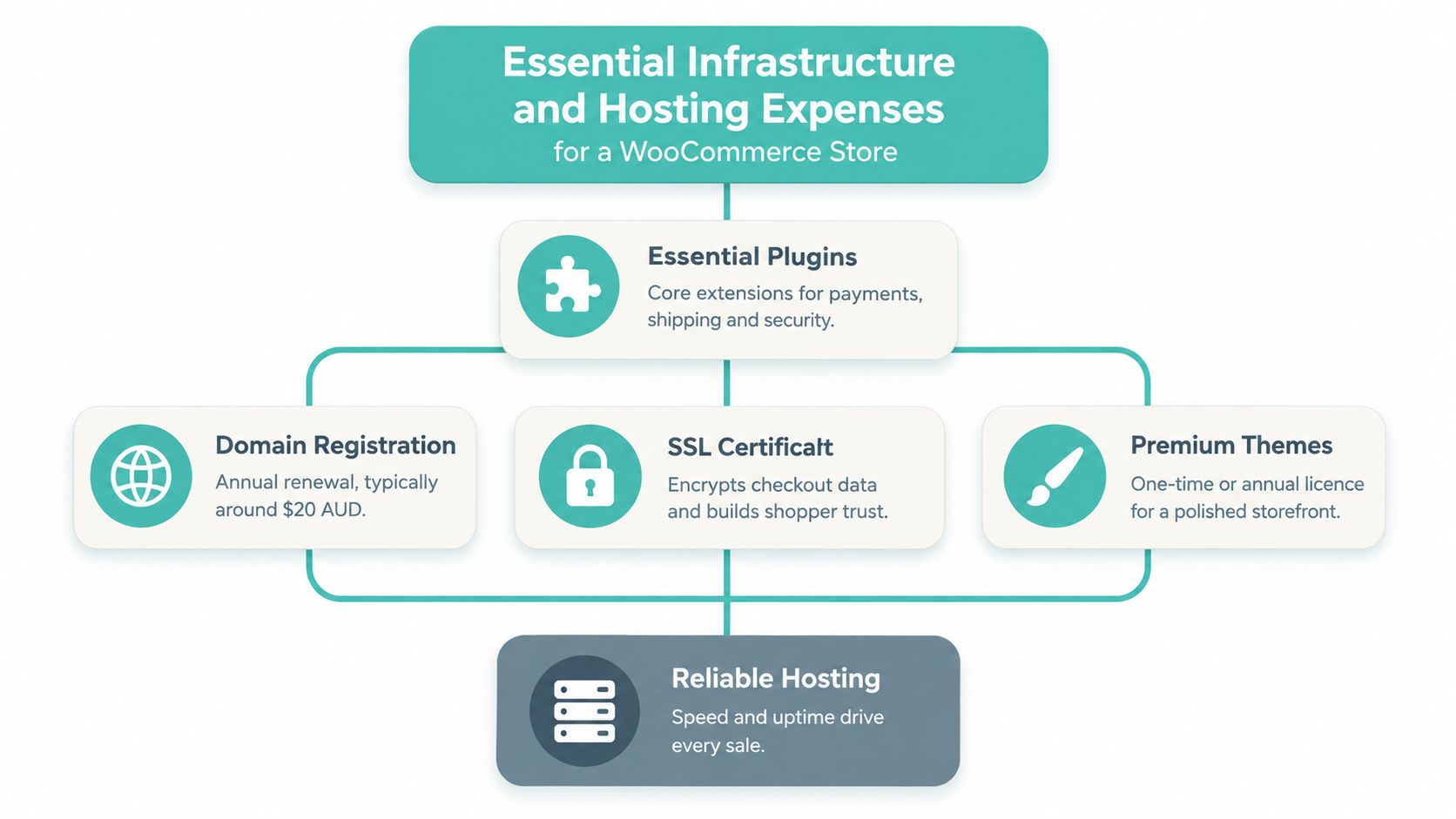
A WooCommerce store needs a dependable base before it needs more marketing features. The domain gives customers a recognisable destination, SSL protects the connection, hosting supplies the processing environment, and backups provide a recovery path when an update or integration causes trouble.
Separate the essentials from the upgrades
Domain registration is a recurring ownership cost. Keep the registrar account and renewal notices under the business's control, not a contractor's personal email. The domain is a business asset, and losing access can disrupt customer communication, search visibility and order recovery.
SSL should be treated as part of the checkout foundation. A valid certificate encrypts customer connections and supports browser trust. Some hosting plans include SSL, while others may require separate administration, so check what is included before comparing headline prices.
Hosting deserves the closest scrutiny. Compare CPU and memory allocations, storage, database limits, backup retention, staging facilities, malware scanning, firewall protection and support response. A store that loads acceptably with a small catalogue can behave differently when product searches, customer sessions and payment callbacks happen concurrently.
An Australian provider such as UpTime Web Hosting offers hosting with servers in Sydney, Melbourne, Brisbane and Perth, along with LiteSpeed acceleration, encrypted off-site nightly backups, malware scanning, DDoS-protected firewalls and local support. Those features don't guarantee that every store will perform perfectly, but they make the cost model easier to assess because important safeguards are visible rather than left for a separate emergency purchase. Its WooCommerce hosting guidance provides a useful checklist for comparing the underlying environment.
Test the plan against a busy period
Ask these questions before choosing a package:
- Can the host explain the resource limits in plain language?
- Are backups stored separately from the live account?
- Can the team provide a staging environment for WooCommerce updates?
- Is support available in Australia when a checkout issue occurs?
- What happens when catalogue size, database activity or traffic exceeds the included allocation?
Cheap offshore hosting can work for a simple brochure site, but the saving becomes less meaningful when latency, support delays or missing safeguards affect a retail checkout. Local infrastructure isn't the only selection criterion, yet it can support a more predictable operating plan for Australian customers and teams.
Host your website with our 5-star rated, cPanel website hosting plans.
Super fast servers, with security included and hosted in your choice of Australian Data Center.
View cPanel Plans
Budgeting for Themes and Essential Extensions
The right question isn't whether an extension is free. It is whether the extension performs one necessary job reliably, remains supported and avoids creating extra work elsewhere.
A free theme may suit a small catalogue with standard products and a straightforward checkout. A premium theme or page-building system may make sense when the store needs stronger merchandising, reusable templates or a marketing team that must update pages without developer assistance. The additional licence cost should be compared with the time saved and the risk reduced, not judged in isolation.
Match functionality to the business model
| Requirement | A free option may suit | A paid option may be justified |
|---|---|---|
| Store design | Standard catalogue and simple branding | Custom layouts, reusable templates and advanced merchandising |
| Shipping | Small product range with simple zones | Multiple destinations, rules, fulfilment workflows or carrier integration |
| Inventory | Low SKU complexity and manual review | Multiple locations, bundles, stock synchronisation or purchase planning |
| Marketing | Basic coupons and email exports | Automated recovery, segmentation, subscriptions or customer journeys |
| Security | Host-provided baseline controls | Additional monitoring, managed response or specialist requirements |
Poorly coded plugins create a cost that doesn't appear on the invoice. They can add database queries, load unnecessary scripts, conflict with checkout components or force a hosting upgrade. Installing several extensions that overlap is often more expensive than choosing one maintained tool with a clear support path.
Before selecting a theme, review themes reviewed by AccountShare as a comparison resource, then check the theme's WooCommerce compatibility, update history, accessibility, mobile behaviour and support arrangements. A visually impressive demo doesn't prove that the theme will remain stable with your payment, shipping and tax setup.
Use a decision test before paying
Write down the business problem first. If the problem is slow merchandising, look for a lightweight theme with editable templates. If the problem is fulfilment complexity, prioritise shipping and inventory integration. If the problem is abandoned carts, evaluate recovery functionality and its data handling rather than adding another general-purpose marketing suite.
A WooCommerce theme guide for Australian store owners can help organise that review. Keep the active plugin set small, document what each extension does and remove tools that no longer serve a live requirement. Licence renewals are only one part of the cost. Maintenance, conflicts and support time matter just as much.
Payment Gateway Fees and GST Compliance
Payment processing is where a store's variable costs become visible on every order. WooPayments advertises no setup fee and no monthly payment-processing fee, but it deducts charges from transactions. Its published Australian fee structure lists domestic card payments at 1.75% plus $0.30, with an additional 1.50% for international payments and 2.00% for currency conversion. Disputes carry a $25 fee. These figures come from the WooPayments Australian fees documentation.
For a domestic $100 card order, the base processing charge is $2.05 before GST. If the 10% GST on the fee is charged, the total becomes $2.255. An international payment involving currency conversion can add 3.50 percentage points to the base rate, producing a $5.55 fee before GST on the same order, excluding a dispute cost.
| Transaction Type | Base Fee | GST (10%) | Total Cost |
|---|---|---|---|
| Domestic $100 card order | $2.05 | $0.205 | $2.255 |
| International $100 card order with currency conversion | $5.55 | $0.555 | $6.105 |
The displayed GST treatment depends on the merchant's circumstances and valid tax records. WooPayments states that GST applies to its fees, while GST-registered merchants may avoid that charge when they provide a valid GST identification number under the reverse-charge mechanism. Confirm the treatment with your accountant and reconcile it against actual settlement statements.
Build GST into the operating process
Xero's Australian GST registration guidance states that businesses generally register when annual turnover reaches A$75,000 or more and charge 10% GST on taxable Australian sales. Queensland Government guidance also separates payment-processing fees and applicable taxes as online-selling cost categories.
Configure WooCommerce so product prices, shipping, discounts and refunds follow one deliberate tax policy. Then reconcile gross orders, gateway deductions and bank deposits. A guide such as EndureGo Tax's GST invoicing explanation can help staff understand the difference between GST-inclusive and GST-exclusive presentation, but your accountant should confirm the treatment for the business.
Consumer-facing prices must also meet Australian display rules. The ACCC price display guidance says businesses should show the minimum total payable, including GST and unavoidable or pre-selected fees, as a single figure before purchase. If a product costs $100, delivery is $10 and GST is $11, the displayed total should be $121, not a surprise revealed at checkout.
For practical implementation considerations, see this guide to online selling in Australia. The aim isn't only a compliant checkout. It is a settlement process that produces records your finance team can trust.
Sample Monthly and Annual Budgets by Store Size
A budget should describe a trading situation, not just a software bundle. A microbusiness may need a dependable store, basic payment acceptance and limited extensions. A growing retailer may need staging, stronger recovery processes and better monitoring. An established store may need agency oversight, performance planning and documented response procedures.
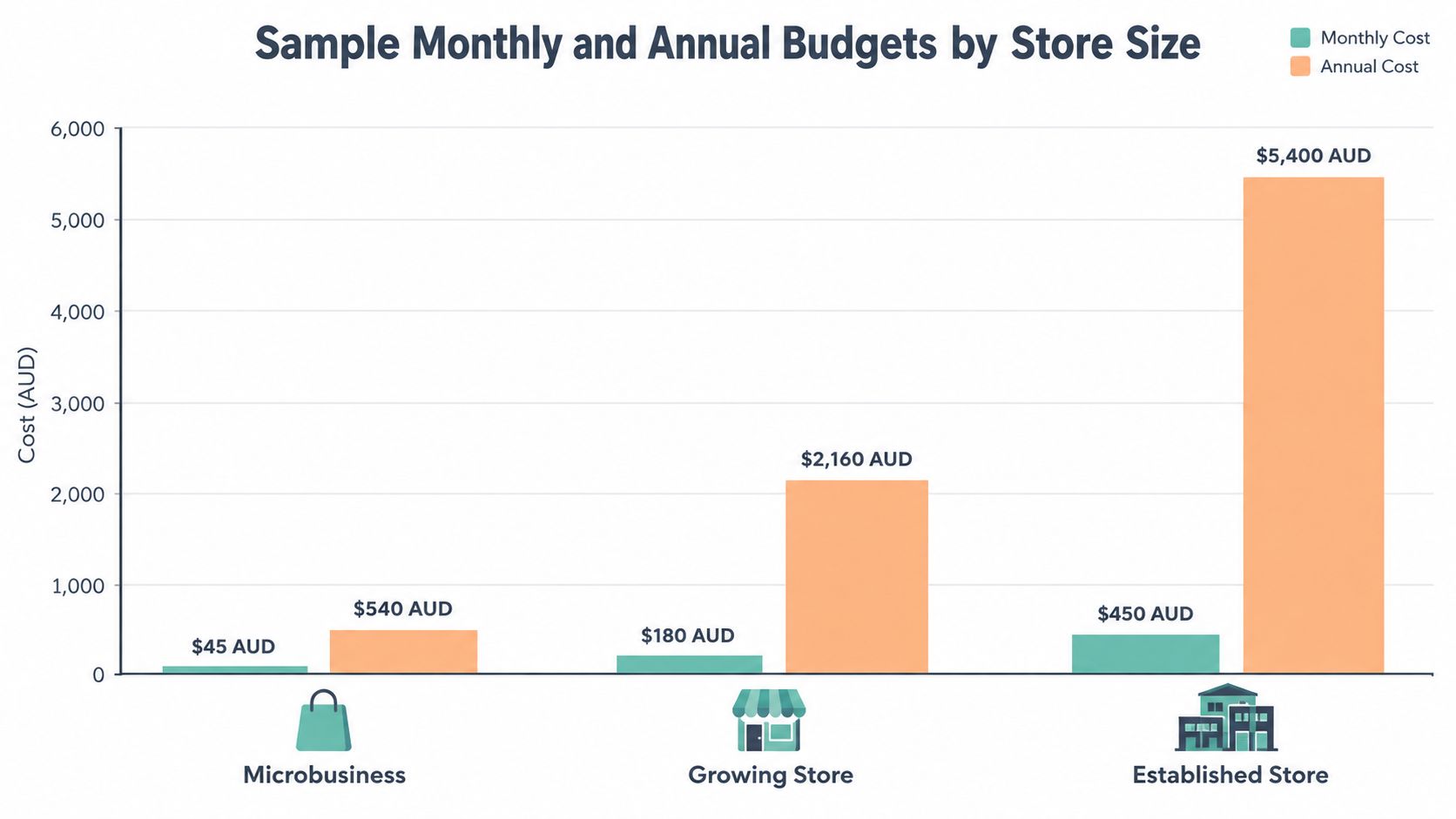
The following figures are illustrative planning scenarios, not universal market rates. They use the supplied budget levels to show how a merchant can organise a forecast, while variable gateway fees, GST treatment, developer work and exceptional incidents should be modelled separately.
| Store profile | Planning focus | Monthly budget | Annual budget |
|---|---|---|---|
| Microbusiness | Core hosting, domain, SSL, basic extensions and routine checks | $45 AUD | $540 AUD |
| Growing store | More capable hosting, premium tools, backups, testing and operational support | $180 AUD | $2,160 AUD |
| Established store | Higher capacity, agency management, monitoring, recovery planning and specialist integrations | $450 AUD | $5,400 AUD |
Microbusiness scenario
A small retailer with a limited catalogue and modest order flow may start with shared or managed WordPress hosting, a supported theme, a payment gateway and straightforward shipping rules. The $45 monthly planning level can provide a starting envelope for predictable infrastructure and software, but it shouldn't be treated as a promise that transaction fees or development are included.
The owner should still test updates in a controlled way, verify tax totals and keep administrator access organised. Manual processes are acceptable while they remain documented and repeatable.
Growing store scenario
A growing retailer needs to ask what happens during a promotion, not only what happens on an ordinary Tuesday. The $180 monthly planning level allows room for stronger hosting, premium extensions, backup management, performance review and occasional technical support.
Track catalogue growth, database activity, checkout errors and recovery time. If a campaign creates more concurrent visitors than the host can handle, an upgrade may be cheaper than repeatedly paying for emergency fixes or accepting failed orders.
Established store scenario
The $450 monthly planning level reflects a different operating standard. An established store may require agency-managed releases, staging, monitoring, fraud controls, abandoned-cart recovery, integration testing and a documented incident process.
The lowest headline cost is not always the lowest cost of ownership. A transparent limit and a predictable upgrade path can protect cash flow better than an apparently cheaper plan.
Use annual web hosting cost guidance to structure the fixed infrastructure portion, then add variable payment costs using domestic and international sales separately. A useful spreadsheet includes monthly orders, average order value, domestic share, international share, expected refunds, peak visitors, recovery-time requirements and planned development hours.
Register your new domain name at competitive market prices including free domain add-ons like privacy, DNS Hosting, Custom Nameservers and Forwarding.
Always the best price and no nasty renewal price hikes.
Register A Domain Name
Strategies to Reduce Ongoing Operating Costs
Cost control works when it removes waste without removing safeguards. Cutting backups, security checks or testing can reduce the invoice today while increasing the cost of the next failure.
Make the stack easier to maintain
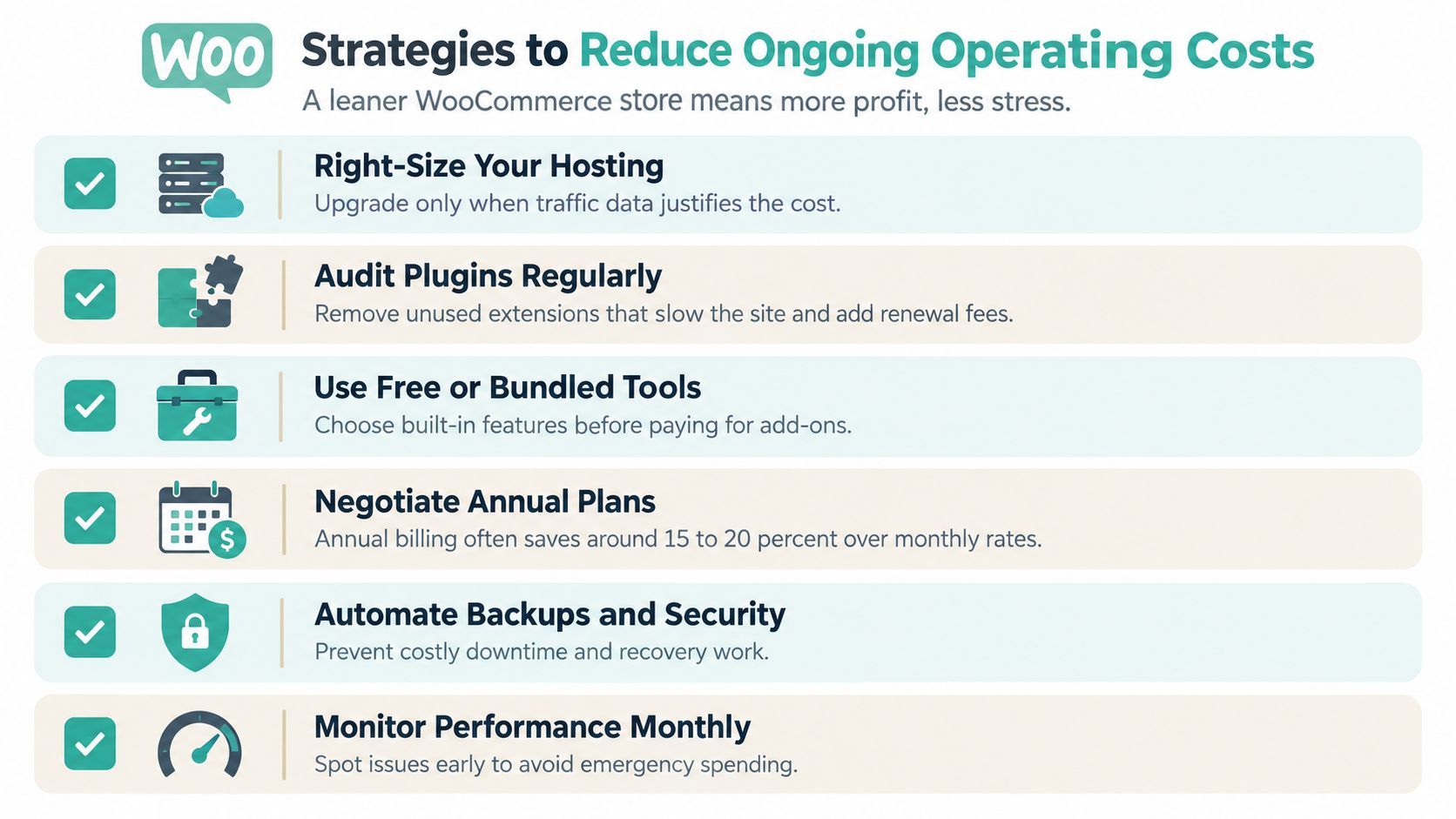
- Right-size hosting: Review resource graphs and error logs before upgrading. Pay for additional capacity when evidence shows the store needs it.
- Audit plugins regularly: Remove unused extensions, duplicate functions and abandoned tools. Every active plugin adds a maintenance and compatibility consideration.
- Use free or bundled tools first: Check WooCommerce, WordPress and the hosting account before buying another extension. A built-in feature may be sufficient.
- Negotiate annual plans: Compare annual billing with monthly billing, but check cancellation terms, renewal pricing and whether the tool remains necessary.
- Automate backups and security: Use encrypted off-site backups, malware scanning and firewall protection so recovery doesn't depend on a rushed manual process.
- Monitor performance monthly: Test product pages, search, cart, checkout and transactional emails. Early detection usually creates more options than an emergency response.
Database maintenance also matters. Remove expired test orders and unnecessary revisions according to a documented retention policy, optimise large images before upload and avoid loading heavy page-builder assets across the entire site. These actions won't replace proper hosting, but they can reduce avoidable resource use.
Keep a renewal register with the extension name, business owner, purpose, renewal date and replacement plan. Before renewing, confirm that the feature is still used and that the provider supports the current WordPress and WooCommerce versions. That simple review prevents silent subscription creep.
Frequently Asked Questions About Australian E-commerce Costs
Can a consumer store show prices excluding GST?
Generally, a consumer-facing product page should show the minimum total price customers must pay, including GST and unavoidable or pre-selected fees. The NSW Government pricing standards guidance explains that single-price rules generally include measurable costs such as GST, duties and fees.
A price stated exclusively to other businesses can be treated differently. For example, a quote clearly restricted to GST-registered business customers may state an amount excluding GST, provided the presentation isn't misleading. The sales channel, wording and audience need to support that distinction. Don't place an “ex GST” label on a public consumer product page and assume it solves the problem.
What happens when an Australian business sells imported digital services?
Imported digital services aren't automatically GST-free. The ATO guidance for Australian consumers importing goods and services explains that overseas suppliers or electronic distribution platforms may have GST obligations, with the A$75,000 registration threshold relevant to whether registration is required.
A WooCommerce merchant should identify who supplies the service, who collects payment and whether a platform applies tax. The displayed price and checkout logic should reflect that arrangement. Keep invoices and platform statements with the accounting records rather than relying only on the product catalogue settings.
Who should own the domain name?
The business should control the registrar account, registrant contact details, renewal email and recovery methods. A developer or agency can manage technical work without owning the asset. Before a handover, confirm that the legal business entity can access renewal notices and authorise changes.
This matters during an agency change, a company restructure or a failed payment. Losing access to a domain can affect the storefront, email and customer trust at the same time. Record ownership details in the business's asset register and review them whenever staff or suppliers change.
How should payment fees appear in the budget?
Record gateway fees separately from hosting and extensions. Model domestic orders, international orders, currency conversion, refunds and disputes as different lines, then reconcile the result against settlement reports. For GST-registered businesses, retain the required tax invoices and confirm whether eligible fee GST can be claimed as a credit.
A store that tracks only gross revenue can look profitable while variable payment costs and operational support consume margin. A store that tracks net settlement, tax obligations and recovery work gives the owner a more useful view of cash flow.
UpTime Web Hosting provides Australian WooCommerce-ready hosting with local server locations, SSL, LiteSpeed performance features, off-site backups, security controls and local support. Review the infrastructure your store needs, then visit UpTime Web Hosting to compare hosting options for a reliable, GST-aware WooCommerce operation.