On an ordinary weeknight, a small Australian business can have a plugin update waiting, online bookings due the next morning, and no staff member whose job is the server.
Many Australian businesses have a website without assigning its routine technical upkeep to anyone.
Managed WordPress hosting means the host runs that upkeep day to day. The label matters because a site taking names, payments or appointment requests continues to carry operational risk after launch. A larger server does not assign that work to anyone, and a long feature list does not prove anyone has rehearsed a failure.
Judge a managed plan by these outcomes. Can a bad update be rolled back? Does a copy live away from the server, and has it been restored in practice? When something breaks after hours, who owns the incident through to resolution?
Those answers show whether “managed” describes an accountable service or a marketing label.
Table of Contents
- What Managed WordPress Hosting Is in Plain Terms
- Managed WordPress Compared with Shared, VPS and Managed VPS
- How Managed WordPress Works and What to Verify
- Features Included in a Managed Plan
- Practical Examples for Australian Businesses
- Who Should Choose Managed WordPress Hosting

Performance you can feel, backed by clients who depend on it. Read how our support and uptime create long‑term customer success.Power Your Business with Better Hosting
What Managed WordPress Hosting Is in Plain Terms
Managed WordPress hosting is a hosting service where the provider runs the WordPress site day to day, covering updates, backups, security, performance and support, on top of the server.
Think of the office you work from. Shared hosting is a desk in a co-working space: you get a seat and the lights stay on, and you look after your own files. An unmanaged VPS is a whole floor you fit out yourself, including the locks and the air-conditioning. Managed WordPress is closer to a serviced office. A facilities team keeps the building running so you can run the business inside it. If you've ever paid someone to watch the rest of the IT stack, the same idea shows up in understanding managed IT services from Nerds 2 You Edmonton: the point is handing recurring technical work to a named operator.

Standard hosting generally supplies server space and connectivity. The managed layer adds WordPress core, plugin and theme updates, security monitoring, malware detection, backups, performance optimisation and support from people who know WordPress, not only the operating system. The Australian Bureau of Statistics characteristics release, citing the Australian Cyber Security Centre, notes that small businesses represent more than 95% of all Australian businesses. The same guidance tells small businesses to update operating systems, software and applications automatically, and to secure internet-exposed services such as webmail and servers.
Managed does not mean someone manages everything. The provider doesn't write your pages, pick your plugins or meet your privacy duties. You still own the content and the customer data. If you're still sorting what "hosting" itself means, start with a plain explanation of web hosting before you compare plans.
Boundary: Managed hosting is an administration and risk-reduction service, not a different kind of server.
Managed WordPress Compared with Shared, VPS and Managed VPS
Four labels, one real question: who fixes the site when something breaks at 9pm? In 2021–22, the Australian Bureau of Statistics business counts reported that 50.7% of Australian businesses had their own website or app, and 40.1% of microbusinesses with 0–4 employees did too. For businesses that size, website upkeep usually lands on whoever has a spare hour, so the maintenance split matters more than the spec sheet.
| Hosting Type | Who Maintains What | Indicative Monthly Cost (AUD) | Best Suited To | Main Limit |
|---|---|---|---|---|
| Shared hosting | You handle WordPress updates, backups and security | Lowest tier; confirm the live price list | Brochure sites and low-traffic blogs | Shared server resources and limited control |
| Unmanaged VPS | You handle the server and WordPress | Set by the server size you choose; confirm the live price list | Developers comfortable with Linux administration | Every patch and fault is your responsibility |
| Managed VPS | Provider maintains the server; you maintain WordPress | Above unmanaged VPS; confirm the live price list | Agencies with in-house WordPress skills | WordPress updates and recovery still rely on you |
| Managed WordPress hosting | Provider maintains WordPress, server, security and backups | Above shared hosting; confirm the live price list | Business sites without dedicated IT staff | Less server-level control; plan resource limits apply |
The cost column shows where each option sits relative to the others, not a quote. GST inclusion and resource allowances change by plan, so check the current price list before you budget.
Shared hosting is the cheapest seat. Other sites share the same machine, so a noisy neighbour can slow you down, and WordPress care stays in your control panel.
An unmanaged VPS gives you a private slice of a server and full control. You also patch the operating system, watch disk space and rebuild the site if an update fails. That is a fair trade when you already administer Linux, and a poor one when nobody on the team does.
Managed VPS moves the server work to the provider. WordPress itself, including a broken checkout after a plugin update, is still yours. Agencies with a developer on the tools often prefer this split. UpTime Web Hosting offers cPanel and WordPress hosting alongside managed VPS, so the split can start with the work you want to hand over.
Managed WordPress takes the application as well as the server: updates, security and backups. You give up some server-level tinkering, and you still live inside the plan's CPU, memory and storage limits.
If the bottleneck is hands-on maintenance, choose managed WordPress. If the bottleneck is server configuration, choose a VPS. Whichever tier you land on, judge it by tested rollback, off-site restore and who owns the incident, not by the length of the feature list.
Host your website with our 5-star rated, cPanel website hosting plans.
Super fast servers, with security included and hosted in your choice of Australian Data Center.
View cPanel Plans
How Managed WordPress Works and What to Verify
A managed plan is an operations routine wrapped around your WordPress site: the provider takes the WordPress core, the PHP runtime, security configuration, monitoring, backups and the recovery workflow. The Australian Cyber Security Centre system-management guidance recommends a centralised patch process that verifies updates have been applied, and says critical online-service vulnerabilities, or flaws already being exploited, should be patched within 48 hours.
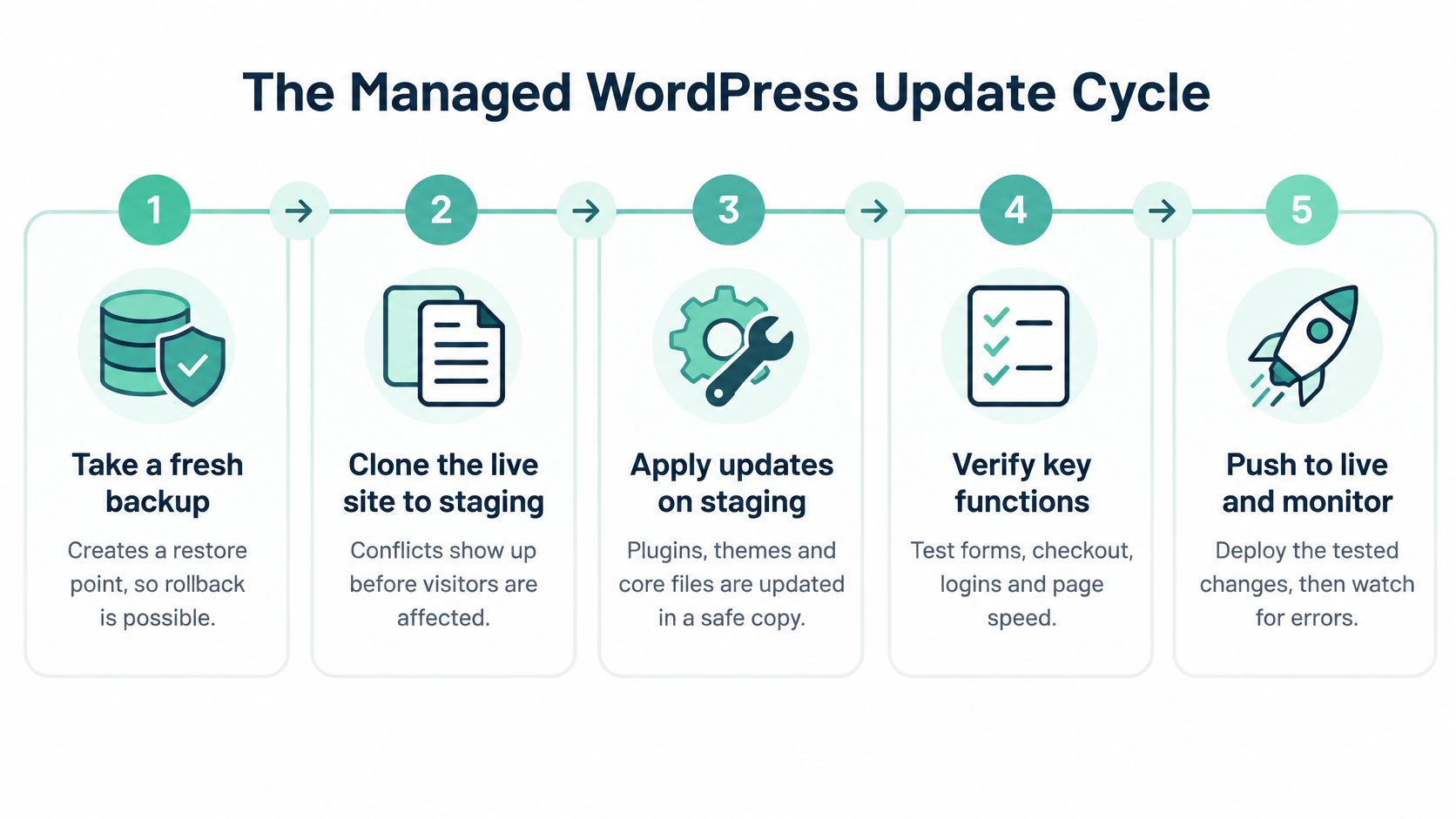
The update cycle
Staging works like a dress rehearsal: the whole show runs behind closed doors before anyone pays for a ticket. The routine looks like this.
- Take a fresh backup before any change, because rollback is impossible without a restore point.
- Clone the live site to staging, so a plugin clash appears before a customer sees it.
- Apply core, plugin and theme updates on that copy, leaving the shopfront untouched.
- Test forms, bookings, checkout and email. A healthy homepage hides most of the faults that cost you money, like a quote form that stops delivering without any warning.
- Push to live if the checks pass, or restore the backup if they fail.
- Watch logs and alerts afterwards. Each alert should point back to a safe rollback.
Faster patching shortens the window in which automated attacks use a flaw that's already public. A tested restore shortens the outage if the patch itself breaks the site. Match that routine to the WordPress hosting requirements your plan should meet before you sign, including PHP version, backup access and who can restore.
Score the shortlist
The ASD Annual Cyber Threat Report factsheet recorded more than 84,700 cybercrime reports in FY2024–25, about one every six minutes, and an average self-reported small-business cost of $56,600, up 14%. ABS figures in that same factsheet show 21% of businesses had a cyber security incident in 2024–25, and 17% of affected businesses reported service downtime.
Score each plan on tested rollback, off-site restore and incident ownership before you count features. Ask for written answers, then compare each host:
- Backups: Are they off-site, encrypted, independently restorable and kept for several points in time, and has a restore been tested within three months?
- Staging and deferral: Is a staging copy included, and can a risky update wait?
- Malware: Does the plan remove infections, or only email you a report?
- Support scope: Does it cover WordPress faults, or only a server that's "up"?
- Failed updates: Is there an automatic rollback when forms, checkout or email break?
- Incident ownership: Who investigates a suspected compromise, and how are logs and backups preserved?
- Data care: Are retention reviews and database housekeeping part of the service?
Under the Australian Privacy Principles, APP 11 requires an entity holding personal information to protect it from misuse, interference, loss, unauthorised access, modification and disclosure. In those principles, loss means accidental loss that is likely to result in unauthorised access or disclosure. A host can patch, monitor and keep recoverable backups. You still carry the duty to confirm those practices fit the enquiry forms and customer records on your site.
A feature list is a brochure. Written answers on rollback, restore tests and incident ownership are the contract you can actually use.
Features Included in a Managed Plan
Read a managed plan as four jobs: speed, safety, recovery and support. The same feature name can mean a nightly copy you can restore yourself, or a zip file nobody has ever opened.
| Feature | What It Does | Why It Matters | What to Ask Your Host |
|---|---|---|---|
| Page and object caching | Stores ready-made pages and database results | Faster loads for visitors across Australia | Which cache layer runs, and is it server-level? |
| Staging environment | Private copy of the live site for testing | Stops broken updates reaching customers | Is staging included, and on which plans? |
| Automatic core, plugin and theme updates | Applies patches on a schedule | Shrinks the window for exploits | Which updates are automatic, and which need approval? |
| Malware scanning and cleanup | Detects and removes infected files | Catches compromised plugins early | Is removal included, or only detection? |
| Firewall and DDoS protection | Filters hostile traffic before it reaches WordPress | Keeps the site reachable during attacks | Which attack types are covered? |
| Off-site encrypted backups | Nightly copies stored away from the server | Makes restoration possible after failure | How many restore points are kept, and are they tested? |
| Uptime monitoring | Checks availability around the clock | Alerts before customers notice | Who responds to alerts, and how fast? |
| WordPress-specific support | Help with themes, plugins and WordPress errors | Fixes faults that server-only support misses | Does support cover application issues, not just server faults? |
| Free SSL certificate | Encrypts traffic with HTTPS | Protects logins and enquiry forms | Is renewal automatic? |
| Performance tools | Image optimisation, CDN and PHP version control | Keeps mobile pages fast | Are these included or add-ons? |
How to read the last column
"Backups included" can mean one copy on the same disk the site already uses. Ask where the copy lives, how far back it goes, who is allowed to restore it, and when the last test restore happened. The same habit applies to malware (detection versus removal) and to support (a ticket about the server versus a broken WooCommerce email). Staging on every plan, not only the top tier, is the difference between a safe Friday update and a weekend outage. Plans that include a WordPress staging environment let you fail the test in private.
Test the speed claim from Australia
Hosting-side controls can include a tuned PHP worker pool, page and object caching, HTTP/2 or HTTP/3, TLS, compression and a data centre your visitors can reach. They only help when themes, plugins, images and third-party scripts are kept in check too. HTTP Archive treats the 75th percentile as the right threshold for page loads on mobile and desktop, so don't accept a single best-case lab score.
Record mobile Core Web Vitals on the live URL before you move. After caching and server tuning, measure that same URL and the same content. Track origin response time, cache-hit ratio, PHP errors and availability beside the vitals. Monitoring should spot a slowdown, logs should show whether the server or a plugin caused it, and backups should let you undo a bad release. Confirm retention, off-site location, how often restores are tested, and who can reach the copies. Backups should follow how critical the site is, with access limited so a stolen password doesn't wipe the safety net as well.
On UpTime Web Hosting WordPress plans, the stack includes free SSL, malware scanning, DDoS-protected firewalls, LiteSpeed, AccelerateWP and nightly encrypted off-site backups, with local support by phone on 1300, ticket or call-back.
Practical Examples for Australian Businesses
A Friday booking form in Brisbane
A physiotherapy clinic runs appointments through a WordPress booking plugin. On the old host, a Friday afternoon update rewrote the form and Monday's diary filled with phone calls instead of online bookings. On a managed plan the same update lands on staging first. The form test fails, the live site is never touched, and the clinic keeps taking bookings over the weekend.

Twenty-five client sites in Perth
A marketing agency looks after 25 WordPress sites. Before, each client had a different login and updates happened when someone remembered. With per-site staging, one update queue and a monthly health note, a single account manager patches the portfolio. Each client still has separate access, so one compromised password doesn't open the other 24 sites.
Enquiry records in Melbourne
A trades business collects names and phone numbers through a contact form. The Australian Privacy Principles are technology-neutral, and an APP entity must take reasonable steps to destroy or de-identify personal information once it isn't needed. Old submissions shouldn't sit in the database forever. The owner sets a monthly tidy-up: export what the job needs, delete the rest, and keep a written restore path. Hosting maintenance here is housekeeping and access reviews, not only a core update.
When a plugin is the breach
Say a vulnerable plugin is exploited on a site that stores customer names and phone numbers. The OAIC's data-breach guidance defines a data breach as unauthorised access to or disclosure of personal information, or its loss. Causes include malicious activity, human error and failures in security systems. The owner suspends the affected account, resets administrator credentials, scans the site, restores a known-clean copy and works out whether personal information was exposed. Logs and backups stay intact for the investigation instead of being overwritten by a hasty restore. Securing personal information under APP 11 is what cuts that risk before the weekend. Where those copies are stored matters too, which is why many Australian operators look at Australian data sovereignty hosting when customer records shouldn't leave the country without a decision.
The label on the plan didn't save any of these sites. The sequence did: test, keep an off-site copy, and name the person who acts.
Register your new domain name at competitive market prices including free domain add-ons like privacy, DNS Hosting, Custom Nameservers and Forwarding.
Always the best price and no nasty renewal price hikes.
Register A Domain Name
Who Should Choose Managed WordPress Hosting
Answer three questions. It takes under a minute.
- Does the site take enquiries, bookings or payments?
- Does downtime cost money or trust?
- Who would fix a broken update this week?
Two or three yes answers point to managed WordPress. One yes, with a person who already enjoys server work, may not.
A small business with no IT staff fits a managed plan because someone else watches updates and restores the site. A WooCommerce store needs caching, staging and rollback, because a broken checkout drops the sale while the customer is still on the page. An agency needs per-site staging and separate client access so patching doesn't become a second full-time job. A developer who likes Linux administration is usually better on a VPS or a managed VPS. A static brochure with no forms, no payments and no monthly update habit can stay on shared hosting. Paying for a facilities team to mind an empty room is hard to justify.
The OAIC APP guidelines set out active technical and organisational measures under APP 11, and they say personal information you no longer need should be destroyed or de-identified. A short internal note, who may export member data, how long form rows are kept, where backups sit and who approves a restore, turns hosting into that control. Trades and local service businesses often pair the site with a specialist build such as roofing web design from Bluelight, then still need a host that will patch and restore it.
The more a site earns, or the more personal information it stores, the stronger the case for managed hosting.
UpTime Web Hosting runs nightly encrypted off-site backups, 24x7 monitoring and local phone support on 1300, with no contracts and GST-inclusive pricing and no hidden fees. Start the seven-question checklist against your current host this week, before the next plugin prompt lands on a Friday.
UpTime Web Hosting runs WordPress on Australian servers with managed-style care around updates, malware scanning, encrypted off-site backups and local support, so the site you rely on for enquiries isn't left to a manual checklist. If you're weighing who should own rollback and restores, compare that against the questions in this guide. Visit UpTime Web Hosting and match a plan to the work you want off your desk.