You've built the site and it looks right on the host's temporary address. The logo sits where it should, the contact form lands in an inbox, and the product pages load quickly on a phone. All that's left is the domain, and that's the moment many small business owners open a registrar panel for the first time in years and start clicking.
Here's where it goes wrong. The fastest-looking option in that panel is to replace the nameservers with the ones your host supplied. Do that on a domain carrying Microsoft 365 or Google Workspace mail, a former developer's staging subdomain or a payment gateway's verification record, and the website can come up while something else stops working.
This walkthrough covers how to connect domain to website in Australia the slower, safer way. It starts with the decision most guides skip, then the records, the HTTPS work, and the checks that tell you the job is finished.
Table of Contents
- Connect a Domain to a Website in Australia
- Prepare the Domain Before You Change DNS
- Point the Domain at the Website
- Secure HTTPS Email and Canonical Hosts
- Fix a Domain That Still Will Not Resolve
- Keep the Domain in Your Business Name

Performance you can feel, backed by clients who depend on it. Read how our support and uptime create long‑term customer success.Power Your Business with Better Hosting
Connect a Domain to a Website in Australia
A domain opens a website when its DNS points at the server holding the site, and that server is configured to answer for the exact hostname someone typed. Registration, hosting and DNS are three separate jobs that get squashed into one sentence, and pulling them apart is most of the work.
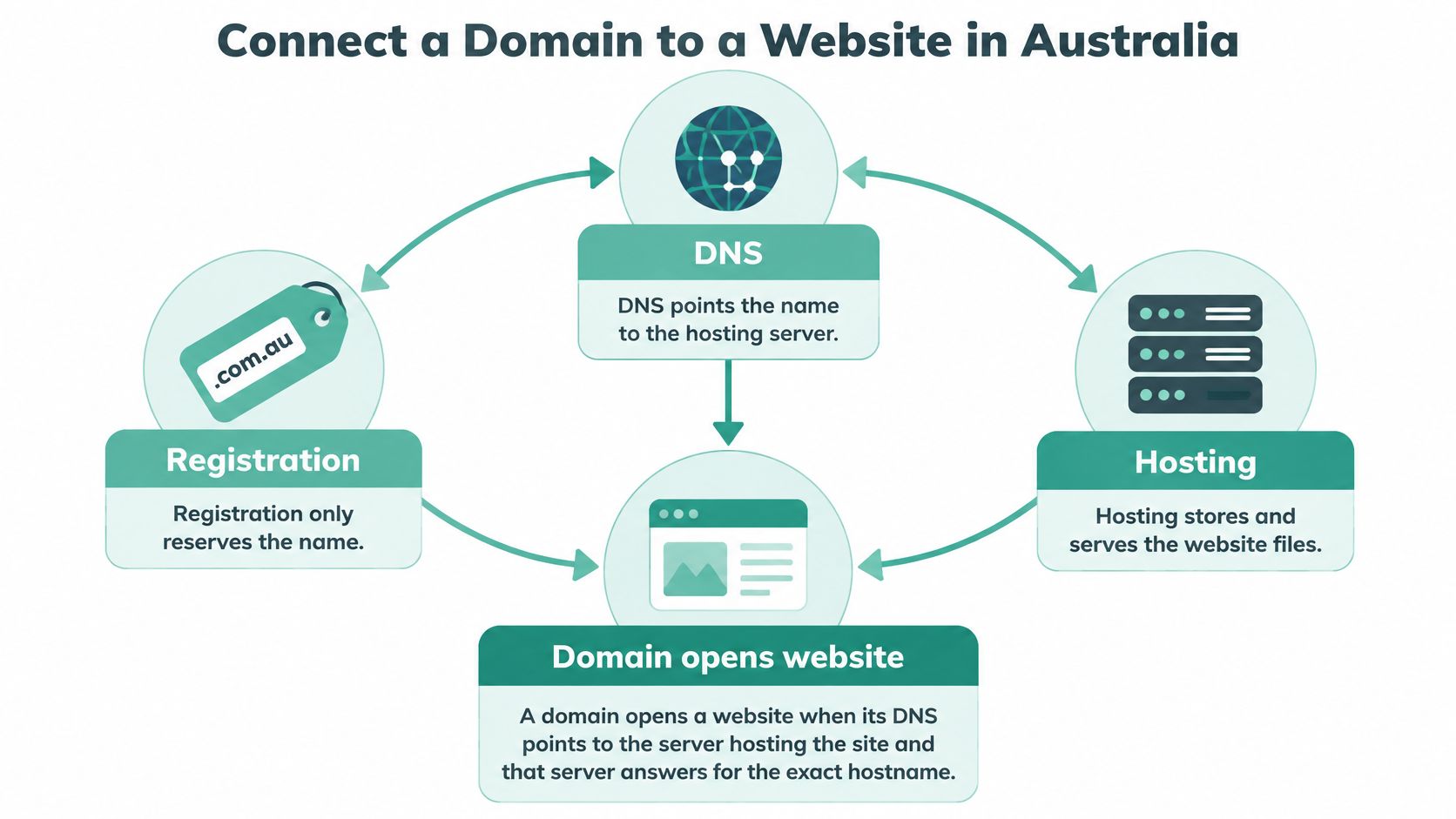
Registration reserves the name and nothing more. Hosting stores the files and serves them. DNS is the signpost between the two, and without it a site that looks perfect on the host's temporary URL stays invisible at its own address.
Australia's .au registry operator explains DNS as the internet's address book. A visitor types a domain, DNS directs the browser to the right web server, and neighbouring records route email and other services. The system is built for speed: during 2023–24 the .au DNS processed an average of approximately 7 billion queries every day, and auDA reports queries were processed within 250 milliseconds 99.99% of the time. Resolution feels instant when it's configured correctly, so any delay you meet later is caching or a wrong record, not slow internet.
Scale puts the risk in context. auDA's August 2025 registry statistics recorded 4,294,520 .au domain names under management, including 3,209,315 com.au names and 789,788 direct .au names. A large share of those domains carry both a website and business email, which is exactly why the next decision matters.
Choose the DNS Method Before You Open a Panel
Most connections come down to three routes, with two awkward cases at the bottom of the table. Pick the row that matches your situation, write the method down, and only then log in anywhere.
| Situation | Best method | What changes | Leave alone |
|---|---|---|---|
| New site and no email yet | Host nameservers | Both host nameservers | Nothing else yet |
| Email on Microsoft 365 or Google Workspace | Existing DNS | Apex A and www A or CNAME | MX, SPF, DKIM and DMARC |
| Host supplies only an IPv4 address | Existing DNS | A record to that IP plus www | Current nameservers |
| Second .au or com.au should redirect | Records plus a web redirect | Both names, one canonical host | A second live site |
| Old panel still looks editable | Fix delegation first | Only the zone WHOIS nameservers use | The unused DNS panel |
Host nameservers, when the domain is a blank slate. New site, no mailboxes, nobody else holding records on the name. Point the registrar at both nameserver values the host gave you and let the host run the whole zone.
Individual records, when something else already lives on the domain. Keep the registrar's nameservers and add an apex A record plus a www entry. Mail keeps flowing because you never touched the zone that routes it.
A web redirect, when you own a second name. Register the alternate .au or com.au, publish one canonical site, and send the other to it in a single hop. Two live copies split your links and create duplicate pages.
That middle row carries more weight than the internet usually admits. auDA's statement on .au as a marker of trust notes that seven in ten Australian small businesses with a domain use a .au address for their website or business email, so a nameserver swap can take out the shopfront and the inbox in the same minute.
Say a Melbourne bakery runs bakeryname.com.au with Google Workspace mail and a booking form on a small app at bookings.bakeryname.com.au. Its new host hands over two nameservers and a cheerful email. Replace the delegation without recreating MX, SPF, DKIM, DMARC and the subdomain, and the site stays up while the booking notifications die, usually by the next morning. Nobody notices until a customer rings to ask why nobody replied.
Before any of that, read what separates a domain name from web hosting. It takes ten minutes and explains why a registered domain can sit there doing absolutely nothing.
Expect changes to appear within the old TTL rather than everywhere at once. A site that loads on your laptop is not yet evidence that a customer in Perth can reach it.
Prepare the Domain Before You Change DNS
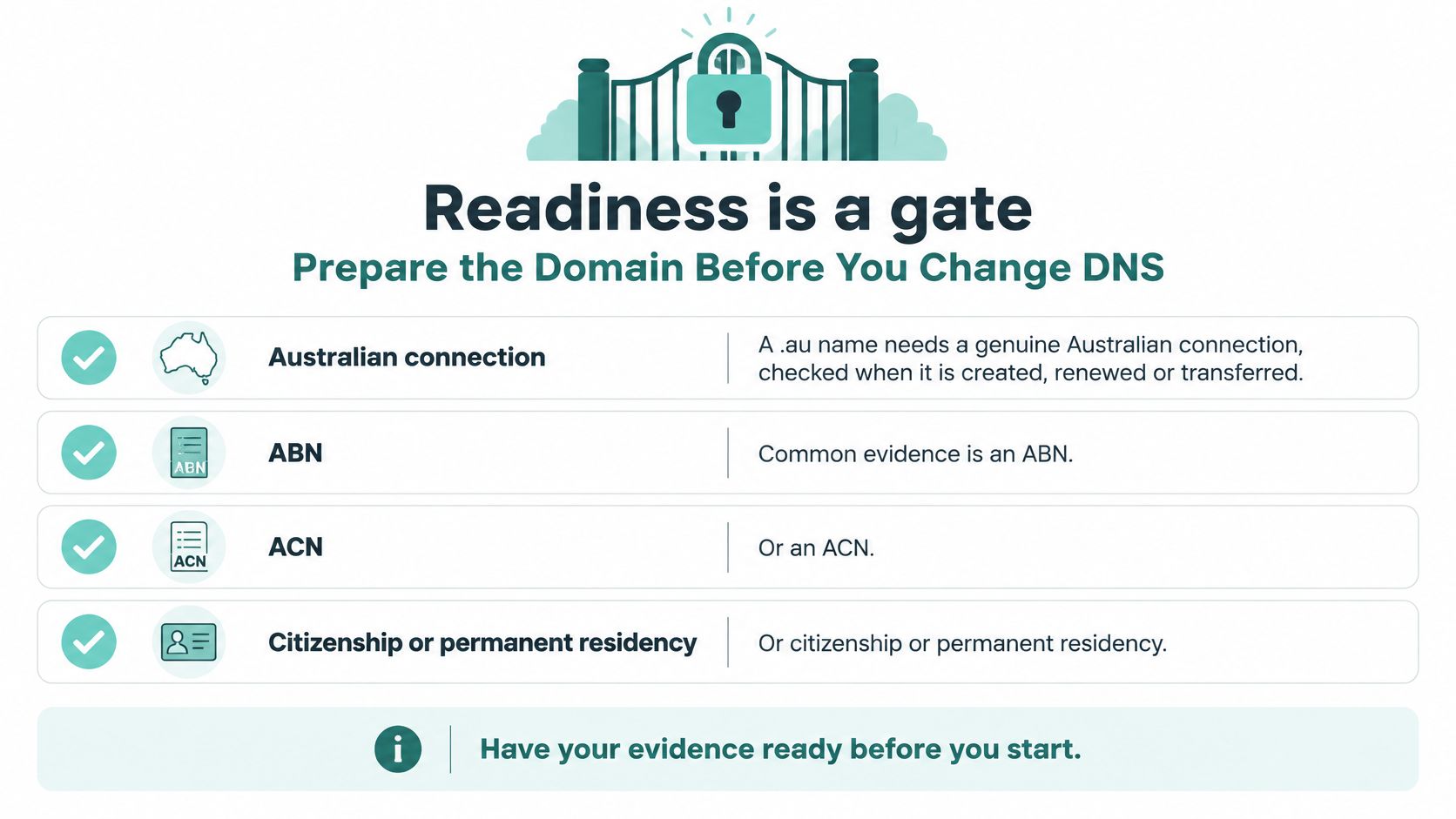
Readiness is a gate, not a formality. A .au name that fails an eligibility or ownership check won't move cleanly no matter how correct your records are, and the problem tends to surface weeks later at renewal.
Clear the Eligibility Gate First
auDA's Australian presence requirement is specific. A person or organisation registering a .au domain must demonstrate a genuine connection to Australia, and the provider must validate that connection when the domain is created, renewed or transferred to a new registrant. Common evidence is a valid Australian Business Number, an Australian Company Number, Australian citizenship or permanent residency.
So businessname.com.au isn't ready for DNS work until that validation is finished. Check who the registrant is while you're there. If the name sits in a former developer's account or under the wrong legal entity, transferring it later triggers the eligibility check again, so fix ownership before you touch records.
Copy What Works Before You Change It
- Two nameservers, minimum. auDA's registrar rules require at least two name servers listed for a .au domain, defined as the computers that resolve the domain name to IP numbers. Enter both ns1 and ns2 values from your host, then confirm them in auDA's WHOIS tool.
- If your host gave you an IP address instead, leave the nameservers alone and note the address. You'll add records rather than delegate.
- Export the current zone. Capture every A, CNAME, MX and TXT entry, SPF, DKIM and DMARC included. Keep the file somewhere you can find it at 9pm.
- Drop the TTL to 300 seconds and wait one full previous TTL interval before changing anything, so old caches expire quickly when you switch.
- Read the public record. WHOIS shows the registrar, registrant, technical contact, nameservers and DNSSEC status. If any of those don't match the plan, stop and fix them.
New to the paperwork? Domain registration requirements in Australia covers the eligibility evidence in more detail.
Hold point: don't change delegation until the new zone exists at the host and the old mail records are saved in a file you can open.
Host your website with our 5-star rated, cPanel website hosting plans.
Super fast servers, with security included and hosted in your choice of Australian Data Center.
View cPanel Plans
Point the Domain at the Website
The order of these steps matters more than the speed you do them at. Work top to bottom and resist the urge to skip ahead.
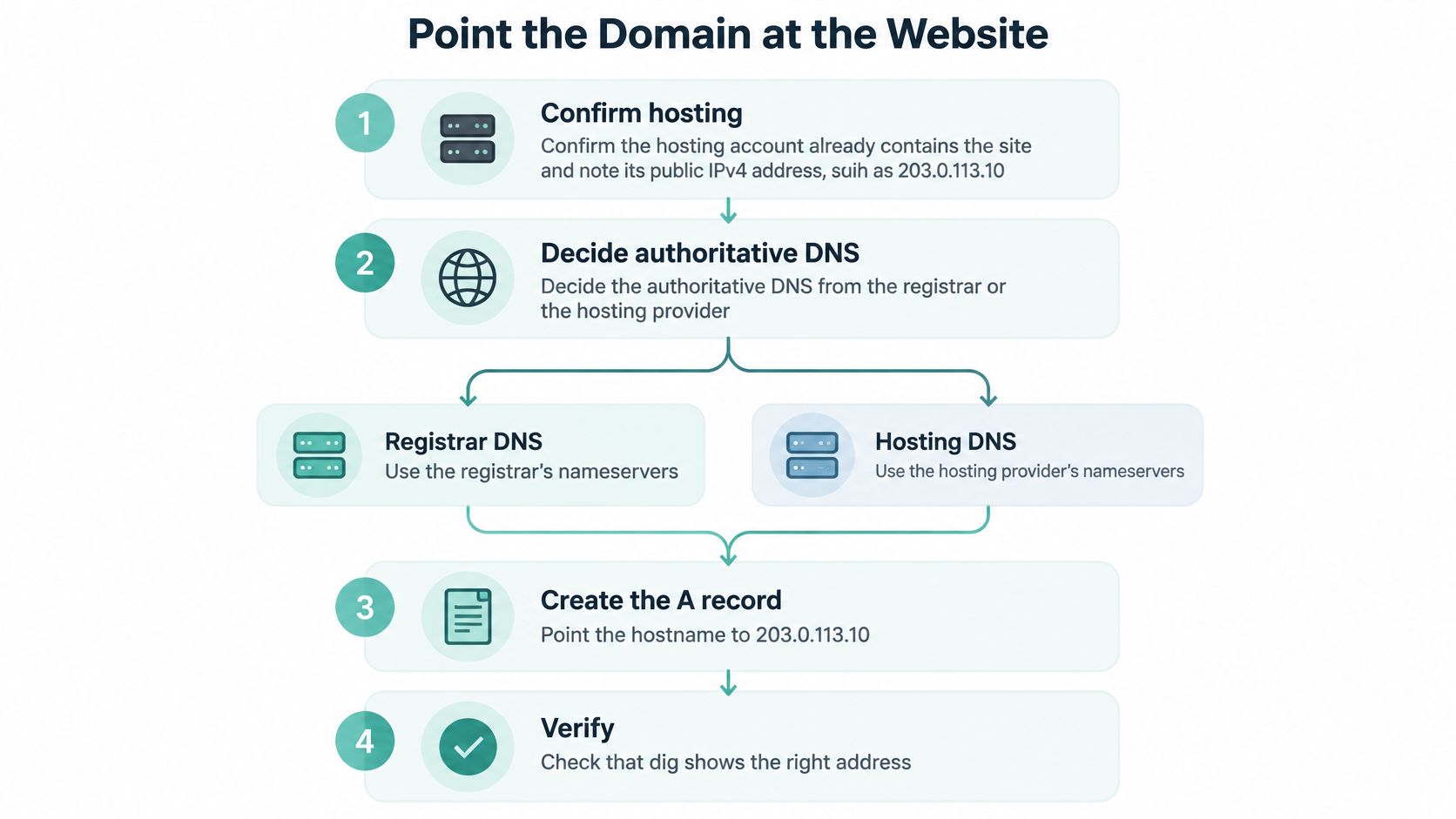
- Check the site is already live on the host. Load it on the temporary address first. DNS only announces something that exists.
- Confirm where DNS will be authoritative. Either keep the registrar's DNS and edit records there, or delegate the domain to the host's nameservers. Choose one and write it down.
- For delegation, replace the registrar's set with both host values, save, then watch WHOIS until those two names appear. This is the only step that changes who runs the zone.
- For records, leave delegation alone. Add the apex A record first, then deal with www.
- Re-enter the mail records exactly as they were before you save anything else.
- Register both hostnames with the website so the server stops answering with a default page.
- Verify from a network that isn't yours, using a public resolver or the dig command, then load both hostnames in a browser.
auDA's domain administration rules for licensing describe the mechanics without decoration. You need an apex A record for the bare domain, www as a CNAME to the apex or a second A record, and never both an A and a CNAME on the same hostname, because that produces an invalid and conflicting zone that resolvers will disagree about. An AAAA record does the same job for IPv6, but only add one if the host supplied an IPv6 address. MX records belong to your real mail provider and nowhere else unless the web server is configured to receive mail.
Lower the relevant TTL before you switch, commonly to 300 seconds, and restore something in the 3600 to 86400 second range once validation passes. That keeps the cutover quick and the steady state quiet.
The zone looks like this when the existing DNS provider stays in place and only the web records move:
| Host | Type | Value | TTL |
|---|---|---|---|
| @ (bakeryname.com.au) | A | 203.0.113.10 | 300 before, 3600 after |
| www | CNAME | bakeryname.com.au | 300 before, 3600 after |
| @ | AAAA | Host IPv6 address, only if supplied | 300 before, 3600 after |
| @ | MX | Values from the real mail provider | Unchanged, copy first |
| @ | TXT (SPF, DKIM, DMARC) | Copied from the current zone | Unchanged, copy first |
| @ | NS | ns1 and ns2 from the host | Set in the registrar nameserver panel |
The Mistake That Catches Most People
Someone changes the nameservers at the registrar, then keeps adding records in the old DNS panel, because that's the interface they know and the one with the familiar login. The delegation moved. The edits didn't. The new host serves an empty zone and the site never changes.
If WHOIS shows the new nameservers and the site is still old, stop editing records. You're in the wrong panel.
DNS works hierarchically: a resolver finds the authoritative nameservers first, then asks them for the website's address. Once delegation moves, the only panel that matters is the one those nameservers belong to. Everything else is a museum exhibit.
Keep the old hosting account running through all of this. It costs you one month and saves you a panicked afternoon if a form, a redirect or a mailbox turns out to be wired to the old server.
Secure HTTPS Email and Canonical Hosts
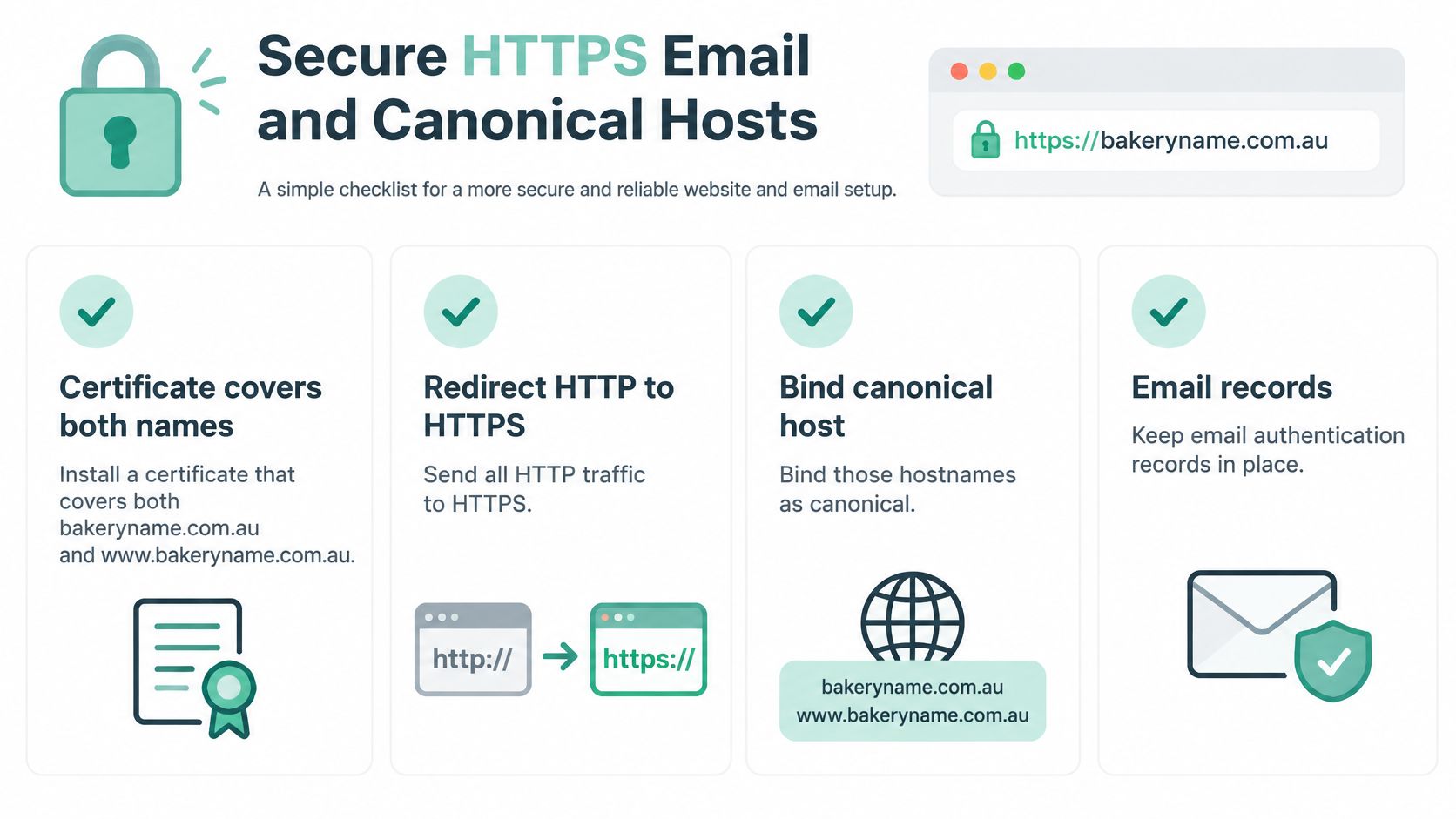
A nameserver change can put your website online while breaking email or an extra subdomain. Before calling the move complete, check that HTTPS, mail and the preferred version of your domain all work.
One Certificate Covers Both Names
Use a website SSL certificate covering your domain and www and configure the web server to recognise both hostnames. Then redirect HTTP traffic to HTTPS. If the certificate or server configuration covers only one hostname, visitors may see a certificate warning or the server's default site, even when DNS points to the right address.
DNSSEC Rewards Patience
DNSSEC adds signed DNS data that lets validating resolvers check whether DNS responses have been altered. If you enable it, publish the DS record at your registrar only after your DNS provider has created the matching DNSKEY. A mismatch can prevent some visitors from resolving the domain. Check the configuration with a DNSSEC validator before and after activation.
Then Mail and Canonical Hosts
A nameserver swap can remove the MX and TXT records that your email provider needs. Send a test message in both directions, and confirm the active DNS zone still has the correct MX, SPF and DKIM records. If you use Microsoft 365, Google Workspace or another mail service, keep its records intact when changing DNS.
Choose either the bare domain or www as the canonical host. Redirect the other to it in one step, then check that the contact page, checkout and forms use the intended Australian domain.
Keep the old hosting account running until the new site, HTTPS, email, redirects and key application paths work. A careful changeover means checking the new DNS zone, lowering the TTL before the switch where possible, updating delegation or records, and monitoring resolution and server logs. Retire the old setup only after those checks pass, then restore a longer TTL.
Fix a Domain That Still Will Not Resolve
"It works on my computer" has probably wasted more afternoons in Australian web hosting than any other sentence. Your laptop holds a cache, and yours is the one cache that already knows the answer.
A visitor in another state on a different network is the only test that counts.
Start by separating propagation from an outage. If one device shows the new site and a phone on mobile data shows the old one, caches still differ and nothing is broken. Compare lookups from two independent resolvers, then wait out the old TTL instead of editing records again and compounding the confusion.
| Symptom | Likely cause | Fix |
|---|---|---|
| New site on one computer only | Resolver or local cache | Compare lookups elsewhere and wait out the old TTL |
| Old or parking page everywhere | Live zone was not edited | Read nameservers in WHOIS and edit only that zone |
| www works but the bare domain fails | Missing apex A record | Add the A record; never CNAME the apex |
| Email stops after the switch | MX removed with the nameservers | Restore the mail provider's MX, SPF and DKIM |
| Certificate or default-site warning | Name missing from the certificate or vhost | Cover apex and www, then redirect to HTTPS |
| Some users cannot resolve at all | Stale or mismatched DS record | Correct or remove the DS and validate again |
Most of these are one cause wearing different clothes. A bare domain that fails while www loads is a missing apex record, not a broken host. A certificate warning that appears once the correct address resolves is a hostname mismatch in the certificate or the virtual host, not slow DNS. Mail that dies the hour after a nameserver swap means MX, SPF and DKIM were never copied, and no amount of website tweaking will bring it back.
The guide to DNS propagation explains the timing side in plain terms if you're unsure whether you're waiting or troubleshooting.
For the security symptoms, the Australian Cyber Security Centre's small business guidance describes HTTPS as the encrypted version of HTTP and recommends it because it protects information such as passwords and payment-card details from interception. The same guidance asks businesses to secure logins with multi-factor authentication, update content management systems and plugins regularly, and keep backups they can restore.
Keep a rollback list next to you while you work: the exported zone file, the previous nameservers, the previous TTL and the old host still running. Rolling back is a five-minute job with those four things and a research project without them.
Register your new domain name at competitive market prices including free domain add-ons like privacy, DNS Hosting, Custom Nameservers and Forwarding.
Always the best price and no nasty renewal price hikes.
Register A Domain Name
Keep the Domain in Your Business Name
Five things should be true before you close the laptop.
- You are the registrant. The business, not a former developer's trading name, appears in WHOIS.
- The live zone matches the plan. Either the two intended nameservers are listed, or the intended A record is answering.
- HTTPS works on both hostnames, and one of them is the canonical address you publish.
- A test message arrives in your inbox, and a reply goes back out.
- The working records are saved outside the DNS panel, with a longer TTL restored.
auDA's research into why Australians choose .au found that half of Australian consumers will only shop at a website ending in .au, while three in four are more likely to trust a business with a .au domain. Keep the public site on the Australian name you tested, rather than leaving a redirect as the only address customers ever see.
If the domain still sits in someone else's account, domain name ownership in Australia explains how to move it to the business before the next renewal. We can register and secure a domain name instantly, and our hosting configuration support covers domain and DNS changes when you'd rather not edit the zone alone.
UpTime Web Hosting keeps the domain, the DNS and the Australian hosting in one place, so the records you just tested are managed where the site lives. With servers in Sydney, Melbourne, Brisbane and Perth, free SSL and hosting configuration support that covers domain and DNS changes, a nameserver switch or a new .au registration becomes something you can work through rather than guess at. Visit UpTime Web Hosting when you're ready to register the name or move the site across.