In short
A website’s hosting provider is usually found by checking, in order, the owner’s account records, the domain’s nameservers, its A and AAAA records, and the IP network’s RDAP entry. No single public result is conclusive because the registrar, DNS provider, CDN and underlying web host can be different organisations.
Key takeaways
- Current invoices, support emails and saved account logins provide stronger evidence than a public hosting checker.
- Nameservers identify the organisation operating authoritative DNS, which may not be the organisation hosting the website.
- An A or AAAA record shows the public IP destination, while an IP RDAP lookup identifies the registered network holder.
- ICANN made RDAP the definitive source for gTLD registration data on 28 January 2025, and auDA introduced RDAP for .au on 2 March 2026.
- A CDN or reverse proxy may deliberately conceal the origin server, so its network appearing in a lookup does not identify the contractual web host.
Table of contents
- What is the fastest way to find who hosts a site?
- What does each lookup result actually prove?
- How do I check the nameservers and IP address?
- Why does the lookup show a CDN or network provider?
- What should I do if I am trying to recover my own website account?
- How do I prepare for a hosting move once I find the provider?
- What else do website owners ask?
- What is the next step?
This guide is for owners, developers and agencies checking infrastructure they manage or have permission to assess. It uses account records, public registration data and passive DNS queries only. It does not require port scanning, bypassing a proxy or attempting to access another party’s account.
What is the fastest way to find who hosts a site?
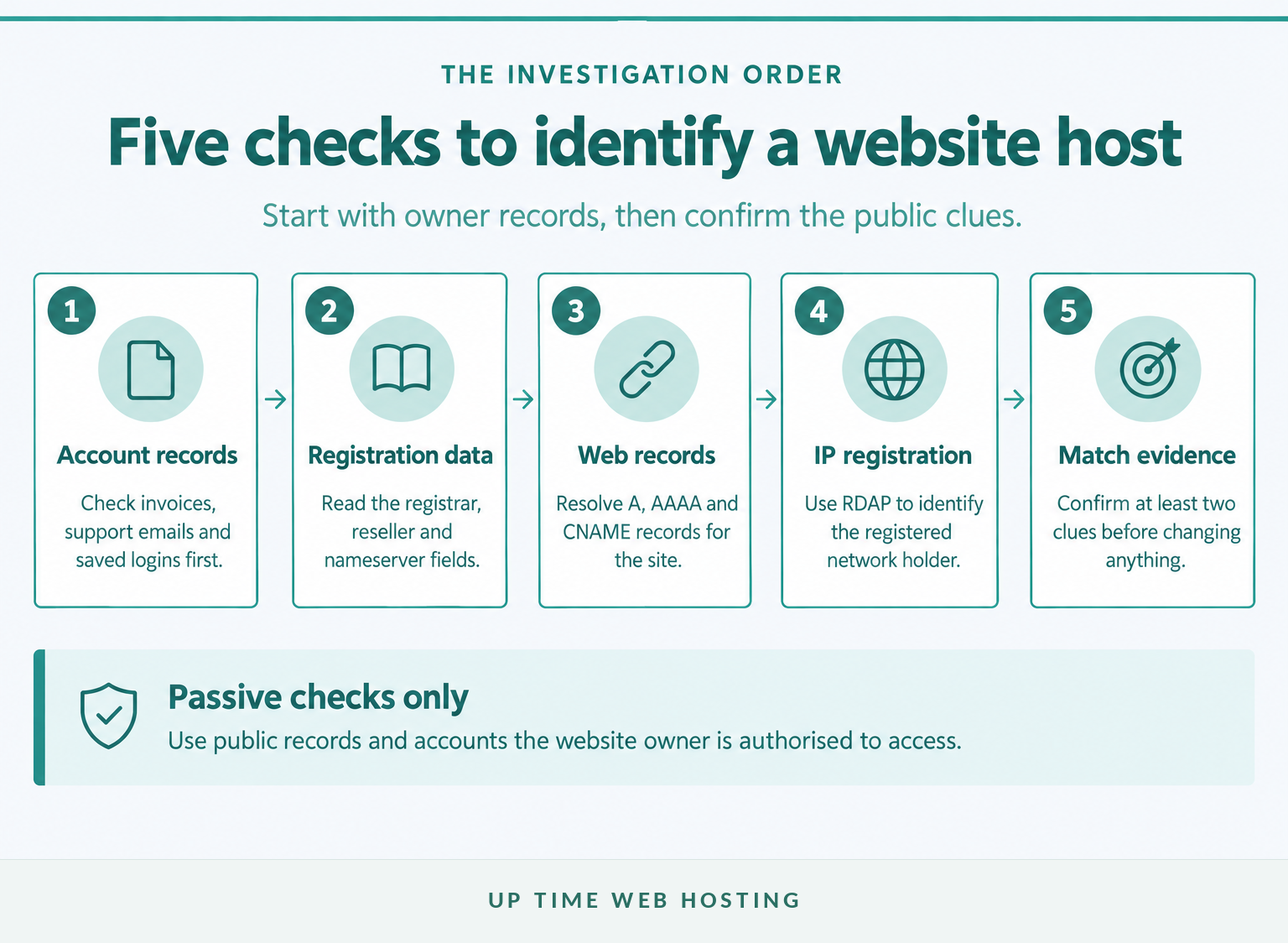
Start with records controlled by the website owner, then use public technical records to confirm the answer. A hosting checker is useful for a first pass, but its result should be treated as a clue rather than proof.
- Check account records. Search invoices, support emails, card statements, password managers and browser bookmarks for the domain name, hosting, server, cPanel, Plesk, renewal or migration.
- Check domain registration data. Look for the registrar, reseller and nameservers, remembering that the registrar may not host the website.
- Query the nameservers. The NS records show who operates authoritative DNS or which branded nameservers the domain uses.
- Resolve the website records. Check the A, AAAA and CNAME records for both the root domain and its
wwwhostname. - Look up the returned IP. Use RDAP to identify the organisation holding the address range and its autonomous system information.
As of November 2026, RDAP is the current registration-data standard for generic top-level domains. Australian readers can use the official auDA WHOIS guide for a .au domain; auDA lists the registrar, possible reseller and nameservers, but also explains that nameservers can belong to a separate DNS or hosting provider.
Do not act on one result. A current invoice plus matching branded nameservers may be convincing, while an IP network result alone may identify only the upstream infrastructure company.
The fastest reliable answer comes from matching account records with DNS and IP evidence, not trusting one hosting checker.

Performance you can feel, backed by clients who depend on it. Read how our support and uptime create long‑term customer success.Power Your Business with Better Hosting
What does each lookup result actually prove?
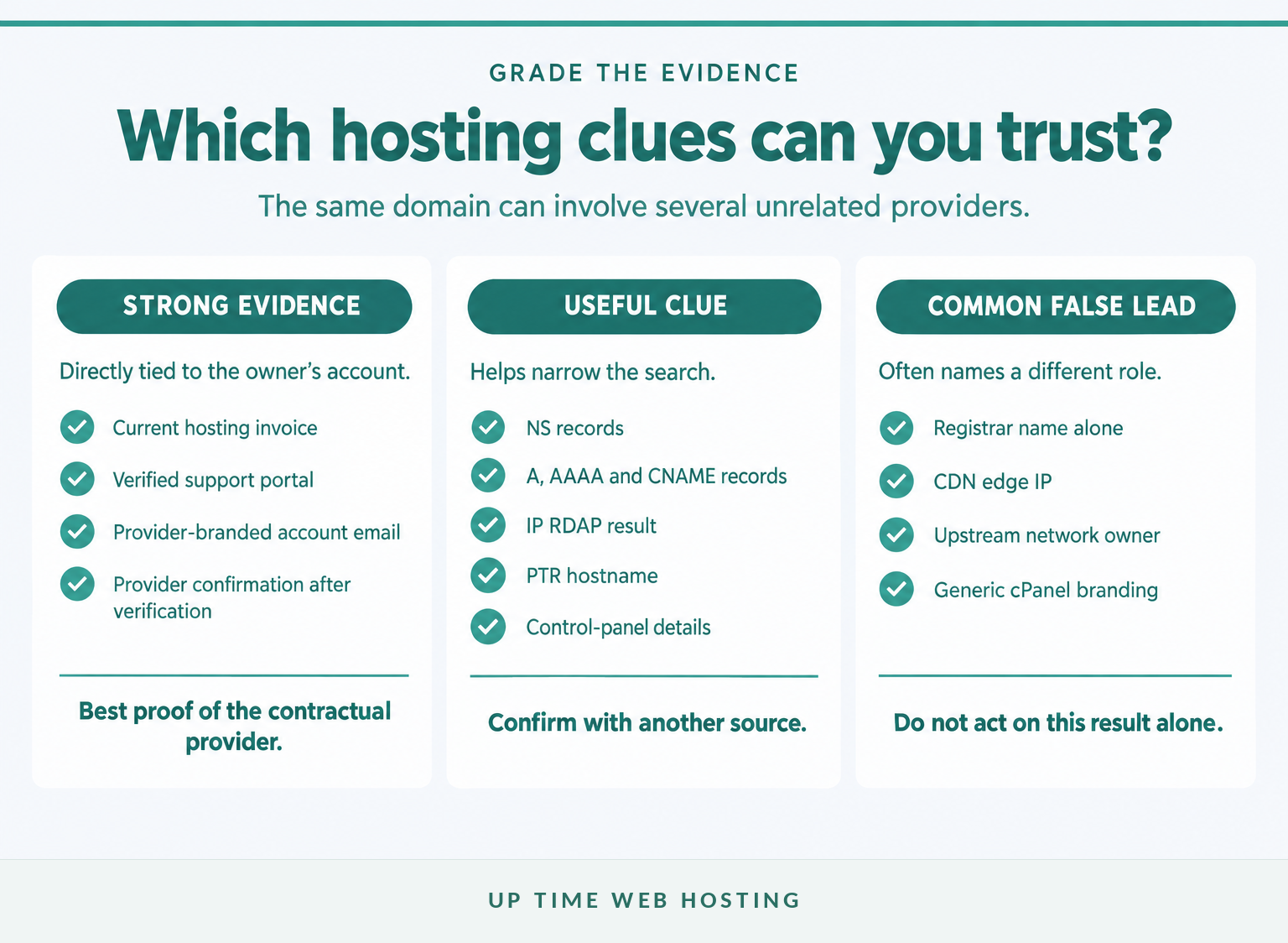
Each result identifies one role in the website’s infrastructure, not necessarily the company that sells hosting to the owner. Label the evidence before deciding who hosts the site.
If the difference between a domain, DNS and a server is unclear, start with what web hosting means.
| Evidence | What it usually tells you | What it does not prove |
|---|---|---|
| Current invoice or support portal | The company billing or supporting the account | That the website still points to that service |
| Domain RDAP or WHOIS result | Registrar, registration status and nameservers | The web hosting provider |
| NS records | The authoritative DNS operator | The provider running the web server |
| A, AAAA or CNAME record | The public destination for web traffic | The origin server when a proxy is active |
| IP RDAP or ASN result | The registered network holder | The reseller or company named on the owner’s invoice |
| PTR or reverse DNS result | A hostname assigned to the IP, if one exists | Ownership of every website using that IP |
The ICANN Lookup FAQ describes registration results such as the sponsoring registrar and authoritative data source. Those fields concern registration. They do not automatically identify the organisation storing the website files or providing the hosting account.
A cPanel login, backup archive or control-panel email is another useful clue, but it identifies the platform before it identifies the provider. The distinction is covered in the guide to what cPanel hosting means.
A registrar, DNS operator, CDN, network owner and web host may all be different, so label each clue before drawing a conclusion.
How do I check the nameservers and IP address?
Query the NS records first, then the A, AAAA and CNAME records for the website. Reverse DNS and RDAP can then add context to the IP address that appears.
Windows includes nslookup, documented by Microsoft. macOS and Linux commonly provide dig, documented in ISC’s BIND manual.
Windows
“text nslookup -type=NS example.com nslookup -type=A example.com nslookup -type=AAAA example.com nslookup -type=CNAME www.example.com nslookup 203.0.113.10 “
macOS or Linux
“text dig NS example.com +short dig A example.com +short dig AAAA example.com +short dig CNAME www.example.com +short dig -x 203.0.113.10 +short “
Replace example.com with the domain being checked. Replace the reserved example IP with an address returned by the A or AAAA query.
Read the results this way:
- NS records may carry a recognisable provider name, but custom nameservers can hide that branding.
- A records return IPv4 addresses and AAAA records return IPv6 addresses.
- CNAME records can show that
wwwpoints to another hostname, platform or delivery network. - PTR results may reveal a server naming convention, but many IP addresses have no useful reverse record.
- RDAP results identify the organisation registered for the address range. APNIC’s RDAP guidance explains how an IPv4 or IPv6 address can be queried for registration information.
If expected records are missing, use the DNS record troubleshooting guide before assuming the hosting account is gone. If the domain was changed recently, cached answers may remain visible during DNS propagation.
Nameservers show who runs DNS, while A, AAAA, CNAME, PTR and RDAP results help trace where web traffic goes.
Host your website with our 5-star rated, cPanel website hosting plans.
Super fast servers, with security included and hosted in your choice of Australian Data Center.
View cPanel Plans
Why does the lookup show a CDN or network provider?
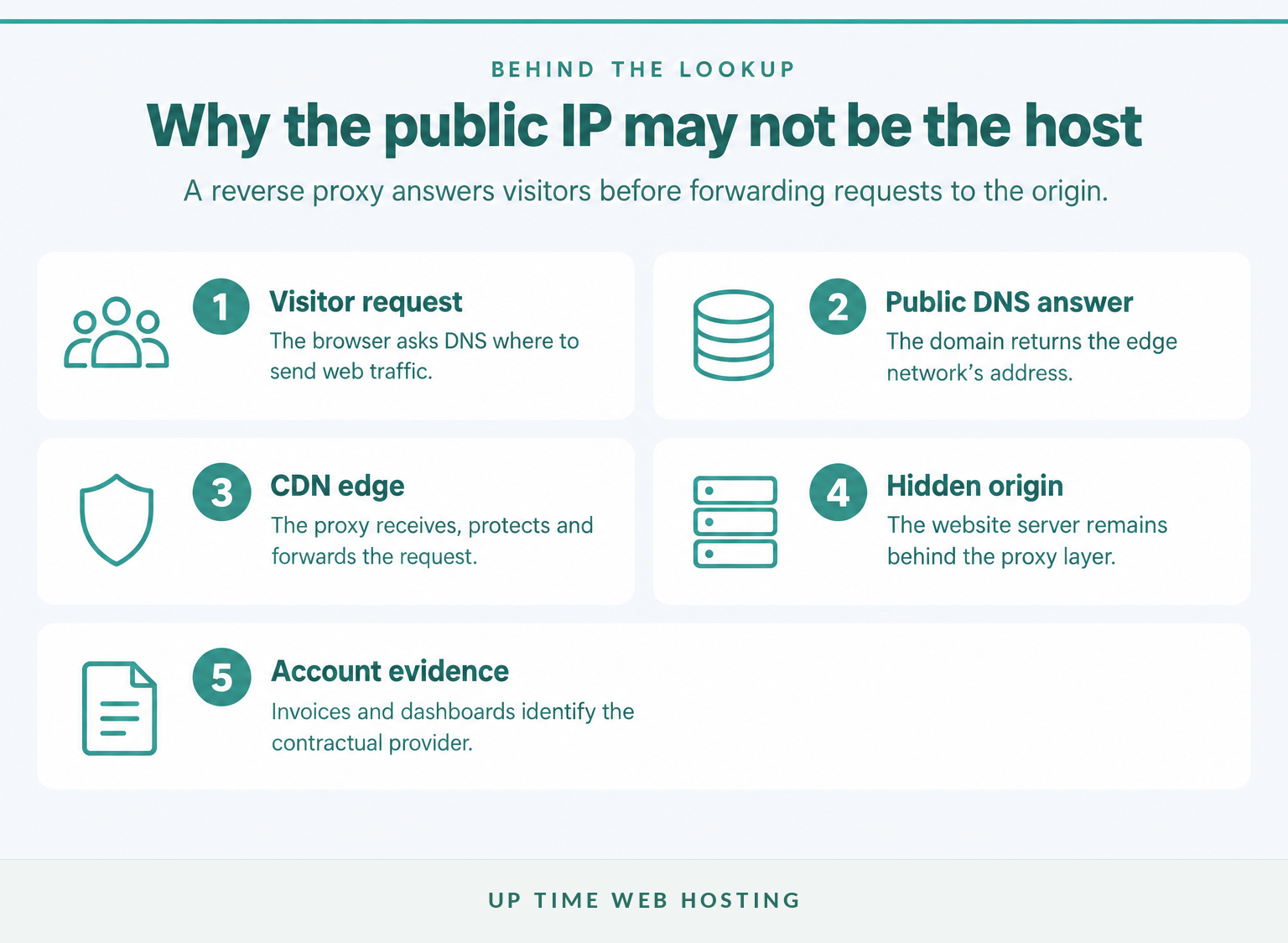
A CDN or reverse proxy can sit between visitors and the origin server, so the public DNS result points to the edge network. The result can be technically correct while still failing to identify the company that stores the site or bills its owner.
For example, Cloudflare’s DNS documentation explains that a proxied A, AAAA or CNAME record returns Cloudflare anycast addresses instead of the origin IP. This protects and accelerates the site while concealing the server behind the proxy.
A similar mismatch can occur with cloud infrastructure, reseller hosting and agencies. The IP range may be registered to an infrastructure operator, while the website owner pays a reseller or managed service provider.
For a site under the reader’s control, use the CDN dashboard, DNS zone, hosting account and invoices to identify the origin provider. For an unrelated site, stop at the public attribution rather than trying to uncover a deliberately concealed origin server.
A CDN result identifies the public edge, not necessarily the origin server or the company that invoices the site owner.
What should I do if I am trying to recover my own website account?
Account recovery should begin with business records because they can identify the company holding the contractual relationship. Public DNS and IP data should be used to confirm the records or narrow the search.
Work through this checklist:
- Search every relevant inbox for the domain name and terms such as hosting, server, cPanel, Plesk, renewal, backup, SSL and migration.
- Check business card and bank statements for recurring annual or monthly technology payments.
- Review browser bookmarks, saved passwords and password-manager entries for hosting or control-panel logins.
- Ask the former developer or agency for the hosting provider, account owner, control panel, DNS access and latest backup.
- Use registration data to identify the registrar, then ask whether a reseller is recorded for the domain.
- Prepare proof that the business controls the domain or account before contacting support.
A provider may be unable to disclose account details until the requester passes its verification process. If a former employee or developer opened the account, the provider may require company records, payment evidence or access to the registrant email before changing control.
Do not cancel a suspected old service or replace nameservers merely to test a theory. First obtain a full backup and confirm where the website, database and email are running.
For account recovery, private business records are more decisive than public technical lookups.
How do I prepare for a hosting move once I find the provider?
Confirm the full service inventory before moving or cancelling anything. A website can use one company for registration, another for DNS, another for email and a fourth for web hosting.
Record at least:
- website files and the document root
- database type, name and credentials
- content management system and version
- DNS zone and nameserver access
- email domains, mailboxes and forwarding rules
- SSL certificates, scheduled tasks and redirects
- the latest restorable backup
Build and test the replacement environment before changing DNS. Keep the old account active until the public site, forms, databases, scheduled tasks, SSL and email have been tested from outside the business network.
The detailed guide to migrating a website to a new host explains how to prepare the backup, cut over DNS and verify the new service. If the site needs a new home, contact Up Time Web Hosting with the inventory to check whether its Australian cPanel Website Hosting suits the website and email requirements before making changes.
Do not start a migration until the website, database, DNS, email and backup requirements are written down.
Register your new domain name at competitive market prices including free domain add-ons like privacy, DNS Hosting, Custom Nameservers and Forwarding.
Always the best price and no nasty renewal price hikes.
Register A Domain Name
What else do website owners ask?
The following questions cover DNS providers, reverse IP lookups and hosting costs. Each answer describes what the relevant result can and cannot establish.
How do I find my DNS hosting provider?
Query the domain’s NS records and note the nameserver hostnames. Those names usually identify the organisation operating authoritative DNS, but that organisation may be the registrar, web host or a separate DNS service. For a .au domain, the official auDA lookup also lists nameservers and the registrar of record.
How to check host name by IP?
Run a reverse DNS query against the IP address using nslookup IP_ADDRESS or dig -x IP_ADDRESS +short. A returned PTR hostname can suggest the network or server naming scheme, but many addresses have no useful PTR record, and a PTR result does not prove which company bills the website owner.
How much does it cost to get a website hosted?
Website hosting cost depends on storage, processing limits, email, backups, security, support and whether migration is included. Compare the renewal price in Australian dollars, including GST, rather than only the introductory rate. A useful quote should also state resource limits, backup retention, support scope and any extra migration or restoration fees.
DNS and IP tools provide clues, but account records remain the best proof of the provider that serves the owner.
What is the next step?
Write down the registrar, nameservers, web IP, IP network holder and any account evidence, then mark each item as confirmed or only a clue. If two sources agree, contact the likely provider through its published support channel and ask it to verify the account using authorised ownership details.
If the evidence points to an ageing or unsupported setup, give Up Time Web Hosting the domain, current control panel, website platform, database and email requirements for a migration check before changing DNS.
Do not change DNS or cancel the old service until the provider, backup and migration plan are confirmed.