Your website's still loading, but the enquiry form hasn't sent anything through since yesterday. Your developer says the hosting needs attention, your hosting invoice is due, and you're not sure whether to renew, upgrade or move. Meanwhile, customers are trying to book, buy or find your phone number.
Choosing web hosting for business starts with those everyday dependencies, not a storage allowance. The right plan gives your software enough resources, makes maintenance someone's responsibility and provides a workable recovery path when an update, outage or security incident interrupts trade.
Table of Contents
- Business Hosting Types Compared at a Glance
- Recommended Setups for Common Australian Small Businesses
- Why Server Location and Speed Matter for Australian Customers
- Security and Backups as Everyday Business Processes
- Local Support, Business Email and Spam Act Obligations
- Total Cost of Business Hosting Beyond the Monthly Fee
- Confirm Your Hosting Shortlist Before You Commit

Performance you can feel, backed by clients who depend on it. Read how our support and uptime create long‑term customer success.Power Your Business with Better Hosting
Business Hosting Types Compared at a Glance
Business web hosting rents space on a server that stays online so customers can reach your website, email and online forms at any hour. Think of it as choosing premises for your digital operations. You need the right building, but you also need to know who maintains it.
Shared hosting is an apartment block where the building manager handles server maintenance. A VPS is closer to a townhouse where you're responsible for upkeep unless you pay someone to manage it. Managed WordPress is a serviced apartment tuned for a particular purpose, while Windows hosting is the right building when your application requires Microsoft tools.
Business hosting types compared
| Hosting type | Best for | Level of control | Who maintains the server | Typical starting point |
|---|---|---|---|---|
| Shared cPanel hosting | Brochure sites and small business websites with modest traffic | Limited to provider settings and cPanel tools | Hosting provider | One to a few websites |
| Managed WordPress hosting | WordPress sites needing updates, plugins and speed tuning | WordPress-specific settings and staging tools | Hosting provider, including core stack and WordPress tools | One WordPress site |
| VPS hosting | Growing sites with custom software or heavier, steady traffic | Root or administrator access to a dedicated slice of a server | Business or its IT partner, or a managed VPS provider | Dedicated virtual resources |
| Windows ASP.NET hosting | ASP.NET, classic ASP and MSSQL applications | IIS and .NET settings, databases | Hosting provider or the business's developer | One Windows application and its database |
Say an electrical contractor needs service pages, project photos and an enquiry form. Shared cPanel hosting can handle that workload without making the owner a server administrator. Moving it to an unmanaged VPS adds responsibility without necessarily solving a business problem.
A WordPress booking site has a different maintenance burden. Managed hosting can simplify its operation, but managed doesn't automatically mean every plugin, custom integration or content change is covered. Establish the boundary between server management and application maintenance before buying.
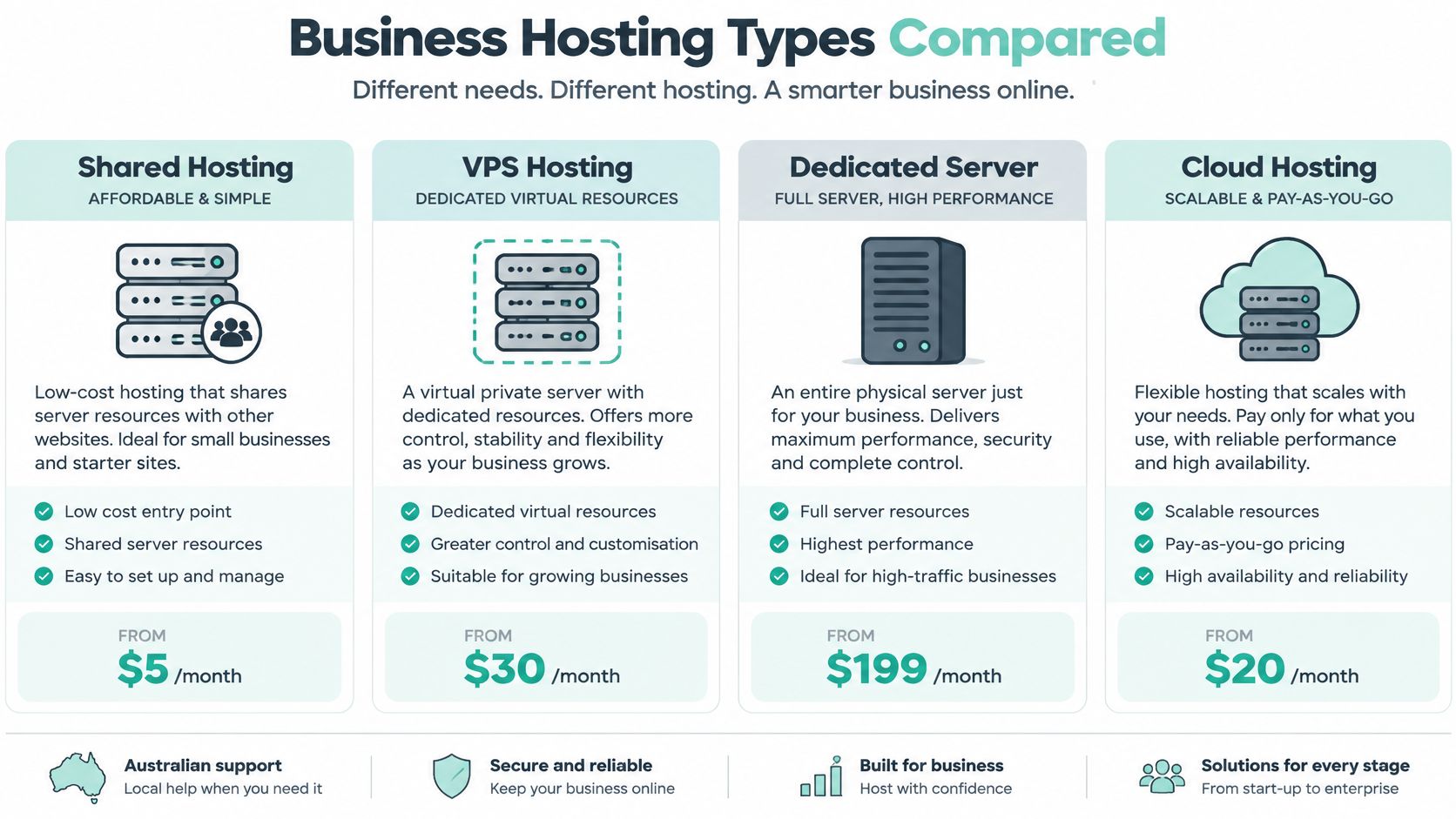
The broader infrastructure options are illustrated below. These categories describe how resources are supplied, whereas WordPress and Windows hosting also describe the software environment.
Choose responsibility before capacity
At 30 June 2025, Australia had 2,729,648 actively trading businesses, including 994,178 employing businesses, according to the Australian Bureau of Statistics. That includes a substantial non-employing business population, for whom taking on server administration may be an unnecessary burden.
A VPS makes sense when you need custom software, privileged access or more predictable resources. A dedicated server gives you the physical machine rather than a virtual allocation, but that doesn't remove maintenance obligations. The VPS versus dedicated hosting guide explains that infrastructure decision in more detail.
Before choosing a type, answer these questions:
- Sites: How many websites need hosting, and should they have separate accounts?
- Software: Are you running WordPress, a custom application or a Windows-dependent system?
- Demand: Do you expect occasional visitors, advertising-driven spikes or steady application activity?
- Maintenance: Who will patch, monitor and recover the server and its applications?
Buy the environment your software needs and your team can operate. More control is useful only when someone knows what to do with it.
Recommended Setups for Common Australian Small Businesses
Match hosting to the consequence of being unavailable, not just visitor numbers. A quiet website can still be essential if it's where customers request quotes or book appointments.
Recommended hosting setups by business scenario
| Business scenario | Likely hosting type | Key configuration | Why this fits |
|---|---|---|---|
| Tradie or local service with brochure site and enquiry form | Shared cPanel hosting with WordPress | SSL, scheduled backups, business email accounts | Revenue depends on enquiries, so reliability and email matter most |
| Cafe or clinic taking online bookings | Managed WordPress hosting | Booking plugin tested on staging, automatic updates, tested backups | Downtime at booking time loses appointments directly |
| Online retailer with a product catalogue | Managed WordPress hosting with WooCommerce | Staging site, object caching, tested backups, monitored checkout | A failed checkout or update costs sales immediately |
| Agency or developer hosting client sites | Multi-site cPanel hosting or VPS | Separate accounts per client, isolated resources, client-level backups | Clients need isolation, clear access control and their own restore points |
| Business running an ASP.NET booking or line-of-business app | Windows ASP.NET hosting with MSSQL | Framework version, MSSQL backups, IIS settings | The application requires a compatible Windows stack |
| Growing company with custom software and steady traffic | VPS or dedicated server | Root access, monitoring, scheduled patching, off-site backups | The business needs control and has someone responsible for operations |
A Melbourne cafe should test its booking workflow, not merely confirm that its homepage opens. Can a customer select a sitting, receive confirmation and amend the booking? A Brisbane retailer needs equivalent checks for stock, shipping, payment and order notifications.
For a Perth agency, account structure matters as much as capacity. Putting unrelated clients into a single account complicates access, troubleshooting and individual restores. Multi-site hosting isn't automatically separate-account hosting, so design the client boundaries deliberately.
Judge the business consequence
The CPA Australia small-business survey market summary reports that 44% of Australian small businesses receive more than 10% of their revenue from online channels. Direct online sales matter, but they aren't the only reason a website deserves dependable hosting.
A brochure site establishes credibility and provides contact details. Its owner generally benefits more from straightforward administration than a complex infrastructure upgrade. A lead-generation site needs working forms, dependable notification delivery and a way to recognise when enquiries stop.
An online booking system also needs accurate availability and confirmation messages. An e-commerce store adds payment, stock and order-processing dependencies. A business-critical application may require coordinated recovery across the application, database and connected services.
A plumber losing a day of enquiries carries a different risk from a retailer losing a Saturday of orders. Neither business should choose hosting from storage capacity alone.
The plumber may be able to keep working while publishing an alternative contact method. The retailer might need immediate technical intervention because customers can't complete purchases. That difference should influence support arrangements and recovery priorities before it influences server size.
Use a consequence-based buying method
- List what stops working. Consider a hypothetical day without the site. Include bookings, forms, customer access and staff workflows, not just sales.
- Name the fixer and response expectation. Identify whether the host, developer or internal IT person owns each failure. Agree what urgent means for the business.
- Choose the simplest setup that covers those answers. Don't buy an unmanaged server to avoid a modest managed-service fee if nobody can operate it.
Plan the next upgrade while the current setup is comfortable. Agree which signs justify a change, such as persistent resource limits, application requirements or unacceptable performance during normal trading. An upgrade should solve an identified constraint, not compensate for uncertainty.
Host your website with our 5-star rated, cPanel website hosting plans.
Super fast servers, with security included and hosted in your choice of Australian Data Center.
View cPanel Plans
Why Server Location and Speed Matter for Australian Customers
Every website request travels across a network. A distant origin server, the server holding the website, adds propagation and routing delay before the browser receives the first byte of HTML. When that response is slow, the browser also discovers the page's stylesheets, scripts, images and fonts later.
An Australia-focused mobile delivery benchmark from Lighthouse AI Metrics reports a median time to first byte of 287 ms from Sydney, approximately 216 ms of additional first-byte latency for sites hosted outside their home region, and median mobile Largest Contentful Paint of 5.7 seconds; its practical acceptance target is mobile LCP below 2.5 seconds. These measurements distinguish server responsiveness from the time a visitor waits for the main page content.
Local infrastructure can reduce avoidable distance, but proximity alone doesn't make a page fast. A nearby server can still respond poorly if the application repeatedly runs expensive database queries.

Match the origin to the audience
Australian data centres in Sydney, Melbourne, Brisbane and Perth give domestic businesses practical origin-location options. Choose against the people using the site, rather than the location of your developer.
A Brisbane plumber serving south-east Queensland usually has a stronger case for an Australian origin than an overseas one. An Australian exporter selling into Asia may also need a content delivery network, or CDN, to serve cacheable content closer to overseas buyers.
Don't treat a CDN as a complete replacement for origin performance. Account pages, live availability and checkout requests may still need the application server. Test those workflows separately from a cached homepage.
Diagnose in the right order
Start with server response time, then investigate what the browser does after receiving the page. The guide to reducing server response time provides a practical starting point for that diagnosis.
Pair an appropriate hosting location with these application-level measures:
- Efficient HTTP serving: Use LiteSpeed or an equivalent well-configured server stack.
- Full-page caching: Serve reusable pages without rebuilding them for every visitor, while excluding personalised and checkout pages.
- Object caching: Reduce repeated database work where the application supports it.
- Image preparation: Resize and compress images before publishing rather than uploading oversized originals.
- Script control: Defer non-critical JavaScript and remove unnecessary widgets.
- Real-user measurement: Check Core Web Vitals from actual visitors alongside controlled tests.
Compare a normal service page with a booking or product page. If only the interactive page is slow, inspect its plugin calls and database activity before changing providers.
A fast server won't fix a heavy theme. Equally, stripping images won't resolve a server that takes too long to generate HTML. Measure both parts so you spend effort on the actual bottleneck.
Security and Backups as Everyday Business Processes
A booking form goes down on a Monday morning and the first question is not "which security badge did we buy?" It is who can log in, who can update the site, and who can put a working copy back online before the next enquiry is lost. Security on a hosting plan is a set of routines with named owners, not a line item beside the price.
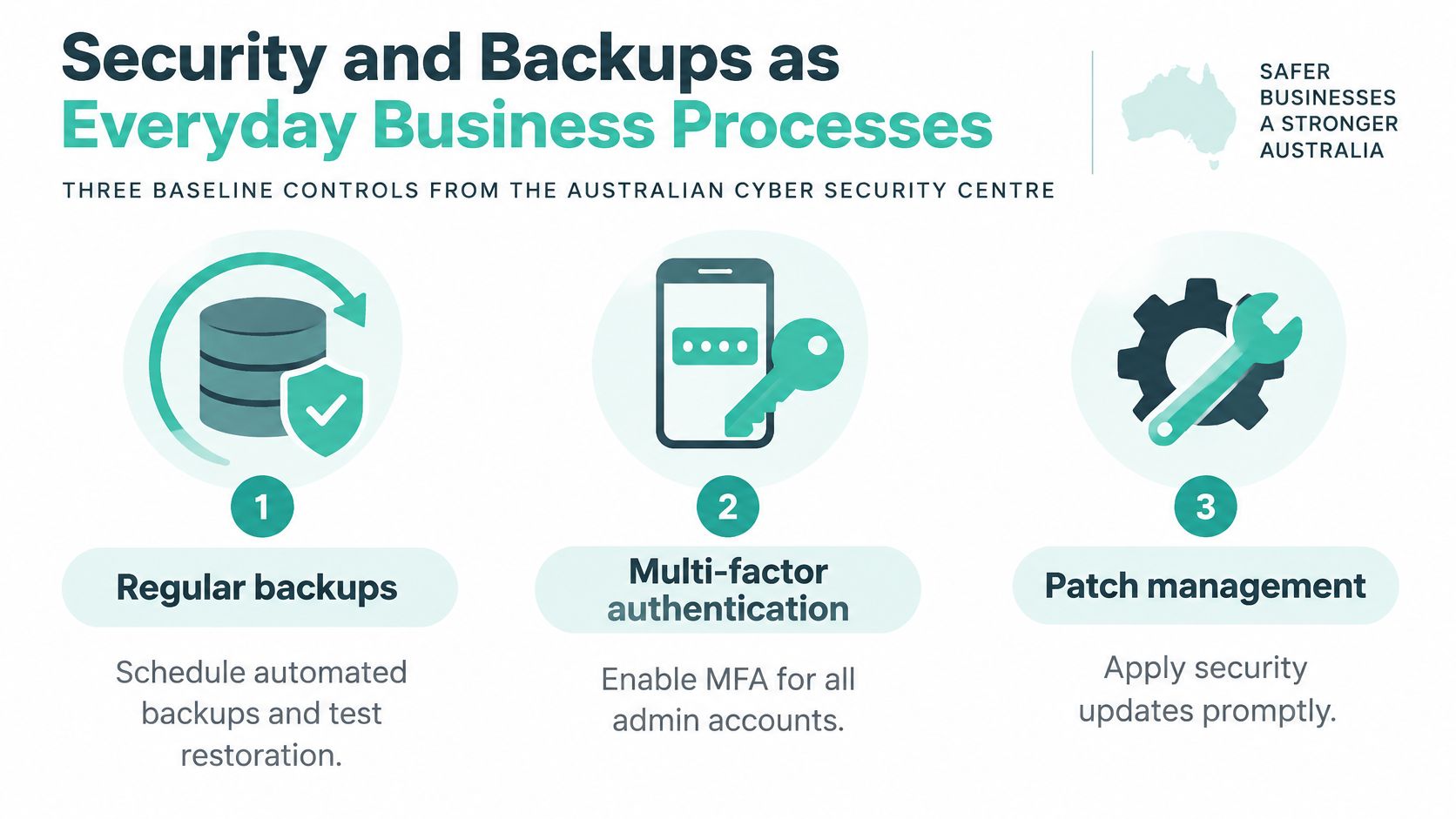
The Australian Cyber Security Centre's small-business guide recommends multi-factor authentication, software updates and backups as baseline controls. It also tells businesses to define what they back up, when, where copies are stored, who manages them and how long they are retained. For a WordPress website, that means one person maintains the application, one person controls access, and one person can recover it. Those roles can sit with the same contractor, but they still need to be written down so a holiday or a staff change does not leave the site unowned.
Separate server protection from website maintenance
Protect administrator accounts with MFA and strong, unique passwords. In the hosting account, open security settings, turn on multi-factor authentication for every admin login, and store the backup codes with the business owner rather than only with the developer. Give staff and contractors individual accounts, remove access when the work ends, and reserve administrator privileges for tasks that need them. Review administrator logins when something unexpected changes.
Keep WordPress core, themes and plugins current. Remove abandoned extensions and unused themes rather than leaving them installed. On a booking or commerce site, copy the site to staging, apply the update there, and check forms, payments and logins before you apply the same update from the WordPress dashboard on the live site.
The hosting environment should add layers the website owner does not patch by hand:
- Server patching: Maintain the operating system, control panel and supporting services.
- Malware detection: Investigate alerts rather than assuming a scan repairs every compromise.
- Account isolation: Limit a compromised website's ability to reach unrelated accounts.
- DDoS filtering: Reduce malicious traffic reaching the hosting environment.
- TLS certificates: Encrypt credentials and customer information in transit.
- Least-privilege access: Give each user only the permissions needed for their role.
These controls address different failures. A TLS certificate does not remove malicious code, and a firewall does not fix a vulnerable plugin. The average self-reported cost of a small-business cybercrime incident reached AUD 56,600 in FY2024–25, according to the ASD cyber-threat factsheet for businesses.
Write a responsibility list that splits what the host maintains from what your developer maintains. Before you hand administration to a staff member, walk them through MFA in the account security settings and a staging-tested WordPress update from the dashboard. Do not leave those steps as an unnamed document they are expected to find later.
Make restoration a routine test
A backup schedule should name the website files, the database and any information stored outside the website account. Specify retention, storage separation, access permissions and the person authorised to request recovery. Copies kept apart from the live server are covered in the off-site backup solutions guide.
Recovery rule: A successful backup notification confirms that a job ran. A successful restore confirms that you can use the result.
Make a monthly recovery exercise part of the operating routine:
- Restore safely. Choose a recent backup and restore it into a separate staging copy of the site, not over the live files or database.
- Prevent side effects. In that staging copy, disable live payments and outbound customer notifications.
- Check the application. Confirm the database, uploaded media, contact forms and administrator access.
- Record the result. Note the backup used, the test date, any faults and the person who will correct them.
Agree how much recent information the business can afford to lose and how long it can trade without the site. A retailer who restores an older database still has to reconcile orders taken after that backup. The restored shop is not the whole story.
Finish the response plan in writing: who is called first, and who decides whether to restore or rebuild? Include incident contacts and who preserves logs, so recovery does not wipe the evidence needed to understand the compromise.
Local Support, Business Email and Spam Act Obligations
A weekend outage is a business problem even when the provider's sales team works weekdays. Check whether help is available by phone, ticket and call-back, and distinguish general enquiries from urgent incident response. Monitoring coverage isn't the same thing as a guaranteed response from an application specialist.
For Australian businesses, support hours need a time zone attached. A Perth owner shouldn't have to guess whether an advertised closing time means local time or eastern time. Ask for the role or team that receives an escalation when the first support contact can't resolve the fault.
Keep email operations separate from campaigns
Domain-based business email needs appropriate mailbox capacity, spam filtering and a clear owner for staff access. Configure authenticated sending for website forms so customer enquiries don't rely on an unmanaged mail function.
Keep transactional messages separate from marketing campaigns. Order confirmations, password resets and booking notices serve a different operational purpose from newsletters, and staff should know which system sends each type.
Australia's business.gov.au guidance on commercial email and text messages explains that the Spam Act 2003 requires consent, sender identification and a functional unsubscribe method; unsubscribe requests must be processed within 5 working days, the mechanism must remain functional for at least 30 days, and opting out must not involve a charge, login or additional personal information.
Promotional content can change how a message is treated. ACMA's report on scams, spam and telemarketing explains that apparently factual messages can still be commercial when they include promotional material, such as an offer link or advertising banner.
A Sydney retailer's newsletter should therefore include an obvious unsubscribe option and a removal workflow that meets the statutory deadline. Don't assume an existing customer relationship makes every promotional follow-up acceptable. Keep consent records and review templates when staff add offers to service notices.
Confirm the operational details
Use the Australian website legal requirements guide alongside your email configuration review. Hosting tools help deliver messages, but the business remains responsible for consent and campaign content.
Before committing, record:
- Support hours: Coverage for the times you trade.
- Escalation contact: The team responsible for a serious unresolved incident.
- Mailbox requirements: Staff accounts, shared addresses and access ownership.
- Sending templates: Separate transactional and promotional messages, with the necessary consent and unsubscribe handling.
Register your new domain name at competitive market prices including free domain add-ons like privacy, DNS Hosting, Custom Nameservers and Forwarding.
Always the best price and no nasty renewal price hikes.
Register A Domain Name
Total Cost of Business Hosting Beyond the Monthly Fee
The monthly plan fee is only one line in a hosting budget. Owners often compare that figure while leaving out domain renewals, email, recovery work and the staff time needed to keep the website usable. That can make an inexpensive plan look cheaper than it is.
Cost items to include in a hosting budget
| Cost item | What it covers | When it applies |
|---|---|---|
| Hosting plan fee | Server resources, control panel and support | Every month or year of the term |
| Renewal price | Charge after any introductory discount ends | At the first renewal date |
| Domain renewal | Keeping the business domain name registered | Every renewal period |
| SSL certificate | Encryption for login and checkout pages | Often included; confirm at renewal |
| Backup storage or retention | Longer history or extra copies | When retention exceeds the plan default |
| Business email accounts | Mailboxes on the business domain | As staff numbers grow |
| Staff time | Updates, restores and site fixes | Monthly, and during incidents |
| Downtime or compromise | Lost enquiries, orders or customer trust | When the site or email is unavailable or breached |
Give each applicable item its own budget line. Use the current published plan charge, then add quoted renewal, domain, email and retention charges rather than assuming they're bundled. Check prices on the current pricing page before setting the budget, because a useful comparison needs the plan you can buy.
Compare work, not just invoices
Suppose a three-person consultancy is comparing a lower-priced plan with a managed arrangement that includes staging and a defined backup-testing service. In this hypothetical example, the cheaper option takes two hours of staff time each month for updates and fixes. The managed arrangement removes that particular workload, although the consultancy still owns its content and account access.
Multiply the staff time by the business's internal labour cost, then add the hosting charges. Don't assume a managed label includes those tasks: the comparison only works when the service scope explicitly includes them.
A cheaper hosting invoice isn't a saving if a staff member repeatedly stops billable work to repair the website.
Term length also changes the effective monthly cost and the amount paid upfront. A no-lock-in arrangement can make leaving easier, but cancellation rights and refunds for prepaid service are separate questions. Read both before committing.
Put the renewal amount in writing
Compare Australian quotes on the same GST basis. GST commonly applies to local hosting invoices, and GST-registered businesses should retain appropriate tax invoices for their records. Our published pricing includes GST, so don't compare it directly with an untaxed headline amount.
Use the annual web hosting cost guide to organise the full budget rather than treating the introductory charge as the ongoing cost. Record any migration or developer work separately from recurring hosting.
The final pricing question is straightforward: what will this configuration cost at renewal, including the services the business needs? Get that answer before authorising payment.
Confirm Your Hosting Shortlist Before You Commit
A hosting shortlist is ready when you can explain why each candidate suits the business and who will operate it. A feature page alone can't answer that. Turn the decision into a short purchasing record that your owner, developer and support contact can all understand.
Use the record during migration too. It gives everyone the same acceptance criteria instead of leaving the move dependent on whether the homepage appears to load.

Sign off the essential commitments
- Workload fit: Identify the application, database and important customer actions. Confirm compatibility rather than buying from a generic business label.
- Audience and location: Record whether customers are domestic or international and which origin location suits them.
- Recovery evidence: Confirm that an authorised person can follow the restore procedure and validate the recovered application.
- Support access: Write down operating hours, phone access and the escalation route for an urgent fault.
- Commercial terms: Record renewal pricing, billing term, cancellation conditions and what you'll need to export when leaving.
For a migration, add acceptance checks for forms, bookings, payments and email where applicable. Keep access to the previous environment until the new one has passed those checks. Don't cancel the old service merely because the website's front page looks correct.
Where our Australian hosting fits
We're an Australian provider with servers in Sydney, Melbourne, Brisbane and Perth. Our service range includes cPanel hosting, WordPress hosting, ASP.NET Windows hosting and managed VPS, giving businesses options for conventional websites, WordPress workloads and specialist applications.
Our WordPress hosting plans have a one-year term and can be cancelled anytime with no lock-in contract. Treat the billing term and cancellation policy as separate considerations when planning expenditure. Customers can also scale CPU and RAM resources up as their businesses grow.
Migrating to us starts with ordering a cPanel hosting plan that has enough storage for the website. Before ordering, total the files and databases you need to move and identify any email that must move with them. Leave room for normal operation rather than sizing only to the current website download.
Choose the business scenario first, complete the cost worksheet, then obtain written confirmation of restoration arrangements and support hours. That sequence makes the buying decision defensible and gives the people moving the site a practical handover.
At UpTime Web Hosting, we offer Australian cPanel, WordPress, ASP.NET Windows and managed VPS hosting for different business workloads. Visit us with your website requirements, storage needs and critical customer workflows, and ask us to confirm the appropriate plan, backup restoration arrangements and support coverage before you move.