In short
As of October 2026, website migration in Australia can cost $0 when the new host includes the transfer. A published standalone WordPress service lists A$280 including GST for sites up to 5 GB and A$550 up to 10 GB, while larger, ecommerce, email-heavy or platform-changing moves usually need a custom quote. (uptimewebhosting.com.au)
Key takeaways
- A compatible host-to-host migration can cost $0 when the new hosting provider includes the transfer with an eligible plan. (uptimewebhosting.com.au)
- One published Australian WordPress migration schedule lists A$280 including GST for up to 5 GB and A$550 for up to 10 GB, but these are examples rather than a market average. (twenty35it.com.au)
- Changing the CMS, domain or URL structure adds rebuilding, redirect mapping and testing that a basic hosting transfer may not require.
- Email should be quoted separately unless the scope expressly includes mailbox data, aliases, DNS records and the final synchronisation.
- A useful quote defines testing, rollback, downtime planning, exclusions and post-migration support in writing.
Table of contents
- How much does it cost to migrate a website in Australia?
- What kind of migration are you actually paying for?
- What makes a website migration quote go up?
- How much does a WordPress migration cost?
- Are email, DNS and downtime included in the quote?
- Can a new host migrate your website for free?
- How can you compare migration quotes without getting caught by extras?
- What SEO work can add to the migration cost?
- What else do website owners ask about migration costs?
- What should you do before requesting a migration quote?
Website migration is not one standard product. Moving an unchanged website between compatible hosting accounts is different from changing the domain, rebuilding the site on another CMS or transferring a live online store with customer, order and payment data.
That distinction matters more than any broad average. Before comparing prices, make sure each quote describes the same job.
How much does it cost to migrate a website in Australia?
A straightforward host-to-host move can cost $0 when the new provider includes migration with an eligible hosting plan. If migration is sold separately, one Australian WordPress schedule lists A$280 including GST for a site up to 5 GB and A$550 for a site up to 10 GB; more than 10 GB is quoted individually. (twenty35it.com.au)
Three ways migration is priced
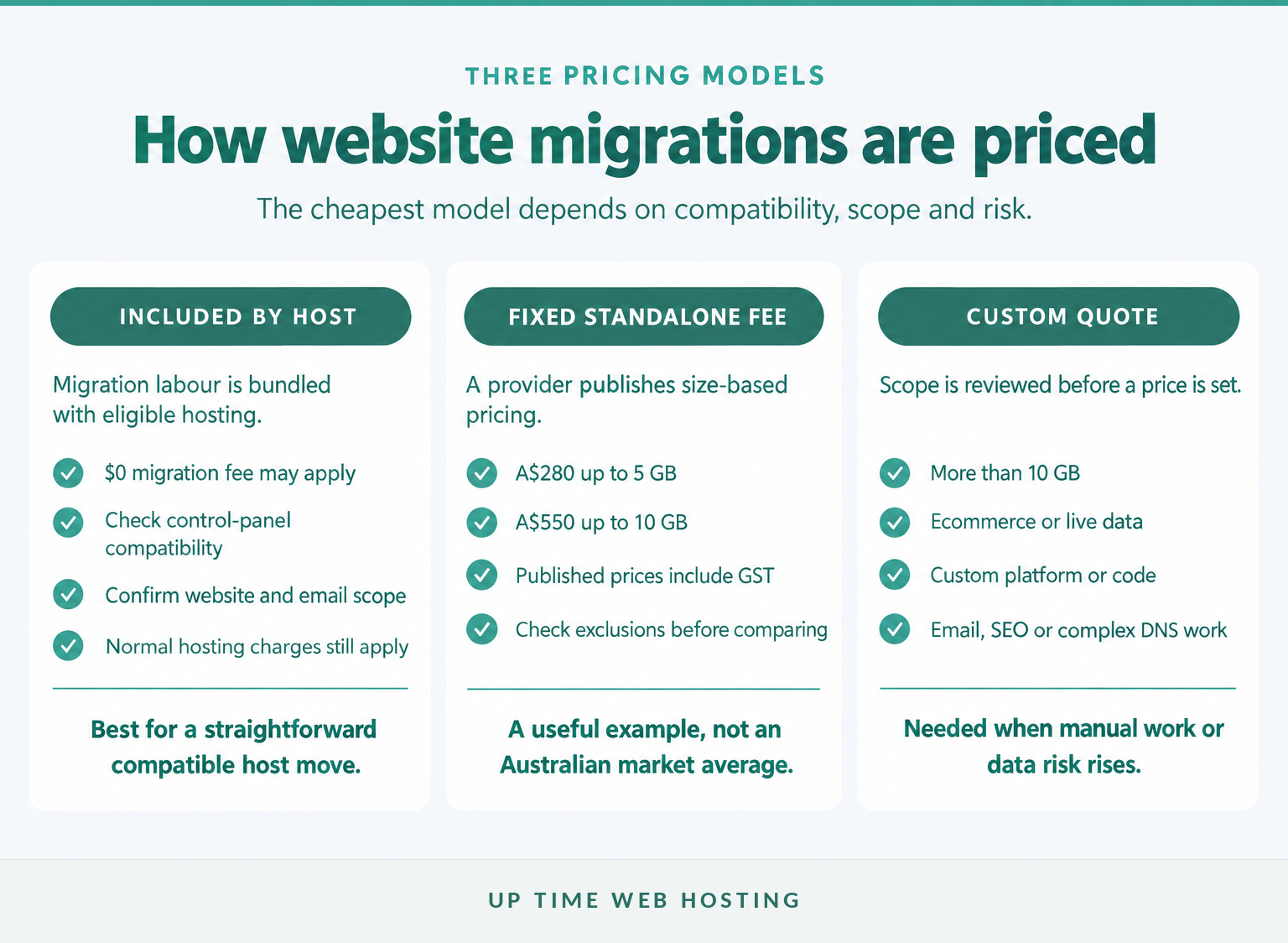
Most quotes fit one of three models:
- Included with new hosting: The migration labour costs $0, but the normal hosting plan price still applies. Check the eligible platforms, number of sites and email scope.
- Fixed standalone fee: The provider prices the work by a limit such as storage, site count or platform. A published Australian fixed-price WordPress migration schedule lists A$280 up to 5 GB and A$550 up to 10 GB, including GST. (twenty35it.com.au)
- Custom quote: The provider reviews the site before pricing it. This is more likely when the move involves more than 10 GB, custom code, ecommerce, several databases, many mailboxes, a new domain or a different platform.
Treat the A$280 and A$550 figures as real published examples, not an Australian industry average. Public prices rarely use the same inclusions, and some providers bundle migration into hosting rather than charging for it separately.
The cheapest headline can also exclude tasks that matter. A $0 website transfer is less useful if mailbox data, DNS changes, testing or a rollback plan are left to the customer.
For a basic Australian host move, budget from $0 to the published A$550 example, then seek a custom quote when the job goes beyond 10 GB or a compatible platform.

Performance you can feel, backed by clients who depend on it. Read how our support and uptime create long‑term customer success.Power Your Business with Better Hosting
What kind of migration are you actually paying for?
The lowest prices usually apply when the website stays unchanged and only the hosting infrastructure moves. Costs rise when the migration also changes the domain, URLs, CMS, design, database structure or business systems connected to the site.
Four projects are commonly described as website migration:
- Host-to-host migration: Website files, databases, email and configuration move to a new server while the domain and visible URLs remain the same. A compatible cPanel-to-cPanel or Plesk-to-Plesk move is usually the simplest case.
- Domain or URL migration: The website moves to a new domain or changes page addresses. This requires URL mapping, permanent redirects, updated internal links, new sitemaps and search monitoring.
- CMS or platform migration: Content and data move between systems. Templates, plugins, forms, integrations and database fields may need to be rebuilt rather than copied.
- Redesign and migration: A new website is designed while content and data are transferred. This is a web development project with a migration component, not a basic hosting transfer.
The CMS matters because compatibility determines how much can be copied automatically. WordPress on standard hosting may transfer as files plus a database. An ASP.NET application may also require compatible .NET versions, IIS settings, application pools, MS-SQL databases, certificates and connection strings. A closed website builder may offer only limited exports, leaving parts of the site to be recreated manually.
Ask the provider to name the migration type in the quote. If the proposal simply says website migration, the buyer cannot tell whether it covers a copy, a rebuild or both.
The price only makes sense once the quote separates a hosting transfer from a domain, CMS or redesign project.
What makes a website migration quote go up?
Migration cost rises when the provider must perform more manual work, test more business functions or manage a greater risk of lost data and downtime. Storage is relevant, but database activity, platform compatibility and the number of connected systems can matter just as much.
What a migration quote should separate
| Cost item | What to tell the provider | Why it changes the quote |
|---|---|---|
| Control panel and CMS | Current host, control panel, CMS and destination platform | Compatible systems can often be copied; incompatible systems may require rebuilding |
| Files and databases | Total storage, database count and largest database size | Large archives take longer to copy, verify and repeat if the transfer fails |
| Ecommerce or live data | Orders, customers, stock, memberships, bookings and user accounts | New records may be created during the move, requiring maintenance mode or a final synchronisation |
| Mailbox count, storage, aliases, forwards, calendars and devices | Copying mail is only part of the work; records and user devices may also need changes | |
| DNS, domain and SSL | DNS host, registrar, nameservers, certificates and third-party services | The person moving the website may not control every system that must be updated |
| SEO and URLs | Domain changes, URL changes, redirects and important landing pages | URL changes require mapping, redirects, link updates and post-launch monitoring |
| Timing and support | Business-hours cutover, overnight work, testing and post-launch cover | A controlled window and extra support can add labour even when the site is small |
Page count alone is a weak pricing measure. A 100-page brochure site with standard templates may be easier to move than a ten-page store with customer accounts, subscriptions, stock synchronisation and a custom checkout.
Database size also deserves its own line in the scope. A small media library does not guarantee a small migration if the database contains years of orders, logs, form entries or membership activity.
For ecommerce and membership sites, ask how the provider prevents new records from being left on the old server. The answer may involve maintenance mode, a read-only period or a final database sync immediately before DNS is changed.
Migration cost follows the amount of manual checking, data risk and recovery planning, not page count alone.
Host your website with our 5-star rated, cPanel website hosting plans.
Super fast servers, with security included and hosted in your choice of Australian Data Center.
View cPanel Plans
How much does a WordPress migration cost?
A standard WordPress host move can sit near the low end of the price range because the files and database can often be transferred without rebuilding the site. The price rises when WordPress includes WooCommerce, large media libraries, staging sites, custom plugins, scheduled jobs or integrations that must be tested individually.
A practical scope assessment looks like this:
- Lower complexity: One WordPress site, one database, standard theme and plugins, unchanged domain, no server-hosted email and no custom integrations.
- Moderate complexity: Large uploads directory, several forms, caching rules, security tools, staging copies, redirects or mailboxes on the same hosting account.
- Higher complexity: WooCommerce, subscriptions, memberships, bookings, learning systems, custom plugins, external stock feeds or a busy site that cannot tolerate a long maintenance window.
- Platform change: WordPress content is being moved to or from a different CMS. This normally requires content mapping and rebuilding rather than a direct copy.
The published Australian fixed-fee example places WordPress sites up to 5 GB at A$280 including GST and sites up to 10 GB at A$550. A different provider may include the same work with hosting, set other limits or exclude email and custom troubleshooting. (twenty35it.com.au)
Before paying for a manual service, check whether the new host supports the existing control panel and WordPress setup. The step-by-step guide to migrate your website to a new host explains the broader process and the access details a provider is likely to request.
A standard WordPress site can sit near the low end, while WooCommerce and custom code need more testing and a written cutover plan.
Are email, DNS and downtime included in the quote?
Email, DNS and downtime planning are not automatically included just because the quote says website migration. Each task should appear in the written scope, particularly when website and business email share the same hosting account.
The hidden email and DNS workload
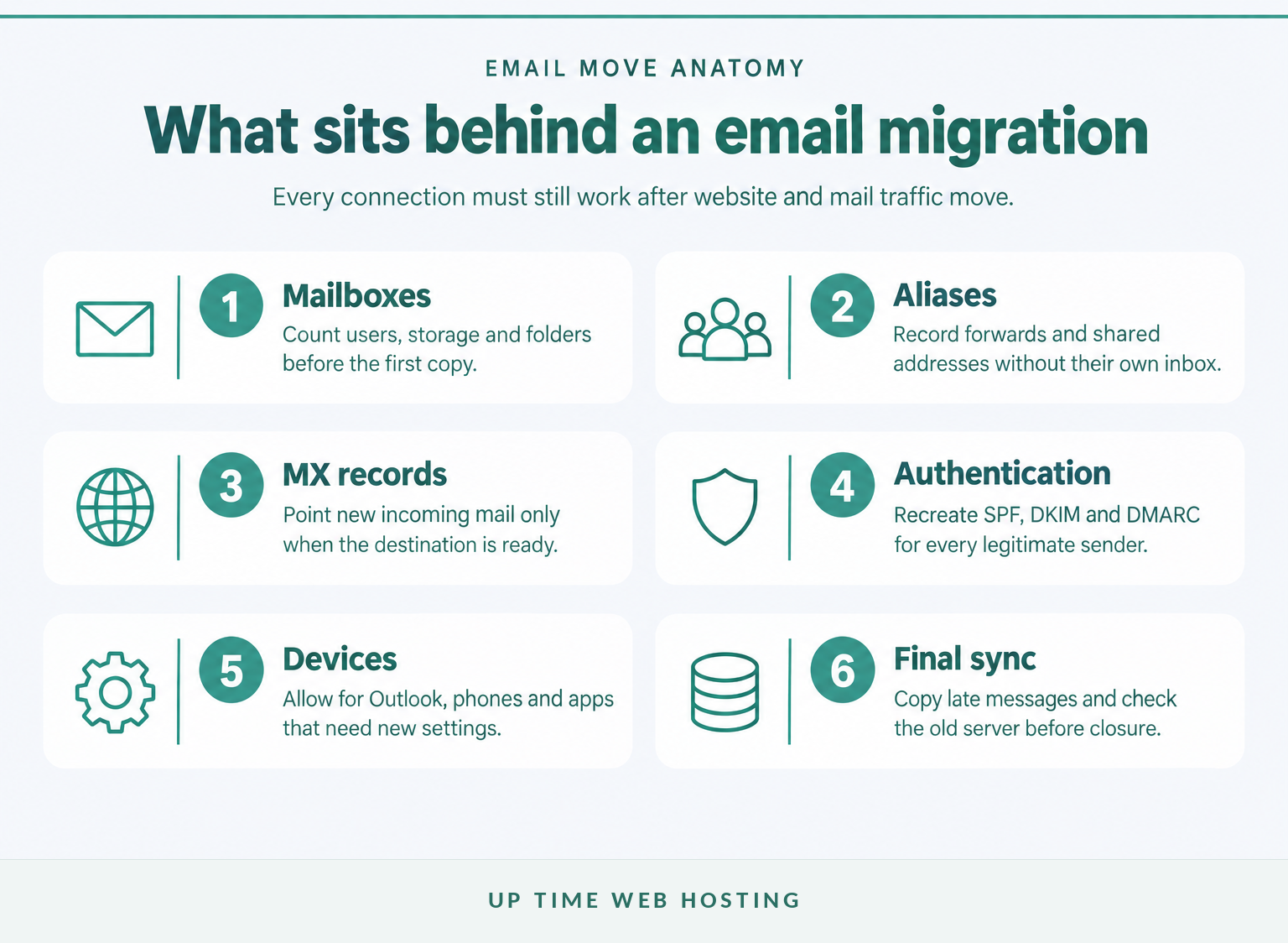
An email migration may need to account for:
- user mailboxes and their stored messages
- shared addresses such as accounts@ or support@
- aliases, forwarders and mailing lists
- MX, SPF, DKIM and DMARC records
- web forms, invoicing tools and other systems that send as the domain
- Outlook, phone and tablet settings
- a final copy of messages delivered during the transition
The guide to migrating email accounts explains why aliases, devices, DNS and the final cutover need to be planned alongside the mailbox copy.
Changing web hosts does not necessarily require transferring the domain registration. The domain can stay with its current registrar while its DNS records or nameservers are changed to direct website and email traffic to the new service.
Downtime risk also changes the amount of work. UpTime's migration terms recommend maintenance mode for ecommerce sites or sites with live customer data, and warn that traffic may temporarily reach both the old and new hosting environments during the transition. (uptimewebhosting.com.au)
Keep the old hosting account active until the website, forms, checkout, incoming mail and outgoing mail have been tested from the new environment. Cancelling early can remove the safest rollback option.
Email, DNS and downtime planning should be priced as named tasks, not assumed to be included.
Can a new host migrate your website for free?
Yes, a new host may include migration as part of an eligible hosting plan. UpTime states that cPanel and Plesk migrations are free, while moves from other platforms may attract a fee that is discussed before work begins. (uptimewebhosting.com.au)
A free migration offer should still answer five questions:
- Which control panels, CMSs and website types qualify?
- How many websites, databases and mailboxes are included?
- Are DNS changes, SSL and testing included?
- Does the provider migrate email messages as well as website files?
- What work becomes chargeable if a plugin, database or custom platform causes a problem?
UpTime's published switch offer says website files and emails are moved for free. It also notes that transferring a domain may require extending the registration by another year, which is separate from the website migration labour. (uptimewebhosting.com.au)
Website owners with a compatible move can review the eligibility and process to switch web host for free before paying for a standalone transfer.
Free migration is valuable only when the included scope covers the website, email, DNS and platform you actually use.
Register your new domain name at competitive market prices including free domain add-ons like privacy, DNS Hosting, Custom Nameservers and Forwarding.
Always the best price and no nasty renewal price hikes.
Register A Domain Name
How can you compare migration quotes without getting caught by extras?
Send every provider the same written scope and ask each one to return inclusions, exclusions and assumptions. Comparing only the total price is unreliable when one quote includes email and testing while another covers only the website files and database.
Questions to ask before accepting a quote
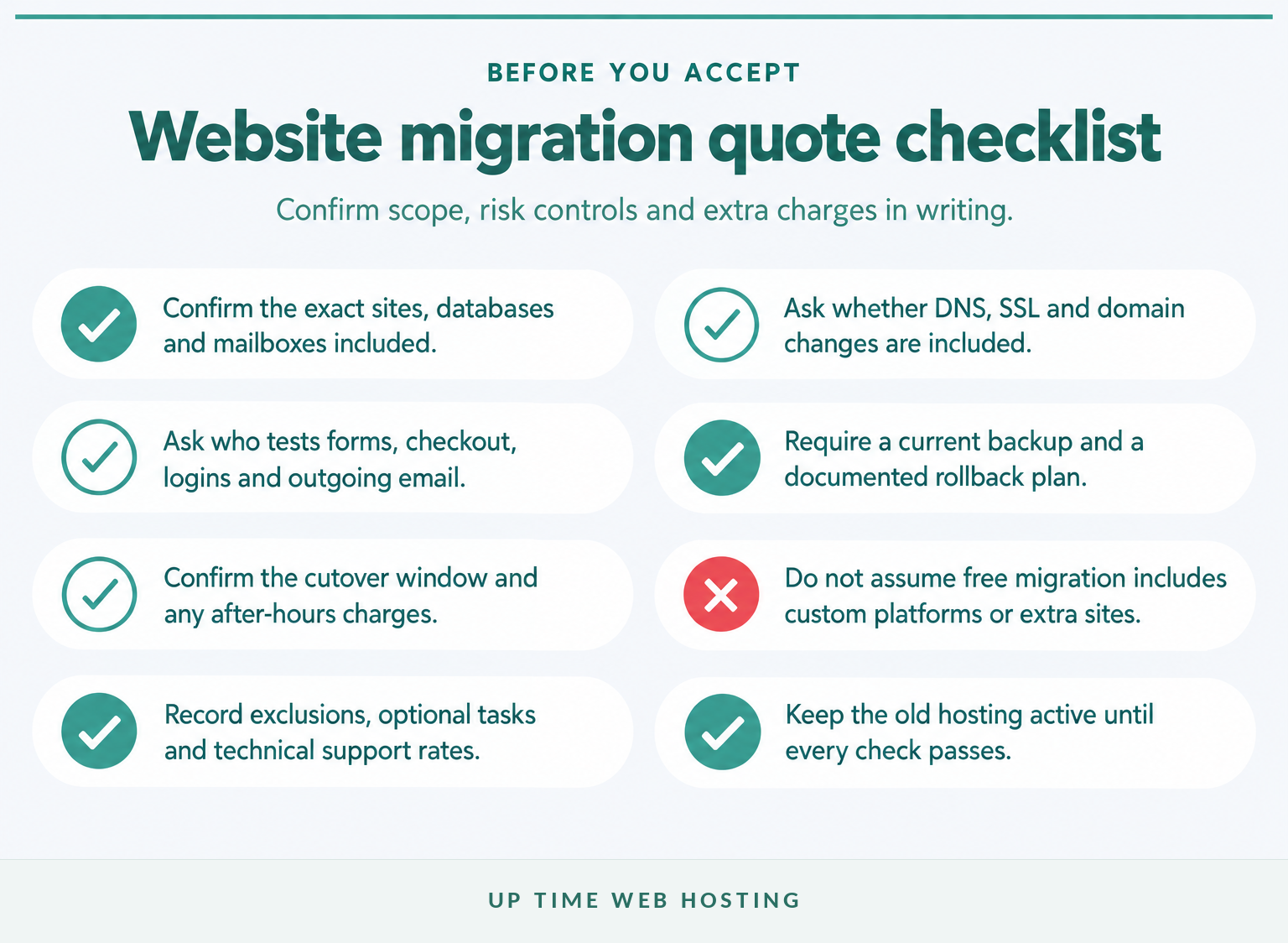
Ask these questions in writing:
- What websites, subdomains, databases and mailboxes are included?
- Is the price in Australian dollars and inclusive of GST?
- Are DNS, SSL, redirects and domain changes included?
- Who tests forms, checkout, logins, scheduled jobs and outgoing email?
- Is there a complete backup and rollback plan?
- Will the work occur during business hours or an agreed cutover window?
- How long should the old hosting remain active?
- What hourly rate or fixed fee applies to unexpected work?
- Is post-migration support included, and for how long?
Use a website migration checklist to prepare the inventory before requesting prices. A provider can quote more accurately when it knows the platforms, storage, databases, email accounts and connected services at the start.
It is also worth reviewing the common migration mistakes before approving a cutover. Missing backups, cancelling the old service early and overlooking email are not small exclusions when the website supports daily business activity.
The safest quote is the one that defines inclusions, exclusions, testing, rollback and responsibility in writing.
What SEO work can add to the migration cost?
A hosting change with unchanged URLs usually needs less SEO work than a domain, CMS or URL-structure change. If visible URLs change, the migration scope should include mapping, permanent redirects, internal-link updates, sitemaps and post-launch monitoring.
For a host change without URL changes, the Google Search Central guide to changing web hosting recommends preparing and testing the new infrastructure, switching DNS, monitoring traffic on both environments and shutting down the old host only after the new infrastructure is serving users correctly. (developers.google.com)
For a move with changed URLs, the Google Search Central guidance for site moves with URL changes calls for old-to-new URL mapping, server-side permanent redirects, updated internal links and sitemaps, and Search Console monitoring. Google also advises avoiding redirect chains and keeping redirects for at least a year. (developers.google.com)
That work takes time even when the website design stays the same. A quote that includes hundreds or thousands of individual redirect decisions should not be compared with a quote for copying one unchanged hosting account.
Keeping URLs stable reduces SEO work; changing URLs requires a mapped redirect and monitoring plan.
Experience Microsoft 365 Business Standard for free for 30 days.
Up to 25 users with full access to email, OneDrive and Teams. Includes full versions of desktop apps of Outlook, Word, Excel, PowerPoint and more.
Try Microsoft 365
What else do website owners ask about migration costs?
These questions separate the migration fee from hosting and SEO work. The answers use Australian dollars where a public Australian price is available and do not treat one provider's schedule as a market average.
How much does it cost to migrate a website?
Website migration can cost $0 when a new host includes a compatible transfer. One Australian published example charges A$280 including GST for a WordPress site up to 5 GB and A$550 up to 10 GB. Larger sites, ecommerce, email migration, custom code or platform changes usually require a tailored quote. (twenty35it.com.au)
How much does website hosting cost in Australia?
Website hosting cost in Australia is separate from migration cost. Compare the plan's renewal price, storage, traffic allowances, backups, SSL, email, support and GST treatment. A migration advertised as free may still require an eligible hosting plan, and optional technical work may be charged separately.
How to migrate a website without losing SEO?
To migrate a website without losing SEO, keep URLs unchanged where possible, test the new host before switching DNS, preserve metadata and internal links, and monitor Search Console after launch. If URLs change, map every important old URL to the correct new URL with permanent server-side redirects. (developers.google.com)
How much should I pay someone to host my website?
Pay for hosting according to the resources and support the website needs, not the migration headline alone. Compare the full annual cost in Australian dollars, including GST, backups, email, security, renewal pricing and paid support. A low monthly price can become expensive if essential migration or recovery work is excluded.
Website migration pricing becomes clearer when hosting, transfer labour and risk-control work are treated as separate costs.
What should you do before requesting a migration quote?
Write down the current platform, control panel, storage, databases, mailboxes, domain arrangements, live-data risks and preferred cutover window. Then send that same scope to each provider and ask for a price that separates included migration work from optional support.
Do not cancel the old hosting or change DNS before the new copy has been backed up and tested. For a store or membership site, also decide who will control new orders, registrations and form submissions during the final transfer.
Send the same written scope to each provider so every quote is pricing the same migration.